Prince Fahad Bin Sultan National University


Computer Skills


                 2011-2012
                                              1
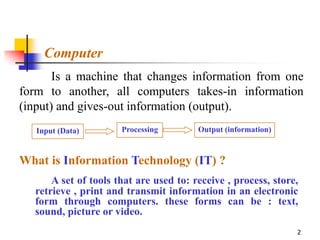
Computer
       Is a machine that changes information from one
form to another, all computers takes-in information
(input) and gives-out information (output).
   Input (Data)       Processing        Output (information)


What is Information Technology (IT) ?
      A set of tools that are used to: receive , process, store,
  retrieve , print and transmit information in an electronic
  form through computers. these forms can be : text,
  sound, picture or video.
                                                               2
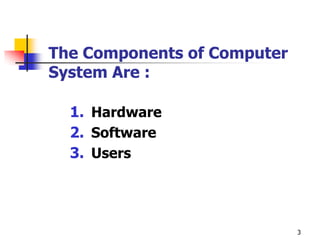
The Components of Computer
System Are :

  1. Hardware
  2. Software
  3. Users


                             3
1 - Hardware
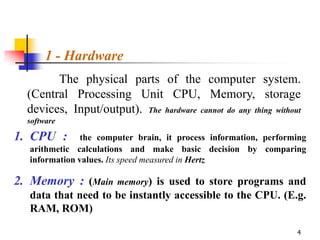
        The physical parts of the computer system.
  (Central Processing Unit CPU, Memory, storage
  devices, Input/output). The hardware cannot do any thing without
  software

1. CPU :        the computer brain, it process information, performing
   arithmetic calculations and make basic decision by comparing
   information values. Its speed measured in Hertz

2. Memory : (Main memory) is used to store programs and
   data that need to be instantly accessible to the CPU. (E.g.
   RAM, ROM)

                                                                   4
1- Hardware


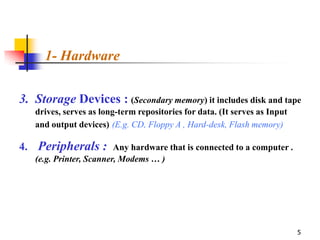
3. Storage Devices : (Secondary memory) it includes disk and tape
   drives, serves as long-term repositories for data. (It serves as Input
   and output devices) (E.g. CD, Floppy A , Hard-desk, Flash memory)

4. Peripherals : Any hardware that is connected to a computer .
   (e.g. Printer, Scanner, Modems … )


                                                                            5
1- Hardware


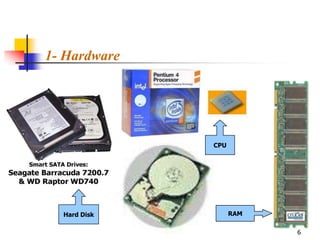
              CPU


  Hard Disk         RAM

                          6
1- Hardware


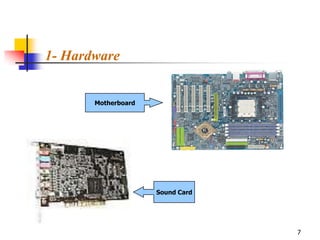
       Motherboard


                     Sound Card


                                  7
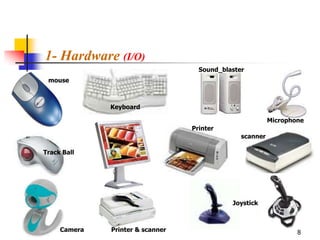
1- Hardware (I/O)
                                    Sound_blaster
 mouse


              Keyboard

                                                          Microphone
                                  Printer
                                                scanner

Track Ball


                                             Joystick


     Camera   Printer & scanner                                   8
1- Hardware (I/O)
   Input Devices
       Keyboard
       Mouse
       Track ball
       Touch bad
       Touch Screen
       Light Pen
       Scanner (FlatBed, SheetFed, HandHeld)
       Joystick
       Microphone
       Disk Drives (DVD, CD-ROM, Floppy Disks)
       Digital and Video Camera

                                                  9
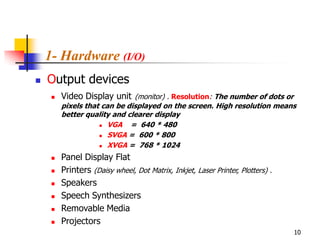
1- Hardware (I/O)
   Output devices
        Video Display unit (monitor) . Resolution: The number of dots or
         pixels that can be displayed on the screen. High resolution means
         better quality and clearer display
                     VGA    = 640 * 480
                     SVGA = 600 * 800

                     XVGA = 768 * 1024


        Panel Display Flat
        Printers (Daisy wheel, Dot Matrix, Inkjet, Laser Printer, Plotters) .
        Speakers
        Speech Synthesizers
        Removable Media
        Projectors
                                                                                 10
2- Software
       The instructions that tell the Hardware how to
transform the input data into necessary output.

There are two General types of computer software:

 1- System Software: which coordinates the Hardware
operations and does behind the scene work, the computer user
seldom sees. (Windows, dos, Mac, Unix, programming languages).

  2- Application Software: which serves as productivity tools
to help computer users to solve problems. (Word, Excel, Power
Point, games, calculator ,…)

                                                           11
2- Software

   Software types based on the source:
1. Commercial Software: for sale software
2. Shareware Software: for sale software but with a tryout period
3. Freeware Software: free software without source code
4. Public Domain Software: free software with the source code


                                                                12
2- Software

   Software Interface:
1. Command Line Interface:           using a keyboard only to type the
   commands as a line of text.

2. Graphical User Interface (GUI):           using mouse or keyboard to
   select the commands as a buttons, pictures, menus … “much simpler”


                                                                   13
3 - Users


Are people who use the software on
  the computer to do some tasks.


                                     14
Data representation in the memory

       Information
         It can be applied to anything that can be communicated,
whether it has a value or not. (Words, Numbers, Pictures, Symbols,
Sounds, Moving Pictures).

Bit (Binary digiT)
        is the smallest unit of the information. A Bit can have one of
two values. (Yes & No, Zero & One, On & OFF, High & Low).

ASCII:
         American Standard Code for Information Interchange.
                                                                         15
Data representation in the memory
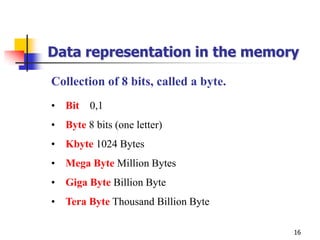
Collection of 8 bits, called a byte.
• Bit 0,1
• Byte 8 bits (one letter)
• Kbyte 1024 Bytes
• Mega Byte Million Bytes
• Giga Byte Billion Byte
• Tera Byte Thousand Billion Byte

                                       16
Computer Performance

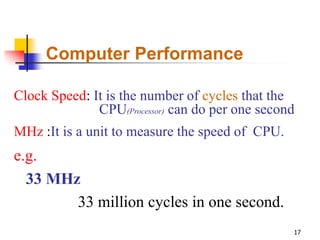
Clock Speed: It is the number of cycles that the
              CPU(Processor) can do per one second
MHz :It is a unit to measure the speed of CPU.
e.g.
  33 MHz
        33 million cycles in one second.
                                                 17
Cycle (Access Time)
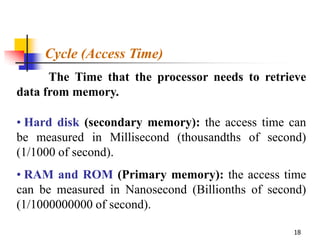
      The Time that the processor needs to retrieve
data from memory.

• Hard disk (secondary memory): the access time can
be measured in Millisecond (thousandths of second)
(1/1000 of second).
• RAM and ROM (Primary memory): the access time
can be measured in Nanosecond (Billionths of second)
(1/1000000000 of second).

                                                 18
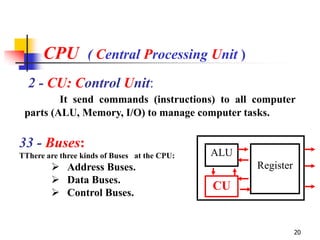
CPU ( Central Processing Unit )

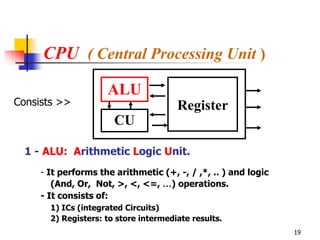
                     ALU
Consists >>                            Register
                       CU

  1 - ALU: Arithmetic Logic Unit.
     - It performs the arithmetic (+, -, / ,*, .. ) and logic
        (And, Or, Not, >, <, <=, …) operations.
     - It consists of:
       1) ICs (integrated Circuits)
       2) Registers: to store intermediate results.
                                                                19
CPU ( Central Processing Unit )
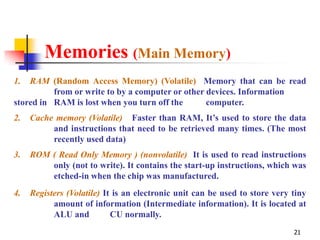
  2 - CU: Control Unit:
         It send commands (instructions) to all computer
 parts (ALU, Memory, I/O) to manage computer tasks.

33 - Buses:
TThere are three kinds of Buses at the CPU:   ALU
         Address Buses.                            Register
         Data Buses.
                                              CU
         Control Buses.


                                                               20
Memories (Main Memory)
1.  RAM (Random Access Memory) (Volatile) Memory that can be read
          from or write to by a computer or other devices. Information
stored in RAM is lost when you turn off the       computer.
2.   Cache memory (Volatile) Faster than RAM, It’s used to store the data
          and instructions that need to be retrieved many times. (The most
          recently used data)
3.   ROM ( Read Only Memory ) (nonvolatile) It is used to read instructions
         only (not to write). It contains the start-up instructions, which was
         etched-in when the chip was manufactured.
4.   Registers (Volatile) It is an electronic unit can be used to store very tiny
           amount of information (Intermediate information). It is located at
           ALU and          CU normally.
                                                                             21
Memories (Secondary Memory)

1.   Flash memory (nonvolatile) Faster than RAM, it can be used also in Mobiles,
           Digital camera and printer.
2.   Magnetic Tape (nonvolatile) Like cassette.
3.   Hard Disk (nonvolatile) : it’s the most important storage media in the computer
4.   Floppy Disks (nonvolatile) : 1.4 MB
5.   CD-ROM (nonvolatile) : 700 MB

6.   Digital Versatile Disk (nonvolatile): 17 or 4.7 GB


                                                                                  22
Computer Types                                  (Based on the Size)

1 - Mainframes:
     - Large and very expensive (Size of refrigerator, cost a round a million US $)
     - Used by large organizations for big computing jobs. (Banks, Airlines)
     - They are connected to a large number of terminals that could be dumb
         (can not operate on their own)

   Terminal: a combination keyboard and screen that transfers
   information to and from the computer.
   Intelligent Terminals: They have processing power themselves that can be
   used by the user.
Characteristics:
   • It gives more mathematical computing power than PCs.
   • It lets the users share expensive computing equipments.
   • Save memory space.

                                                                                  23
Computer Types                       (Based on the Size)

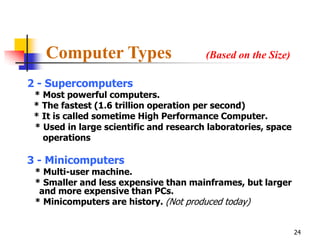
2 - Supercomputers
 * Most powerful computers.
 * The fastest (1.6 trillion operation per second)
 * It is called sometime High Performance Computer.
 * Used in large scientific and research laboratories, space
   operations

3 - Minicomputers
 * Multi-user machine.
 * Smaller and less expensive than mainframes, but larger
  and more expensive than PCs.
 * Minicomputers are history. (Not produced today)


                                                               24
Computer Types                               (Based on the Size)

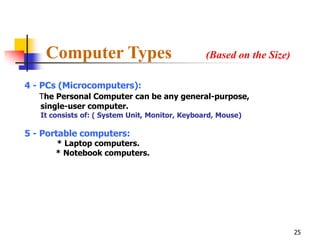
4 - PCs (Microcomputers):
   The Personal Computer can be any general-purpose,
   single-user computer.
   It consists of: ( System Unit, Monitor, Keyboard, Mouse)

5 - Portable computers:
       * Laptop computers.
       * Notebook computers.


                                                                       25
Computer Types                     (Based on the Size)


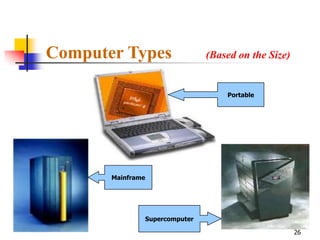
                                       Portable


       Mainframe


                   Supercomputer

                                                         26
Computer Types
                                            (Based on the processing method)
1) Digital Computers: are used to process all discrete data.
                        (Digits, Letters)
 2) Analog Computers: are used to process the connected
          data. (Temperature, Speed, atmospheric pressure)
 3) Hybrid computers: for all data (discrete and connected
                    data), the internal processing is digital.

 Computer characteristics:

* High speed in performing Operations. (thousand million operation per second)
* It gives very accurate results.
* It used to store very big amount of information.
* Multiple uses.


                                                                                 27
Operating Systems (OS)
   It is a collection of programs and instructions, which
    it is main function is to manage the computer
    resources and to organize using it. (Resources: I/O,
    Programs, and Secondary storage devices like magnetic tapes.)

     Functions
         Make sure of I/O operations.
         Manage the stored information in the memory.
         Protect computer users from each other.
         Provide the connection with other computers.
         Keep the computer system in secure


                                                                    28
Operating Systems (OS)                     Continued …

Types of OS:
 1. Multi-users (Network OS)
    Allow many users to use the computer at the same
    time. it uses the timesharing property
 2. Multi-tasks:
    The ability to perform many tasks at the same time.
 3. Open-system:
    The ability to use the OS over different devices.
 4. Multiprocessor:
                                                        29
Programming Languages
          A set of words, rules, syntax and semantic used by a programmer
to input his instruction to the computer to solve some problems or to do
specific task. Computers can understand these languages.

Compiler or Interpreter: is a translator that translates the programming
languages to the machine language that the computer can understand. A
Compiler translates whole program at once but the Interpreter translates
one instruction at a time

      Programming languages have to levels :
      1- Low-Level Languages
          * Machine language
          * Assembly Language
      2- High-Level-Language
                                                                      30
Programming Languages                                           Continued …

1 – Low Level Languages ( LLL ):
      Machine Language:
        Is the only language that the computer can understand without
          translation.
           It consists of (0, 1).
           Very fast (in execution).
           Each computer has its own machine language.
           Very difficult ( because the programmer should know his computer
            very-well )

      Assembly Language:
       Relatively, its more developed and easer than machine
       language.
           It considers as intermediary language between machine
           language and High-level languages.
           It allows you to use letters and digits instead of (0, 1).
                                                                               31
Programming Languages                          Continued …

2 – High Level Languages (HLL):
      Its more developed and close to the human languages.

       Easy to use and to write programs.
       Easy to discover the errors and to fix it.
       It saves the time and the efforts.
       Easy to deal with computers.
       Portable: the program that designed for special
                   computer can be executed in other
                   computers, which are differ in its version.

      Examples: Fortran, Cobol, Basic, Pascal, C.

                                                                 32
Multimedia
   Is the use of different media in computer
    programs:
        Text
        Graphics
        Audio
        Video
        Animation
   Its used in
        Presentation
        Education
        Learning
        games
                                                33
Data Communication & Networks

   The Benefits of this technique are:
       Sharing of files, documents and resources
       Sharing Software
       Sharing Equipments
       Sending messages to all people on the network
       Providing Services efficiently (E-government)


                                                        34
NETWORKS
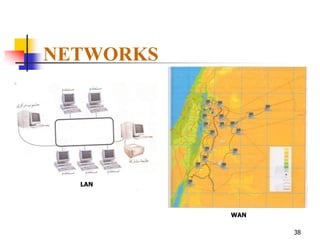
1- Local Area Network (LAN)
   It’s a network designed to span short distances and relatively
   small number of computers, usually a LAN connects the
   machines in only one building or in a single room.
   • Client Server Architecture
       The server saves all common files and documentations so that
       other computers (client) can use them
   • Peer-to-Peer network
       No servers, all computers have same level they share data directly
       with others.

2- Wide Area Network (WAN)
   It’s a network that connects two or more LANs over a large area
   using satellite communications. ( e.g. Bank ATM, Internet)
                                                                      35
NETWORKS
     2- Wide Area Network (WAN)
         It’s a network that connects two or more LANs over a large area
         using satellite communications. ( e.g. Bank ATM, Internet)

     WAN Devices :
1.   HUB: to connect a lot of commuters together
2.   Switcher: like a hub but it transmits data directly to it’s destination
3.   Router: connects two LANs together, for large distance
4.   Gateway: to connect two different OS LANs, for short distance
5.   Bridge: to connect two LANs with the same OS, for short distance
6.   Repeater : Repeat signals that travels via long distance
7.   Multipliers: high speed path for messages

                                                                               36
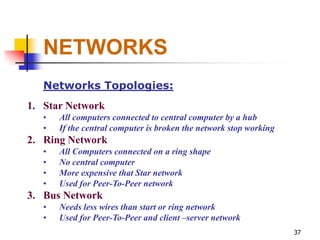
NETWORKS
   Networks Topologies:
1. Star Network
   •   All computers connected to central computer by a hub
   •   If the central computer is broken the network stop working
2. Ring Network
   •   All Computers connected on a ring shape
   •   No central computer
   •   More expensive that Star network
   •   Used for Peer-To-Peer network
3. Bus Network
   •   Needs less wires than start or ring network
   •   Used for Peer-To-Peer and client –server network
                                                                    37
NETWORKS


  LAN


           WAN

                 38
NETWORKS
   Data Communication hardware:
1. Modem
   •   MODulate / DEModulate
   •   Telephone network
   •   Designed for voice (Analog format)
   •   Used by computer to convert analog format to digital format
2. Network card
   •   To connect the computers with others
3. Wire Media
   •   Twisted pairs (e.g Phone wire, need a modem)
   •   Coaxial cables (e.g T.V. wire, need a Network card)
   •   Fiber optics (very fast and more expensive)
4. Wireless Media
   •   Radio waves – Microwaves -- Satellite
                                                                     39
INTERNET
   Is a WAN network that span the globe, it gives us the
capability to exchange information.

  World Wide Web (WWW, or Web): Is software that
makes sharing information across a network easy.
   Uniform Resources Locator ( URL ): Specifies
documents and other information on the WWW for
browser (Internet Explorer, Netscape) to obtain and display.


                                                        40
INTERNET
    To connect to the Internet you need:
1. PC (Personal Computer)
2. Modem
3. Telephone line
4. Browser (internet software)
5. Account with Internet service provider (ISP)

    Internet Services
1. Search Engines (to help you to find information)
2. E-mail (to send and receive messages over the Internet)

                                                             41
Computer Ethics
   Copyright
       Pay for software and register to use it
       Copyright principles
            Software should be copied only for backup.
            Sharing/lending not allowed
            Copy software through network should be
             under terms of license agreement.
            Software piracy is a crime.

                                                          42
Computer Ethics
   Licensing
       Buying software entitle the user for license to
        use it.
       Licensing agreement is a combinations of
        rules.
       Two kinds of license
            Single User : install software only on one
             computer
            Site License: can be install into multiple
             computers, which save money.
                                                          43
Computer Ethics
                             Viruses
Types of viruses
     Worms                                     Time Bombs
          Do not make any damages                   It makes the damage at a
          Spread quickly through network              specific time
          Keep system busy


     Trojan Horse
          Can be carried onto a computer by other files to
           perform its illegal objectives.
          Backdoor
                                                                          44
Computer Ethics

   Protecting from Viruses
       Do not use floppies from unreliable sources
       Use only registered software
       Never open an E-mail attachment unless it
        is from reliable source.
       Keep regular back-ups.


                                                      45

IT level 1

  • 1.
    Prince Fahad BinSultan National University Computer Skills 2011-2012 1
  • 2.
    Computer Is a machine that changes information from one form to another, all computers takes-in information (input) and gives-out information (output). Input (Data) Processing Output (information) What is Information Technology (IT) ? A set of tools that are used to: receive , process, store, retrieve , print and transmit information in an electronic form through computers. these forms can be : text, sound, picture or video. 2
  • 3.
    The Components ofComputer System Are : 1. Hardware 2. Software 3. Users 3
  • 4.
    1 - Hardware The physical parts of the computer system. (Central Processing Unit CPU, Memory, storage devices, Input/output). The hardware cannot do any thing without software 1. CPU : the computer brain, it process information, performing arithmetic calculations and make basic decision by comparing information values. Its speed measured in Hertz 2. Memory : (Main memory) is used to store programs and data that need to be instantly accessible to the CPU. (E.g. RAM, ROM) 4
  • 5.
    1- Hardware 3. StorageDevices : (Secondary memory) it includes disk and tape drives, serves as long-term repositories for data. (It serves as Input and output devices) (E.g. CD, Floppy A , Hard-desk, Flash memory) 4. Peripherals : Any hardware that is connected to a computer . (e.g. Printer, Scanner, Modems … ) 5
  • 6.
    1- Hardware CPU Hard Disk RAM 6
  • 7.
    1- Hardware Motherboard Sound Card 7
  • 8.
    1- Hardware (I/O) Sound_blaster mouse Keyboard Microphone Printer scanner Track Ball Joystick Camera Printer & scanner 8
  • 9.
    1- Hardware (I/O)  Input Devices  Keyboard  Mouse  Track ball  Touch bad  Touch Screen  Light Pen  Scanner (FlatBed, SheetFed, HandHeld)  Joystick  Microphone  Disk Drives (DVD, CD-ROM, Floppy Disks)  Digital and Video Camera 9
  • 10.
    1- Hardware (I/O)  Output devices  Video Display unit (monitor) . Resolution: The number of dots or pixels that can be displayed on the screen. High resolution means better quality and clearer display  VGA = 640 * 480  SVGA = 600 * 800  XVGA = 768 * 1024  Panel Display Flat  Printers (Daisy wheel, Dot Matrix, Inkjet, Laser Printer, Plotters) .  Speakers  Speech Synthesizers  Removable Media  Projectors 10
  • 11.
    2- Software The instructions that tell the Hardware how to transform the input data into necessary output. There are two General types of computer software: 1- System Software: which coordinates the Hardware operations and does behind the scene work, the computer user seldom sees. (Windows, dos, Mac, Unix, programming languages). 2- Application Software: which serves as productivity tools to help computer users to solve problems. (Word, Excel, Power Point, games, calculator ,…) 11
  • 12.
    2- Software Software types based on the source: 1. Commercial Software: for sale software 2. Shareware Software: for sale software but with a tryout period 3. Freeware Software: free software without source code 4. Public Domain Software: free software with the source code 12
  • 13.
    2- Software Software Interface: 1. Command Line Interface: using a keyboard only to type the commands as a line of text. 2. Graphical User Interface (GUI): using mouse or keyboard to select the commands as a buttons, pictures, menus … “much simpler” 13
  • 14.
    3 - Users Arepeople who use the software on the computer to do some tasks. 14
  • 15.
    Data representation inthe memory Information It can be applied to anything that can be communicated, whether it has a value or not. (Words, Numbers, Pictures, Symbols, Sounds, Moving Pictures). Bit (Binary digiT) is the smallest unit of the information. A Bit can have one of two values. (Yes & No, Zero & One, On & OFF, High & Low). ASCII: American Standard Code for Information Interchange. 15
  • 16.
    Data representation inthe memory Collection of 8 bits, called a byte. • Bit 0,1 • Byte 8 bits (one letter) • Kbyte 1024 Bytes • Mega Byte Million Bytes • Giga Byte Billion Byte • Tera Byte Thousand Billion Byte 16
  • 17.
    Computer Performance Clock Speed:It is the number of cycles that the CPU(Processor) can do per one second MHz :It is a unit to measure the speed of CPU. e.g. 33 MHz 33 million cycles in one second. 17
  • 18.
    Cycle (Access Time) The Time that the processor needs to retrieve data from memory. • Hard disk (secondary memory): the access time can be measured in Millisecond (thousandths of second) (1/1000 of second). • RAM and ROM (Primary memory): the access time can be measured in Nanosecond (Billionths of second) (1/1000000000 of second). 18
  • 19.
    CPU ( CentralProcessing Unit ) ALU Consists >> Register CU 1 - ALU: Arithmetic Logic Unit. - It performs the arithmetic (+, -, / ,*, .. ) and logic (And, Or, Not, >, <, <=, …) operations. - It consists of: 1) ICs (integrated Circuits) 2) Registers: to store intermediate results. 19
  • 20.
    CPU ( CentralProcessing Unit ) 2 - CU: Control Unit: It send commands (instructions) to all computer parts (ALU, Memory, I/O) to manage computer tasks. 33 - Buses: TThere are three kinds of Buses at the CPU: ALU  Address Buses. Register  Data Buses. CU  Control Buses. 20
  • 21.
    Memories (Main Memory) 1. RAM (Random Access Memory) (Volatile) Memory that can be read from or write to by a computer or other devices. Information stored in RAM is lost when you turn off the computer. 2. Cache memory (Volatile) Faster than RAM, It’s used to store the data and instructions that need to be retrieved many times. (The most recently used data) 3. ROM ( Read Only Memory ) (nonvolatile) It is used to read instructions only (not to write). It contains the start-up instructions, which was etched-in when the chip was manufactured. 4. Registers (Volatile) It is an electronic unit can be used to store very tiny amount of information (Intermediate information). It is located at ALU and CU normally. 21
  • 22.
    Memories (Secondary Memory) 1. Flash memory (nonvolatile) Faster than RAM, it can be used also in Mobiles, Digital camera and printer. 2. Magnetic Tape (nonvolatile) Like cassette. 3. Hard Disk (nonvolatile) : it’s the most important storage media in the computer 4. Floppy Disks (nonvolatile) : 1.4 MB 5. CD-ROM (nonvolatile) : 700 MB 6. Digital Versatile Disk (nonvolatile): 17 or 4.7 GB 22
  • 23.
    Computer Types (Based on the Size) 1 - Mainframes: - Large and very expensive (Size of refrigerator, cost a round a million US $) - Used by large organizations for big computing jobs. (Banks, Airlines) - They are connected to a large number of terminals that could be dumb (can not operate on their own) Terminal: a combination keyboard and screen that transfers information to and from the computer. Intelligent Terminals: They have processing power themselves that can be used by the user. Characteristics: • It gives more mathematical computing power than PCs. • It lets the users share expensive computing equipments. • Save memory space. 23
  • 24.
    Computer Types (Based on the Size) 2 - Supercomputers * Most powerful computers. * The fastest (1.6 trillion operation per second) * It is called sometime High Performance Computer. * Used in large scientific and research laboratories, space operations 3 - Minicomputers * Multi-user machine. * Smaller and less expensive than mainframes, but larger and more expensive than PCs. * Minicomputers are history. (Not produced today) 24
  • 25.
    Computer Types (Based on the Size) 4 - PCs (Microcomputers): The Personal Computer can be any general-purpose, single-user computer. It consists of: ( System Unit, Monitor, Keyboard, Mouse) 5 - Portable computers: * Laptop computers. * Notebook computers. 25
  • 26.
    Computer Types (Based on the Size) Portable Mainframe Supercomputer 26
  • 27.
    Computer Types (Based on the processing method) 1) Digital Computers: are used to process all discrete data. (Digits, Letters) 2) Analog Computers: are used to process the connected data. (Temperature, Speed, atmospheric pressure) 3) Hybrid computers: for all data (discrete and connected data), the internal processing is digital. Computer characteristics: * High speed in performing Operations. (thousand million operation per second) * It gives very accurate results. * It used to store very big amount of information. * Multiple uses. 27
  • 28.
    Operating Systems (OS)  It is a collection of programs and instructions, which it is main function is to manage the computer resources and to organize using it. (Resources: I/O, Programs, and Secondary storage devices like magnetic tapes.) Functions  Make sure of I/O operations.  Manage the stored information in the memory.  Protect computer users from each other.  Provide the connection with other computers.  Keep the computer system in secure 28
  • 29.
    Operating Systems (OS) Continued … Types of OS: 1. Multi-users (Network OS) Allow many users to use the computer at the same time. it uses the timesharing property 2. Multi-tasks: The ability to perform many tasks at the same time. 3. Open-system: The ability to use the OS over different devices. 4. Multiprocessor: 29
  • 30.
    Programming Languages A set of words, rules, syntax and semantic used by a programmer to input his instruction to the computer to solve some problems or to do specific task. Computers can understand these languages. Compiler or Interpreter: is a translator that translates the programming languages to the machine language that the computer can understand. A Compiler translates whole program at once but the Interpreter translates one instruction at a time Programming languages have to levels : 1- Low-Level Languages * Machine language * Assembly Language 2- High-Level-Language 30
  • 31.
    Programming Languages Continued … 1 – Low Level Languages ( LLL ):  Machine Language: Is the only language that the computer can understand without translation.  It consists of (0, 1).  Very fast (in execution).  Each computer has its own machine language.  Very difficult ( because the programmer should know his computer very-well )  Assembly Language: Relatively, its more developed and easer than machine language.  It considers as intermediary language between machine  language and High-level languages.  It allows you to use letters and digits instead of (0, 1). 31
  • 32.
    Programming Languages Continued … 2 – High Level Languages (HLL): Its more developed and close to the human languages.  Easy to use and to write programs.  Easy to discover the errors and to fix it.  It saves the time and the efforts.  Easy to deal with computers.  Portable: the program that designed for special computer can be executed in other computers, which are differ in its version. Examples: Fortran, Cobol, Basic, Pascal, C. 32
  • 33.
    Multimedia  Is the use of different media in computer programs:  Text  Graphics  Audio  Video  Animation  Its used in  Presentation  Education  Learning  games 33
  • 34.
    Data Communication &Networks  The Benefits of this technique are:  Sharing of files, documents and resources  Sharing Software  Sharing Equipments  Sending messages to all people on the network  Providing Services efficiently (E-government) 34
  • 35.
    NETWORKS 1- Local AreaNetwork (LAN) It’s a network designed to span short distances and relatively small number of computers, usually a LAN connects the machines in only one building or in a single room. • Client Server Architecture The server saves all common files and documentations so that other computers (client) can use them • Peer-to-Peer network No servers, all computers have same level they share data directly with others. 2- Wide Area Network (WAN) It’s a network that connects two or more LANs over a large area using satellite communications. ( e.g. Bank ATM, Internet) 35
  • 36.
    NETWORKS 2- Wide Area Network (WAN) It’s a network that connects two or more LANs over a large area using satellite communications. ( e.g. Bank ATM, Internet) WAN Devices : 1. HUB: to connect a lot of commuters together 2. Switcher: like a hub but it transmits data directly to it’s destination 3. Router: connects two LANs together, for large distance 4. Gateway: to connect two different OS LANs, for short distance 5. Bridge: to connect two LANs with the same OS, for short distance 6. Repeater : Repeat signals that travels via long distance 7. Multipliers: high speed path for messages 36
  • 37.
    NETWORKS Networks Topologies: 1. Star Network • All computers connected to central computer by a hub • If the central computer is broken the network stop working 2. Ring Network • All Computers connected on a ring shape • No central computer • More expensive that Star network • Used for Peer-To-Peer network 3. Bus Network • Needs less wires than start or ring network • Used for Peer-To-Peer and client –server network 37
  • 38.
  • 39.
    NETWORKS Data Communication hardware: 1. Modem • MODulate / DEModulate • Telephone network • Designed for voice (Analog format) • Used by computer to convert analog format to digital format 2. Network card • To connect the computers with others 3. Wire Media • Twisted pairs (e.g Phone wire, need a modem) • Coaxial cables (e.g T.V. wire, need a Network card) • Fiber optics (very fast and more expensive) 4. Wireless Media • Radio waves – Microwaves -- Satellite 39
  • 40.
    INTERNET Is a WAN network that span the globe, it gives us the capability to exchange information. World Wide Web (WWW, or Web): Is software that makes sharing information across a network easy. Uniform Resources Locator ( URL ): Specifies documents and other information on the WWW for browser (Internet Explorer, Netscape) to obtain and display. 40
  • 41.
    INTERNET To connect to the Internet you need: 1. PC (Personal Computer) 2. Modem 3. Telephone line 4. Browser (internet software) 5. Account with Internet service provider (ISP) Internet Services 1. Search Engines (to help you to find information) 2. E-mail (to send and receive messages over the Internet) 41
  • 42.
    Computer Ethics  Copyright  Pay for software and register to use it  Copyright principles  Software should be copied only for backup.  Sharing/lending not allowed  Copy software through network should be under terms of license agreement.  Software piracy is a crime. 42
  • 43.
    Computer Ethics  Licensing  Buying software entitle the user for license to use it.  Licensing agreement is a combinations of rules.  Two kinds of license  Single User : install software only on one computer  Site License: can be install into multiple computers, which save money. 43
  • 44.
    Computer Ethics Viruses Types of viruses  Worms  Time Bombs  Do not make any damages  It makes the damage at a  Spread quickly through network specific time  Keep system busy  Trojan Horse  Can be carried onto a computer by other files to perform its illegal objectives.  Backdoor 44
  • 45.
    Computer Ethics  Protecting from Viruses  Do not use floppies from unreliable sources  Use only registered software  Never open an E-mail attachment unless it is from reliable source.  Keep regular back-ups. 45