Click to Edit Master Title Style
Click to edit master subtitle style
Webinar:
Microsoft Teams is Here!
Presented by Avanade, AvePoint & Microsoft’s Matt Berg
Webinar Agenda:
• Introductions
• Microsoft Teams 101
• Microsoft Teams Demo
• Avanade’s Experience
• Webinar Recap
• Questions & Answers
About Dux:
Dux Raymond Sy
Chief Technology
Officer
AvePoint Public Sector
Microsoft MVP and
Regional Director
@meetdux
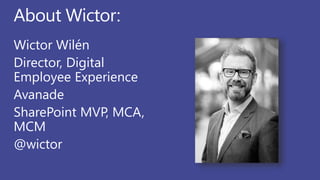
About Wictor:
Wictor Wilén
Director, Digital
Employee Experience
Avanade
SharePoint MVP, MCA,
MCM
@wictor
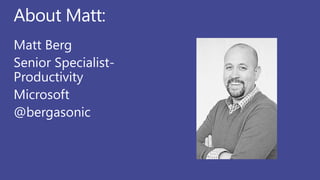
About Matt:
Matt Berg
Senior Specialist-
Productivity
Microsoft
@bergasonic
Welcome to
Microsoft Teams
Chat-based workspace in Office 365
Presented by Matt
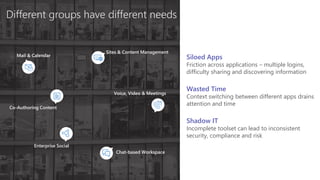
Different groups have different needs
Co-Authoring Content
Chat-based Workspace
Sites & Content Management
Enterprise Social
Mail & Calendar
Voice, Video & Meetings
Wasted Time
Context switching between different apps drains
attention and time
Shadow IT
Incomplete toolset can lead to inconsistent
security, compliance and risk
Siloed Apps
Friction across applications – multiple logins,
difficulty sharing and discovering information
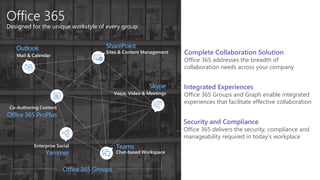
Office 365
Designed for the unique workstyle of every group
SharePoint
Teams
Office 365 ProPlus
Yammer
Outlook
Skype
Sites & Content Management
Chat-based Workspace
Co-Authoring Content
Enterprise Social
Mail & Calendar
Voice, Video & Meetings
Office 365 Groups
Complete Collaboration Solution
Office 365 addresses the breadth of
collaboration needs across your company
Integrated Experiences
Office 365 Groups and Graph enable integrated
experiences that facilitate effective collaboration
Security and Compliance
Office 365 delivers the security, compliance and
manageability required in today’s workplace
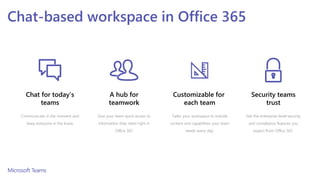
Chat for today’s
teams
Communicate in the moment and
keep everyone in the know
Customizable for
each team
Tailor your workspace to include
content and capabilities your team
needs every day.
A hub for
teamwork
Give your team quick access to
information they need right in
Office 365
Chat-based workspace in Office 365
Security teams
trust
Get the enterprise-level security
and compliance features you
expect from Office 365.
Demos
Microsoft Teams
Chat-based workspace in Office 365
Presented by Matt
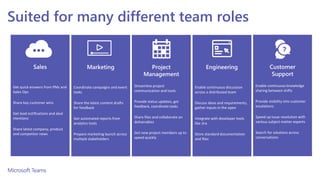
Suited for many different team roles
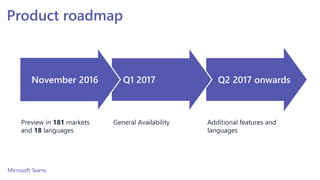
Product roadmap
Additional features and
languages
Preview in 181 markets
and 18 languages
General Availability
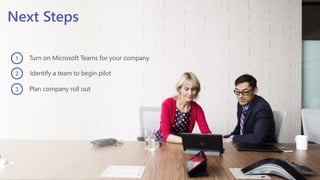
Next Steps
Turn on Microsoft Teams for your company
Identify a team to begin pilot
Plan company roll out
1
2
3
Questions and Answers:
Avanade’s Experience with
Microsoft Teams
Chat-based workspace in Office 365
Presented by Wictor
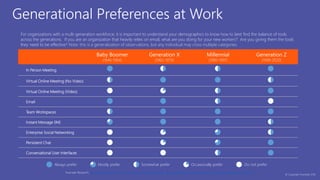
Generational Preferences at Work
Baby Boomer
(1946-1964)
Generation X
(1965-1979)
Millennial
(1980-1997)
Generation Z
(1998-2020)
In Person Meeting
Virtual Online Meeting (No Video)
Virtual Online Meeting (Video)
Email
Team Workspaces
Instant Message (IM)
Enterprise Social Networking
Persistent Chat
Conversational User Interfaces
Mostly preferAlways prefer Somewhat prefer Occasionally prefer Do not prefer
Avanade Research, Wired Magazine: The Next Generation of Working Practices, Herman Miller: Generations at Work, EY Study on Generational Shifts
For organizations with a multi-generation workforce, it is important to understand your demographics to know how to best find the balance of tools
across the generations. If you are an organization that heavily relies on email, what are you doing for your new workers? Are you giving them the tools
they need to be effective? Note: this is a generalization of observations, but any individual may cross multiple categories.
© Copyright Avanade 2016
Outlook e-mail
Skype for Business
Microsoft Teams
Office 365 Groups
OneDrive for Business
Yammer
SharePoint Sites
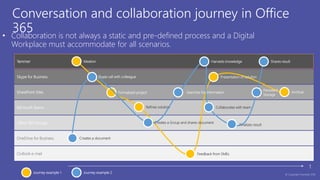
Conversation and collaboration journey in Office
365• Collaboration is not always a static and pre-defined process and a Digital
Workplace must accommodate for all scenarios.
t
Ideation
Formalized project
Refines solution
Presentation of solution
Archival
Feedback from SMEs
Creates a document
Skype call with colleague
Creates a Group and shares document
Collaborates with team
Harvests knowledge
Finalizes result
Shares result
Searches for information
Persistent
Storage
Journey example 1 Journey example 2 © Copyright Avanade 2016
Audience (Internal or External)
INDIVIDUAL GROUP TEAM DEPARTMENT ORGANIZATION
PRIORITY/TIMESENSITIVITY
URGENT/HIGHAD-HOC/LOW
GENERATIONALPREFERENCES
GenZ(1998-2020)BabyBoomer(1946-1964)
Millennial(1980-1997)
GenX(1965-1979)
MyAnalytics
Skype for Business Call or
Instant Message (IM)
Skype for Business Online Meetings Skype Broadcast
Outlook Email
OneDrive for Business
Yammer
(All Company and Groups)
Team Sites
(Office 365 Groups)
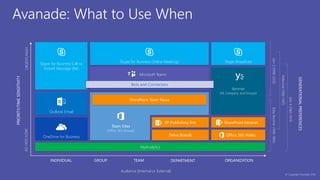
Avanade: What to Use When
Microsoft Teams
Delve Boards
SP Publishing Site
SharePoint Team News
Office 365 Video
SharePoint Intranet
Bots and Connectors
© Copyright Avanade 2016
Microsoft Graph
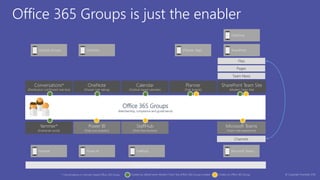
Office 365 Groups is just the enabler
Office 365 Groups
(Membership, compliance and governance)
Microsoft Teams
(Team chat experience)
Planner
(Task boards)
Power BI
(Data and analytics)
SharePoint Team Site
(Modern Team Site)
Conversations*
(Distribution List/Shared mail box)
OneNote
(Shared note taking)
Calendar
(Outlook based calendar)
Files
Team News
Pages
Channels
Created by default when Modern Team Site (Office 365 Group) created
StaffHub
(Desk-free workers)
Yammer*
(Enterprise social)
* Conversations or Yammer based Office 365 Group
SharePointOutlook Groups
Microsoft TeamsYammer
OneNote (Planner App)
OneDrive
StaffHubPower BI
Creates an Office 365 Group © Copyright Avanade 2016
Questions and Answers:
Webinar Recap:
Microsoft Teams
Chat-based workspace in Office 365
Presented by Dux, Matt and Wictor
Click to Edit Master Title Style
Click to edit master subtitle style
Questions and Answers:
Microsoft Teams is Here!
Thank You!

Webinar: Microsoft Teams is Here! Presented by Avanade, AvePoint and Microsoft.

  • 1.
    Click to EditMaster Title Style Click to edit master subtitle style Webinar: Microsoft Teams is Here! Presented by Avanade, AvePoint & Microsoft’s Matt Berg
  • 2.
    Webinar Agenda: • Introductions •Microsoft Teams 101 • Microsoft Teams Demo • Avanade’s Experience • Webinar Recap • Questions & Answers
  • 3.
    About Dux: Dux RaymondSy Chief Technology Officer AvePoint Public Sector Microsoft MVP and Regional Director @meetdux
  • 4.
    About Wictor: Wictor Wilén Director,Digital Employee Experience Avanade SharePoint MVP, MCA, MCM @wictor
  • 5.
    About Matt: Matt Berg SeniorSpecialist- Productivity Microsoft @bergasonic
  • 6.
    Welcome to Microsoft Teams Chat-basedworkspace in Office 365 Presented by Matt
  • 7.
    Different groups havedifferent needs Co-Authoring Content Chat-based Workspace Sites & Content Management Enterprise Social Mail & Calendar Voice, Video & Meetings Wasted Time Context switching between different apps drains attention and time Shadow IT Incomplete toolset can lead to inconsistent security, compliance and risk Siloed Apps Friction across applications – multiple logins, difficulty sharing and discovering information
  • 8.
    Office 365 Designed forthe unique workstyle of every group SharePoint Teams Office 365 ProPlus Yammer Outlook Skype Sites & Content Management Chat-based Workspace Co-Authoring Content Enterprise Social Mail & Calendar Voice, Video & Meetings Office 365 Groups Complete Collaboration Solution Office 365 addresses the breadth of collaboration needs across your company Integrated Experiences Office 365 Groups and Graph enable integrated experiences that facilitate effective collaboration Security and Compliance Office 365 delivers the security, compliance and manageability required in today’s workplace
  • 9.
    Chat for today’s teams Communicatein the moment and keep everyone in the know Customizable for each team Tailor your workspace to include content and capabilities your team needs every day. A hub for teamwork Give your team quick access to information they need right in Office 365 Chat-based workspace in Office 365 Security teams trust Get the enterprise-level security and compliance features you expect from Office 365.
  • 10.
    Demos Microsoft Teams Chat-based workspacein Office 365 Presented by Matt
  • 11.
    Suited for manydifferent team roles
  • 12.
    Product roadmap Additional featuresand languages Preview in 181 markets and 18 languages General Availability
  • 13.
    Next Steps Turn onMicrosoft Teams for your company Identify a team to begin pilot Plan company roll out 1 2 3
  • 14.
  • 15.
    Avanade’s Experience with MicrosoftTeams Chat-based workspace in Office 365 Presented by Wictor
  • 16.
    Generational Preferences atWork Baby Boomer (1946-1964) Generation X (1965-1979) Millennial (1980-1997) Generation Z (1998-2020) In Person Meeting Virtual Online Meeting (No Video) Virtual Online Meeting (Video) Email Team Workspaces Instant Message (IM) Enterprise Social Networking Persistent Chat Conversational User Interfaces Mostly preferAlways prefer Somewhat prefer Occasionally prefer Do not prefer Avanade Research, Wired Magazine: The Next Generation of Working Practices, Herman Miller: Generations at Work, EY Study on Generational Shifts For organizations with a multi-generation workforce, it is important to understand your demographics to know how to best find the balance of tools across the generations. If you are an organization that heavily relies on email, what are you doing for your new workers? Are you giving them the tools they need to be effective? Note: this is a generalization of observations, but any individual may cross multiple categories. © Copyright Avanade 2016
  • 17.
    Outlook e-mail Skype forBusiness Microsoft Teams Office 365 Groups OneDrive for Business Yammer SharePoint Sites Conversation and collaboration journey in Office 365• Collaboration is not always a static and pre-defined process and a Digital Workplace must accommodate for all scenarios. t Ideation Formalized project Refines solution Presentation of solution Archival Feedback from SMEs Creates a document Skype call with colleague Creates a Group and shares document Collaborates with team Harvests knowledge Finalizes result Shares result Searches for information Persistent Storage Journey example 1 Journey example 2 © Copyright Avanade 2016
  • 18.
    Audience (Internal orExternal) INDIVIDUAL GROUP TEAM DEPARTMENT ORGANIZATION PRIORITY/TIMESENSITIVITY URGENT/HIGHAD-HOC/LOW GENERATIONALPREFERENCES GenZ(1998-2020)BabyBoomer(1946-1964) Millennial(1980-1997) GenX(1965-1979) MyAnalytics Skype for Business Call or Instant Message (IM) Skype for Business Online Meetings Skype Broadcast Outlook Email OneDrive for Business Yammer (All Company and Groups) Team Sites (Office 365 Groups) Avanade: What to Use When Microsoft Teams Delve Boards SP Publishing Site SharePoint Team News Office 365 Video SharePoint Intranet Bots and Connectors © Copyright Avanade 2016
  • 19.
    Microsoft Graph Office 365Groups is just the enabler Office 365 Groups (Membership, compliance and governance) Microsoft Teams (Team chat experience) Planner (Task boards) Power BI (Data and analytics) SharePoint Team Site (Modern Team Site) Conversations* (Distribution List/Shared mail box) OneNote (Shared note taking) Calendar (Outlook based calendar) Files Team News Pages Channels Created by default when Modern Team Site (Office 365 Group) created StaffHub (Desk-free workers) Yammer* (Enterprise social) * Conversations or Yammer based Office 365 Group SharePointOutlook Groups Microsoft TeamsYammer OneNote (Planner App) OneDrive StaffHubPower BI Creates an Office 365 Group © Copyright Avanade 2016
  • 20.
  • 21.
    Webinar Recap: Microsoft Teams Chat-basedworkspace in Office 365 Presented by Dux, Matt and Wictor
  • 22.
    Click to EditMaster Title Style Click to edit master subtitle style Questions and Answers: Microsoft Teams is Here!
  • 23.