Getting familiar with the in’s & out’s
Let’s get started!
MicrosoftTeams Overview
At it’s very core…
Move your conversations from Email to Teams.
…a chat application
Communication
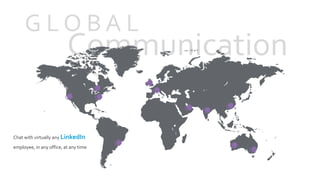
G L O B A L
Chat with virtually any LinkedIn
employee, in any office, at any time
Increasing your
productivity
01.Group Chat
GroupChats allow you to connect with multiple peers using the
same chat window. Share ideas, files, or even host impromptu video
meeting sessions with your group!
02.Teams
Take it to the next level withTeams. Create aTeam for larger
groups, projects, activities, or a general collaboration space. Also,
gain access to all other collaboration tools that Microsoft offers…
Increasing your
productivity
01.Group Chat
GroupChats allow you to connect with multiple peers using the
same chat window. Share ideas, files, or even host impromptu video
meeting sessions with your group!
02.Teams
Take it to the next level withTeams. Create aTeam for larger
groups, projects, activities, or a general collaboration space. Also,
gain access to all other collaboration tools that Microsoft offers…
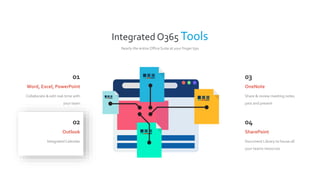
Integrated O365 Tools
Nearly the entire Office Suite at your finger tips
01
Collaborate & edit real-time with
your team
Word, Excel, PowerPoint
02
Integrated Calendar
Outlook
03
Share & review meeting notes
past and present
OneNote
04
Document Library to house all
your teams resources
SharePoint
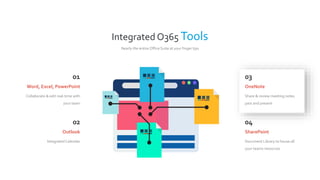
Integrated O365 Tools
Nearly the entire Office Suite at your finger tips
01
Collaborate & edit real-time with
your team
Word, Excel, PowerPoint
02
Integrated Calendar
Outlook
03
Share & review meeting notes
past and present
OneNote
04
Document Library to house all
your teams resources
SharePoint
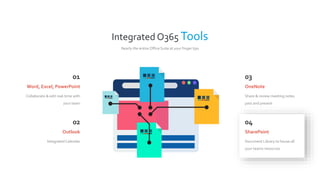
Integrated O365 Tools
Nearly the entire Office Suite at your finger tips
01
Collaborate & edit real-time with
your team
Word, Excel, PowerPoint
02
Integrated Calendar
Outlook
03
Share & review meeting notes
past and present
OneNote
04
Document Library to house all
your teams resources
SharePoint
Integrated O365 Tools
Nearly the entire Office Suite at your finger tips
01
Collaborate & edit real-time with
your team
Word, Excel, PowerPoint
02
Integrated Calendar
Outlook
03
Share & review meeting notes
past and present
OneNote
04
Document Library to house all
your teams resources
SharePoint
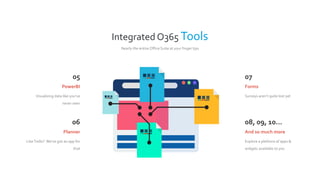
Integrated O365 Tools
Nearly the entire Office Suite at your finger tips
05
Visualizing data like you’ve
never seen
PowerBI
06
LikeTrello? We’ve got an app for
that
Planner
07
Surveys aren’t quite lost yet
Forms
08, 09, 10…
Explore a plethora of apps &
widgets available to you
And so much more
Host an impromptu meeting from your
desktopor laptop
You can launch video meetings any time from within a GroupChat orTeam’s Channel
D E S I G N E D01
 Share customer wins
 Get lead notifications & deal
mentions
 Share the latest
company/competitor news
Sales
02
 Host Sprint updates
 Discuss ideas, requirements,
and gather input
 Store standard
documentation
Engineering
03
 Streamline project
communication & tools
 Share files and collaborate on
deliverables
 Provide status updates & get
feedback
Project Management
04
 Enable continuous knowledge
sharing
 Speed up resolutions with
SME’s
 Search for solutions across
conversations
Customer Support
…to fit different teams &
different roles
Product Specs
Here are some quick tech specs to get you
familiar with the limitations ofTeams
Tech specs
250Teams per user
100 owners perTeam
100 Channels perTeam
500,000Teams per tenant
2,500 members perTeam
80 users per meeting
20 members per group chat
I n t e g r a t i o n
M O B I L E
Download the App on your
mobile
Get access to:
 chats & conversations
 video conference
 files
A P P E N D I X
©2014 LinkedIn Corporation. All Rights Reserved.©2014 LinkedIn Corporation. All Rights Reserved.
17
Our mission is to connect the world’s
professionals to make them more
productive and successful.
Jeff Weiner
18
Our vision is to create economic
opportunity for every member
of the global workforce.
Jeff Weiner
19
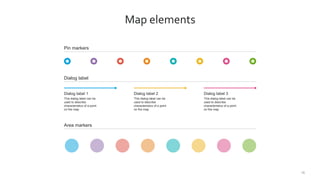
Map elements
Pin markers
Dialog label
Dialog label 1
This dialog label can be
used to describe
characteristics of a point
on the map
Dialog label 2
This dialog label can be
used to describe
characteristics of a point
on the map
Dialog label 3
This dialog label can be
used to describe
characteristics of a point
on the map
Area markers
20
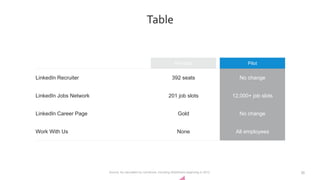
Table
Pre-pilot Pilot
LinkedIn Recruiter 392 seats No change
LinkedIn Jobs Network 201 job slots 12,000+ job slots
LinkedIn Career Page Gold No change
Work With Us None All employees
Source: As calculated by comScore, including SlideShare beginning in 2012
21
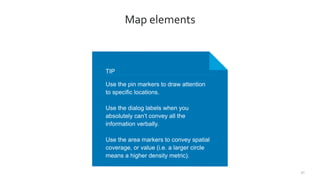
Map elements
TIP
Use the pin markers to draw attention
to specific locations.
Use the dialog labels when you
absolutely can’t convey all the
information verbally.
Use the area markers to convey spatial
coverage, or value (i.e. a larger circle
means a higher density metric).
22
Icons

Microsoft Teams

  • 1.
    Getting familiar withthe in’s & out’s Let’s get started! MicrosoftTeams Overview
  • 2.
    At it’s verycore… Move your conversations from Email to Teams. …a chat application
  • 3.
    Communication G L OB A L Chat with virtually any LinkedIn employee, in any office, at any time
  • 4.
    Increasing your productivity 01.Group Chat GroupChatsallow you to connect with multiple peers using the same chat window. Share ideas, files, or even host impromptu video meeting sessions with your group! 02.Teams Take it to the next level withTeams. Create aTeam for larger groups, projects, activities, or a general collaboration space. Also, gain access to all other collaboration tools that Microsoft offers…
  • 5.
    Increasing your productivity 01.Group Chat GroupChatsallow you to connect with multiple peers using the same chat window. Share ideas, files, or even host impromptu video meeting sessions with your group! 02.Teams Take it to the next level withTeams. Create aTeam for larger groups, projects, activities, or a general collaboration space. Also, gain access to all other collaboration tools that Microsoft offers…
  • 6.
    Integrated O365 Tools Nearlythe entire Office Suite at your finger tips 01 Collaborate & edit real-time with your team Word, Excel, PowerPoint 02 Integrated Calendar Outlook 03 Share & review meeting notes past and present OneNote 04 Document Library to house all your teams resources SharePoint
  • 7.
    Integrated O365 Tools Nearlythe entire Office Suite at your finger tips 01 Collaborate & edit real-time with your team Word, Excel, PowerPoint 02 Integrated Calendar Outlook 03 Share & review meeting notes past and present OneNote 04 Document Library to house all your teams resources SharePoint
  • 8.
    Integrated O365 Tools Nearlythe entire Office Suite at your finger tips 01 Collaborate & edit real-time with your team Word, Excel, PowerPoint 02 Integrated Calendar Outlook 03 Share & review meeting notes past and present OneNote 04 Document Library to house all your teams resources SharePoint
  • 9.
    Integrated O365 Tools Nearlythe entire Office Suite at your finger tips 01 Collaborate & edit real-time with your team Word, Excel, PowerPoint 02 Integrated Calendar Outlook 03 Share & review meeting notes past and present OneNote 04 Document Library to house all your teams resources SharePoint
  • 10.
    Integrated O365 Tools Nearlythe entire Office Suite at your finger tips 05 Visualizing data like you’ve never seen PowerBI 06 LikeTrello? We’ve got an app for that Planner 07 Surveys aren’t quite lost yet Forms 08, 09, 10… Explore a plethora of apps & widgets available to you And so much more
  • 11.
    Host an impromptumeeting from your desktopor laptop You can launch video meetings any time from within a GroupChat orTeam’s Channel
  • 12.
    D E SI G N E D01  Share customer wins  Get lead notifications & deal mentions  Share the latest company/competitor news Sales 02  Host Sprint updates  Discuss ideas, requirements, and gather input  Store standard documentation Engineering 03  Streamline project communication & tools  Share files and collaborate on deliverables  Provide status updates & get feedback Project Management 04  Enable continuous knowledge sharing  Speed up resolutions with SME’s  Search for solutions across conversations Customer Support …to fit different teams & different roles
  • 13.
    Product Specs Here aresome quick tech specs to get you familiar with the limitations ofTeams Tech specs 250Teams per user 100 owners perTeam 100 Channels perTeam 500,000Teams per tenant 2,500 members perTeam 80 users per meeting 20 members per group chat
  • 14.
    I n te g r a t i o n M O B I L E Download the App on your mobile Get access to:  chats & conversations  video conference  files
  • 15.
    A P PE N D I X
  • 16.
    ©2014 LinkedIn Corporation.All Rights Reserved.©2014 LinkedIn Corporation. All Rights Reserved.
  • 17.
    17 Our mission isto connect the world’s professionals to make them more productive and successful. Jeff Weiner
  • 18.
    18 Our vision isto create economic opportunity for every member of the global workforce. Jeff Weiner
  • 19.
    19 Map elements Pin markers Dialoglabel Dialog label 1 This dialog label can be used to describe characteristics of a point on the map Dialog label 2 This dialog label can be used to describe characteristics of a point on the map Dialog label 3 This dialog label can be used to describe characteristics of a point on the map Area markers
  • 20.
    20 Table Pre-pilot Pilot LinkedIn Recruiter392 seats No change LinkedIn Jobs Network 201 job slots 12,000+ job slots LinkedIn Career Page Gold No change Work With Us None All employees Source: As calculated by comScore, including SlideShare beginning in 2012
  • 21.
    21 Map elements TIP Use thepin markers to draw attention to specific locations. Use the dialog labels when you absolutely can’t convey all the information verbally. Use the area markers to convey spatial coverage, or value (i.e. a larger circle means a higher density metric).
  • 22.

Editor's Notes

  • #14 Before creating a team, it's a good practice to think about a goal, project, or work item and the organization’s people or groups who can help deliver it collaboratively. Once created, add these people or groups to a team to start collaborating. It's a good idea to designate more than one owner for each team. The great thing with Microsoft Teams, is that when you add new people/groups, they can quickly get up to speed on what has already been discussed as the conversations and files are available to users regardless of when they join. The General channel is created for you when you create the team. You can use this to share an overview of what the team wants to achieve and other high-level information that a new team member would find useful. Be descriptive when naming channels to make it easier to understand what the conversation in the channel is there to achieve. You can add new Tabs to channels to add tools like OneNote, PowerBI or links to web pages and other content to make it easy for people to find content and share their thoughts.