A vision for intelligent
communications
David J. Rosenthal
VP & GM, Digital Business
Razor Technology
December 12, 2017
Microsoft Technology Center, New York City
Legal Notice
This document reflects Microsoft’s current expectations about Skype for
Business capabilities coming to Teams.
However, dates and individual features may change and should not be relied
upon in making purchasing decisions.
3 billion
minutes of voice
and video per day on
the Skype ecosystem
The foundation of unified
communications at Microsoft
100 million
Microsoft Office 365
monthly active users
2X
commercial growth
year over year for Microsoft
Skype for Business
1 billion
meetings per year
on the Skype ecosystem
90+
countries with audio
conferencing available
12 years
as a leader in the Gartner
Unified Communications
Magic Quadrant
[1] Gartner. “Magic Quadrant for Unified Communications.” July 2017.
[2] Gartner. “Magic Quadrant for Unified Communications as a Service, Worldwide.” September 2017.
[3] Gartner. “Magic Quadrant for Meeting Solutions.” September 2017.
These graphics were published by Gartner, Inc., as part of a larger research document and should be evaluated in the context of the entire document. The Gartner document is available upon request from Microsoft. Gartner does not endorse any vendor, product or service
depicted in its research publications, and does not advise technology users to select only those vendors with the highest ratings or other designation. Gartner research publications consist of the opinions of Gartner's research organization and should not be construed as
statements of fact. Gartner disclaims all warranties, expressed or implied, with respect to this research, including any warranties of merchantability or fitness for a particular purpose.
Microsoft is a recognized solution in communications
Magic Quadrant for
Unified Communications
12 years as a leader in unified communications
Magic Quadrant for
Meeting Solutions
A leader in meeting solutions
Magic Quadrant for Unified
Communications as a Service, Worldwide
Positioned highest in Ability to Execute
Forrester provides a holistic view of unified
communications, on-premises and in the cloud​
We believe this is a reflection of our momentum
to date and how Microsoft is moving forward
Microsoft is a recognized
solution in communications
Forrester Wave™: Unified Communications And Collaboration, Q3 '17
The Forrester Wave™ is copyrighted by Forrester Research, Inc. Forrester and Forrester Wave™ are trademarks of Forrester Research, Inc. The Forrester Wave™ is a graphical representation of Forrester's call on a market and is plotted using a detailed spreadsheet with exposed scores, weightings,
and comments. Forrester does not endorse any vendor, product, or service depicted in the Forrester Wave. Information is based on best available resources. Opinions reflect judgment at the time and are subject to change.
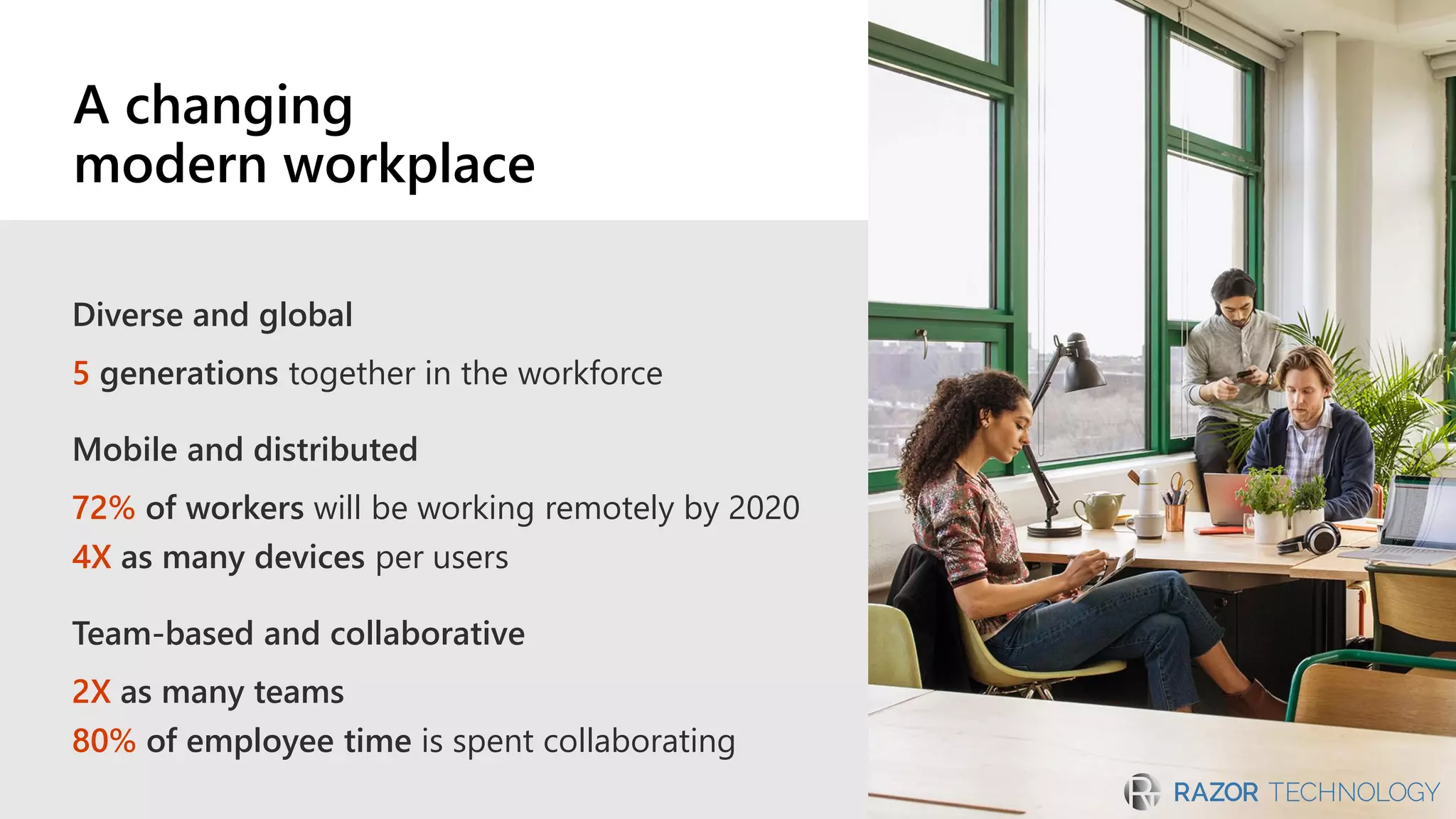
Diverse and global
5 generations together in the workforce
Mobile and distributed
72% of workers will be working remotely by 2020
4X as many devices per users
Team-based and collaborative
2X as many teams
80% of employee time is spent collaborating
A changing
modern workplace
Microsoft Teams
“We gain huge benefit by improving
collaboration and amplifying the value
of our creative talent.”
—Jamie McLellan: Chief Technology Officer,
J. Walter Thompson Worldwide
Chat-based workspace in Office 365
Generally available in March 2017
125K+ organizations using Teams
Harnessing the power of intelligence to transform
calls and meetings
Intelligent communications
Machine learningCognitive services Microsoft Graph
Insights, history,
and deeper context
Envisioning intelligent communications
for calls and meetings
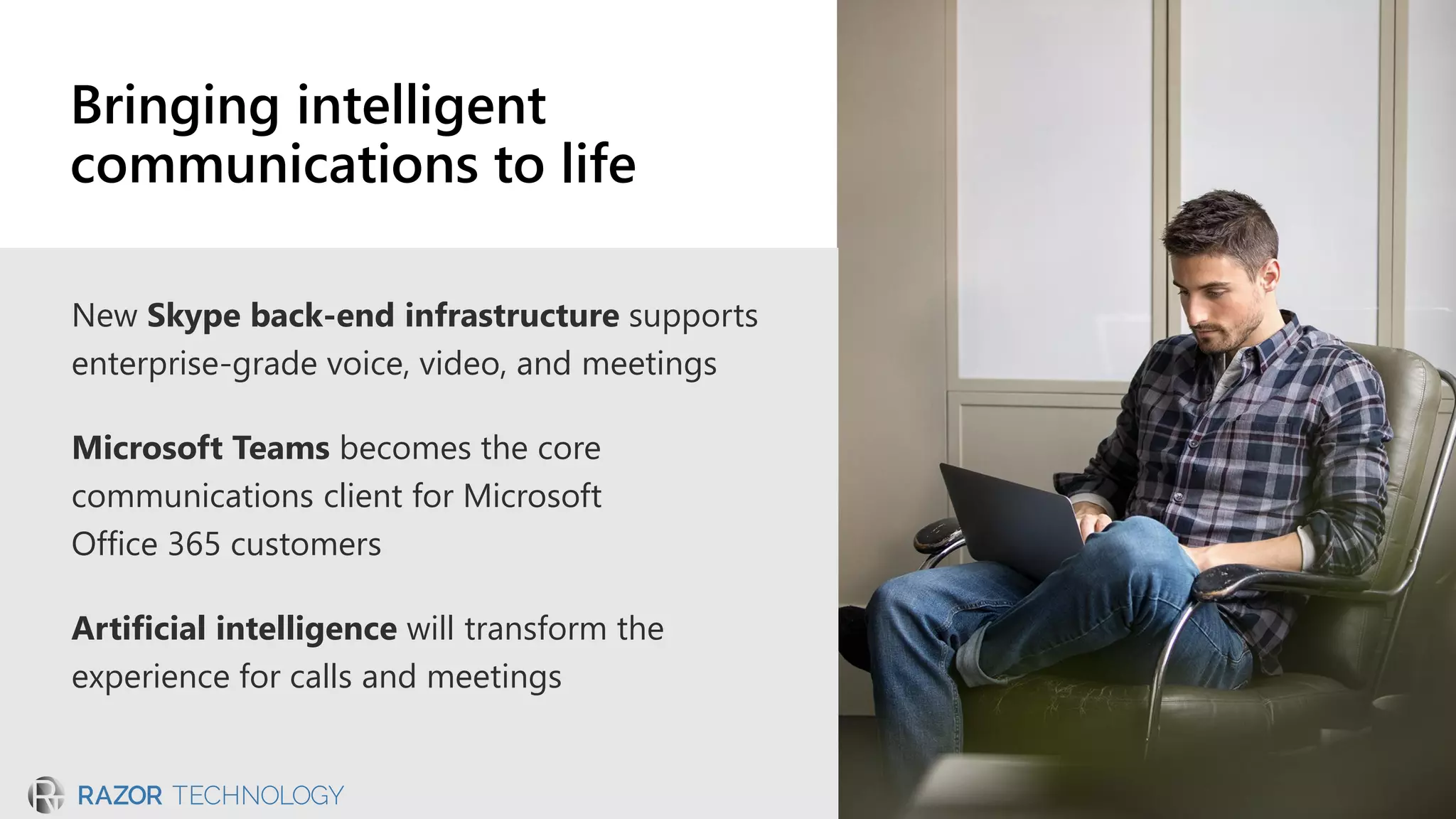
New Skype back-end infrastructure supports
enterprise-grade voice, video, and meetings
Microsoft Teams becomes the core
communications client for Microsoft
Office 365 customers
Artificial intelligence will transform the
experience for calls and meetings
Bringing intelligent
communications to life
New Skype back-end
infrastructure
Built for enterprise-grade voice, video, and meetings
More efficient bandwidth consumption
More robust telemetry
Maintenance and upgrades with minimal disruption
Faster meeting join times for users and a better
browser experience
Commercial on-premises
Microsoft Teams
Online voice, video, and meetings
Teams client
Skype for Business
On-premises server for voice, video, and meetings
Skype for Business client
Commercial cloud (Office 365)
Single client experience in the cloud with Microsoft Teams​
Skype-branded voice and video experiences​
Continued support for Skype for Business Server for on-premises environments​
Continued support for Skype for Business Online until Teams meets your business needs
Future unified communications portfolio
in the cloud and on-premises
Microsoft Cognitive Services and the power of
Microsoft Graph to transform calls and meetings
Related files and relevant history at
your fingertips
Transcription, translation, and speech recognition
abilities to connect attendees
Artificial intelligence to autogenerate notes
and next steps when a meeting ends
Calls and meetings with built-in intelligence
Teams: the hub for teamwork in Office 365
Chat, calls, and meetings for
today’s teams
Integrated Microsoft
Office 365 apps
Enterprise security, compliance,
and manageability
Customizable workspace to meet
your needs
Working better and smarter with Teams
Everyone in the know
Communicate in the moment with
team chats, calls and meetings
A complete
meeting experience
Easily plan, prep, and follow up to
any meeting
Enterprise-grade voice
and video
Experience higher quality communication
on new Skype infrastructure
Single workspace,
tailored for you
Customize your workspace
to meet your team’s needs
Fully integrated
Access files, chat, and presence
without leaving the workspace
Cross-device support
Switch among devices and
connect to meeting rooms
Enable with transparency and communication
Upgrade when Teams meets your organization’s needs
Empower IT to control and manage process
Ease user transition with in-product features
Support through partner and device ecosystem
Transition to Teams
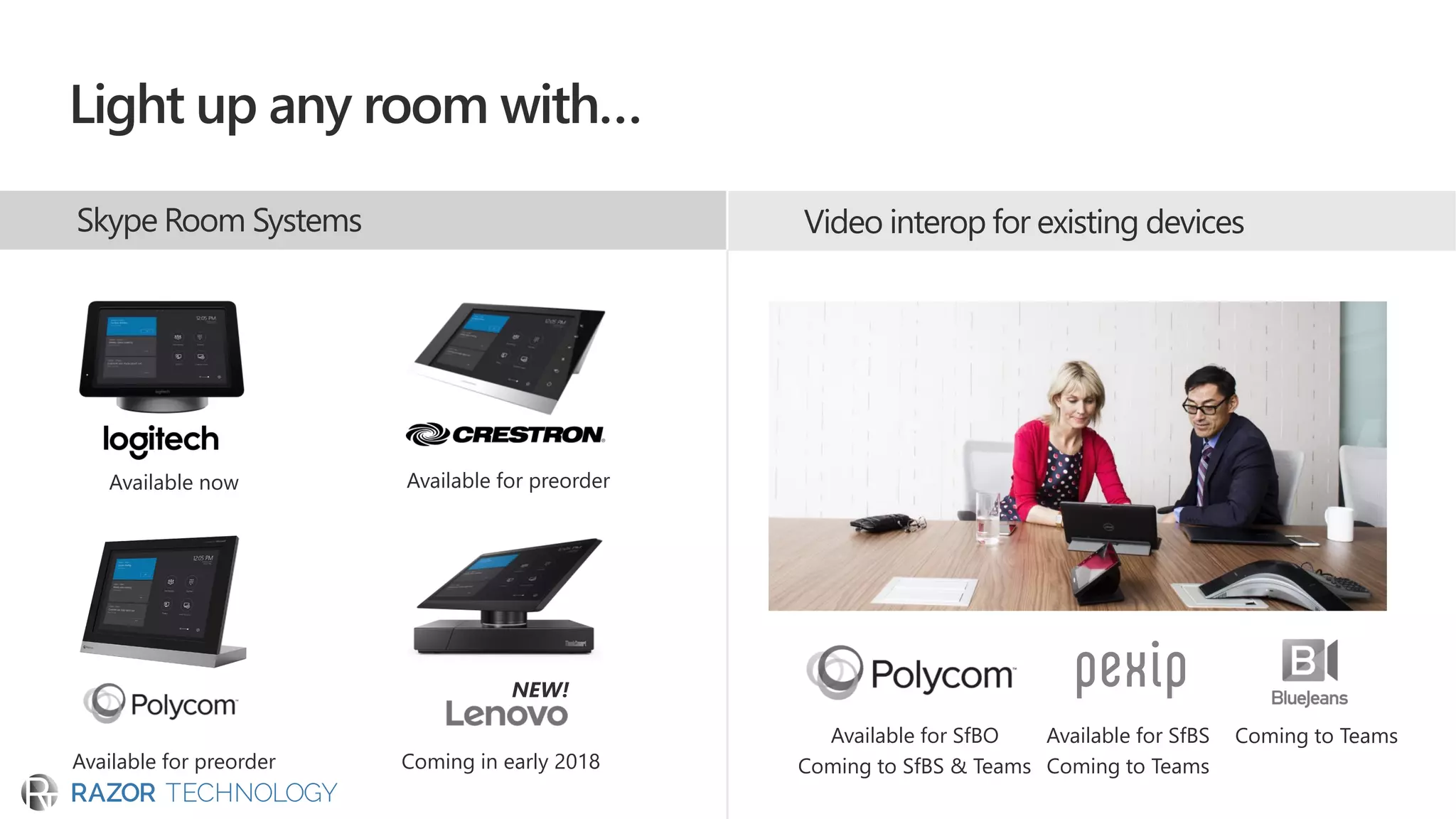
Video interop for existing devices
Available now Available for preorder
Available for preorder
NEW!
Coming in early 2018
Available for SfBO
Coming to SfBS & Teams
Available for SfBS
Coming to Teams
Coming to Teams
Skype Room Systems
Light up any room with…
Unlock the power of the group
with Teams on Surface Hub
Skype-to-Teams customer experience journey
Evaluate your needs relative to timing and capabilities on the
Microsoft Teams roadmap
Engage your account team, FastTrack, and partners for guidance
and support along the journey
Begin using Teams today to explore the benefits
of the hub for teamwork in Microsoft 365
Run Teams and Skype for Business side by side until
Teams fully meets your needs
Go to https://aka.ms/skypeandteams for guidance or learn more at https://products.office.com/en-US/business/office-365-roadmap
H2 CY2018H1 CY2018 CY2019
Hub for Teamwork
September 2017
Meetings, Audio Conference
Voice, Phone System
Skype for Business Microsoft Teams
Chat, Presence
What can you do now?
This document reflects Microsoft’s current
expectations; however, dates and individual
features may change and should not be relied
upon in making purchasing decisions.
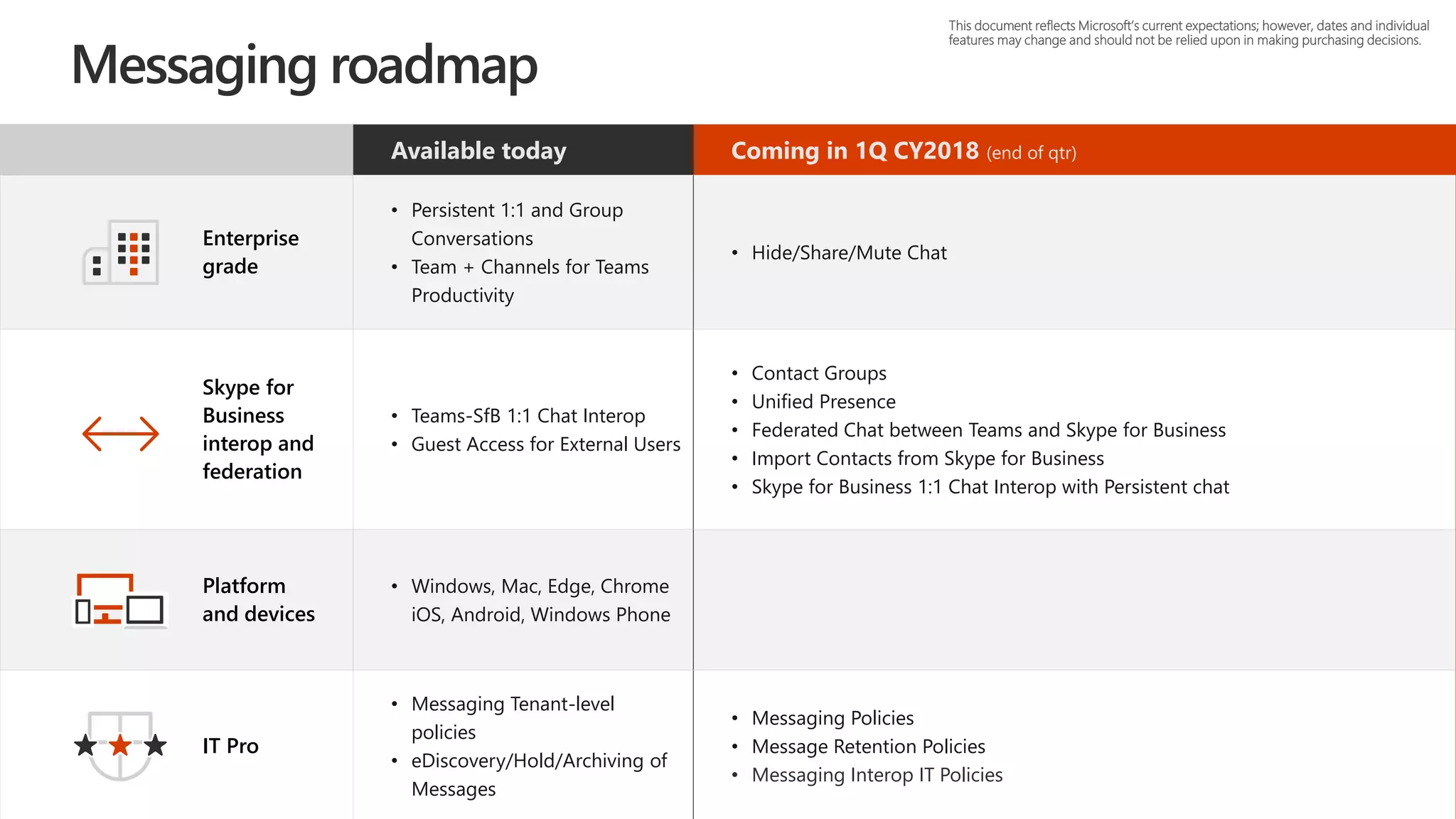
Available today Coming in 1Q CY2018 (end of qtr)
Enterprise
grade
• Persistent 1:1 and Group
Conversations
• Team + Channels for Teams
Productivity
• Hide/Share/Mute Chat
Skype for
Business
interop and
federation
• Teams-SfB 1:1 Chat Interop
• Guest Access for External Users
• Contact Groups
• Unified Presence
• Federated Chat between Teams and Skype for Business
• Import Contacts from Skype for Business
• Skype for Business 1:1 Chat Interop with Persistent chat
Platform
and devices
• Windows, Mac, Edge, Chrome
iOS, Android, Windows Phone
IT Pro
• Messaging Tenant-level
policies
• eDiscovery/Hold/Archiving of
Messages
• Messaging Policies
• Message Retention Policies
• Messaging Interop IT Policies
This document reflects Microsoft’s current expectations; however, dates and individual
features may change and should not be relied upon in making purchasing decisions.
Messaging roadmap
Available today Coming in 4Q 2017 (end of qtr)
Coming in 2Q CY2018 (end of
qtr)
Enterprise
grade
• Schedule in Outlook & Teams
• Private and Channel Meetings
• User Facing Diagnostics
• 80 users in a meeting
• Audio Conferencing (preview)
• Participant Management
• Improved Device Selection
• Audio Conferencing in over 90
countries
• Anonymous Join
• Interactive Troubleshooting
• Lobby Support
• Mute Other Participants
• Broadcast Meetings
• Cloud Recording
• Federated Meetings
• Large Meeting Support (~250)
• Lobby for PSTN callers
• Outlook meeting schedule from other
platforms (OWA, OLK, mobile)
• PSTN Fallback
Collaborative
meetings
• Enable Meeting Lifecycle with
Pre/During/Post
• Desktop sharing
• Conversations
• Immersive Meeting Experiences
• Application Sharing
• Give and Take Control in sharing
• PowerPoint Load and Share
• Whiteboard and Meeting Notes
Platform
and devices
• Windows, Mac
• Mobile: iOS and Android
Meetings
• Edge, Chrome Browser Support for
meetings
• Enable VTC Interop Services*
• Skype Room Systems Support*
• Surface Hub Support
• Trio 1 Touch Teams Meeting Join*
IT Pro
• Call Quality Diagnostic Portal
• Tenant Policies
• Enable Call Quality Analytics
• User-Level Meeting Policy
• eDiscovery enhancements
This document reflects Microsoft’s current expectations; however, dates and individual
features may change and should not be relied upon in making purchasing decisions.
* Capability has third party dependencies
Meetings roadmap
Coming in 4Q CY2017 (end of qtr)
Coming in 2Q CY2018
(end of qtr)
Coming in 4Q CY2018
(end of qtr)
Enterprise
grade
• Boss and Delegate Support
• Call Queues
• Consultative & Safe Transfer
• Do not Disturb breakthrough
• Distinctive Ring
• 1:1 to Group Call Escalation with
Teams, Skype for Business, and PSTN
participants
• Forward to Group
• Organizational Auto-Attendant
• Transfer to PSTN Call
• Hybrid connection to Teams
• Out of Office Support
• Call Park
• Group Call Pickup
• Location-Based Routing
• Shared Line Appearance
Skype for
Business
interop & fed
• SfB-Teams Calling
• Call Support between Teams &
Skype Consumer
Platform
and devices
• Windows, Mac, Edge, iOS, Android
• TTY Support
• Support for existing certified SIP
Phones*
• USB HID
IT Pro
• SfB-Teams Interop Policies
• Call Quality Diagnostic Portal
• eDiscovery Enhancements
This document reflects Microsoft’s current expectations; however, dates and individual
features may change and should not be relied upon in making purchasing decisions.
* Capability has third party dependencies
• Blind Transfer
• Call Blocking
• Call Forwarding
• Caller ID Masking
• e911 Support
• Extension Dialing
• Translate user input
to standard format
phone #
• Hold
• Multi-call Handling
• Simultaneous
Ringing
• Speed Dial
• Suggested Contacts
• Voicemail
• Enable Existing
Calling Plan Support
Calling roadmap
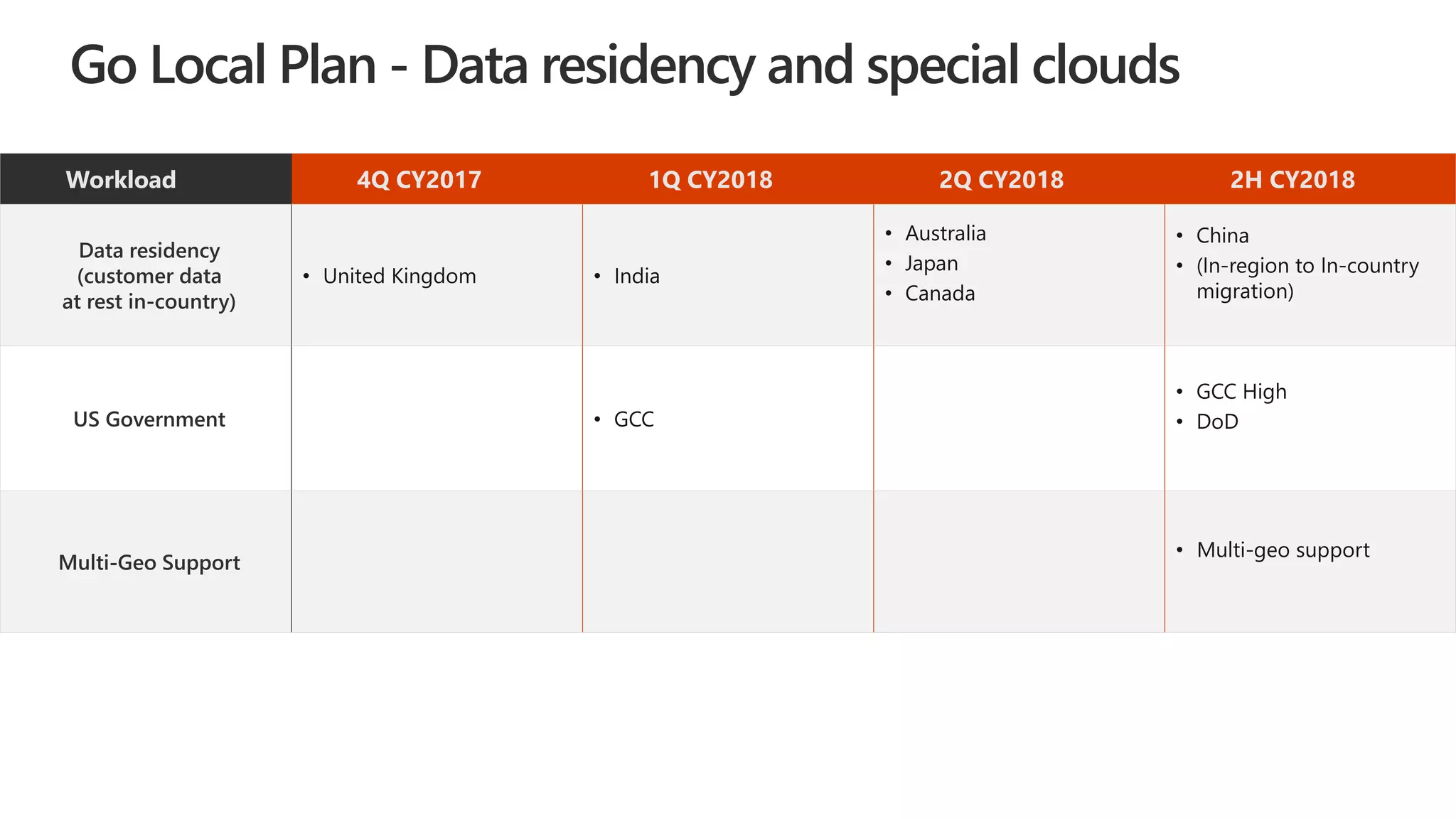
Go Local Plan - Data residency and special clouds
Workload 4Q CY2017 1Q CY2018 2Q CY2018 2H CY2018
Data residency
(customer data
at rest in-country)
• United Kingdom • India
• Australia
• Japan
• Canada
• China
• (In-region to In-country
migration)
US Government • GCC
• GCC High
• DoD
Multi-Geo Support
• Multi-geo support
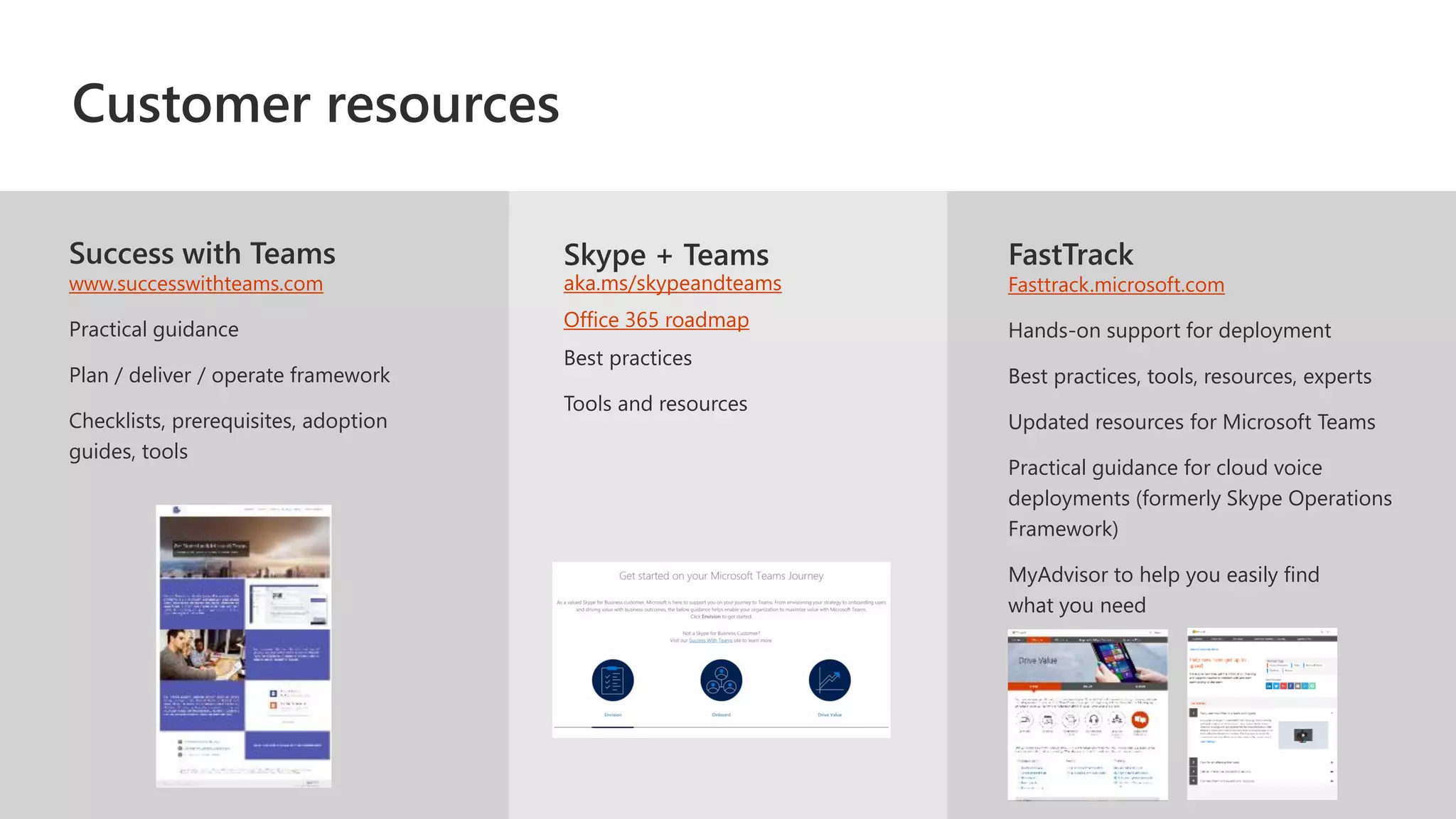
Success with Teams
www.successwithteams.com
Practical guidance
Plan / deliver / operate framework
Checklists, prerequisites, adoption
guides, tools
FastTrack
Fasttrack.microsoft.com
Hands-on support for deployment
Best practices, tools, resources, experts
Updated resources for Microsoft Teams
Practical guidance for cloud voice
deployments (formerly Skype Operations
Framework)​
MyAdvisor to help you easily find
what you need
Skype + Teams
aka.ms/skypeandteams
Office 365 roadmap
Customer resources
Startusing Teams today
Give users a modernhub for teamwork
Plan your UC roadmap
Evaluatecurrentandfuture UCdeployment
plans in anticipation of upgrade
Get started today
© 2017 Microsoft Corporation. All rights reserved. Microsoft, Windows, Office 365, Skype, and other product names are or may be registered trademarks and/or trademarks in the U.S. and/or other countries. The information herein is for informational
purposes only and represents the current view of Microsoft Corporation as of the date of this presentation. Because Microsoft must respond to changing market conditions, it should not be interpreted to be a commitment
on the part of Microsoft, and Microsoft cannot guarantee the accuracy of any information provided after the date of this presentation. MICROSOFT MAKES NO WARRANTIES, EXPRESS, IMPLIED OR STATUTORY, AS TO THE INFORMATION IN THIS
PRESENTATION.
David.Rosenthal@razor-tech.com
The Microsoft vision for
intelligent communication
New Skype back-end architecture
Communication and collaboration together
in Microsoft Teams
Transforming communication with the
power of intelligence
Enabling IT with transparency and
empowerment through transition
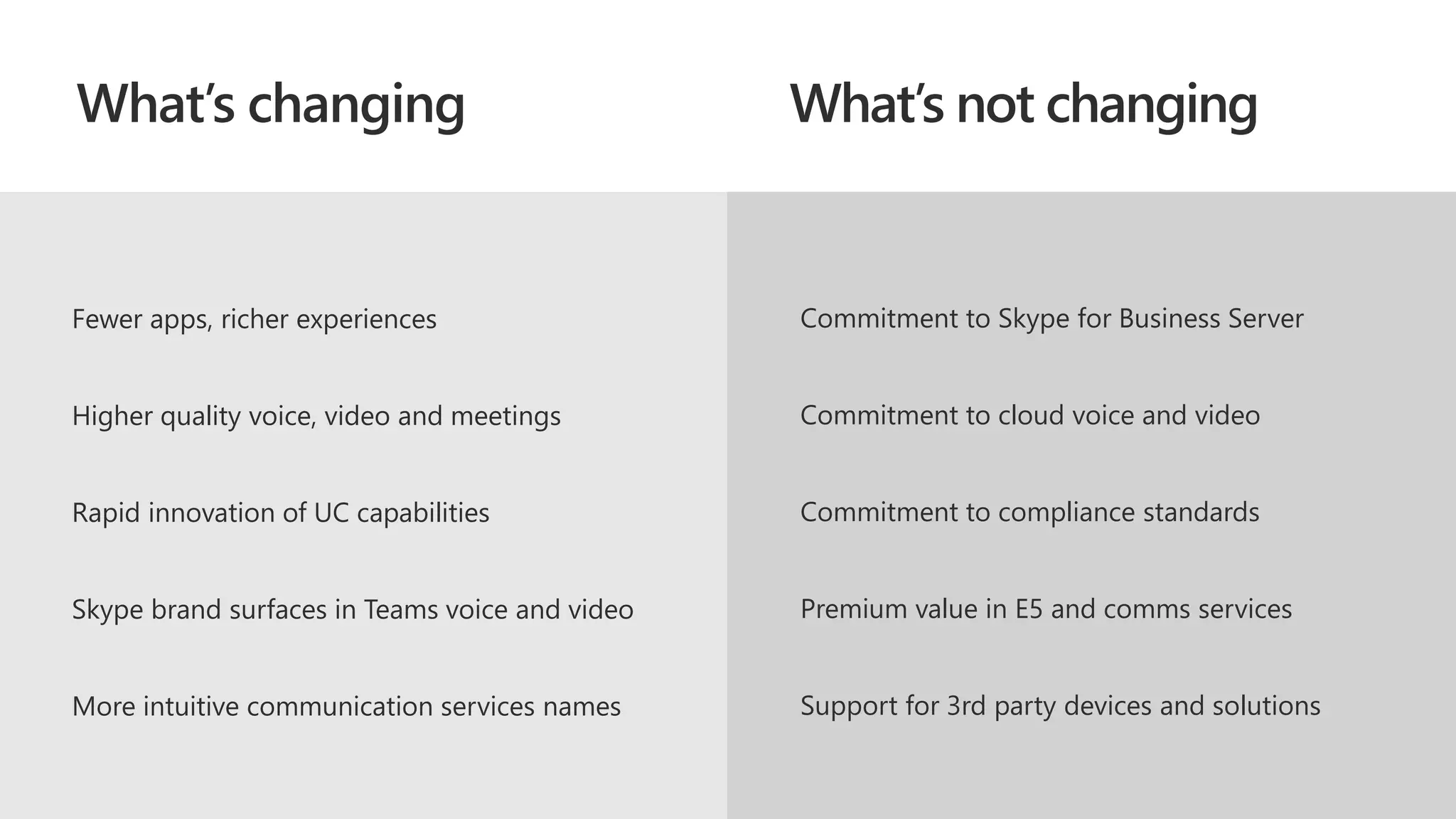
What’s changing What’s not changing
Fewer apps, richer experiences
Higher quality voice, video and meetings
Rapid innovation of UC capabilities
Skype brand surfaces in Teams voice and video
More intuitive communication services names
Commitment to Skype for Business Server
Commitment to cloud voice and video
Commitment to compliance standards
Premium value in E5 and comms services
Support for 3rd party devices and solutions
Communication services
name changes
Skype for Business
Server vNext
Continuing commitment to
on-premises and hybrid
customer needs
Refreshed mainstream support
Quality, security, and
performance fixes
Refreshed Skype for Business client
IT pro and voice-centric release
Cloud-connected analytics and
voice apps
Improved Teams interop
Targeting 2018 Q4
Conditional access
& MAM
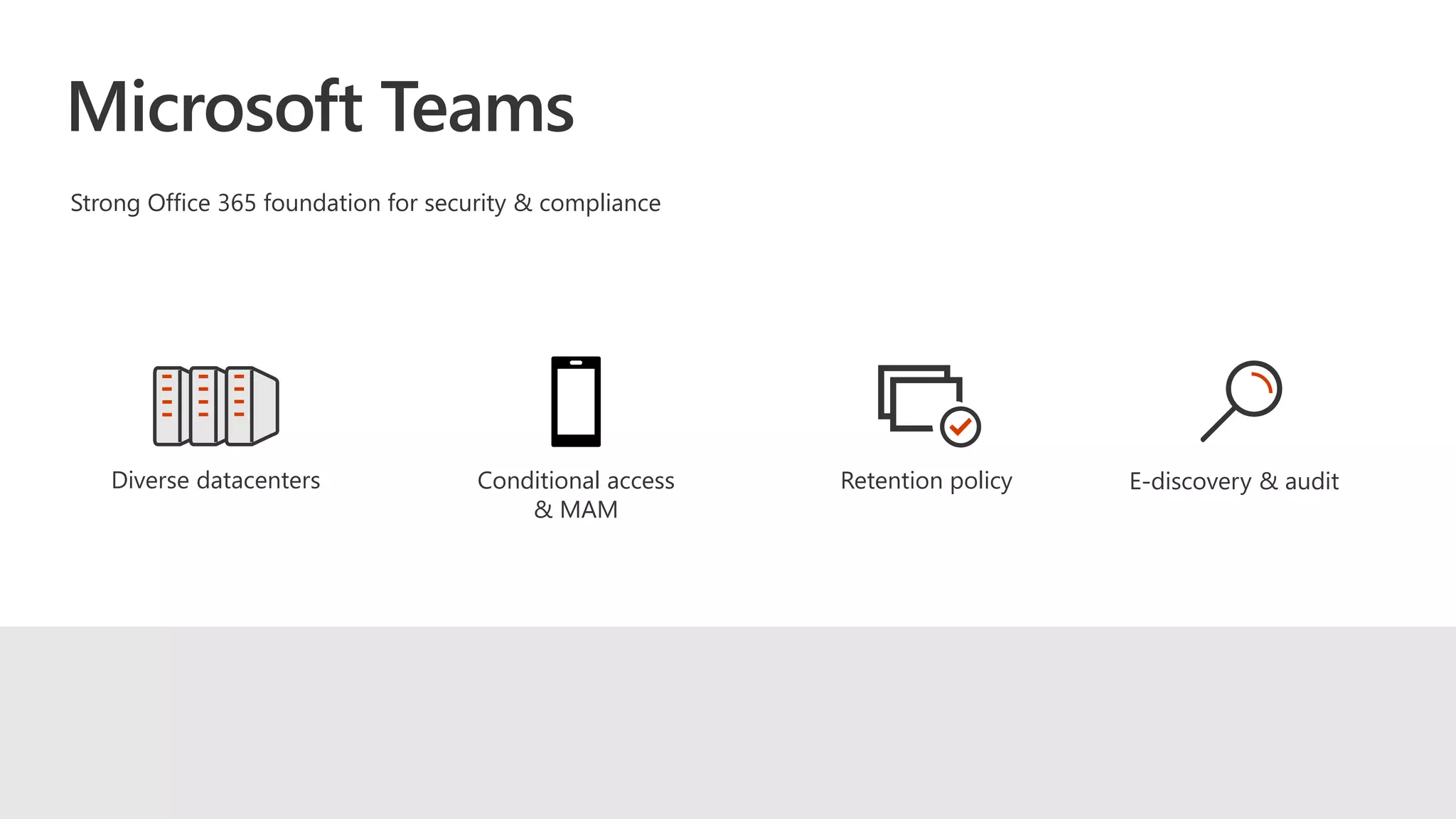
Strong Office 365 foundation for security & compliance
Diverse datacenters Retention policy E-discovery & audit
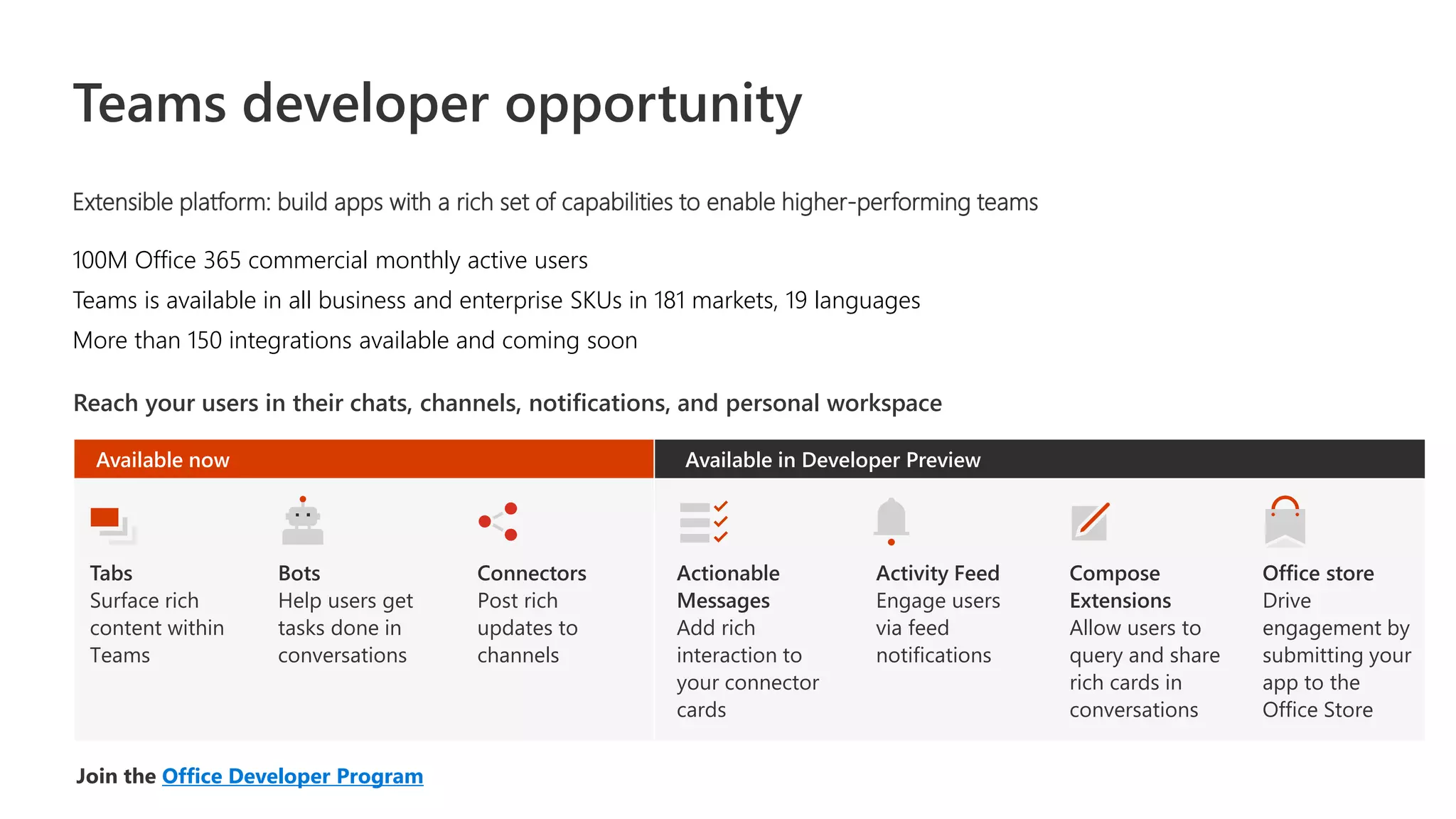
Teams developer opportunity
Extensible platform: build apps with a rich set of capabilities to enable higher-performing teams
100M Office 365 commercial monthly active users
Teams is available in all business and enterprise SKUs in 181 markets, 19 languages
More than 150 integrations available and coming soon
Join the Office Developer Program
Reach your users in their chats, channels, notifications, and personal workspace
Tabs
Surface rich
content within
Teams
Bots
Help users get
tasks done in
conversations
Connectors
Post rich
updates to
channels
Actionable
Messages
Add rich
interaction to
your connector
cards
Activity Feed
Engage users
via feed
notifications
Compose
Extensions
Allow users to
query and share
rich cards in
conversations
Office store
Drive
engagement by
submitting your
app to the
Office Store
Available now Available in Developer Preview
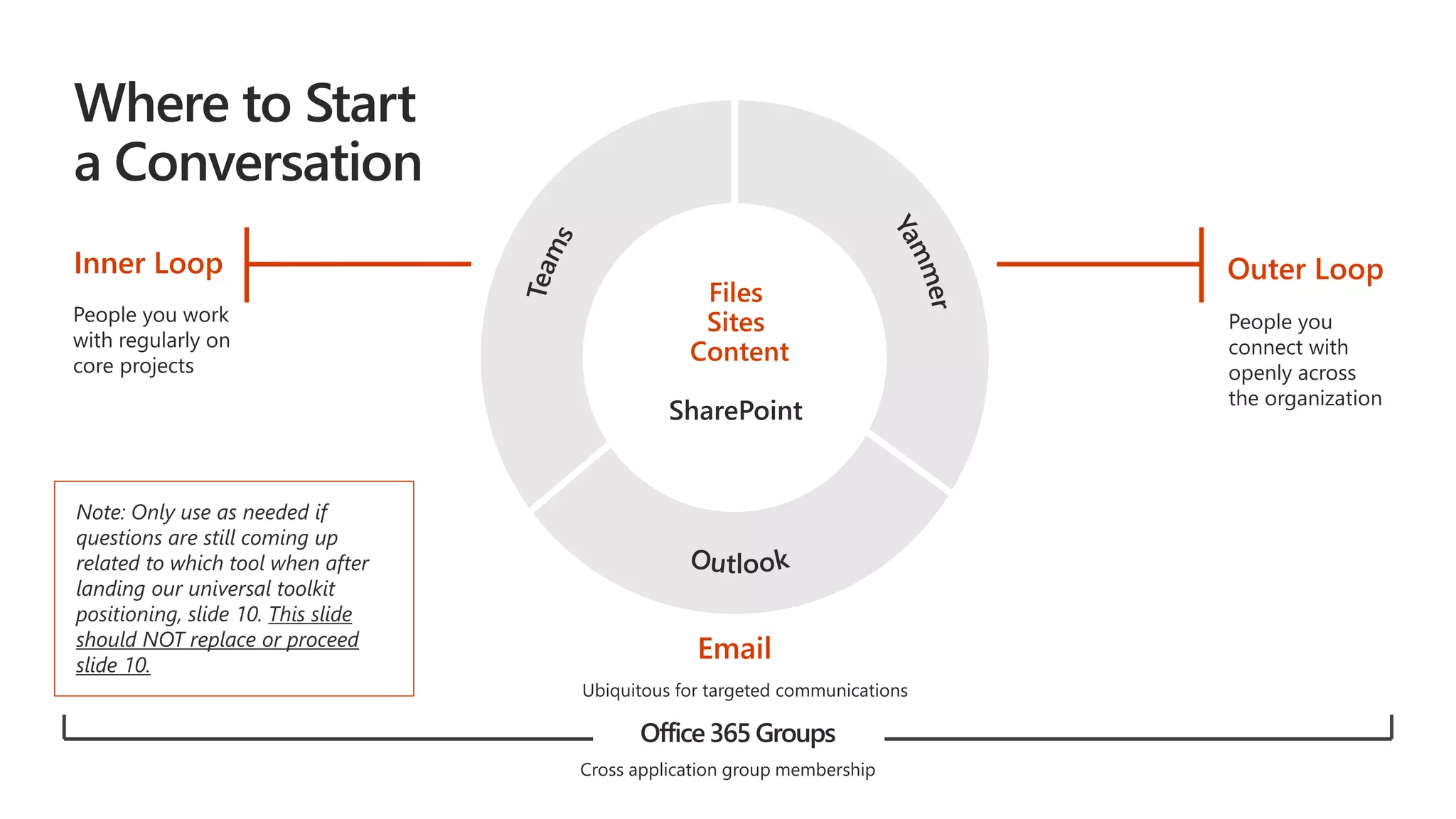
Office 365 Groups
Outer LoopInner Loop
Files
Sites
Content
SharePoint
Note: Only use as needed if
questions are still coming up
related to which tool when after
landing our universal toolkit
positioning, slide 10. This slide
should NOT replace or proceed
slide 10.
Email
Practical Guidance for Cloud Voice
BRK2036
FastTrack Cloud Voice Page
aka.ms/cloudvoice (MyAdvisor)
Extending practical guidance across
the Microsoft 365 workloads over time
Skype Operations
Framework
SOF content
Skype for Business
& Teams guidance
Extended with cloud voice guidance
moved to docs aka.ms/swt
SWT
Intelligent meetings lifecycle
A moment of synchronous communication within the context of a rich, ongoing dialog
During a Meeting
Join the meeting from any device
View immersive video and content
Share desktop, apps & content
Follow or share from your phone
Record and Playback
Post Meeting
Continue Group Chat
Follow up on action items
Share notes
Share recording
Schedule follow up
meeting with context
Pre Meeting
Ongoing conversation
Prepare and discuss content
Scheduling from Teams
Scheduling from Outlook
Align info to next
Teams Admin
Call quality dashboard
What it looks like to migrate users: View user list
What it looks like to migrate users: Filter and select users
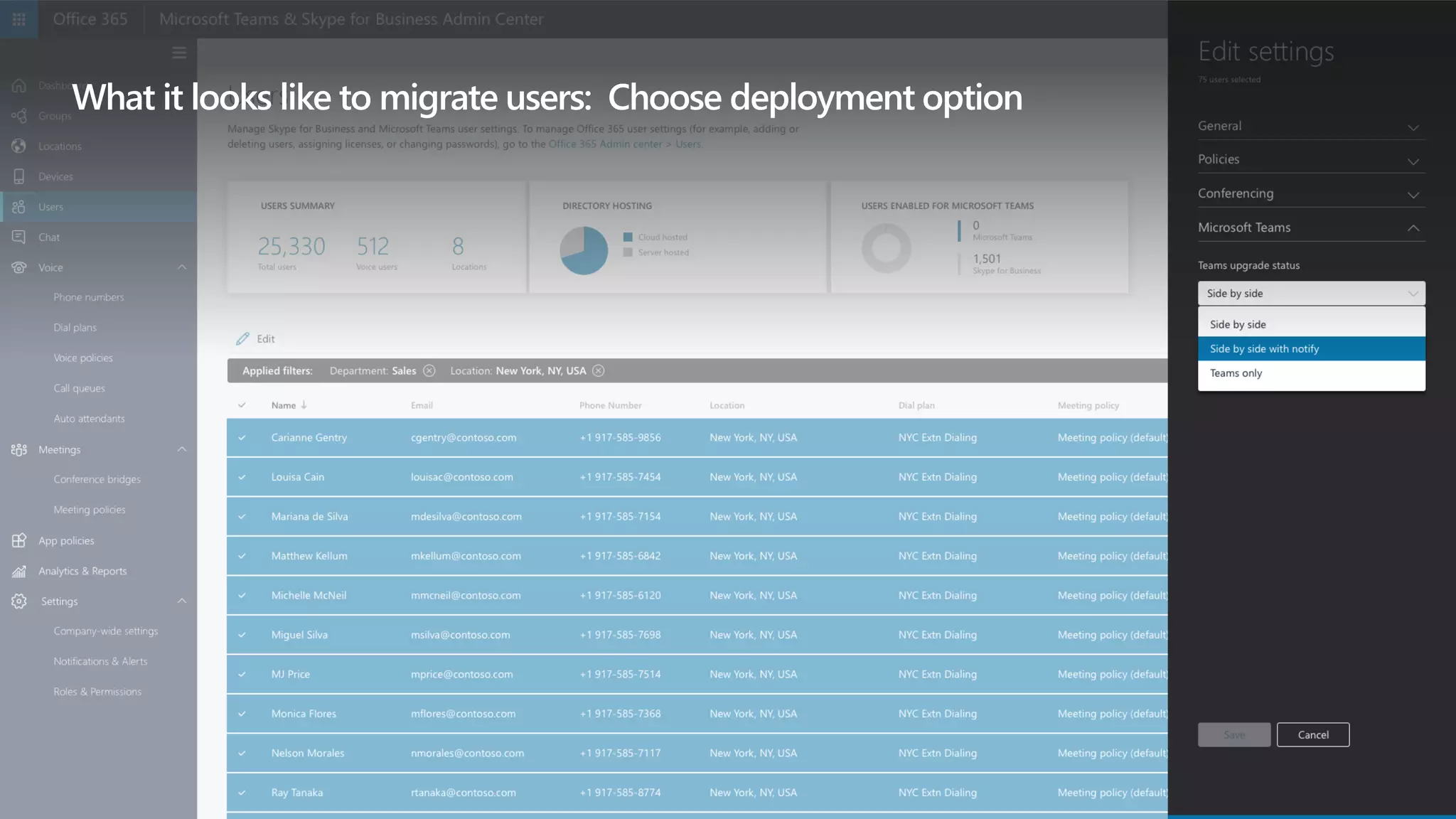
What it looks like to migrate users: Choose deployment option
First-run experience for Skype for Business users
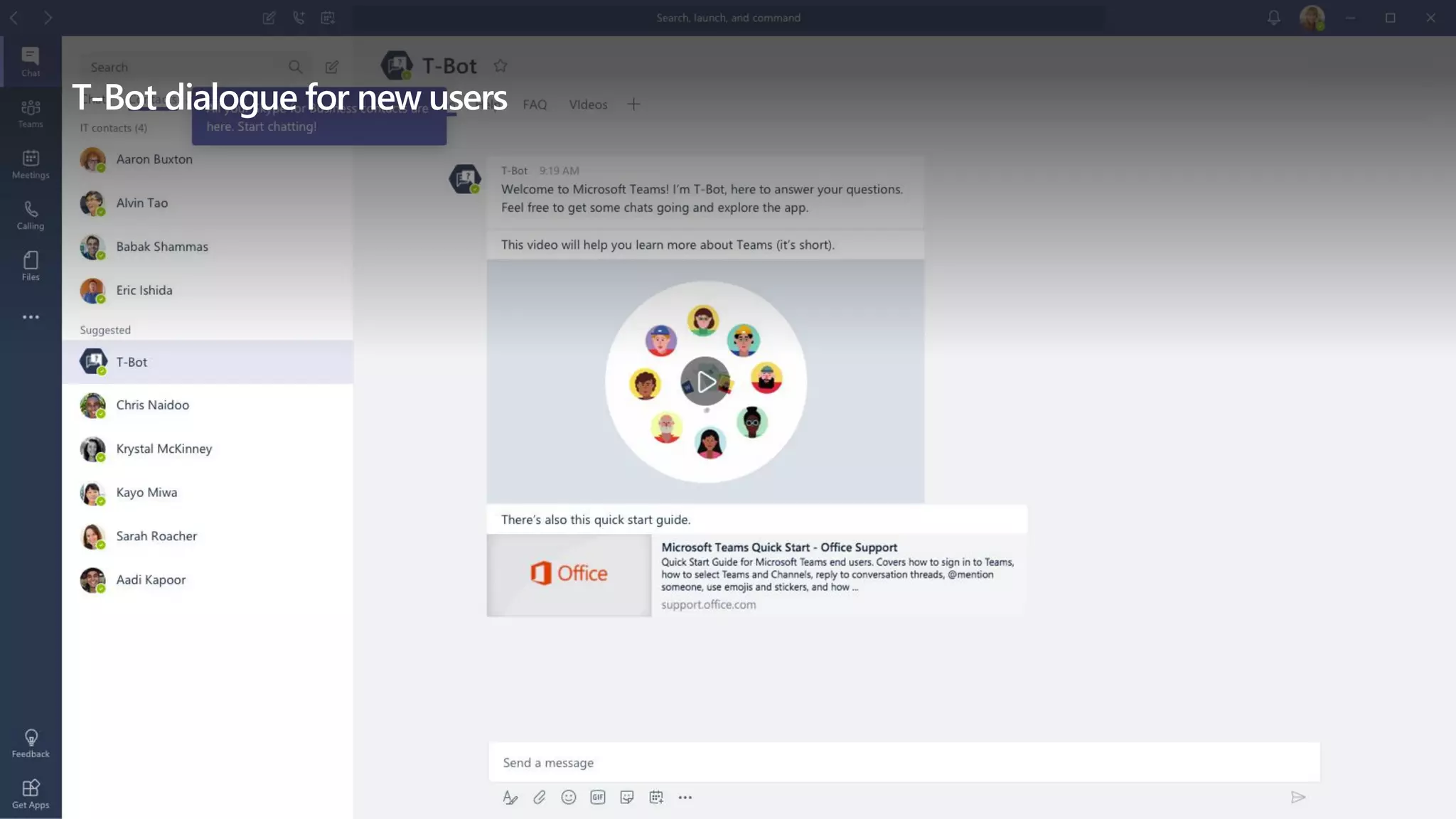
T-Bot dialogue for new users

Microsoft Intelligent Communications - Skype and Teams with Office 365

  • 1.
    A vision forintelligent communications David J. Rosenthal VP & GM, Digital Business Razor Technology December 12, 2017 Microsoft Technology Center, New York City
  • 2.
    Legal Notice This documentreflects Microsoft’s current expectations about Skype for Business capabilities coming to Teams. However, dates and individual features may change and should not be relied upon in making purchasing decisions.
  • 3.
    3 billion minutes ofvoice and video per day on the Skype ecosystem The foundation of unified communications at Microsoft 100 million Microsoft Office 365 monthly active users 2X commercial growth year over year for Microsoft Skype for Business 1 billion meetings per year on the Skype ecosystem 90+ countries with audio conferencing available 12 years as a leader in the Gartner Unified Communications Magic Quadrant
  • 4.
    [1] Gartner. “MagicQuadrant for Unified Communications.” July 2017. [2] Gartner. “Magic Quadrant for Unified Communications as a Service, Worldwide.” September 2017. [3] Gartner. “Magic Quadrant for Meeting Solutions.” September 2017. These graphics were published by Gartner, Inc., as part of a larger research document and should be evaluated in the context of the entire document. The Gartner document is available upon request from Microsoft. Gartner does not endorse any vendor, product or service depicted in its research publications, and does not advise technology users to select only those vendors with the highest ratings or other designation. Gartner research publications consist of the opinions of Gartner's research organization and should not be construed as statements of fact. Gartner disclaims all warranties, expressed or implied, with respect to this research, including any warranties of merchantability or fitness for a particular purpose. Microsoft is a recognized solution in communications Magic Quadrant for Unified Communications 12 years as a leader in unified communications Magic Quadrant for Meeting Solutions A leader in meeting solutions Magic Quadrant for Unified Communications as a Service, Worldwide Positioned highest in Ability to Execute
  • 5.
    Forrester provides aholistic view of unified communications, on-premises and in the cloud​ We believe this is a reflection of our momentum to date and how Microsoft is moving forward Microsoft is a recognized solution in communications Forrester Wave™: Unified Communications And Collaboration, Q3 '17 The Forrester Wave™ is copyrighted by Forrester Research, Inc. Forrester and Forrester Wave™ are trademarks of Forrester Research, Inc. The Forrester Wave™ is a graphical representation of Forrester's call on a market and is plotted using a detailed spreadsheet with exposed scores, weightings, and comments. Forrester does not endorse any vendor, product, or service depicted in the Forrester Wave. Information is based on best available resources. Opinions reflect judgment at the time and are subject to change.
  • 6.
    Diverse and global 5generations together in the workforce Mobile and distributed 72% of workers will be working remotely by 2020 4X as many devices per users Team-based and collaborative 2X as many teams 80% of employee time is spent collaborating A changing modern workplace
  • 7.
    Microsoft Teams “We gainhuge benefit by improving collaboration and amplifying the value of our creative talent.” —Jamie McLellan: Chief Technology Officer, J. Walter Thompson Worldwide Chat-based workspace in Office 365 Generally available in March 2017 125K+ organizations using Teams
  • 9.
    Harnessing the powerof intelligence to transform calls and meetings Intelligent communications Machine learningCognitive services Microsoft Graph
  • 10.
    Insights, history, and deepercontext Envisioning intelligent communications for calls and meetings
  • 11.
    New Skype back-endinfrastructure supports enterprise-grade voice, video, and meetings Microsoft Teams becomes the core communications client for Microsoft Office 365 customers Artificial intelligence will transform the experience for calls and meetings Bringing intelligent communications to life
  • 12.
    New Skype back-end infrastructure Builtfor enterprise-grade voice, video, and meetings More efficient bandwidth consumption More robust telemetry Maintenance and upgrades with minimal disruption Faster meeting join times for users and a better browser experience
  • 13.
    Commercial on-premises Microsoft Teams Onlinevoice, video, and meetings Teams client Skype for Business On-premises server for voice, video, and meetings Skype for Business client Commercial cloud (Office 365) Single client experience in the cloud with Microsoft Teams​ Skype-branded voice and video experiences​ Continued support for Skype for Business Server for on-premises environments​ Continued support for Skype for Business Online until Teams meets your business needs Future unified communications portfolio in the cloud and on-premises
  • 14.
    Microsoft Cognitive Servicesand the power of Microsoft Graph to transform calls and meetings Related files and relevant history at your fingertips Transcription, translation, and speech recognition abilities to connect attendees Artificial intelligence to autogenerate notes and next steps when a meeting ends Calls and meetings with built-in intelligence
  • 15.
    Teams: the hubfor teamwork in Office 365 Chat, calls, and meetings for today’s teams Integrated Microsoft Office 365 apps Enterprise security, compliance, and manageability Customizable workspace to meet your needs
  • 16.
    Working better andsmarter with Teams Everyone in the know Communicate in the moment with team chats, calls and meetings A complete meeting experience Easily plan, prep, and follow up to any meeting Enterprise-grade voice and video Experience higher quality communication on new Skype infrastructure Single workspace, tailored for you Customize your workspace to meet your team’s needs Fully integrated Access files, chat, and presence without leaving the workspace Cross-device support Switch among devices and connect to meeting rooms
  • 18.
    Enable with transparencyand communication Upgrade when Teams meets your organization’s needs Empower IT to control and manage process Ease user transition with in-product features Support through partner and device ecosystem Transition to Teams
  • 19.
    Video interop forexisting devices Available now Available for preorder Available for preorder NEW! Coming in early 2018 Available for SfBO Coming to SfBS & Teams Available for SfBS Coming to Teams Coming to Teams Skype Room Systems Light up any room with…
  • 20.
    Unlock the powerof the group with Teams on Surface Hub
  • 21.
    Skype-to-Teams customer experiencejourney Evaluate your needs relative to timing and capabilities on the Microsoft Teams roadmap Engage your account team, FastTrack, and partners for guidance and support along the journey Begin using Teams today to explore the benefits of the hub for teamwork in Microsoft 365 Run Teams and Skype for Business side by side until Teams fully meets your needs Go to https://aka.ms/skypeandteams for guidance or learn more at https://products.office.com/en-US/business/office-365-roadmap H2 CY2018H1 CY2018 CY2019 Hub for Teamwork September 2017 Meetings, Audio Conference Voice, Phone System Skype for Business Microsoft Teams Chat, Presence What can you do now? This document reflects Microsoft’s current expectations; however, dates and individual features may change and should not be relied upon in making purchasing decisions.
  • 22.
    Available today Comingin 1Q CY2018 (end of qtr) Enterprise grade • Persistent 1:1 and Group Conversations • Team + Channels for Teams Productivity • Hide/Share/Mute Chat Skype for Business interop and federation • Teams-SfB 1:1 Chat Interop • Guest Access for External Users • Contact Groups • Unified Presence • Federated Chat between Teams and Skype for Business • Import Contacts from Skype for Business • Skype for Business 1:1 Chat Interop with Persistent chat Platform and devices • Windows, Mac, Edge, Chrome iOS, Android, Windows Phone IT Pro • Messaging Tenant-level policies • eDiscovery/Hold/Archiving of Messages • Messaging Policies • Message Retention Policies • Messaging Interop IT Policies This document reflects Microsoft’s current expectations; however, dates and individual features may change and should not be relied upon in making purchasing decisions. Messaging roadmap
  • 23.
    Available today Comingin 4Q 2017 (end of qtr) Coming in 2Q CY2018 (end of qtr) Enterprise grade • Schedule in Outlook & Teams • Private and Channel Meetings • User Facing Diagnostics • 80 users in a meeting • Audio Conferencing (preview) • Participant Management • Improved Device Selection • Audio Conferencing in over 90 countries • Anonymous Join • Interactive Troubleshooting • Lobby Support • Mute Other Participants • Broadcast Meetings • Cloud Recording • Federated Meetings • Large Meeting Support (~250) • Lobby for PSTN callers • Outlook meeting schedule from other platforms (OWA, OLK, mobile) • PSTN Fallback Collaborative meetings • Enable Meeting Lifecycle with Pre/During/Post • Desktop sharing • Conversations • Immersive Meeting Experiences • Application Sharing • Give and Take Control in sharing • PowerPoint Load and Share • Whiteboard and Meeting Notes Platform and devices • Windows, Mac • Mobile: iOS and Android Meetings • Edge, Chrome Browser Support for meetings • Enable VTC Interop Services* • Skype Room Systems Support* • Surface Hub Support • Trio 1 Touch Teams Meeting Join* IT Pro • Call Quality Diagnostic Portal • Tenant Policies • Enable Call Quality Analytics • User-Level Meeting Policy • eDiscovery enhancements This document reflects Microsoft’s current expectations; however, dates and individual features may change and should not be relied upon in making purchasing decisions. * Capability has third party dependencies Meetings roadmap
  • 24.
    Coming in 4QCY2017 (end of qtr) Coming in 2Q CY2018 (end of qtr) Coming in 4Q CY2018 (end of qtr) Enterprise grade • Boss and Delegate Support • Call Queues • Consultative & Safe Transfer • Do not Disturb breakthrough • Distinctive Ring • 1:1 to Group Call Escalation with Teams, Skype for Business, and PSTN participants • Forward to Group • Organizational Auto-Attendant • Transfer to PSTN Call • Hybrid connection to Teams • Out of Office Support • Call Park • Group Call Pickup • Location-Based Routing • Shared Line Appearance Skype for Business interop & fed • SfB-Teams Calling • Call Support between Teams & Skype Consumer Platform and devices • Windows, Mac, Edge, iOS, Android • TTY Support • Support for existing certified SIP Phones* • USB HID IT Pro • SfB-Teams Interop Policies • Call Quality Diagnostic Portal • eDiscovery Enhancements This document reflects Microsoft’s current expectations; however, dates and individual features may change and should not be relied upon in making purchasing decisions. * Capability has third party dependencies • Blind Transfer • Call Blocking • Call Forwarding • Caller ID Masking • e911 Support • Extension Dialing • Translate user input to standard format phone # • Hold • Multi-call Handling • Simultaneous Ringing • Speed Dial • Suggested Contacts • Voicemail • Enable Existing Calling Plan Support Calling roadmap
  • 25.
    Go Local Plan- Data residency and special clouds Workload 4Q CY2017 1Q CY2018 2Q CY2018 2H CY2018 Data residency (customer data at rest in-country) • United Kingdom • India • Australia • Japan • Canada • China • (In-region to In-country migration) US Government • GCC • GCC High • DoD Multi-Geo Support • Multi-geo support
  • 26.
    Success with Teams www.successwithteams.com Practicalguidance Plan / deliver / operate framework Checklists, prerequisites, adoption guides, tools FastTrack Fasttrack.microsoft.com Hands-on support for deployment Best practices, tools, resources, experts Updated resources for Microsoft Teams Practical guidance for cloud voice deployments (formerly Skype Operations Framework)​ MyAdvisor to help you easily find what you need Skype + Teams aka.ms/skypeandteams Office 365 roadmap Customer resources
  • 27.
    Startusing Teams today Giveusers a modernhub for teamwork Plan your UC roadmap Evaluatecurrentandfuture UCdeployment plans in anticipation of upgrade Get started today
  • 28.
    © 2017 MicrosoftCorporation. All rights reserved. Microsoft, Windows, Office 365, Skype, and other product names are or may be registered trademarks and/or trademarks in the U.S. and/or other countries. The information herein is for informational purposes only and represents the current view of Microsoft Corporation as of the date of this presentation. Because Microsoft must respond to changing market conditions, it should not be interpreted to be a commitment on the part of Microsoft, and Microsoft cannot guarantee the accuracy of any information provided after the date of this presentation. MICROSOFT MAKES NO WARRANTIES, EXPRESS, IMPLIED OR STATUTORY, AS TO THE INFORMATION IN THIS PRESENTATION. David.Rosenthal@razor-tech.com
  • 29.
    The Microsoft visionfor intelligent communication New Skype back-end architecture Communication and collaboration together in Microsoft Teams Transforming communication with the power of intelligence Enabling IT with transparency and empowerment through transition
  • 30.
    What’s changing What’snot changing Fewer apps, richer experiences Higher quality voice, video and meetings Rapid innovation of UC capabilities Skype brand surfaces in Teams voice and video More intuitive communication services names Commitment to Skype for Business Server Commitment to cloud voice and video Commitment to compliance standards Premium value in E5 and comms services Support for 3rd party devices and solutions
  • 31.
  • 32.
    Skype for Business ServervNext Continuing commitment to on-premises and hybrid customer needs Refreshed mainstream support Quality, security, and performance fixes Refreshed Skype for Business client IT pro and voice-centric release Cloud-connected analytics and voice apps Improved Teams interop Targeting 2018 Q4
  • 33.
    Conditional access & MAM StrongOffice 365 foundation for security & compliance Diverse datacenters Retention policy E-discovery & audit
  • 34.
    Teams developer opportunity Extensibleplatform: build apps with a rich set of capabilities to enable higher-performing teams 100M Office 365 commercial monthly active users Teams is available in all business and enterprise SKUs in 181 markets, 19 languages More than 150 integrations available and coming soon Join the Office Developer Program Reach your users in their chats, channels, notifications, and personal workspace Tabs Surface rich content within Teams Bots Help users get tasks done in conversations Connectors Post rich updates to channels Actionable Messages Add rich interaction to your connector cards Activity Feed Engage users via feed notifications Compose Extensions Allow users to query and share rich cards in conversations Office store Drive engagement by submitting your app to the Office Store Available now Available in Developer Preview
  • 35.
    Office 365 Groups OuterLoopInner Loop Files Sites Content SharePoint Note: Only use as needed if questions are still coming up related to which tool when after landing our universal toolkit positioning, slide 10. This slide should NOT replace or proceed slide 10. Email
  • 36.
    Practical Guidance forCloud Voice BRK2036 FastTrack Cloud Voice Page aka.ms/cloudvoice (MyAdvisor) Extending practical guidance across the Microsoft 365 workloads over time Skype Operations Framework SOF content Skype for Business & Teams guidance Extended with cloud voice guidance moved to docs aka.ms/swt SWT
  • 37.
    Intelligent meetings lifecycle Amoment of synchronous communication within the context of a rich, ongoing dialog During a Meeting Join the meeting from any device View immersive video and content Share desktop, apps & content Follow or share from your phone Record and Playback Post Meeting Continue Group Chat Follow up on action items Share notes Share recording Schedule follow up meeting with context Pre Meeting Ongoing conversation Prepare and discuss content Scheduling from Teams Scheduling from Outlook
  • 38.
  • 39.
  • 40.
    What it lookslike to migrate users: View user list
  • 41.
    What it lookslike to migrate users: Filter and select users
  • 42.
    What it lookslike to migrate users: Choose deployment option
  • 43.
    First-run experience forSkype for Business users
  • 44.