





Microsoft Teams Usage
Presentation
David J. Rosenthal
VP & GM, Digital Business
March 23, 2020
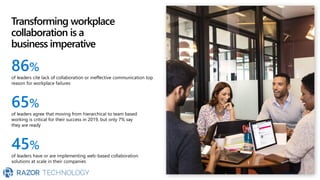
Transforming workplace
collaboration is a
business imperative
86%
of leaders cite lack of collaboration or ineffective communication top
reason for workplace failures
65%
of leaders agree that moving from hierarchical to team based
working is critical for their success in 2019, but only 7% say
they are ready
45%
of leaders have or are implementing web-based collaboration
solutions at scale in their companies
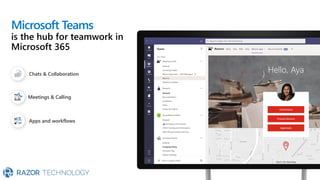
Microsoft Teams
is the hub for teamwork in
Microsoft 365
Chats & Collaboration
Meetings & Calling
Apps and workflows
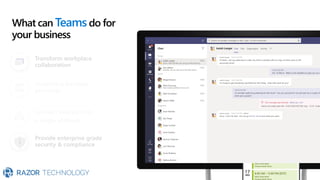
Transform workplace
collaboration
Streamline business
processes
Connect everyone on
a single platform
What can Teams do for
your business
Provide enterprise grade
security & compliance
Running your business on Teams
Projects Processes People
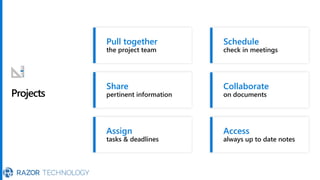
Projects
Pull together
the project team
Share
pertinent information
Assign
tasks & deadlines
Schedule
check in meetings
Collaborate
on documents
Access
always up to date notes
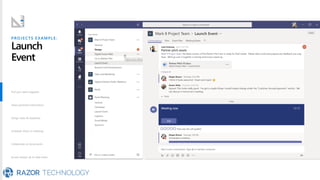
PROJECTS EXAMPLE:
Launch
Event
Pull your team together
Share pertinent information
Assign tasks & deadlines
Schedule check in meetings
Collaborate on documents
Access always up to date notes
Pull your team together
Share pertinent information
Assign tasks & deadlines
Schedule check in meetings
Collaborate on documents
Access always up to date notes
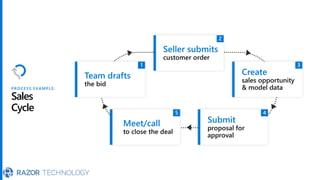
PROCESS EXAMPLE:
Sales
Cycle
Team drafts
the bid
Seller submits
customer order
Create
sales opportunity
& model data
Submit
proposal for
approval
Meet/call
to close the deal
Team drafts the bid
Sellers submit customer order
Create sales opportunity
& model data
Submit proposal for approval
Meet/Call to close the deal
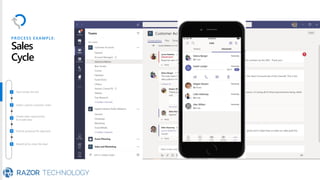
Team drafts the bid
Sellers submit customer order
Create sales opportunity
& model data
Submit proposal for approval
Meet/Call to close the deal
PROCESS EXAMPLE:
Sales
Cycle
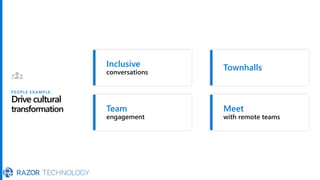
PEOPLE EXAMPLE:
Drive cultural
transformation
Inclusive
conversations
Team
engagement
Townhalls
Meet
with remote teams
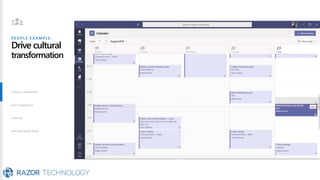
PEOPLE EXAMPLE:
Drive cultural
transformation
Inclusive conversations
Team engagement
Townhalls
Meet with global teams
Inclusive conversations
Team engagement
Townhalls
Meet with global teams
Running your business on Teams
Projects Processes People
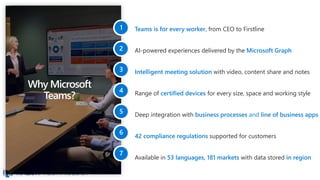
Why Microsoft
Teams?
Teams is for every worker, from CEO to Firstline
AI-powered experiences delivered by the Microsoft Graph
Intelligent meeting solution with video, content share and notes
Range of certified devices for every size, space and working style
Deep integration with business processes and line of business apps
42 compliance regulations supported for customers
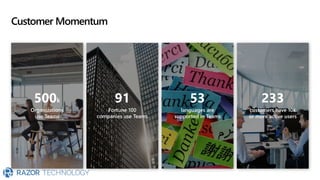
Available in 53 languages, 181 markets with data stored in region
Customer Momentum
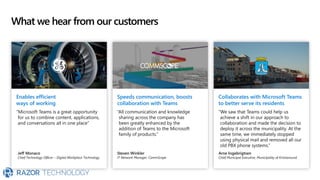
What we hear from our customers
Enables efficient
ways of working
“Microsoft Teams is a great opportunity
for us to combine content, applications,
and conversations all in one place”
Jeff Monaco
Chief Technology Officer – Digital Workplace Technology
Speeds communication, boosts
collaboration with Teams
“All communication and knowledge
sharing across the company has
been greatly enhanced by the
addition of Teams to the Microsoft
family of products.”
Steven Winkler
IT Network Manager, CommScope
Collaborates with Microsoft Teams
to better serve its residents
“We saw that Teams could help us
achieve a shift in our approach to
collaboration and made the decision to
deploy it across the municipality. At the
same time, we immediately stopped
using physical mail and removed all our
old PBX phone systems.”
Arne Ingebrigtsen
Chief Municipal Executive, Municipality of Kristiansund
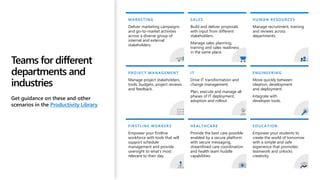
Teams for different
departments and
industries
Get guidance on these and other
scenarios in the Productivity Library
FIRSTLINE WORKERS
Empower your firstline
workforce with tools that will
support schedule
management and provide
oversight to what’s most
relevant to their day.
MARKETING
Deliver marketing campaigns
and go-to-market activities
across a diverse group of
internal and external
stakeholders.
PROJECT MANAGEMENT
Manage project stakeholders,
tools, budgets, project reviews
and feedback.
SALES
Build and deliver proposals
with input from different
stakeholders.
Manage sales planning,
training and sales readiness
in the same place.
IT
Drive IT transformation and
change management.
Plan, execute and manage all
phases of IT deployment,
adoption and rollout.
HEALTHCARE
Provide the best care possible
enabled by a secure platform
with secure messaging,
streamlined care coordination
and health team huddle
capabilities.
EDUCATION
Empower your students to
create the world of tomorrow
with a simple and safe
experience that promotes
teamwork and unlocks
creativity.
ENGINEERING
Move quickly between
ideation, development
and deployment.
Integrate with
developer tools.
HUMAN RESOURCES
Manage recruitment, training
and reviews across
departments.
Demo
Microsoft Teams Hero Demo
Next steps
Get started
Microsoft Teams
mobile app
Get support
Adoption Hub
Contact Information
© 2020 Razor Technology, LLCwww.razor-tech.com
David Rosenthal
VP & General Manager
Digital Business
@DavidJRosenthal
Slideshare
Blog: www.razor-tech.com
5 Tower Bridge
300 Barr Harbor Dr., Suite 705
West Conshohocken, PA 19428
www.razor-tech.com
David.Rosenthal@razor-tech.com
Cell: 215.801.4430
Office: 866.RZR.DATA
LETS KEEP IN TOUCH
Appendix
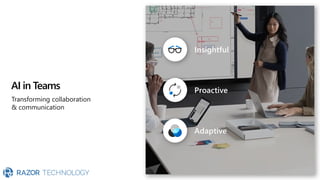
AI in Teams
Transforming collaboration
& communication
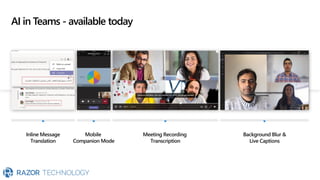
AI in Teams - available today
Inline Message
Translation
Mobile
Companion Mode
Meeting Recording
Transcription
Background Blur &
Live Captions
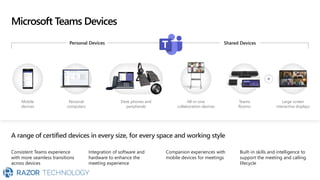
Microsoft Teams Devices
Personal Devices Shared Devices
Mobile
devices
Personal
computers
Desk phones and
peripherals
All-in-one
collaboration devices
Teams
Rooms
Large screen
interactive displays
A range of certified devices in every size, for every space and working style
Consistent Teams experience
with more seamless transitions
across devices
Integration of software and
hardware to enhance the
meeting experience
Companion experiences with
mobile devices for meetings
Built-in skills and intelligence to
support the meeting and calling
lifecycle
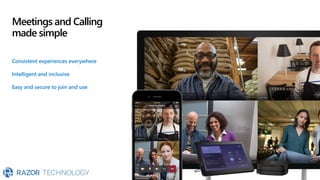
Meetings and Calling
made simple
Consistent experiences everywhere
Intelligent and inclusive
Easy and secure to join and use
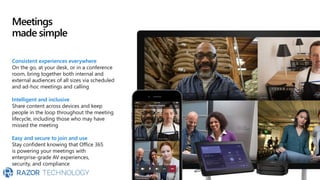
Meetings
made simple
Consistent experiences everywhere
On the go, at your desk, or in a conference
room, bring together both internal and
external audiences of all sizes via scheduled
and ad-hoc meetings and calling
Intelligent and inclusive
Share content across devices and keep
people in the loop throughout the meeting
lifecycle, including those who may have
missed the meeting
Easy and secure to join and use
Stay confident knowing that Office 365
is powering your meetings with
enterprise-grade AV experiences,
security, and compliance
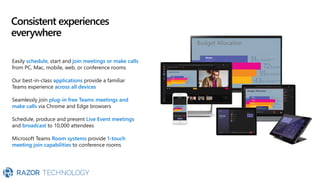
Consistent experiences
everywhere
Easily schedule, start and join meetings or make calls
from PC, Mac, mobile, web, or conference rooms
Our best-in-class applications provide a familiar
Teams experience across all devices
Seamlessly join plug-in free Teams meetings and
make calls via Chrome and Edge browsers
Schedule, produce and present Live Event meetings
and broadcast to 10,000 attendees
Microsoft Teams Room systems provide 1-touch
meeting join capabilities to conference rooms
Budget Allocation
Budget Allocation
Budget Allocation
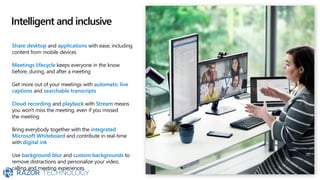
Intelligent and inclusive
Share desktop and applications with ease, including
content from mobile devices
Meetings lifecycle keeps everyone in the know
before, during, and after a meeting
Get more out of your meetings with automatic live
captions and searchable transcripts
Cloud recording and playback with Stream means
you won't miss the meeting, even if you missed
the meeting
Bring everybody together with the integrated
Microsoft Whiteboard and contribute in real-time
with digital ink
Use background blur and custom backgrounds to
remove distractions and personalize your video,
calling and meeting experiences
Easy and secure to
join and use
Office 365 compliance, security, and
manageability means you can call and meet with
confidence
Great audio, video & sharing quality over Wi-Fi
& cellular networks
Adaptive A/V experiences over variable
bandwidth networks provides optimized calling
& meetings
Speak-while-muted and echo suppression alerts
help you keep your meetings on track
No internet? No problem. Dial into meetings with
Audio Conferencing, available in 90+ countries
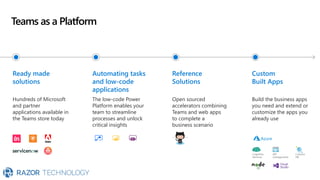
Teams as a Platform
Ready made
solutions
Hundreds of Microsoft
and partner
applications available in
the Teams store today
Automating tasks
and low-code
applications
The low-code Power
Platform enables your
team to streamline
processes and unlock
critical insights
Reference
Solutions
Open sourced
accelerators combining
Teams and web apps
to complete a
business scenario
Custom
Built Apps
Build the business apps
you need and extend or
customize the apps you
already use
Cognitive
Services
API
management
Cosmos
DB
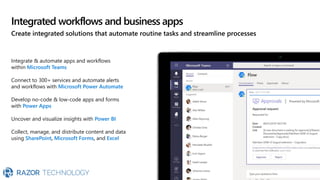
Integrated workflows and business apps
Create integrated solutions that automate routine tasks and streamline processes
Integrate & automate apps and workflows
within Microsoft Teams
Connect to 300+ services and automate alerts
and workflows with Microsoft Power Automate
Develop no-code & low-code apps and forms
with Power Apps
Uncover and visualize insights with Power BI
Collect, manage, and distribute content and data
using SharePoint, Microsoft Forms, and Excel
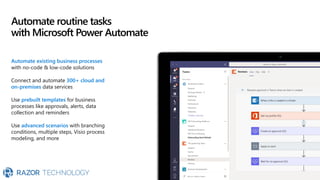
Automate routine tasks
with Microsoft Power Automate
Automate existing business processes
with no-code & low-code solutions​
Connect and automate 300+ cloud and
on-premises data services
Use prebuilt templates for business
processes like approvals, alerts, data
collection and reminders
Use advanced scenarios with branching
conditions, multiple steps, Visio process
modeling, and more
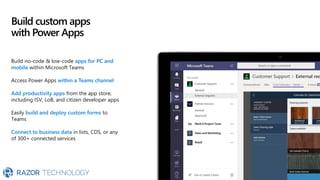
Build custom apps
with Power Apps
Build no-code & low-code apps for PC and
mobile within Microsoft Teams
Access Power Apps within a Teams channel
Add productivity apps from the app store,
including ISV, LoB, and citizen developer apps
Easily build and deploy custom forms to
Teams
Connect to business data in lists, CDS, or any
of 300+ connected services
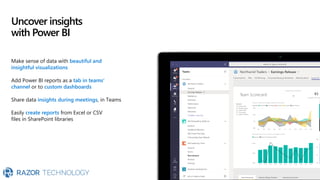
Uncover insights
with Power BI
Make sense of data with beautiful and
insightful visualizations
Add Power BI reports as a tab in teams'
channel or to custom dashboards
Share data insights during meetings, in Teams
Easily create reports from Excel or CSV
files in SharePoint libraries

Microsoft Teams Usage

  • 1.
    Microsoft Teams Usage Presentation DavidJ. Rosenthal VP & GM, Digital Business March 23, 2020
  • 2.
    Transforming workplace collaboration isa business imperative 86% of leaders cite lack of collaboration or ineffective communication top reason for workplace failures 65% of leaders agree that moving from hierarchical to team based working is critical for their success in 2019, but only 7% say they are ready 45% of leaders have or are implementing web-based collaboration solutions at scale in their companies
  • 3.
    Microsoft Teams is thehub for teamwork in Microsoft 365 Chats & Collaboration Meetings & Calling Apps and workflows
  • 4.
    Transform workplace collaboration Streamline business processes Connecteveryone on a single platform What can Teams do for your business Provide enterprise grade security & compliance
  • 5.
    Running your businesson Teams Projects Processes People
  • 6.
    Projects Pull together the projectteam Share pertinent information Assign tasks & deadlines Schedule check in meetings Collaborate on documents Access always up to date notes
  • 7.
    PROJECTS EXAMPLE: Launch Event Pull yourteam together Share pertinent information Assign tasks & deadlines Schedule check in meetings Collaborate on documents Access always up to date notes Pull your team together Share pertinent information Assign tasks & deadlines Schedule check in meetings Collaborate on documents Access always up to date notes
  • 8.
    PROCESS EXAMPLE: Sales Cycle Team drafts thebid Seller submits customer order Create sales opportunity & model data Submit proposal for approval Meet/call to close the deal
  • 9.
    Team drafts thebid Sellers submit customer order Create sales opportunity & model data Submit proposal for approval Meet/Call to close the deal Team drafts the bid Sellers submit customer order Create sales opportunity & model data Submit proposal for approval Meet/Call to close the deal PROCESS EXAMPLE: Sales Cycle
  • 10.
  • 11.
    PEOPLE EXAMPLE: Drive cultural transformation Inclusiveconversations Team engagement Townhalls Meet with global teams Inclusive conversations Team engagement Townhalls Meet with global teams
  • 12.
    Running your businesson Teams Projects Processes People
  • 13.
    Why Microsoft Teams? Teams isfor every worker, from CEO to Firstline AI-powered experiences delivered by the Microsoft Graph Intelligent meeting solution with video, content share and notes Range of certified devices for every size, space and working style Deep integration with business processes and line of business apps 42 compliance regulations supported for customers Available in 53 languages, 181 markets with data stored in region
  • 14.
  • 15.
    What we hearfrom our customers Enables efficient ways of working “Microsoft Teams is a great opportunity for us to combine content, applications, and conversations all in one place” Jeff Monaco Chief Technology Officer – Digital Workplace Technology Speeds communication, boosts collaboration with Teams “All communication and knowledge sharing across the company has been greatly enhanced by the addition of Teams to the Microsoft family of products.” Steven Winkler IT Network Manager, CommScope Collaborates with Microsoft Teams to better serve its residents “We saw that Teams could help us achieve a shift in our approach to collaboration and made the decision to deploy it across the municipality. At the same time, we immediately stopped using physical mail and removed all our old PBX phone systems.” Arne Ingebrigtsen Chief Municipal Executive, Municipality of Kristiansund
  • 16.
    Teams for different departmentsand industries Get guidance on these and other scenarios in the Productivity Library FIRSTLINE WORKERS Empower your firstline workforce with tools that will support schedule management and provide oversight to what’s most relevant to their day. MARKETING Deliver marketing campaigns and go-to-market activities across a diverse group of internal and external stakeholders. PROJECT MANAGEMENT Manage project stakeholders, tools, budgets, project reviews and feedback. SALES Build and deliver proposals with input from different stakeholders. Manage sales planning, training and sales readiness in the same place. IT Drive IT transformation and change management. Plan, execute and manage all phases of IT deployment, adoption and rollout. HEALTHCARE Provide the best care possible enabled by a secure platform with secure messaging, streamlined care coordination and health team huddle capabilities. EDUCATION Empower your students to create the world of tomorrow with a simple and safe experience that promotes teamwork and unlocks creativity. ENGINEERING Move quickly between ideation, development and deployment. Integrate with developer tools. HUMAN RESOURCES Manage recruitment, training and reviews across departments.
  • 17.
  • 18.
    Next steps Get started MicrosoftTeams mobile app Get support Adoption Hub
  • 19.
    Contact Information © 2020Razor Technology, LLCwww.razor-tech.com David Rosenthal VP & General Manager Digital Business @DavidJRosenthal Slideshare Blog: www.razor-tech.com 5 Tower Bridge 300 Barr Harbor Dr., Suite 705 West Conshohocken, PA 19428 www.razor-tech.com David.Rosenthal@razor-tech.com Cell: 215.801.4430 Office: 866.RZR.DATA LETS KEEP IN TOUCH
  • 20.
  • 21.
    AI in Teams Transformingcollaboration & communication
  • 22.
    AI in Teams- available today Inline Message Translation Mobile Companion Mode Meeting Recording Transcription Background Blur & Live Captions
  • 23.
    Microsoft Teams Devices PersonalDevices Shared Devices Mobile devices Personal computers Desk phones and peripherals All-in-one collaboration devices Teams Rooms Large screen interactive displays A range of certified devices in every size, for every space and working style Consistent Teams experience with more seamless transitions across devices Integration of software and hardware to enhance the meeting experience Companion experiences with mobile devices for meetings Built-in skills and intelligence to support the meeting and calling lifecycle
  • 24.
    Meetings and Calling madesimple Consistent experiences everywhere Intelligent and inclusive Easy and secure to join and use
  • 25.
    Meetings made simple Consistent experienceseverywhere On the go, at your desk, or in a conference room, bring together both internal and external audiences of all sizes via scheduled and ad-hoc meetings and calling Intelligent and inclusive Share content across devices and keep people in the loop throughout the meeting lifecycle, including those who may have missed the meeting Easy and secure to join and use Stay confident knowing that Office 365 is powering your meetings with enterprise-grade AV experiences, security, and compliance
  • 26.
    Consistent experiences everywhere Easily schedule,start and join meetings or make calls from PC, Mac, mobile, web, or conference rooms Our best-in-class applications provide a familiar Teams experience across all devices Seamlessly join plug-in free Teams meetings and make calls via Chrome and Edge browsers Schedule, produce and present Live Event meetings and broadcast to 10,000 attendees Microsoft Teams Room systems provide 1-touch meeting join capabilities to conference rooms Budget Allocation Budget Allocation Budget Allocation
  • 27.
    Intelligent and inclusive Sharedesktop and applications with ease, including content from mobile devices Meetings lifecycle keeps everyone in the know before, during, and after a meeting Get more out of your meetings with automatic live captions and searchable transcripts Cloud recording and playback with Stream means you won't miss the meeting, even if you missed the meeting Bring everybody together with the integrated Microsoft Whiteboard and contribute in real-time with digital ink Use background blur and custom backgrounds to remove distractions and personalize your video, calling and meeting experiences
  • 28.
    Easy and secureto join and use Office 365 compliance, security, and manageability means you can call and meet with confidence Great audio, video & sharing quality over Wi-Fi & cellular networks Adaptive A/V experiences over variable bandwidth networks provides optimized calling & meetings Speak-while-muted and echo suppression alerts help you keep your meetings on track No internet? No problem. Dial into meetings with Audio Conferencing, available in 90+ countries
  • 29.
    Teams as aPlatform Ready made solutions Hundreds of Microsoft and partner applications available in the Teams store today Automating tasks and low-code applications The low-code Power Platform enables your team to streamline processes and unlock critical insights Reference Solutions Open sourced accelerators combining Teams and web apps to complete a business scenario Custom Built Apps Build the business apps you need and extend or customize the apps you already use Cognitive Services API management Cosmos DB
  • 30.
    Integrated workflows andbusiness apps Create integrated solutions that automate routine tasks and streamline processes Integrate & automate apps and workflows within Microsoft Teams Connect to 300+ services and automate alerts and workflows with Microsoft Power Automate Develop no-code & low-code apps and forms with Power Apps Uncover and visualize insights with Power BI Collect, manage, and distribute content and data using SharePoint, Microsoft Forms, and Excel
  • 31.
    Automate routine tasks withMicrosoft Power Automate Automate existing business processes with no-code & low-code solutions​ Connect and automate 300+ cloud and on-premises data services Use prebuilt templates for business processes like approvals, alerts, data collection and reminders Use advanced scenarios with branching conditions, multiple steps, Visio process modeling, and more
  • 32.
    Build custom apps withPower Apps Build no-code & low-code apps for PC and mobile within Microsoft Teams Access Power Apps within a Teams channel Add productivity apps from the app store, including ISV, LoB, and citizen developer apps Easily build and deploy custom forms to Teams Connect to business data in lists, CDS, or any of 300+ connected services
  • 33.
    Uncover insights with PowerBI Make sense of data with beautiful and insightful visualizations Add Power BI reports as a tab in teams' channel or to custom dashboards Share data insights during meetings, in Teams Easily create reports from Excel or CSV files in SharePoint libraries