Microsoft Teams is Here!
Presented by AvePoint, Avanade, and Microsoft
Webinar: April 12, 2017
Agenda:
• Meet Our Experts
• Modern Collaboration Journey
• Meet Microsoft Teams
• When To Use What in Groups
• Panel Discussion with Live Q&A
Dux Raymond Sy
AvePoint
Chief Technology Officer (CTO)
Microsoft MVP & Regional Director
@meetdux
Dan Stevenson
Microsoft
Group Program Manager
Microsoft Teams
@DanSkype
Michelle Caldwell
Avanade
Digital Workplace Director
Microsoft MVP & Regional Director
@shellecaldwell
Modern Collaboration Journey
By Michelle Caldwell, Avanade
Microsoft MVP and Regional Director
Collaboration Has Changed
Collaboration Is Not What It Use To Be
Collaboration Is Not Technology
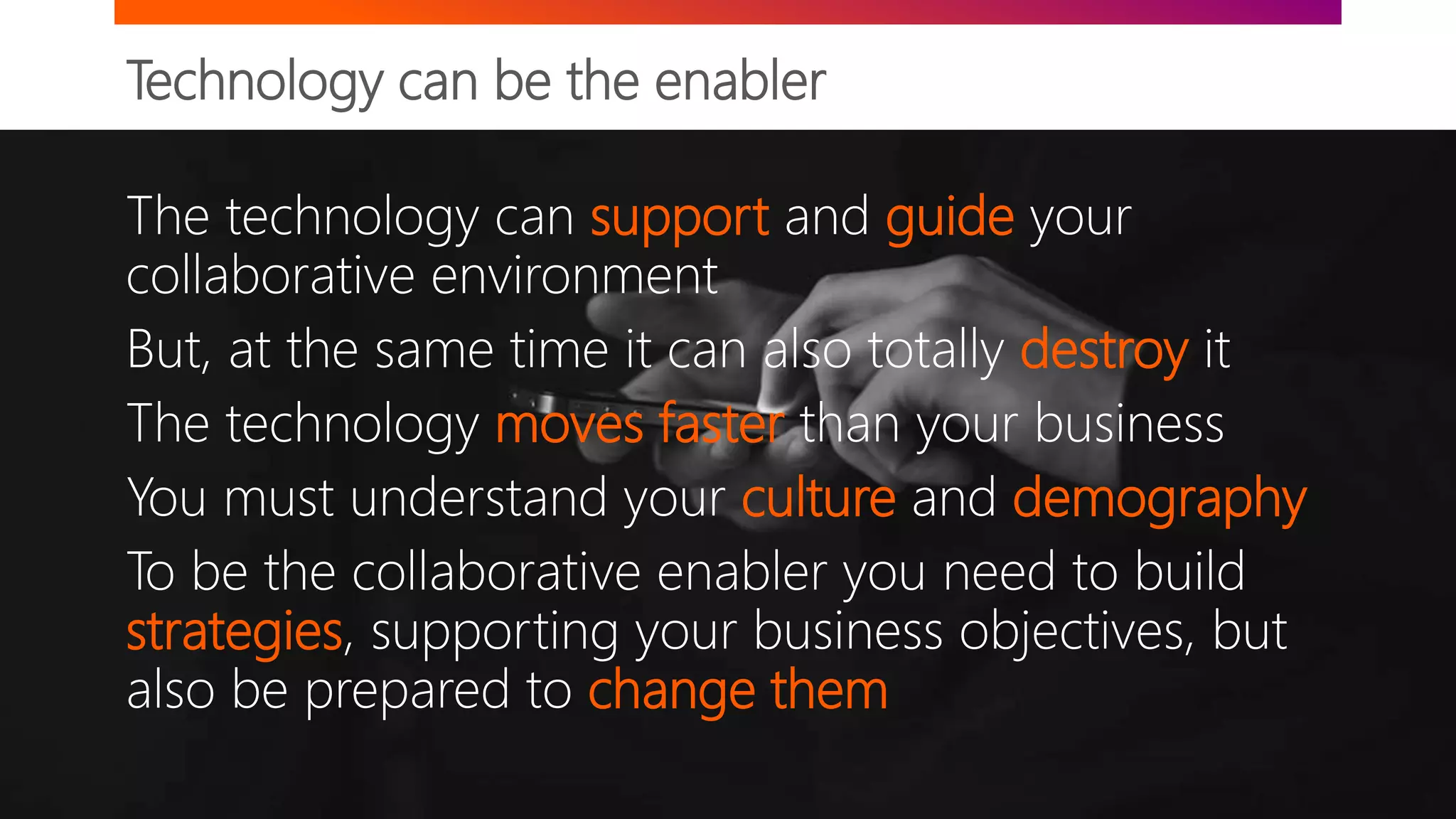
Technology can be the enabler
The technology can support and guide your
collaborative environment
But, at the same time it can also totally destroy it
The technology moves faster than your business
You must understand your culture and demography
To be the collaborative enabler you need to build
strategies, supporting your business objectives, but
also be prepared to change them
Generational Preferences at Work -Bruce Tulgan
Characteristics Maturists
(pre-1945)
Baby Boomer
(1946-1964)
Generation X
(1965-1977)
Generation Y
(1978-1989)
Generation Z
(1990-2000)
Formative experiences Second world war
Rationing
Rock ‘n Roll
Nuclear families
Defined gender roes –
particularly for women
Cold War
Post War boom
“Swinging 60s”
Apollo Moon landings
Youth culture
Woodstock
End of Cold War
Fall of Berlin Wall
Live Aid
Introduction of first PC
Early mobile technology
Latch-key kids
Rising levels of divorce
9/11 terrorist attacks
PlayStation
Social media
Invasion of Iraq
Reality TV
Google Earth
Economic downturn
Global warming
Mobile devices
Arab Spring
Produce own media
Cloud Computing
Wiki-leaks
Percentage in NA workforce
1% 30% 27% 28% 14%
Aspiration Home Ownership Job Security Work-life balance Freedom and flexibility Security and stability
Attitude toward technology Largely disengaged Early IT adaptors Digital Immigrants Digital Natives “Technoholics”
Attitude toward career
Jobs are for life
Organizational – careers are
defined by employers
Early “portfolio” careers – loyal
to profession, not necessarily
employer
Digital entrepreneurs – work
“with” organizations not “for”
Career multitaskers – will move
seamlessly between
organizations and “pop-up
businesses
Signature product
Automobile Television Personal Computer Tablet/Smart Phone
Google Glass, graphene, nano-
computing, 3-D printing,
driverless cars
Communication media
Formal Letter Telephone E-mail and text message Text or social media Hand-held communication
Communication Preference
Face-to-face meetings
Face-to-face ideally but
increasingly will go online Text message or email Online and mobile (txt msg) Facetime
Collaboration Is Driving Business Value
Organizations with a modern collaboration strategy are seeing vast improvements in:
It’s a Journey!
Avanade’s Point of View on Collaboration
Technology can be the enabler
A modern collaboration platform supports many
modalities
A continuous suite to minimize context switching
At the forefront of modern collaboration
Allows many different journeys
Applicable for many cultures and ways of working
An always evolving platform
Conversation and Collaboration Journey
Collaboration is not always a static and pre-defined process and a modern
collaboration platform must accommodate for all scenarios.
Email
Instant Messaging
Team Collaboration
Document Library
Cloud Storage
Enterprise Social
Knowledge Management
t
Ideation
Formalized project
Refines solution
Presentation of solution
Archival
Feedback from SMEs
Creates a document
Skype conversation with colleague
Creates and shares document
Collaborates with team
Harvests knowledge
Finalizes result
Shares result
Searches for information
Persistent
Storage
Journey example 1 Journey example 2
Your First Steps
Generational Preferences at Work
Baby Boomer
(1946-1964)
Generation X
(1965-1979)
Millennial
(1980-1997)
Generation Z
(1998-2020)
In Person Meeting
Virtual Online Meeting (No Video)
Virtual Online Meeting (Video)
Email
Team Workspaces
Instant Message (IM)
Enterprise Social Networking
Persistent Chat
Conversational User Interfaces
Mostly preferAlways prefer Somewhat prefer Occasionally prefer Do not prefer
Avanade Research, Wired Magazine: The Next Generation of Working Practices, Herman Miller: Generations at Work, EY Study on Generational Shifts
For organizations with a multi-generation workforce, it is important to understand your demographics to know how to best find the balance of tools
across the generations. If you are an organization that heavily relies on email, what are you doing for your new workers? Are you giving them the tools
they need to be effective? Note: this is a generalization of observations, but any individual may cross multiple categories.
©2017 Avanade Inc. All Rights Reserved. <Highly Confidential> See Avanade’s Data Management Policy
What to use when
Audience (Internal or External)
INDIVIDUAL GROUP TEAM DEPARTMENT ORGANIZATION
PRIORITY/TIMESENSITIVITY
URGENT/HIGHAD-HOC/LOW
GENERATIONALPREFERENCES
GenZ(1998-2020)BabyBoomer(1946-1964)
Millennial(1980-1997)
GenX(1965-1979)
MyAnalytics
Skype for Business Call or
Instant Message (IM)
Skype for Business Online Meetings Skype Broadcast
Outlook Email
OneDrive for Business
Yammer
(All Company and Groups)
Team Sites
(Office 365 Groups)
Microsoft Teams
Delve Boards
SP Publishing Site
SharePoint Team News
Office 365 Video
SharePoint Intranet
Avanade Research, Microsoft
Bots and Connectors
Welcome to Microsoft Teams
By Dan Stevenson, Microsoft
Group Program Manager for Microsoft Teams
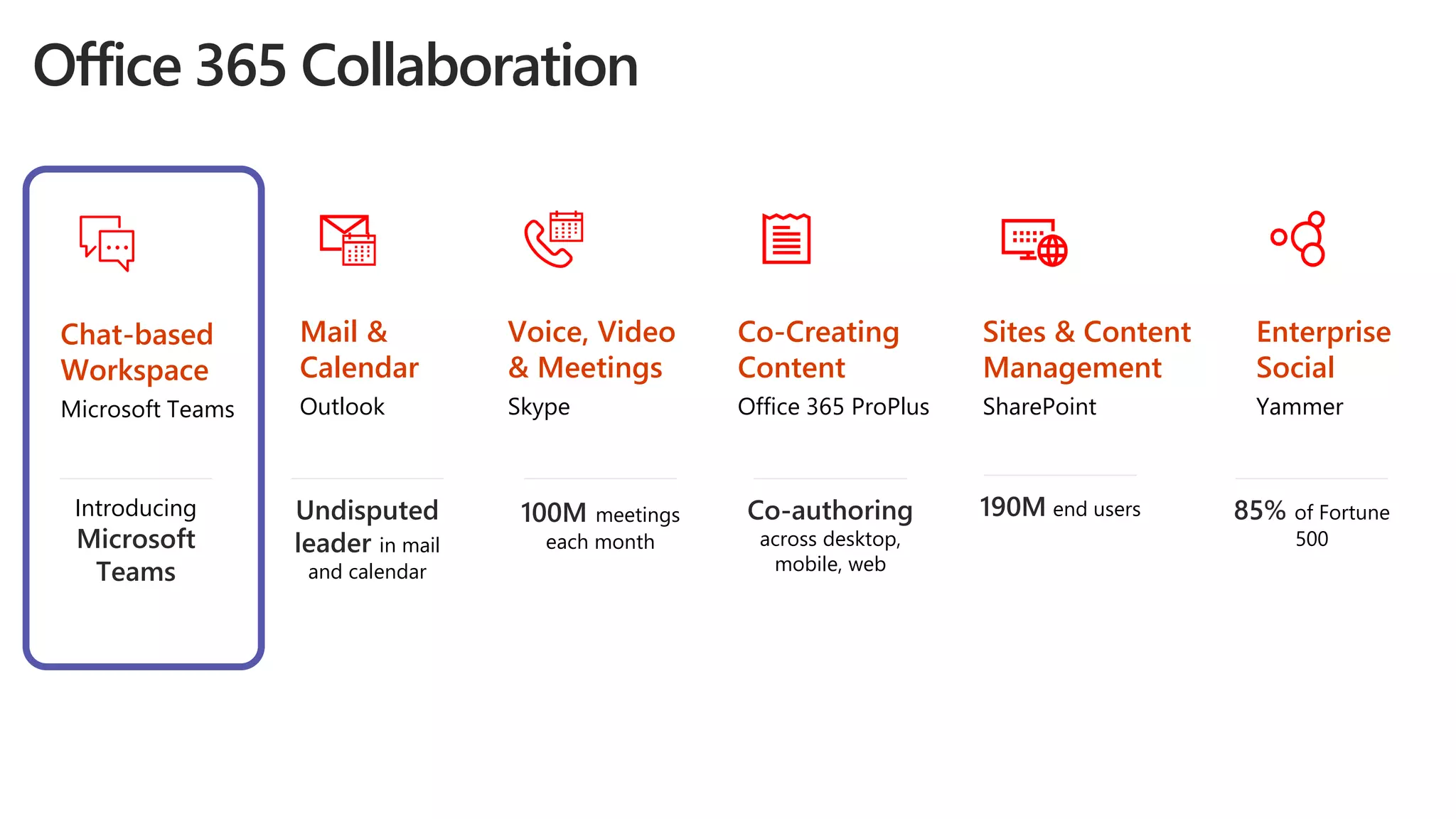
Co-Creating
Content
Office 365 ProPlus
Co-authoring
across desktop,
mobile, web
Mail &
Calendar
Outlook
Undisputed
leader in mail
and calendar
Voice, Video
& Meetings
Skype
100M meetings
each month
Chat-based
Workspace
Microsoft Teams
Introducing
Microsoft
Teams
Sites & Content
Management
SharePoint
190M end users
Enterprise
Social
Yammer
85% of Fortune
500
Office 365 Collaboration
The chat-based workspace in Office 365
Customizable for each team
Security teams trust
A hub for teamwork
Chat for today’s teams
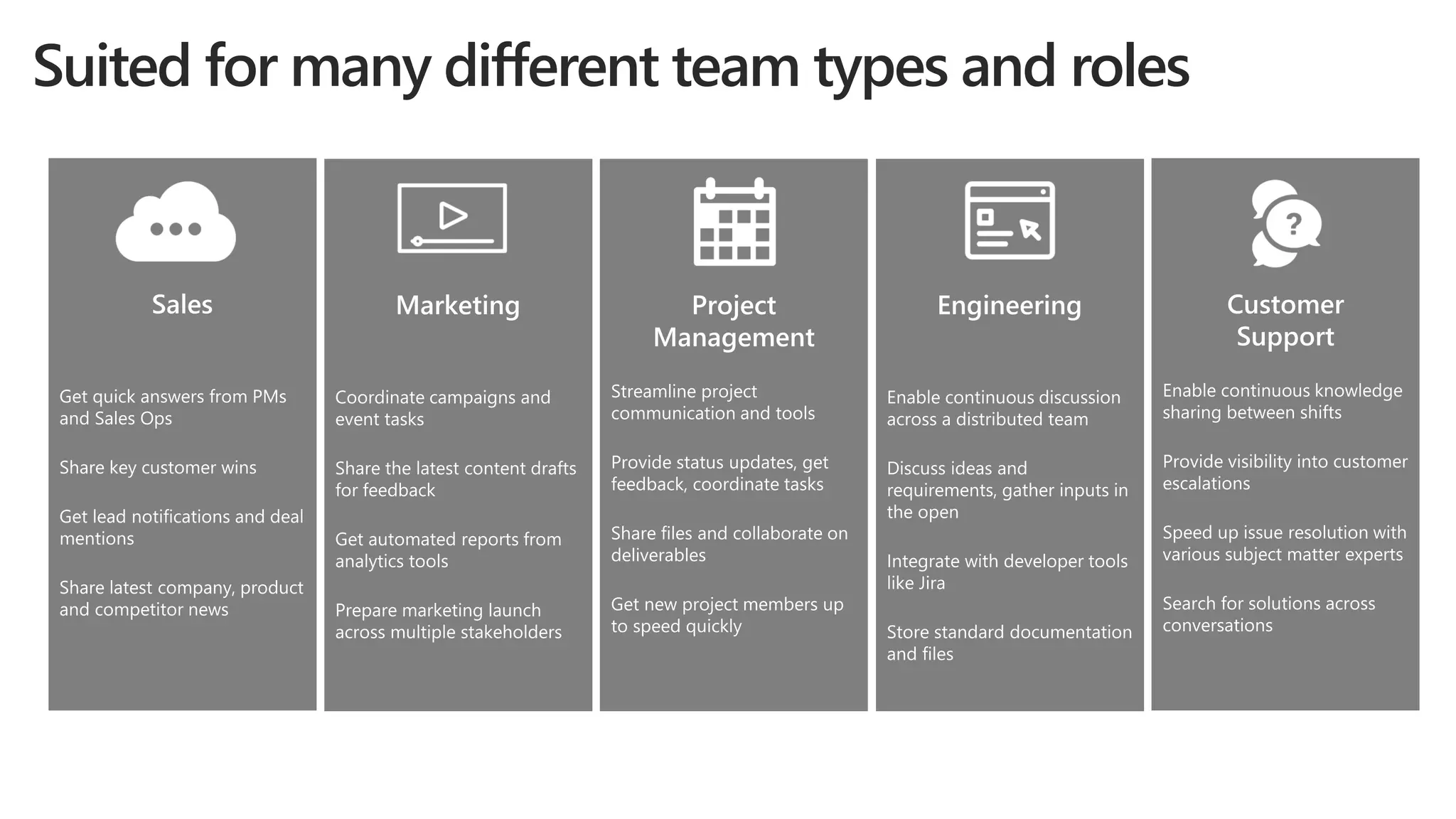
Suited for many different team types and roles
Microsoft Teams Demo!
Architecture and Technical Design
Azure AD/Office 365 services
• AAD for identity, groups, authentication
(including future guest support)
• Groups shared w/SharePoint, Planner, etc.
• O365 Connectors infrastructure
• Web clients (Word, PowerPoint, Excel,
OneNote, PowerBI) in tab view
• Custom views for SharePoint and Planner
Chat service
• Chat data are stored at rest in regional
clouds (Azure) based on tenant location
• Microsoft Teams Chat Service runs within
the O365 compliance boundary
• Several other services within the chat
framework e.g. permissions, search
InTune & Conditional Access
Web
Desktop
(Windows & Mac) iOS App Android App
Windows Phone
AppClients
GraphAPI
OfficeOnline
OneDrivefor
Business
SharePoint
Online
Exchange
Mailbox
Teams
Middle Tier
Chat Services Media Services
WebView
Files
Files
SettingsandOffice365
Access
Messaging
Audio/Video
Archiving/
Auditing
Connectors
Services
Extensibility
Azure Active
Directory
Office 365
Groups
Exchange
Calendar
Scheduling
Tabs Extensibility
Bots
Bot
Framework
Technical Requirements
Office 365 suite license required, and prefer but not require Exchange, SharePoint
• On-premises/hybrid must be synced via Azure AD Connect (fka dirsync)
• Exchange on-premises users will have a little less functionality e.g. Connectors
• OneDrive (as part of SharePoint) required for private chat files
Skype for Business is not a pre-req; SfB users will benefit from interop features
• 1-1 IM between Teams and Skype for Business
• Click to join Skype for Business meetings from the meetings view in Teams
• Support for hybrid deployments and richer interop is under investigation
Archiving, eDiscovery, compliance via the Office 365 Security & Compliance Center
• Exchange group mailboxes for team chats and events, user mailboxes for private chats
• SharePoint/OneDrive archiving for files
For more technical guidance, visit www.successwithteams.com
Deployment and Education
Success with Teams
• www.successwithteams.com
• Practical guidance
• Plan-deliver-operate
framework
• Checklists, pre-reqs,
adoption guides, tools
FastTrack
• fasttrack.microsoft.com
• Customer success service
• Best practices, tools,
resources, experts
• New content and service
for Microsoft Teams
Customer success kit
• aka.ms/teams-kit
• Email templates,
flyers, and posters to
assist with rollout
• Announcement,
countdown, getting
started, tips and tricks
When To Use What?
By Dux Raymond Sy, AvePoint
Microsoft MVP and Regional Director
©AvePoint, Inc. All rights reserved. Confidential and proprietary information of AvePoint, Inc.
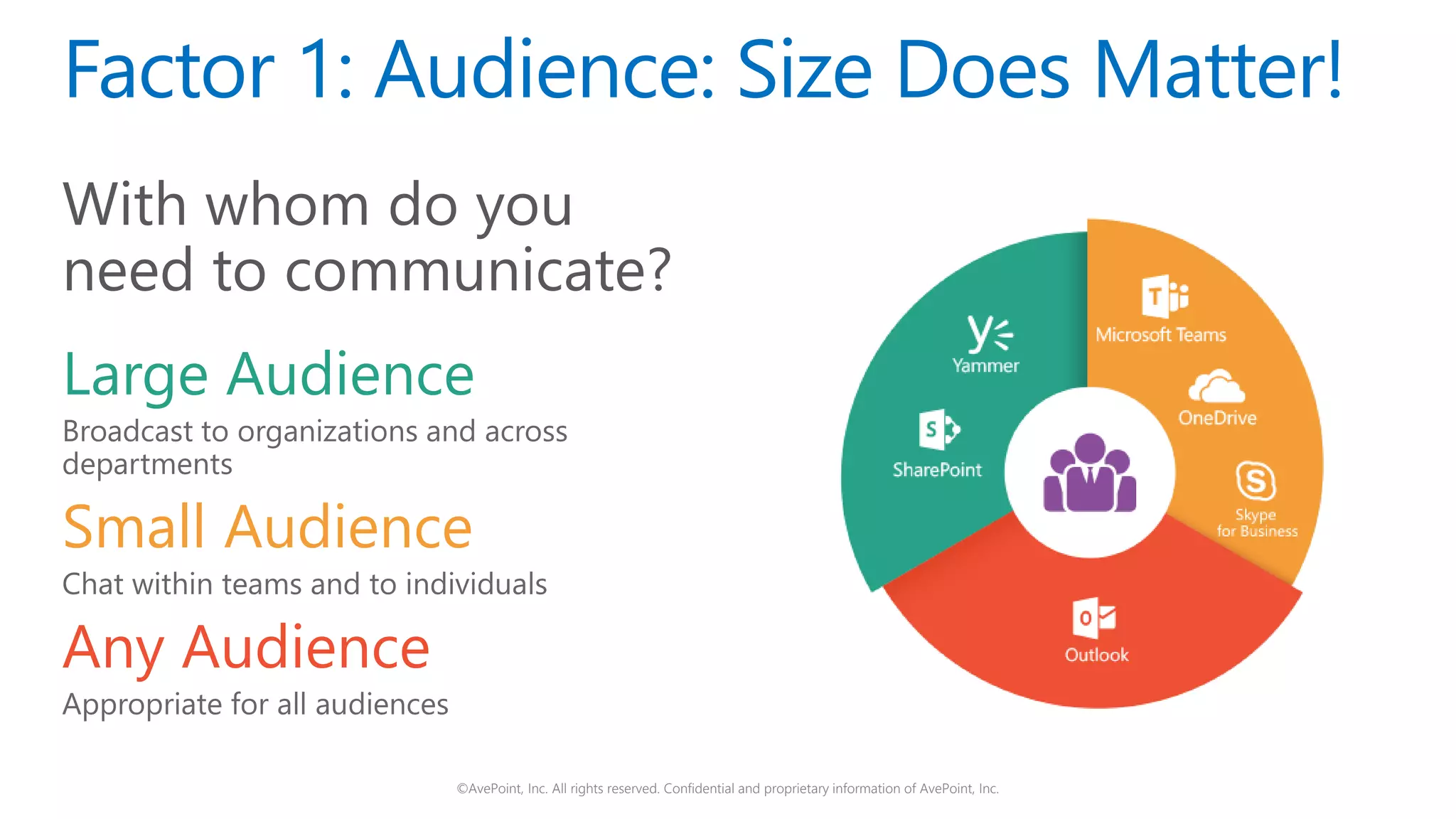
Factor 1: Audience: Size Does Matter!
With whom do you
need to communicate?
Large Audience
Broadcast to organizations and across
departments
Small Audience
Chat within teams and to individuals
Any Audience
Appropriate for all audiences
©AvePoint, Inc. All rights reserved. Confidential and proprietary information of AvePoint, Inc.
Factor 2: Tone – Express Yourself!
How do you want to
express yourself?
Formal Tone
Professional and objective
Informal Tone
Personal and conversational
Any Tone
Appropriate for all tones
©AvePoint, Inc. All rights reserved. Confidential and proprietary information of AvePoint, Inc.
Factor 3: Speed – Need for Speed!
How quickly do you
need to communicate?
High Tempo
Fast and quick responses
Low Tempo
Slow and ad hoc responses
Any Tempo
Appropriate for any speed
©AvePoint, Inc. All rights reserved. Confidential and proprietary information of AvePoint, Inc.
Your one-stop shop to learn everything about
Office 365 Groups.
Get free access to regularly updated articles,
webinars with industry leaders, and best practices.
www.avepoint.com/office-365-groups/
Live Panel Discussion
With Questions & Answers
From The Community & MVPs
From The Community
Matthias Einig, MVP
CEO & Co-Founder
Rencore GmbH
@mattein
• Any chance we see
private channels
within a team coming
in the future?
From The Community
Jeff Shuey,
President
IAMCP
@jshuey
• When will External
Guest Access be
enabled?
• Will there be a Slack
to Teams Migration
Tool?
From The Community
Loryan Strant, MVP
@TheCloudMouth
• As Teams becomes a more
all-encompassing interface
for accessing and working
with Office 365 services -
what can we expect to see
around bringing in
conversations from Skype
for Business or Yammer?
From The Community
Dan Usher, MVP
Chief Technologist &
Cloud Architect
@binarybrewery
• When will Microsoft
Teams be available for
our friends on macOS
running Safari?
• Will Microsoft Teams
allow for future
integration with Groups
conversations or
Yammer?
From The Community
Andy Talbot,
SharePoint & Office
365 Consultant
Collab365.community
host
@SharePointAndy
• When can we expect
to see future Teams
development
capabilities appear on
the Office 365
roadmap?
From The Community
Asif Rehmani, MVP
Founder & CEO
VisualSP
@asifrehmani
• Is there enough room
or even a business use
case for small to
midsize organizations
for using both Teams
as well as Yammer?
From The Community
Knut Relbe-Moe, MVP
Product Evanelist
Valo Intranet
@sharePTkarm
• Will it be possible to
see the chat from
Teams in embeded
view in SharePoint,
like we can do with
Yammer?
From The Community
René Modery, MVP
Solutions Architect
Synergy Corporate
Technologies
@modery
• What kind of
"organizational“
requirements are needed to
get started successfully
with Teams? Can any part of
a company get started
using teams, or are there
certain factors that help
getting started with it and
improve usage and value.
From The Community
Tamara Bredemus
Director of
Collaborative Services
City of Minneapolis
@TamaraBred
• What resources are
available to prepare
our users at large for
the rollout of Teams?
• What is your favorite
feature of the MS
Team site and why?
Thank You!

Microsoft Teams is Here!

  • 1.
    Microsoft Teams isHere! Presented by AvePoint, Avanade, and Microsoft Webinar: April 12, 2017
  • 2.
    Agenda: • Meet OurExperts • Modern Collaboration Journey • Meet Microsoft Teams • When To Use What in Groups • Panel Discussion with Live Q&A
  • 3.
    Dux Raymond Sy AvePoint ChiefTechnology Officer (CTO) Microsoft MVP & Regional Director @meetdux
  • 4.
    Dan Stevenson Microsoft Group ProgramManager Microsoft Teams @DanSkype
  • 5.
    Michelle Caldwell Avanade Digital WorkplaceDirector Microsoft MVP & Regional Director @shellecaldwell
  • 6.
    Modern Collaboration Journey ByMichelle Caldwell, Avanade Microsoft MVP and Regional Director
  • 7.
  • 8.
    Collaboration Is NotWhat It Use To Be
  • 9.
  • 10.
    Technology can bethe enabler The technology can support and guide your collaborative environment But, at the same time it can also totally destroy it The technology moves faster than your business You must understand your culture and demography To be the collaborative enabler you need to build strategies, supporting your business objectives, but also be prepared to change them
  • 11.
    Generational Preferences atWork -Bruce Tulgan Characteristics Maturists (pre-1945) Baby Boomer (1946-1964) Generation X (1965-1977) Generation Y (1978-1989) Generation Z (1990-2000) Formative experiences Second world war Rationing Rock ‘n Roll Nuclear families Defined gender roes – particularly for women Cold War Post War boom “Swinging 60s” Apollo Moon landings Youth culture Woodstock End of Cold War Fall of Berlin Wall Live Aid Introduction of first PC Early mobile technology Latch-key kids Rising levels of divorce 9/11 terrorist attacks PlayStation Social media Invasion of Iraq Reality TV Google Earth Economic downturn Global warming Mobile devices Arab Spring Produce own media Cloud Computing Wiki-leaks Percentage in NA workforce 1% 30% 27% 28% 14% Aspiration Home Ownership Job Security Work-life balance Freedom and flexibility Security and stability Attitude toward technology Largely disengaged Early IT adaptors Digital Immigrants Digital Natives “Technoholics” Attitude toward career Jobs are for life Organizational – careers are defined by employers Early “portfolio” careers – loyal to profession, not necessarily employer Digital entrepreneurs – work “with” organizations not “for” Career multitaskers – will move seamlessly between organizations and “pop-up businesses Signature product Automobile Television Personal Computer Tablet/Smart Phone Google Glass, graphene, nano- computing, 3-D printing, driverless cars Communication media Formal Letter Telephone E-mail and text message Text or social media Hand-held communication Communication Preference Face-to-face meetings Face-to-face ideally but increasingly will go online Text message or email Online and mobile (txt msg) Facetime
  • 12.
    Collaboration Is DrivingBusiness Value Organizations with a modern collaboration strategy are seeing vast improvements in:
  • 13.
  • 14.
    Avanade’s Point ofView on Collaboration Technology can be the enabler A modern collaboration platform supports many modalities A continuous suite to minimize context switching At the forefront of modern collaboration Allows many different journeys Applicable for many cultures and ways of working An always evolving platform
  • 15.
    Conversation and CollaborationJourney Collaboration is not always a static and pre-defined process and a modern collaboration platform must accommodate for all scenarios. Email Instant Messaging Team Collaboration Document Library Cloud Storage Enterprise Social Knowledge Management t Ideation Formalized project Refines solution Presentation of solution Archival Feedback from SMEs Creates a document Skype conversation with colleague Creates and shares document Collaborates with team Harvests knowledge Finalizes result Shares result Searches for information Persistent Storage Journey example 1 Journey example 2
  • 16.
  • 17.
    Generational Preferences atWork Baby Boomer (1946-1964) Generation X (1965-1979) Millennial (1980-1997) Generation Z (1998-2020) In Person Meeting Virtual Online Meeting (No Video) Virtual Online Meeting (Video) Email Team Workspaces Instant Message (IM) Enterprise Social Networking Persistent Chat Conversational User Interfaces Mostly preferAlways prefer Somewhat prefer Occasionally prefer Do not prefer Avanade Research, Wired Magazine: The Next Generation of Working Practices, Herman Miller: Generations at Work, EY Study on Generational Shifts For organizations with a multi-generation workforce, it is important to understand your demographics to know how to best find the balance of tools across the generations. If you are an organization that heavily relies on email, what are you doing for your new workers? Are you giving them the tools they need to be effective? Note: this is a generalization of observations, but any individual may cross multiple categories.
  • 18.
    ©2017 Avanade Inc.All Rights Reserved. <Highly Confidential> See Avanade’s Data Management Policy What to use when Audience (Internal or External) INDIVIDUAL GROUP TEAM DEPARTMENT ORGANIZATION PRIORITY/TIMESENSITIVITY URGENT/HIGHAD-HOC/LOW GENERATIONALPREFERENCES GenZ(1998-2020)BabyBoomer(1946-1964) Millennial(1980-1997) GenX(1965-1979) MyAnalytics Skype for Business Call or Instant Message (IM) Skype for Business Online Meetings Skype Broadcast Outlook Email OneDrive for Business Yammer (All Company and Groups) Team Sites (Office 365 Groups) Microsoft Teams Delve Boards SP Publishing Site SharePoint Team News Office 365 Video SharePoint Intranet Avanade Research, Microsoft Bots and Connectors
  • 19.
    Welcome to MicrosoftTeams By Dan Stevenson, Microsoft Group Program Manager for Microsoft Teams
  • 20.
    Co-Creating Content Office 365 ProPlus Co-authoring acrossdesktop, mobile, web Mail & Calendar Outlook Undisputed leader in mail and calendar Voice, Video & Meetings Skype 100M meetings each month Chat-based Workspace Microsoft Teams Introducing Microsoft Teams Sites & Content Management SharePoint 190M end users Enterprise Social Yammer 85% of Fortune 500 Office 365 Collaboration
  • 21.
    The chat-based workspacein Office 365 Customizable for each team Security teams trust A hub for teamwork Chat for today’s teams
  • 22.
    Suited for manydifferent team types and roles
  • 23.
  • 24.
    Architecture and TechnicalDesign Azure AD/Office 365 services • AAD for identity, groups, authentication (including future guest support) • Groups shared w/SharePoint, Planner, etc. • O365 Connectors infrastructure • Web clients (Word, PowerPoint, Excel, OneNote, PowerBI) in tab view • Custom views for SharePoint and Planner Chat service • Chat data are stored at rest in regional clouds (Azure) based on tenant location • Microsoft Teams Chat Service runs within the O365 compliance boundary • Several other services within the chat framework e.g. permissions, search InTune & Conditional Access Web Desktop (Windows & Mac) iOS App Android App Windows Phone AppClients GraphAPI OfficeOnline OneDrivefor Business SharePoint Online Exchange Mailbox Teams Middle Tier Chat Services Media Services WebView Files Files SettingsandOffice365 Access Messaging Audio/Video Archiving/ Auditing Connectors Services Extensibility Azure Active Directory Office 365 Groups Exchange Calendar Scheduling Tabs Extensibility Bots Bot Framework
  • 25.
    Technical Requirements Office 365suite license required, and prefer but not require Exchange, SharePoint • On-premises/hybrid must be synced via Azure AD Connect (fka dirsync) • Exchange on-premises users will have a little less functionality e.g. Connectors • OneDrive (as part of SharePoint) required for private chat files Skype for Business is not a pre-req; SfB users will benefit from interop features • 1-1 IM between Teams and Skype for Business • Click to join Skype for Business meetings from the meetings view in Teams • Support for hybrid deployments and richer interop is under investigation Archiving, eDiscovery, compliance via the Office 365 Security & Compliance Center • Exchange group mailboxes for team chats and events, user mailboxes for private chats • SharePoint/OneDrive archiving for files For more technical guidance, visit www.successwithteams.com
  • 26.
    Deployment and Education Successwith Teams • www.successwithteams.com • Practical guidance • Plan-deliver-operate framework • Checklists, pre-reqs, adoption guides, tools FastTrack • fasttrack.microsoft.com • Customer success service • Best practices, tools, resources, experts • New content and service for Microsoft Teams Customer success kit • aka.ms/teams-kit • Email templates, flyers, and posters to assist with rollout • Announcement, countdown, getting started, tips and tricks
  • 27.
    When To UseWhat? By Dux Raymond Sy, AvePoint Microsoft MVP and Regional Director
  • 28.
    ©AvePoint, Inc. Allrights reserved. Confidential and proprietary information of AvePoint, Inc. Factor 1: Audience: Size Does Matter! With whom do you need to communicate? Large Audience Broadcast to organizations and across departments Small Audience Chat within teams and to individuals Any Audience Appropriate for all audiences
  • 29.
    ©AvePoint, Inc. Allrights reserved. Confidential and proprietary information of AvePoint, Inc. Factor 2: Tone – Express Yourself! How do you want to express yourself? Formal Tone Professional and objective Informal Tone Personal and conversational Any Tone Appropriate for all tones
  • 30.
    ©AvePoint, Inc. Allrights reserved. Confidential and proprietary information of AvePoint, Inc. Factor 3: Speed – Need for Speed! How quickly do you need to communicate? High Tempo Fast and quick responses Low Tempo Slow and ad hoc responses Any Tempo Appropriate for any speed
  • 31.
    ©AvePoint, Inc. Allrights reserved. Confidential and proprietary information of AvePoint, Inc. Your one-stop shop to learn everything about Office 365 Groups. Get free access to regularly updated articles, webinars with industry leaders, and best practices. www.avepoint.com/office-365-groups/
  • 32.
    Live Panel Discussion WithQuestions & Answers
  • 33.
  • 34.
    From The Community MatthiasEinig, MVP CEO & Co-Founder Rencore GmbH @mattein • Any chance we see private channels within a team coming in the future?
  • 35.
    From The Community JeffShuey, President IAMCP @jshuey • When will External Guest Access be enabled? • Will there be a Slack to Teams Migration Tool?
  • 36.
    From The Community LoryanStrant, MVP @TheCloudMouth • As Teams becomes a more all-encompassing interface for accessing and working with Office 365 services - what can we expect to see around bringing in conversations from Skype for Business or Yammer?
  • 37.
    From The Community DanUsher, MVP Chief Technologist & Cloud Architect @binarybrewery • When will Microsoft Teams be available for our friends on macOS running Safari? • Will Microsoft Teams allow for future integration with Groups conversations or Yammer?
  • 38.
    From The Community AndyTalbot, SharePoint & Office 365 Consultant Collab365.community host @SharePointAndy • When can we expect to see future Teams development capabilities appear on the Office 365 roadmap?
  • 39.
    From The Community AsifRehmani, MVP Founder & CEO VisualSP @asifrehmani • Is there enough room or even a business use case for small to midsize organizations for using both Teams as well as Yammer?
  • 40.
    From The Community KnutRelbe-Moe, MVP Product Evanelist Valo Intranet @sharePTkarm • Will it be possible to see the chat from Teams in embeded view in SharePoint, like we can do with Yammer?
  • 41.
    From The Community RenéModery, MVP Solutions Architect Synergy Corporate Technologies @modery • What kind of "organizational“ requirements are needed to get started successfully with Teams? Can any part of a company get started using teams, or are there certain factors that help getting started with it and improve usage and value.
  • 42.
    From The Community TamaraBredemus Director of Collaborative Services City of Minneapolis @TamaraBred • What resources are available to prepare our users at large for the rollout of Teams? • What is your favorite feature of the MS Team site and why?
  • 43.