Microsoft Teams
The hub for teamwork in Office 365
David J. Rosenthal
VP & GM, Digital Business
Microsoft Partner Sales Executive
March 13, 2019
Microsoft Technology Center, Philadelphia, PA
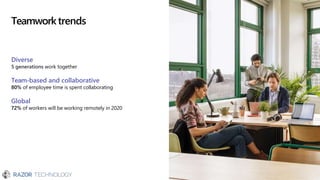
Teamworktrends
Diverse
5 generations work together
Team-based and collaborative
80% of employee time is spent collaborating
Global
72% of workers will be working remotely in 2020
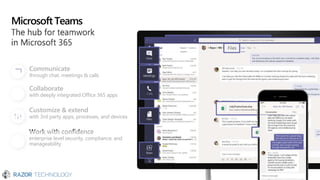
Microsoft Teams
Communicate
through chat, meetings & calls
Collaborate
with deeply integrated Office 365 apps
Customize & extend
with 3rd party apps, processes, and devices
Work with confidence
enterprise level security, compliance, and
manageability
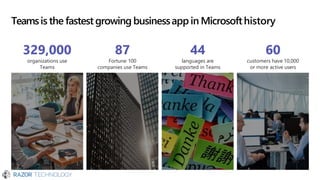
Teamsis the fastest growing businessapp in Microsofthistory
87
Fortune 100
companies use Teams
329,000
organizations use
Teams
44
languages are
supported in Teams
60
customers have 10,000
or more active users
Demo
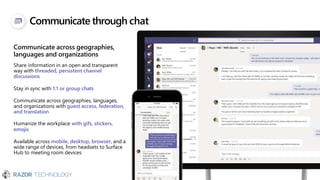
Communicate through chat
Communicate across geographies,
languages and organizations
Share information in an open and transparent
way with threaded, persistent channel
discussions
Stay in sync with 1:1 or group chats
Communicate across geographies, languages,
and organizations with guest access, federation,
and translation
Humanize the workplace with gifs, stickers,
emojis
Available across mobile, desktop, browser, and a
wide range of devices, from headsets to Surface
Hub to meeting room devices
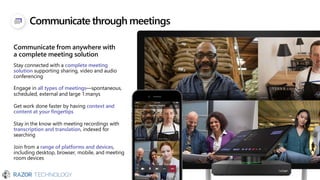
Communicate through meetings
Communicate from anywhere with
a complete meeting solution
Stay connected with a complete meeting
solution supporting sharing, video and audio
conferencing
Engage in all types of meetings—spontaneous,
scheduled, external and large 1:manys
Get work done faster by having context and
content at your fingertips
Stay in the know with meeting recordings with
transcription and translation, indexed for
searching
Join from a range of platforms and devices,
including desktop, browser, mobile, and meeting
room devices
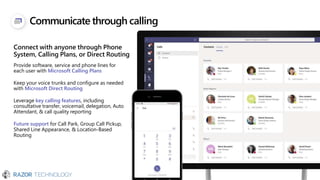
Communicate through calling
Connect with anyone through Phone
System, Calling Plans, or Direct Routing
Provide software, service and phone lines for
each user with Microsoft Calling Plans
Keep your voice trunks and configure as needed
with Microsoft Direct Routing
Leverage key calling features, including
consultative transfer, voicemail, delegation, Auto
Attendant, & call quality reporting
Future support for Call Park, Group Call Pickup,
Shared Line Appearance, & Location-Based
Routing
15551234567
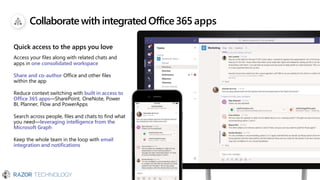
Collaborate with integratedOffice365 apps
Quick access to the apps you love
Access your files along with related chats and
apps in one consolidated workspace
Share and co-author Office and other files
within the app
Reduce context switching with built in access to
Office 365 apps—SharePoint, OneNote, Power
BI, Planner, Flow and PowerApps
Search across people, files and chats to find what
you need—leveraging intelligence from the
Microsoft Graph
Keep the whole team in the loop with email
integration and notifications
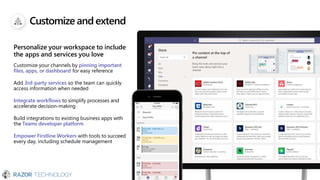
Customize andextend
Personalize your workspace to include
the apps and services you love
Customize your channels by pinning important
files, apps, or dashboard for easy reference
Add 3rd-party services so the team can quickly
access information when needed
Integrate workflows to simplify processes and
accelerate decision-making
Build integrations to existing business apps with
the Teams developer platform
Empower Firstline Workers with tools to succeed
every day, including schedule management
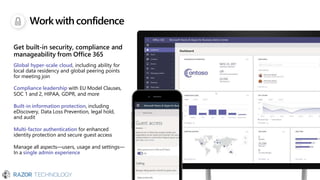
Workwithconfidence
Get built-in security, compliance and
manageability from Office 365
Global hyper-scale cloud, including ability for
local data residency and global peering points
for meeting join
Compliance leadership with EU Model Clauses,
SOC 1 and 2, HIPAA, GDPR, and more
Built-in information protection, including
eDiscovery, Data Loss Prevention, legal hold,
and audit
Multi-factor authentication for enhanced
identity protection and secure guest access
Manage all aspects—users, usage and settings—
In a single admin experience
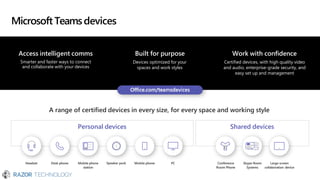
Microsoft Teamsdevices
Work with confidence
Certified devices, with high quality video
and audio, enterprise-grade security, and
easy set up and management
Access intelligent comms
Smarter and faster ways to connect
and collaborate with your devices
Built for purpose
Devices optimized for your
spaces and work styles
A range of certified devices in every size, for every space and working style
Personal devices Shared devices
Headset Desk phone Mobile phone Speaker puck Mobile phone PC Conference Skype Room Large screen
station Room Phone Systems collaboration device
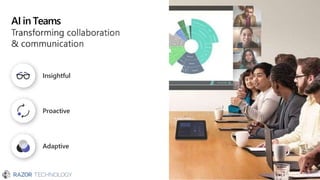
AI in Teams
Proactive
Insightful
Adaptive
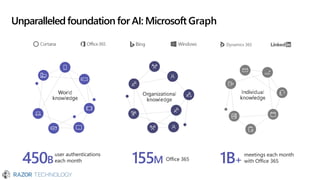
Unparalleledfoundation for AI: Microsoft Graph
Dynamics 365
450B
user authentications
each month 155M Office 365 1B+
meetings each month
with Office 365
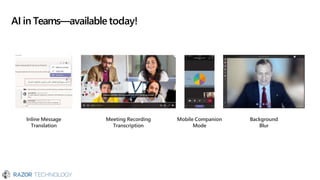
AI in Teams—available today!
Mobile Companion
Mode
Inline Message
Translation
Meeting Recording
Transcription
Background
Blur
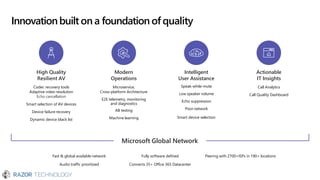
Innovationbuilt on a foundation of quality
Fast & global available network
Audio traffic prioritized
Fully software defined
Connects 35+ Office 365 Datacenter
Peering with 2700+ISPs in 190+ locations
High Quality
Resilient AV
Codec recovery tools
Adaptive video resolution
Echo cancellation
Smart selection of AV devices
Device failure recovery
Dynamic device black list
Modern
Operations
Microservice,
Cross-platform Architecture
E2E telemetry, monitoring
and diagnostics
AB testing
Machine learning
Intelligent
User Assistance
Speak-while-mute
Low speaker volume
Echo suppression
Poor network
Smart device selection
Actionable
IT Insights
Call Analytics
Call Quality Dashboard
Microsoft Global Network
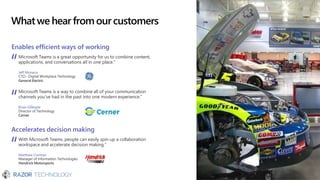
Whatwe hear fromourcustomers
Enables efficient ways of working
Microsoft Teams is a great opportunity for us to combine content,
applications, and conversations all in one place.”
Jeff Monaco
CTO - Digital Workplace Technology
General Electric
Microsoft Teams is a way to combine all of your communication
channels you’ve had in the past into one modern experience.”
Brian Gillespie
Director of Technology
Cerner
Accelerates decision making
With Microsoft Teams, people can easily spin up a collaboration
workspace and accelerate decision making.”
Matthew Cochran
Manager of Information Technologies
Hendrick Motorsports
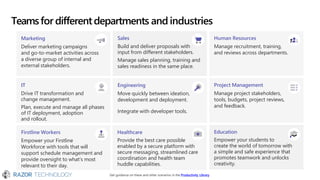
Teamsfor differentdepartments andindustries
Marketing
Deliver marketing campaigns
and go-to-market activities across
a diverse group of internal and
external stakeholders.
Sales
Build and deliver proposals with
input from different stakeholders.
Manage sales planning, training and
sales readiness in the same place.
Human Resources
Manage recruitment, training,
and reviews across departments.
IT
Drive IT transformation and
change management.
Plan, execute and manage all phases
of IT deployment, adoption
and rollout.
Engineering
Move quickly between ideation,
development and deployment.
Integrate with developer tools.
Project Management
Manage project stakeholders,
tools, budgets, project reviews,
and feedback.
Firstline Workers
Empower your Firstline
Workforce with tools that will
support schedule management and
provide oversight to what’s most
relevant to their day.
Healthcare
Provide the best care possible
enabled by a secure platform with
secure messaging, streamlined care
coordination and health team
huddle capabilities.
Education
Empower your students to
create the world of tomorrow with
a simple and safe experience that
promotes teamwork and unlocks
creativity.
Get guidance on these and other scenarios in the Productivity Library
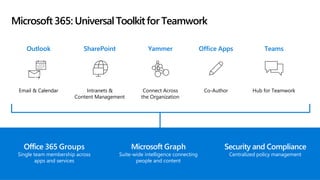
Microsoft 365: Universal Toolkitfor Teamwork
Hub for Teamwork
Co-Author
Connect Across
the Organization
Intranets &
Content Management
Email & Calendar
Teams
Office Apps
Yammer
SharePoint
Outlook
Office 365 Groups
Single team membership across
apps and services
Microsoft Graph
Suite-wide intelligence connecting
people and content
Security and Compliance
Centralized policy management
Nextsteps
Get started
Start using Microsoft Teams today
• Pick one project
• Do all collaboration on that project in Teams
• Download the mobile app
Access resources & support
Get deployment & adoption support from
• Razor Technology
• https://aka.ms/SuccessWithTeams
Contact Information
© 2019 Razor Technology, LLCwww.razor-tech.com
David Rosenthal
VP & General Manager
Digital Business
@DavidJRosenthal
Slideshare
Blog: www.razor-tech.com
5 Tower Bridge
300 Barr Harbor Dr., Suite 705
West Conshohocken, PA 19428
www.razor-tech.com
David.Rosenthal@razor-tech.com
Cell: 215.801.4430
Office: 866.RZR.DATA
LETS KEEP IN TOUCH
Appendix
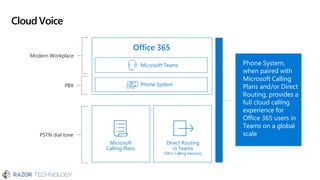
CloudVoice
PSTN dial tone
Microsoft
Calling Plans
Direct Routing
in Teams
(Telco Calling Services)
Modern Workplace
Microsoft Teams
Office 365
PBX Phone System
Phone System,
when paired with
Microsoft Calling
Plans and/or Direct
Routing, provides a
full cloud calling
experience for
Office 365 users in
Teams on a global
scale
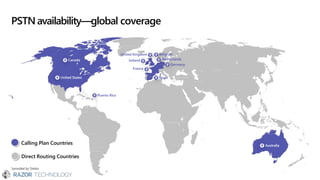
PSTN availability—global coverage
*provided by Telstra
Canada
United States
Puerto Rico
Spain
United Kingdom
Ireland
France
Belgium
Netherlands
Germany
Australia
Calling Plan Countries
Direct Routing Countries
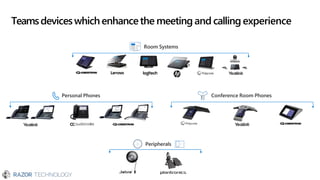
Teamsdeviceswhichenhancethe meeting and calling experience
Personal Phones Conference Room Phones
Peripherals
Room Systems
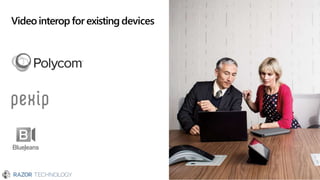
Videointerop for existing devices
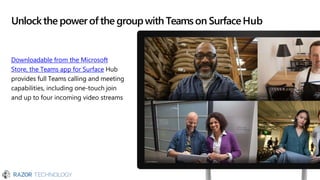
Unlockthe powerof the groupwith Teamson SurfaceHub
Downloadable from the Microsoft
Store, the Teams app for Surface Hub
provides full Teams calling and meeting
capabilities, including one-touch join
and up to four incoming video streams
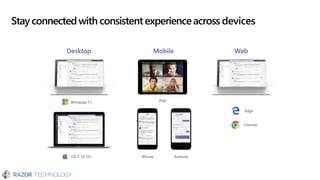
Stay connected with consistentexperienceacross devices
Desktop Mobile Web
iPhone Android
iPad
OS X 10.10+
Windows 7+
Edge
Chrome
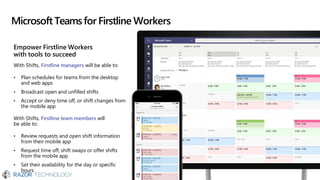
Empower Firstline Workers
with tools to succeed
With Shifts, Firstline managers will be able to:
• Plan schedules for teams from the desktop
and web apps
• Broadcast open and unfilled shifts
• Accept or deny time off, or shift changes from
the mobile app
With Shifts, Firstline team members will
be able to:
• Review requests and open shift information
from their mobile app
• Request time off, shift swaps or offer shifts
from the mobile app
• Set their availability for the day or specific
hours
Microsoft Teamsfor Firstline Workers
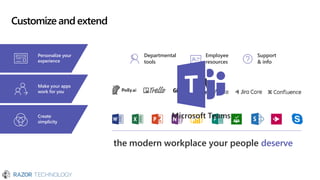
Customize and extend
Create
simplicity
Departmental
tools
Employee
resources
Support
& info
Personalize your
experience
Make your apps
work for you
Microsoft Teams
the modern workplace your people deserve
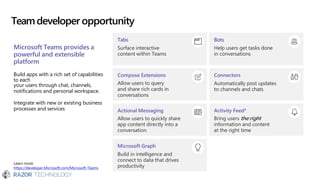
Teamdeveloper opportunity
Tabs
Surface interactive
content within Teams
Microsoft Teams provides a
powerful and extensible
platform
Build apps with a rich set of capabilities
to each
your users through chat, channels,
notifications and personal workspace.
Integrate with new or existing business
processes and services
Learn more:
https://developer.Microsoft.com/Microsoft-Teams
Compose Extensions
Allow users to query
and share rich cards in
conversations
Actional Messaging
Allow users to quickly share
app content directly into a
conversation
Microsoft Graph
Build in intelligence and
connect to data that drives
productivity
Bots
Help users get tasks done
in conversations
Connectors
Automatically post updates
to channels and chats
Activity Feed*
Bring users the right
information and content
at the right time
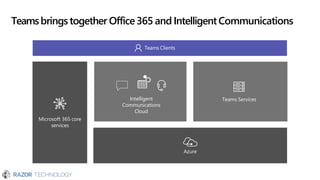
Teamsbringstogether Office365 and IntelligentCommunications
Teams Clients
Teams Services
Intelligent
Communications
Cloud
Microsoft 365 core
services
Azure
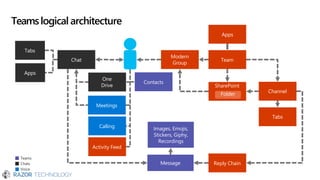
Teamslogical architecture
Modern
Group
Chat
Channel
Reply Chain
Message
Images, Emojis,
Stickers, Giphy,
Recordings
One
Drive
Tabs
SharePoint
Folder
Tabs
Activity Feed
Meetings
Calling
Apps
Team
Apps
Contacts
Teams
Chats
Voice
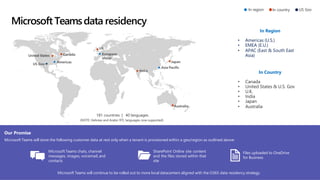
Microsoft Teamsdata residency
Our Promise
Microsoft Teams will store the following customer data at rest only when a tenant is provisioned within a geo/region as outlined above:
Microsoft Teams will continue to be rolled out to more local datacenters aligned with the O365 data residency strategy.
181 countries | 40 languages
(NOTE: Hebrew and Arabic RTL languages now supported)
In region In country US Gov
Microsoft Teams chats, channel
messages, images, voicemail, and
contacts
SharePoint Online site content
and the files stored within that
site
Files uploaded to OneDrive
for Business
In Region
• Americas (U.S.)
• EMEA (E.U.)
• APAC (East & South East
Asia)
In Country
• Canada
• United States & U.S. Gov
• U.K.
• India
• Japan
• Australia
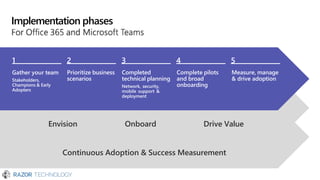
Implementation phases
Gather your team
Stakeholders,
Champions & Early
Adopters
Prioritize business
scenarios
Completed
technical planning
Network, security,
mobile support &
deployment
Complete pilots
and broad
onboarding
Measure, manage
& drive adoption
Continuous Adoption & Success Measurement
Envision Onboard Drive Value
1 2 3 4 5
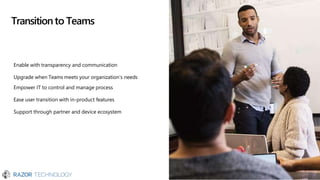
Transitionto Teams
Enable with transparency and communication
Upgrade when Teams meets your organization’s needs
Empower IT to control and manage process
Ease user transition with in-product features
Support through partner and device ecosystem
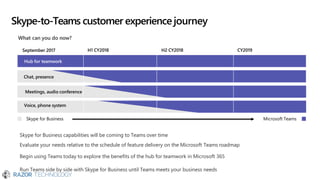
Skype-to-Teams customer experiencejourney
Skype for Business capabilities will be coming to Teams over time
Evaluate your needs relative to the schedule of feature delivery on the Microsoft Teams roadmap
Begin using Teams today to explore the benefits of the hub for teamwork in Microsoft 365
Run Teams side by side with Skype for Business until Teams meets your business needs
CY2019
Chat, presence
Meetings, audio conference
Voice, phone system
What can you do now?
September 2017 H1 CY2018 H2 CY2018
Hub for teamwork
Skype for Business Microsoft Teams
Resourcesto learnmore
Success with Teams: aka.ms/SuccessWithTeams
Your hub for all things Teams including vision, practical
onboarding guidance, success stories, help and support.
FastTrack: FastTrack.microsoft.com
Assistance for customers to realize their vision with
Microsoft cloud services.
Office Blog: aka.ms/OfficeBlog and aka.ms/TeamsOfficeBlog
Office Roadmap: aka.ms/OfficeRoadmap
Product Help: aka.ms/TeamsSupport
Known Issues List: aka.ms/TeamsKnownIssues
Customer evidence
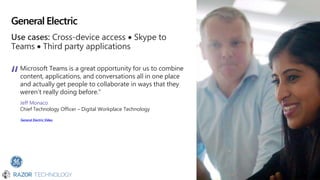
General Electric
Use cases: Cross-device access  Skype to
Teams  Third party applications
Microsoft Teams is a great opportunity for us to combine
content, applications, and conversations all in one place
and actually get people to collaborate in ways that they
weren’t really doing before.”
Jeff Monaco
Chief Technology Officer – Digital Workplace Technology
General Electric Video
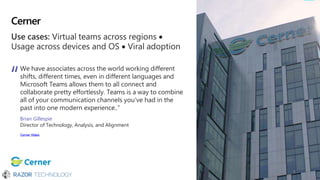
Cerner
Use cases: Virtual teams across regions 
Usage across devices and OS  Viral adoption
We have associates across the world working different
shifts, different times, even in different languages and
Microsoft Teams allows them to all connect and
collaborate pretty effortlessly. Teams is a way to combine
all of your communication channels you’ve had in the
past into one modern experience..”
Brian Gillespie
Director of Technology, Analysis, and Alignment
Cerner Video
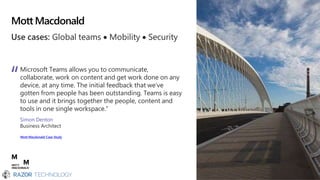
Mott Macdonald
Use cases: Global teams  Mobility  Security
Microsoft Teams allows you to communicate,
collaborate, work on content and get work done on any
device, at any time. The initial feedback that we’ve
gotten from people has been outstanding. Teams is easy
to use and it brings together the people, content and
tools in one single workspace.”
Simon Denton
Business Architect
Mott Macdonald Case Study
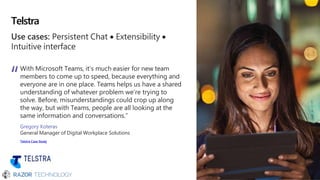
Telstra
Use cases: Persistent Chat  Extensibility 
Intuitive interface
With Microsoft Teams, it’s much easier for new team
members to come up to speed, because everything and
everyone are in one place. Teams helps us have a shared
understanding of whatever problem we’re trying to
solve. Before, misunderstandings could crop up along
the way, but with Teams, people are all looking at the
same information and conversations.”
Gregory Koteras
General Manager of Digital Workplace Solutions
Telstra Case Study
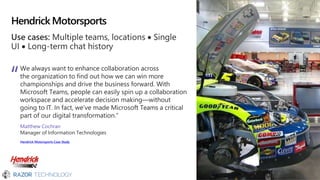
Hendrick Motorsports
Use cases: Multiple teams, locations  Single
UI  Long-term chat history
We always want to enhance collaboration across
the organization to find out how we can win more
championships and drive the business forward. With
Microsoft Teams, people can easily spin up a collaboration
workspace and accelerate decision making—without
going to IT. In fact, we’ve made Microsoft Teams a critical
part of our digital transformation.”
Matthew Cochran
Manager of Information Technologies
Hendrick Motorsports Case Study

Microsoft teams by Shampratik

  • 1.
    Microsoft Teams The hubfor teamwork in Office 365 David J. Rosenthal VP & GM, Digital Business Microsoft Partner Sales Executive March 13, 2019 Microsoft Technology Center, Philadelphia, PA
  • 2.
    Teamworktrends Diverse 5 generations worktogether Team-based and collaborative 80% of employee time is spent collaborating Global 72% of workers will be working remotely in 2020
  • 3.
    Microsoft Teams Communicate through chat,meetings & calls Collaborate with deeply integrated Office 365 apps Customize & extend with 3rd party apps, processes, and devices Work with confidence enterprise level security, compliance, and manageability
  • 4.
    Teamsis the fastestgrowing businessapp in Microsofthistory 87 Fortune 100 companies use Teams 329,000 organizations use Teams 44 languages are supported in Teams 60 customers have 10,000 or more active users
  • 5.
  • 6.
    Communicate through chat Communicateacross geographies, languages and organizations Share information in an open and transparent way with threaded, persistent channel discussions Stay in sync with 1:1 or group chats Communicate across geographies, languages, and organizations with guest access, federation, and translation Humanize the workplace with gifs, stickers, emojis Available across mobile, desktop, browser, and a wide range of devices, from headsets to Surface Hub to meeting room devices
  • 7.
    Communicate through meetings Communicatefrom anywhere with a complete meeting solution Stay connected with a complete meeting solution supporting sharing, video and audio conferencing Engage in all types of meetings—spontaneous, scheduled, external and large 1:manys Get work done faster by having context and content at your fingertips Stay in the know with meeting recordings with transcription and translation, indexed for searching Join from a range of platforms and devices, including desktop, browser, mobile, and meeting room devices
  • 8.
    Communicate through calling Connectwith anyone through Phone System, Calling Plans, or Direct Routing Provide software, service and phone lines for each user with Microsoft Calling Plans Keep your voice trunks and configure as needed with Microsoft Direct Routing Leverage key calling features, including consultative transfer, voicemail, delegation, Auto Attendant, & call quality reporting Future support for Call Park, Group Call Pickup, Shared Line Appearance, & Location-Based Routing 15551234567
  • 9.
    Collaborate with integratedOffice365apps Quick access to the apps you love Access your files along with related chats and apps in one consolidated workspace Share and co-author Office and other files within the app Reduce context switching with built in access to Office 365 apps—SharePoint, OneNote, Power BI, Planner, Flow and PowerApps Search across people, files and chats to find what you need—leveraging intelligence from the Microsoft Graph Keep the whole team in the loop with email integration and notifications
  • 10.
    Customize andextend Personalize yourworkspace to include the apps and services you love Customize your channels by pinning important files, apps, or dashboard for easy reference Add 3rd-party services so the team can quickly access information when needed Integrate workflows to simplify processes and accelerate decision-making Build integrations to existing business apps with the Teams developer platform Empower Firstline Workers with tools to succeed every day, including schedule management
  • 11.
    Workwithconfidence Get built-in security,compliance and manageability from Office 365 Global hyper-scale cloud, including ability for local data residency and global peering points for meeting join Compliance leadership with EU Model Clauses, SOC 1 and 2, HIPAA, GDPR, and more Built-in information protection, including eDiscovery, Data Loss Prevention, legal hold, and audit Multi-factor authentication for enhanced identity protection and secure guest access Manage all aspects—users, usage and settings— In a single admin experience
  • 12.
    Microsoft Teamsdevices Work withconfidence Certified devices, with high quality video and audio, enterprise-grade security, and easy set up and management Access intelligent comms Smarter and faster ways to connect and collaborate with your devices Built for purpose Devices optimized for your spaces and work styles A range of certified devices in every size, for every space and working style Personal devices Shared devices Headset Desk phone Mobile phone Speaker puck Mobile phone PC Conference Skype Room Large screen station Room Phone Systems collaboration device
  • 13.
  • 14.
    Unparalleledfoundation for AI:Microsoft Graph Dynamics 365 450B user authentications each month 155M Office 365 1B+ meetings each month with Office 365
  • 15.
    AI in Teams—availabletoday! Mobile Companion Mode Inline Message Translation Meeting Recording Transcription Background Blur
  • 16.
    Innovationbuilt on afoundation of quality Fast & global available network Audio traffic prioritized Fully software defined Connects 35+ Office 365 Datacenter Peering with 2700+ISPs in 190+ locations High Quality Resilient AV Codec recovery tools Adaptive video resolution Echo cancellation Smart selection of AV devices Device failure recovery Dynamic device black list Modern Operations Microservice, Cross-platform Architecture E2E telemetry, monitoring and diagnostics AB testing Machine learning Intelligent User Assistance Speak-while-mute Low speaker volume Echo suppression Poor network Smart device selection Actionable IT Insights Call Analytics Call Quality Dashboard Microsoft Global Network
  • 17.
    Whatwe hear fromourcustomers Enablesefficient ways of working Microsoft Teams is a great opportunity for us to combine content, applications, and conversations all in one place.” Jeff Monaco CTO - Digital Workplace Technology General Electric Microsoft Teams is a way to combine all of your communication channels you’ve had in the past into one modern experience.” Brian Gillespie Director of Technology Cerner Accelerates decision making With Microsoft Teams, people can easily spin up a collaboration workspace and accelerate decision making.” Matthew Cochran Manager of Information Technologies Hendrick Motorsports
  • 18.
    Teamsfor differentdepartments andindustries Marketing Delivermarketing campaigns and go-to-market activities across a diverse group of internal and external stakeholders. Sales Build and deliver proposals with input from different stakeholders. Manage sales planning, training and sales readiness in the same place. Human Resources Manage recruitment, training, and reviews across departments. IT Drive IT transformation and change management. Plan, execute and manage all phases of IT deployment, adoption and rollout. Engineering Move quickly between ideation, development and deployment. Integrate with developer tools. Project Management Manage project stakeholders, tools, budgets, project reviews, and feedback. Firstline Workers Empower your Firstline Workforce with tools that will support schedule management and provide oversight to what’s most relevant to their day. Healthcare Provide the best care possible enabled by a secure platform with secure messaging, streamlined care coordination and health team huddle capabilities. Education Empower your students to create the world of tomorrow with a simple and safe experience that promotes teamwork and unlocks creativity. Get guidance on these and other scenarios in the Productivity Library
  • 19.
    Microsoft 365: UniversalToolkitfor Teamwork Hub for Teamwork Co-Author Connect Across the Organization Intranets & Content Management Email & Calendar Teams Office Apps Yammer SharePoint Outlook Office 365 Groups Single team membership across apps and services Microsoft Graph Suite-wide intelligence connecting people and content Security and Compliance Centralized policy management
  • 20.
    Nextsteps Get started Start usingMicrosoft Teams today • Pick one project • Do all collaboration on that project in Teams • Download the mobile app Access resources & support Get deployment & adoption support from • Razor Technology • https://aka.ms/SuccessWithTeams
  • 21.
    Contact Information © 2019Razor Technology, LLCwww.razor-tech.com David Rosenthal VP & General Manager Digital Business @DavidJRosenthal Slideshare Blog: www.razor-tech.com 5 Tower Bridge 300 Barr Harbor Dr., Suite 705 West Conshohocken, PA 19428 www.razor-tech.com David.Rosenthal@razor-tech.com Cell: 215.801.4430 Office: 866.RZR.DATA LETS KEEP IN TOUCH
  • 22.
  • 23.
    CloudVoice PSTN dial tone Microsoft CallingPlans Direct Routing in Teams (Telco Calling Services) Modern Workplace Microsoft Teams Office 365 PBX Phone System Phone System, when paired with Microsoft Calling Plans and/or Direct Routing, provides a full cloud calling experience for Office 365 users in Teams on a global scale
  • 24.
    PSTN availability—global coverage *providedby Telstra Canada United States Puerto Rico Spain United Kingdom Ireland France Belgium Netherlands Germany Australia Calling Plan Countries Direct Routing Countries
  • 25.
    Teamsdeviceswhichenhancethe meeting andcalling experience Personal Phones Conference Room Phones Peripherals Room Systems
  • 26.
  • 27.
    Unlockthe powerof thegroupwith Teamson SurfaceHub Downloadable from the Microsoft Store, the Teams app for Surface Hub provides full Teams calling and meeting capabilities, including one-touch join and up to four incoming video streams
  • 28.
    Stay connected withconsistentexperienceacross devices Desktop Mobile Web iPhone Android iPad OS X 10.10+ Windows 7+ Edge Chrome
  • 29.
    Empower Firstline Workers withtools to succeed With Shifts, Firstline managers will be able to: • Plan schedules for teams from the desktop and web apps • Broadcast open and unfilled shifts • Accept or deny time off, or shift changes from the mobile app With Shifts, Firstline team members will be able to: • Review requests and open shift information from their mobile app • Request time off, shift swaps or offer shifts from the mobile app • Set their availability for the day or specific hours Microsoft Teamsfor Firstline Workers
  • 30.
    Customize and extend Create simplicity Departmental tools Employee resources Support &info Personalize your experience Make your apps work for you Microsoft Teams the modern workplace your people deserve
  • 31.
    Teamdeveloper opportunity Tabs Surface interactive contentwithin Teams Microsoft Teams provides a powerful and extensible platform Build apps with a rich set of capabilities to each your users through chat, channels, notifications and personal workspace. Integrate with new or existing business processes and services Learn more: https://developer.Microsoft.com/Microsoft-Teams Compose Extensions Allow users to query and share rich cards in conversations Actional Messaging Allow users to quickly share app content directly into a conversation Microsoft Graph Build in intelligence and connect to data that drives productivity Bots Help users get tasks done in conversations Connectors Automatically post updates to channels and chats Activity Feed* Bring users the right information and content at the right time
  • 32.
    Teamsbringstogether Office365 andIntelligentCommunications Teams Clients Teams Services Intelligent Communications Cloud Microsoft 365 core services Azure
  • 33.
    Teamslogical architecture Modern Group Chat Channel Reply Chain Message Images,Emojis, Stickers, Giphy, Recordings One Drive Tabs SharePoint Folder Tabs Activity Feed Meetings Calling Apps Team Apps Contacts Teams Chats Voice
  • 34.
    Microsoft Teamsdata residency OurPromise Microsoft Teams will store the following customer data at rest only when a tenant is provisioned within a geo/region as outlined above: Microsoft Teams will continue to be rolled out to more local datacenters aligned with the O365 data residency strategy. 181 countries | 40 languages (NOTE: Hebrew and Arabic RTL languages now supported) In region In country US Gov Microsoft Teams chats, channel messages, images, voicemail, and contacts SharePoint Online site content and the files stored within that site Files uploaded to OneDrive for Business In Region • Americas (U.S.) • EMEA (E.U.) • APAC (East & South East Asia) In Country • Canada • United States & U.S. Gov • U.K. • India • Japan • Australia
  • 35.
    Implementation phases Gather yourteam Stakeholders, Champions & Early Adopters Prioritize business scenarios Completed technical planning Network, security, mobile support & deployment Complete pilots and broad onboarding Measure, manage & drive adoption Continuous Adoption & Success Measurement Envision Onboard Drive Value 1 2 3 4 5
  • 36.
    Transitionto Teams Enable withtransparency and communication Upgrade when Teams meets your organization’s needs Empower IT to control and manage process Ease user transition with in-product features Support through partner and device ecosystem
  • 37.
    Skype-to-Teams customer experiencejourney Skypefor Business capabilities will be coming to Teams over time Evaluate your needs relative to the schedule of feature delivery on the Microsoft Teams roadmap Begin using Teams today to explore the benefits of the hub for teamwork in Microsoft 365 Run Teams side by side with Skype for Business until Teams meets your business needs CY2019 Chat, presence Meetings, audio conference Voice, phone system What can you do now? September 2017 H1 CY2018 H2 CY2018 Hub for teamwork Skype for Business Microsoft Teams
  • 38.
    Resourcesto learnmore Success withTeams: aka.ms/SuccessWithTeams Your hub for all things Teams including vision, practical onboarding guidance, success stories, help and support. FastTrack: FastTrack.microsoft.com Assistance for customers to realize their vision with Microsoft cloud services. Office Blog: aka.ms/OfficeBlog and aka.ms/TeamsOfficeBlog Office Roadmap: aka.ms/OfficeRoadmap Product Help: aka.ms/TeamsSupport Known Issues List: aka.ms/TeamsKnownIssues
  • 39.
  • 40.
    General Electric Use cases:Cross-device access  Skype to Teams  Third party applications Microsoft Teams is a great opportunity for us to combine content, applications, and conversations all in one place and actually get people to collaborate in ways that they weren’t really doing before.” Jeff Monaco Chief Technology Officer – Digital Workplace Technology General Electric Video
  • 41.
    Cerner Use cases: Virtualteams across regions  Usage across devices and OS  Viral adoption We have associates across the world working different shifts, different times, even in different languages and Microsoft Teams allows them to all connect and collaborate pretty effortlessly. Teams is a way to combine all of your communication channels you’ve had in the past into one modern experience..” Brian Gillespie Director of Technology, Analysis, and Alignment Cerner Video
  • 42.
    Mott Macdonald Use cases:Global teams  Mobility  Security Microsoft Teams allows you to communicate, collaborate, work on content and get work done on any device, at any time. The initial feedback that we’ve gotten from people has been outstanding. Teams is easy to use and it brings together the people, content and tools in one single workspace.” Simon Denton Business Architect Mott Macdonald Case Study
  • 43.
    Telstra Use cases: PersistentChat  Extensibility  Intuitive interface With Microsoft Teams, it’s much easier for new team members to come up to speed, because everything and everyone are in one place. Teams helps us have a shared understanding of whatever problem we’re trying to solve. Before, misunderstandings could crop up along the way, but with Teams, people are all looking at the same information and conversations.” Gregory Koteras General Manager of Digital Workplace Solutions Telstra Case Study
  • 44.
    Hendrick Motorsports Use cases:Multiple teams, locations  Single UI  Long-term chat history We always want to enhance collaboration across the organization to find out how we can win more championships and drive the business forward. With Microsoft Teams, people can easily spin up a collaboration workspace and accelerate decision making—without going to IT. In fact, we’ve made Microsoft Teams a critical part of our digital transformation.” Matthew Cochran Manager of Information Technologies Hendrick Motorsports Case Study