Zoraini Wati Abas
Learning Outcomes
• Describe what Web 2.0
  is
• Identify several Web 2.0
  tools for teaching and
  learning
• Select the Web 2.0 tools
  that can be used to
  enhance teaching and
  learning

                         Web 2.0   2
What is Web 2.0
Web 2.0 is here (2:15)


                         Web 2.0   3
Introducing Web 2.0
What is Web 2.02? (3:00)


                           Web 2.0   4
• Think of one Web 2.0
                       tool/platform/application that
Activity 1
Explaining Web 2.0
                       you have used.


                         Web 2.0                        5
Poll
        Web 2.0 tool/platform/application
Web 2.0 used      Reason


                           Web 2.0          6
• Go to as many resources as
Web 2.0 Tools for the
teacher
                                you like (see the next set of
Explore, Experiment and Use     slides)
                              • Explore, experiment and
                                try to think of how it would
                                work for you and your
                                students


                                 Web 2.0                    7
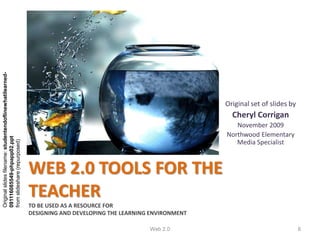
Original slides filename: studentendoflinewhatilearned-


                                                                                                              Original set of slides by
                                                                                                                Cheryl Corrigan
                                                                                                                 November 2009
                                                                                                              Northwood Elementary
091116085549-phpapp02.ppt


                                                                                                                 Media Specialist
from slideshare (repurposed)


                                                          WEB 2.0 TOOLS FOR THE
                                                          TEACHER
                                                          TO BE USED AS A RESOURCE FOR
                                                          DESIGNING AND DEVELOPING THE LEARNING ENVIRONMENT

                                                                                               Web 2.0                                    8
Web 2.0   9
“Any activity becomes CREATIVE
               when the doer CARES
about doing it right,or doing it better.”
                              John Updike


                 Web 2.0                10
Sharing online gives students more of a
                    need to “get it right”


                   Web 2.0               11
Web 2.0 Class Assignment
                     November 9, 2009


 This slideshow represents an attempt to organize and annotate the
21 items I viewed online from Tony Vincent’s “21 Ways to Reach 21st
Century Students,” his presentation at the GETC November 6, 2009.


                              Web 2.0                             12
IMAGES!

• Create online jigsaw, reading poster, magazine cover,
  cartoon. Add frames and text. Resize pictures
  (resizeimages.org) for web page use.
• Speechable.com – add speech bubbles to pics
• READ poster – ala.org
• Chocolate bar www.glassgiant.com/chocolate_bar/
• www.Redkid.net – put image on a hot dog, bowl of
  soup, etc.
• More on next slide …
                          Web 2.0                     13
More IMAGES!

•   Dynamic Einstein picture – place text on b&w chalkboard
•   Wanted poster – glassgiant.com
•   Newspaper clipping – fodey.com
•   Badge maker – bighugelabs.com
•   Befunky.com – fun photo effects
•   Jigsaw puzzle – jigsawplanet.com

Free image sources:
•   Wikimedia commons
•   Openphoto
•   Freefoto
•   Image*after
•   pics4Learning
•   Flickr Creative Commons search
                                     Web 2.0                  14
VIDEOS!
YouTube videos:
• They are in flash (.flv) – you need to convert to a
    different file type and then you can put them on an
    iPod, Powerpoint, or MovieMaker.
• Use Zamzar.com to convert to mpeg-4
    Paste YouTube url into Zamzar. Select format. They will email you the link
     to download.
•    Use RealPlayer to download, but it doesn’t convert
•    Use KickYouTube.com (and others like it)
    Find video. Click “Watch in HD.” Type “kick” in front of url.
Skype – need webcam hookup
                                     Web 2.0                                 15
HIP SLIDESHOWS!


Animoto
• Free 30-second shows – about 12 images
• Upload photos; insert music; show is created
  for you


                      Web 2.0                    16
PECHA KUCHA!


•   Japanese - means “chit chat”
•   20 slides for 20 seconds each
•   Fun and fast-paced presentation
•   Encourages brevity and time for Q&A


                      Web 2.0             17
ZOOMING PRESENTATIONS!


• Prezi.com – a free online zooming editor that zooms
  in and out on details of a slide or video
• Prezi.com/mohshuoe-qcf – Prezi presentation on
  Google search tricks
• http://prezi.com/prezi/27/try/ - learn Prezi in 4
  minutes


                         Web 2.0                        18
CO-CREATING RUBRICS!

Students help design assessment rubrics online
  before a project begins

•   RubiStar
•   Recipes4success
•   Teachnology.com
•   Kathy Shrock’s Guide for Educators

                        Web 2.0                  19
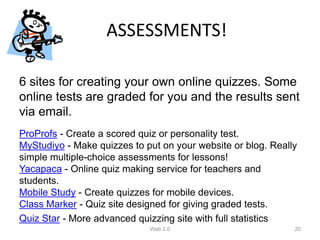
ASSESSMENTS!

6 sites for creating your own online quizzes. Some
online tests are graded for you and the results sent
via email.
ProProfs - Create a scored quiz or personality test.
MyStudiyo - Make quizzes to put on your website or blog. Really
simple multiple-choice assessments for lessons!
Yacapaca - Online quiz making service for teachers and
students.
Mobile Study - Create quizzes for mobile devices.
Class Marker - Quiz site designed for giving graded tests.
Quiz Star - More advanced quizzing site with full statistics
                             Web 2.0                          20
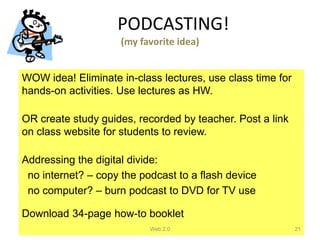
PODCASTING!
                     (my favorite idea)


WOW idea! Eliminate in-class lectures, use class time for
hands-on activities. Use lectures as HW.

OR create study guides, recorded by teacher. Post a link
on class website for students to review.

Addressing the digital divide:
 no internet? – copy the podcast to a flash device
 no computer? – burn podcast to DVD for TV use

Download 34-page how-to booklet
                           Web 2.0                          21
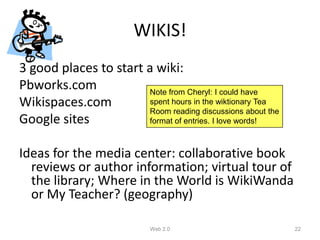
WIKIS!
3 good places to start a wiki:
Pbworks.com            Note from Cheryl: I could have
Wikispaces.com         spent hours in the wiktionary Tea
                       Room reading discussions about the
Google sites           format of entries. I love words!


Ideas for the media center: collaborative book
  reviews or author information; virtual tour of
  the library; Where in the World is WikiWanda
  or My Teacher? (geography)

                            Web 2.0                         22
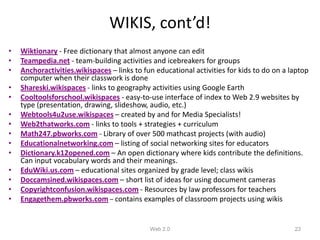
WIKIS, cont’d!
•   Wiktionary - Free dictionary that almost anyone can edit
•   Teampedia.net - team-building activities and icebreakers for groups
•   Anchoractivities.wikispaces – links to fun educational activities for kids to do on a laptop
    computer when their classwork is done
•   Shareski.wikispaces - links to geography activities using Google Earth
•   Cooltoolsforschool.wikispaces - easy-to-use interface of index to Web 2.9 websites by
    type (presentation, drawing, slideshow, audio, etc.)
•   Webtools4u2use.wikispaces – created by and for Media Specialists!
•   Web2thatworks.com - links to tools + strategies + curriculum
•   Math247.pbworks.com - Library of over 500 mathcast projects (with audio)
•   Educationalnetworking.com – listing of social networking sites for educators
•   Dictionary.k12opened.com – An open dictionary where kids contribute the definitions.
    Can input vocabulary words and their meanings.
•   EduWiki.us.com – educational sites organized by grade level; class wikis
•   Doccamsined.wikispaces.com – short list of ideas for using document cameras
•   Copyrightconfusion.wikispaces.com - Resources by law professors for teachers
•   Engagethem.pbworks.com – contains examples of classroom projects using wikis


                                             Web 2.0                                       23
ORGANIZE WEBSITES!

• Diigo
• Deli.ci.ous
• PortaPortal

Websites for teachers:
• Freetech4teachers.com
  includes an ESOL site – “Learn English for Kids”

                       Web 2.0                   24
COLLABORATE!

Documents:
• Googledocs – we have our Media Specialist
  handbook done this way
• Etherpad – no sign-in, real-time collaboration
• Scriblink – write-on whiteboard, real-time


                      Web 2.0                      25
SHARE DATA!

• Google docs is a way to share info with others
• Can share data collection on a shared
  spreadsheet
• Use wufoo.com for shared forms, surveys, and
  invitations


                      Web 2.0                  26
VIRTUAL STICKY NOTES!

Wallwisher = online bulletin board

Students can post notes on prior knowledge, or
  what they have learned, or questions, or a
  critique, …
Wallwisher.com/build
  Select image; title and subtitle; create url or
  leave blank; theme; Done.
                       Web 2.0                      27
GAMES!


• Powerpoint games
• Classroom game templates
• Jeopardylabs.com

Add music from freeplaymusic or
  soundsnap.com

                     Web 2.0      28
COMIC STRIPS!

Can also add speech bubbles to photos – a good language arts
  activity

Places to make comics online:
• Pixton
• Comiqs
• Make Beliefs Comix
• Speechable


                             Web 2.0                           29
TALKING CARTOONS!

• Blabberize - Upload a photo and select the
  mouth. Then record your voice.
• Voki - Create a talking avatar.
• Xtranormal - Type what you want our
  characters to say.
• Gizmoz - Upload a photo and then select
  background and hair.

                      Web 2.0                  30
ONLINE POSTERS!


• Glogster.com – no ink, paper, collaborative.
  Can add video and hyperlinks


                       Web 2.0                   31
Roving Reporters!

Kids take photos and create quick articles about the day’s events
   or a special field trip or activity
Examples:
• The Daily Planet - Tony Vincent's 5th Grade Roving Reporters from 2003-
  2004.
• Fairbury, NE 6th Grade Roving Reporters
• The Daily Blog - 5th graders in California
• The Learning Zone Blog - 4th graders in California
• Graduate Class Log - Roving reporter articles from Handhelds in Teaching
  & Learning.
• Also read their individual blogs.
• Google Docs - A great place for students to type their article and to share
  it with the teacher.
                                     Web 2.0                                    32
LET YOUR STUDENTS DECIDE!
Endless choices of end products:
•   Create a slideshow in PowerPoint, OpenOffice, Google Docs, or SlideRocket.
•   Use Word or a graphics program to design a brochure or poster.
•   Create an interactive game in PowerPoint.
•   Make a presentation using Prezi.
•   Tell a story using Microsoft PhotoStory (free for Windows)
•   Author a comic strip using Comiqs, or Super Action Comic Maker.
•   Make a movie using MovieMaker.
•   Create a narrated slide show using PhotoStory or VoiceThread.
•   Record a radio show using Audacity.
•   Author a website, blog, or wiki. Places to do this include Google Sites, Blogger, and PBwiki.
•   Create a glog, a virtual online poster at Glogster.
•   Combine voice with an image at Blabberize or StoryBlender.
•   Draw an animation using Ajax Animator, Xtranormal, or Aniboom.

                                             Web 2.0                                       33
THE END


          Web 2.0   34

Web 2.0 Technologies

  • 1.
  • 2.
    Learning Outcomes • Describewhat Web 2.0 is • Identify several Web 2.0 tools for teaching and learning • Select the Web 2.0 tools that can be used to enhance teaching and learning Web 2.0 2
  • 3.
    What is Web2.0 Web 2.0 is here (2:15) Web 2.0 3
  • 4.
    Introducing Web 2.0 Whatis Web 2.02? (3:00) Web 2.0 4
  • 5.
    • Think ofone Web 2.0 tool/platform/application that Activity 1 Explaining Web 2.0 you have used. Web 2.0 5
  • 6.
    Poll Web 2.0 tool/platform/application Web 2.0 used Reason Web 2.0 6
  • 7.
    • Go toas many resources as Web 2.0 Tools for the teacher you like (see the next set of Explore, Experiment and Use slides) • Explore, experiment and try to think of how it would work for you and your students Web 2.0 7
  • 8.
    Original slides filename:studentendoflinewhatilearned- Original set of slides by Cheryl Corrigan November 2009 Northwood Elementary 091116085549-phpapp02.ppt Media Specialist from slideshare (repurposed) WEB 2.0 TOOLS FOR THE TEACHER TO BE USED AS A RESOURCE FOR DESIGNING AND DEVELOPING THE LEARNING ENVIRONMENT Web 2.0 8
  • 9.
  • 10.
    “Any activity becomesCREATIVE when the doer CARES about doing it right,or doing it better.” John Updike Web 2.0 10
  • 11.
    Sharing online givesstudents more of a need to “get it right” Web 2.0 11
  • 12.
    Web 2.0 ClassAssignment November 9, 2009 This slideshow represents an attempt to organize and annotate the 21 items I viewed online from Tony Vincent’s “21 Ways to Reach 21st Century Students,” his presentation at the GETC November 6, 2009. Web 2.0 12
  • 13.
    IMAGES! • Create onlinejigsaw, reading poster, magazine cover, cartoon. Add frames and text. Resize pictures (resizeimages.org) for web page use. • Speechable.com – add speech bubbles to pics • READ poster – ala.org • Chocolate bar www.glassgiant.com/chocolate_bar/ • www.Redkid.net – put image on a hot dog, bowl of soup, etc. • More on next slide … Web 2.0 13
  • 14.
    More IMAGES! • Dynamic Einstein picture – place text on b&w chalkboard • Wanted poster – glassgiant.com • Newspaper clipping – fodey.com • Badge maker – bighugelabs.com • Befunky.com – fun photo effects • Jigsaw puzzle – jigsawplanet.com Free image sources: • Wikimedia commons • Openphoto • Freefoto • Image*after • pics4Learning • Flickr Creative Commons search Web 2.0 14
  • 15.
    VIDEOS! YouTube videos: • Theyare in flash (.flv) – you need to convert to a different file type and then you can put them on an iPod, Powerpoint, or MovieMaker. • Use Zamzar.com to convert to mpeg-4 Paste YouTube url into Zamzar. Select format. They will email you the link to download. • Use RealPlayer to download, but it doesn’t convert • Use KickYouTube.com (and others like it) Find video. Click “Watch in HD.” Type “kick” in front of url. Skype – need webcam hookup Web 2.0 15
  • 16.
    HIP SLIDESHOWS! Animoto • Free30-second shows – about 12 images • Upload photos; insert music; show is created for you Web 2.0 16
  • 17.
    PECHA KUCHA! • Japanese - means “chit chat” • 20 slides for 20 seconds each • Fun and fast-paced presentation • Encourages brevity and time for Q&A Web 2.0 17
  • 18.
    ZOOMING PRESENTATIONS! • Prezi.com– a free online zooming editor that zooms in and out on details of a slide or video • Prezi.com/mohshuoe-qcf – Prezi presentation on Google search tricks • http://prezi.com/prezi/27/try/ - learn Prezi in 4 minutes Web 2.0 18
  • 19.
    CO-CREATING RUBRICS! Students helpdesign assessment rubrics online before a project begins • RubiStar • Recipes4success • Teachnology.com • Kathy Shrock’s Guide for Educators Web 2.0 19
  • 20.
    ASSESSMENTS! 6 sites forcreating your own online quizzes. Some online tests are graded for you and the results sent via email. ProProfs - Create a scored quiz or personality test. MyStudiyo - Make quizzes to put on your website or blog. Really simple multiple-choice assessments for lessons! Yacapaca - Online quiz making service for teachers and students. Mobile Study - Create quizzes for mobile devices. Class Marker - Quiz site designed for giving graded tests. Quiz Star - More advanced quizzing site with full statistics Web 2.0 20
  • 21.
    PODCASTING! (my favorite idea) WOW idea! Eliminate in-class lectures, use class time for hands-on activities. Use lectures as HW. OR create study guides, recorded by teacher. Post a link on class website for students to review. Addressing the digital divide: no internet? – copy the podcast to a flash device no computer? – burn podcast to DVD for TV use Download 34-page how-to booklet Web 2.0 21
  • 22.
    WIKIS! 3 good placesto start a wiki: Pbworks.com Note from Cheryl: I could have Wikispaces.com spent hours in the wiktionary Tea Room reading discussions about the Google sites format of entries. I love words! Ideas for the media center: collaborative book reviews or author information; virtual tour of the library; Where in the World is WikiWanda or My Teacher? (geography) Web 2.0 22
  • 23.
    WIKIS, cont’d! • Wiktionary - Free dictionary that almost anyone can edit • Teampedia.net - team-building activities and icebreakers for groups • Anchoractivities.wikispaces – links to fun educational activities for kids to do on a laptop computer when their classwork is done • Shareski.wikispaces - links to geography activities using Google Earth • Cooltoolsforschool.wikispaces - easy-to-use interface of index to Web 2.9 websites by type (presentation, drawing, slideshow, audio, etc.) • Webtools4u2use.wikispaces – created by and for Media Specialists! • Web2thatworks.com - links to tools + strategies + curriculum • Math247.pbworks.com - Library of over 500 mathcast projects (with audio) • Educationalnetworking.com – listing of social networking sites for educators • Dictionary.k12opened.com – An open dictionary where kids contribute the definitions. Can input vocabulary words and their meanings. • EduWiki.us.com – educational sites organized by grade level; class wikis • Doccamsined.wikispaces.com – short list of ideas for using document cameras • Copyrightconfusion.wikispaces.com - Resources by law professors for teachers • Engagethem.pbworks.com – contains examples of classroom projects using wikis Web 2.0 23
  • 24.
    ORGANIZE WEBSITES! • Diigo •Deli.ci.ous • PortaPortal Websites for teachers: • Freetech4teachers.com includes an ESOL site – “Learn English for Kids” Web 2.0 24
  • 25.
    COLLABORATE! Documents: • Googledocs –we have our Media Specialist handbook done this way • Etherpad – no sign-in, real-time collaboration • Scriblink – write-on whiteboard, real-time Web 2.0 25
  • 26.
    SHARE DATA! • Googledocs is a way to share info with others • Can share data collection on a shared spreadsheet • Use wufoo.com for shared forms, surveys, and invitations Web 2.0 26
  • 27.
    VIRTUAL STICKY NOTES! Wallwisher= online bulletin board Students can post notes on prior knowledge, or what they have learned, or questions, or a critique, … Wallwisher.com/build Select image; title and subtitle; create url or leave blank; theme; Done. Web 2.0 27
  • 28.
    GAMES! • Powerpoint games •Classroom game templates • Jeopardylabs.com Add music from freeplaymusic or soundsnap.com Web 2.0 28
  • 29.
    COMIC STRIPS! Can alsoadd speech bubbles to photos – a good language arts activity Places to make comics online: • Pixton • Comiqs • Make Beliefs Comix • Speechable Web 2.0 29
  • 30.
    TALKING CARTOONS! • Blabberize- Upload a photo and select the mouth. Then record your voice. • Voki - Create a talking avatar. • Xtranormal - Type what you want our characters to say. • Gizmoz - Upload a photo and then select background and hair. Web 2.0 30
  • 31.
    ONLINE POSTERS! • Glogster.com– no ink, paper, collaborative. Can add video and hyperlinks Web 2.0 31
  • 32.
    Roving Reporters! Kids takephotos and create quick articles about the day’s events or a special field trip or activity Examples: • The Daily Planet - Tony Vincent's 5th Grade Roving Reporters from 2003- 2004. • Fairbury, NE 6th Grade Roving Reporters • The Daily Blog - 5th graders in California • The Learning Zone Blog - 4th graders in California • Graduate Class Log - Roving reporter articles from Handhelds in Teaching & Learning. • Also read their individual blogs. • Google Docs - A great place for students to type their article and to share it with the teacher. Web 2.0 32
  • 33.
    LET YOUR STUDENTSDECIDE! Endless choices of end products: • Create a slideshow in PowerPoint, OpenOffice, Google Docs, or SlideRocket. • Use Word or a graphics program to design a brochure or poster. • Create an interactive game in PowerPoint. • Make a presentation using Prezi. • Tell a story using Microsoft PhotoStory (free for Windows) • Author a comic strip using Comiqs, or Super Action Comic Maker. • Make a movie using MovieMaker. • Create a narrated slide show using PhotoStory or VoiceThread. • Record a radio show using Audacity. • Author a website, blog, or wiki. Places to do this include Google Sites, Blogger, and PBwiki. • Create a glog, a virtual online poster at Glogster. • Combine voice with an image at Blabberize or StoryBlender. • Draw an animation using Ajax Animator, Xtranormal, or Aniboom. Web 2.0 33
  • 34.
    THE END Web 2.0 34