Web2.0 tools What’s the use? Kristyn Paul 2010
What this presentation will cover … Web 2.0 - What is it? Web 1.0 vs. Web 2.0  Examples of collaborative tools Blogs Wikis Bookmarking sites Web2.0 tools for the languages classroom Speaking tools Writing tools Listening tools Online games Vocabulary acquisition
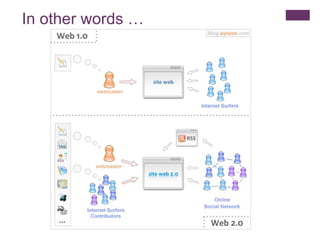
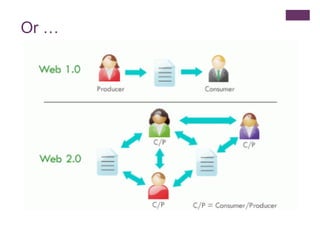
What is it? Some definitions of web2.0: The second generation of the World Wide Web, especially the movement away from static webpages (web1.0) to dynamic and shareable content and social networking. Web2.0 (2004-present) is commonly associated with web applications that facilitate interactive information sharing, interoperability, user-centred design, and collaboration on the World Wide Web.  Web2.0 does not refer to any specific change in the technology of the Internet, but rather the behaviour of how people use the Internet.  Web2.0 enables people with no specialized technical knowledge to create their own websites, to self-publish, create and upload audio and video files, share photos and information and complete a variety of other tasks.
In other words …
Or …
Web 2.0 The read / write web You’ve probably used some Web2.0 Tools already!
Which of these have you used? Flickr Gmail Google Maps Wikipedia Facebook Ning  Moodle
Blogs … Let’s look at some examples of web2.0 tools …
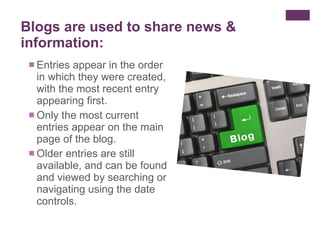
Entries appear in the order in which they were created, with the most recent entry appearing first.  Only the most current entries appear on the main page of the blog. Older entries are still available, and can be found and viewed by searching or navigating using the date controls.  Blogs are used to share news & information:
Wikis …
So, what is a wiki? A wiki  contains shared content that doesn't appear in chronological order.  The best known example is Wikipedia
Use wikis to build learning communities:  Students can work on different aspects of the same task. Separate pages can be readily linked together.  Students can contribute to and rework shared content. Wikis are used for group collaboration:
What’s the difference between a wiki and a blog?
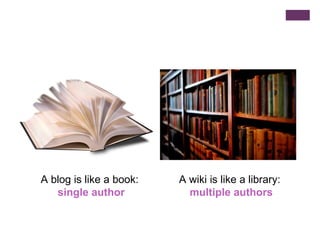
A blog is like a book:  single author A wiki is like a library:  multiple authors
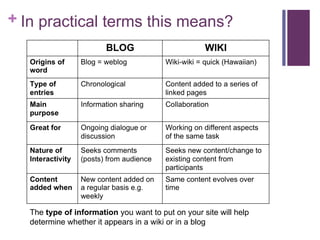
In practical terms this means? The  type of information  you want to put on your site will help determine whether it appears in a wiki or in a blog
Security Both blogs and wikis have in-built  access controls  to determine who can read and write to the blog/wiki. With wikis, many teachers fear that students will destroy the content on a page – but you can always revert to previous saved copies!
Some practical suggestions … Use a blog and wiki yourself  Decide on your purpose for using a blog/wiki  Check out other blogs/wikis  Analyse the genre in class Make the rules & expectations explicit Make the blog/wiki public
Suggested uses for a wiki Collaborative task between your school and a sister school – e.g. exchange of cultural information Wiki created for a given class – teacher posts links, assignment tasks, documents etc Students contribute to the content of the wiki Students/teacher  embed  directly into the Wiki: Youtube clips Podcasts Avatar (using Voki) Interactive posters (using Glogster)  PowerPoint presentations (using Slideshare)
Some concrete examples … http://kristynpaul.edublogs.org/ http://web2-4languageteachers.wikispaces.com/
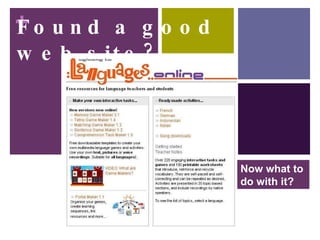
Found a good web site? Now what to do with it?
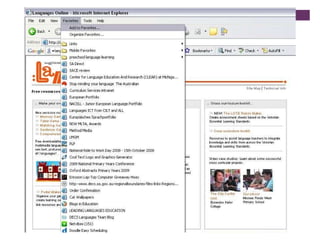
Bookmark it?  Flickr photo by  Here’s Kate
Save it for later?
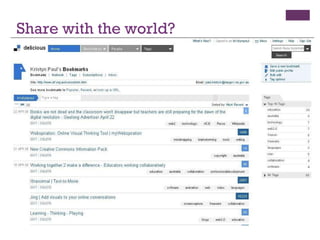
Or share them with the world Share with the world?
Benefits of social bookmarking Bookmarking sites for later is a great idea but you need time to organise your favorites or you’ll just end up with a long list. What happens when you are at work and the link you want is on your home computer?  Putting this bookmark on a social bookmarking site means you can access it from any device with an internet connection. The use of tags means that you can quickly narrow down your search for a saved bookmark. Even better, you can share your web addresses with people who have similar interests to you! Check out my links:  http://delicious.com/kristynpaul
A sample of useful web2.0 tools for the languages classroom … Speaking tools Writing tools Listening tools Online games Vocabulary acquisition
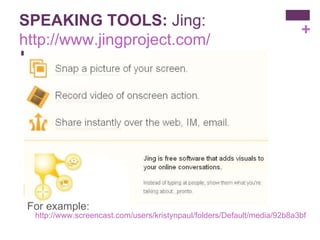
SPEAKING TOOLS:  Jing: http://www.jingproject.com/ For example:  http://www.screencast.com/users/kristynpaul/folders/Default/media/92b8a3bf-0889-40e7-b33a-96ffd6c175f7
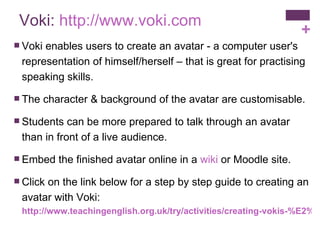
Voki:  http://www.voki.com Voki enables users to create an avatar - a computer user's representation of himself/herself – that is great for practising speaking skills.  The character & background of the avatar are customisable. Students can be more prepared to talk through an avatar than in front of a live audience.  Embed the finished avatar online in a  wiki  or Moodle site. Click on the link below for a step by step guide to creating an avatar with Voki: http://www.teachingenglish.org.uk/try/activities/creating-vokis-%E2%80%93-online-animated-characters-speak
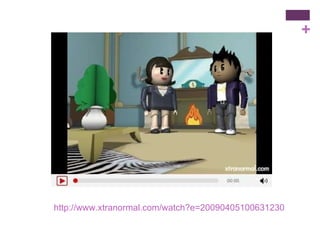
WRITING TOOLS:  Xtranormal:  http://www.xtranormal.com The website claims “If you can type, you can make movies…” Students select the characters, setting and language for the digitised speech (male & female voices) and then type the text (or cut and paste from a pre-prepared Word document). They then select the camera angles and put in actions. The finished movie can be embedded in a website or uploaded to uTube.
http://www.xtranormal.com/watch?e=20090405100631230
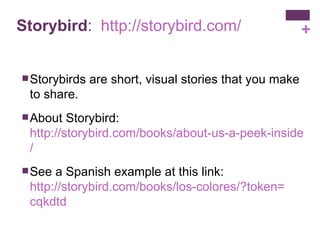
Storybird :  http:// storybird.com / Storybirds are short, visual stories that you make to share.  About Storybird:  http://storybird.com/books/about-us-a-peek-inside-storybird / See a Spanish example at this link:  http://storybird.com/books/los-colores/?token = cqkdtd
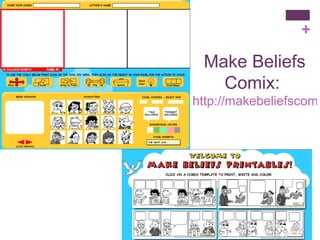
Make Beliefs Comix:  http://makebeliefscomix.com/
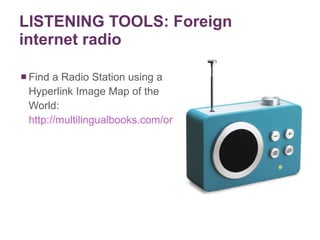
LISTENING TOOLS: Foreign internet radio Find a Radio Station using a Hyperlink Image Map of the World:  http://multilingualbooks.com/online-radio.html
Podcasts …
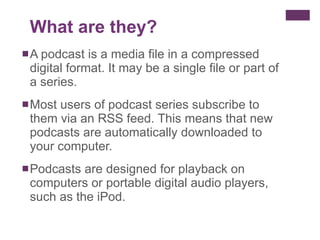
A podcast is a media file in a compressed digital format. It may be a single file or part of a series. Most users of podcast series subscribe to them via an RSS feed. This means that new podcasts are automatically downloaded to your computer. Podcasts are designed for playback on computers or portable digital audio players, such as the iPod. What are they?
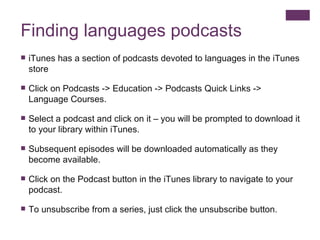
Finding languages podcasts iTunes has a section of podcasts devoted to languages in the iTunes store Click on Podcasts -> Education -> Podcasts Quick Links -> Language Courses.  Select a podcast and click on it – you will be prompted to download it to your library within iTunes. Subsequent episodes will be downloaded automatically as they become available. Click on the Podcast button in the iTunes library to navigate to your podcast. To unsubscribe from a series, just click the unsubscribe button.
Making your own podcasts You or your students can create your own podcasts, e.g. ‘ Listening vocab’ lists  Weekly news Stories Oral presentations etc Record your podcast using a free program such as  Audacity  ( download for Mac/PC) or GarageBand (already on Mac) - open a new project and press record. Upload the finished podcasts to a podcast site such as  http :// www.podomatic.com Embed the podcast in your class wiki/Moodle etc
ONLINE “GAMES” NB with all game sites, think of the  purpose  of the activity Integrate  each game into the learning program so that students are practising vocabulary related to the topic at hand Don’t just use games as ‘ time fillers ’ – used purposefully, games can add tremendous value to the learning program
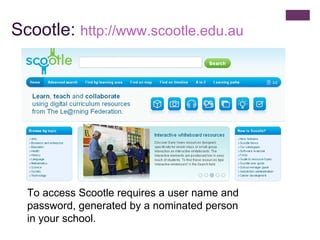
Scootle:  http:// www.scootle.edu.au To access Scootle requires a user name and password, generated by a nominated person in your school.
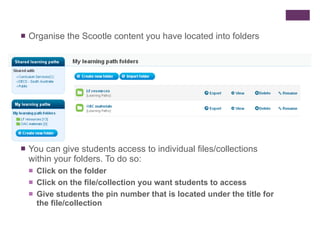
Organise the Scootle content you have located into folders You can give students access to individual files/collections within your folders. To do so: Click on the folder Click on the file/collection you want students to access Give students the pin number that is located under the title for the file/collection
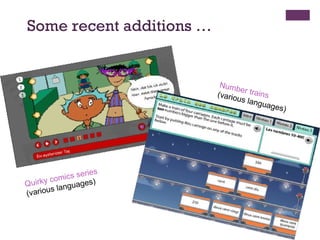
Some recent additions … Quirky comics series  (various languages) Number trains  (various languages)
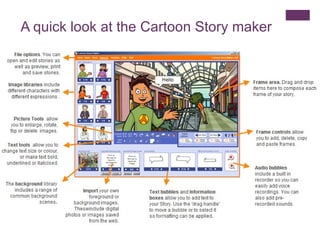
Languages online:  http:// www.education.vic.gov.au/languagesonline / Free Victorian resource.  Make your own interactive games or select from some ready-made activities in Chinese, French, German, Indonesian and Italian.  A new and engaging addition to this site is Cartoon Story, a downloadable program for Windows XP, Vista or Windows 7.  Look at the examples for ideas.
A quick look at the Cartoon Story maker
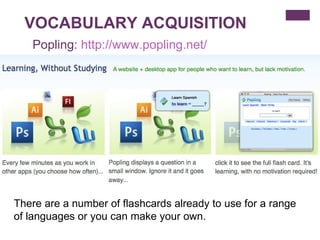
VOCABULARY ACQUISITION There are a number of flashcards already to use for a range of languages or you can make your own. Popling:  http:// www.popling.net /
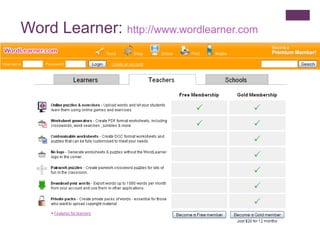
Word Learner:  http:// www.wordlearner.com
Download this presentation from  SlideShare Go to SlideShare:  http://www.slideshare.net   Search for this presentation:  Web2.0 tools for languages teachers

Web2.0 tools for languages teachers

  • 1.
    Web2.0 tools What’sthe use? Kristyn Paul 2010
  • 2.
    What this presentationwill cover … Web 2.0 - What is it? Web 1.0 vs. Web 2.0 Examples of collaborative tools Blogs Wikis Bookmarking sites Web2.0 tools for the languages classroom Speaking tools Writing tools Listening tools Online games Vocabulary acquisition
  • 3.
    What is it?Some definitions of web2.0: The second generation of the World Wide Web, especially the movement away from static webpages (web1.0) to dynamic and shareable content and social networking. Web2.0 (2004-present) is commonly associated with web applications that facilitate interactive information sharing, interoperability, user-centred design, and collaboration on the World Wide Web. Web2.0 does not refer to any specific change in the technology of the Internet, but rather the behaviour of how people use the Internet. Web2.0 enables people with no specialized technical knowledge to create their own websites, to self-publish, create and upload audio and video files, share photos and information and complete a variety of other tasks.
  • 4.
  • 5.
  • 6.
    Web 2.0 Theread / write web You’ve probably used some Web2.0 Tools already!
  • 7.
    Which of thesehave you used? Flickr Gmail Google Maps Wikipedia Facebook Ning Moodle
  • 8.
    Blogs … Let’slook at some examples of web2.0 tools …
  • 9.
    Entries appear inthe order in which they were created, with the most recent entry appearing first. Only the most current entries appear on the main page of the blog. Older entries are still available, and can be found and viewed by searching or navigating using the date controls. Blogs are used to share news & information:
  • 10.
  • 11.
    So, what isa wiki? A wiki contains shared content that doesn't appear in chronological order. The best known example is Wikipedia
  • 12.
    Use wikis tobuild learning communities: Students can work on different aspects of the same task. Separate pages can be readily linked together. Students can contribute to and rework shared content. Wikis are used for group collaboration:
  • 13.
    What’s the differencebetween a wiki and a blog?
  • 14.
    A blog islike a book: single author A wiki is like a library: multiple authors
  • 15.
    In practical termsthis means? The type of information you want to put on your site will help determine whether it appears in a wiki or in a blog
  • 16.
    Security Both blogsand wikis have in-built access controls to determine who can read and write to the blog/wiki. With wikis, many teachers fear that students will destroy the content on a page – but you can always revert to previous saved copies!
  • 17.
    Some practical suggestions… Use a blog and wiki yourself Decide on your purpose for using a blog/wiki Check out other blogs/wikis Analyse the genre in class Make the rules & expectations explicit Make the blog/wiki public
  • 18.
    Suggested uses fora wiki Collaborative task between your school and a sister school – e.g. exchange of cultural information Wiki created for a given class – teacher posts links, assignment tasks, documents etc Students contribute to the content of the wiki Students/teacher embed directly into the Wiki: Youtube clips Podcasts Avatar (using Voki) Interactive posters (using Glogster) PowerPoint presentations (using Slideshare)
  • 19.
    Some concrete examples… http://kristynpaul.edublogs.org/ http://web2-4languageteachers.wikispaces.com/
  • 20.
    Found a goodweb site? Now what to do with it?
  • 21.
    Bookmark it? Flickr photo by Here’s Kate
  • 22.
  • 23.
    Or share themwith the world Share with the world?
  • 24.
    Benefits of socialbookmarking Bookmarking sites for later is a great idea but you need time to organise your favorites or you’ll just end up with a long list. What happens when you are at work and the link you want is on your home computer? Putting this bookmark on a social bookmarking site means you can access it from any device with an internet connection. The use of tags means that you can quickly narrow down your search for a saved bookmark. Even better, you can share your web addresses with people who have similar interests to you! Check out my links: http://delicious.com/kristynpaul
  • 25.
    A sample ofuseful web2.0 tools for the languages classroom … Speaking tools Writing tools Listening tools Online games Vocabulary acquisition
  • 26.
    SPEAKING TOOLS: Jing: http://www.jingproject.com/ For example: http://www.screencast.com/users/kristynpaul/folders/Default/media/92b8a3bf-0889-40e7-b33a-96ffd6c175f7
  • 27.
    Voki: http://www.voki.comVoki enables users to create an avatar - a computer user's representation of himself/herself – that is great for practising speaking skills. The character & background of the avatar are customisable. Students can be more prepared to talk through an avatar than in front of a live audience. Embed the finished avatar online in a wiki or Moodle site. Click on the link below for a step by step guide to creating an avatar with Voki: http://www.teachingenglish.org.uk/try/activities/creating-vokis-%E2%80%93-online-animated-characters-speak
  • 28.
    WRITING TOOLS: Xtranormal: http://www.xtranormal.com The website claims “If you can type, you can make movies…” Students select the characters, setting and language for the digitised speech (male & female voices) and then type the text (or cut and paste from a pre-prepared Word document). They then select the camera angles and put in actions. The finished movie can be embedded in a website or uploaded to uTube.
  • 29.
  • 30.
    Storybird : http:// storybird.com / Storybirds are short, visual stories that you make to share. About Storybird: http://storybird.com/books/about-us-a-peek-inside-storybird / See a Spanish example at this link: http://storybird.com/books/los-colores/?token = cqkdtd
  • 31.
    Make Beliefs Comix: http://makebeliefscomix.com/
  • 32.
    LISTENING TOOLS: Foreigninternet radio Find a Radio Station using a Hyperlink Image Map of the World: http://multilingualbooks.com/online-radio.html
  • 33.
  • 34.
    A podcast isa media file in a compressed digital format. It may be a single file or part of a series. Most users of podcast series subscribe to them via an RSS feed. This means that new podcasts are automatically downloaded to your computer. Podcasts are designed for playback on computers or portable digital audio players, such as the iPod. What are they?
  • 35.
    Finding languages podcastsiTunes has a section of podcasts devoted to languages in the iTunes store Click on Podcasts -> Education -> Podcasts Quick Links -> Language Courses. Select a podcast and click on it – you will be prompted to download it to your library within iTunes. Subsequent episodes will be downloaded automatically as they become available. Click on the Podcast button in the iTunes library to navigate to your podcast. To unsubscribe from a series, just click the unsubscribe button.
  • 36.
    Making your ownpodcasts You or your students can create your own podcasts, e.g. ‘ Listening vocab’ lists Weekly news Stories Oral presentations etc Record your podcast using a free program such as Audacity ( download for Mac/PC) or GarageBand (already on Mac) - open a new project and press record. Upload the finished podcasts to a podcast site such as http :// www.podomatic.com Embed the podcast in your class wiki/Moodle etc
  • 37.
    ONLINE “GAMES” NBwith all game sites, think of the purpose of the activity Integrate each game into the learning program so that students are practising vocabulary related to the topic at hand Don’t just use games as ‘ time fillers ’ – used purposefully, games can add tremendous value to the learning program
  • 38.
    Scootle: http://www.scootle.edu.au To access Scootle requires a user name and password, generated by a nominated person in your school.
  • 39.
    Organise the Scootlecontent you have located into folders You can give students access to individual files/collections within your folders. To do so: Click on the folder Click on the file/collection you want students to access Give students the pin number that is located under the title for the file/collection
  • 40.
    Some recent additions… Quirky comics series (various languages) Number trains (various languages)
  • 41.
    Languages online: http:// www.education.vic.gov.au/languagesonline / Free Victorian resource. Make your own interactive games or select from some ready-made activities in Chinese, French, German, Indonesian and Italian. A new and engaging addition to this site is Cartoon Story, a downloadable program for Windows XP, Vista or Windows 7. Look at the examples for ideas.
  • 42.
    A quick lookat the Cartoon Story maker
  • 43.
    VOCABULARY ACQUISITION Thereare a number of flashcards already to use for a range of languages or you can make your own. Popling: http:// www.popling.net /
  • 44.
    Word Learner: http:// www.wordlearner.com
  • 45.
    Download this presentationfrom SlideShare Go to SlideShare: http://www.slideshare.net Search for this presentation: Web2.0 tools for languages teachers

Editor's Notes

  • #21 So once you’ve found more people to connect to and come across interesting, funny and even useful sites, what do you do with it?
  • #22 This is what I used to do…
  • #24 Delicious is a social bookmarking site. A place to store & share your bookmarks. When you save a bookmark you attach tags to it – words you identify with the site for easy referencing later. So a site that allows you to create language games – you might tag with ‘language’ ‘japanese’ ‘games’ or even ‘generator’.