Technology
Integration in
the elementary
classroom
 Presented by
 Patti Wyatt ESC 15
 San Felipe Del Rio
 CISD
 October 26, 2011
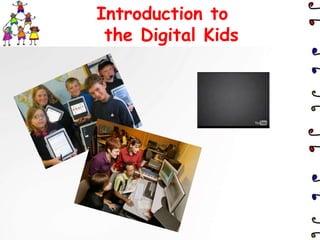
Introduction to
 the Digital Kids
Inexpensive Ways to
Integrate Technology to
Enhance Curriculum

         . . . or, how to connect
            with your students on
            a consistent basis.
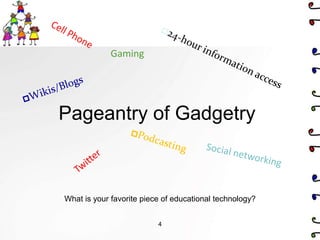
Gaming


Pageantry of Gadgetry


What is your favorite piece of educational technology?


                          4
Why Integrate Technology?
• Digital Native Map

• Students learn best when they are engaged with what they are
  studying, when they are making decisions, when they are thinking
  critically—(technology in any classroom encourages this).

• ―Preparing our students not only to be digitally savvy, but
  leveraging these technologies to help them create, communicate,
  connect and collaborate will prepare them to be contributing
  citizens to their future.‖ The Super Book of Web Tools for
  Educators

• ―Your students are going to use this technology either because of
  you, or in spite of you.‖ The Super Book of Web Tools for
  Educators                       5
Technology in the Classroom
Consider the following points as you plan to
incorporate technology into a classroom or school:

Technology. . .
• is a tool, not an end in and of itself.
• can be an advantage or an abused.
• is a channel for accessing information.
• reaches student’s learning styles.
• provides amazing new channels for communications.
• can be fun; sometimes it is edutainment.
AND
• is a heavy investment of capital outlay dollars and requires
  substantial cost to upgrade and to keep operational.
• is extremely difficult to justify if it lies unused or becomes
  outmoded.
Focus for Today

1. To give you ideas for integration
2. To share free websites and tools that can
   enhance curriculum
3. To motivate you to use technology in your
   lessons


                                               7
The Hat

Classroom Applications
•    Who should I call on??? Let the Hat determine. Keeps
     students ready with an answer. . .
•    Creates attentiveness
•    Random selection of pairs

    http://download.cnet.com/The-Hat/3000-2132_4-
    10074565.html?tag=recommendedDownloads
    (Avoid installing the Harmony Hollow Toolbar)
    Show ―The Hat‖


                                                            8
Cool Timer

Classroom application:
•   Teacher at beginning of hour puts up three review
    questions from the previous day’s learning, students must
    answer the questions with or without help from fellow
    students before the timer ends. Gets students to the
    room and ready to learn.
•   Time students as they work on a project
•   Time student s to come back together to start a new
    activity

    http://download.cnet.com/Cool-Timer/3000-2350_4-
    10062255.html
    (Avoid installing the Harmony Hollow Toolbar)
    Show Cool Timer

                                       9
Website Online Storage

Site for easily storing, accessing and sharing all of your
favorite sites.
Classroom Applications:
• Save and organize sites for a unit or topic
• Students could use a previewed hotlist of resources
• Share curricular sites with colleagues

 Diigo: http://www.diigo.com (furl absorbed by Diigo)
 Copy and organize anything
 (bookmarks, highlights, notes, screenshots, pictures, articles, bibliographie
 s), access anywhere, share with others.

 Diigo tutorial: http://www.slideshare.net/cliotech/diigo-tutorial-presentation
 De.lici.ous: http://delicious.com/
 I Keep Bookmarks: http://www.ikeepbookmarks.com/
                                        10
Diigo Educator Features

• Create student accounts for an
  entire class with just a few clicks
• Students of the same class are automatically set
  up as a Diigo group, such as group bookmarks
  and annotations.
• Privacy settings of student accounts are pre-set
  so that only teachers and classmates can
  communicate with them.
• Examples…Debate, foreign language
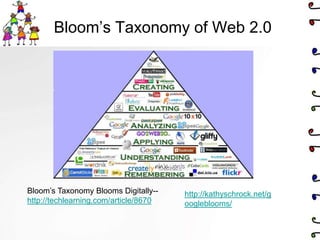
Bloom’s Taxonomy of Web 2.0


Bloom’s Taxonomy Blooms Digitally--    http://kathyschrock.net/g
http://techlearning.com/article/8670   oogleblooms/
VoiceThread

Classroom Applications:
• Share images and create
  conversations
• Communicate on line
• Use of online audio
  communication

www.voicethread.com
Example
                            13
Integration ideas
Classroom Applications:
• Post presentations online for
  students to view later
• Save class time

Brain Shark
https://my.brainshark.com
Example

Slide Share http://www.slideshare.net
Avatars
Classroom Applications:
• Creative announcements or messages
• Used for student presentations

Voki http://www.voki.com/ (Recorded voice)
  Example 1 Example 2

Xtranormal http://www.xtranormal.com/
  (text to speech) Example
                                             15
Creating Books Online

Classroom Applications:
• Creative writing
• Summaries or reviews
• Publishing and sharing ideas

ToonDoo http://www.toondoo.com/ Example
Tikatok http://www.tikatok.com/
Comic Creator
   http://www.readwritethink.org/files/resources/interactives/comic
Bookr www.pimpampum.net/bookr (all pictures must be in flickr)


                                   16
Online Scrapbooks

• Glogster – www.glogster.com
   • Example
   • http://www.teachertrainingvideos.com/

• Tagxedo – www.tagxedo.com
   • word cloud with shape, can even add photos
     (Must download Microsoft Silverlight)

• Wordle - www.wordle.net

• Image Chef -
  http://www.imagechef.com/ic/word_mosaic/
Timeline Generators
Classroom Applications:
• Brainstorm an idea with individual or class
• Organize thoughts
• Capture ideas
• Historical events

   TimeGlider: http://timeglider.com/    Example

   Student Interactive Timeline:
     http://www.readwritethink.org/classroom-resources/student-
     interactives/timeline-30007.html

   Excel Timeline:
   http://www.vertex42.com/ExcelTemplates/timeline.html

   Links to many timeline generators: http://www.squidoo.com/how-to-
   make-a-timeline                18
Podcasting/Vodcasting
Classroom Applications:
   • Assist auditory learners
   • Facilitate material review
   • Deliver online lectures
   • Provide supplementary content

Audacity: a free, open source software for recording and editing sounds.
http://audacity.sourceforge.net/
       Lame encoder allows Audacity to export MP3 files.
       http://lame.sourceforge.net/download.php

Audacity tutorial http://www.how-to-podcast-tutorial.com/17-audacity-tutorial.htm

Itunes u – Emerging Technologies in the Classroom

   Examples: Book Reviews, Campaign Videos, This I Believe

                                      19
Webcams
Classroom Applications:
• Interact with the community – webcam from location
    to a classroom
• Communicate with your class when you are gone
• Interact with students on homebound
• Communicate with other schools during PLC
• Interact (talk using microphone, chat free with anyone – even
   internationally)

www.skype.com (2 video participants, 24 audio participants)
me.tokbox.com (up to 20 participants)
www.dimdim.com (collaborate, share documents, white board, even
      record session)
www.stickam.com (stream live video on the internet)
                                 20
Graphic Organizers
Classroom Applications:
• Brainstorm an idea with individual or class
• Organize thoughts
• Capture ideas


   Webspiration:
    http://www.mywebspiration.com/
     Example

   Mindmeister: http://www.mindmeister.com/

   Bubble.us: http://bubbl.us
                             21
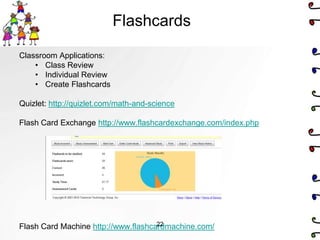
Flashcards

Classroom Applications:
    • Class Review
    • Individual Review
    • Create Flashcards

Quizlet: http://quizlet.com/math-and-science

Flash Card Exchange http://www.flashcardexchange.com/index.php


                                     22
Flash Card Machine http://www.flashcardmachine.com/
Quizzes

Classroom Applications:
• Provides interactive and collaborative review sessions
• Allows individual practice and drill in a non-threatening
   environment
• Allows another avenue of review and study for various learning
   styles
• Allows anywhere/anytime review if activities are online

Quizstar: http://quizstar.4teachers.org/

Quiz Revolutions: http://www.mystudiyo.com/

Other quiz programs: http://www.techlearning.com/blogs/31494
                                                                   23
Templates of All Kinds


Templates of all kinds
  http://officeupdate.microsoft.com/TemplateGallery/

Recognize student work with pre-designed certificates
http://www.123certificates.com/

http://www.dyetub.com/certificates/traditional/


                             24
Survey & Polls (Free)
Classroom Applications:
• Source for survey data
• Lesson plan on graphing
• Source for gathering opinions on current events or curricular issues
• Interdisciplinary projects involving a group of teachers
• Pretests
• Brainstorming prior to reading
   www.surveykey.com (100 people, 10 questions, up to 30 days)
   www.zoomerang.com (100 people, up to 10 days)
   www.surveymonkey.com (100 people, 10 questions)
   www.polleverywhere.com (audience response system that uses
   mobile phones, twitter, and the web)
   GoogleDoc Forms – must create account, no restrictions, results in
   spreadsheet or graph form. Example
                                  25
Creating Movies
Classroom Applications:
• Create a video presentation for any curricular area
• Explain or demonstrate concepts


MovieMaker – http://explore.live.com/windows-live-movie-maker-get-
  started With Windows Live Movie Maker, you can quickly turn your
  photos and videos into polished movies. Add special effects,
  transitions, sound, and captions to help tell your story. And sharing
  with friends and family is easy—whether on the web, a computer, TV,
  mobile device, or a DVD.*

Animoto www.animoto.com Takes photos, video clips and music and
   automatically creates completely unique video slideshows. Example


                                      26
Rubrics
Classroom Applications:
• Evaluate student projects
• Student evaluation/rubric

http://rubistar.4teachers.org/index.php a free tool to help the teacher
   who wants to use quality rubrics but does not have the time to
   develop them from scratch.

http://www.teach-nology.com/web_tools/rubrics/general/ Contains
   numerous rubrics that are linked by categories and concepts.

http://myt4l.com/index.php?v=pl&page_ac=view&type=tools site to
   create rubrics and more


                                   27
Thinkfinity: Great Classroom
                          Resource
Access to high-quality, standards-based lesson plans, student
activities, reviewed websites and other resources

Classroom Applications:

•   Teacher tool used to create reviews for standardized testing and higher-
    level thinking applications
•   Lesson plan library
•   Resources for online and traditional research
•   Previewed (by teachers) Internet resources

Thinkfinity Lesson Plans and Interactive Resources
    http://www.thinkfinity.org/


                                      28
Ideas for Halloween

                             www.thinkfinity.org/bump-in-
                             the-night


Carve a virtual pumpkin!
http://www.theoworlds.com/
halloween/
MSOffice Productivity
Classroom Applications

• Teacher/peer editing
• Grading projects created in Word documents


Comments (Word) – Under the Review Tab
2007-2010- http://office.microsoft.com/en-us/word-help/insert-or-delete-
  a-comment-HA001219010.aspx


                                                                           30
Other Resources

Other good technology sites:

   • Lee’s Summit Technology
   http://its.leesummit.k12.mo.us/
   • Olathe
   http://online.olatheschools.com/depts/irc/
   • Cool Tools for Teachers
   http://cooltoolsforschools.wikispaces.com/
   • Discovery Education Web 20.11
   http://web2011.discoveryeducation.com/
   • Go 2 Web 2.0
   http://www.go2web20.net/
Recognizing Obstacles

Why don’t teachers integrate technology:

•   Time--it takes too much time
•   Fear - students will know more than I do
•   Money
•   Equipment


― The greater the stress associated with the activity,
  the smaller the cadre of teachers willing to give such
  activities a try.‖ Jamie McKenzie, Nov. FNO
  (http://fno.org)

                Don’t let this be YOU!!!
                                32
Your Challenge

1. Use one thing you learned today in
   the next week.

2. Share what you learned today with
   your colleagues (become a
   technology leader).


                        34

Technology integration elementary

  • 1.
    Technology Integration in the elementary classroom Presented by Patti Wyatt ESC 15 San Felipe Del Rio CISD October 26, 2011
  • 2.
    Introduction to theDigital Kids
  • 3.
    Inexpensive Ways to IntegrateTechnology to Enhance Curriculum . . . or, how to connect with your students on a consistent basis.
  • 4.
    Gaming Pageantry of Gadgetry Whatis your favorite piece of educational technology? 4
  • 5.
    Why Integrate Technology? •Digital Native Map • Students learn best when they are engaged with what they are studying, when they are making decisions, when they are thinking critically—(technology in any classroom encourages this). • ―Preparing our students not only to be digitally savvy, but leveraging these technologies to help them create, communicate, connect and collaborate will prepare them to be contributing citizens to their future.‖ The Super Book of Web Tools for Educators • ―Your students are going to use this technology either because of you, or in spite of you.‖ The Super Book of Web Tools for Educators 5
  • 6.
    Technology in theClassroom Consider the following points as you plan to incorporate technology into a classroom or school: Technology. . . • is a tool, not an end in and of itself. • can be an advantage or an abused. • is a channel for accessing information. • reaches student’s learning styles. • provides amazing new channels for communications. • can be fun; sometimes it is edutainment. AND • is a heavy investment of capital outlay dollars and requires substantial cost to upgrade and to keep operational. • is extremely difficult to justify if it lies unused or becomes outmoded.
  • 7.
    Focus for Today 1.To give you ideas for integration 2. To share free websites and tools that can enhance curriculum 3. To motivate you to use technology in your lessons 7
  • 8.
    The Hat Classroom Applications • Who should I call on??? Let the Hat determine. Keeps students ready with an answer. . . • Creates attentiveness • Random selection of pairs http://download.cnet.com/The-Hat/3000-2132_4- 10074565.html?tag=recommendedDownloads (Avoid installing the Harmony Hollow Toolbar) Show ―The Hat‖ 8
  • 9.
    Cool Timer Classroom application: • Teacher at beginning of hour puts up three review questions from the previous day’s learning, students must answer the questions with or without help from fellow students before the timer ends. Gets students to the room and ready to learn. • Time students as they work on a project • Time student s to come back together to start a new activity http://download.cnet.com/Cool-Timer/3000-2350_4- 10062255.html (Avoid installing the Harmony Hollow Toolbar) Show Cool Timer 9
  • 10.
    Website Online Storage Sitefor easily storing, accessing and sharing all of your favorite sites. Classroom Applications: • Save and organize sites for a unit or topic • Students could use a previewed hotlist of resources • Share curricular sites with colleagues Diigo: http://www.diigo.com (furl absorbed by Diigo) Copy and organize anything (bookmarks, highlights, notes, screenshots, pictures, articles, bibliographie s), access anywhere, share with others. Diigo tutorial: http://www.slideshare.net/cliotech/diigo-tutorial-presentation De.lici.ous: http://delicious.com/ I Keep Bookmarks: http://www.ikeepbookmarks.com/ 10
  • 11.
    Diigo Educator Features •Create student accounts for an entire class with just a few clicks • Students of the same class are automatically set up as a Diigo group, such as group bookmarks and annotations. • Privacy settings of student accounts are pre-set so that only teachers and classmates can communicate with them. • Examples…Debate, foreign language
  • 12.
    Bloom’s Taxonomy ofWeb 2.0 Bloom’s Taxonomy Blooms Digitally-- http://kathyschrock.net/g http://techlearning.com/article/8670 oogleblooms/
  • 13.
    VoiceThread Classroom Applications: • Shareimages and create conversations • Communicate on line • Use of online audio communication www.voicethread.com Example 13
  • 14.
    Integration ideas Classroom Applications: •Post presentations online for students to view later • Save class time Brain Shark https://my.brainshark.com Example Slide Share http://www.slideshare.net
  • 15.
    Avatars Classroom Applications: • Creativeannouncements or messages • Used for student presentations Voki http://www.voki.com/ (Recorded voice) Example 1 Example 2 Xtranormal http://www.xtranormal.com/ (text to speech) Example 15
  • 16.
    Creating Books Online ClassroomApplications: • Creative writing • Summaries or reviews • Publishing and sharing ideas ToonDoo http://www.toondoo.com/ Example Tikatok http://www.tikatok.com/ Comic Creator http://www.readwritethink.org/files/resources/interactives/comic Bookr www.pimpampum.net/bookr (all pictures must be in flickr) 16
  • 17.
    Online Scrapbooks • Glogster– www.glogster.com • Example • http://www.teachertrainingvideos.com/ • Tagxedo – www.tagxedo.com • word cloud with shape, can even add photos (Must download Microsoft Silverlight) • Wordle - www.wordle.net • Image Chef - http://www.imagechef.com/ic/word_mosaic/
  • 18.
    Timeline Generators Classroom Applications: •Brainstorm an idea with individual or class • Organize thoughts • Capture ideas • Historical events TimeGlider: http://timeglider.com/ Example Student Interactive Timeline: http://www.readwritethink.org/classroom-resources/student- interactives/timeline-30007.html Excel Timeline: http://www.vertex42.com/ExcelTemplates/timeline.html Links to many timeline generators: http://www.squidoo.com/how-to- make-a-timeline 18
  • 19.
    Podcasting/Vodcasting Classroom Applications: • Assist auditory learners • Facilitate material review • Deliver online lectures • Provide supplementary content Audacity: a free, open source software for recording and editing sounds. http://audacity.sourceforge.net/ Lame encoder allows Audacity to export MP3 files. http://lame.sourceforge.net/download.php Audacity tutorial http://www.how-to-podcast-tutorial.com/17-audacity-tutorial.htm Itunes u – Emerging Technologies in the Classroom Examples: Book Reviews, Campaign Videos, This I Believe 19
  • 20.
    Webcams Classroom Applications: • Interactwith the community – webcam from location to a classroom • Communicate with your class when you are gone • Interact with students on homebound • Communicate with other schools during PLC • Interact (talk using microphone, chat free with anyone – even internationally) www.skype.com (2 video participants, 24 audio participants) me.tokbox.com (up to 20 participants) www.dimdim.com (collaborate, share documents, white board, even record session) www.stickam.com (stream live video on the internet) 20
  • 21.
    Graphic Organizers Classroom Applications: •Brainstorm an idea with individual or class • Organize thoughts • Capture ideas Webspiration: http://www.mywebspiration.com/ Example Mindmeister: http://www.mindmeister.com/ Bubble.us: http://bubbl.us 21
  • 22.
    Flashcards Classroom Applications: • Class Review • Individual Review • Create Flashcards Quizlet: http://quizlet.com/math-and-science Flash Card Exchange http://www.flashcardexchange.com/index.php 22 Flash Card Machine http://www.flashcardmachine.com/
  • 23.
    Quizzes Classroom Applications: • Providesinteractive and collaborative review sessions • Allows individual practice and drill in a non-threatening environment • Allows another avenue of review and study for various learning styles • Allows anywhere/anytime review if activities are online Quizstar: http://quizstar.4teachers.org/ Quiz Revolutions: http://www.mystudiyo.com/ Other quiz programs: http://www.techlearning.com/blogs/31494 23
  • 24.
    Templates of AllKinds Templates of all kinds http://officeupdate.microsoft.com/TemplateGallery/ Recognize student work with pre-designed certificates http://www.123certificates.com/ http://www.dyetub.com/certificates/traditional/ 24
  • 25.
    Survey & Polls(Free) Classroom Applications: • Source for survey data • Lesson plan on graphing • Source for gathering opinions on current events or curricular issues • Interdisciplinary projects involving a group of teachers • Pretests • Brainstorming prior to reading www.surveykey.com (100 people, 10 questions, up to 30 days) www.zoomerang.com (100 people, up to 10 days) www.surveymonkey.com (100 people, 10 questions) www.polleverywhere.com (audience response system that uses mobile phones, twitter, and the web) GoogleDoc Forms – must create account, no restrictions, results in spreadsheet or graph form. Example 25
  • 26.
    Creating Movies Classroom Applications: •Create a video presentation for any curricular area • Explain or demonstrate concepts MovieMaker – http://explore.live.com/windows-live-movie-maker-get- started With Windows Live Movie Maker, you can quickly turn your photos and videos into polished movies. Add special effects, transitions, sound, and captions to help tell your story. And sharing with friends and family is easy—whether on the web, a computer, TV, mobile device, or a DVD.* Animoto www.animoto.com Takes photos, video clips and music and automatically creates completely unique video slideshows. Example 26
  • 27.
    Rubrics Classroom Applications: • Evaluatestudent projects • Student evaluation/rubric http://rubistar.4teachers.org/index.php a free tool to help the teacher who wants to use quality rubrics but does not have the time to develop them from scratch. http://www.teach-nology.com/web_tools/rubrics/general/ Contains numerous rubrics that are linked by categories and concepts. http://myt4l.com/index.php?v=pl&page_ac=view&type=tools site to create rubrics and more 27
  • 28.
    Thinkfinity: Great Classroom Resource Access to high-quality, standards-based lesson plans, student activities, reviewed websites and other resources Classroom Applications: • Teacher tool used to create reviews for standardized testing and higher- level thinking applications • Lesson plan library • Resources for online and traditional research • Previewed (by teachers) Internet resources Thinkfinity Lesson Plans and Interactive Resources http://www.thinkfinity.org/ 28
  • 29.
    Ideas for Halloween www.thinkfinity.org/bump-in- the-night Carve a virtual pumpkin! http://www.theoworlds.com/ halloween/
  • 30.
    MSOffice Productivity Classroom Applications •Teacher/peer editing • Grading projects created in Word documents Comments (Word) – Under the Review Tab 2007-2010- http://office.microsoft.com/en-us/word-help/insert-or-delete- a-comment-HA001219010.aspx 30
  • 31.
    Other Resources Other goodtechnology sites: • Lee’s Summit Technology http://its.leesummit.k12.mo.us/ • Olathe http://online.olatheschools.com/depts/irc/ • Cool Tools for Teachers http://cooltoolsforschools.wikispaces.com/ • Discovery Education Web 20.11 http://web2011.discoveryeducation.com/ • Go 2 Web 2.0 http://www.go2web20.net/
  • 32.
    Recognizing Obstacles Why don’tteachers integrate technology: • Time--it takes too much time • Fear - students will know more than I do • Money • Equipment ― The greater the stress associated with the activity, the smaller the cadre of teachers willing to give such activities a try.‖ Jamie McKenzie, Nov. FNO (http://fno.org) Don’t let this be YOU!!! 32
  • 34.
    Your Challenge 1. Useone thing you learned today in the next week. 2. Share what you learned today with your colleagues (become a technology leader). 34