ICE 2010:


 Google:

 more than
just search
Agenda

    1.who is this guy?
   2.Google Apps for Ed
       3.Google Docs
      4.Google Sites
     5.Google Calendar
      6.Google Video
      7.Google Voice
      8.Google Books
  8.Google Custom Search
  9.Google Maps and Earth
    10.Google Sketchup
11.Google Search Curriculum
12.Keep Updated...and more
Ideas>Time
8 Million Students...
  543.30 - Stock Price
Chris Atkinson
www.ChrisLAtkinson.com
Why Google Apps for Education? 


       Browser
       Agnostic
Why Google Apps for Education? 


             One login for
             many services.
The Power of
        Google Apps
Google offers hosted solutions for both educational institutions and businesses.

Google Apps Education Edition is free of charge to schools – a value of $50/person/year over
what we offer to our business customers in Google Apps Premier Edition.

Here is a comparison chart of Education Edition vs. Premier Edition:
Compare

  vs.
   www.johnsmith.com
www.dataliberation.org/
http://bit.ly/dliberation
The Power of
Google Docs
docs.google.com/demo
Google Docs


Google Docs is a free, web-based word processor, spreadsheet and presentation
tool that allows you to create and edit documents from anywhere and collaborate
with multiple people at the same time.
Anywhere access & collaboration


Google Docs is different:
• Documents are saved online and can be accessed from any computer
  with an Internet connection
• Collaboration: Multiple people can work together on the same
  document. No need to email documents back and forth
Saves changes automatically


 Google Docs saves automatically, on a regular basis. Each change
 is tracked as a new revision. You can see exactly what’s been
 revised, by whom, and when.
     “Teachers are able to individually assess student participation and
     content using the revision tab on Google Docs to see how editing is
     proceeding and to encourage students as they work.”          -
     Technology coordinator, Lafayette, CA
Collaboration gets students
          excited and engaged


“Students love it, no more coaxing kids to do their writing assignments. They
beg to go to the computer lab to work on a collaborative assignment with their
partner.”
   - High School Journalism teacher, Palo Alto, CA
Add collaborators to documents


  After students invite you to their documents:
   •   you can review, comment, and grade their work at any time
   •   it's hard for students to tell fibs when you can see their work at all times
  Also, students can work together on projects and get peer feedback
Folders organize your students’ work


  • Folders keep student work organized
  • Standard naming schemes allow you to sort by “Name” to easily find a class
    period
Writing for an authentic audience


 • Publish a document to make it visible to an authentic audience: parents,
   peers, and friends
 • You can even publish directly to your blog.
Not just
documents…
Spreadsheets and
presentations, too.
Online spreadsheets
Spreadsheet forms simplify data collection


 • Create a survey or poll in a few easy steps
 • Your respondents’ data appears in your spreadsheet as they fill it out
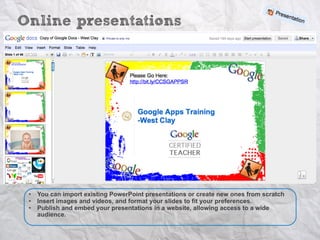
Online presentations


 •   You can import existing PowerPoint presentations or create new ones from scratch
 •   Insert images and videos, and format your slides to fit your preferences.
 •   Publish and embed your presentations in a website, allowing access to a wide
     audience.
Students can chat while others are presenting


   “One student talked aloud while everyone listened and chatted about the presentation… For the first time I can
   EVER remember as a teacher - 100% of the students were engaged in the presentation and participated in the
   chat. The students were enthusiastic and offered insightful and appropriate comments.“
        - Computer Applications teacher, Beaverton, OR
Example Exercises
          1.Documents
              § Journaling
              § Essays (individual or co-edited)
              § Collaborative research papers (history,
                 geography, science)
              § Collaborative book reports
              § Creative writing (script writing, poetry)
              § Writing portfolios


          2.Spreadsheets
              § Stock portfolio (live data)
              § Graphs, charts, and data presentation
                 techniques


          3.Presentations
              § Presenting group research
              § Active student participation during a
                 presentation
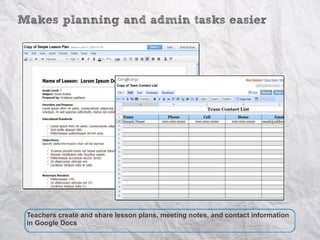
Makes planning and admin tasks easier


 Teachers create and share lesson plans, meeting notes, and contact information
 in Google Docs
Forms make life easier
Google Sites
Google Sites
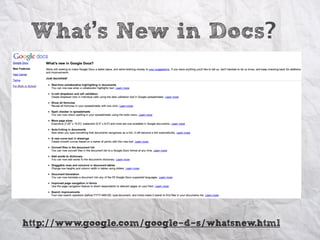
What’s New in Docs?


http://www.google.com/google-d-s/whatsnew.html
Google Sites
Google Calendar
- Create and share multiple calendars
Google Calendar
Never miss a meeting with Google Calendar reminders
•   Default Reminders
•   Email Reminders
•   Daily Agendas
•   Pop-ups
Google Calendar
Google Calendar SMS Tricks
• Create & check your events by SMS
   o 48368 (GVENT)
      § ex. - Maths Exam at 10am Monday
      § help
      § next
      § day
      § nday


 http://www.google.com/
 googlecalendar/new.html
Google Calendar
Google Calendar
Google Calendar
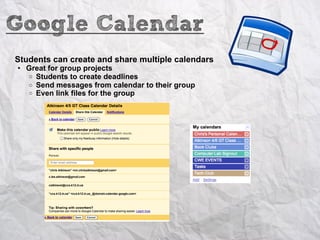
Students can create and share multiple calendars
• Great for group projects
  o Students to create deadlines
  o Send messages from calendar to their group
  o Even link files for the group
Google Calendar
Publish school calendars on your teacher/school website
• Multiple calendars: One Page
   o   Multiple calendars = Multiple Classes
   o   Use the Agenda view
Google Calendar
Keep events organized
• Add the "Assignment" to the event (Calendar Labs)
• Send a message without leaving calendar
Google Calendar
Event Publisher Guide
• Link to event

• Link to an entire Calendar


                    http://www.google.com/googlecalendar/event_publisher_guide.html
Google Calendar
Add a QR code to an assignment
• Use w/ Event Publisher Guide
• Add a link on paper
  o Students can "Click" on it with a smart phone


http://www.google.com/googlecalendar/
event_publisher_guide.html
Google Video
• Private
• Unlimited time
• Host your school PD videos
Google Voice:
phone calls, podcast and more...
Google Voice:
phone calls, podcast and more...
Google Custom Search:


          You pick, and then
           let them search
Google Books
Google Books
Google Books
Google Maps and Earth
  http://www.googlelittrips.com

http://www.davidrumsey.com/view/google-maps
Google Sketchup
 http://sketchup.google.com/intl/en/training/
        http://www.aidanchopra.com/
http://sketchup.google.com/buy/eduresellers.html
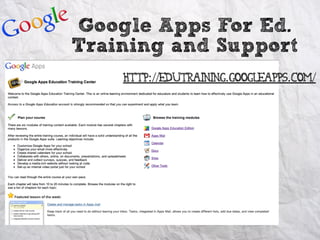
Google Apps For Ed.
Training and Support
    http://edutraining.googleapps.com/
Search Curriculum
http://www.google.com/educators/p_websearch.html
Stay Posted
http://www.google.com/newproducts/
  http://googleapps.blogspot.com/
  http://googledocs.blogspot.com/
www.ChrisLAtkinson.com

   @ChrisLAtkinson

    Mr.ChrisAtkinson@gmail.com
Google: Beyond Search -- Google Apps and More

Google: Beyond Search -- Google Apps and More

  • 1.
    ICE 2010: Google: more than just search
  • 2.
    Agenda 1.who is this guy? 2.Google Apps for Ed 3.Google Docs 4.Google Sites 5.Google Calendar 6.Google Video 7.Google Voice 8.Google Books 8.Google Custom Search 9.Google Maps and Earth 10.Google Sketchup 11.Google Search Curriculum 12.Keep Updated...and more
  • 3.
  • 5.
    8 Million Students... 543.30 - Stock Price
  • 6.
  • 8.
    Why Google Appsfor Education?  Browser Agnostic
  • 9.
    Why Google Appsfor Education?  One login for many services.
  • 10.
    The Power of Google Apps Google offers hosted solutions for both educational institutions and businesses. Google Apps Education Edition is free of charge to schools – a value of $50/person/year over what we offer to our business customers in Google Apps Premier Edition. Here is a comparison chart of Education Edition vs. Premier Edition:
  • 11.
    Compare vs. www.johnsmith.com
  • 12.
  • 14.
  • 15.
  • 16.
    Google Docs Google Docsis a free, web-based word processor, spreadsheet and presentation tool that allows you to create and edit documents from anywhere and collaborate with multiple people at the same time.
  • 17.
    Anywhere access &collaboration Google Docs is different: • Documents are saved online and can be accessed from any computer with an Internet connection • Collaboration: Multiple people can work together on the same document. No need to email documents back and forth
  • 18.
    Saves changes automatically Google Docs saves automatically, on a regular basis. Each change is tracked as a new revision. You can see exactly what’s been revised, by whom, and when. “Teachers are able to individually assess student participation and content using the revision tab on Google Docs to see how editing is proceeding and to encourage students as they work.” - Technology coordinator, Lafayette, CA
  • 19.
    Collaboration gets students excited and engaged “Students love it, no more coaxing kids to do their writing assignments. They beg to go to the computer lab to work on a collaborative assignment with their partner.” - High School Journalism teacher, Palo Alto, CA
  • 20.
    Add collaborators todocuments After students invite you to their documents: • you can review, comment, and grade their work at any time • it's hard for students to tell fibs when you can see their work at all times Also, students can work together on projects and get peer feedback
  • 21.
    Folders organize yourstudents’ work • Folders keep student work organized • Standard naming schemes allow you to sort by “Name” to easily find a class period
  • 22.
    Writing for anauthentic audience • Publish a document to make it visible to an authentic audience: parents, peers, and friends • You can even publish directly to your blog.
  • 23.
  • 24.
  • 25.
    Spreadsheet forms simplifydata collection • Create a survey or poll in a few easy steps • Your respondents’ data appears in your spreadsheet as they fill it out
  • 26.
    Online presentations • You can import existing PowerPoint presentations or create new ones from scratch • Insert images and videos, and format your slides to fit your preferences. • Publish and embed your presentations in a website, allowing access to a wide audience.
  • 27.
    Students can chatwhile others are presenting “One student talked aloud while everyone listened and chatted about the presentation… For the first time I can EVER remember as a teacher - 100% of the students were engaged in the presentation and participated in the chat. The students were enthusiastic and offered insightful and appropriate comments.“ - Computer Applications teacher, Beaverton, OR
  • 28.
    Example Exercises 1.Documents § Journaling § Essays (individual or co-edited) § Collaborative research papers (history, geography, science) § Collaborative book reports § Creative writing (script writing, poetry) § Writing portfolios 2.Spreadsheets § Stock portfolio (live data) § Graphs, charts, and data presentation techniques 3.Presentations § Presenting group research § Active student participation during a presentation
  • 29.
    Makes planning andadmin tasks easier Teachers create and share lesson plans, meeting notes, and contact information in Google Docs
  • 30.
  • 31.
  • 32.
  • 33.
    What’s New inDocs? http://www.google.com/google-d-s/whatsnew.html
  • 34.
  • 35.
    Google Calendar - Createand share multiple calendars
  • 36.
    Google Calendar Never missa meeting with Google Calendar reminders • Default Reminders • Email Reminders • Daily Agendas • Pop-ups
  • 37.
    Google Calendar Google CalendarSMS Tricks • Create & check your events by SMS o 48368 (GVENT) § ex. - Maths Exam at 10am Monday § help § next § day § nday http://www.google.com/ googlecalendar/new.html
  • 38.
  • 39.
  • 40.
    Google Calendar Students cancreate and share multiple calendars • Great for group projects o Students to create deadlines o Send messages from calendar to their group o Even link files for the group
  • 41.
    Google Calendar Publish schoolcalendars on your teacher/school website • Multiple calendars: One Page o Multiple calendars = Multiple Classes o Use the Agenda view
  • 42.
    Google Calendar Keep eventsorganized • Add the "Assignment" to the event (Calendar Labs) • Send a message without leaving calendar
  • 43.
    Google Calendar Event PublisherGuide • Link to event • Link to an entire Calendar http://www.google.com/googlecalendar/event_publisher_guide.html
  • 44.
    Google Calendar Add aQR code to an assignment • Use w/ Event Publisher Guide • Add a link on paper o Students can "Click" on it with a smart phone http://www.google.com/googlecalendar/ event_publisher_guide.html
  • 45.
    Google Video • Private •Unlimited time • Host your school PD videos
  • 46.
    Google Voice: phone calls,podcast and more...
  • 47.
    Google Voice: phone calls,podcast and more...
  • 48.
    Google Custom Search: You pick, and then let them search
  • 49.
  • 50.
  • 51.
  • 52.
    Google Maps andEarth http://www.googlelittrips.com http://www.davidrumsey.com/view/google-maps
  • 53.
    Google Sketchup http://sketchup.google.com/intl/en/training/ http://www.aidanchopra.com/ http://sketchup.google.com/buy/eduresellers.html
  • 54.
    Google Apps ForEd. Training and Support http://edutraining.googleapps.com/
  • 55.
  • 56.
    Stay Posted http://www.google.com/newproducts/ http://googleapps.blogspot.com/ http://googledocs.blogspot.com/
  • 57.
    www.ChrisLAtkinson.com @ChrisLAtkinson Mr.ChrisAtkinson@gmail.com