Final WBAN Report
Designing and Building a Prototype Wireless Body Area
Network
Final WBAN Report ii
Bennett Blake, Sara Britton, Xavier Edokpa, Matthew Mosley,
Colton Rando, Trey Sanchez, and Alexandra Tripp
Senior Design, Fall 2014
Dr. Garner and Prof. Miller
December 15, 2014
Final WBAN Report iii
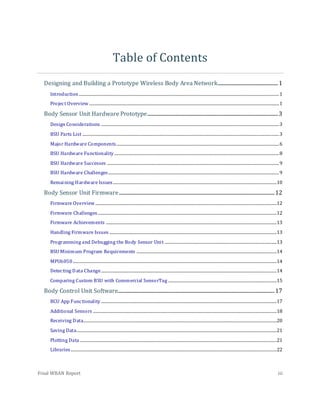
Table of Contents
Designing and Building a Prototype Wireless Body Area Network...................................................1
Introduction..........................................................................................................................................................................1
Project Overview .................................................................................................................................................................1
Body Sensor Unit Hardware Prototype...............................................................................................................3
Design Considerations .......................................................................................................................................................3
BSU Parts List .......................................................................................................................................................................3
Major Hardware Components..........................................................................................................................................6
BSU Hardware Functionality............................................................................................................................................8
BSU Hardware Successes ..................................................................................................................................................9
BSU Hardware Challenges.................................................................................................................................................9
Remaining Hardware Issues...........................................................................................................................................10
Body Sensor Unit Firmware....................................................................................................................................12
Firmware Overview ..........................................................................................................................................................12
Firmware Challenges........................................................................................................................................................12
Firmware Achievements .................................................................................................................................................13
Handling Firmware Issues ..............................................................................................................................................13
Programming and Debugging the Body Sensor Unit ...............................................................................................13
BSU Minimum Program Requirements .......................................................................................................................14
MPU6050.............................................................................................................................................................................14
Detecting Data Change.....................................................................................................................................................14
Comparing Custom BSU with Commercial SensorTag ............................................................................................15
Body Control Unit Software.....................................................................................................................................17
BCU App Functionality .....................................................................................................................................................17
Additional Sensors ............................................................................................................................................................18
Receiving Data....................................................................................................................................................................20
Saving Data..........................................................................................................................................................................21
Plotting Data .......................................................................................................................................................................21
Libraries...............................................................................................................................................................................22
Final WBAN Report iv
Project Repository.............................................................................................................................................................22
Project Summary and Conclusion........................................................................................................................22
Results of Custom BSU .....................................................................................................................................................22
Results of Android Application for Body Control Unit ............................................................................................23
Conclusion...........................................................................................................................................................................23
WBAN Team
Senior Design, Fall 2014
Dr. Garner and Prof. Miller
December 16, 2014
Final WBAN Report 1
Designing and Building a Prototype Wireless Body Area Network
Introduction
A variety of health conditions continue to negatively affect
the daily lives of so many people. When faced with a
disease, old age, or other restrictions, trips to the
emergency room become more frequent and healthcare
bills begin to soar. With cases such as a diabetic’s need for
insulin, an impending heart attack, or an elderly fall, timely
intervention is crucial.
Wireless Body Area Network (WBAN) technology has the potential to transform healthcare
by providing timely intervention that can save and prolong lives. With this noninvasive
technology emerging, a high-risk patient can remain in the comfort of his or her own home
while still having the luxury of knowing that his or her health is being monitored by a
medical caretaker. Several challenges exist with WBAN technology, but overcoming these
challenges could lead to a significant reduction in healthcare costs, fewer trips to the
emergency room, and a healthier population.
A typical WBAN consists of at least one wearable body sensor unit (BSU) that continually
measures and records a patient’s physiological data. This data is then wirelessly
transmitted to a wearable body control unit (BCU), where the data is further synchronized,
processed, and transmitted to a personal computer. At this point, a medical caretaker can
analyze the data to monitor the patient’s health. As this technology becomes more
prevalent, trends and patterns found in physiological data will be better understood by
medical caretakers, allowing for even timelier intervention.
ProjectOverview
The purpose of this semester’s senior design project was for a group of engineering
students to design and construct a very simple prototype WBAN that is comprised of just
one body sensor unit and a body control unit. For this prototype, an Android phone
Figure 1. Elderly fall (pixgood.com)
Final WBAN Report 2
equipped with a custom Android application serves as the BCU. Instead of spanning a wide
range of physiological data parameters, this WBAN involves only motion data, which is
measured using an accelerometer and a gyroscope.
In the beginning stages of the semester, several important specifications for both the BSU
and the BCU were established as goals for the project. A few of the major specifications are
explained below. To see a detailed list of specifications for the body sensor unit and body
control unit, refer to the ‘WBAN_Specifications’ document located in the WBAN Fall 2014
folder in the BES server.
The body sensor unit shall have dimensions no greater than 3”x3”x1” so that it can function
as a compact, wearable and lightweight product. The BSU shall continually measure motion
data, assign a timestamp to each sample, and continually transmit the time-stamped data to
the BCU via a Bluetooth Low Energy modem. The BSU shall provide local storage of at least
thirty minutes of motion data so that, if either BSU power is lost or connection to the BCU is
lost, that data can be retrieved. The BSU shall reach a battery life of at least eight hours so
that the patient can wear the device for a long period of time before battery replacement or
recharge is necessary. As an additional attempt to conserve power, the BSU shall undergo
an interrupt in transmission if the motion data suggests that the patient has not been in
motion for a set period of time.
The body control unit shall receive and synchronize motion data that the body sensor unit
has wirelessly transmitted. The Android application shall provide an interactive way for
the user to view his or her motion data. The Android application shall enable local storage
(i.e., on the BCU itself) of at least eight hours of motion data so that this data can be later
extracted to a personal computer. This data extraction process shall produce a file
compatible with either Excel or MATLAB. Lastly, the Android application should have a
visually pleasing and intuitive user interface.
Final WBAN Report 3
Body Sensor Unit Hardware Prototype
DesignConsiderations
When designing the Body Sensor Unit (BSU), four main considerations are essential to
designing and constructing a practical device:
1. Low power and energy consumption for long lasting battery life
2. Modularity of major electrical components
3. Low cost to both consumer and manufacturer
4. Small volume
These four criteria are selected with the consumer in mind. In everyday life, it can become
a chore to change or even recharge our electronic devices and the less frequently this is
necessary, the better. With a low energy-consuming device, this necessary evil becomes
less of a burden.
With many damage-prone devices today, hardware components are typically difficult to
replace and often costly to repair. But, because of the modularity of the BSU’s major
components, cost to the consumer is significantly minimized.
Adhering to the technological trend of modern wearable electronics, this device is
compacted within a small volume that will allow the wearer to move with absolute ease. If
the consumer’s convenience remains the guiding principle in the research and
development phases of product design, the product is sure to have an edge on the
competition!
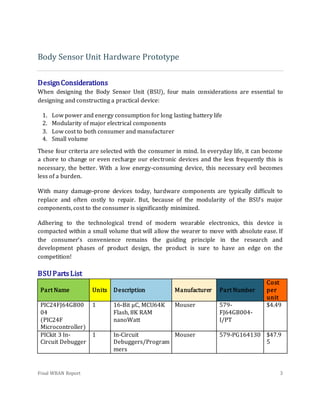
BSUPartsList
Part Name Units Description Manufacturer Part Number
Cost
per
unit
PIC24FJ64GB00
04
(PIC24F
Microcontroller)
1 16-Bit µC, MCU64K
Flash, 8K RAM
nanoWatt
Mouser 579-
FJ64GB004-
I/PT
$4.49
PICkit 3 In-
Circuit Debugger
1 In-Circuit
Debuggers/Program
mers
Mouser 579-PG164130 $47.9
5
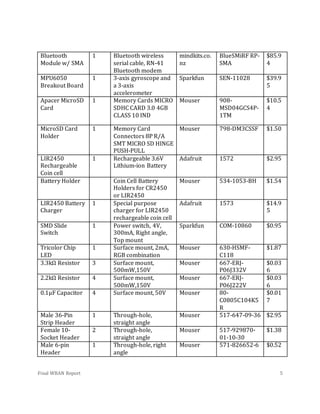
Final WBAN Report 4
Final WBAN Report 5
Bluetooth
Module w/ SMA
1 Bluetooth wireless
serial cable, RN-41
Bluetooth modem
mindkits.co.
nz
BlueSMiRF RP-
SMA
$85.9
4
MPU6050
Breakout Board
1 3-axis gyroscope and
a 3-axis
accelerometer
Sparkfun SEN-11028 $39.9
5
Apacer MicroSD
Card
1 Memory Cards MICRO
SDHC CARD 3.0 4GB
CLASS 10 IND
Mouser 908-
MSD04GCS4P-
1TM
$10.5
4
MicroSD Card
Holder
1 Memory Card
Connectors 8P R/A
SMT MICRO SD HINGE
PUSH-PULL
Mouser 798-DM3CSSF $1.50
LIR2450
Rechargeable
Coin cell
1 Rechargeable 3.6V
Lithium-ion Battery
Adafruit 1572 $2.95
Battery Holder Coin Cell Battery
Holders for CR2450
or LIR2450
Mouser 534-1053-BH $1.54
LIR2450 Battery
Charger
1 Special purpose
charger for LIR2450
rechargeable coin cell
Adafruit 1573 $14.9
5
SMD Slide
Switch
1 Power switch, 4V,
300mA, Right angle,
Top mount
Sparkfun COM-10860 $0.95
Tricolor Chip
LED
1 Surface mount, 2mA,
RGB combination
Mouser 630-HSMF-
C118
$1.87
3.3kΩ Resistor 3 Surface mount,
500mW,150V
Mouser 667-ERJ-
P06J332V
$0.03
6
2.2kΩ Resistor 4 Surface mount,
500mW,150V
Mouser 667-ERJ-
P06J222V
$0.03
6
0.1µF Capacitor 4 Surface mount, 50V Mouser 80-
C0805C104K5
R
$0.01
7
Male 36-Pin
Strip Header
1 Through-hole,
straight angle
Mouser 517-647-09-36 $2.95
Female 10-
Socket Header
2 Through-hole,
straight angle
Mouser 517-929870-
01-10-30
$1.38
Male 6-pin
Header
1 Through-hole, right
angle
Mouser 571-826652-6 $0.52
Final WBAN Report 6
Major HardwareComponents
In order to achieve low energy consumption, low cost, small volume, and modularity
specifications, it is pertinent that individual components comprising the BSU not only
consume minimal energy during operation, but also are easily removed or replaced.
Modularity is achieved with a few steps: soldering male pin headers into the MPU6050
Breakout Board, BlueSMiRF RP-SMA module and PICkit 3 In-Circuit Debugger; soldering
female receptacles into the printed circuit board (PCB); and docking the three major
components to the PCB via a header connection. To achieve the optimal performance for
the least cost, components are selected to meet overall calculated performance
requirements, including energy consumption and processing speed, while remaining
relatively inexpensive for their class. These general principles are the basis for selecting the
BSU’s individual components.
The PIC24F Microcontroller is a
suitable choice because of low
operating voltage, bus size, and
communication compatibility, as
well as ease of programming.
Because of all the different types
of microcontrollers (AVR, ARM
etc.), the PIC programming
language seemed most familiar
and therefore allowed for a less
steep learning curve. Naturally,
the PICkit 3 In-Circuit Debugger
was a necessary and convenient
part because of its low operating voltage, ease of use, and necessity in programming the
microcontroller.
Because Bluetooth devices operate within in the ISM radio band (UHF radio waves, Wi-Fi
frequency band), operate in short-range, and are widely used in low power communication
systems, it is the logical choice of data exchanging method for medical devices to use. The
Bluetooth module, BlueSMiRF RP-SMA, was chosen for various reasons: its inherent low
energy consumption due to the Bluetooth low energy protocol of the RN-41 Bluetooth
Figure 2. Custom body sensor unit (BSU)
Final WBAN Report 7
modem; its modular capabilities; and the attached SMA port, which allows for
interchangeable 2.4GHz antennas per the request of Dr. Li.
In order to stay within specified volume, integrated technologies are important. The
MPU6050 Breakout Board meets all four previously mentioned requirements and is
compatible with the chosen microcontroller. Its use of the MPU6050 combines a 3-channel
gyroscope and a 3-channel accelerometer onto a single silicon die together with an
onboard Digital Motion Processor and eliminates the need for two separate gyroscope and
accelerometer sensors. In effect, the combination of these sensors reduces size and cost by
removing the need to purchase separate components. The implementation of the chip onto
a breakout board introduces further modularity of design and use while the low operating
voltage satisfies the calculated power constraints of the project.
One of the overall project specifications is that the device locally stores at least 30 minutes
of time-stamped motion data. As seen in the calculations below, any external on-board
storage device must have a storage capacity of at least 2.4 MB. By taking into consideration
the design constraints, it is apparent that the storage device must be small, low energy
consuming, and capable of holding greater than 2.4 MB. Because today’s manufacturers
don’t make secure digital cards any smaller than 4GB, the removable Apacer 4GB MicroSD
Card is the cheapest, most reliable choice and possesses a sufficient theoretical storage
capacity of over 800 hours of data.
Equation 1:
{(
6 channel
sample
∗
16 bits
channel
) + (
18 bits
timestamp
)} ∗ [
60 seconds
minute
∗ 30 minutes ∗
100 samples
second
]
= 20,520,000 bits =̃ 2.5MB
Equation 2:
4GB ∗ [
1024MB
1GB
∗
30 minutes
2.5MB
∗
1 hour
60 minutes
] ≅ 800 hours
Due to discrepancies between nominal voltages and actual voltages, in addition to
variations in voltage levels, a rechargeable power source with an output above that of our
component with the largest operating voltage is essential. The 3.6V lithium-ion
Final WBAN Report 8
rechargeable battery, LIR2450 Rechargeable Coin Cell, is chosen based on its compact size,
suitable output voltage, low price, ubiquity, and ease of use. The rechargeable feature
allows the user prolonged use, reducing the frequency of replacement. Although the
LIR2450 is the recommended choice of power source, a 3V non-rechargeable CR2450 coin
cell will suffice when the BSU is not transmitting motion data.
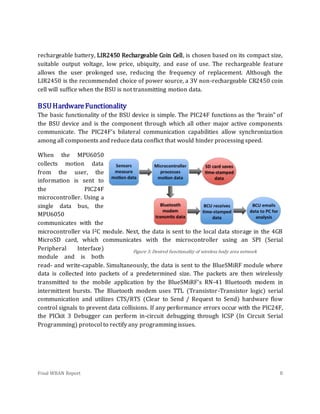
BSUHardwareFunctionality
The basic functionality of the BSU device is simple. The PIC24F functions as the “brain” of
the BSU device and is the component through which all other major active components
communicate. The PIC24F’s bilateral communication capabilities allow synchronization
among all components and reduce data conflict that would hinder processing speed.
When the MPU6050
collects motion data
from the user, the
information is sent to
the PIC24F
microcontroller. Using a
single data bus, the
MPU6050
communicates with the
microcontroller via I2C module. Next, the data is sent to the local data storage in the 4GB
MicroSD card, which communicates with the microcontroller using an SPI (Serial
Peripheral Interface)
module and is both
read- and write-capable. Simultaneously, the data is sent to the BlueSMiRF module where
data is collected into packets of a predetermined size. The packets are then wirelessly
transmitted to the mobile application by the BlueSMiRF’s RN-41 Bluetooth modem in
intermittent bursts. The Bluetooth modem uses TTL (Transistor-Transistor logic) serial
communication and utilizes CTS/RTS (Clear to Send / Request to Send) hardware flow
control signals to prevent data collisions. If any performance errors occur with the PIC24F,
the PICkit 3 Debugger can perform in-circuit debugging through ICSP (In Circuit Serial
Programming) protocol to rectify any programming issues.
Figure 3. Desired functionality of wireless body area network
Final WBAN Report 9
BSUHardwareSuccesses
The Body Sensor Unit (BSU), although not fully functioning, meets several of the
specifications established in the beginning of the semester. The achieved specifications
include:
1. Constructing a BSU with dimensions no greater than of 3’’x3’’x1’’
2. Containing an SMA port to enable interchangeable antenna designs
3. Including six channels of motion data provided by a 3-axis gyroscope and a 3-axis
accelerometer
BSUHardwareChallenges
In the BSU hardware design phase, the team faced several challenges. Two challenges that
were faced and ultimately were overcome include:
1. Selecting modular components that meet the power and voltage requirements
2. Creating custom footprints for less common hardware components (e.g., MicroSD
card holder and power switch)
3. Outsourcing the printed circuit board for manufacturing due to failure of the plating
machine at the BRIC
Modularity is a cornerstone in the BSU hardware design because it helps to minimize cost
of production. For example, if either the MPU6050 or the Bluetooth modem were to fail,
these modems can be easily detached and replaced instead of refabricating the entire
board. Modularity also provides ease of BSU maintenance and evolution in the future.
Once the circuit schematic was created in Altium designer, custom footprints were created
to represent several of the BSU hardware components that were not standard in the Altium
Library. These custom footprints are located in the Baylor custom library provided by
Professor Miller. Parts that had readily available libraries include the PIC24F (microchip
library found on Altium site), all headers, and the LED. Once the footprints were
constructed, the PCB footprints needed to be linked to the Altium Schematic. This proved to
be a challenge due to improper initial creation of the footprints. The initial creation of the
footprints involved a misuse of the origin button when measuring silkscreen lines. This
mistake resulted in the inability to place all components in the project view. The team
eliminated the issue by recreating the footprints and placing them on a completely new
PCB. At this point, the PCB footprints were successfully linked to the PCB.
Final WBAN Report 10
After satisfying all the PCB requirements for the BRIC, Gerber files were submitted for
production. It later became clear that the BRIC lacked a functioning plating machine. The
only remaining option was to outsource the PCB to a manufacturer such as Sunstone. After
modifying the Altium PCB rules to satisfy Sunstone’s manufacturing requirements, the PCB
project file was submitted to Sunstone’s website. Using their QuickTurn service, Sunstone
manufactured and shipped the PCB within a few days.
RemainingHardwareIssues
Even after the construction of the BSU, issues remained. These issues, which stemmed from
initial lack of design knowledge, are described below:
1. The serial communications of the BLE and the PIC24F are incompatible.
2. The battery life of the BSU will not reach 8 hours during transmission.
Final WBAN Report 11
The differing serial communication ports creates a crucial issue and prevented the team
from pairing with and transmitting motion data to the BCU. The PIC24F has RS-232 serial
connection while the Bluetooth module has TTL serial communication. Because these serial
protocols are incompatible, a UART connection could not be established. This issue was
discovered toward the end of the project, but some high level research has been done. In
order to remedy this issue, a charge pump and an RS-232 to TTL converter should be
introduced into the BSU design. The charge pump is necessary due to the different voltages
between RS-232 and TTL. The converter is necessary to convert the TTL protocol to RS-232
so that the PIC24F can send data to the Bluetooth modem. Although this will result in a
hardware redesign, this should make for an easier time programming firmware. This issue
can be remedied using a charge pump such as a step down charge pump made by TI and a
converter such as the MAX-232 on Sparkfun.
The second remaining issue is the short battery life of the BSU. According to power
calculations seen below, the battery life should exceed eight hours with the current
functionality of the BSU (i.e., without transmission).
Battery Type: 3.3V, 110mAh Lithium Ion 2450 rechargeable coin cell
MPU6050 Breakout Current Draw: 𝐼𝑖𝑛 < 4mA
PIC24F Current Draw: 𝐼𝑖𝑛 < 2mA
Theoretical Battery life:
𝐵𝑎𝑡𝑡𝑒𝑟𝑦 𝐶𝑢𝑟𝑟𝑒𝑛𝑡 (
A
h
)
𝐶𝑢𝑟𝑟𝑒𝑛𝑡 𝐷𝑟𝑎𝑤 (A)
=
0.11
0.006
= 18.33 hours
However, the power is being consumed much more quickly than expected. It is possible
that this short battery life is due to the fact that the BSU lacks a voltage regulator. Because
the PCB is battery-powered and experiences unpredictable or varying voltage levels, the
PCB should be redesigned to include voltage regulation. This regulator will ensure that all
components receive a regulated amount of power and will shut off at a certain cut off
voltage. Most regulators also contain boosters that can maintain a much more consistent
voltage level. The absence of voltage regulation in the BSU design makes it very challenging
to determine how much power each component consumes. This issue can be remedied by
Final WBAN Report 12
adding a voltage regulator such as the LP5990TM-3.6/NOPB or the LT1086 regulator,
which are both available through the Mouser website.
Body Sensor Unit Firmware
FirmwareOverview
The firmware for the WBAN BSU is what enables the BSU to perform its required functions.
The BSU contains a PIC24F microcontroller that should receive motion data from the
MPU6050 sensor, convert the data into common units of measurement, locally store 30
minutes of time-stamped data to a MicroSD card in case of transmission loss, and finally
transmit time-stamped motion data via Bluetooth. The data to be collected, stored,
processed, and wirelessly transmitted should have six channels of data, each with a
sampling rate of at least 100Hz. Using MPLAB X, custom firmware was developed to
establish communication between the motion sensor, microcontroller, Bluetooth modem,
and MicroSD card. When writing firmware for the custom WBAN sensor board, there were
three principle challenges or concerns that the team faced.
1. Wireless transmission of motion data via Bluetooth
2. Unavailability of MicroSD card custom libraries
3. Sensor Sampling rate
FirmwareChallenges
This first challenge is that Bluetooth data transmission was not established. Since it was
understood that the PIC24F uses serial communication, UART was needed in order to
transmit data from the PIC24F to the Bluetooth module, which would then transmit the
data to the BCU. It was discovered that the PIC24F and Bluetooth module use different
serial communication protocols. The PIC24F uses RS-232 protocol, and the Bluetooth
module is configured to use TTL protocol. These two protocols are inverts of each other. A
signal converter and charge pump are necessary to establish communication between the
PIC24F microcontroller and the Bluetooth module. See the hardware section for more
details.
Final WBAN Report 13
The second challenge is a MPLAB library for interfacing with a MicroSD card could not be
found. Without this library, custom functions must be written in order to communicate and
store data using the MicroSD card. A second possible solution to this problem would be to
use a different microcontroller whose vendor provides detailed documentation on
interfacing with a MicroSD card.
The third challenge is the BSU does not reach the desired 100 Hz sampling rate. The actual
sampling rate received by the PIC is approximately 11.6 Hz. This is due to the fact that the
MPU6050 must send six 16-bit channels of data over a single I2
C bus one byte at a time. A
possible solution is the use a different motion sensor that outputs the six channels of data
across six separate pins, thus increasing the possible sampling rate. Another solution
would be to use an external oscillator to increase the clock speed of the PIC24F, which is
currently running a clock speed of 8MHz using the internal oscillator.
FirmwareAchievements
Portions of the firmware that were fully realized include: Identifying and fulfilling the
minimum program requirements for the PIC24F including configuration bits. Establishing
I2C communication with the MPU6050 and converting accelerometer and gyroscopic data
into g’s and °/sec, respectively. Creating an interrupt-driven timer to timestamp data in
milliseconds. Creating an algorithm to dynamically detect data change and trigger a pause
in data storage and transmission in order to conserve power.
HandlingFirmwareIssues
In order to solve firmware issues, it is necessary for the team to either find a Bluetooth
module that uses RS-232 protocol, or install a charge pump and RS-232 to TTL converter.
The UART code must be finalized to establish communication between the Bluetooth
module and the PIC24F. Moving forward, the team should contact Microchip to determine if
a MicroSD card library still exists. Otherwise, it would be necessary to create custom
functions to achieve initialization and communication between the MicroSD card and
PIC24F.
Programmingand DebuggingtheBodySensorUnit
The microcontroller used on the BSU (PIC24FJ64GB004), is programmed in C using code
developed in MPLAB X IDE, and compiled using the MPLAB XC16 compiler v1.23. Programs
are transferred from a PC to the microcontroller via the PICkit™3. The PICkit 3 acts as both
a programmer and as an in-circuit debugger, allowing the user to debug code as it runs on
Final WBAN Report 14
the microcontroller. The PICkit 3 programs the microcontroller using In-Circuit Serial
Programming (ICSP™), a programming method developed by Microchip. For instructions
on how to install and use MPLAB X IDE and how to use the PICkit 3, refer to the document
named ‘Installation Guide MPLAB X IDE & XC16 Compiler’ located in the Firmware section
of the WBAN Fall 2014 folder on the BES server.
BSUMinimumProgramRequirements
Any program developed for the BSU must include both a main file and a configuration bits
file. Configuration bits determine how the microcontroller operates at its most basic level,
including oscillator settings, watchdog timer operations, and code protection settings. For a
more detailed explanation and directions on how to create a configuration bits file, see the
document named ‘Quick Introduction to MPLAB X IDE’ located in the Firmware section of
the WBAN Fall 2014 folder on the BES server.
MPU6050
The MPU6050 communicates with the microcontroller via the I2C bus. The code to perform
these operations was primarily sourced from this tutorial. The full source can be accessed
at GitHub. Portions of the code are heavily modified in order to function with the BSU
microcontroller, but further analysis of the existing code is highly recommended. For more
detailed information on the MPU and I2C code, refer to the code comments in the programs
‘TestDataChangeV2’ and ‘DataCollectV1.’
DetectingDataChange
A large portion of the BSU power is consumed during the transmission of motion data. In
order to conserve power, an algorithm is implemented to detect whether the BSU is
undergoing significant movement. The algorithm works by reading in a new data sample
and then taking the absolute value of the difference of the acceleration measured by the
newest data sample against the value of acceleration of the previous data sample.
𝐴𝑥 𝑑𝑖𝑓𝑓 = 𝑎𝑏𝑠( 𝐴𝑥1 − 𝐴𝑥2) , 𝐴𝑦 𝑑𝑖𝑓𝑓 = 𝑎𝑏𝑠( 𝐴𝑦1 − 𝐴𝑦2) , 𝐴𝑧 𝑑𝑖𝑓𝑓 = 𝑎𝑏𝑠( 𝐴𝑧1 − 𝐴𝑧2)
If the difference in acceleration along any axis exceeds the data-change threshold, the BSU
detects that there has been a significant enough change in data to continue transmission.
While the BSU is at rest, acceleration values are collected, and the average difference in
acceleration values is determined for each axis. This average difference is selected as the
Final WBAN Report 15
threshold value for the appropriate axis. This method accounts for noise present in the
system.
If the difference in acceleration values does not exceed the threshold, the BSU detects that
there has been no data change. When no data change is detected, a counter is incremented.
When the counter reaches a value that indicates that there has been no data change for a
set time interval (e.g., 1 minute), pauses in both data transmission and on-board storage
are triggered. Once a significant data change is detected, the counter is reset and the BSU
resumes normal operations. The operation of this algorithm is demonstrated in the
program “TestDataChangeV2” by turning on an LED to signal that transmission and storage
are to be paused, and keeping the LED off otherwise.
ComparingCustomBSUwithCommercial SensorTag
In order to test the accuracy of the body sensor unit’s motion data, its data is compared to
the commercial SensorTag. A simple firmware program is created in order to extract and
analyze the BSU data. Though the BSU has a desired sampling rate of 100Hz, its
microcontroller receives the data from the MPU-6050 sensor at a significantly lower rate of
about 12Hz. After both the BSU and the SensorTag experience a set of essentially identical
motions for the same amount of time, their data are extracted and compared. The three
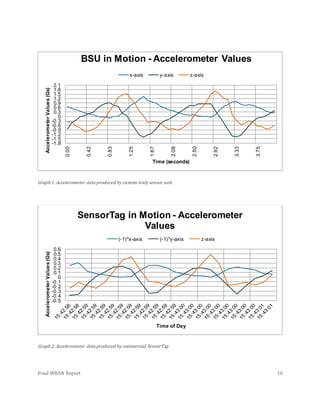
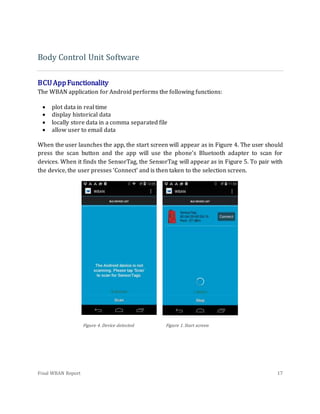
axes of the BSU’s accelerometer data can be seen in Graph 1, while the SensorTag’s
accelerometer data can be seen in Graph 2. Note that the x- and y- axes of the SensorTag
data have been inverted to allow ease of comparing the two graphs. While the amplitudes
are not consistent between Graph 1 and Graph 2, it is clear that the trends and general
appearance of the two plots are very similar. Further analysis and debugging of firmware
are necessary to determine why this discrepancy in amplitude appears.
Final WBAN Report 16
Graph 1. Accelerometer data produced by custom body sensor unit
Graph 2. Accelerometer data produced by commercial SensorTag
-1.8
-1.5
-1.2
-0.9
-0.6
-0.3
0
0.3
0.6
0.9
1.2
1.5
1.8
2.1
0.00
0.42
0.83
1.25
1.67
2.08
2.50
2.92
3.33
3.75
AccelerometerValues(Gs)
Time (seconds)
BSU in Motion - Accelerometer Values
x-axis y-axis z-axis
-0.5
-0.4
-0.3
-0.2
-0.1
0
0.1
0.2
0.3
0.4
0.5
0.6
AccelerometerValues(Gs)
Time of Day
SensorTag in Motion - Accelerometer
Values
(-1)*x-axis (-1)*y-axis z-axis
Final WBAN Report 17
Body Control Unit Software
BCUAppFunctionality
The WBAN application for Android performs the following functions:
 plot data in real time
 display historical data
 locally store data in a comma separated file
 allow user to email data
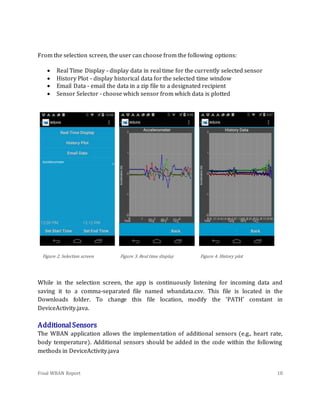
When the user launches the app, the start screen will appear as in Figure 4. The user should
press the scan button and the app will use the phone's Bluetooth adapter to scan for
devices. When it finds the SensorTag, the SensorTag will appear as in Figure 5. To pair with
the device, the user presses ‘Connect’ and is then taken to the selection screen.
Figure 4. Device detected Figure 1.Start screen
Final WBAN Report 18
From the selection screen, the user can choose from the following options:
 Real Time Display - display data in real time for the currently selected sensor
 History Plot - display historical data for the selected time window
 Email Data - email the data in a zip file to a designated recipient
 Sensor Selector - choose which sensor from which data is plotted
Figure 2. Selection screen Figure 3. Real time display Figure 4. History plot
While in the selection screen, the app is continuously listening for incoming data and
saving it to a comma-separated file named wbandata.csv. This file is located in the
Downloads folder. To change this file location, modify the ‘PATH’ constant in
DeviceActivity.java.
AdditionalSensors
The WBAN application allows the implementation of additional sensors (e.g., heart rate,
body temperature). Additional sensors should be added in the code within the following
methods in DeviceActivity.java
Final WBAN Report 19
public void onItemSelected(AdapterView<?> parent, View view,
int pos, long id) {
// An item was selected. You can retrieve the selected item
using
// parent.getItemAtPosition(pos)
selected = parent.getItemAtPosition(pos).toString();
if (selected.equals("Accelerometer")){
RTPlot.setTitle("Accelerometer");
RTPlot.setRangeLabel("Acceleration (G)");
}
else if (selected.equals("Gyroscope")){
RTPlot.setTitle("Gyroscope");
RTPlot.setRangeLabel("Deg/s");
}
}
void updatePlot(String uuidStr, dataPoint point) {
double[] d = point.getDatac();
if (selected.equals("Accelerometer")){
for (int i = 0; i < 3; i++) {
RTSeries[i].addFirst(null, d[i]);
}
}
else if (selected.equals("Gyroscope")){
for (int i = 0; i < 3; i++) {
RTSeries[i].addFirst(null, d[i+3]);
Final WBAN Report 20
}
}
as well as in res/values/strings.xml
<!-- populate the spinner list -->
<string-array name="sensor_array">
<item>Accelerometer</item>
<item>Gyroscope</item>
</string-array>
ReceivingData
The following code shows how data is received in DeviceActivity.java. The data is pulled in
from BluetoothLeService as an EXTRA. It is then put in a byte array called value along with
three other “dummy” values that are meant to simulate an additional sensor. The current
time is then found and then both the data and timestamp are stored together as a dataPoint
object. The convert() method is then called, which converts the raw value into G’s (Note
that this conversion factor will be different when using a sensor other than the sensorTag).
The updatePlot and saveData methods are then called.
byte[] tmp =
intent.getByteArrayExtra(BluetoothLeService.EXTRA_DATA);
// 64, 0, -64 are dummy data for an additional sensor
byte[] value = {tmp[0], tmp[1], tmp[2], 64, 0, -64};
r = value.length;
Date date1 = getTimeStamp();
dataPoint myPoint = new dataPoint(value, date1);
myPoint.convert();
updatePlot(uuidStr, myPoint);
Final WBAN Report 21
saveData(myPoint);
SavingData
Saving data is done with the saveData method, which initilizes a CSVWriter object and
writes the current sensor sample to a comma-separated file called ‘wbandata.csv’. This
method also adds the current sample to a list object so that it can be retrieved quickly when
the user wants to display historical data.
PlottingData
Plots are created using the library Androidplot. The code for the real time plot and the
history plot is in res/layout/plot.xml along with the other UI widgets. Plotting is done with
the updatePlot method, which takes the current data point and adds it to RTSeries.
RTSeries is an object that stores data and it is associated with RTPlot as shown in the
following code:
RTSeries[0] = new SimpleXYSeries("X");
RTSeries[1] = new SimpleXYSeries("Y");
RTSeries[2] = new SimpleXYSeries("Z");
RTPlot.addSeries(RTSeries[0],
new LineAndPointFormatter(Color.rgb(200,0,0),Color.rgb(100,0,0),
null, null));
RTPlot.addSeries(RTSeries[1],
new LineAndPointFormatter(Color.rgb(0,200,0),Color.rgb(0,100,0),
null, null));
RTPlot.addSeries(RTSeries[2],
new LineAndPointFormatter(Color.rgb(0,0,200),Color.rgb(0,0,100),
null, null));
Most of the WBAN app’s action takes place within DeviceActivity.java, as opposed to being
split up logically between several activities. This is done by setting the visibility of UI
elements to VISIBLE or INVISIBLE depending on whether they should be displayed.
Final WBAN Report 22
Libraries
The following libraries were used for the WBAN app:
 Androidplot - used for the real time plot and the history plot
 OpenCSV - used for writing data to the .csv file
ProjectRepository
The WBAN project is currently being hosted on Github, and a link to the repository can be
found here. The current maintainer of the project is Matthew Mosley, and he can be
contacted through Github or by email: Matthew_Mosley@baylor.edu.
Project Summary and Conclusion
Resultsof CustomBSU
The custom body sensor unit is a compact design that satisfies the original size
specification. With the design of a simple case, the BSU can easily become a wearable
device. The electronic modularity of the device allows for ease of component repair,
component replacement, component testing, and circuit debugging.
While the custom BSU is unable to transmit data to the BCU, it does contain an SMA port
where interchangeable antenna designs can be placed. Once the board is capable of
transmission, this SMA port enables Dr. Li to further his research on which antenna designs
result in the optimal propagation of signals across a human body.
Though transmission is not achieved, the device is capable of measuring, processing and
analyzing data. That is, the MPU6050 measures accelerometer and gyroscope data and
communicates this data to the PIC24F microcontroller; the microcontroller processes the
data by applying conversions to common units of measure; a user defined firmware
function analyzes the data change between data samples to determine whether or not the
sensor should be considered ‘at rest’; and after the sensor is in an ‘at rest’ state for a
programmable period of time, an interrupt is triggered. Currently, an LED indicates
Final WBAN Report 23
whether the interrupt service routine is successfully running. Once the BSU is capable of
transmission, this interrupt service routing will instead involve a pause in transmission,
thereby saving power.
Resultsof AndroidApplicationforBody ControlUnit
Because transmission of the custom BSU was not achieved, the final Android application is
modeled based on the accelerometer data it receives from the commercial SensorTag. Due
to the modular nature of the app development, the code should require only minor
modifications when it begins to receive accelerometer and gyroscope data from the custom
BSU.
The Android handset serving as the BCU is equipped with a custom WBAN application. The
app enables a Bluetooth connection with the commercial SensorTag. It is through this
connection that the BCU can receive, process, and synchronize the motion data with the
actual time of day. Up to eight hours of data are automatically stored in the local memory of
the BCU, a capability that allows for the successful implementation of a ‘History Plot’
feature. This feature enables the user to choose a time window for which he or she would
like to view previously collected accelerometer data. In addition to a history plot feature,
the user has the option to display a real-time plot of his or her motion data. Using the app’s
‘Email Data’ feature, the locally stored data can be emailed to a personal computer. The
ability to extract the motion data to a personal computer is a crucial feature that is
necessary for analyzing the data and monitoring the health of a patient.
Conclusion
Though there were several challenges with constructing a completely functional WBAN, the
team has designed, constructed, and developed a system that has the potential to serve as a
starting point for a new team of engineering students. It is clear that several changes
should be made to the existing WBAN so that on-board storage and wireless transmission
of data to the BCU can be achieved. By utilizing the documentation that the Fall 2014
WBAN team has provided, a new team should be able to understand the design decisions
that were made, the challenges that the team faced, any solutions that were attempted, and
suggestions that have been provided.

WBAN

  • 1.
    Final WBAN Report Designingand Building a Prototype Wireless Body Area Network
  • 2.
    Final WBAN Reportii Bennett Blake, Sara Britton, Xavier Edokpa, Matthew Mosley, Colton Rando, Trey Sanchez, and Alexandra Tripp Senior Design, Fall 2014 Dr. Garner and Prof. Miller December 15, 2014
  • 3.
    Final WBAN Reportiii Table of Contents Designing and Building a Prototype Wireless Body Area Network...................................................1 Introduction..........................................................................................................................................................................1 Project Overview .................................................................................................................................................................1 Body Sensor Unit Hardware Prototype...............................................................................................................3 Design Considerations .......................................................................................................................................................3 BSU Parts List .......................................................................................................................................................................3 Major Hardware Components..........................................................................................................................................6 BSU Hardware Functionality............................................................................................................................................8 BSU Hardware Successes ..................................................................................................................................................9 BSU Hardware Challenges.................................................................................................................................................9 Remaining Hardware Issues...........................................................................................................................................10 Body Sensor Unit Firmware....................................................................................................................................12 Firmware Overview ..........................................................................................................................................................12 Firmware Challenges........................................................................................................................................................12 Firmware Achievements .................................................................................................................................................13 Handling Firmware Issues ..............................................................................................................................................13 Programming and Debugging the Body Sensor Unit ...............................................................................................13 BSU Minimum Program Requirements .......................................................................................................................14 MPU6050.............................................................................................................................................................................14 Detecting Data Change.....................................................................................................................................................14 Comparing Custom BSU with Commercial SensorTag ............................................................................................15 Body Control Unit Software.....................................................................................................................................17 BCU App Functionality .....................................................................................................................................................17 Additional Sensors ............................................................................................................................................................18 Receiving Data....................................................................................................................................................................20 Saving Data..........................................................................................................................................................................21 Plotting Data .......................................................................................................................................................................21 Libraries...............................................................................................................................................................................22
  • 4.
    Final WBAN Reportiv Project Repository.............................................................................................................................................................22 Project Summary and Conclusion........................................................................................................................22 Results of Custom BSU .....................................................................................................................................................22 Results of Android Application for Body Control Unit ............................................................................................23 Conclusion...........................................................................................................................................................................23
  • 5.
    WBAN Team Senior Design,Fall 2014 Dr. Garner and Prof. Miller December 16, 2014 Final WBAN Report 1 Designing and Building a Prototype Wireless Body Area Network Introduction A variety of health conditions continue to negatively affect the daily lives of so many people. When faced with a disease, old age, or other restrictions, trips to the emergency room become more frequent and healthcare bills begin to soar. With cases such as a diabetic’s need for insulin, an impending heart attack, or an elderly fall, timely intervention is crucial. Wireless Body Area Network (WBAN) technology has the potential to transform healthcare by providing timely intervention that can save and prolong lives. With this noninvasive technology emerging, a high-risk patient can remain in the comfort of his or her own home while still having the luxury of knowing that his or her health is being monitored by a medical caretaker. Several challenges exist with WBAN technology, but overcoming these challenges could lead to a significant reduction in healthcare costs, fewer trips to the emergency room, and a healthier population. A typical WBAN consists of at least one wearable body sensor unit (BSU) that continually measures and records a patient’s physiological data. This data is then wirelessly transmitted to a wearable body control unit (BCU), where the data is further synchronized, processed, and transmitted to a personal computer. At this point, a medical caretaker can analyze the data to monitor the patient’s health. As this technology becomes more prevalent, trends and patterns found in physiological data will be better understood by medical caretakers, allowing for even timelier intervention. ProjectOverview The purpose of this semester’s senior design project was for a group of engineering students to design and construct a very simple prototype WBAN that is comprised of just one body sensor unit and a body control unit. For this prototype, an Android phone Figure 1. Elderly fall (pixgood.com)
  • 6.
    Final WBAN Report2 equipped with a custom Android application serves as the BCU. Instead of spanning a wide range of physiological data parameters, this WBAN involves only motion data, which is measured using an accelerometer and a gyroscope. In the beginning stages of the semester, several important specifications for both the BSU and the BCU were established as goals for the project. A few of the major specifications are explained below. To see a detailed list of specifications for the body sensor unit and body control unit, refer to the ‘WBAN_Specifications’ document located in the WBAN Fall 2014 folder in the BES server. The body sensor unit shall have dimensions no greater than 3”x3”x1” so that it can function as a compact, wearable and lightweight product. The BSU shall continually measure motion data, assign a timestamp to each sample, and continually transmit the time-stamped data to the BCU via a Bluetooth Low Energy modem. The BSU shall provide local storage of at least thirty minutes of motion data so that, if either BSU power is lost or connection to the BCU is lost, that data can be retrieved. The BSU shall reach a battery life of at least eight hours so that the patient can wear the device for a long period of time before battery replacement or recharge is necessary. As an additional attempt to conserve power, the BSU shall undergo an interrupt in transmission if the motion data suggests that the patient has not been in motion for a set period of time. The body control unit shall receive and synchronize motion data that the body sensor unit has wirelessly transmitted. The Android application shall provide an interactive way for the user to view his or her motion data. The Android application shall enable local storage (i.e., on the BCU itself) of at least eight hours of motion data so that this data can be later extracted to a personal computer. This data extraction process shall produce a file compatible with either Excel or MATLAB. Lastly, the Android application should have a visually pleasing and intuitive user interface.
  • 7.
    Final WBAN Report3 Body Sensor Unit Hardware Prototype DesignConsiderations When designing the Body Sensor Unit (BSU), four main considerations are essential to designing and constructing a practical device: 1. Low power and energy consumption for long lasting battery life 2. Modularity of major electrical components 3. Low cost to both consumer and manufacturer 4. Small volume These four criteria are selected with the consumer in mind. In everyday life, it can become a chore to change or even recharge our electronic devices and the less frequently this is necessary, the better. With a low energy-consuming device, this necessary evil becomes less of a burden. With many damage-prone devices today, hardware components are typically difficult to replace and often costly to repair. But, because of the modularity of the BSU’s major components, cost to the consumer is significantly minimized. Adhering to the technological trend of modern wearable electronics, this device is compacted within a small volume that will allow the wearer to move with absolute ease. If the consumer’s convenience remains the guiding principle in the research and development phases of product design, the product is sure to have an edge on the competition! BSUPartsList Part Name Units Description Manufacturer Part Number Cost per unit PIC24FJ64GB00 04 (PIC24F Microcontroller) 1 16-Bit µC, MCU64K Flash, 8K RAM nanoWatt Mouser 579- FJ64GB004- I/PT $4.49 PICkit 3 In- Circuit Debugger 1 In-Circuit Debuggers/Program mers Mouser 579-PG164130 $47.9 5
  • 8.
  • 9.
    Final WBAN Report5 Bluetooth Module w/ SMA 1 Bluetooth wireless serial cable, RN-41 Bluetooth modem mindkits.co. nz BlueSMiRF RP- SMA $85.9 4 MPU6050 Breakout Board 1 3-axis gyroscope and a 3-axis accelerometer Sparkfun SEN-11028 $39.9 5 Apacer MicroSD Card 1 Memory Cards MICRO SDHC CARD 3.0 4GB CLASS 10 IND Mouser 908- MSD04GCS4P- 1TM $10.5 4 MicroSD Card Holder 1 Memory Card Connectors 8P R/A SMT MICRO SD HINGE PUSH-PULL Mouser 798-DM3CSSF $1.50 LIR2450 Rechargeable Coin cell 1 Rechargeable 3.6V Lithium-ion Battery Adafruit 1572 $2.95 Battery Holder Coin Cell Battery Holders for CR2450 or LIR2450 Mouser 534-1053-BH $1.54 LIR2450 Battery Charger 1 Special purpose charger for LIR2450 rechargeable coin cell Adafruit 1573 $14.9 5 SMD Slide Switch 1 Power switch, 4V, 300mA, Right angle, Top mount Sparkfun COM-10860 $0.95 Tricolor Chip LED 1 Surface mount, 2mA, RGB combination Mouser 630-HSMF- C118 $1.87 3.3kΩ Resistor 3 Surface mount, 500mW,150V Mouser 667-ERJ- P06J332V $0.03 6 2.2kΩ Resistor 4 Surface mount, 500mW,150V Mouser 667-ERJ- P06J222V $0.03 6 0.1µF Capacitor 4 Surface mount, 50V Mouser 80- C0805C104K5 R $0.01 7 Male 36-Pin Strip Header 1 Through-hole, straight angle Mouser 517-647-09-36 $2.95 Female 10- Socket Header 2 Through-hole, straight angle Mouser 517-929870- 01-10-30 $1.38 Male 6-pin Header 1 Through-hole, right angle Mouser 571-826652-6 $0.52
  • 10.
    Final WBAN Report6 Major HardwareComponents In order to achieve low energy consumption, low cost, small volume, and modularity specifications, it is pertinent that individual components comprising the BSU not only consume minimal energy during operation, but also are easily removed or replaced. Modularity is achieved with a few steps: soldering male pin headers into the MPU6050 Breakout Board, BlueSMiRF RP-SMA module and PICkit 3 In-Circuit Debugger; soldering female receptacles into the printed circuit board (PCB); and docking the three major components to the PCB via a header connection. To achieve the optimal performance for the least cost, components are selected to meet overall calculated performance requirements, including energy consumption and processing speed, while remaining relatively inexpensive for their class. These general principles are the basis for selecting the BSU’s individual components. The PIC24F Microcontroller is a suitable choice because of low operating voltage, bus size, and communication compatibility, as well as ease of programming. Because of all the different types of microcontrollers (AVR, ARM etc.), the PIC programming language seemed most familiar and therefore allowed for a less steep learning curve. Naturally, the PICkit 3 In-Circuit Debugger was a necessary and convenient part because of its low operating voltage, ease of use, and necessity in programming the microcontroller. Because Bluetooth devices operate within in the ISM radio band (UHF radio waves, Wi-Fi frequency band), operate in short-range, and are widely used in low power communication systems, it is the logical choice of data exchanging method for medical devices to use. The Bluetooth module, BlueSMiRF RP-SMA, was chosen for various reasons: its inherent low energy consumption due to the Bluetooth low energy protocol of the RN-41 Bluetooth Figure 2. Custom body sensor unit (BSU)
  • 11.
    Final WBAN Report7 modem; its modular capabilities; and the attached SMA port, which allows for interchangeable 2.4GHz antennas per the request of Dr. Li. In order to stay within specified volume, integrated technologies are important. The MPU6050 Breakout Board meets all four previously mentioned requirements and is compatible with the chosen microcontroller. Its use of the MPU6050 combines a 3-channel gyroscope and a 3-channel accelerometer onto a single silicon die together with an onboard Digital Motion Processor and eliminates the need for two separate gyroscope and accelerometer sensors. In effect, the combination of these sensors reduces size and cost by removing the need to purchase separate components. The implementation of the chip onto a breakout board introduces further modularity of design and use while the low operating voltage satisfies the calculated power constraints of the project. One of the overall project specifications is that the device locally stores at least 30 minutes of time-stamped motion data. As seen in the calculations below, any external on-board storage device must have a storage capacity of at least 2.4 MB. By taking into consideration the design constraints, it is apparent that the storage device must be small, low energy consuming, and capable of holding greater than 2.4 MB. Because today’s manufacturers don’t make secure digital cards any smaller than 4GB, the removable Apacer 4GB MicroSD Card is the cheapest, most reliable choice and possesses a sufficient theoretical storage capacity of over 800 hours of data. Equation 1: {( 6 channel sample ∗ 16 bits channel ) + ( 18 bits timestamp )} ∗ [ 60 seconds minute ∗ 30 minutes ∗ 100 samples second ] = 20,520,000 bits =̃ 2.5MB Equation 2: 4GB ∗ [ 1024MB 1GB ∗ 30 minutes 2.5MB ∗ 1 hour 60 minutes ] ≅ 800 hours Due to discrepancies between nominal voltages and actual voltages, in addition to variations in voltage levels, a rechargeable power source with an output above that of our component with the largest operating voltage is essential. The 3.6V lithium-ion
  • 12.
    Final WBAN Report8 rechargeable battery, LIR2450 Rechargeable Coin Cell, is chosen based on its compact size, suitable output voltage, low price, ubiquity, and ease of use. The rechargeable feature allows the user prolonged use, reducing the frequency of replacement. Although the LIR2450 is the recommended choice of power source, a 3V non-rechargeable CR2450 coin cell will suffice when the BSU is not transmitting motion data. BSUHardwareFunctionality The basic functionality of the BSU device is simple. The PIC24F functions as the “brain” of the BSU device and is the component through which all other major active components communicate. The PIC24F’s bilateral communication capabilities allow synchronization among all components and reduce data conflict that would hinder processing speed. When the MPU6050 collects motion data from the user, the information is sent to the PIC24F microcontroller. Using a single data bus, the MPU6050 communicates with the microcontroller via I2C module. Next, the data is sent to the local data storage in the 4GB MicroSD card, which communicates with the microcontroller using an SPI (Serial Peripheral Interface) module and is both read- and write-capable. Simultaneously, the data is sent to the BlueSMiRF module where data is collected into packets of a predetermined size. The packets are then wirelessly transmitted to the mobile application by the BlueSMiRF’s RN-41 Bluetooth modem in intermittent bursts. The Bluetooth modem uses TTL (Transistor-Transistor logic) serial communication and utilizes CTS/RTS (Clear to Send / Request to Send) hardware flow control signals to prevent data collisions. If any performance errors occur with the PIC24F, the PICkit 3 Debugger can perform in-circuit debugging through ICSP (In Circuit Serial Programming) protocol to rectify any programming issues. Figure 3. Desired functionality of wireless body area network
  • 13.
    Final WBAN Report9 BSUHardwareSuccesses The Body Sensor Unit (BSU), although not fully functioning, meets several of the specifications established in the beginning of the semester. The achieved specifications include: 1. Constructing a BSU with dimensions no greater than of 3’’x3’’x1’’ 2. Containing an SMA port to enable interchangeable antenna designs 3. Including six channels of motion data provided by a 3-axis gyroscope and a 3-axis accelerometer BSUHardwareChallenges In the BSU hardware design phase, the team faced several challenges. Two challenges that were faced and ultimately were overcome include: 1. Selecting modular components that meet the power and voltage requirements 2. Creating custom footprints for less common hardware components (e.g., MicroSD card holder and power switch) 3. Outsourcing the printed circuit board for manufacturing due to failure of the plating machine at the BRIC Modularity is a cornerstone in the BSU hardware design because it helps to minimize cost of production. For example, if either the MPU6050 or the Bluetooth modem were to fail, these modems can be easily detached and replaced instead of refabricating the entire board. Modularity also provides ease of BSU maintenance and evolution in the future. Once the circuit schematic was created in Altium designer, custom footprints were created to represent several of the BSU hardware components that were not standard in the Altium Library. These custom footprints are located in the Baylor custom library provided by Professor Miller. Parts that had readily available libraries include the PIC24F (microchip library found on Altium site), all headers, and the LED. Once the footprints were constructed, the PCB footprints needed to be linked to the Altium Schematic. This proved to be a challenge due to improper initial creation of the footprints. The initial creation of the footprints involved a misuse of the origin button when measuring silkscreen lines. This mistake resulted in the inability to place all components in the project view. The team eliminated the issue by recreating the footprints and placing them on a completely new PCB. At this point, the PCB footprints were successfully linked to the PCB.
  • 14.
    Final WBAN Report10 After satisfying all the PCB requirements for the BRIC, Gerber files were submitted for production. It later became clear that the BRIC lacked a functioning plating machine. The only remaining option was to outsource the PCB to a manufacturer such as Sunstone. After modifying the Altium PCB rules to satisfy Sunstone’s manufacturing requirements, the PCB project file was submitted to Sunstone’s website. Using their QuickTurn service, Sunstone manufactured and shipped the PCB within a few days. RemainingHardwareIssues Even after the construction of the BSU, issues remained. These issues, which stemmed from initial lack of design knowledge, are described below: 1. The serial communications of the BLE and the PIC24F are incompatible. 2. The battery life of the BSU will not reach 8 hours during transmission.
  • 15.
    Final WBAN Report11 The differing serial communication ports creates a crucial issue and prevented the team from pairing with and transmitting motion data to the BCU. The PIC24F has RS-232 serial connection while the Bluetooth module has TTL serial communication. Because these serial protocols are incompatible, a UART connection could not be established. This issue was discovered toward the end of the project, but some high level research has been done. In order to remedy this issue, a charge pump and an RS-232 to TTL converter should be introduced into the BSU design. The charge pump is necessary due to the different voltages between RS-232 and TTL. The converter is necessary to convert the TTL protocol to RS-232 so that the PIC24F can send data to the Bluetooth modem. Although this will result in a hardware redesign, this should make for an easier time programming firmware. This issue can be remedied using a charge pump such as a step down charge pump made by TI and a converter such as the MAX-232 on Sparkfun. The second remaining issue is the short battery life of the BSU. According to power calculations seen below, the battery life should exceed eight hours with the current functionality of the BSU (i.e., without transmission). Battery Type: 3.3V, 110mAh Lithium Ion 2450 rechargeable coin cell MPU6050 Breakout Current Draw: 𝐼𝑖𝑛 < 4mA PIC24F Current Draw: 𝐼𝑖𝑛 < 2mA Theoretical Battery life: 𝐵𝑎𝑡𝑡𝑒𝑟𝑦 𝐶𝑢𝑟𝑟𝑒𝑛𝑡 ( A h ) 𝐶𝑢𝑟𝑟𝑒𝑛𝑡 𝐷𝑟𝑎𝑤 (A) = 0.11 0.006 = 18.33 hours However, the power is being consumed much more quickly than expected. It is possible that this short battery life is due to the fact that the BSU lacks a voltage regulator. Because the PCB is battery-powered and experiences unpredictable or varying voltage levels, the PCB should be redesigned to include voltage regulation. This regulator will ensure that all components receive a regulated amount of power and will shut off at a certain cut off voltage. Most regulators also contain boosters that can maintain a much more consistent voltage level. The absence of voltage regulation in the BSU design makes it very challenging to determine how much power each component consumes. This issue can be remedied by
  • 16.
    Final WBAN Report12 adding a voltage regulator such as the LP5990TM-3.6/NOPB or the LT1086 regulator, which are both available through the Mouser website. Body Sensor Unit Firmware FirmwareOverview The firmware for the WBAN BSU is what enables the BSU to perform its required functions. The BSU contains a PIC24F microcontroller that should receive motion data from the MPU6050 sensor, convert the data into common units of measurement, locally store 30 minutes of time-stamped data to a MicroSD card in case of transmission loss, and finally transmit time-stamped motion data via Bluetooth. The data to be collected, stored, processed, and wirelessly transmitted should have six channels of data, each with a sampling rate of at least 100Hz. Using MPLAB X, custom firmware was developed to establish communication between the motion sensor, microcontroller, Bluetooth modem, and MicroSD card. When writing firmware for the custom WBAN sensor board, there were three principle challenges or concerns that the team faced. 1. Wireless transmission of motion data via Bluetooth 2. Unavailability of MicroSD card custom libraries 3. Sensor Sampling rate FirmwareChallenges This first challenge is that Bluetooth data transmission was not established. Since it was understood that the PIC24F uses serial communication, UART was needed in order to transmit data from the PIC24F to the Bluetooth module, which would then transmit the data to the BCU. It was discovered that the PIC24F and Bluetooth module use different serial communication protocols. The PIC24F uses RS-232 protocol, and the Bluetooth module is configured to use TTL protocol. These two protocols are inverts of each other. A signal converter and charge pump are necessary to establish communication between the PIC24F microcontroller and the Bluetooth module. See the hardware section for more details.
  • 17.
    Final WBAN Report13 The second challenge is a MPLAB library for interfacing with a MicroSD card could not be found. Without this library, custom functions must be written in order to communicate and store data using the MicroSD card. A second possible solution to this problem would be to use a different microcontroller whose vendor provides detailed documentation on interfacing with a MicroSD card. The third challenge is the BSU does not reach the desired 100 Hz sampling rate. The actual sampling rate received by the PIC is approximately 11.6 Hz. This is due to the fact that the MPU6050 must send six 16-bit channels of data over a single I2 C bus one byte at a time. A possible solution is the use a different motion sensor that outputs the six channels of data across six separate pins, thus increasing the possible sampling rate. Another solution would be to use an external oscillator to increase the clock speed of the PIC24F, which is currently running a clock speed of 8MHz using the internal oscillator. FirmwareAchievements Portions of the firmware that were fully realized include: Identifying and fulfilling the minimum program requirements for the PIC24F including configuration bits. Establishing I2C communication with the MPU6050 and converting accelerometer and gyroscopic data into g’s and °/sec, respectively. Creating an interrupt-driven timer to timestamp data in milliseconds. Creating an algorithm to dynamically detect data change and trigger a pause in data storage and transmission in order to conserve power. HandlingFirmwareIssues In order to solve firmware issues, it is necessary for the team to either find a Bluetooth module that uses RS-232 protocol, or install a charge pump and RS-232 to TTL converter. The UART code must be finalized to establish communication between the Bluetooth module and the PIC24F. Moving forward, the team should contact Microchip to determine if a MicroSD card library still exists. Otherwise, it would be necessary to create custom functions to achieve initialization and communication between the MicroSD card and PIC24F. Programmingand DebuggingtheBodySensorUnit The microcontroller used on the BSU (PIC24FJ64GB004), is programmed in C using code developed in MPLAB X IDE, and compiled using the MPLAB XC16 compiler v1.23. Programs are transferred from a PC to the microcontroller via the PICkit™3. The PICkit 3 acts as both a programmer and as an in-circuit debugger, allowing the user to debug code as it runs on
  • 18.
    Final WBAN Report14 the microcontroller. The PICkit 3 programs the microcontroller using In-Circuit Serial Programming (ICSP™), a programming method developed by Microchip. For instructions on how to install and use MPLAB X IDE and how to use the PICkit 3, refer to the document named ‘Installation Guide MPLAB X IDE & XC16 Compiler’ located in the Firmware section of the WBAN Fall 2014 folder on the BES server. BSUMinimumProgramRequirements Any program developed for the BSU must include both a main file and a configuration bits file. Configuration bits determine how the microcontroller operates at its most basic level, including oscillator settings, watchdog timer operations, and code protection settings. For a more detailed explanation and directions on how to create a configuration bits file, see the document named ‘Quick Introduction to MPLAB X IDE’ located in the Firmware section of the WBAN Fall 2014 folder on the BES server. MPU6050 The MPU6050 communicates with the microcontroller via the I2C bus. The code to perform these operations was primarily sourced from this tutorial. The full source can be accessed at GitHub. Portions of the code are heavily modified in order to function with the BSU microcontroller, but further analysis of the existing code is highly recommended. For more detailed information on the MPU and I2C code, refer to the code comments in the programs ‘TestDataChangeV2’ and ‘DataCollectV1.’ DetectingDataChange A large portion of the BSU power is consumed during the transmission of motion data. In order to conserve power, an algorithm is implemented to detect whether the BSU is undergoing significant movement. The algorithm works by reading in a new data sample and then taking the absolute value of the difference of the acceleration measured by the newest data sample against the value of acceleration of the previous data sample. 𝐴𝑥 𝑑𝑖𝑓𝑓 = 𝑎𝑏𝑠( 𝐴𝑥1 − 𝐴𝑥2) , 𝐴𝑦 𝑑𝑖𝑓𝑓 = 𝑎𝑏𝑠( 𝐴𝑦1 − 𝐴𝑦2) , 𝐴𝑧 𝑑𝑖𝑓𝑓 = 𝑎𝑏𝑠( 𝐴𝑧1 − 𝐴𝑧2) If the difference in acceleration along any axis exceeds the data-change threshold, the BSU detects that there has been a significant enough change in data to continue transmission. While the BSU is at rest, acceleration values are collected, and the average difference in acceleration values is determined for each axis. This average difference is selected as the
  • 19.
    Final WBAN Report15 threshold value for the appropriate axis. This method accounts for noise present in the system. If the difference in acceleration values does not exceed the threshold, the BSU detects that there has been no data change. When no data change is detected, a counter is incremented. When the counter reaches a value that indicates that there has been no data change for a set time interval (e.g., 1 minute), pauses in both data transmission and on-board storage are triggered. Once a significant data change is detected, the counter is reset and the BSU resumes normal operations. The operation of this algorithm is demonstrated in the program “TestDataChangeV2” by turning on an LED to signal that transmission and storage are to be paused, and keeping the LED off otherwise. ComparingCustomBSUwithCommercial SensorTag In order to test the accuracy of the body sensor unit’s motion data, its data is compared to the commercial SensorTag. A simple firmware program is created in order to extract and analyze the BSU data. Though the BSU has a desired sampling rate of 100Hz, its microcontroller receives the data from the MPU-6050 sensor at a significantly lower rate of about 12Hz. After both the BSU and the SensorTag experience a set of essentially identical motions for the same amount of time, their data are extracted and compared. The three axes of the BSU’s accelerometer data can be seen in Graph 1, while the SensorTag’s accelerometer data can be seen in Graph 2. Note that the x- and y- axes of the SensorTag data have been inverted to allow ease of comparing the two graphs. While the amplitudes are not consistent between Graph 1 and Graph 2, it is clear that the trends and general appearance of the two plots are very similar. Further analysis and debugging of firmware are necessary to determine why this discrepancy in amplitude appears.
  • 20.
    Final WBAN Report16 Graph 1. Accelerometer data produced by custom body sensor unit Graph 2. Accelerometer data produced by commercial SensorTag -1.8 -1.5 -1.2 -0.9 -0.6 -0.3 0 0.3 0.6 0.9 1.2 1.5 1.8 2.1 0.00 0.42 0.83 1.25 1.67 2.08 2.50 2.92 3.33 3.75 AccelerometerValues(Gs) Time (seconds) BSU in Motion - Accelerometer Values x-axis y-axis z-axis -0.5 -0.4 -0.3 -0.2 -0.1 0 0.1 0.2 0.3 0.4 0.5 0.6 AccelerometerValues(Gs) Time of Day SensorTag in Motion - Accelerometer Values (-1)*x-axis (-1)*y-axis z-axis
  • 21.
    Final WBAN Report17 Body Control Unit Software BCUAppFunctionality The WBAN application for Android performs the following functions:  plot data in real time  display historical data  locally store data in a comma separated file  allow user to email data When the user launches the app, the start screen will appear as in Figure 4. The user should press the scan button and the app will use the phone's Bluetooth adapter to scan for devices. When it finds the SensorTag, the SensorTag will appear as in Figure 5. To pair with the device, the user presses ‘Connect’ and is then taken to the selection screen. Figure 4. Device detected Figure 1.Start screen
  • 22.
    Final WBAN Report18 From the selection screen, the user can choose from the following options:  Real Time Display - display data in real time for the currently selected sensor  History Plot - display historical data for the selected time window  Email Data - email the data in a zip file to a designated recipient  Sensor Selector - choose which sensor from which data is plotted Figure 2. Selection screen Figure 3. Real time display Figure 4. History plot While in the selection screen, the app is continuously listening for incoming data and saving it to a comma-separated file named wbandata.csv. This file is located in the Downloads folder. To change this file location, modify the ‘PATH’ constant in DeviceActivity.java. AdditionalSensors The WBAN application allows the implementation of additional sensors (e.g., heart rate, body temperature). Additional sensors should be added in the code within the following methods in DeviceActivity.java
  • 23.
    Final WBAN Report19 public void onItemSelected(AdapterView<?> parent, View view, int pos, long id) { // An item was selected. You can retrieve the selected item using // parent.getItemAtPosition(pos) selected = parent.getItemAtPosition(pos).toString(); if (selected.equals("Accelerometer")){ RTPlot.setTitle("Accelerometer"); RTPlot.setRangeLabel("Acceleration (G)"); } else if (selected.equals("Gyroscope")){ RTPlot.setTitle("Gyroscope"); RTPlot.setRangeLabel("Deg/s"); } } void updatePlot(String uuidStr, dataPoint point) { double[] d = point.getDatac(); if (selected.equals("Accelerometer")){ for (int i = 0; i < 3; i++) { RTSeries[i].addFirst(null, d[i]); } } else if (selected.equals("Gyroscope")){ for (int i = 0; i < 3; i++) { RTSeries[i].addFirst(null, d[i+3]);
  • 24.
    Final WBAN Report20 } } as well as in res/values/strings.xml <!-- populate the spinner list --> <string-array name="sensor_array"> <item>Accelerometer</item> <item>Gyroscope</item> </string-array> ReceivingData The following code shows how data is received in DeviceActivity.java. The data is pulled in from BluetoothLeService as an EXTRA. It is then put in a byte array called value along with three other “dummy” values that are meant to simulate an additional sensor. The current time is then found and then both the data and timestamp are stored together as a dataPoint object. The convert() method is then called, which converts the raw value into G’s (Note that this conversion factor will be different when using a sensor other than the sensorTag). The updatePlot and saveData methods are then called. byte[] tmp = intent.getByteArrayExtra(BluetoothLeService.EXTRA_DATA); // 64, 0, -64 are dummy data for an additional sensor byte[] value = {tmp[0], tmp[1], tmp[2], 64, 0, -64}; r = value.length; Date date1 = getTimeStamp(); dataPoint myPoint = new dataPoint(value, date1); myPoint.convert(); updatePlot(uuidStr, myPoint);
  • 25.
    Final WBAN Report21 saveData(myPoint); SavingData Saving data is done with the saveData method, which initilizes a CSVWriter object and writes the current sensor sample to a comma-separated file called ‘wbandata.csv’. This method also adds the current sample to a list object so that it can be retrieved quickly when the user wants to display historical data. PlottingData Plots are created using the library Androidplot. The code for the real time plot and the history plot is in res/layout/plot.xml along with the other UI widgets. Plotting is done with the updatePlot method, which takes the current data point and adds it to RTSeries. RTSeries is an object that stores data and it is associated with RTPlot as shown in the following code: RTSeries[0] = new SimpleXYSeries("X"); RTSeries[1] = new SimpleXYSeries("Y"); RTSeries[2] = new SimpleXYSeries("Z"); RTPlot.addSeries(RTSeries[0], new LineAndPointFormatter(Color.rgb(200,0,0),Color.rgb(100,0,0), null, null)); RTPlot.addSeries(RTSeries[1], new LineAndPointFormatter(Color.rgb(0,200,0),Color.rgb(0,100,0), null, null)); RTPlot.addSeries(RTSeries[2], new LineAndPointFormatter(Color.rgb(0,0,200),Color.rgb(0,0,100), null, null)); Most of the WBAN app’s action takes place within DeviceActivity.java, as opposed to being split up logically between several activities. This is done by setting the visibility of UI elements to VISIBLE or INVISIBLE depending on whether they should be displayed.
  • 26.
    Final WBAN Report22 Libraries The following libraries were used for the WBAN app:  Androidplot - used for the real time plot and the history plot  OpenCSV - used for writing data to the .csv file ProjectRepository The WBAN project is currently being hosted on Github, and a link to the repository can be found here. The current maintainer of the project is Matthew Mosley, and he can be contacted through Github or by email: Matthew_Mosley@baylor.edu. Project Summary and Conclusion Resultsof CustomBSU The custom body sensor unit is a compact design that satisfies the original size specification. With the design of a simple case, the BSU can easily become a wearable device. The electronic modularity of the device allows for ease of component repair, component replacement, component testing, and circuit debugging. While the custom BSU is unable to transmit data to the BCU, it does contain an SMA port where interchangeable antenna designs can be placed. Once the board is capable of transmission, this SMA port enables Dr. Li to further his research on which antenna designs result in the optimal propagation of signals across a human body. Though transmission is not achieved, the device is capable of measuring, processing and analyzing data. That is, the MPU6050 measures accelerometer and gyroscope data and communicates this data to the PIC24F microcontroller; the microcontroller processes the data by applying conversions to common units of measure; a user defined firmware function analyzes the data change between data samples to determine whether or not the sensor should be considered ‘at rest’; and after the sensor is in an ‘at rest’ state for a programmable period of time, an interrupt is triggered. Currently, an LED indicates
  • 27.
    Final WBAN Report23 whether the interrupt service routine is successfully running. Once the BSU is capable of transmission, this interrupt service routing will instead involve a pause in transmission, thereby saving power. Resultsof AndroidApplicationforBody ControlUnit Because transmission of the custom BSU was not achieved, the final Android application is modeled based on the accelerometer data it receives from the commercial SensorTag. Due to the modular nature of the app development, the code should require only minor modifications when it begins to receive accelerometer and gyroscope data from the custom BSU. The Android handset serving as the BCU is equipped with a custom WBAN application. The app enables a Bluetooth connection with the commercial SensorTag. It is through this connection that the BCU can receive, process, and synchronize the motion data with the actual time of day. Up to eight hours of data are automatically stored in the local memory of the BCU, a capability that allows for the successful implementation of a ‘History Plot’ feature. This feature enables the user to choose a time window for which he or she would like to view previously collected accelerometer data. In addition to a history plot feature, the user has the option to display a real-time plot of his or her motion data. Using the app’s ‘Email Data’ feature, the locally stored data can be emailed to a personal computer. The ability to extract the motion data to a personal computer is a crucial feature that is necessary for analyzing the data and monitoring the health of a patient. Conclusion Though there were several challenges with constructing a completely functional WBAN, the team has designed, constructed, and developed a system that has the potential to serve as a starting point for a new team of engineering students. It is clear that several changes should be made to the existing WBAN so that on-board storage and wireless transmission of data to the BCU can be achieved. By utilizing the documentation that the Fall 2014 WBAN team has provided, a new team should be able to understand the design decisions that were made, the challenges that the team faced, any solutions that were attempted, and suggestions that have been provided.