Virtual Local Area Network (VLAN)
Student: Mohammad Javad Abdolmaleki
Supervisor: Dr. Mohammad Fathi
Student ID: 9617007114 1-31
Outlines
• Introduction
• Why VLAN?
• VLAN Trunking
• VLAN Tagging
• Types of VLAN
• Advantages and Disadvantages
• Conclusion
• References
2-31
Introduction
3-31
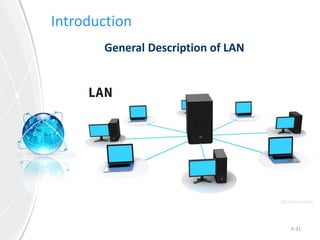
General Description of LAN
Covering a small geographic area
• Home
• Office
• Group of buildings
Introduction
4-31
General Description of LAN
Introduction
5-31
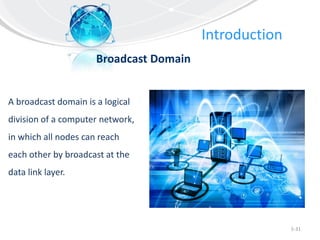
Broadcast Domain
A broadcast domain is a logical
division of a computer network,
in which all nodes can reach
each other by broadcast at the
data link layer.
Introduction
6-31
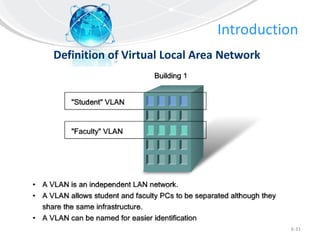
Definition of Virtual Local Area Network
Introduction
7-31
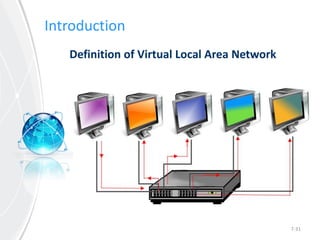
Definition of Virtual Local Area Network
Introduction
8-31
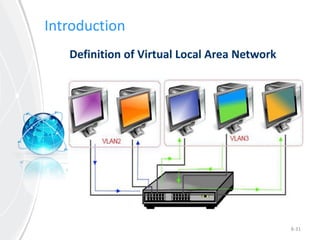
Definition of Virtual Local Area Network
Outlines
• Introduction
• Why VLAN?
• VLAN Trunking
• VLAN Tagging
• Types of VLAN
• Advantages and Disadvantages
• Conclusion
• References
9-31
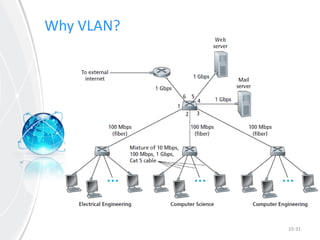
Why VLAN?
10-31
Why VLAN?
11-31
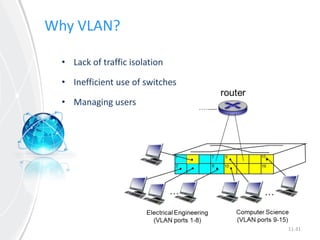
• Lack of traffic isolation
• Inefficient use of switches
• Managing users
Why VLAN?
12-31
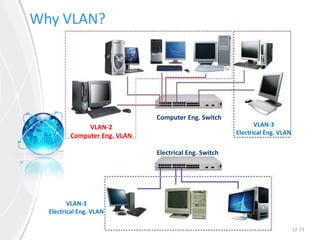
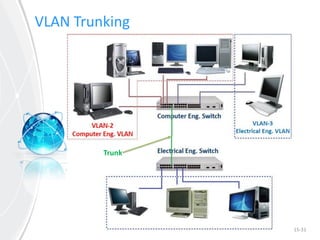
Electrical Eng. Switch
Computer Eng. Switch
VLAN-2
Computer Eng. VLAN
VLAN-3
Electrical Eng. VLAN
VLAN-3
Electrical Eng. VLAN
Outlines
• Introduction
• Why VLAN?
• VLAN Trunking
• VLAN Tagging
• Types of VLAN
• Advantages and Disadvantages
• Conclusion
• References
13-31
14-31
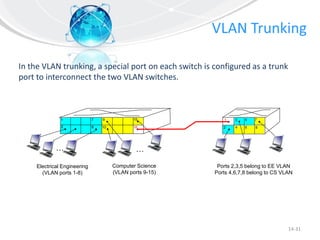
In the VLAN trunking, a special port on each switch is configured as a trunk
port to interconnect the two VLAN switches.
1
8
9
102
7
…
Electrical Engineering
(VLAN ports 1-8)
Computer Science
(VLAN ports 9-15)
15
…
2
73
Ports 2,3,5 belong to EE VLAN
Ports 4,6,7,8 belong to CS VLAN
5
4 6 816
1
15-31
VLAN Trunking
Trunk
16-31
VLAN Trunking
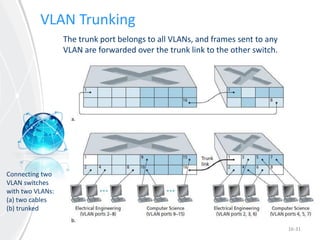
The trunk port belongs to all VLANs, and frames sent to any
VLAN are forwarded over the trunk link to the other switch.
Connecting two
VLAN switches
with two VLANs:
(a) two cables
(b) trunked
Outlines
• Introduction
• Why VLAN?
• VLAN Trunking
• VLAN Tagging
• Types of VLAN
• Advantages and Disadvantages
• Conclusion
• References
17-31
18-31
VLAN Tagging
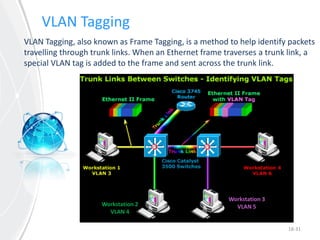
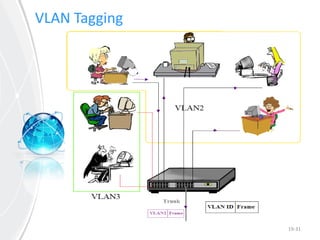
VLAN Tagging, also known as Frame Tagging, is a method to help identify packets
travelling through trunk links. When an Ethernet frame traverses a trunk link, a
special VLAN tag is added to the frame and sent across the trunk link.
Workstation 2
VLAN 4
Workstation 3
VLAN 5
VLAN Tagging
19-31
20-31
VLAN Tagging
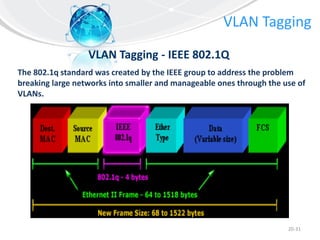
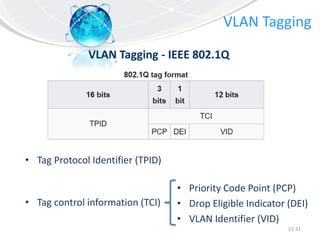
VLAN Tagging - IEEE 802.1Q
The 802.1q standard was created by the IEEE group to address the problem
breaking large networks into smaller and manageable ones through the use of
VLANs.
21-31
VLAN Tagging
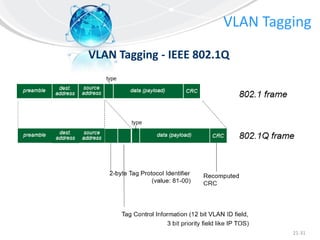
VLAN Tagging - IEEE 802.1Q
22-31
VLAN Tagging
VLAN Tagging - IEEE 802.1Q
• Tag Protocol Identifier (TPID)
• Tag control information (TCI)
• Priority Code Point (PCP)
• Drop Eligible Indicator (DEI)
• VLAN Identifier (VID)
Outlines
• Introduction
• Why VLAN?
• VLAN Trunking
• VLAN Tagging
• Types of VLAN
• Advantages and Disadvantages
• Conclusion
• References
23-31
Types of VLANs
24-31
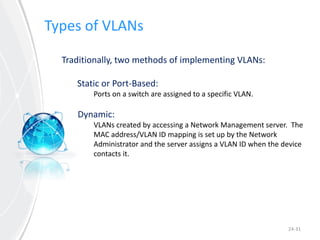
Traditionally, two methods of implementing VLANs:
Static or Port-Based:
Ports on a switch are assigned to a specific VLAN.
Dynamic:
VLANs created by accessing a Network Management server. The
MAC address/VLAN ID mapping is set up by the Network
Administrator and the server assigns a VLAN ID when the device
contacts it.
Types of VLANs
25-31
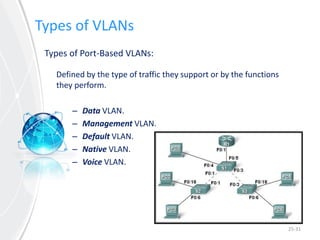
Types of Port-Based VLANs:
Defined by the type of traffic they support or by the functions
they perform.
– Data VLAN.
– Management VLAN.
– Default VLAN.
– Native VLAN.
– Voice VLAN.
Outlines
• Introduction
• Why VLAN?
• VLAN Trunking
• VLAN Tagging
• Types of VLAN
• Advantages and Disadvantages
• Conclusion
• References
26-31
Advantages and Disadvantages
27-31
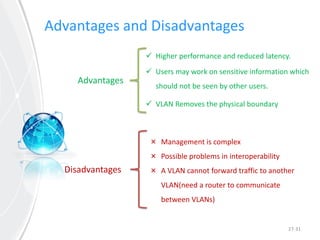
Advantages
Disadvantages
 Higher performance and reduced latency.
 Users may work on sensitive information which
should not be seen by other users.
 VLAN Removes the physical boundary
× Management is complex
× Possible problems in interoperability
× A VLAN cannot forward traffic to another
VLAN(need a router to communicate
between VLANs)
Outlines
• Introduction
• Why VLAN?
• VLAN Trunking
• VLAN Tagging
• Types of VLAN
• Advantages and Disadvantages
• Conclusion
• References
28-31
Conclusion
• Using VLANs in networks, greatly reduces costs of setting up and
maintenance of the networks.
• VLAN helps the manager of the network in managing hosts and
their limitations and accesses.
• By using VLAN, hosts in different and independent LANs can be in
a same broadcast domain.
• VLANs may low-off the requirement of using switches, therefore
the probability of cyber attacks decreases.
29-31
References
30-31
[1] James F. Kurose & Keith W. Ross, Computer Networking a t
T Top-Down Approach, Sixth edition
[2] Andrew S. Tanenbaum, Computer Networks, Fourth edition
[3] www.cyberlone.com
[4] www.firewall.cx
[5] www.wikipedia.org
[6] www.blog.router-switch.com
Thank you for your attention!
The End
31-31
Any Questions?

Virtual Local Area Network (VLAN)

  • 1.
    Virtual Local AreaNetwork (VLAN) Student: Mohammad Javad Abdolmaleki Supervisor: Dr. Mohammad Fathi Student ID: 9617007114 1-31
  • 2.
    Outlines • Introduction • WhyVLAN? • VLAN Trunking • VLAN Tagging • Types of VLAN • Advantages and Disadvantages • Conclusion • References 2-31
  • 3.
    Introduction 3-31 General Description ofLAN Covering a small geographic area • Home • Office • Group of buildings
  • 4.
  • 5.
    Introduction 5-31 Broadcast Domain A broadcastdomain is a logical division of a computer network, in which all nodes can reach each other by broadcast at the data link layer.
  • 6.
  • 7.
  • 8.
  • 9.
    Outlines • Introduction • WhyVLAN? • VLAN Trunking • VLAN Tagging • Types of VLAN • Advantages and Disadvantages • Conclusion • References 9-31
  • 10.
  • 11.
    Why VLAN? 11-31 • Lackof traffic isolation • Inefficient use of switches • Managing users
  • 12.
    Why VLAN? 12-31 Electrical Eng.Switch Computer Eng. Switch VLAN-2 Computer Eng. VLAN VLAN-3 Electrical Eng. VLAN VLAN-3 Electrical Eng. VLAN
  • 13.
    Outlines • Introduction • WhyVLAN? • VLAN Trunking • VLAN Tagging • Types of VLAN • Advantages and Disadvantages • Conclusion • References 13-31
  • 14.
    14-31 In the VLANtrunking, a special port on each switch is configured as a trunk port to interconnect the two VLAN switches. 1 8 9 102 7 … Electrical Engineering (VLAN ports 1-8) Computer Science (VLAN ports 9-15) 15 … 2 73 Ports 2,3,5 belong to EE VLAN Ports 4,6,7,8 belong to CS VLAN 5 4 6 816 1
  • 15.
  • 16.
    16-31 VLAN Trunking The trunkport belongs to all VLANs, and frames sent to any VLAN are forwarded over the trunk link to the other switch. Connecting two VLAN switches with two VLANs: (a) two cables (b) trunked
  • 17.
    Outlines • Introduction • WhyVLAN? • VLAN Trunking • VLAN Tagging • Types of VLAN • Advantages and Disadvantages • Conclusion • References 17-31
  • 18.
    18-31 VLAN Tagging VLAN Tagging,also known as Frame Tagging, is a method to help identify packets travelling through trunk links. When an Ethernet frame traverses a trunk link, a special VLAN tag is added to the frame and sent across the trunk link. Workstation 2 VLAN 4 Workstation 3 VLAN 5
  • 19.
  • 20.
    20-31 VLAN Tagging VLAN Tagging- IEEE 802.1Q The 802.1q standard was created by the IEEE group to address the problem breaking large networks into smaller and manageable ones through the use of VLANs.
  • 21.
  • 22.
    22-31 VLAN Tagging VLAN Tagging- IEEE 802.1Q • Tag Protocol Identifier (TPID) • Tag control information (TCI) • Priority Code Point (PCP) • Drop Eligible Indicator (DEI) • VLAN Identifier (VID)
  • 23.
    Outlines • Introduction • WhyVLAN? • VLAN Trunking • VLAN Tagging • Types of VLAN • Advantages and Disadvantages • Conclusion • References 23-31
  • 24.
    Types of VLANs 24-31 Traditionally,two methods of implementing VLANs: Static or Port-Based: Ports on a switch are assigned to a specific VLAN. Dynamic: VLANs created by accessing a Network Management server. The MAC address/VLAN ID mapping is set up by the Network Administrator and the server assigns a VLAN ID when the device contacts it.
  • 25.
    Types of VLANs 25-31 Typesof Port-Based VLANs: Defined by the type of traffic they support or by the functions they perform. – Data VLAN. – Management VLAN. – Default VLAN. – Native VLAN. – Voice VLAN.
  • 26.
    Outlines • Introduction • WhyVLAN? • VLAN Trunking • VLAN Tagging • Types of VLAN • Advantages and Disadvantages • Conclusion • References 26-31
  • 27.
    Advantages and Disadvantages 27-31 Advantages Disadvantages Higher performance and reduced latency.  Users may work on sensitive information which should not be seen by other users.  VLAN Removes the physical boundary × Management is complex × Possible problems in interoperability × A VLAN cannot forward traffic to another VLAN(need a router to communicate between VLANs)
  • 28.
    Outlines • Introduction • WhyVLAN? • VLAN Trunking • VLAN Tagging • Types of VLAN • Advantages and Disadvantages • Conclusion • References 28-31
  • 29.
    Conclusion • Using VLANsin networks, greatly reduces costs of setting up and maintenance of the networks. • VLAN helps the manager of the network in managing hosts and their limitations and accesses. • By using VLAN, hosts in different and independent LANs can be in a same broadcast domain. • VLANs may low-off the requirement of using switches, therefore the probability of cyber attacks decreases. 29-31
  • 30.
    References 30-31 [1] James F.Kurose & Keith W. Ross, Computer Networking a t T Top-Down Approach, Sixth edition [2] Andrew S. Tanenbaum, Computer Networks, Fourth edition [3] www.cyberlone.com [4] www.firewall.cx [5] www.wikipedia.org [6] www.blog.router-switch.com
  • 31.
    Thank you foryour attention! The End 31-31 Any Questions?