© Copyright IBM Corporation 2009
3.2
PowerVM Virtualization plain and simple
© Copyright IBM Corporation 2009
IBM System p
Goals with Virtualization
Lower costs and improve resource utilization
- Data Center floor space reduction or…
- Increase processing capacity in the same space
- Environmental (cooling and energy challenges)
- Consolidation of servers
- Lower over all solution costs
 Less hardware, fewer software licenses
- Increase business flexibility
 Meet ever changing business needs faster provisioning
- Improving Application Availability
 Flexibility in moving applications between servers
© Copyright IBM Corporation 2009
IBM System p
The virtualization elevator pitch
• The basic elements of PowerVM
- Micro-partitioning – allows 1 CPU look like 10
- Dynamic LPARs – moving resources
- Virtual I/O server – partitions can share
physical adapters
- Live partition mobility – using Power6
- Live application mobility – using AIX 6.1
© Copyright IBM Corporation 2009
IBM System p
First there were servers
• One physical server for one operating
system
• Additional physical servers added as
business grows
Physical view Users view
© Copyright IBM Corporation 2009
IBM System p
Then there were logical partitions
• One physical server was divided into
logical partitions
• Each partition is assigned a whole number
of physical CPUs (or cores)
• One physical server now looks like
multiple individual servers to the user
Physical view
8 CPUs
Users viewLogical view
1 CPUs
3 CPUs
2 CPUs
2 CPUs
© Copyright IBM Corporation 2009
IBM System p
Then came dynamic logical partitions
• Whole CPUs can be moved from one
partition to another partition
• These CPUs can be added and removed
from partitions without shutting the
partition down
• Memory can also be dynamically added
and removed from partitions
Physical view
8 CPUs
Users viewLogical view
1 CPUs
3 CPUs
2 CPUs
2 CPUs
1 CPUs
3 CPUs
2 CPUs
© Copyright IBM Corporation 2009
IBM System p
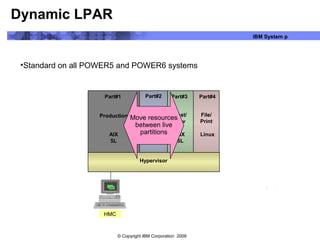
Dynamic LPAR
•Standard on all POWER5 and POWER6 systems
HMC
AIX
5L
Linux
Hypervisor
Part#1
Production
Part#2 Part#3 Part#4
Legacy
Apps
Test/
Dev
File/
Print
AIX
5L
AIX
5L
Move resources
between live
partitions
© Copyright IBM Corporation 2009
IBM System p
Now there is micro partitioning
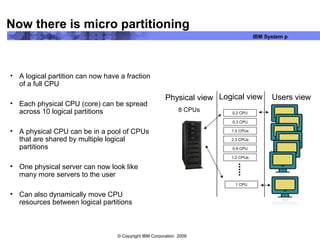
• A logical partition can now have a fraction
of a full CPU
• Each physical CPU (core) can be spread
across 10 logical partitions
• A physical CPU can be in a pool of CPUs
that are shared by multiple logical
partitions
• One physical server can now look like
many more servers to the user
• Can also dynamically move CPU
resources between logical partitions
Physical view
8 CPUs
Users viewLogical view
0.2 CPU
2.3 CPUs
1.2 CPUs
1 CPU
0.3 CPU
1.5 CPUs
0.9 CPU
© Copyright IBM Corporation 2009
IBM System p
Logical partitions (LPARs) can be defined with
dedicated or shared processors
Processors not dedicated to a LPAR are part of the
pool of shared processors
Processing capacity for a shared LPAR is specified
in terms of processing units.
With as little as 1/10 of a processor
Micro-partitioning terminology
© Copyright IBM Corporation 2009
IBM System p
Micro-partitioning – more details
Lets look deeper into micro-partitioning
© Copyright IBM Corporation 2009
IBM System p
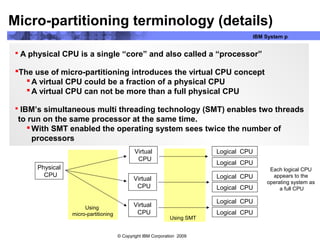
 A physical CPU is a single “core” and also called a “processor”
The use of micro-partitioning introduces the virtual CPU concept
A virtual CPU could be a fraction of a physical CPU
A virtual CPU can not be more than a full physical CPU
 IBM’s simultaneous multi threading technology (SMT) enables two threads
to run on the same processor at the same time.
With SMT enabled the operating system sees twice the number of
processors
Micro-partitioning terminology (details)
Physical
CPU
Virtual
CPU
Virtual
CPU
Virtual
CPU
Logical CPU
Logical CPU
Logical CPU
Logical CPU
Logical CPU
Logical CPU
Using SMT
Using
micro-partitioning
Each logical CPU
appears to the
operating system as
a full CPU
© Copyright IBM Corporation 2009
IBM System p
The LPAR definition sets the options for processing capacity:
ƒ Minimum:
ƒ Desired:
ƒ Maximum:
The processing capacity of an LPAR can be dynamically changed
ƒ Changed by the administrator at the HMC
ƒ Changed automatically by the hypervisor
The LPAR definition set the behavior when under a load
ƒ Capped: LPAR processing capacity is limited to the
desired setting
ƒ Uncapped: LPAR is allowed to use more then it was given
Micro-partitioning terminology (details)
© Copyright IBM Corporation 2009
IBM System p
Shared processor pool
Basic terminology around Logical Partitions
Shared processor
partition
SMT Off
Shared processor
partition
SMT On
Dedicated
processor partition
SMT Off
Deconfigured
Inactive (CUoD)
Dedicated
Shared
Virtual
Logical (SMT)
Installed physical
processors
Entitled capacity
© Copyright IBM Corporation 2009
IBM System p
Capped and uncapped partitions
• Capped partition
- Not allowed to exceed its entitlement
• Uncapped partition
- Is allowed to exceed its entitlement
• Capacity weight
- Used for prioritizing uncapped partitions
- Value 0-255
- Value of 0 referred to as a “soft cap”
Note: The CPU utilization metric has less relevance
in the uncapped partition.
© Copyright IBM Corporation 2009
IBM System p
What about system I/O adapters
• Back in the “old” days, each partition had
to have its own dedicated adapters
• One Ethernet adapter for a network
connection
• One SCSI or HBA card to connect to local
or external disk storage
• The number of partitions was limited by
the number of available adapters
Physical
adapters Users view
Logical
Partitions
1 CPUs
3 CPUs
2 CPUs
2 CPUs
Ethernet adap
Ethernet adap
Ethernet adap
Ethernet adap
SCSI adap
SCSI adap
SCSI adap
SCSI adap
© Copyright IBM Corporation 2009
IBM System p
Then came the Virtual I/O server (VIOS)
• The virtual I/O server allows partitions to
share physical adapters
• One Ethernet adapter can not provide a
network connection for multiple partitions
• Disks on one SCSI or HBA card can now
be shared with multiple partitions
• The number of partitions is no longer
limited by the number of available
adapters
Ethernet adap
SCSI adap
Virtual I/O Server
partition
0.5 CPU
1.1 CPUs
0.3 CPU
1.4 CPUs
2.1 CPUs
Ethernet network
© Copyright IBM Corporation 2009
IBM System p
Virtual I/O server and SCSI disks
© Copyright IBM Corporation 2009
IBM System p
Integrated Virtual Ethernet
LPAR
#2
LPAR
VIOS
LPAR
#3
LPAR
#1
Power Hypervisor
SEA
Virtual Ethernet Switch
Virtual
Ethernet
Driver
Virtual
Ethernet
Driver
Virtual
Ethernet
Driver
LPAR
#2
LPAR
VIOS
LPAR
#3
LPAR
#1
Power
Hyper-
visor
SEA Ethernet
Driver
Ethernet
Driver
Ethernet
Driver
Integrated
Virtual Adapter
VIOS Set up is not
required for sharing
Ethernet Adapters
PCI Ethernet Adapter
Virtual I/O Shared Ethernet Adapter Integrated Virtual Ethernet
vs
© Copyright IBM Corporation 2009
IBM System p
Lets see it in action
Now let’s see this technology in action
This demo illustrates the topics just discussed
© Copyright IBM Corporation 2009
IBM System p
© Copyright IBM Corporation 2009
IBM System p
Shared Processor pools
It is possible to have multiple shared processor pools
Lets dive in deeper
© Copyright IBM Corporation 2009
IBM System p
Linux
Software: A,B,C
AIX 5L
Software: X,Y,Z
Multiple Shared Processor Pools
VSP2 Max Cap=2VSP1 Max Cap=4
AIX 5L DB/2
Physical Shared Pool
► Useful for multiple business units in a single company – resource allocation
► Only license the relevant software based on VSP Max
► Cap total capacity used by a group of partitions
► Still allow other partitions to consume capacity not used by the partitions in the
VSP
© Copyright IBM Corporation 2009
IBM System p
AIX 6.1 Introduces Workload Partitions
• Workload partitions (WPAR) is yet another way to create virtual
systems
• WPARs are partitions within a partition
• Each partition is isolated from one another
• AIX 6.1 can be run on Power5 or Power6 hardware
© Copyright IBM Corporation 2009
IBM System p
AIX 6 Workload Partitions (details)
 WPAR appears to be a stand alone AIX system
 Created entirely within a single AIX system image
 Created entirely in software (no HW assist or configuration)
 Provides an isolated process environment: Processes within
a WPAR can only see other processes in the same partition.
 Provides an isolated file system space
A separate branch of the global file system space is created
and all of the WPARS processes are chrooted to this
branch.
Processes within a WPAR see files only in this branch.
 Provides an isolated network environment
Separate network addresses, hostnames, domain names
Other nodes on the network see WPAR as a stand alone
system.
 Provides WPAR resource controls
The amount of system memory, CPU resources, paging
space allocated to each WPAR can be set.
 Shared system resources: OS, I/O Devices, Shared Library
Workload
Partition
A
Workload
Partition
C
Workload
Partition
B
AIX 6 Image
Workload
Partition
D
Workload
Partition
E
© Copyright IBM Corporation 2009
IBM System p
Inside a WPAR
© Copyright IBM Corporation 2009
IBM System p
Workload
Partition
Billing
Workload
Partition
QA
AIX # 2
Workload
Partition
Data Mining
Live Application Mobility
Workload
Partition
Application
Server
Workload
Partition
Web
AIX # 1
Application
Partition
Dev
The ability to move a Workload Partition from one server to another
Provides outage avoidance and multi-system workload balancing
Workload
Partition
eMail
Policy based automation can provide more efficient resource usage
Workload
Partitions
Manager
Policy
NFSNFS
© Copyright IBM Corporation 2009
IBM System p
Live application mobility in action
Lets see this techonolgy in action with another demo
Need to exit presentation in order to run the demo
© Copyright IBM Corporation 2009
IBM System p
Power6 hardware introduced partition mobility
With Power6 hardware, partitions can not be moved from on system to
another without stopping the applications running on that partition.
© Copyright IBM Corporation 2009
IBM System p
Partition Mobility: Active and Inactive
LPARs
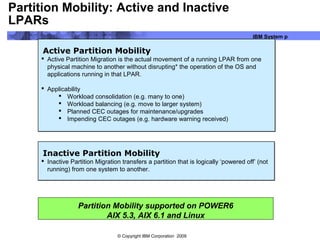
Active Partition Mobility
 Active Partition Migration is the actual movement of a running LPAR from one
physical machine to another without disrupting* the operation of the OS and
applications running in that LPAR.
 Applicability
 Workload consolidation (e.g. many to one)
 Workload balancing (e.g. move to larger system)
 Planned CEC outages for maintenance/upgrades
 Impending CEC outages (e.g. hardware warning received)
Active Partition Mobility
 Active Partition Migration is the actual movement of a running LPAR from one
physical machine to another without disrupting* the operation of the OS and
applications running in that LPAR.
 Applicability
 Workload consolidation (e.g. many to one)
 Workload balancing (e.g. move to larger system)
 Planned CEC outages for maintenance/upgrades
 Impending CEC outages (e.g. hardware warning received)
Inactive Partition Mobility
 Inactive Partition Migration transfers a partition that is logically ‘powered off’ (not
running) from one system to another.
Inactive Partition Mobility
 Inactive Partition Migration transfers a partition that is logically ‘powered off’ (not
running) from one system to another.
Partition Mobility supported on POWER6
AIX 5.3, AIX 6.1 and Linux
© Copyright IBM Corporation 2009
IBM System p
Live partition mobility demo
The following demo show live partition mobility (LPM) in action
© Copyright IBM Corporation 2009
IBM System p
Response Time & Utilization based Workload & Resource Management
AIX 5.3
Linux
Partitions
Power Hypervisor
Virtual I / O Server (VI OS)
Ethernet & Fiber Channel
Adapter Sharing
Virtualized disks
Interpartition Communication
Dedicated I/O Shared I/O
AIX 6
IBM System p Offers Best of Both Worlds in Virtualization
WPAR
Application
Server
WPAR
Web
Server
WPAR
Billing
AIX instance
WPAR
Test
WPAR
BI
Logical Partitions (LPARS) AIX 6 Workload Partitions (WPARs)
 Multiple OS Images in LPARs
 Up to a maximum of 254
 Maximum Flexibility
 Different OSes and OS Versions in LPARs
 Maximum Fault / Security / Resource Isolation
 Multiple workloads within a single OS image
 Minimum number of OS Images: one
 Improved administrative efficiency
 Reduce number of OS images to maintain
 Good Fault / Security / Resource isolation
AIX Workload Partitions can be Used in LPARs
© Copyright IBM Corporation 2009
IBM System p
Virtualization Benefits
• Increase Utilization
- Single application servers
often run at lower average
utilizations levels.
- Idle capacity cannot be used
- Virtualized servers run at high
utilization levels.
• Simplify Workload Sizing
- Sizing new workloads is difficult
- LPARs can be resized to match
needs
- Can over commit capacity
- Scale up and scale out
applications on the same hardware
platform
0
10
20
30
40
50
60
70
80
90
100
8:00 10:00 12:00 2:00 4:00
Time
CPUUtilization
Purchased
Peak
Average
© Copyright IBM Corporation 2009
IBM System p
Backup slides
Still more details for those interest….
© Copyright IBM Corporation 2009
IBM System p
Partition capacity entitlement
• Processing units
- 1.0 processing unit represents one
physical processor
• Entitled processor capacity
- Commitment of capacity that is reserved
for the partition
- Set upper limit of processor utilization for
capped partitions
- Each virtual processor must be granted at
least 1/10 of a processing unit of
entitlement
• Shared processor capacity is always delivered
in terms of whole physical processors
Processing capacity
1 physical processor
1.0 processing units
0.5 processing unit 0.4 processing unit
Minimum requirement
0.1 processing units
© Copyright IBM Corporation 2009
IBM System p
Capped Shared Processor LPAR
Maximum Processor Capacity
Entitled Processor CapacityProcessor
Capacity
Utilization
LPARCapacity Utilization
Pool Idle CapacityAvailable
Time
minimumprocessor capacity
ceded capacity
utilized capacity
© Copyright IBM Corporation 2009
IBM System p
Uncapped Shared Processor LPAR
MaximumProcessor Capacity
Processor
Capacity
Utilization
Pool IdleCapacityAvailable
Time
EntitledProcessor Capacity
minimumprocessor capacity
UtilizedCapacity
cededcapacity
© Copyright IBM Corporation 2009
IBM System p
Shared processor partitions
• Micro-Partitioning allows for multiple partitions to share one
physical processor
• Up to 10 partitions per physical processor
• Up to 254 partitions active at the same time
• Partition’s resource definition
- Minimum, desired, and maximum values for each resource
- Processor capacity
- Virtual processors
- Capped or uncapped
• Capacity weight
- Dedicated memory
• Minimum of 128 MB and 16 MB increments
- Physical or virtual I/O resources
CPU 0 CPU 1
CPU 3 CPU 4
LPAR 1 LPAR 2
LPAR 5 LPAR 6
LPAR 4LPAR 3
© Copyright IBM Corporation 2009
IBM System p
Understanding min/max/desired resource values
• The desired value for a resource is given to a partition
if enough resource is available.
• If there is not enough resource to meet the desired
value, then a lower amount is allocated.
• If there is not enough resource to meet the min value,
the partition will not start.
• The maximum value is only used as an upper limit for
dynamic partitioning operations.
© Copyright IBM Corporation 2009
IBM System p
Partition capacity entitlement example
• Shared pool has 2.0 processing units available
• LPARs activated in sequence
• Partition 1 activated
- Min = 1.0, max = 2.0, desired = 1.5
- Starts with 1.5 allocated processing units
• Partition 2 activated
- Min = 1.0, max = 2.0, desired = 1.0
- Does not start
• Partition 3 activated
- Min = 0.1, max = 1.0, desired = 0.8
- Starts with 0.5 allocated processing units
© Copyright IBM Corporation 2009
IBM System p
Capped and uncapped partitions
• Capped partition
- Not allowed to exceed its entitlement
• Uncapped partition
- Is allowed to exceed its entitlement
• Capacity weight
- Used for prioritizing uncapped partitions
- Value 0-255
- Value of 0 referred to as a “soft cap”
© Copyright IBM Corporation 2009
IBM System p
Shared Dedicated Capacity
0
25
50
75
100
125
150
175
200
1-way Dedicated Wasted Dedicated
0.5 Uncapped 1 0.5 Uncapped 2
Dedicated Processor Partitions often have excess capacity that can be utilized by uncapped micropartitions
Increased Resource Utilization
Today
 Unused capacity in dedicated partitions gets wasted
0
25
50
75
100
125
150
175
200
1-way Dedicated Wasted Dedicated
0.5 Uncapped 1 0.5 Uncapped 2
 With the new support, a dedicated partition will donate its
excess cycles to the uncapped partitions
 Results in increased resource utilization
 Dedicated processor partition maintains the performance
characteristics and predictability of the dedicated environment
under load
With Shared Dedicated Capacity
Equivalent
Workload
Complete
© Copyright IBM Corporation 2009
IBM System p
WPAR Manager view of WPARs
© Copyright IBM Corporation 2009
IBM System p
Active Memory Sharing Overview
• Next step in resource virtualization, analogous to shared processor partitions
that share the processor resources available in a pool of processors.
• Supports over-commitment of physical memory with overflow going to a paging
device.
- Users can define a partition with a logical memory size larger than the available physical
memory.
- Users can activate a set of partitions whose aggregate logical memory size exceeds the
available physical memory.
• Enables fine-grained sharing of physical memory and automated expansion and
contraction of a partition’s physical memory footprint based on workload
demands.
• Supports OS collaborative memory management (ballooning) to reduce
hypervisor paging.
A pool of physical memory is dynamically allocated amongst
multiple logical partitions as needed to optimize overall
physical memory usage in the pool.

Virtualisation overview

  • 1.
    © Copyright IBMCorporation 2009 3.2 PowerVM Virtualization plain and simple
  • 2.
    © Copyright IBMCorporation 2009 IBM System p Goals with Virtualization Lower costs and improve resource utilization - Data Center floor space reduction or… - Increase processing capacity in the same space - Environmental (cooling and energy challenges) - Consolidation of servers - Lower over all solution costs  Less hardware, fewer software licenses - Increase business flexibility  Meet ever changing business needs faster provisioning - Improving Application Availability  Flexibility in moving applications between servers
  • 3.
    © Copyright IBMCorporation 2009 IBM System p The virtualization elevator pitch • The basic elements of PowerVM - Micro-partitioning – allows 1 CPU look like 10 - Dynamic LPARs – moving resources - Virtual I/O server – partitions can share physical adapters - Live partition mobility – using Power6 - Live application mobility – using AIX 6.1
  • 4.
    © Copyright IBMCorporation 2009 IBM System p First there were servers • One physical server for one operating system • Additional physical servers added as business grows Physical view Users view
  • 5.
    © Copyright IBMCorporation 2009 IBM System p Then there were logical partitions • One physical server was divided into logical partitions • Each partition is assigned a whole number of physical CPUs (or cores) • One physical server now looks like multiple individual servers to the user Physical view 8 CPUs Users viewLogical view 1 CPUs 3 CPUs 2 CPUs 2 CPUs
  • 6.
    © Copyright IBMCorporation 2009 IBM System p Then came dynamic logical partitions • Whole CPUs can be moved from one partition to another partition • These CPUs can be added and removed from partitions without shutting the partition down • Memory can also be dynamically added and removed from partitions Physical view 8 CPUs Users viewLogical view 1 CPUs 3 CPUs 2 CPUs 2 CPUs 1 CPUs 3 CPUs 2 CPUs
  • 7.
    © Copyright IBMCorporation 2009 IBM System p Dynamic LPAR •Standard on all POWER5 and POWER6 systems HMC AIX 5L Linux Hypervisor Part#1 Production Part#2 Part#3 Part#4 Legacy Apps Test/ Dev File/ Print AIX 5L AIX 5L Move resources between live partitions
  • 8.
    © Copyright IBMCorporation 2009 IBM System p Now there is micro partitioning • A logical partition can now have a fraction of a full CPU • Each physical CPU (core) can be spread across 10 logical partitions • A physical CPU can be in a pool of CPUs that are shared by multiple logical partitions • One physical server can now look like many more servers to the user • Can also dynamically move CPU resources between logical partitions Physical view 8 CPUs Users viewLogical view 0.2 CPU 2.3 CPUs 1.2 CPUs 1 CPU 0.3 CPU 1.5 CPUs 0.9 CPU
  • 9.
    © Copyright IBMCorporation 2009 IBM System p Logical partitions (LPARs) can be defined with dedicated or shared processors Processors not dedicated to a LPAR are part of the pool of shared processors Processing capacity for a shared LPAR is specified in terms of processing units. With as little as 1/10 of a processor Micro-partitioning terminology
  • 10.
    © Copyright IBMCorporation 2009 IBM System p Micro-partitioning – more details Lets look deeper into micro-partitioning
  • 11.
    © Copyright IBMCorporation 2009 IBM System p  A physical CPU is a single “core” and also called a “processor” The use of micro-partitioning introduces the virtual CPU concept A virtual CPU could be a fraction of a physical CPU A virtual CPU can not be more than a full physical CPU  IBM’s simultaneous multi threading technology (SMT) enables two threads to run on the same processor at the same time. With SMT enabled the operating system sees twice the number of processors Micro-partitioning terminology (details) Physical CPU Virtual CPU Virtual CPU Virtual CPU Logical CPU Logical CPU Logical CPU Logical CPU Logical CPU Logical CPU Using SMT Using micro-partitioning Each logical CPU appears to the operating system as a full CPU
  • 12.
    © Copyright IBMCorporation 2009 IBM System p The LPAR definition sets the options for processing capacity: ƒ Minimum: ƒ Desired: ƒ Maximum: The processing capacity of an LPAR can be dynamically changed ƒ Changed by the administrator at the HMC ƒ Changed automatically by the hypervisor The LPAR definition set the behavior when under a load ƒ Capped: LPAR processing capacity is limited to the desired setting ƒ Uncapped: LPAR is allowed to use more then it was given Micro-partitioning terminology (details)
  • 13.
    © Copyright IBMCorporation 2009 IBM System p Shared processor pool Basic terminology around Logical Partitions Shared processor partition SMT Off Shared processor partition SMT On Dedicated processor partition SMT Off Deconfigured Inactive (CUoD) Dedicated Shared Virtual Logical (SMT) Installed physical processors Entitled capacity
  • 14.
    © Copyright IBMCorporation 2009 IBM System p Capped and uncapped partitions • Capped partition - Not allowed to exceed its entitlement • Uncapped partition - Is allowed to exceed its entitlement • Capacity weight - Used for prioritizing uncapped partitions - Value 0-255 - Value of 0 referred to as a “soft cap” Note: The CPU utilization metric has less relevance in the uncapped partition.
  • 15.
    © Copyright IBMCorporation 2009 IBM System p What about system I/O adapters • Back in the “old” days, each partition had to have its own dedicated adapters • One Ethernet adapter for a network connection • One SCSI or HBA card to connect to local or external disk storage • The number of partitions was limited by the number of available adapters Physical adapters Users view Logical Partitions 1 CPUs 3 CPUs 2 CPUs 2 CPUs Ethernet adap Ethernet adap Ethernet adap Ethernet adap SCSI adap SCSI adap SCSI adap SCSI adap
  • 16.
    © Copyright IBMCorporation 2009 IBM System p Then came the Virtual I/O server (VIOS) • The virtual I/O server allows partitions to share physical adapters • One Ethernet adapter can not provide a network connection for multiple partitions • Disks on one SCSI or HBA card can now be shared with multiple partitions • The number of partitions is no longer limited by the number of available adapters Ethernet adap SCSI adap Virtual I/O Server partition 0.5 CPU 1.1 CPUs 0.3 CPU 1.4 CPUs 2.1 CPUs Ethernet network
  • 17.
    © Copyright IBMCorporation 2009 IBM System p Virtual I/O server and SCSI disks
  • 18.
    © Copyright IBMCorporation 2009 IBM System p Integrated Virtual Ethernet LPAR #2 LPAR VIOS LPAR #3 LPAR #1 Power Hypervisor SEA Virtual Ethernet Switch Virtual Ethernet Driver Virtual Ethernet Driver Virtual Ethernet Driver LPAR #2 LPAR VIOS LPAR #3 LPAR #1 Power Hyper- visor SEA Ethernet Driver Ethernet Driver Ethernet Driver Integrated Virtual Adapter VIOS Set up is not required for sharing Ethernet Adapters PCI Ethernet Adapter Virtual I/O Shared Ethernet Adapter Integrated Virtual Ethernet vs
  • 19.
    © Copyright IBMCorporation 2009 IBM System p Lets see it in action Now let’s see this technology in action This demo illustrates the topics just discussed
  • 20.
    © Copyright IBMCorporation 2009 IBM System p
  • 21.
    © Copyright IBMCorporation 2009 IBM System p Shared Processor pools It is possible to have multiple shared processor pools Lets dive in deeper
  • 22.
    © Copyright IBMCorporation 2009 IBM System p Linux Software: A,B,C AIX 5L Software: X,Y,Z Multiple Shared Processor Pools VSP2 Max Cap=2VSP1 Max Cap=4 AIX 5L DB/2 Physical Shared Pool ► Useful for multiple business units in a single company – resource allocation ► Only license the relevant software based on VSP Max ► Cap total capacity used by a group of partitions ► Still allow other partitions to consume capacity not used by the partitions in the VSP
  • 23.
    © Copyright IBMCorporation 2009 IBM System p AIX 6.1 Introduces Workload Partitions • Workload partitions (WPAR) is yet another way to create virtual systems • WPARs are partitions within a partition • Each partition is isolated from one another • AIX 6.1 can be run on Power5 or Power6 hardware
  • 24.
    © Copyright IBMCorporation 2009 IBM System p AIX 6 Workload Partitions (details)  WPAR appears to be a stand alone AIX system  Created entirely within a single AIX system image  Created entirely in software (no HW assist or configuration)  Provides an isolated process environment: Processes within a WPAR can only see other processes in the same partition.  Provides an isolated file system space A separate branch of the global file system space is created and all of the WPARS processes are chrooted to this branch. Processes within a WPAR see files only in this branch.  Provides an isolated network environment Separate network addresses, hostnames, domain names Other nodes on the network see WPAR as a stand alone system.  Provides WPAR resource controls The amount of system memory, CPU resources, paging space allocated to each WPAR can be set.  Shared system resources: OS, I/O Devices, Shared Library Workload Partition A Workload Partition C Workload Partition B AIX 6 Image Workload Partition D Workload Partition E
  • 25.
    © Copyright IBMCorporation 2009 IBM System p Inside a WPAR
  • 26.
    © Copyright IBMCorporation 2009 IBM System p Workload Partition Billing Workload Partition QA AIX # 2 Workload Partition Data Mining Live Application Mobility Workload Partition Application Server Workload Partition Web AIX # 1 Application Partition Dev The ability to move a Workload Partition from one server to another Provides outage avoidance and multi-system workload balancing Workload Partition eMail Policy based automation can provide more efficient resource usage Workload Partitions Manager Policy NFSNFS
  • 27.
    © Copyright IBMCorporation 2009 IBM System p Live application mobility in action Lets see this techonolgy in action with another demo Need to exit presentation in order to run the demo
  • 28.
    © Copyright IBMCorporation 2009 IBM System p Power6 hardware introduced partition mobility With Power6 hardware, partitions can not be moved from on system to another without stopping the applications running on that partition.
  • 29.
    © Copyright IBMCorporation 2009 IBM System p Partition Mobility: Active and Inactive LPARs Active Partition Mobility  Active Partition Migration is the actual movement of a running LPAR from one physical machine to another without disrupting* the operation of the OS and applications running in that LPAR.  Applicability  Workload consolidation (e.g. many to one)  Workload balancing (e.g. move to larger system)  Planned CEC outages for maintenance/upgrades  Impending CEC outages (e.g. hardware warning received) Active Partition Mobility  Active Partition Migration is the actual movement of a running LPAR from one physical machine to another without disrupting* the operation of the OS and applications running in that LPAR.  Applicability  Workload consolidation (e.g. many to one)  Workload balancing (e.g. move to larger system)  Planned CEC outages for maintenance/upgrades  Impending CEC outages (e.g. hardware warning received) Inactive Partition Mobility  Inactive Partition Migration transfers a partition that is logically ‘powered off’ (not running) from one system to another. Inactive Partition Mobility  Inactive Partition Migration transfers a partition that is logically ‘powered off’ (not running) from one system to another. Partition Mobility supported on POWER6 AIX 5.3, AIX 6.1 and Linux
  • 30.
    © Copyright IBMCorporation 2009 IBM System p Live partition mobility demo The following demo show live partition mobility (LPM) in action
  • 31.
    © Copyright IBMCorporation 2009 IBM System p Response Time & Utilization based Workload & Resource Management AIX 5.3 Linux Partitions Power Hypervisor Virtual I / O Server (VI OS) Ethernet & Fiber Channel Adapter Sharing Virtualized disks Interpartition Communication Dedicated I/O Shared I/O AIX 6 IBM System p Offers Best of Both Worlds in Virtualization WPAR Application Server WPAR Web Server WPAR Billing AIX instance WPAR Test WPAR BI Logical Partitions (LPARS) AIX 6 Workload Partitions (WPARs)  Multiple OS Images in LPARs  Up to a maximum of 254  Maximum Flexibility  Different OSes and OS Versions in LPARs  Maximum Fault / Security / Resource Isolation  Multiple workloads within a single OS image  Minimum number of OS Images: one  Improved administrative efficiency  Reduce number of OS images to maintain  Good Fault / Security / Resource isolation AIX Workload Partitions can be Used in LPARs
  • 32.
    © Copyright IBMCorporation 2009 IBM System p Virtualization Benefits • Increase Utilization - Single application servers often run at lower average utilizations levels. - Idle capacity cannot be used - Virtualized servers run at high utilization levels. • Simplify Workload Sizing - Sizing new workloads is difficult - LPARs can be resized to match needs - Can over commit capacity - Scale up and scale out applications on the same hardware platform 0 10 20 30 40 50 60 70 80 90 100 8:00 10:00 12:00 2:00 4:00 Time CPUUtilization Purchased Peak Average
  • 33.
    © Copyright IBMCorporation 2009 IBM System p Backup slides Still more details for those interest….
  • 34.
    © Copyright IBMCorporation 2009 IBM System p Partition capacity entitlement • Processing units - 1.0 processing unit represents one physical processor • Entitled processor capacity - Commitment of capacity that is reserved for the partition - Set upper limit of processor utilization for capped partitions - Each virtual processor must be granted at least 1/10 of a processing unit of entitlement • Shared processor capacity is always delivered in terms of whole physical processors Processing capacity 1 physical processor 1.0 processing units 0.5 processing unit 0.4 processing unit Minimum requirement 0.1 processing units
  • 35.
    © Copyright IBMCorporation 2009 IBM System p Capped Shared Processor LPAR Maximum Processor Capacity Entitled Processor CapacityProcessor Capacity Utilization LPARCapacity Utilization Pool Idle CapacityAvailable Time minimumprocessor capacity ceded capacity utilized capacity
  • 36.
    © Copyright IBMCorporation 2009 IBM System p Uncapped Shared Processor LPAR MaximumProcessor Capacity Processor Capacity Utilization Pool IdleCapacityAvailable Time EntitledProcessor Capacity minimumprocessor capacity UtilizedCapacity cededcapacity
  • 37.
    © Copyright IBMCorporation 2009 IBM System p Shared processor partitions • Micro-Partitioning allows for multiple partitions to share one physical processor • Up to 10 partitions per physical processor • Up to 254 partitions active at the same time • Partition’s resource definition - Minimum, desired, and maximum values for each resource - Processor capacity - Virtual processors - Capped or uncapped • Capacity weight - Dedicated memory • Minimum of 128 MB and 16 MB increments - Physical or virtual I/O resources CPU 0 CPU 1 CPU 3 CPU 4 LPAR 1 LPAR 2 LPAR 5 LPAR 6 LPAR 4LPAR 3
  • 38.
    © Copyright IBMCorporation 2009 IBM System p Understanding min/max/desired resource values • The desired value for a resource is given to a partition if enough resource is available. • If there is not enough resource to meet the desired value, then a lower amount is allocated. • If there is not enough resource to meet the min value, the partition will not start. • The maximum value is only used as an upper limit for dynamic partitioning operations.
  • 39.
    © Copyright IBMCorporation 2009 IBM System p Partition capacity entitlement example • Shared pool has 2.0 processing units available • LPARs activated in sequence • Partition 1 activated - Min = 1.0, max = 2.0, desired = 1.5 - Starts with 1.5 allocated processing units • Partition 2 activated - Min = 1.0, max = 2.0, desired = 1.0 - Does not start • Partition 3 activated - Min = 0.1, max = 1.0, desired = 0.8 - Starts with 0.5 allocated processing units
  • 40.
    © Copyright IBMCorporation 2009 IBM System p Capped and uncapped partitions • Capped partition - Not allowed to exceed its entitlement • Uncapped partition - Is allowed to exceed its entitlement • Capacity weight - Used for prioritizing uncapped partitions - Value 0-255 - Value of 0 referred to as a “soft cap”
  • 41.
    © Copyright IBMCorporation 2009 IBM System p Shared Dedicated Capacity 0 25 50 75 100 125 150 175 200 1-way Dedicated Wasted Dedicated 0.5 Uncapped 1 0.5 Uncapped 2 Dedicated Processor Partitions often have excess capacity that can be utilized by uncapped micropartitions Increased Resource Utilization Today  Unused capacity in dedicated partitions gets wasted 0 25 50 75 100 125 150 175 200 1-way Dedicated Wasted Dedicated 0.5 Uncapped 1 0.5 Uncapped 2  With the new support, a dedicated partition will donate its excess cycles to the uncapped partitions  Results in increased resource utilization  Dedicated processor partition maintains the performance characteristics and predictability of the dedicated environment under load With Shared Dedicated Capacity Equivalent Workload Complete
  • 42.
    © Copyright IBMCorporation 2009 IBM System p WPAR Manager view of WPARs
  • 43.
    © Copyright IBMCorporation 2009 IBM System p Active Memory Sharing Overview • Next step in resource virtualization, analogous to shared processor partitions that share the processor resources available in a pool of processors. • Supports over-commitment of physical memory with overflow going to a paging device. - Users can define a partition with a logical memory size larger than the available physical memory. - Users can activate a set of partitions whose aggregate logical memory size exceeds the available physical memory. • Enables fine-grained sharing of physical memory and automated expansion and contraction of a partition’s physical memory footprint based on workload demands. • Supports OS collaborative memory management (ballooning) to reduce hypervisor paging. A pool of physical memory is dynamically allocated amongst multiple logical partitions as needed to optimize overall physical memory usage in the pool.

Editor's Notes

  • #2 This presentation is targeted to for a less technical audience with the objective of explaining the power of IBM’s virtualization technologies
  • #3 One or all of these topics are good reasons to do Virtualization. Some will say you can even lower your overall cost in head count. That is some what true but you need to have highly skilled UNIX talent for this. If you look at what a UNIX admin can support for physical servers maybe 50 systems and that is a lot. Compared to two UNIX admin who are trained and skilled with Virtualization. The pair can easily mange 4 595 class systems with a range of 350 to 400 LPARs on these systems, increasing the over all effectiveness of FTE (full time employee) staff.
  • #8 Allocate processors, memory and I/O to create virtual servers Minimum 128 MB memory, one CPU, one PCI-X adapter slot All resources can be allocated independently Resources can be moved between live partitions Applications notified of configuration changes Movement can be automated using Partition Load Manager Works with AIX 5.2+ or Linux 2.4+
  • #9 Micro partitioning allows for many more logical partitions to be created since you are no longer required to assign a full processor to a logical partition. Partitions can now more effectively be assigned enough CPU resources to do its workload allowing other partitions to use remaining CPU resources.
  • #10 Here is the basic terminology.
  • #11 The next few slides go into a little more detail. Use if audience is interested in knowing more.
  • #12 Talk about the relationship between the physical CPU, the virtual CPU and the logical CPU.
  • #13 Explain the concept of min, desired (or entitled) and maximum. Explain how the behavior of the hypervisor is controlled by the lpar definition
  • #14 The diagram in this chart shows the relationship and new concepts regarding Micro-Partitioning processor terminology used in this presentation. Virtual processors These are the whole number of concurrent operations that the operating system can use on a partition. The processing power can be conceptualized as being spread equally across these virtual processors. Selecting the optimal number of virtual processors depends on the workload in the partition. Some partitions benefit from greater concurrence, where other partitions require greater power. The maximum number of virtual processors per partition is 64. Dedicated processors Dedicated processors are whole processors that are assigned to a single partition. If you choose to assign dedicated processors to a logical partition, you must assign at least one processor to that partition. By default, a powered-off logical partition using dedicated processors will have its processors available to the shared processing pool. When the processors are in the shared processing pool, an uncapped partition that needs more processing power can use the idle processing resources. However, when you power on the dedicated partition while the uncapped partition is using the processors, the activated partition will regain all of its processing resources. If you want to prevent dedicated processors from being used in the shared processing pool, you can disable this function using the logical partition profile properties panels on the Hardware Management Console. Shared processor pool The POWER Hypervisor schedules shared processor partitions from a set of physical processors that is called the shared processor pool. By definition, these processors are not associated with dedicated partitions. Deconfigured processor This is a failing processor left outside the system’s configuration after a dynamic processor deallocation has occurred.
  • #15 A capped partition is not allowed to exceed it capacity entitlement, while an uncapped partition is. In fact, it may exceed its maximum processor capacity. An uncapped partition is only limited in its ability to consume cycles by the lack of online virtual processors and its variable capacity weight attribute. The variable capacity weight attribute is a number between 0–255, which represents the relative share of extra capacity that the partition is eligible to receive. This parameter applies only to uncapped partitions. A partition’s share is computed by dividing its variable capacity weight by the sum of the variable capacity weights for all uncapped partitions. Therefore, a value of 0 may be used to prevent a partition from receiving extra capacity. This is sometimes referred to as a “soft cap”. There is overhead associated with the maintenance of online virtual processors, so clients should carefully consider their capacity requirements before choosing values for these attributes. In general, the value of the minimum, desired, and maximum virtual processor attributes should parallel those of the minimum, desired, and maximum capacity attributes in some fashion. A special allowance should be made for uncapped partitions, since they are allowed to consume more than their entitlement. If the partition is uncapped, then the administrator may want to define the desired and maximum virtual processor attributes x% above the corresponding entitlement attributes. The exact percentage is installation specific, but 25-50% seems like a reasonable number.
  • #16 Explain how partitions were limited by the number of physical adapters in the system
  • #19 The Integrated Virtual Ethernet adapter is a standard feature of every POWER6 processor-based server. You can select from different offerings according to the specific IBM System p server. At the time of writing, the IBM System p 570 is the first server to offer this feature. The IVE consists of a physical Ethernet adapter that is connected directly to the GX+ bus of a POWER6 processor-based server instead of being connected to a PCIe or PCI-X bus, either as an optional or integrated PCI adapter. This provides IVE with the high throughput and low latency of a bus imbedded in the I/O controller. IVE also includes special hardware features that provide logical Ethernet adapters. These adapters can communicate directly to logical partitions (LPARs), reducing the interaction with the POWER Hypervisor™ (PHYP). In addition to 10 Gbps speeds, the IVE can provide familiar 1 Gbps Ethernet connectivity common on POWER5 and POWER5+™ processor-based servers. Prior to IVE, virtual Ethernet provided a connection between LPARs. The use of an SEA and the Virtual I/O Server allowed connection to an external network. The IVE replaces the need for both the virtual Ethernet and the SEA. It provides most of the function of each. Therefore, this eliminates the need to move packets (using virtual Ethernet) between partitions and then through a shared Ethernet adapter (SEA) to an Ethernet port. LPARs can share IVE ports with improved performance.
  • #25 A System WPAR presents an environment most similar to a standalone AIX 5L system. This WPAR type runs most of the system services that would be found in a standalone system and does not share writeable file systems with any other WPAR or the global system. An Application WPAR has all the process isolation that a system WPAR provides, except that it shares file system name space with the global system and any other application WPAR defined within the system. Other than the application itself, a typical Application WPAR only runs an additional light weight init process within the WPAR.
  • #26 Note that the read only directories are the file systems provided by the global environment.
  • #27 Application Mobility is an optional capability that will allow an administrator to move a running WPAR from one system to another using advanced checkpoint restart capabilities that will make the movement transparent to the end user.
  • #28 The demo is a flash file viewed by using a browser that can not be started from within the presentation. Unzip the LAM_DB2_SAP_demo.zip file and open the html file to start the demo
  • #31 Again it is necessary to leave the presentation to run the demo. Two choices, LPM with DB2 and network attached storage use the LPM_DB2_NAS_demo.zip or for LPM with DB2 and SAP use the LPM_DB2_SAP_demo.zip file. Either case, unzip the file locally and open the html file to start the demo.
  • #35 Processor capacity attributes are specified in terms of processing units. 1.0 processing unit represents one physical processor. 1.5 processing units is equivalent to one and a half physical processors. For example, a shared processor partition with 2.2 processing units has the equivalent power of 2.2 physical processors. Processor units are also used; they represent the processor percentage allocated to a partition. One processor unit represents one percent of one physical processor. One hundred processor units is equivalent to one physical processor. Shared processor partitions may be defined with a processor capacity as small as 1/10 of a physical processor. A maximum of 10 partitions may be started for each physical processor in the platform. A maximum of 254 partitions may be active at the same time. When a partition is started, the system chooses the partition’s entitled processor capacity from the specified capacity range. The value that is chosen represents a commitment of capacity that is reserved for the partition. This capacity cannot be used to start another shared partition; otherwise, capacity could be overcommitted. Preference is given to the desired value, but these values cannot always be used, because there may not be enough unassigned capacity in the system. In that event, a different value is chosen, which must be greater than or equal to the minimum capacity attribute. Otherwise, the partition cannot be started. The same basic process applies for selecting the number of online virtual processors with the extra restriction that each virtual processor must be granted at least 1/10 of a processing unit of entitlement. In this way, the entitled processor capacity may affect the number of virtual processors that are automatically brought online by the system during boot. The maximum number of virtual processors per partition is 64. The POWER Hypervisor saves and restores all necessary processor states, when preempting or dispatching virtual processors, which for simultaneous multi-threading-enabled processors means two active thread contexts. The result for shared processors is that two of the logical CPUs will always be scheduled in a physical sense together. These sibling threads are always scheduled in the same partition.
  • #38 Micro-partitioning allows for multiple partitions to share one physical processor. A partition may be defined with a processor capacity as small as 10 processor units. This represents 1/10 of a physical processor. Each processor can be shared by up to 10 shared processor partitions. The shared processor partitions are dispatched and time-sliced on the physical processors under control of the POWER Hypervisor. Micro-partitioning is supported across the entire POWER5 product line from the entry to the high-end systems. Shared processor partitions still need dedicated memory, but the partitions I/O requirements can be supported through Virtual Ethernet and Virtual SCSI Server. Utilizing all virtualization features support for up to 254 shared processor partitions is possible. The shared processor partitions are created and managed by the HMC. When you start creating a partition, you have to choose between a shared processor partition and a dedicated processor partition. When setting up a partition, you have to define the resources that belong to the partition like memory and IO resources. For shared processor partitions, you have to specify the following partition attributes that are used to define the dimensions and performance characteristics of shared partitions: Minimum, desired, and maximum processor capacity Minimum, desired, and maximum number of virtual processors Capped or uncapped Variable capacity weight
  • #41 A capped partition is not allowed to exceed it capacity entitlement, while an uncapped partition is. In fact, it may exceed its maximum processor capacity. An uncapped partition is only limited in its ability to consume cycles by the lack of online virtual processors and its variable capacity weight attribute. The variable capacity weight attribute is a number between 0–255, which represents the relative share of extra capacity that the partition is eligible to receive. This parameter applies only to uncapped partitions. A partition’s share is computed by dividing its variable capacity weight by the sum of the variable capacity weights for all uncapped partitions. Therefore, a value of 0 may be used to prevent a partition from receiving extra capacity. This is sometimes referred to as a “soft cap”. There is overhead associated with the maintenance of online virtual processors, so clients should carefully consider their capacity requirements before choosing values for these attributes. In general, the value of the minimum, desired, and maximum virtual processor attributes should parallel those of the minimum, desired, and maximum capacity attributes in some fashion. A special allowance should be made for uncapped partitions, since they are allowed to consume more than their entitlement. If the partition is uncapped, then the administrator may want to define the desired and maximum virtual processor attributes x% above the corresponding entitlement attributes. The exact percentage is installation specific, but 25-50% seems like a reasonable number.
  • #44 Virtual real memory provides on capable Power Systems servers the ability to overcommit system’s memory, enabling better memory utilization and dynamic memory allocation across partitions in response to the partitions workload. Virtual real memory helps users reduce costs because they don’t have to dedicate memory to a particular logical partition. In doing so, they can reduce the total amount of memory in the system. It also allows users to “right-size” memory to their needs. Virtual Real Memory is the next step in resource virtualization evolution on POWER systems. The experiences gained in processor virtualization are applied to the virtualization of real memory to enable better memory utilization across partitions. The hypervisor manages a Virtual Real Memory Pool, which is just a portion of physical memory set aside to meet the memory residency requirements of a set of partitions defined as “shared memory partitions”. The hypervisor move page frames in and out of the system to a paging device as required to support overcommitment of physical memory. The OS collaborates with the hypervisor to reduce hypervisor paging. The most important aspect of the VRM function is the ability to overcommit the system’s memory. The virtualization of “real” main storage enables better memory utilization and dynamic memory allocation across partitions in response to partitions workload. The hypervisor distributes the physical memory in the pool among these partitions based on partition configuration parameters and dynamically changes a partition’s physical memory footprint based on workload demands. The hypervisor also coalesces common pages shared across shared memory partitions to reduce a partition’s cache foot print and free page frames.