World’s Leader in
Power Systems
Software Solutions
How to Upgrade
to IBM i 7.2
How to Upgrade to IBM i 7.2 2
Tom Huntington
Vice President of Technical Services
HelpSystems
Pete Massiello
President
iTech Solutions
Your Presenters
How to Upgrade to IBM i 7.2 3
•  Why Upgrade?
•  Tips and Procedures
–  Pete Massiello
•  What Is the Solution Edition?
–  Tom Huntington
Agenda
How to Upgrade to IBM i 7.2 4
•  IBM dropped normal support for V5R4 in September 2013
•  IBM will drop support for 6.1 in September 2015
•  Java runs faster on 6.1, 7.1, or 7.2
•  SQL runs faster on 6.1, 7.1, or 7.2
•  Support of newer hardware for POWER7 or POWER8
–  SAN, VTL
•  PowerHA
Why Upgrade?
How to Upgrade to IBM i 7.2 5
•  Why Upgrade?
•  Tips and Procedures
–  Pete Massiello
•  What Is the Solution Edition?
–  Tom Huntington
Agenda
How to Upgrade to IBM i 7.2 6
Next Up: Pete’s Presentation
Pete Massiello
President
iTech Solutions
What you need to know to do successful
IBM i upgrades to 7.2 (and 6.1 or 7.1)
Pete Massiello
iTech Solutions
pmassiello@itechsol.com
203-744-7854
iTech Solutions because IBM i (AS/400s) don’t come with System Administrators
1
Copyright iTech Solutions
2
In this session
We are going to run through all the steps required to do an
upgrade: from when you initially start thinking about the
upgrade, what you need to do to prepare for the upgrade,
issues & concerns to address before we start the upgrade, the
actual upgrade, and then the verification and conversions
afterward.
A successful upgrade is one which the users don’t know you
worked all weekend, and they don’t realize anything has
changed until you start rolling out the new features and
functions.
Copyright iTech Solutions
3
What we will cover…
• Map, starting, and documentation
• Analyze Object Conversion
• Release Mapping
• HMC, FSP, firmware, & IBM i
• Models
• Required PTFs, Resaves, and License Keys
• Image Catalogue & Preparing
• Right before the upgrade
• The Upgrade
• Verification
• Conversions & Afterwards
Copyright iTech Solutions
4
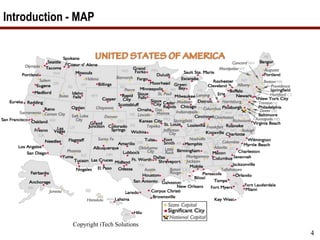
Introduction - MAP
Copyright iTech Solutions
5
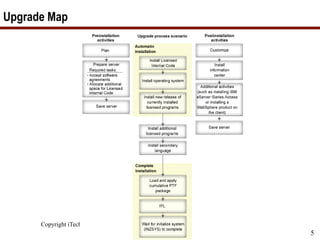
Upgrade Map
Copyright iTech Solutions
6
What you need before you start
• Have your Business Partner order 6.1, 7.1, or 7.2 about 6 weeks before
your planned upgrade date.
• Can also download software.
• License Keys.
• Order PSP PTF V5R4: SF98540 V6R1: SF98610 V7R1: SF98710 V7R2:
SF98720
• i5/OS V5R4 CDs, 6.1, 7.1, & 7.2 primarily on DVDs.
• Manuals.
• PTFs order about 2 weeks before the upgrade.
• Save Media for backups
• Approximately 6 hours of Dedicated system time.
• Bottle of Tums (if doing this yourself)
7
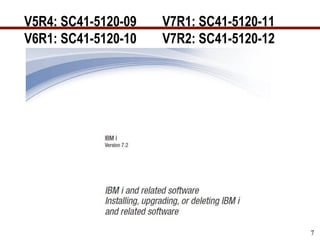
V5R4: SC41-5120-09 V7R1: SC41-5120-11
V6R1: SC41-5120-10 V7R2: SC41-5120-12
Copyright iTech Solutions
8
Manual – Memo to Users
https://publib.boulder.ibm.com/infocenter/systems/topic/rzaq9/rzaq9.pdf
Copyright iTech Solutions
9
What we will cover…
• Map, starting, and documentation
• Analyze Object Conversion
• Release Mapping
• HMC, FSP, firmware, & IBM i
• Models
• Required PTFs, Resaves, and License Keys
• Image Catalogue & Preparing
• Right before the upgrade
• The Upgrade
• Verification
• Conversions & Afterwards
Copyright iTech Solutions
10
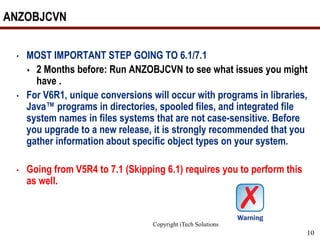
ANZOBJCVN
• MOST IMPORTANT STEP GOING TO 6.1/7.1
 2 Months before: Run ANZOBJCVN to see what issues you might
have .
• For V6R1, unique conversions will occur with programs in libraries,
Java™ programs in directories, spooled files, and integrated file
system names in files systems that are not case-sensitive. Before
you upgrade to a new release, it is strongly recommended that you
gather information about specific object types on your system.
• Going from V5R4 to 7.1 (Skipping 6.1) requires you to perform this
as well.
Copyright iTech Solutions
11
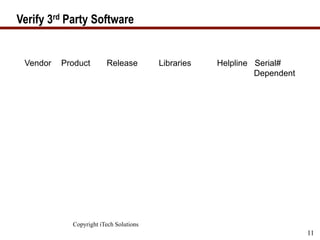
Verify 3rd Party Software
Vendor Product Release Libraries Helpline Serial#
Dependent
Copyright iTech Solutions
12
What we will cover…
• Map, starting, and documentation
• Analyze Object Conversion
• Release Mapping
• HMC, FSP, firmware, & IBM I
• Models
• Required PTFs, Resaves, and License Keys
• Image Catalogue & Preparing
• Right before the upgrade
• The Upgrade
• Verification
• Conversions & Afterwards
Copyright iTech Solutions
13
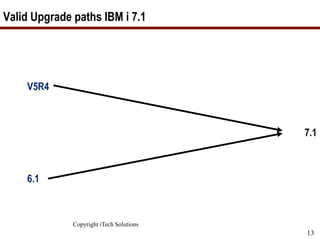
Valid Upgrade paths IBM i 7.1
V5R4
7.1
6.1
Copyright iTech Solutions
14
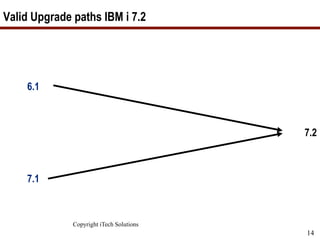
Valid Upgrade paths IBM i 7.2
6.1
7.2
7.1
Copyright iTech Solutions
15
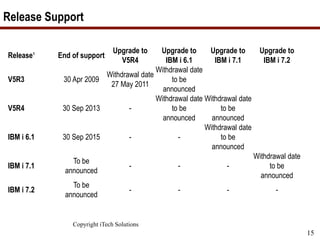
Release Support
Release¹ End of support
Upgrade to
V5R4
Upgrade to
IBM i 6.1
Upgrade to
IBM i 7.1
Upgrade to
IBM i 7.2
V5R3 30 Apr 2009
Withdrawal date
27 May 2011
Withdrawal date
to be
announced
V5R4 30 Sep 2013 -
Withdrawal date
to be
announced
Withdrawal date
to be
announced
IBM i 6.1 30 Sep 2015 - -
Withdrawal date
to be
announced
IBM i 7.1
To be
announced
- - -
Withdrawal date
to be
announced
IBM i 7.2
To be
announced
- - - -
16
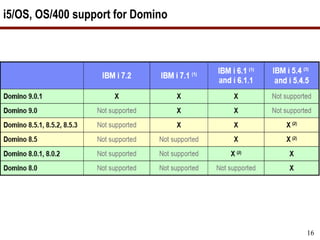
i5/OS, OS/400 support for Domino
http://www-
03.ibm.com/systems/resources/systems_po
wer_ibmi_lotus_releasesupport.pdf
Copyright iTech Solutions
17
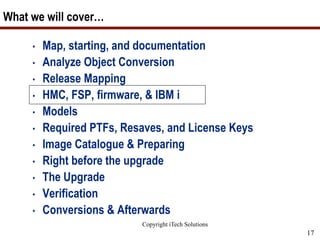
What we will cover…
• Map, starting, and documentation
• Analyze Object Conversion
• Release Mapping
• HMC, FSP, firmware, & IBM i
• Models
• Required PTFs, Resaves, and License Keys
• Image Catalogue & Preparing
• Right before the upgrade
• The Upgrade
• Verification
• Conversions & Afterwards
18
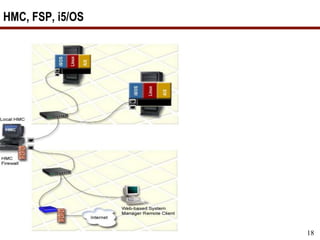
HMC, FSP, i5/OS
Copyright iTech Solutions
19
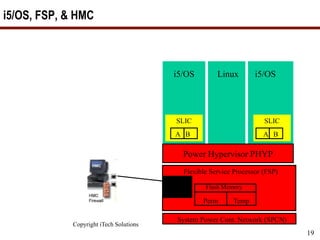
i5/OS, FSP, & HMC
i5/OSLinuxi5/OS
A B
SLIC
A B
SLIC
Power Hypervisor PHYP
Flexible Service Processor (FSP)
Flash Memory
Perm Temp
HMC 1
HMC 2
System Power Cont. Network (SPCN)
Copyright iTech Solutions
20
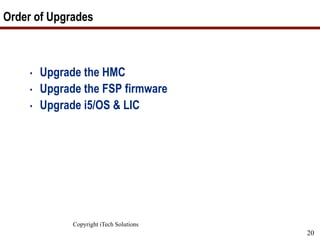
Order of Upgrades
• Upgrade the HMC
• Upgrade the FSP firmware
• Upgrade i5/OS & LIC
Copyright iTech Solutions
21
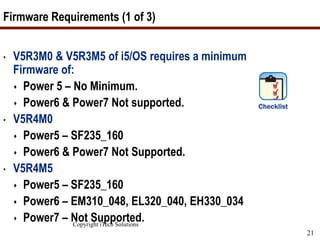
Firmware Requirements (1 of 3)
• V5R3M0 & V5R3M5 of i5/OS requires a minimum
Firmware of:
 Power 5 – No Minimum.
 Power6 & Power7 Not supported.
• V5R4M0
 Power5 – SF235_160
 Power6 & Power7 Not Supported.
• V5R4M5
 Power5 – SF235_160
 Power6 – EM310_048, EL320_040, EH330_034
 Power7 – Not Supported.
Copyright iTech Solutions
22
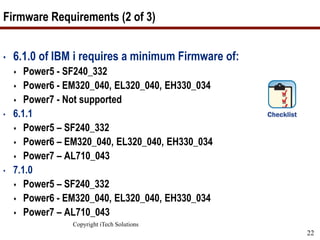
Firmware Requirements (2 of 3)
• 6.1.0 of IBM i requires a minimum Firmware of:
 Power5 - SF240_332
 Power6 - EM320_040, EL320_040, EH330_034
 Power7 - Not supported
• 6.1.1
 Power5 – SF240_332
 Power6 – EM320_040, EL320_040, EH330_034
 Power7 – AL710_043
• 7.1.0
 Power5 – SF240_332
 Power6 - EM320_040, EL320_040, EH330_034
 Power7 – AL710_043
Copyright iTech Solutions
23
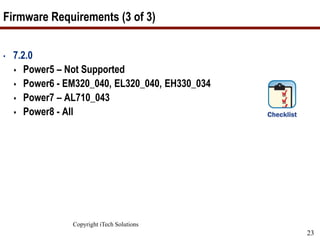
Firmware Requirements (3 of 3)
• 7.2.0
 Power5 – Not Supported
 Power6 - EM320_040, EL320_040, EH330_034
 Power7 – AL710_043
 Power8 - All
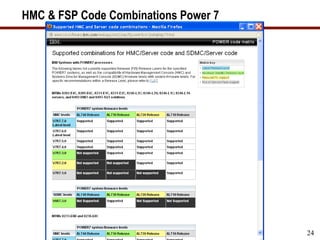
HMC & FSP Code Combinations Power 7
Copyright iTech Solutions
24
Copyright iTech Solutions
25
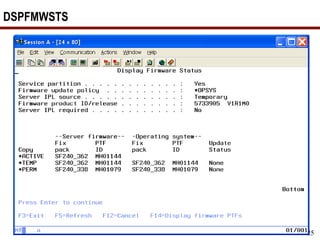
DSPFMWSTS
Copyright iTech Solutions
26
What we will cover…
• Map, starting, and documentation
• Analyze Object Conversion
• Release Mapping
• HMC, FSP, firmware, & IBM i
• Models
• Required PTFs, Resaves, and License Keys
• Image Catalogue & Preparing
• Right before the upgrade
• The Upgrade
• Verification
• Conversions & Afterwards
Copyright iTech Solutions
27
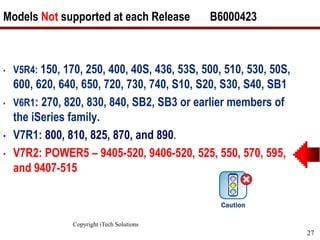
Models Not supported at each Release B6000423
• V5R4: 150, 170, 250, 400, 40S, 436, 53S, 500, 510, 530, 50S,
600, 620, 640, 650, 720, 730, 740, S10, S20, S30, S40, SB1
• V6R1: 270, 820, 830, 840, SB2, SB3 or earlier members of
the iSeries family.
• V7R1: 800, 810, 825, 870, and 890.
• V7R2: POWER5 – 9405-520, 9406-520, 525, 550, 570, 595,
and 9407-515
Copyright iTech Solutions
28
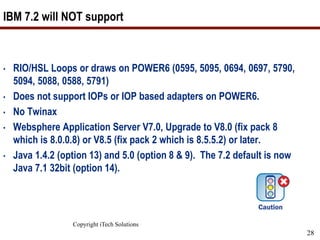
IBM 7.2 will NOT support
• RIO/HSL Loops or draws on POWER6 (0595, 5095, 0694, 0697, 5790,
5094, 5088, 0588, 5791)
• Does not support IOPs or IOP based adapters on POWER6.
• No Twinax
• Websphere Application Server V7.0, Upgrade to V8.0 (fix pack 8
which is 8.0.0.8) or V8.5 (fix pack 2 which is 8.5.5.2) or later.
• Java 1.4.2 (option 13) and 5.0 (option 8 & 9). The 7.2 default is now
Java 7.1 32bit (option 14).
Copyright iTech Solutions
29
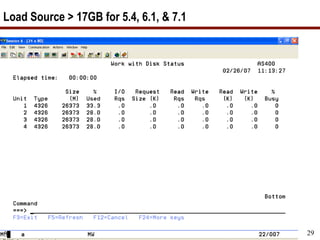
Load Source > 17GB for 5.4, 6.1, & 7.1
Copyright iTech Solutions
30
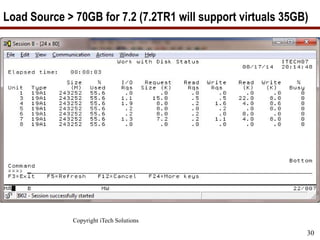
Load Source > 70GB for 7.2 (7.2TR1 will support virtuals 35GB)
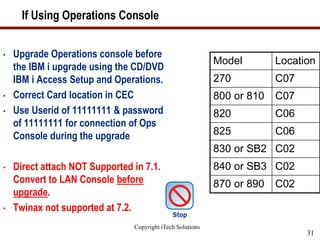
If Using Operations Console
Copyright iTech Solutions
31
• Upgrade Operations console before
the IBM i upgrade using the CD/DVD
IBM i Access Setup and Operations.
• Correct Card location in CEC
• Use Userid of 11111111 & password
of 11111111 for connection of Ops
Console during the upgrade
• Direct attach NOT Supported in 7.1.
Convert to LAN Console before
upgrade.
• Twinax not supported at 7.2.
Model Location
270 C07
800 or 810 C07
820 C06
825 C06
830 or SB2 C02
840 or SB3 C02
870 or 890 C02
Copyright iTech Solutions
32
What we will cover…
• Map, starting, and documentation
• Analyze Object Conversion
• Release Mapping
• HMC, FSP, firmware, & IBM i
• Models
• Required PTFs, Resaves, and License Keys
• Image Catalogue & Preparing
• Right before the upgrade
• The Upgrade
• Verification
• Conversions & Afterwards
Copyright iTech Solutions
33
Required PTFs before upgrading
• Here is the PTF list for going to:
 V5R3 APAR II14149
 V5R4 APAR II14131
 6.1 APAR II14310
 7.1 APAR II14482
 7.2
https://www.ibm.com/developerworks/community/wiki
s/home?lang=en#!/wiki/IBM%20i%20and%20Related%
20Software/page/Required%20PTFs%20for%20upgradi
ng%20to%20IBM%20i%207.2
Copyright iTech Solutions
34
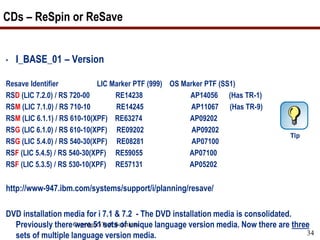
CDs – ReSpin or ReSave
• I_BASE_01 – Version
Resave Identifier LIC Marker PTF (999) OS Marker PTF (SS1)
RSD (LIC 7.2.0) / RS 720-00 RE14238 AP14056 (Has TR-1)
RSM (LIC 7.1.0) / RS 710-10 RE14245 AP11067 (Has TR-9)
RSM (LIC 6.1.1) / RS 610-10(XPF) RE63274 AP09202
RSG (LIC 6.1.0) / RS 610-10(XPF) RE09202 AP09202
RSG (LIC 5.4.0) / RS 540-30(XPF) RE08281 AP07100
RSF (LIC 5.4.5) / RS 540-30(XPF) RE59055 AP07100
RSF (LIC 5.3.5) / RS 530-10(XPF) RE57131 AP05202
http://www-947.ibm.com/systems/support/i/planning/resave/
DVD installation media for i 7.1 & 7.2 - The DVD installation media is consolidated.
Previously there were 51 sets of unique language version media. Now there are three
sets of multiple language version media.
Copyright iTech Solutions
35
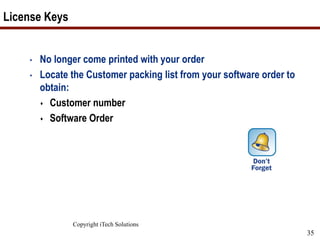
License Keys
• No longer come printed with your order
• Locate the Customer packing list from your software order to
obtain:
 Customer number
 Software Order
Copyright iTech Solutions
36
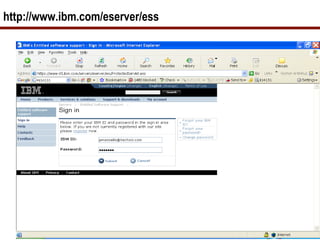
http://www.ibm.com/eserver/ess
Copyright iTech Solutions
37
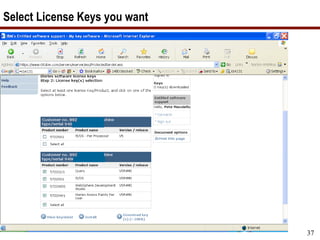
Select License Keys you want
Copyright iTech Solutions
38
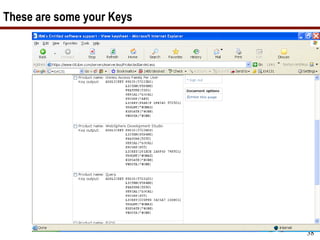
These are some your Keys
Copyright iTech Solutions
39
What we will cover…
• Map, starting, and documentation
• Analyze Object Conversion
• Release Mapping
• HMC, FSP, firmware, & IBM i
• Models
• Required PTFs, Resaves, and License Keys
• Image Catalog & Preparing
• Right before the upgrade
• The Upgrade
• Verification
• Conversions & Afterwards
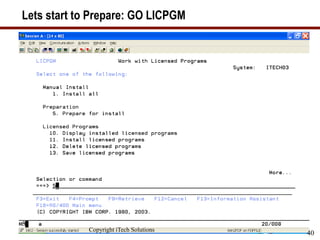
Lets start to Prepare: GO LICPGM
Copyright iTech Solutions
40
Copyright iTech Solutions
41
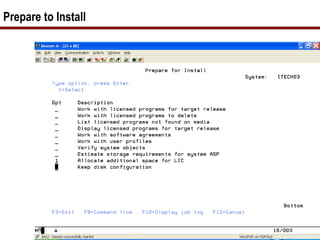
Prepare to Install
Copyright iTech Solutions
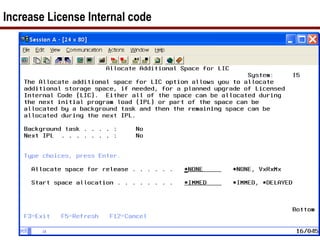
Increase License Internal code
Copyright iTech Solutions
43
Additional Space required on Load Source for 7.2
• Increase the space for the licensed internal code prior to
upgrading.
• The following PTFs are required to be installed first:
• 6.1.0 MF51695 & SI51661
• 6.1.1 MF51696 & SI51661
• 7.1.0 MF51697
• Call QLPALCSP PARM(‘V7R2M0’ ‘0’)
• If coming from V5R2 or V5R3M0 (to V5R4) use the
API QLPALCSP. (Increases by 4GB)
• If on V5R3M5 you have enough space for V5R4 or
V6R1 or V7R1
Copyright iTech Solutions
44
Permanently Apply PTFs
• APYPTF LICPGM(*ALL) APY(*PERM)
DELAYED(*IMMDLY) IPLAPY(*YES)
• Saves Space
• Can’t have any PTFs set for apply when the upgrade starts.
Copyright iTech Solutions
45
Document these System Values
• WRKSYSVAL
 QSYSLIBL __________
 QUSRLIBL __________
 QALWOBJRST _____ (Needs to be *All)
 QVFYOBJRST ______ (Max is 3)
 QSTRUPPGM _______________
• Good time to look at your startup program.
Copyright iTech Solutions
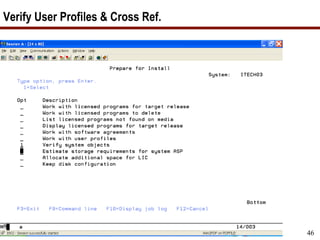
46
Verify User Profiles & Cross Ref.
Copyright iTech Solutions
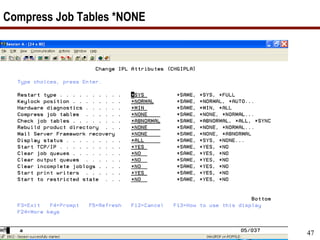
47
Compress Job Tables *NONE
Copyright iTech Solutions
48
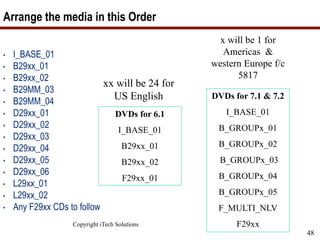
Arrange the media in this Order
• I_BASE_01
• B29xx_01
• B29xx_02
• B29MM_03
• B29MM_04
• D29xx_01
• D29xx_02
• D29xx_03
• D29xx_04
• D29xx_05
• D29xx_06
• L29xx_01
• L29xx_02
• Any F29xx CDs to follow
xx will be 24 for
US English DVDs for 7.1 & 7.2
I_BASE_01
B_GROUPx_01
B_GROUPx_02
B_GROUPx_03
B_GROUPx_04
B_GROUPx_05
F_MULTI_NLV
F29xx
DVDs for 6.1
I_BASE_01
B29xx_01
B29xx_02
F29xx_01
x will be 1 for
Americas &
western Europe f/c
5817
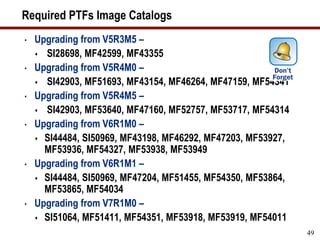
Required PTFs Image Catalogs
• Upgrading from V5R3M5 –
 SI28698, MF42599, MF43355
• Upgrading from V5R4M0 –
 SI42903, MF51693, MF43154, MF46264, MF47159, MF54341
• Upgrading from V5R4M5 –
 SI42903, MF53640, MF47160, MF52757, MF53717, MF54314
• Upgrading from V6R1M0 –
 SI44484, SI50969, MF43198, MF46292, MF47203, MF53927,
MF53936, MF54327, MF53938, MF53949
• Upgrading from V6R1M1 –
 SI44484, SI50969, MF47204, MF51455, MF54350, MF53864,
MF53865, MF54034
• Upgrading from V7R1M0 –
 SI51064, MF51411, MF54351, MF53918, MF53919, MF54011
49
Required Prepare for Installation
• Upgrading from V6R1Mx –
 SI42213, SI53145, SI51661, SI52932
• Upgrading from V7R1M0 –
 SI52927, SI52990, SI53143
• Database Cross Reference Errors upgrading to 7.1 & 7.2
 V6R1Mx: SI45174, SI47823, SI47825
50
Copyright iTech Solutions
51
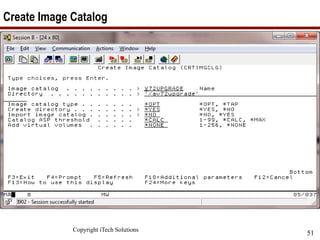
Create Image Catalog
Copyright iTech Solutions
52
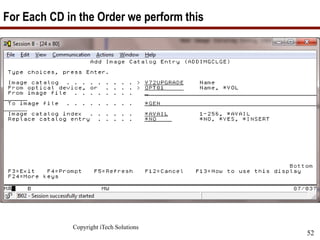
For Each CD in the Order we perform this
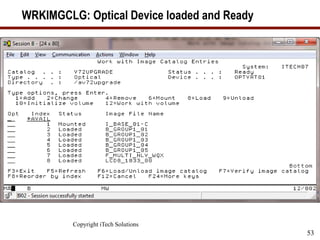
WRKIMGCLG: Optical Device loaded and Ready
Copyright iTech Solutions
53
Copyright iTech Solutions
54
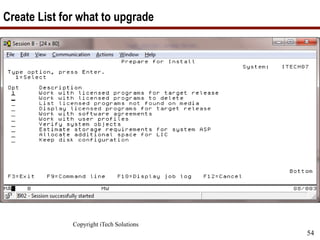
Create List for what to upgrade
Copyright iTech Solutions
55
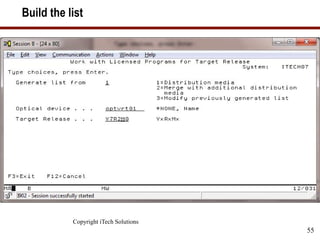
Build the list
Copyright iTech Solutions
56
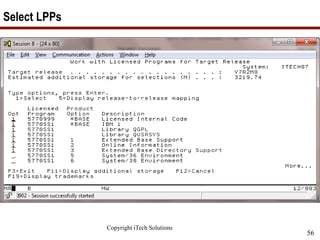
Select LPPs
Copyright iTech Solutions
57
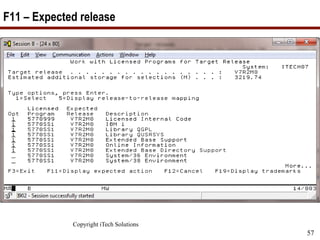
F11 – Expected release
Copyright iTech Solutions
58
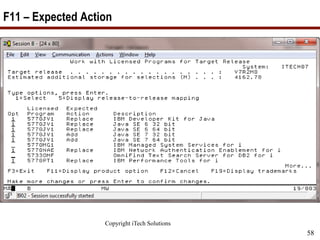
F11 – Expected Action
Copyright iTech Solutions
59
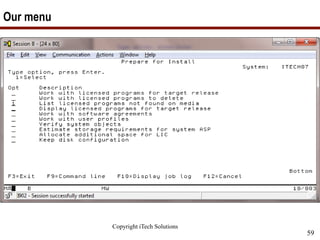
Our menu
Copyright iTech Solutions
60
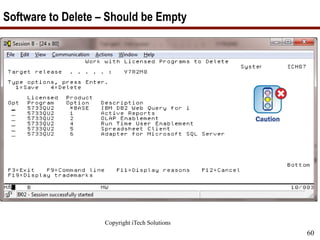
Software to Delete – Should be Empty
Copyright iTech Solutions
61
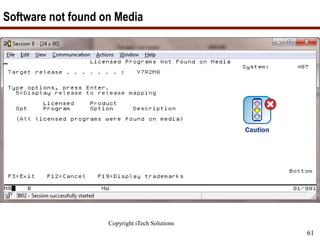
Software not found on Media
Copyright iTech Solutions
62
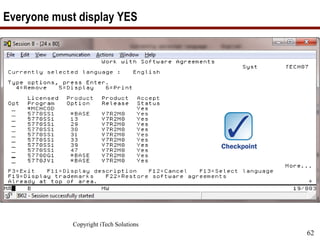
Everyone must display YES
Copyright iTech Solutions
63
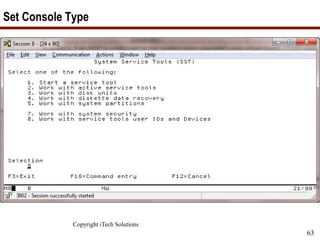
Set Console Type
Copyright iTech Solutions
64
What we will cover…
• Map, starting, and documentation
• Analyze Object Conversion
• Release Mapping
• HMC, FSP, firmware, & IBM i
• Models
• Required PTFs, Resaves, and License Keys
• Image Catalogue & Preparing
• Right before the upgrade
• The Upgrade
• Verification
• Conversions & Afterwards
Copyright iTech Solutions 65
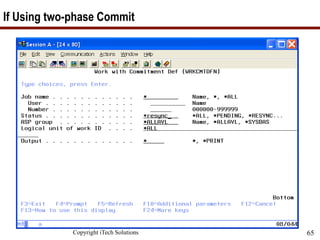
If Using two-phase Commit
Copyright iTech Solutions
66
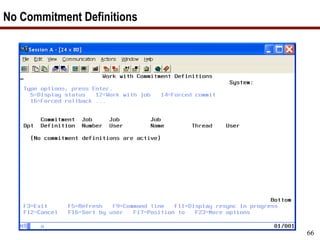
No Commitment Definitions
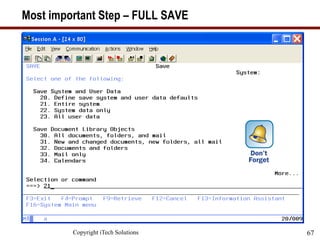
Most important Step – FULL SAVE
Copyright iTech Solutions 67
Copyright iTech Solutions
68
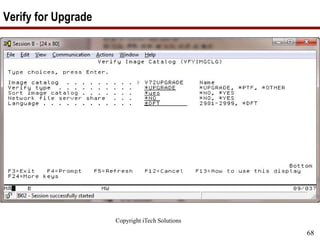
Verify for Upgrade
Copyright iTech Solutions
69
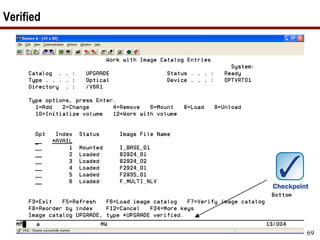
Verified
Copyright iTech Solutions
70
What we will cover…
• Map, starting, and documentation
• Analyze Object Conversion
• Release Mapping
• HMC, FSP, firmware, & IBM I
• Models
• Required PTFs, Resaves, and License Keys
• Image Catalogue & Preparing
• Right before the upgrade
• The Upgrade
• Verification
• Conversions & Afterwards
Copyright iTech Solutions 71
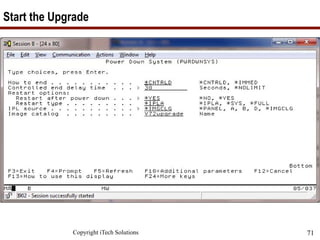
Start the Upgrade
Sit back and relax while Image Catalogues do the work
Copyright iTech Solutions
72
Copyright iTech Solutions
73
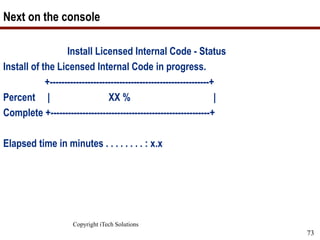
Next on the console
Install Licensed Internal Code - Status
Install of the Licensed Internal Code in progress.
+-------------------------------------------------------+
Percent | XX % |
Complete +-------------------------------------------------------+
Elapsed time in minutes . . . . . . . . : x.x
Copyright iTech Solutions
74
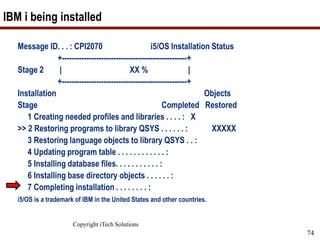
IBM i being installed
Message ID. . . : CPI2070 i5/OS Installation Status
+---------------------------------------------------+
Stage 2 | XX % |
+---------------------------------------------------+
Installation Objects
Stage Completed Restored
1 Creating needed profiles and libraries . . . . : X
>> 2 Restoring programs to library QSYS . . . . . . : XXXXX
3 Restoring language objects to library QSYS . . :
4 Updating program table . . . . . . . . . . . . :
5 Installing database files. . . . . . . . . . . :
6 Installing base directory objects . . . . . . :
7 Completing installation . . . . . . . . :
i5/OS is a trademark of IBM in the United States and other countries.
Copyright iTech Solutions
75
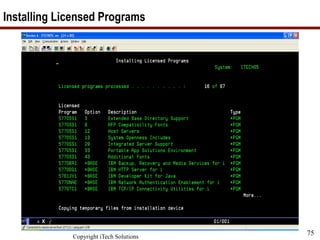
Installing Licensed Programs
Copyright iTech Solutions
76
What we will cover…
• Map, starting, and documentation
• Analyze Object Conversion
• Release Mapping
• HMC, FSP, firmware, & IBM I
• Models
• Required PTFs, Resaves, and License Keys
• Image Catalogue & Preparing
• Right before the upgrade
• The Upgrade
• Verification
• Conversions & Afterwards
Copyright iTech Solutions 77
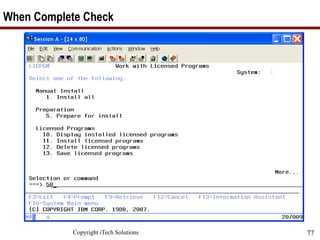
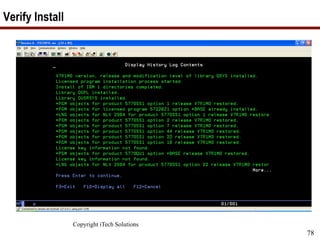
When Complete Check
Copyright iTech Solutions
78
Verify Install
Copyright iTech Solutions
79
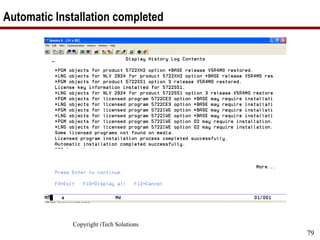
Automatic Installation completed
Copyright iTech Solutions
80
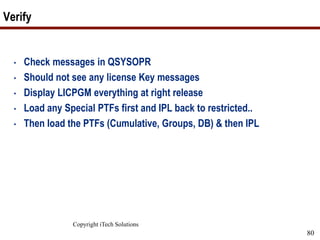
Verify
• Check messages in QSYSOPR
• Should not see any license Key messages
• Display LICPGM everything at right release
• Load any Special PTFs first and IPL back to restricted..
• Then load the PTFs (Cumulative, Groups, DB) & then IPL
Copyright iTech Solutions
81
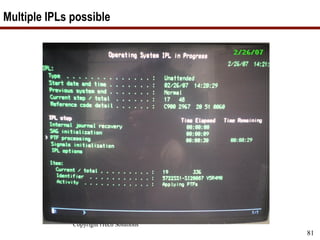
Multiple IPLs possible
Copyright iTech Solutions
82
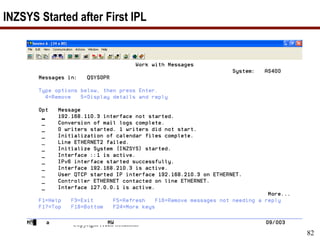
INZSYS Started after First IPL
Copyright iTech Solutions
83
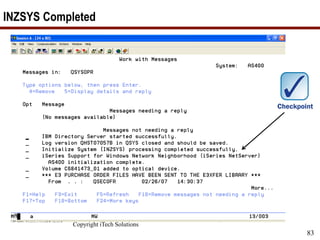
INZSYS Completed
Copyright iTech Solutions
84
What we will cover…
• Map, starting, and documentation
• Analyze Object Conversion
• Release Mapping
• HMC, FSP, firmware, & IBM I
• Models
• Required PTFs, Resaves, and License Keys
• Image Catalogue & Preparing
• Right before the upgrade
• The Upgrade
• Verification
• Conversions & Afterwards
Copyright iTech Solutions
85
Afterwards
• Update System Values that you changed.
• CFGACCWEB2
• Enable Service Director
• Check PM400 (GO PMAGT)
• Performance Data
• Delete Image Catalogues
• Test SNDPTFORD & SNDSRVRQS
• Cleanup PTF Groups WRKPTFGRP
• Update Client Access Clients
• Update iSeries Integrated Windows Servers
Copyright iTech Solutions
86
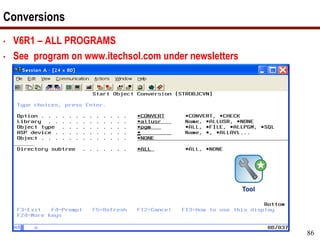
Conversions
• V6R1 – ALL PROGRAMS
• See program on www.itechsol.com under newsletters
Copyright iTech Solutions
87
SAVE – New starting point
• Full Save if have the time
• Otherwise (GO SAVE 22)
 SAVSYS
 SAVLIB *IBM
 SAV ('/QIBM/ProdData') + ('/QOpenSys/QIBM/ProdData'))
Copyright iTech Solutions
88
7 Key Points to take home
• ANZOBJCVN, ANZOBJCVN, ANZOBJCVN !!!
• Get the required PTFs on your system before the
upgrade.
• Check FSP Firmware minimum levels.
• Have a Good FULL Backup right before the upgrade.
• Have license keys and new PTFs available.
• Conversions need to complete afterwards.
• SAVE 22 or Full save after the conversions.
Your Turn!
How to contact me:
Pete Massiello
Email: pmassiello@itechsol.com
Twitter: petem59
How to Upgrade to IBM i 7.2 7
•  Why Upgrade?
•  Tips and Procedures
–  Pete Massiello
•  What Is the Solution Edition?
–  Tom Huntington
Agenda
How to Upgrade to IBM i 7.2 8
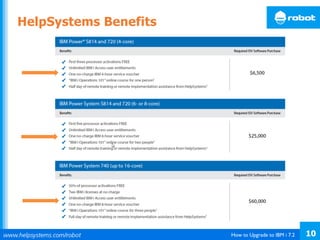
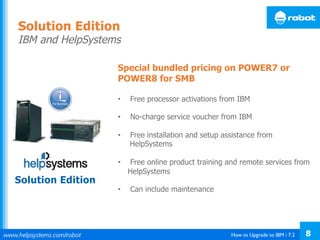
Special bundled pricing on POWER7 or
POWER8 for SMB
•  Free processor activations from IBM
•  No-charge service voucher from IBM
•  Free installation and setup assistance from
HelpSystems
•  Free online product training and remote services from
HelpSystems
•  Can include maintenance
Solution Edition
IBM and HelpSystems
Solution Edition
How to Upgrade to IBM i 7.2 9
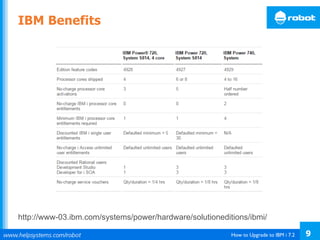
IBM Benefits
http://www-03.ibm.com/systems/power/hardware/solutioneditions/ibmi/
How to Upgrade to IBM i 7.2 10
HelpSystems Benefits
How to Upgrade to IBM i 7.2 11
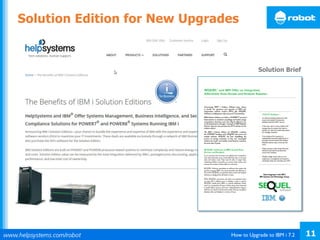
Solution Brief
Solution Edition for New Upgrades
How to Upgrade to IBM i 7.2 12
• Solution Edition for HelpSystems: http://www.helpsystems.com/i_solution
• IBM: http://www-03.ibm.com/systems/power/hardware/solutioneditions/ibmi/index.html
For More Details
How to Upgrade to IBM i 7.2 13
•  IBM dropped normal support for V5R4 in September 2013
•  IBM will drop support for 6.1 in September 2015
•  You can pay more for support and they will extend you
•  Follow Pete Massiello’s suggestions on the upgrade process
•  When you upgrade, consider the Solution Edition program if
you also update your hardware
Summary
How to Upgrade to IBM i 7.2 14
HelpSystems Family of Brands
Tom Huntington, HelpSystems
+1 952-563-1606
tom.huntington@helpsystems.com
Pete Massiello, iTech Solutions
+1 203-744-7854
pmassiello@itechsol.com
Contact Information
Thank	
  you	
  for	
  a,ending!	
  

How to Upgrade to IBM i 7.2

  • 1.
    World’s Leader in PowerSystems Software Solutions How to Upgrade to IBM i 7.2
  • 2.
    How to Upgradeto IBM i 7.2 2 Tom Huntington Vice President of Technical Services HelpSystems Pete Massiello President iTech Solutions Your Presenters
  • 3.
    How to Upgradeto IBM i 7.2 3 •  Why Upgrade? •  Tips and Procedures –  Pete Massiello •  What Is the Solution Edition? –  Tom Huntington Agenda
  • 4.
    How to Upgradeto IBM i 7.2 4 •  IBM dropped normal support for V5R4 in September 2013 •  IBM will drop support for 6.1 in September 2015 •  Java runs faster on 6.1, 7.1, or 7.2 •  SQL runs faster on 6.1, 7.1, or 7.2 •  Support of newer hardware for POWER7 or POWER8 –  SAN, VTL •  PowerHA Why Upgrade?
  • 5.
    How to Upgradeto IBM i 7.2 5 •  Why Upgrade? •  Tips and Procedures –  Pete Massiello •  What Is the Solution Edition? –  Tom Huntington Agenda
  • 6.
    How to Upgradeto IBM i 7.2 6 Next Up: Pete’s Presentation Pete Massiello President iTech Solutions
  • 7.
    What you needto know to do successful IBM i upgrades to 7.2 (and 6.1 or 7.1) Pete Massiello iTech Solutions pmassiello@itechsol.com 203-744-7854 iTech Solutions because IBM i (AS/400s) don’t come with System Administrators 1
  • 8.
    Copyright iTech Solutions 2 Inthis session We are going to run through all the steps required to do an upgrade: from when you initially start thinking about the upgrade, what you need to do to prepare for the upgrade, issues & concerns to address before we start the upgrade, the actual upgrade, and then the verification and conversions afterward. A successful upgrade is one which the users don’t know you worked all weekend, and they don’t realize anything has changed until you start rolling out the new features and functions.
  • 9.
    Copyright iTech Solutions 3 Whatwe will cover… • Map, starting, and documentation • Analyze Object Conversion • Release Mapping • HMC, FSP, firmware, & IBM i • Models • Required PTFs, Resaves, and License Keys • Image Catalogue & Preparing • Right before the upgrade • The Upgrade • Verification • Conversions & Afterwards
  • 10.
  • 11.
  • 12.
    Copyright iTech Solutions 6 Whatyou need before you start • Have your Business Partner order 6.1, 7.1, or 7.2 about 6 weeks before your planned upgrade date. • Can also download software. • License Keys. • Order PSP PTF V5R4: SF98540 V6R1: SF98610 V7R1: SF98710 V7R2: SF98720 • i5/OS V5R4 CDs, 6.1, 7.1, & 7.2 primarily on DVDs. • Manuals. • PTFs order about 2 weeks before the upgrade. • Save Media for backups • Approximately 6 hours of Dedicated system time. • Bottle of Tums (if doing this yourself)
  • 13.
    7 V5R4: SC41-5120-09 V7R1:SC41-5120-11 V6R1: SC41-5120-10 V7R2: SC41-5120-12
  • 14.
    Copyright iTech Solutions 8 Manual– Memo to Users https://publib.boulder.ibm.com/infocenter/systems/topic/rzaq9/rzaq9.pdf
  • 15.
    Copyright iTech Solutions 9 Whatwe will cover… • Map, starting, and documentation • Analyze Object Conversion • Release Mapping • HMC, FSP, firmware, & IBM i • Models • Required PTFs, Resaves, and License Keys • Image Catalogue & Preparing • Right before the upgrade • The Upgrade • Verification • Conversions & Afterwards
  • 16.
    Copyright iTech Solutions 10 ANZOBJCVN •MOST IMPORTANT STEP GOING TO 6.1/7.1  2 Months before: Run ANZOBJCVN to see what issues you might have . • For V6R1, unique conversions will occur with programs in libraries, Java™ programs in directories, spooled files, and integrated file system names in files systems that are not case-sensitive. Before you upgrade to a new release, it is strongly recommended that you gather information about specific object types on your system. • Going from V5R4 to 7.1 (Skipping 6.1) requires you to perform this as well.
  • 17.
    Copyright iTech Solutions 11 Verify3rd Party Software Vendor Product Release Libraries Helpline Serial# Dependent
  • 18.
    Copyright iTech Solutions 12 Whatwe will cover… • Map, starting, and documentation • Analyze Object Conversion • Release Mapping • HMC, FSP, firmware, & IBM I • Models • Required PTFs, Resaves, and License Keys • Image Catalogue & Preparing • Right before the upgrade • The Upgrade • Verification • Conversions & Afterwards
  • 19.
    Copyright iTech Solutions 13 ValidUpgrade paths IBM i 7.1 V5R4 7.1 6.1
  • 20.
    Copyright iTech Solutions 14 ValidUpgrade paths IBM i 7.2 6.1 7.2 7.1
  • 21.
    Copyright iTech Solutions 15 ReleaseSupport Release¹ End of support Upgrade to V5R4 Upgrade to IBM i 6.1 Upgrade to IBM i 7.1 Upgrade to IBM i 7.2 V5R3 30 Apr 2009 Withdrawal date 27 May 2011 Withdrawal date to be announced V5R4 30 Sep 2013 - Withdrawal date to be announced Withdrawal date to be announced IBM i 6.1 30 Sep 2015 - - Withdrawal date to be announced IBM i 7.1 To be announced - - - Withdrawal date to be announced IBM i 7.2 To be announced - - - -
  • 22.
    16 i5/OS, OS/400 supportfor Domino http://www- 03.ibm.com/systems/resources/systems_po wer_ibmi_lotus_releasesupport.pdf
  • 23.
    Copyright iTech Solutions 17 Whatwe will cover… • Map, starting, and documentation • Analyze Object Conversion • Release Mapping • HMC, FSP, firmware, & IBM i • Models • Required PTFs, Resaves, and License Keys • Image Catalogue & Preparing • Right before the upgrade • The Upgrade • Verification • Conversions & Afterwards
  • 24.
  • 25.
    Copyright iTech Solutions 19 i5/OS,FSP, & HMC i5/OSLinuxi5/OS A B SLIC A B SLIC Power Hypervisor PHYP Flexible Service Processor (FSP) Flash Memory Perm Temp HMC 1 HMC 2 System Power Cont. Network (SPCN)
  • 26.
    Copyright iTech Solutions 20 Orderof Upgrades • Upgrade the HMC • Upgrade the FSP firmware • Upgrade i5/OS & LIC
  • 27.
    Copyright iTech Solutions 21 FirmwareRequirements (1 of 3) • V5R3M0 & V5R3M5 of i5/OS requires a minimum Firmware of:  Power 5 – No Minimum.  Power6 & Power7 Not supported. • V5R4M0  Power5 – SF235_160  Power6 & Power7 Not Supported. • V5R4M5  Power5 – SF235_160  Power6 – EM310_048, EL320_040, EH330_034  Power7 – Not Supported.
  • 28.
    Copyright iTech Solutions 22 FirmwareRequirements (2 of 3) • 6.1.0 of IBM i requires a minimum Firmware of:  Power5 - SF240_332  Power6 - EM320_040, EL320_040, EH330_034  Power7 - Not supported • 6.1.1  Power5 – SF240_332  Power6 – EM320_040, EL320_040, EH330_034  Power7 – AL710_043 • 7.1.0  Power5 – SF240_332  Power6 - EM320_040, EL320_040, EH330_034  Power7 – AL710_043
  • 29.
    Copyright iTech Solutions 23 FirmwareRequirements (3 of 3) • 7.2.0  Power5 – Not Supported  Power6 - EM320_040, EL320_040, EH330_034  Power7 – AL710_043  Power8 - All
  • 30.
    HMC & FSPCode Combinations Power 7 Copyright iTech Solutions 24
  • 31.
  • 32.
    Copyright iTech Solutions 26 Whatwe will cover… • Map, starting, and documentation • Analyze Object Conversion • Release Mapping • HMC, FSP, firmware, & IBM i • Models • Required PTFs, Resaves, and License Keys • Image Catalogue & Preparing • Right before the upgrade • The Upgrade • Verification • Conversions & Afterwards
  • 33.
    Copyright iTech Solutions 27 ModelsNot supported at each Release B6000423 • V5R4: 150, 170, 250, 400, 40S, 436, 53S, 500, 510, 530, 50S, 600, 620, 640, 650, 720, 730, 740, S10, S20, S30, S40, SB1 • V6R1: 270, 820, 830, 840, SB2, SB3 or earlier members of the iSeries family. • V7R1: 800, 810, 825, 870, and 890. • V7R2: POWER5 – 9405-520, 9406-520, 525, 550, 570, 595, and 9407-515
  • 34.
    Copyright iTech Solutions 28 IBM7.2 will NOT support • RIO/HSL Loops or draws on POWER6 (0595, 5095, 0694, 0697, 5790, 5094, 5088, 0588, 5791) • Does not support IOPs or IOP based adapters on POWER6. • No Twinax • Websphere Application Server V7.0, Upgrade to V8.0 (fix pack 8 which is 8.0.0.8) or V8.5 (fix pack 2 which is 8.5.5.2) or later. • Java 1.4.2 (option 13) and 5.0 (option 8 & 9). The 7.2 default is now Java 7.1 32bit (option 14).
  • 35.
    Copyright iTech Solutions 29 LoadSource > 17GB for 5.4, 6.1, & 7.1
  • 36.
    Copyright iTech Solutions 30 LoadSource > 70GB for 7.2 (7.2TR1 will support virtuals 35GB)
  • 37.
    If Using OperationsConsole Copyright iTech Solutions 31 • Upgrade Operations console before the IBM i upgrade using the CD/DVD IBM i Access Setup and Operations. • Correct Card location in CEC • Use Userid of 11111111 & password of 11111111 for connection of Ops Console during the upgrade • Direct attach NOT Supported in 7.1. Convert to LAN Console before upgrade. • Twinax not supported at 7.2. Model Location 270 C07 800 or 810 C07 820 C06 825 C06 830 or SB2 C02 840 or SB3 C02 870 or 890 C02
  • 38.
    Copyright iTech Solutions 32 Whatwe will cover… • Map, starting, and documentation • Analyze Object Conversion • Release Mapping • HMC, FSP, firmware, & IBM i • Models • Required PTFs, Resaves, and License Keys • Image Catalogue & Preparing • Right before the upgrade • The Upgrade • Verification • Conversions & Afterwards
  • 39.
    Copyright iTech Solutions 33 RequiredPTFs before upgrading • Here is the PTF list for going to:  V5R3 APAR II14149  V5R4 APAR II14131  6.1 APAR II14310  7.1 APAR II14482  7.2 https://www.ibm.com/developerworks/community/wiki s/home?lang=en#!/wiki/IBM%20i%20and%20Related% 20Software/page/Required%20PTFs%20for%20upgradi ng%20to%20IBM%20i%207.2
  • 40.
    Copyright iTech Solutions 34 CDs– ReSpin or ReSave • I_BASE_01 – Version Resave Identifier LIC Marker PTF (999) OS Marker PTF (SS1) RSD (LIC 7.2.0) / RS 720-00 RE14238 AP14056 (Has TR-1) RSM (LIC 7.1.0) / RS 710-10 RE14245 AP11067 (Has TR-9) RSM (LIC 6.1.1) / RS 610-10(XPF) RE63274 AP09202 RSG (LIC 6.1.0) / RS 610-10(XPF) RE09202 AP09202 RSG (LIC 5.4.0) / RS 540-30(XPF) RE08281 AP07100 RSF (LIC 5.4.5) / RS 540-30(XPF) RE59055 AP07100 RSF (LIC 5.3.5) / RS 530-10(XPF) RE57131 AP05202 http://www-947.ibm.com/systems/support/i/planning/resave/ DVD installation media for i 7.1 & 7.2 - The DVD installation media is consolidated. Previously there were 51 sets of unique language version media. Now there are three sets of multiple language version media.
  • 41.
    Copyright iTech Solutions 35 LicenseKeys • No longer come printed with your order • Locate the Customer packing list from your software order to obtain:  Customer number  Software Order
  • 42.
  • 43.
  • 44.
  • 45.
    Copyright iTech Solutions 39 Whatwe will cover… • Map, starting, and documentation • Analyze Object Conversion • Release Mapping • HMC, FSP, firmware, & IBM i • Models • Required PTFs, Resaves, and License Keys • Image Catalog & Preparing • Right before the upgrade • The Upgrade • Verification • Conversions & Afterwards
  • 46.
    Lets start toPrepare: GO LICPGM Copyright iTech Solutions 40
  • 47.
  • 48.
  • 49.
    Copyright iTech Solutions 43 AdditionalSpace required on Load Source for 7.2 • Increase the space for the licensed internal code prior to upgrading. • The following PTFs are required to be installed first: • 6.1.0 MF51695 & SI51661 • 6.1.1 MF51696 & SI51661 • 7.1.0 MF51697 • Call QLPALCSP PARM(‘V7R2M0’ ‘0’) • If coming from V5R2 or V5R3M0 (to V5R4) use the API QLPALCSP. (Increases by 4GB) • If on V5R3M5 you have enough space for V5R4 or V6R1 or V7R1
  • 50.
    Copyright iTech Solutions 44 PermanentlyApply PTFs • APYPTF LICPGM(*ALL) APY(*PERM) DELAYED(*IMMDLY) IPLAPY(*YES) • Saves Space • Can’t have any PTFs set for apply when the upgrade starts.
  • 51.
    Copyright iTech Solutions 45 Documentthese System Values • WRKSYSVAL  QSYSLIBL __________  QUSRLIBL __________  QALWOBJRST _____ (Needs to be *All)  QVFYOBJRST ______ (Max is 3)  QSTRUPPGM _______________ • Good time to look at your startup program.
  • 52.
    Copyright iTech Solutions 46 VerifyUser Profiles & Cross Ref.
  • 53.
  • 54.
    Copyright iTech Solutions 48 Arrangethe media in this Order • I_BASE_01 • B29xx_01 • B29xx_02 • B29MM_03 • B29MM_04 • D29xx_01 • D29xx_02 • D29xx_03 • D29xx_04 • D29xx_05 • D29xx_06 • L29xx_01 • L29xx_02 • Any F29xx CDs to follow xx will be 24 for US English DVDs for 7.1 & 7.2 I_BASE_01 B_GROUPx_01 B_GROUPx_02 B_GROUPx_03 B_GROUPx_04 B_GROUPx_05 F_MULTI_NLV F29xx DVDs for 6.1 I_BASE_01 B29xx_01 B29xx_02 F29xx_01 x will be 1 for Americas & western Europe f/c 5817
  • 55.
    Required PTFs ImageCatalogs • Upgrading from V5R3M5 –  SI28698, MF42599, MF43355 • Upgrading from V5R4M0 –  SI42903, MF51693, MF43154, MF46264, MF47159, MF54341 • Upgrading from V5R4M5 –  SI42903, MF53640, MF47160, MF52757, MF53717, MF54314 • Upgrading from V6R1M0 –  SI44484, SI50969, MF43198, MF46292, MF47203, MF53927, MF53936, MF54327, MF53938, MF53949 • Upgrading from V6R1M1 –  SI44484, SI50969, MF47204, MF51455, MF54350, MF53864, MF53865, MF54034 • Upgrading from V7R1M0 –  SI51064, MF51411, MF54351, MF53918, MF53919, MF54011 49
  • 56.
    Required Prepare forInstallation • Upgrading from V6R1Mx –  SI42213, SI53145, SI51661, SI52932 • Upgrading from V7R1M0 –  SI52927, SI52990, SI53143 • Database Cross Reference Errors upgrading to 7.1 & 7.2  V6R1Mx: SI45174, SI47823, SI47825 50
  • 57.
  • 58.
    Copyright iTech Solutions 52 ForEach CD in the Order we perform this
  • 59.
    WRKIMGCLG: Optical Deviceloaded and Ready Copyright iTech Solutions 53
  • 60.
    Copyright iTech Solutions 54 CreateList for what to upgrade
  • 61.
  • 62.
  • 63.
  • 64.
  • 65.
  • 66.
    Copyright iTech Solutions 60 Softwareto Delete – Should be Empty
  • 67.
  • 68.
  • 69.
  • 70.
    Copyright iTech Solutions 64 Whatwe will cover… • Map, starting, and documentation • Analyze Object Conversion • Release Mapping • HMC, FSP, firmware, & IBM i • Models • Required PTFs, Resaves, and License Keys • Image Catalogue & Preparing • Right before the upgrade • The Upgrade • Verification • Conversions & Afterwards
  • 71.
    Copyright iTech Solutions65 If Using two-phase Commit
  • 72.
    Copyright iTech Solutions 66 NoCommitment Definitions
  • 73.
    Most important Step– FULL SAVE Copyright iTech Solutions 67
  • 74.
  • 75.
  • 76.
    Copyright iTech Solutions 70 Whatwe will cover… • Map, starting, and documentation • Analyze Object Conversion • Release Mapping • HMC, FSP, firmware, & IBM I • Models • Required PTFs, Resaves, and License Keys • Image Catalogue & Preparing • Right before the upgrade • The Upgrade • Verification • Conversions & Afterwards
  • 77.
    Copyright iTech Solutions71 Start the Upgrade
  • 78.
    Sit back andrelax while Image Catalogues do the work Copyright iTech Solutions 72
  • 79.
    Copyright iTech Solutions 73 Nexton the console Install Licensed Internal Code - Status Install of the Licensed Internal Code in progress. +-------------------------------------------------------+ Percent | XX % | Complete +-------------------------------------------------------+ Elapsed time in minutes . . . . . . . . : x.x
  • 80.
    Copyright iTech Solutions 74 IBMi being installed Message ID. . . : CPI2070 i5/OS Installation Status +---------------------------------------------------+ Stage 2 | XX % | +---------------------------------------------------+ Installation Objects Stage Completed Restored 1 Creating needed profiles and libraries . . . . : X >> 2 Restoring programs to library QSYS . . . . . . : XXXXX 3 Restoring language objects to library QSYS . . : 4 Updating program table . . . . . . . . . . . . : 5 Installing database files. . . . . . . . . . . : 6 Installing base directory objects . . . . . . : 7 Completing installation . . . . . . . . : i5/OS is a trademark of IBM in the United States and other countries.
  • 81.
  • 82.
    Copyright iTech Solutions 76 Whatwe will cover… • Map, starting, and documentation • Analyze Object Conversion • Release Mapping • HMC, FSP, firmware, & IBM I • Models • Required PTFs, Resaves, and License Keys • Image Catalogue & Preparing • Right before the upgrade • The Upgrade • Verification • Conversions & Afterwards
  • 83.
    Copyright iTech Solutions77 When Complete Check
  • 84.
  • 85.
  • 86.
    Copyright iTech Solutions 80 Verify •Check messages in QSYSOPR • Should not see any license Key messages • Display LICPGM everything at right release • Load any Special PTFs first and IPL back to restricted.. • Then load the PTFs (Cumulative, Groups, DB) & then IPL
  • 87.
  • 88.
    Copyright iTech Solutions 82 INZSYSStarted after First IPL
  • 89.
  • 90.
    Copyright iTech Solutions 84 Whatwe will cover… • Map, starting, and documentation • Analyze Object Conversion • Release Mapping • HMC, FSP, firmware, & IBM I • Models • Required PTFs, Resaves, and License Keys • Image Catalogue & Preparing • Right before the upgrade • The Upgrade • Verification • Conversions & Afterwards
  • 91.
    Copyright iTech Solutions 85 Afterwards •Update System Values that you changed. • CFGACCWEB2 • Enable Service Director • Check PM400 (GO PMAGT) • Performance Data • Delete Image Catalogues • Test SNDPTFORD & SNDSRVRQS • Cleanup PTF Groups WRKPTFGRP • Update Client Access Clients • Update iSeries Integrated Windows Servers
  • 92.
    Copyright iTech Solutions 86 Conversions •V6R1 – ALL PROGRAMS • See program on www.itechsol.com under newsletters
  • 93.
    Copyright iTech Solutions 87 SAVE– New starting point • Full Save if have the time • Otherwise (GO SAVE 22)  SAVSYS  SAVLIB *IBM  SAV ('/QIBM/ProdData') + ('/QOpenSys/QIBM/ProdData'))
  • 94.
    Copyright iTech Solutions 88 7Key Points to take home • ANZOBJCVN, ANZOBJCVN, ANZOBJCVN !!! • Get the required PTFs on your system before the upgrade. • Check FSP Firmware minimum levels. • Have a Good FULL Backup right before the upgrade. • Have license keys and new PTFs available. • Conversions need to complete afterwards. • SAVE 22 or Full save after the conversions.
  • 95.
    Your Turn! How tocontact me: Pete Massiello Email: pmassiello@itechsol.com Twitter: petem59
  • 96.
    How to Upgradeto IBM i 7.2 7 •  Why Upgrade? •  Tips and Procedures –  Pete Massiello •  What Is the Solution Edition? –  Tom Huntington Agenda
  • 97.
    How to Upgradeto IBM i 7.2 8 Special bundled pricing on POWER7 or POWER8 for SMB •  Free processor activations from IBM •  No-charge service voucher from IBM •  Free installation and setup assistance from HelpSystems •  Free online product training and remote services from HelpSystems •  Can include maintenance Solution Edition IBM and HelpSystems Solution Edition
  • 98.
    How to Upgradeto IBM i 7.2 9 IBM Benefits http://www-03.ibm.com/systems/power/hardware/solutioneditions/ibmi/
  • 99.
    How to Upgradeto IBM i 7.2 10 HelpSystems Benefits
  • 100.
    How to Upgradeto IBM i 7.2 11 Solution Brief Solution Edition for New Upgrades
  • 101.
    How to Upgradeto IBM i 7.2 12 • Solution Edition for HelpSystems: http://www.helpsystems.com/i_solution • IBM: http://www-03.ibm.com/systems/power/hardware/solutioneditions/ibmi/index.html For More Details
  • 102.
    How to Upgradeto IBM i 7.2 13 •  IBM dropped normal support for V5R4 in September 2013 •  IBM will drop support for 6.1 in September 2015 •  You can pay more for support and they will extend you •  Follow Pete Massiello’s suggestions on the upgrade process •  When you upgrade, consider the Solution Edition program if you also update your hardware Summary
  • 103.
    How to Upgradeto IBM i 7.2 14 HelpSystems Family of Brands
  • 104.
    Tom Huntington, HelpSystems +1952-563-1606 tom.huntington@helpsystems.com Pete Massiello, iTech Solutions +1 203-744-7854 pmassiello@itechsol.com Contact Information Thank  you  for  a,ending!