Distributed Systems and
Distributed Computing

Introduction.
Outline
•
•
•
•
•
•
•
•
•

Definition of Distributed Systems
Advantages and Disadvantages
Goals
Parallel Computing
Distributed Computing
Hardware Concepts
Software Concepts
Middle Ware Systems
Technologies under use

2
Outline
•
•
•
•
•
•
•
•
•
•

RPC (Remote Procedure Call)
ROI (Remote Object Invocation)
Network Programming
Implementation of RPC using C
Implementation of ROI using Java
Java RMI
XML
Implementation of RPC using XML
SOAP
A little bit about CORBA

3
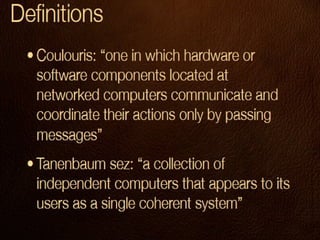
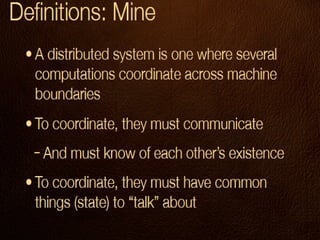
Distributed Systems
• Definition:
– The Collection of individual computers that
appears to its users as a single coherent
system.

• Coherent System:
– The system in which all the individual systems
shares the central memory (RAM).
4
Examples
•
•
•
•
•

Internet
Aero plane Ticket Reservation System
ATMs
Mobile Cellular Phone Systems
Centralized Data Base System Working in
Banks
• LAN
• MAN
• WAN
7
DS: I know it when I see it
•
•
•
•
•

-Big: Enterprise level
• Examples of DS are all around us
-Small: Personal
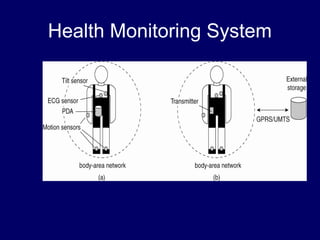
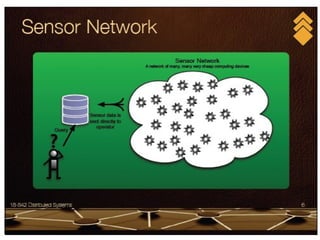
-Innovative: Sensor Networks
-Common: Web service
Health Monitoring System
Biggest Challenges of DS
•
•
•
•

• Configuration: How to find each other,
get started, etc
• Consensus: How to agree on stuff
• Consistency: How to have the same
view
• in the face of changes
• • Fault Tolerance: How to survive in a
world
Characteristics of DS
•
•
•
•

Scalability
Support Heterogeneity
Continuous Availability
Users are unaware about the distribution
and heterogeneity of the system
• The components of a system are also
unaware of the heterogeneity
• Users and applications can interact with
the system uniformly
12
Goals of DS
•
•
•
•

Connecting Users and Resources
Transparency
Openness
Scalability

13
Connecting Users and
Resources
• The main goal is to make easy for users to
access remote resources and to share
them with other users in a controlled way
– Security
• From external users: (Authentication, Firewall)
• From internal users: (Policies, Log Files)

14
Transparency
• To hide the fact that its processes and
resources are physically distributed across
multiple computers.
OR
• A distributed system that is able to present
itself to users and applications as it were
only a single computer system is said to
be transparent.
15
Types of Transparency
• Access (Data representation: little endian / big endian )
– To hide the details of data representations, code
translation etc.

• Location (URL)
– To hide the actual location of the resource.

• Migration
– To hide the fact that the resource has migrated from
previous location.

• Relocation
– To hide the fact that resource has been reallocated due
16
to non availability from previous location.
Types of Transparency
• Replication
– To hide the fact that resource is copied at different
locations to make availability of the resource faster.

• Concurrency
– This is a type of transparency that is related to
concurrent access to same resource.

• Failure
– To hide any of the failure that occur in accessing the
resources.

17
Openness
• An open distributed system support
heterogeneity.
• An open distributed system offer services
according to standard rules (protocols).
• Interoperability
– It is an extent by which two implementations
of system or components from different
manufacturers can co exists.

• Portability
– An application developed on one system can
be executed without modification on another.

18
Scalability
• A distributed system should be expandable
– Scalable with respect to Size
• Increase in number of nodes.

– Scalable Geographically
• Increase in size with respect to geographical location.

– Scalable Administratively
• If we expand the system then administration should not
19
become difficult.
Scalability
• Problems to be taken care of in scalability:
– Centralized Services
• Services available at central machine i-e server.

– Centralized Data
• Data available at central machine i-e data base
server.

– Centralized Algorithms.
• The algorithms that are running on server machine

20
Parallel Processing or
Computing
• Parallel computing
– Using parallel computer to solve single
problems faster

• Parallel computer
– Multiple-processor system supporting parallel
programming

• Parallel programming
– Programming in a language that supports
concurrency explicitly

21
Evolution of Supercomputing
• Supercomputers – Most powerful computers that
can currently be built. Note: This definition is
time dependent.
• Uses during World War II
– Hand-computed artillery tables
– Need to speed computations
– Army funded ENIAC to speedup calculations

• Uses during the Cold War
– Nuclear weapon design
– Intelligence gathering
– Code-breaking

22
Supercomputer
• General-purpose computer
• Solves individual problems at high speeds,
compared with contemporary systems
• Typically costs $10 million or more
• Traditionally found in government labs

23
Commercial Supercomputing
• Started in capital-intensive industries
– Petroleum exploration
– Automobile manufacturing

• Other companies followed suit
– Pharmaceutical design
– Consumer products

24
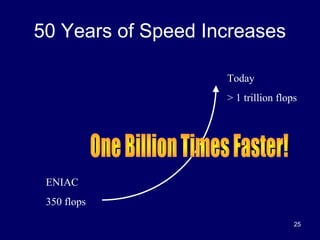
50 Years of Speed Increases
Today
> 1 trillion flops

ENIAC
350 flops
25
CPUs 1 Million Times Faster
• Faster clock speeds
• Greater system concurrency
– Multiple functional units
– Concurrent instruction execution
– Speculative instruction execution

26
CHAPTER 2
HARDWARE CONCEPTS

27
Hardware Concepts
• All distributed systems consist of multiple
CPUs.
• we can organize hardwares in several
different ways in term of their connection
and communication
• Various classification schemes have been
proposed by the time but none of them
have been widely adopted
28
Classification in term of Hardware
• We can classify distributed systems
regarding hardware in two broad
categories.
– Multi Processor Systems.
– Multi Computer Systems.

29
Hardware Requirements
• We cant define complete hardware
requirements for a distributed system in
general but we will discuss the most basic
requirements here and these are.
– Processors.
– Memory (Specially RAM).
– Interconnecting Resources.

30
Multi Processor Systems
• Such systems consist of computer having
multiple processors and memory that are
connected through a high speed back
plane over the mother board.
OR
• A simple configuration is to have a high
speed mother board into which CPU and
memory cards can be inserted.
31
Multi Processor Systems
• There are two types of multiprocessor
system with respect to Memory.
– Multi Processor System with Shared Memory.
– Multi Processor System with Non Shared
Memory.

• There are two types of multiprocessor
system with respect to Inter connection of
Memory and Processors.
– Bus Based Systems.
– Switch Based Systems.
32
Multi Processor Systems With
Shared Memory
• In such system there are multiple
processors using memory that is shared
among the processors.
• Coherent System:
– In shared memory system since there is only
one memory if processor A writes some thing
at memory address 40, and after some time
processor B reads from memory address 40 it
will get the same data written by processor A.
Inter process communication is very easy. 33
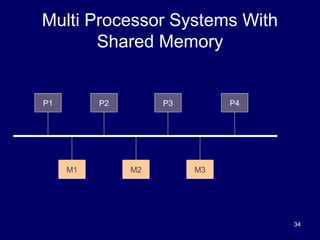
Multi Processor Systems With
Shared Memory

P1

P2

M1

P3

M2

P4

M3

34
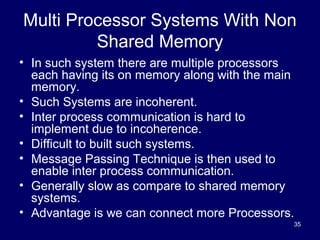
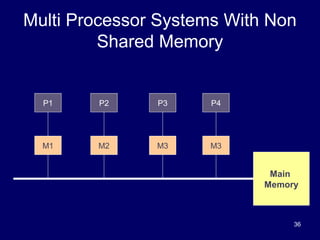
Multi Processor Systems With Non
Shared Memory
• In such system there are multiple processors
each having its on memory along with the main
memory.
• Such Systems are incoherent.
• Inter process communication is hard to
implement due to incoherence.
• Difficult to built such systems.
• Message Passing Technique is then used to
enable inter process communication.
• Generally slow as compare to shared memory
systems.
• Advantage is we can connect more Processors.
35
Multi Processor Systems With Non
Shared Memory

P1

P2

P3

P4

M1

M2

M3

M3

Main
Memory

36
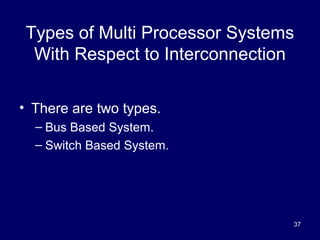
Types of Multi Processor Systems
With Respect to Interconnection
• There are two types.
– Bus Based System.
– Switch Based System.

37
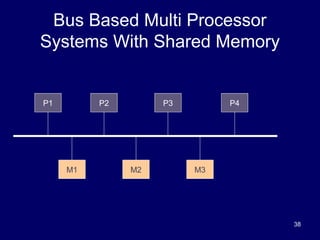
Bus Based Multi Processor
Systems With Shared Memory

P1

P2

M1

P3

M2

P4

M3

38
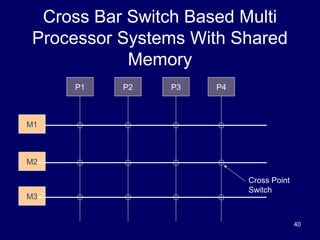
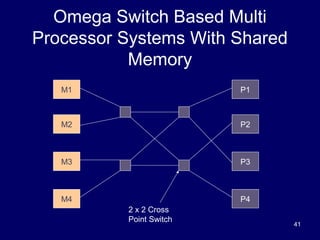
Switch Based Multi Processor
Systems With Shared Memory

• There are two types.
– Cross Bar Switch Based.
– Omega Switch Based.

39
Cross Bar Switch Based Multi
Processor Systems With Shared
Memory
P1

P2

P3

P4

M1

M2

M3

Cross Point
Switch

40
Omega Switch Based Multi
Processor Systems With Shared
Memory
M1

P1

M2

P2

M3

P3

M4

P4
2 x 2 Cross
Point Switch

41
Multi Computer Systems
• The system consists of multiple computers
connected by interconnecting resources.
• For Example:
– We have ten computers in the lab, we have
ten processors with memories available for
process an application.
– Why not we use them as a single system to
process an application.
– Internet.

42
Multi Computer Systems
• Such system will be incoherent in nature as it
will have ten processors, all of which have its
own memory.
• In other words No Shared memory.
• Inter Process communication will then achieved
through message passing techniques.
• This technique is little bit hard to implement but
not as much costly as to buy minicomputer or
any other high rank systems.
• And then make program using parallel
programming.
43
Types Of Multi Computer Systems

• There are two types based on types of
computers we wanted to use in our
system
– Homogeneous Multi Computer systems.
– Heterogeneous Multi Computer Systems.
44
Types Of Multi Computer Systems
• There are two types further based on
Interconnection resources.
– Homogeneous Multi Computer Systems
• Bus Based Systems.
• Switch Based systems.

– Heterogeneous Multi Computer Systems
• Bus Based Systems.
• Switch Based systems.
45
Homogeneous Multi Computer
Systems
• The system consist of same type of
computers.
• Each Computer has its own memory.
• Computer will communicate each other
through a high speed interconnection
network.
• This high speed interconnection network
can be a bus based or switch based.
46
System Area Network
• SAN are homogeneous multi computer
systems based on fast bus based
interconnecting network.
• Normally these computers are connected
through a shared multi access network
(Fast Ethernet).
• They have limited scalability.

47
Cluster of Workstation
• COWs are homogeneous multi computer
systems based on switches.
• Topologies used are
– Meshes.
– Hypercubes.

48
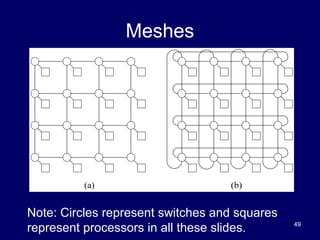
Meshes

Note: Circles represent switches and squares
represent processors in all these slides.

49
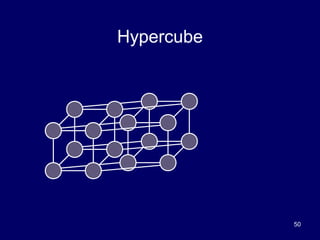
Hypercube

50
Heterogeneous Multi Computer
Systems
• The system consist of computers of
different types.
• Each Computer has its own memory.
• Computer will communicate each other
through a high speed interconnection
network.
• This high speed interconnection network
can be a bus based or switch based.
51
Bus based Heterogeneous Multi
Computer Systems
• These are heterogeneous multi computer
systems based on fast bus based
interconnecting network.
• Normally these computers are connected
through a shared multi access network
(Fast Ethernet).
• They have limited scalability.
52
Switch Based Heterogeneous Multi
Computer Systems
• These are heterogeneous multi computer
systems based on switches.
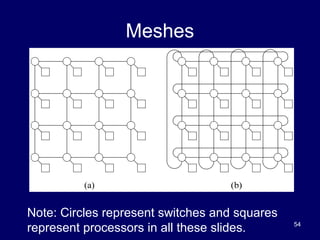
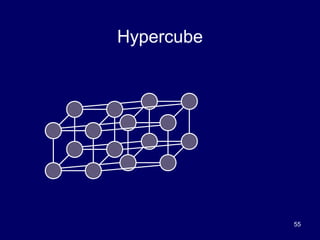
• Topologies used are
– Meshes.
– Hypercubes.

53
Meshes

Note: Circles represent switches and squares
represent processors in all these slides.

54
Hypercube

55

Lecture 1 (distributed systems)

  • 1.
    Distributed Systems and DistributedComputing Introduction.
  • 2.
    Outline • • • • • • • • • Definition of DistributedSystems Advantages and Disadvantages Goals Parallel Computing Distributed Computing Hardware Concepts Software Concepts Middle Ware Systems Technologies under use 2
  • 3.
    Outline • • • • • • • • • • RPC (Remote ProcedureCall) ROI (Remote Object Invocation) Network Programming Implementation of RPC using C Implementation of ROI using Java Java RMI XML Implementation of RPC using XML SOAP A little bit about CORBA 3
  • 4.
    Distributed Systems • Definition: –The Collection of individual computers that appears to its users as a single coherent system. • Coherent System: – The system in which all the individual systems shares the central memory (RAM). 4
  • 7.
    Examples • • • • • Internet Aero plane TicketReservation System ATMs Mobile Cellular Phone Systems Centralized Data Base System Working in Banks • LAN • MAN • WAN 7
  • 8.
    DS: I knowit when I see it • • • • • -Big: Enterprise level • Examples of DS are all around us -Small: Personal -Innovative: Sensor Networks -Common: Web service
  • 9.
  • 11.
    Biggest Challenges ofDS • • • • • Configuration: How to find each other, get started, etc • Consensus: How to agree on stuff • Consistency: How to have the same view • in the face of changes • • Fault Tolerance: How to survive in a world
  • 12.
    Characteristics of DS • • • • Scalability SupportHeterogeneity Continuous Availability Users are unaware about the distribution and heterogeneity of the system • The components of a system are also unaware of the heterogeneity • Users and applications can interact with the system uniformly 12
  • 13.
    Goals of DS • • • • ConnectingUsers and Resources Transparency Openness Scalability 13
  • 14.
    Connecting Users and Resources •The main goal is to make easy for users to access remote resources and to share them with other users in a controlled way – Security • From external users: (Authentication, Firewall) • From internal users: (Policies, Log Files) 14
  • 15.
    Transparency • To hidethe fact that its processes and resources are physically distributed across multiple computers. OR • A distributed system that is able to present itself to users and applications as it were only a single computer system is said to be transparent. 15
  • 16.
    Types of Transparency •Access (Data representation: little endian / big endian ) – To hide the details of data representations, code translation etc. • Location (URL) – To hide the actual location of the resource. • Migration – To hide the fact that the resource has migrated from previous location. • Relocation – To hide the fact that resource has been reallocated due 16 to non availability from previous location.
  • 17.
    Types of Transparency •Replication – To hide the fact that resource is copied at different locations to make availability of the resource faster. • Concurrency – This is a type of transparency that is related to concurrent access to same resource. • Failure – To hide any of the failure that occur in accessing the resources. 17
  • 18.
    Openness • An opendistributed system support heterogeneity. • An open distributed system offer services according to standard rules (protocols). • Interoperability – It is an extent by which two implementations of system or components from different manufacturers can co exists. • Portability – An application developed on one system can be executed without modification on another. 18
  • 19.
    Scalability • A distributedsystem should be expandable – Scalable with respect to Size • Increase in number of nodes. – Scalable Geographically • Increase in size with respect to geographical location. – Scalable Administratively • If we expand the system then administration should not 19 become difficult.
  • 20.
    Scalability • Problems tobe taken care of in scalability: – Centralized Services • Services available at central machine i-e server. – Centralized Data • Data available at central machine i-e data base server. – Centralized Algorithms. • The algorithms that are running on server machine 20
  • 21.
    Parallel Processing or Computing •Parallel computing – Using parallel computer to solve single problems faster • Parallel computer – Multiple-processor system supporting parallel programming • Parallel programming – Programming in a language that supports concurrency explicitly 21
  • 22.
    Evolution of Supercomputing •Supercomputers – Most powerful computers that can currently be built. Note: This definition is time dependent. • Uses during World War II – Hand-computed artillery tables – Need to speed computations – Army funded ENIAC to speedup calculations • Uses during the Cold War – Nuclear weapon design – Intelligence gathering – Code-breaking 22
  • 23.
    Supercomputer • General-purpose computer •Solves individual problems at high speeds, compared with contemporary systems • Typically costs $10 million or more • Traditionally found in government labs 23
  • 24.
    Commercial Supercomputing • Startedin capital-intensive industries – Petroleum exploration – Automobile manufacturing • Other companies followed suit – Pharmaceutical design – Consumer products 24
  • 25.
    50 Years ofSpeed Increases Today > 1 trillion flops ENIAC 350 flops 25
  • 26.
    CPUs 1 MillionTimes Faster • Faster clock speeds • Greater system concurrency – Multiple functional units – Concurrent instruction execution – Speculative instruction execution 26
  • 27.
  • 28.
    Hardware Concepts • Alldistributed systems consist of multiple CPUs. • we can organize hardwares in several different ways in term of their connection and communication • Various classification schemes have been proposed by the time but none of them have been widely adopted 28
  • 29.
    Classification in termof Hardware • We can classify distributed systems regarding hardware in two broad categories. – Multi Processor Systems. – Multi Computer Systems. 29
  • 30.
    Hardware Requirements • Wecant define complete hardware requirements for a distributed system in general but we will discuss the most basic requirements here and these are. – Processors. – Memory (Specially RAM). – Interconnecting Resources. 30
  • 31.
    Multi Processor Systems •Such systems consist of computer having multiple processors and memory that are connected through a high speed back plane over the mother board. OR • A simple configuration is to have a high speed mother board into which CPU and memory cards can be inserted. 31
  • 32.
    Multi Processor Systems •There are two types of multiprocessor system with respect to Memory. – Multi Processor System with Shared Memory. – Multi Processor System with Non Shared Memory. • There are two types of multiprocessor system with respect to Inter connection of Memory and Processors. – Bus Based Systems. – Switch Based Systems. 32
  • 33.
    Multi Processor SystemsWith Shared Memory • In such system there are multiple processors using memory that is shared among the processors. • Coherent System: – In shared memory system since there is only one memory if processor A writes some thing at memory address 40, and after some time processor B reads from memory address 40 it will get the same data written by processor A. Inter process communication is very easy. 33
  • 34.
    Multi Processor SystemsWith Shared Memory P1 P2 M1 P3 M2 P4 M3 34
  • 35.
    Multi Processor SystemsWith Non Shared Memory • In such system there are multiple processors each having its on memory along with the main memory. • Such Systems are incoherent. • Inter process communication is hard to implement due to incoherence. • Difficult to built such systems. • Message Passing Technique is then used to enable inter process communication. • Generally slow as compare to shared memory systems. • Advantage is we can connect more Processors. 35
  • 36.
    Multi Processor SystemsWith Non Shared Memory P1 P2 P3 P4 M1 M2 M3 M3 Main Memory 36
  • 37.
    Types of MultiProcessor Systems With Respect to Interconnection • There are two types. – Bus Based System. – Switch Based System. 37
  • 38.
    Bus Based MultiProcessor Systems With Shared Memory P1 P2 M1 P3 M2 P4 M3 38
  • 39.
    Switch Based MultiProcessor Systems With Shared Memory • There are two types. – Cross Bar Switch Based. – Omega Switch Based. 39
  • 40.
    Cross Bar SwitchBased Multi Processor Systems With Shared Memory P1 P2 P3 P4 M1 M2 M3 Cross Point Switch 40
  • 41.
    Omega Switch BasedMulti Processor Systems With Shared Memory M1 P1 M2 P2 M3 P3 M4 P4 2 x 2 Cross Point Switch 41
  • 42.
    Multi Computer Systems •The system consists of multiple computers connected by interconnecting resources. • For Example: – We have ten computers in the lab, we have ten processors with memories available for process an application. – Why not we use them as a single system to process an application. – Internet. 42
  • 43.
    Multi Computer Systems •Such system will be incoherent in nature as it will have ten processors, all of which have its own memory. • In other words No Shared memory. • Inter Process communication will then achieved through message passing techniques. • This technique is little bit hard to implement but not as much costly as to buy minicomputer or any other high rank systems. • And then make program using parallel programming. 43
  • 44.
    Types Of MultiComputer Systems • There are two types based on types of computers we wanted to use in our system – Homogeneous Multi Computer systems. – Heterogeneous Multi Computer Systems. 44
  • 45.
    Types Of MultiComputer Systems • There are two types further based on Interconnection resources. – Homogeneous Multi Computer Systems • Bus Based Systems. • Switch Based systems. – Heterogeneous Multi Computer Systems • Bus Based Systems. • Switch Based systems. 45
  • 46.
    Homogeneous Multi Computer Systems •The system consist of same type of computers. • Each Computer has its own memory. • Computer will communicate each other through a high speed interconnection network. • This high speed interconnection network can be a bus based or switch based. 46
  • 47.
    System Area Network •SAN are homogeneous multi computer systems based on fast bus based interconnecting network. • Normally these computers are connected through a shared multi access network (Fast Ethernet). • They have limited scalability. 47
  • 48.
    Cluster of Workstation •COWs are homogeneous multi computer systems based on switches. • Topologies used are – Meshes. – Hypercubes. 48
  • 49.
    Meshes Note: Circles representswitches and squares represent processors in all these slides. 49
  • 50.
  • 51.
    Heterogeneous Multi Computer Systems •The system consist of computers of different types. • Each Computer has its own memory. • Computer will communicate each other through a high speed interconnection network. • This high speed interconnection network can be a bus based or switch based. 51
  • 52.
    Bus based HeterogeneousMulti Computer Systems • These are heterogeneous multi computer systems based on fast bus based interconnecting network. • Normally these computers are connected through a shared multi access network (Fast Ethernet). • They have limited scalability. 52
  • 53.
    Switch Based HeterogeneousMulti Computer Systems • These are heterogeneous multi computer systems based on switches. • Topologies used are – Meshes. – Hypercubes. 53
  • 54.
    Meshes Note: Circles representswitches and squares represent processors in all these slides. 54
  • 55.