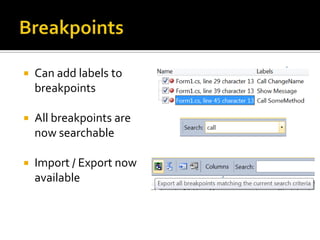
 Breakpoint Labeling
 Breakpoint Searching
 Breakpoint Import/Export
 Dynamic DataTooling
 WPFTreeVisualizer
 Call Hierarchy
 ImprovedWPFTooling
 Historical Debugging
 Mini-Dump Debugging
 Quick Search
 Better Multi-Monitor
Support
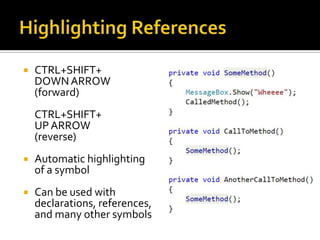
 Highlight References
 Parallel Stacks Window
 ParallelTasksWindow
 Document Map Margin
 Generate From Usage
 Concurrency Profiler
 Inline CallTree
 ExtensibleTest Runner
 MVCTooling
 Web Deploy
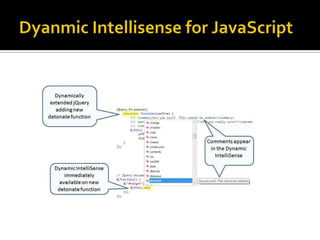
 JQuery Intellisense
 SharePointTooling
 HTML Snippets
 Web.configTransformation
 Click-Once Enhancements
for Microsoft Office
 General Improvements
 Debugging
 Parallelism
 Web
 Extensibility
 CTRL+SHIFT+
DOWNARROW
(forward)
CTRL+SHIFT+
UP ARROW
(reverse)
 Automatic highlighting
of a symbol
 Can be used with
declarations, references,
and many other symbols
 CTRL + ,
 Provides search-as-
you-type support for
symbols
 Enables quick
searching based on
case usage
 New Guide Diamond
 Windows can be docked
anywhere
 Can now pull document
windows outside the IDE
 CTRL + K,T
 Used to see calls to
and from a method
 Great way to see calls
at design time
 CTRL + Mouse Wheel
 New feature that
enhances the size of
your code
 Very useful for pair
programming (or
similar scenarios)
 Used to automatically
create stub code
 Enables you to use
classes and members
before you define
them
 CTRL + ALT + SPACE
 Used when classes and
members are used
before they are defined
 Helps to reduce
situations where
IntelliSense inserts
unintended text into the
editor
 Can add labels to
breakpoints
 All breakpoints are
now searchable
 Import / Export now
available
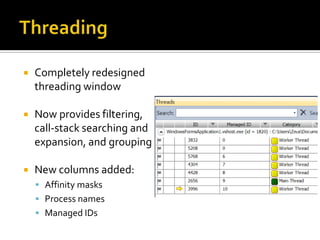
 Completely redesigned
threading window
 Now provides filtering,
call-stack searching and
expansion, and grouping
 New columns added:
 Affinity masks
 Process names
 Managed IDs
 You can save a dump file
and debug it later, either
on the build computer or
on another computer
that has the source files
and debugging symbols
 Can read dump files that
contain information
about managed code,
unmanaged code, or a
mixture of both
 Used to visualize and
debug parallel code that is
written in C++, C#, or
Visual Basic
 Using the Parallel Stacks
window, you can view
multiple call stacks at the
same time in a single view
 ParallelTasks allow you to
see multiple tasks and the
corresponding status of
those tasks
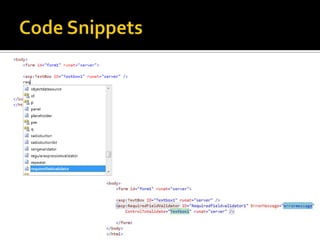
 Snippets are now
available in web
applications
 Two major contextual
areas:
 JavaScript
 HTML
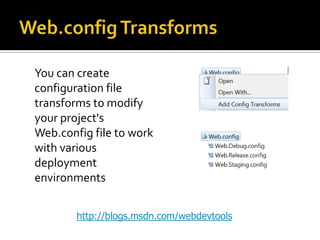
You can create
configuration file
transforms to modify
your project's
Web.config file to work
with various
deployment
environments
http://blogs.msdn.com/webdevtools
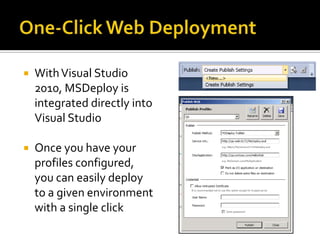
 WithVisual Studio
2010, MSDeploy is
integrated directly into
Visual Studio
 Once you have your
profiles configured,
you can easily deploy
to a given environment
with a single click
http://visualstudiogallery.msdn.microsoft.com
http://msdn.microsoft.com/en-us/vsx/default.aspx
 What’s New inVisual Studio 2010
http://msdn.microsoft.com/en-
us/library/bb386063(VS.100).aspx
 Visual Studio on MSDN
http://msdn.microsoft.com/vstudio
 Visual Studio 2010Tips andTricks
http://blogs.msdn.com/zainnab
.NET 1.0 .NET 1.1 .NET 2.0
3.0
3.5
.NET 4
2002 2003 2008 CTP!2005-08
CLR 1.0 CLR 1.1 CLR 2.0 CLR 4
SP1
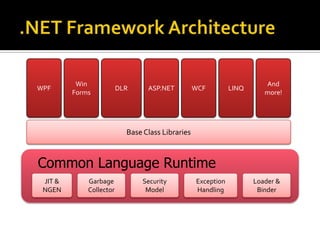
Base Class Libraries
Common Language Runtime
JIT &
NGEN
Garbage
Collector
Security
Model
Exception
Handling
Loader &
Binder
WPF
Win
Forms
DLR ASP.NET WCF
And
more!
LINQ
 Client Profile
 Visualization
 Data
 Programming Languages
 Common Language Runtime (CLR)
 Base Class Libraries (BCL)
 Web
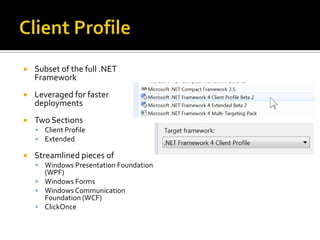
 Subset of the full .NET
Framework
 Leveraged for faster
deployments
 Two Sections
 Client Profile
 Extended
 Streamlined pieces of
 Windows Presentation Foundation
(WPF)
 Windows Forms
 Windows Communication
Foundation (WCF)
 ClickOnce
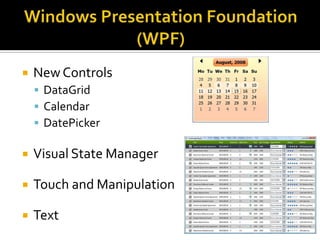
 NewControls
 DataGrid
 Calendar
 DatePicker
 Visual State Manager
 Touch and Manipulation
 Text
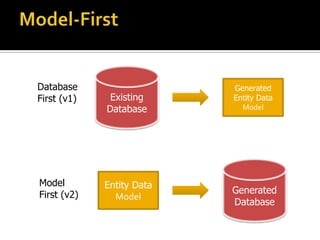
Existing
Database
Generated
Entity Data
Model
Database
First (v1)
Entity Data
Model
Generated
Database
Model
First (v2)
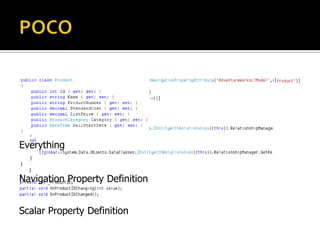
Class Definition
Scalar Property Definition
Navigation Property Definition
Everything
EXPLICIT
DEFERRED / LAZY
VS.
 DynamicType
 Operations that contain expressions of type dynamic are not
resolved or type checked by the compiler.The compiler
packages together information about the operation, and that
information is later used to evaluate the operation at run time
 Optional and Named Parameters
 Named arguments enable you to specify an argument for a
particular parameter by associating the argument with the
parameter's name rather than with the parameter's position in
the parameter list.
 Optional arguments enable you to omit arguments for some
parameters. Both techniques can be used with methods,
indexers, constructors, and delegates.
 IDE support for F#
 Interactive F# for prototyping code
 Asynchronous constructs
 Parallel constructs
 Immutable data types
.NET 2.0
2.0
add-in
3.0
3.5
Host Process (i.e. Outlook)
3.0
add-in
3.5
add-in
1.1
add-in
.NET 1.1
.NET 2.0
.NET 4.0
2.0
add-in
3.0
3.5
Host Process (i.e. Outlook)
3.0
add-in
3.5
add-in
4.0
add-in
 Set of public types and APIs
 System.Threading
 System.Threading.Tasks
// Sequential
foreach (var item in sourceCollection)
{
Process(item);
}
// Parallel
Parallel.ForEach (sourceCollection, item => Process(item));
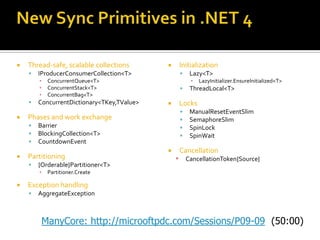
 Thread-safe, scalable collections
 IProducerConsumerCollection<T>
▪ ConcurrentQueue<T>
▪ ConcurrentStack<T>
▪ ConcurrentBag<T>
 ConcurrentDictionary<TKey,TValue>
 Phases and work exchange
 Barrier
 BlockingCollection<T>
 CountdownEvent
 Partitioning
 {Orderable}Partitioner<T>
▪ Partitioner.Create
 Exception handling
 AggregateException
 Initialization
 Lazy<T>
▪ LazyInitializer.EnsureInitialized<T>
 ThreadLocal<T>
 Locks
 ManualResetEventSlim
 SemaphoreSlim
 SpinLock
 SpinWait
 Cancellation
▪ CancellationToken{Source}
ManyCore: http://microoftpdc.com/Sessions/P09-09
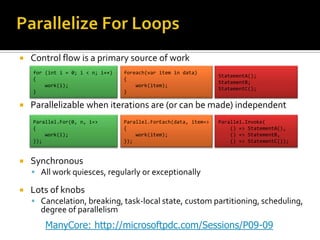
 Control flow is a primary source of work
 Parallelizable when iterations are (or can be made) independent
 Synchronous
 All work quiesces, regularly or exceptionally
 Lots of knobs
 Cancelation, breaking, task-local state, custom partitioning, scheduling,
degree of parallelism
for (int i = 0; i < n; i++)
{
work(i);
}
foreach(var item in data)
{
work(item);
}
StatementA();
StatementB;
StatementC();
Parallel.For(0, n, i=>
{
work(i);
});
Parallel.ForEach(data, item=>
{
work(item);
});
Parallel.Invoke(
() => StatementA(),
() => StatementB,
() => StatementC());
ManyCore: http://microsoftpdc.com/Sessions/P09-09
 Implements the full set of LINQ standard query
operators
 Extension methods for the IParallelEnumerable
interface
 Additional operators for parallel operations
from n in names.AsParallel().WithDegreeOfParallelism(ProcessorsToUse.Value)
where n.Name.Equals(queryInfo.Name,
StringComparison.InvariantCultureIgnoreCase) &&
n.State == queryInfo.State &&
n.Year >= yearStart && n.Year <= yearEnd
orderby n.Year ascending
select n;
 System.Diagnostics.Contracts
 Code Contracts introduce a way to specify
contractual information that is not represented
by a method or type’s signature alone
 Scenarios for using contracts include:
 Perform static bug finding, which enables some bugs
to be found without executing the code
 Create guidance for automated testing tools to
enhance test coverage
 Create a standard notation for code behavior, which
provides more information for documentation
public Boolean ExampleMethod(String parameter) { if (parameter ==
null) throw new ArgumentNullException ("parameter must be non-
null"); }http://msdn.microsoft.com/devlabs
 BigInteger
 Immutable type that represents an arbitrarily
large integer whose value in theory has no upper
or lower bounds
 SortedSet<T>
 Provides a self-balancing tree that maintains data
in sorted order after insertions, deletions, and
searches
 Memory-Mapped File
 Used to edit very large files and to create shared
memory for inter-process communication
 Stream.CopyTo
 Allows you to copy the contents of one stream
into another
 Huge investment from Microsoft
 Alternative toWebForms
 ModularArchitecture
 MVC 2.0 Integrated in
.NET Framework 4.0
 Ability to set meta tags
 More control over view state
 Added and Updated browser definition files
 ASP.NET Routing
 The ability to persist selected rows in data controls
 More control over rendered HTML in the FormView
and ListView controls
 Filtering support for data source controls
 A RAD experience for quickly building a data-
drivenWeb site
 Automatic validation that is based on
constraints defined in the data model
 The ability to easily change the markup that
is generated for fields in the GridView and
DetailsView controls by using field templates
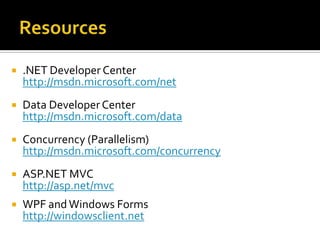
 .NET Developer Center
http://msdn.microsoft.com/net
 Data Developer Center
http://msdn.microsoft.com/data
 Concurrency (Parallelism)
http://msdn.microsoft.com/concurrency
 ASP.NET MVC
http://asp.net/mvc
 WPF andWindows Forms
http://windowsclient.net
 New object model
 LINQ for SharePoint
 Native support for Silverlight
 Sandboxed Solutions
 External data lists
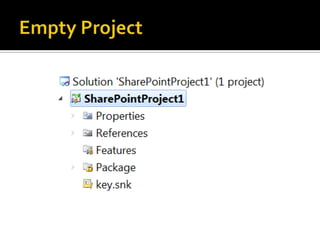
 SharePoint Projects
 Event Receivers
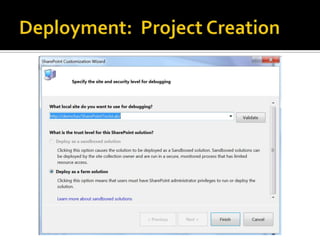
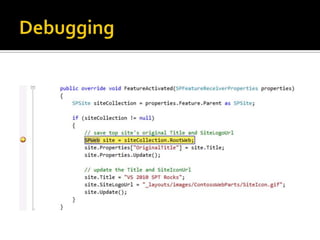
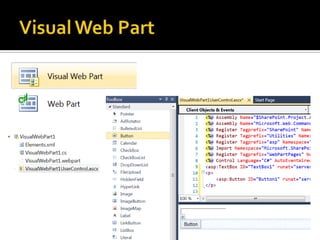
 Deployment & Debugging
 Web Parts
THEN NOW
 Learn SharePoint 2010 on Channel 9
http://channel9.msdn.com/learn/courses/ShareP
oint2010Developer/
 SharePoint 2010 Developer Center
http://msdn.microsoft.com/SharePoint
Vb essentials

Vb essentials

  • 2.
     Breakpoint Labeling Breakpoint Searching  Breakpoint Import/Export  Dynamic DataTooling  WPFTreeVisualizer  Call Hierarchy  ImprovedWPFTooling  Historical Debugging  Mini-Dump Debugging  Quick Search  Better Multi-Monitor Support  Highlight References  Parallel Stacks Window  ParallelTasksWindow  Document Map Margin  Generate From Usage  Concurrency Profiler  Inline CallTree  ExtensibleTest Runner  MVCTooling  Web Deploy  JQuery Intellisense  SharePointTooling  HTML Snippets  Web.configTransformation  Click-Once Enhancements for Microsoft Office
  • 3.
     General Improvements Debugging  Parallelism  Web  Extensibility
  • 5.
     CTRL+SHIFT+ DOWNARROW (forward) CTRL+SHIFT+ UP ARROW (reverse) Automatic highlighting of a symbol  Can be used with declarations, references, and many other symbols
  • 6.
     CTRL +,  Provides search-as- you-type support for symbols  Enables quick searching based on case usage
  • 7.
     New GuideDiamond  Windows can be docked anywhere  Can now pull document windows outside the IDE
  • 8.
     CTRL +K,T  Used to see calls to and from a method  Great way to see calls at design time
  • 9.
     CTRL +Mouse Wheel  New feature that enhances the size of your code  Very useful for pair programming (or similar scenarios)
  • 10.
     Used toautomatically create stub code  Enables you to use classes and members before you define them
  • 11.
     CTRL +ALT + SPACE  Used when classes and members are used before they are defined  Helps to reduce situations where IntelliSense inserts unintended text into the editor
  • 14.
     Can addlabels to breakpoints  All breakpoints are now searchable  Import / Export now available
  • 16.
     Completely redesigned threadingwindow  Now provides filtering, call-stack searching and expansion, and grouping  New columns added:  Affinity masks  Process names  Managed IDs
  • 17.
     You cansave a dump file and debug it later, either on the build computer or on another computer that has the source files and debugging symbols  Can read dump files that contain information about managed code, unmanaged code, or a mixture of both
  • 18.
     Used tovisualize and debug parallel code that is written in C++, C#, or Visual Basic  Using the Parallel Stacks window, you can view multiple call stacks at the same time in a single view  ParallelTasks allow you to see multiple tasks and the corresponding status of those tasks
  • 21.
     Snippets arenow available in web applications  Two major contextual areas:  JavaScript  HTML
  • 24.
    You can create configurationfile transforms to modify your project's Web.config file to work with various deployment environments http://blogs.msdn.com/webdevtools
  • 25.
     WithVisual Studio 2010,MSDeploy is integrated directly into Visual Studio  Once you have your profiles configured, you can easily deploy to a given environment with a single click
  • 28.
  • 29.
  • 30.
     What’s NewinVisual Studio 2010 http://msdn.microsoft.com/en- us/library/bb386063(VS.100).aspx  Visual Studio on MSDN http://msdn.microsoft.com/vstudio  Visual Studio 2010Tips andTricks http://blogs.msdn.com/zainnab
  • 31.
    .NET 1.0 .NET1.1 .NET 2.0 3.0 3.5 .NET 4 2002 2003 2008 CTP!2005-08 CLR 1.0 CLR 1.1 CLR 2.0 CLR 4 SP1
  • 32.
    Base Class Libraries CommonLanguage Runtime JIT & NGEN Garbage Collector Security Model Exception Handling Loader & Binder WPF Win Forms DLR ASP.NET WCF And more! LINQ
  • 33.
     Client Profile Visualization  Data  Programming Languages  Common Language Runtime (CLR)  Base Class Libraries (BCL)  Web
  • 35.
     Subset ofthe full .NET Framework  Leveraged for faster deployments  Two Sections  Client Profile  Extended  Streamlined pieces of  Windows Presentation Foundation (WPF)  Windows Forms  Windows Communication Foundation (WCF)  ClickOnce
  • 37.
     NewControls  DataGrid Calendar  DatePicker  Visual State Manager  Touch and Manipulation  Text
  • 40.
  • 41.
    Class Definition Scalar PropertyDefinition Navigation Property Definition Everything
  • 42.
  • 43.
  • 45.
     DynamicType  Operationsthat contain expressions of type dynamic are not resolved or type checked by the compiler.The compiler packages together information about the operation, and that information is later used to evaluate the operation at run time  Optional and Named Parameters  Named arguments enable you to specify an argument for a particular parameter by associating the argument with the parameter's name rather than with the parameter's position in the parameter list.  Optional arguments enable you to omit arguments for some parameters. Both techniques can be used with methods, indexers, constructors, and delegates.
  • 47.
     IDE supportfor F#  Interactive F# for prototyping code  Asynchronous constructs  Parallel constructs  Immutable data types
  • 49.
    .NET 2.0 2.0 add-in 3.0 3.5 Host Process(i.e. Outlook) 3.0 add-in 3.5 add-in 1.1 add-in .NET 1.1
  • 50.
    .NET 2.0 .NET 4.0 2.0 add-in 3.0 3.5 HostProcess (i.e. Outlook) 3.0 add-in 3.5 add-in 4.0 add-in
  • 52.
     Set ofpublic types and APIs  System.Threading  System.Threading.Tasks // Sequential foreach (var item in sourceCollection) { Process(item); } // Parallel Parallel.ForEach (sourceCollection, item => Process(item));
  • 53.
     Thread-safe, scalablecollections  IProducerConsumerCollection<T> ▪ ConcurrentQueue<T> ▪ ConcurrentStack<T> ▪ ConcurrentBag<T>  ConcurrentDictionary<TKey,TValue>  Phases and work exchange  Barrier  BlockingCollection<T>  CountdownEvent  Partitioning  {Orderable}Partitioner<T> ▪ Partitioner.Create  Exception handling  AggregateException  Initialization  Lazy<T> ▪ LazyInitializer.EnsureInitialized<T>  ThreadLocal<T>  Locks  ManualResetEventSlim  SemaphoreSlim  SpinLock  SpinWait  Cancellation ▪ CancellationToken{Source} ManyCore: http://microoftpdc.com/Sessions/P09-09
  • 54.
     Control flowis a primary source of work  Parallelizable when iterations are (or can be made) independent  Synchronous  All work quiesces, regularly or exceptionally  Lots of knobs  Cancelation, breaking, task-local state, custom partitioning, scheduling, degree of parallelism for (int i = 0; i < n; i++) { work(i); } foreach(var item in data) { work(item); } StatementA(); StatementB; StatementC(); Parallel.For(0, n, i=> { work(i); }); Parallel.ForEach(data, item=> { work(item); }); Parallel.Invoke( () => StatementA(), () => StatementB, () => StatementC()); ManyCore: http://microsoftpdc.com/Sessions/P09-09
  • 55.
     Implements thefull set of LINQ standard query operators  Extension methods for the IParallelEnumerable interface  Additional operators for parallel operations from n in names.AsParallel().WithDegreeOfParallelism(ProcessorsToUse.Value) where n.Name.Equals(queryInfo.Name, StringComparison.InvariantCultureIgnoreCase) && n.State == queryInfo.State && n.Year >= yearStart && n.Year <= yearEnd orderby n.Year ascending select n;
  • 57.
     System.Diagnostics.Contracts  CodeContracts introduce a way to specify contractual information that is not represented by a method or type’s signature alone  Scenarios for using contracts include:  Perform static bug finding, which enables some bugs to be found without executing the code  Create guidance for automated testing tools to enhance test coverage  Create a standard notation for code behavior, which provides more information for documentation public Boolean ExampleMethod(String parameter) { if (parameter == null) throw new ArgumentNullException ("parameter must be non- null"); }http://msdn.microsoft.com/devlabs
  • 58.
     BigInteger  Immutabletype that represents an arbitrarily large integer whose value in theory has no upper or lower bounds  SortedSet<T>  Provides a self-balancing tree that maintains data in sorted order after insertions, deletions, and searches
  • 59.
     Memory-Mapped File Used to edit very large files and to create shared memory for inter-process communication  Stream.CopyTo  Allows you to copy the contents of one stream into another
  • 61.
     Huge investmentfrom Microsoft  Alternative toWebForms  ModularArchitecture  MVC 2.0 Integrated in .NET Framework 4.0
  • 62.
     Ability toset meta tags  More control over view state  Added and Updated browser definition files  ASP.NET Routing  The ability to persist selected rows in data controls  More control over rendered HTML in the FormView and ListView controls  Filtering support for data source controls
  • 63.
     A RADexperience for quickly building a data- drivenWeb site  Automatic validation that is based on constraints defined in the data model  The ability to easily change the markup that is generated for fields in the GridView and DetailsView controls by using field templates
  • 64.
     .NET DeveloperCenter http://msdn.microsoft.com/net  Data Developer Center http://msdn.microsoft.com/data  Concurrency (Parallelism) http://msdn.microsoft.com/concurrency  ASP.NET MVC http://asp.net/mvc  WPF andWindows Forms http://windowsclient.net
  • 66.
     New objectmodel  LINQ for SharePoint  Native support for Silverlight  Sandboxed Solutions  External data lists
  • 67.
     SharePoint Projects Event Receivers  Deployment & Debugging  Web Parts
  • 71.
  • 88.
     Learn SharePoint2010 on Channel 9 http://channel9.msdn.com/learn/courses/ShareP oint2010Developer/  SharePoint 2010 Developer Center http://msdn.microsoft.com/SharePoint