ASSIGNMENT # 4
SUBMITTED TO:
MISS SARA SARWAR
SUBMITTED BY:
RABIA ZAFAR
17581556-045
BS IT (5TH
SEMESTER)
SECTION ‘A’
Internet architecture and protocol
ISP and Its Architecture:
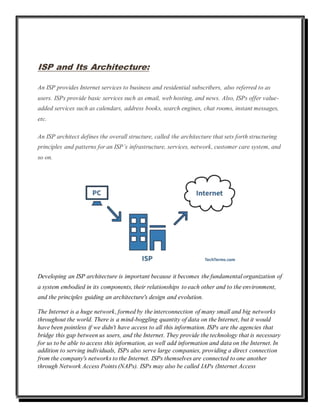
An ISP provides Internet services to business and residential subscribers, also referred to as
users. ISPs provide basic services such as email, web hosting, and news. Also, ISPs offer value-
added services such as calendars, address books, search engines, chat rooms, instant messages,
etc.
An ISP architect defines the overall structure, called the architecture that sets forth structuring
principles and patterns for an ISP’s infrastructure, services, network, customer care system, and
so on.
Developing an ISP architecture is important because it becomes the fundamental organization of
a system embodied in its components, their relationships to each other and to the environment,
and the principles guiding an architecture's design and evolution.
The Internet is a huge network, formed by the interconnection of many small and big networks
throughout the world. There is a mind-boggling quantity of data on the Internet, but it would
have been pointless if we didn't have access to all this information. ISPs are the agencies that
bridge this gap between us users, and the Internet. They provide the technology that is necessary
for us to be able to access this information, as well add information and data on the Internet. In
addition to serving individuals, ISPs also serve large companies, providing a direct connection
from the company's networks to the Internet. ISPs themselves are connected to one another
through Network Access Points (NAPs). ISPs may also be called IAPs (Internet Access
Providers). An organization that provides access to the Internet. Connection to the user is
provided via dialup, ISDN, cable, DSL, fiber. Customers are generally billed a fixed rate per
month, but other charges may apply.
The ISPs are classified based on the way in which they provide service to their customers. There
are 5 types of ISPs:
1. Dial-up ISP
2. DSL ISP
3. Cable/Fiber Optic ISP
4. Wi-Fi ISP
5. Satellite ISP
Modem:
Every computer that connects to the Internet has to do so using a modem. The full form of
modem is 'modulator-demodulator'. The function of the modem is equal to its name. It modulates
the data and converts it into digital form before passing on the information to the Internet
service provider. The data that it receives from the Internet service provider is also in the form of
digital signal, and so it demodulates the data.
IP Address
IP stands for Internet Protocol. Every computer that connects to the Internet is assigned an IP
address by the ISP. When we type in the name of a particular website in our web browser, we
are actually typing in the Internet Protocol address of the website. The IP address in this case is
the address of the server machine that holds the desired web pages.
DHCP
'Dynamic Host Control Protocol' in its abbreviated form is known as DHCP. The dynamic host
control protocol is used by the ISP to assign temporary addresses to any of its subscribers who
intend to connect to the Internet.
Backbone of ISP
This is the point that connects your ISP to the Internet. The ISPs buy a particular range of
bandwidth for the working of its backbone. It is through this bandwidth that information is sent
or received.
The ISP Facility
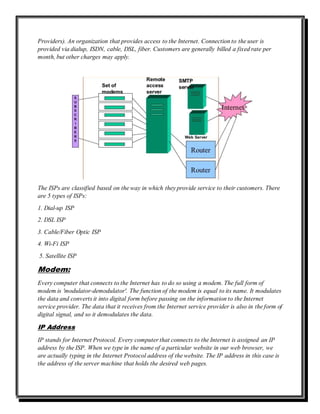
The Internet service provider carries out its entire functioning in a room called the data center.
The advanced data centers consist of various equipment. A pool of modems inside the data
center is used to connect every subscriber to the Internet. Once a modem in the pool receives the
information, it connects the subscriber to the backbone. The entire functioning of the modem
pool is controlled by algorithms running in a computer to which the modems are connected. This
setup of modems is generally referred to as the ISP port server.
How does an ISP Work?
Connect your computer to the network with the modem/router.
1- Modem sends request to the ISP.
2- ISP checks whether you have a static IP address.
3- If YES, your request is processed. OR If NO, the ISP communicates with the DHCP
server and allots your computer a dynamic IP address.
4- Your request is processed by the ISP, the ISP figures out the IP address of the page that
you are requesting.
5- Once it knows the IP address of the requested page, it refers to its own cache.
6- If the page is available in its cache, it transfers the data from that page to your IP
address.
7- If the page is not available in its cache, then it tracks the IP address that you have
requested, and sends a request to that IP address.
8- If the server accepts the request, it allows data transfer to the ISP. OR If the request is
declined, you have to try again till it is accepted.
9- Once the request is accepted by the server, the data is sent to the ISP.
10- The ISP then redirects this data to your IP address.
11- You now have the data on your computer.
Components:
1- Standard-based network access servers (NASs).
2- RADIUS PROXY SERVERS
3- Authentication services
4- Phone book support

ISP AND ITS ARCHITECTURE.

  • 1.
    ASSIGNMENT # 4 SUBMITTEDTO: MISS SARA SARWAR SUBMITTED BY: RABIA ZAFAR 17581556-045 BS IT (5TH SEMESTER) SECTION ‘A’ Internet architecture and protocol
  • 2.
    ISP and ItsArchitecture: An ISP provides Internet services to business and residential subscribers, also referred to as users. ISPs provide basic services such as email, web hosting, and news. Also, ISPs offer value- added services such as calendars, address books, search engines, chat rooms, instant messages, etc. An ISP architect defines the overall structure, called the architecture that sets forth structuring principles and patterns for an ISP’s infrastructure, services, network, customer care system, and so on. Developing an ISP architecture is important because it becomes the fundamental organization of a system embodied in its components, their relationships to each other and to the environment, and the principles guiding an architecture's design and evolution. The Internet is a huge network, formed by the interconnection of many small and big networks throughout the world. There is a mind-boggling quantity of data on the Internet, but it would have been pointless if we didn't have access to all this information. ISPs are the agencies that bridge this gap between us users, and the Internet. They provide the technology that is necessary for us to be able to access this information, as well add information and data on the Internet. In addition to serving individuals, ISPs also serve large companies, providing a direct connection from the company's networks to the Internet. ISPs themselves are connected to one another through Network Access Points (NAPs). ISPs may also be called IAPs (Internet Access
  • 3.
    Providers). An organizationthat provides access to the Internet. Connection to the user is provided via dialup, ISDN, cable, DSL, fiber. Customers are generally billed a fixed rate per month, but other charges may apply. The ISPs are classified based on the way in which they provide service to their customers. There are 5 types of ISPs: 1. Dial-up ISP 2. DSL ISP 3. Cable/Fiber Optic ISP 4. Wi-Fi ISP 5. Satellite ISP Modem: Every computer that connects to the Internet has to do so using a modem. The full form of modem is 'modulator-demodulator'. The function of the modem is equal to its name. It modulates the data and converts it into digital form before passing on the information to the Internet service provider. The data that it receives from the Internet service provider is also in the form of digital signal, and so it demodulates the data. IP Address IP stands for Internet Protocol. Every computer that connects to the Internet is assigned an IP address by the ISP. When we type in the name of a particular website in our web browser, we are actually typing in the Internet Protocol address of the website. The IP address in this case is the address of the server machine that holds the desired web pages.
  • 4.
    DHCP 'Dynamic Host ControlProtocol' in its abbreviated form is known as DHCP. The dynamic host control protocol is used by the ISP to assign temporary addresses to any of its subscribers who intend to connect to the Internet. Backbone of ISP This is the point that connects your ISP to the Internet. The ISPs buy a particular range of bandwidth for the working of its backbone. It is through this bandwidth that information is sent or received. The ISP Facility The Internet service provider carries out its entire functioning in a room called the data center. The advanced data centers consist of various equipment. A pool of modems inside the data center is used to connect every subscriber to the Internet. Once a modem in the pool receives the information, it connects the subscriber to the backbone. The entire functioning of the modem pool is controlled by algorithms running in a computer to which the modems are connected. This setup of modems is generally referred to as the ISP port server. How does an ISP Work? Connect your computer to the network with the modem/router. 1- Modem sends request to the ISP. 2- ISP checks whether you have a static IP address. 3- If YES, your request is processed. OR If NO, the ISP communicates with the DHCP server and allots your computer a dynamic IP address. 4- Your request is processed by the ISP, the ISP figures out the IP address of the page that you are requesting. 5- Once it knows the IP address of the requested page, it refers to its own cache. 6- If the page is available in its cache, it transfers the data from that page to your IP address. 7- If the page is not available in its cache, then it tracks the IP address that you have requested, and sends a request to that IP address. 8- If the server accepts the request, it allows data transfer to the ISP. OR If the request is declined, you have to try again till it is accepted. 9- Once the request is accepted by the server, the data is sent to the ISP. 10- The ISP then redirects this data to your IP address. 11- You now have the data on your computer. Components: 1- Standard-based network access servers (NASs). 2- RADIUS PROXY SERVERS 3- Authentication services 4- Phone book support