ARUBA INSTANT BEST PRACTICES &
TROUBLESHOOTING
Technical Climb Webinar
12:00 GMT | 13:00 CET | 15:00 GST
June 21st, 2016
Presenter: Barath Srinivasan
barath.srinivasan@hpe.com
2
Welcome to the Technical Climb Webinar
Listen to this webinar using the computer
audio broadcasting or dial in by phone.
The dial in number can be found in the audio
panel, click additional numbers to view local
dial in numbers.
If you experience any difficulties accessing
the webinar contact us
using the questions panel.
3
Housekeeping
This	webinar	will	be	recorded
All	lines	will	be	muted	during	the	
webinar
How	can	you	ask	questions?
Use	the	question	panel	on	your	screen
The	recorded	presentation	will	be	posted	on	Arubapedia	for
Partners	(https://arubapedia.arubanetworks.com/afp/)
TROUBLESHOOTING 802.1X ISSUES
How to identify, diagnose and debug 802.1x related user
authentication issues
5
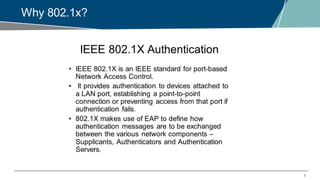
Why 802.1x?
6
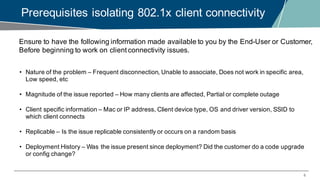
Prerequisites isolating 802.1x client connectivity
Ensure to have the following information made available to you by the End-User or Customer,
Before beginning to work on client connectivity issues.
• Nature of the problem – Frequent disconnection, Unable to associate, Does not work in specific area,
Low speed, etc
• Magnitude of the issue reported – How many clients are affected, Partial or complete outage
• Client specific information – Mac or IP address, Client device type, OS and driver version, SSID to
which client connects
• Replicable – Is the issue replicable consistently or occurs on a random basis
• Deployment History – Was the issue present since deployment? Did the customer do a code upgrade
or config change?
7
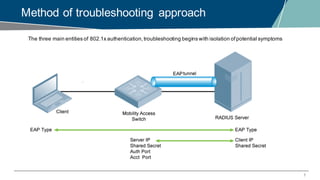
Method of troubleshooting approach
The three main entities of 802.1x authentication,troubleshooting begins with isolation ofpotential symptoms
8
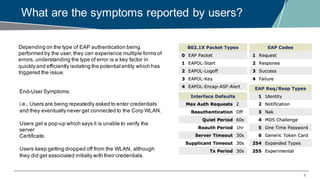
What are the symptoms reported by users?
Depending on the type of EAP authentication being
performed by the user, they can experience multiple forms of
errors, understanding the type of error is a key factor in
quickly and efficiently isolating the potential entity which has
triggered the issue.
End-User Symptoms:
i.e., Users are being repeatedly asked to enter credentials
and they eventually never get connected to the Corp WLAN.
Users get a pop-up which says it is unable to verify the
server
Certificate.
Users keep getting dropped off from the WLAN, although
they did get associated initially with their credentials.
9
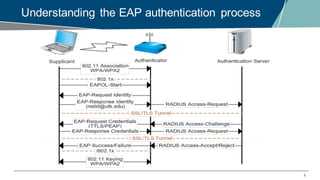
Understanding the EAP authentication process
10
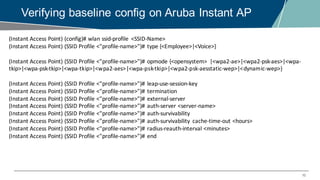
Verifying baseline config on Aruba Instant AP
(Instant	Access	Point)	(config)#	wlan ssid-profile	 <SSID-Name>
(Instant	Access	Point)	(SSID	Profile	<"profile-name>")#	type	{<Employee>|<Voice>}
(Instant	Access	Point)	(SSID	Profile	<"profile-name>")#	opmode {<opensystem>	 |<wpa2-ae>|<wpa2-psk-aes>|<wpa-
tkip>|<wpa-psk-tkip>|<wpa-tkip>|<wpa2-aes>|<wpa-psk-tkip>|<wpa2-psk-aesstatic-wep>|<dynamic-wep>}
(Instant	Access	Point)	(SSID	Profile	<"profile-name>")#	leap-use-session-key
(Instant	Access	Point)	(SSID	Profile	<"profile-name>")#	termination
(Instant	Access	Point)	(SSID	Profile	<"profile-name>")#	external-server
(Instant	Access	Point)	(SSID	Profile	<"profile-name>")#	auth-server	<server-name>
(Instant	Access	Point)	(SSID	Profile	<"profile-name>")#	auth-survivability
(Instant	Access	Point)	(SSID	Profile	<"profile-name>")#	auth-survivability	 cache-time-out	<hours>
(Instant	Access	Point)	(SSID	Profile	<"profile-name>")#	radius-reauth-interval	<minutes>
(Instant	Access	Point)	(SSID	Profile	<"profile-name>")#	end
11
Instant Access point Overview
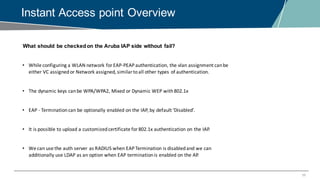
• While	configuring	a	WLAN	network	for	EAP-PEAP	authentication,	the	vlan assignment	can	be	
either	VC	assigned	or	Network	assigned,	similar	to	all	other	types	of	authentication.
• The	dynamic	keys	can	be	WPA/WPA2,	Mixed	or	Dynamic	WEP	with	802.1x
• EAP	- Termination	can	be	optionally	enabled	on	the	IAP,	by	default	‘Disabled’.
• It	is	possible	to	upload	a	customized	certificate	for	802.1x	authentication	on	the	IAP.
• We	can	use	the	auth	server	as	RADIUS	when	EAP	Termination	is	disabled	and	we	can	
additionally	use	LDAP	as	an	option	when	EAP	termination	is	enabled	on	the	AP.
What should be checkedon the Aruba IAP side without fail?
12
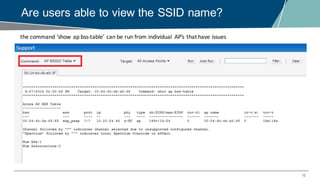
Are users able to view the SSID name?
the	command	‘show	ap bss-table’	can	be	run	from	individual	 AP’s	that	have	issues
13
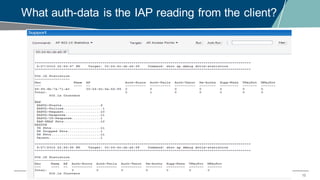
What auth-data is the IAP reading from the client?
14
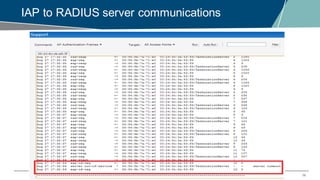
IAP to RADIUS server communications
15
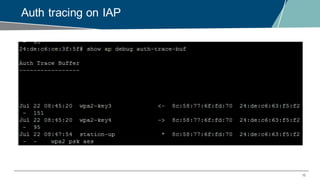
Auth tracing on IAP
16
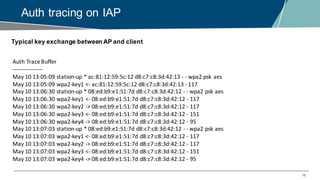
Auth tracing on IAP
Auth	Trace	Buffer
-----------------
May	10	13:05:09	station-up *	ac:81:12:59:5c:12	d8:c7:c8:3d:42:13	- - wpa2	psk aes
May	10	13:05:09	wpa2-key1	<- ac:81:12:59:5c:12	d8:c7:c8:3d:42:13	- 117
May	10	13:06:30	station-up *	08:ed:b9:e1:51:7d	d8:c7:c8:3d:42:12	- - wpa2	psk aes
May	10	13:06:30	wpa2-key1	<- 08:ed:b9:e1:51:7d	d8:c7:c8:3d:42:12	- 117
May	10	13:06:30	wpa2-key2	->	08:ed:b9:e1:51:7d	d8:c7:c8:3d:42:12	- 117
May	10	13:06:30	wpa2-key3	<- 08:ed:b9:e1:51:7d	d8:c7:c8:3d:42:12	- 151
May	10	13:06:30	wpa2-key4	->	08:ed:b9:e1:51:7d	d8:c7:c8:3d:42:12	- 95
May	10	13:07:03	station-up *	08:ed:b9:e1:51:7d	d8:c7:c8:3d:42:12	- - wpa2	psk aes
May	10	13:07:03	wpa2-key1	<- 08:ed:b9:e1:51:7d	d8:c7:c8:3d:42:12	- 117
May	10	13:07:03	wpa2-key2	->	08:ed:b9:e1:51:7d	d8:c7:c8:3d:42:12	- 117
May	10	13:07:03	wpa2-key3	<- 08:ed:b9:e1:51:7d	d8:c7:c8:3d:42:12	- 151
May	10	13:07:03	wpa2-key4	->	08:ed:b9:e1:51:7d	d8:c7:c8:3d:42:12	- 95
Typical key exchange between AP and client
17
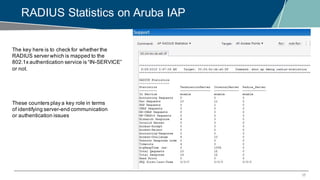
RADIUS Statistics on Aruba IAP
The key here is to check for whether the
RADIUS server which is mapped to the
802.1x authentication service is “IN-SERVICE”
or not.
These counters play a key role in terms
of identifying server-end communication
or authentication issues
18
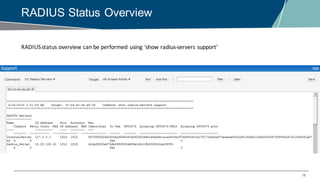
RADIUS Status Overview
RADIUS	status	overview	can	be	performed	using	‘show	radius-servers	support’
19
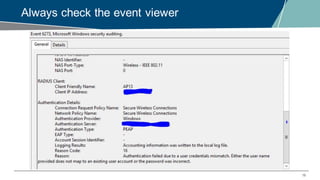
Always check the event viewer
20
Useful bits & bytes, when in a hurry!
Complete list of IAP CLI commands with definition ofthe debug command –
http://www.arubanetworks.com/techdocs/InstantMobile/Advanced/Content/Troubleshooting.htm
https://www.youtube.com/watch?v=9x5uvhn2pHg
Setting up IAP with Clearpass for 802.1x authentication
http://community.arubanetworks.com/aruba/attachments/aruba/84/106/1/Troubleshooting+Cheat+Sheet-
.pdf
Troubleshooting Cheatsheet
QUESTIONS
Any Questions?
THANK YOU FOR YOUR TIME!

EMEA Airheads- Troubleshooting 802.1x issues

  • 1.
    ARUBA INSTANT BESTPRACTICES & TROUBLESHOOTING Technical Climb Webinar 12:00 GMT | 13:00 CET | 15:00 GST June 21st, 2016 Presenter: Barath Srinivasan barath.srinivasan@hpe.com
  • 2.
    2 Welcome to theTechnical Climb Webinar Listen to this webinar using the computer audio broadcasting or dial in by phone. The dial in number can be found in the audio panel, click additional numbers to view local dial in numbers. If you experience any difficulties accessing the webinar contact us using the questions panel.
  • 3.
  • 4.
    TROUBLESHOOTING 802.1X ISSUES Howto identify, diagnose and debug 802.1x related user authentication issues
  • 5.
  • 6.
    6 Prerequisites isolating 802.1xclient connectivity Ensure to have the following information made available to you by the End-User or Customer, Before beginning to work on client connectivity issues. • Nature of the problem – Frequent disconnection, Unable to associate, Does not work in specific area, Low speed, etc • Magnitude of the issue reported – How many clients are affected, Partial or complete outage • Client specific information – Mac or IP address, Client device type, OS and driver version, SSID to which client connects • Replicable – Is the issue replicable consistently or occurs on a random basis • Deployment History – Was the issue present since deployment? Did the customer do a code upgrade or config change?
  • 7.
    7 Method of troubleshootingapproach The three main entities of 802.1x authentication,troubleshooting begins with isolation ofpotential symptoms
  • 8.
    8 What are thesymptoms reported by users? Depending on the type of EAP authentication being performed by the user, they can experience multiple forms of errors, understanding the type of error is a key factor in quickly and efficiently isolating the potential entity which has triggered the issue. End-User Symptoms: i.e., Users are being repeatedly asked to enter credentials and they eventually never get connected to the Corp WLAN. Users get a pop-up which says it is unable to verify the server Certificate. Users keep getting dropped off from the WLAN, although they did get associated initially with their credentials.
  • 9.
    9 Understanding the EAPauthentication process
  • 10.
    10 Verifying baseline configon Aruba Instant AP (Instant Access Point) (config)# wlan ssid-profile <SSID-Name> (Instant Access Point) (SSID Profile <"profile-name>")# type {<Employee>|<Voice>} (Instant Access Point) (SSID Profile <"profile-name>")# opmode {<opensystem> |<wpa2-ae>|<wpa2-psk-aes>|<wpa- tkip>|<wpa-psk-tkip>|<wpa-tkip>|<wpa2-aes>|<wpa-psk-tkip>|<wpa2-psk-aesstatic-wep>|<dynamic-wep>} (Instant Access Point) (SSID Profile <"profile-name>")# leap-use-session-key (Instant Access Point) (SSID Profile <"profile-name>")# termination (Instant Access Point) (SSID Profile <"profile-name>")# external-server (Instant Access Point) (SSID Profile <"profile-name>")# auth-server <server-name> (Instant Access Point) (SSID Profile <"profile-name>")# auth-survivability (Instant Access Point) (SSID Profile <"profile-name>")# auth-survivability cache-time-out <hours> (Instant Access Point) (SSID Profile <"profile-name>")# radius-reauth-interval <minutes> (Instant Access Point) (SSID Profile <"profile-name>")# end
  • 11.
    11 Instant Access pointOverview • While configuring a WLAN network for EAP-PEAP authentication, the vlan assignment can be either VC assigned or Network assigned, similar to all other types of authentication. • The dynamic keys can be WPA/WPA2, Mixed or Dynamic WEP with 802.1x • EAP - Termination can be optionally enabled on the IAP, by default ‘Disabled’. • It is possible to upload a customized certificate for 802.1x authentication on the IAP. • We can use the auth server as RADIUS when EAP Termination is disabled and we can additionally use LDAP as an option when EAP termination is enabled on the AP. What should be checkedon the Aruba IAP side without fail?
  • 12.
    12 Are users ableto view the SSID name? the command ‘show ap bss-table’ can be run from individual AP’s that have issues
  • 13.
    13 What auth-data isthe IAP reading from the client?
  • 14.
    14 IAP to RADIUSserver communications
  • 15.
  • 16.
    16 Auth tracing onIAP Auth Trace Buffer ----------------- May 10 13:05:09 station-up * ac:81:12:59:5c:12 d8:c7:c8:3d:42:13 - - wpa2 psk aes May 10 13:05:09 wpa2-key1 <- ac:81:12:59:5c:12 d8:c7:c8:3d:42:13 - 117 May 10 13:06:30 station-up * 08:ed:b9:e1:51:7d d8:c7:c8:3d:42:12 - - wpa2 psk aes May 10 13:06:30 wpa2-key1 <- 08:ed:b9:e1:51:7d d8:c7:c8:3d:42:12 - 117 May 10 13:06:30 wpa2-key2 -> 08:ed:b9:e1:51:7d d8:c7:c8:3d:42:12 - 117 May 10 13:06:30 wpa2-key3 <- 08:ed:b9:e1:51:7d d8:c7:c8:3d:42:12 - 151 May 10 13:06:30 wpa2-key4 -> 08:ed:b9:e1:51:7d d8:c7:c8:3d:42:12 - 95 May 10 13:07:03 station-up * 08:ed:b9:e1:51:7d d8:c7:c8:3d:42:12 - - wpa2 psk aes May 10 13:07:03 wpa2-key1 <- 08:ed:b9:e1:51:7d d8:c7:c8:3d:42:12 - 117 May 10 13:07:03 wpa2-key2 -> 08:ed:b9:e1:51:7d d8:c7:c8:3d:42:12 - 117 May 10 13:07:03 wpa2-key3 <- 08:ed:b9:e1:51:7d d8:c7:c8:3d:42:12 - 151 May 10 13:07:03 wpa2-key4 -> 08:ed:b9:e1:51:7d d8:c7:c8:3d:42:12 - 95 Typical key exchange between AP and client
  • 17.
    17 RADIUS Statistics onAruba IAP The key here is to check for whether the RADIUS server which is mapped to the 802.1x authentication service is “IN-SERVICE” or not. These counters play a key role in terms of identifying server-end communication or authentication issues
  • 18.
  • 19.
    19 Always check theevent viewer
  • 20.
    20 Useful bits &bytes, when in a hurry! Complete list of IAP CLI commands with definition ofthe debug command – http://www.arubanetworks.com/techdocs/InstantMobile/Advanced/Content/Troubleshooting.htm https://www.youtube.com/watch?v=9x5uvhn2pHg Setting up IAP with Clearpass for 802.1x authentication http://community.arubanetworks.com/aruba/attachments/aruba/84/106/1/Troubleshooting+Cheat+Sheet- .pdf Troubleshooting Cheatsheet
  • 21.
  • 22.
    THANK YOU FORYOUR TIME!