LAB REPORT
Experiment No- 03
Experiment Name: Configuration VLAN (Virtual Local Area Network).
Subject: Computer Network LAB
Course Code: CSE 312
Submittedby:
Name: Md. Al-Amin
Department: CSE
ID No: 172015031
Shift: Evening
Submittedto:
Name: MS. Farhan Akhter Sunny
Designation: Lecturer
Department: CSE
Signature:
ExperimentNo- 03
ExperimentName: Configuration VLAN(Virtual Local Area Network).
Objective:
 To learn about the configuration of VLAN (Virtual Local Area Network).
VLAN:
A virtual LAN (VLAN) is any broadcastdomain that is partitioned and isolated in
a computer network at the data link layer (OSI layer 2).[1][2] LAN is the abbreviation
for local area network and in this context virtual refers to a physical object recreated
and altered by additional logic. VLANs work by applying tags to network frames
and handling these tags in networking systems – creating the appearance and
functionality of network traffic that is physically on a single network but acts as if it
is split between separate networks. In this way, VLANs can keep network
applications separate despite being connected to the same physical network, and
without requiring multiple sets of cabling and networking devices to be deployed.
VLAN Configuration:
To configure the VLAN first of all I arrange two network in a switch where each
network have two connected PC. Then I isolate two network by define the VLAN
as follow below-
Switch# configureterminal
Switch(config)#vlan2
Switch(config-vlan)# nameHR
Switch(config-vlan)# exit
Switch(config)#vlan3
Switch(config-vlan)# nameHR
Switch(config-vlan)# exit
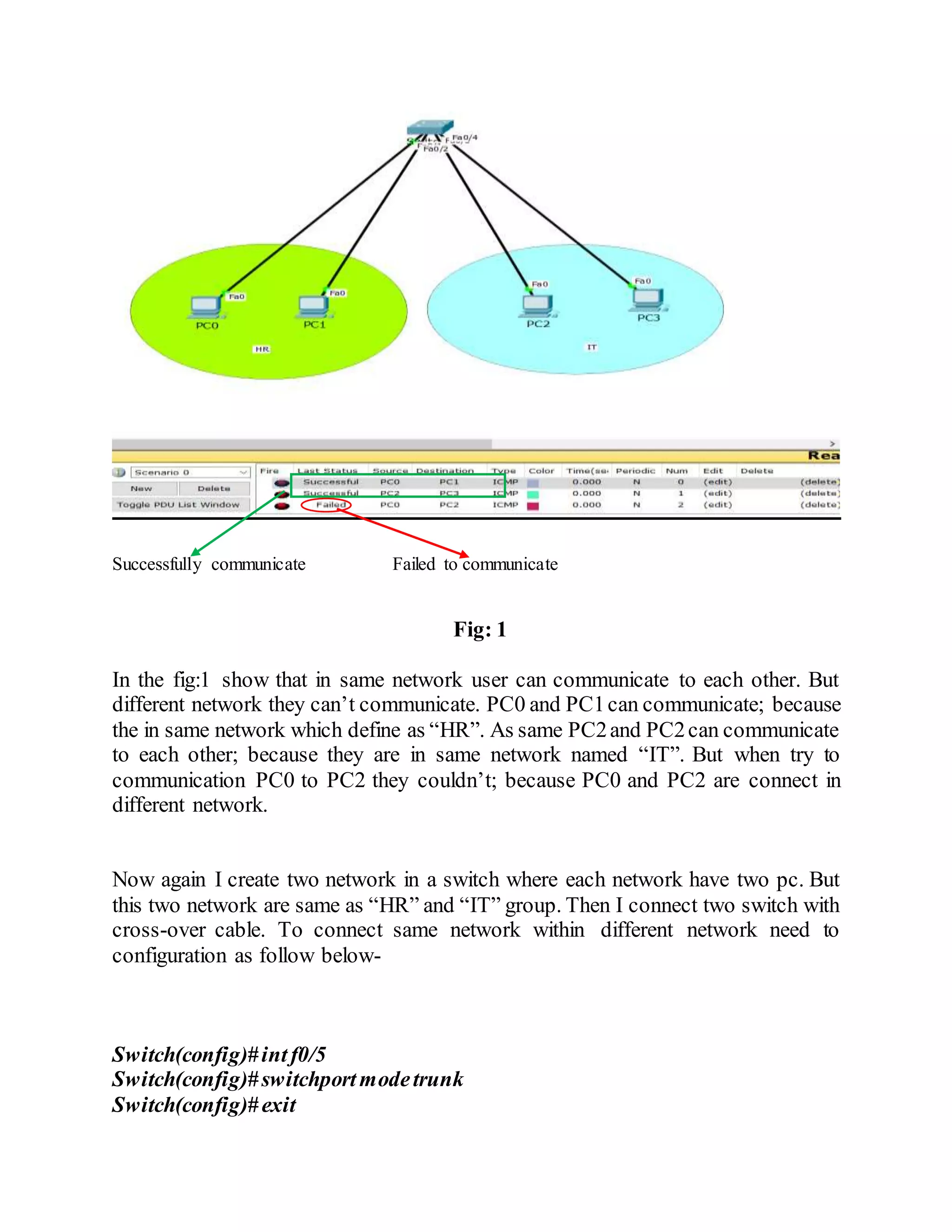
After configuration VLAN two network now isolated. Therefore, they can’t
communicate to each other. The below fig is showed it clearly-
Successfully communicate Failed to communicate
Fig: 1
In the fig:1 show that in same network user can communicate to each other. But
different network they can’t communicate. PC0 and PC1can communicate; because
the in same network which define as “HR”. As same PC2and PC2can communicate
to each other; because they are in same network named “IT”. But when try to
communication PC0 to PC2 they couldn’t; because PC0 and PC2 are connect in
different network.
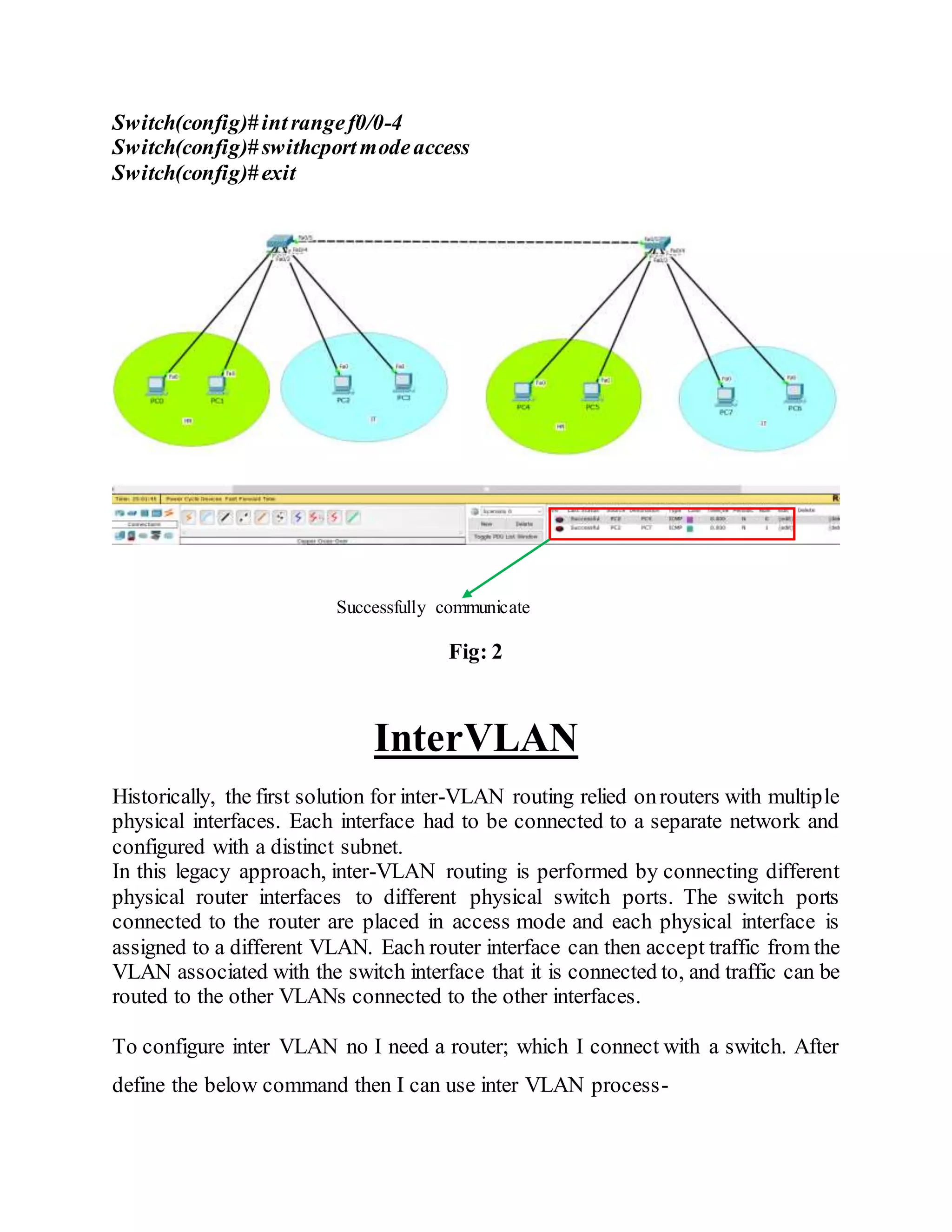
Now again I create two network in a switch where each network have two pc. But
this two network are same as “HR” and “IT” group. Then I connect two switch with
cross-over cable. To connect same network within different network need to
configuration as follow below-
Switch(config)#intf0/5
Switch(config)#switchportmodetrunk
Switch(config)#exit
Switch(config)#intrangef0/0-4
Switch(config)#swithcportmodeaccess
Switch(config)#exit
Successfully communicate
Fig: 2
InterVLAN
Historically, the first solution for inter-VLAN routing relied onrouters with multiple
physical interfaces. Each interface had to be connected to a separate network and
configured with a distinct subnet.
In this legacy approach, inter-VLAN routing is performed by connecting different
physical router interfaces to different physical switch ports. The switch ports
connected to the router are placed in access mode and each physical interface is
assigned to a different VLAN. Each router interface can then accept traffic from the
VLAN associated with the switch interface that it is connected to, and traffic can be
routed to the other VLANs connected to the other interfaces.
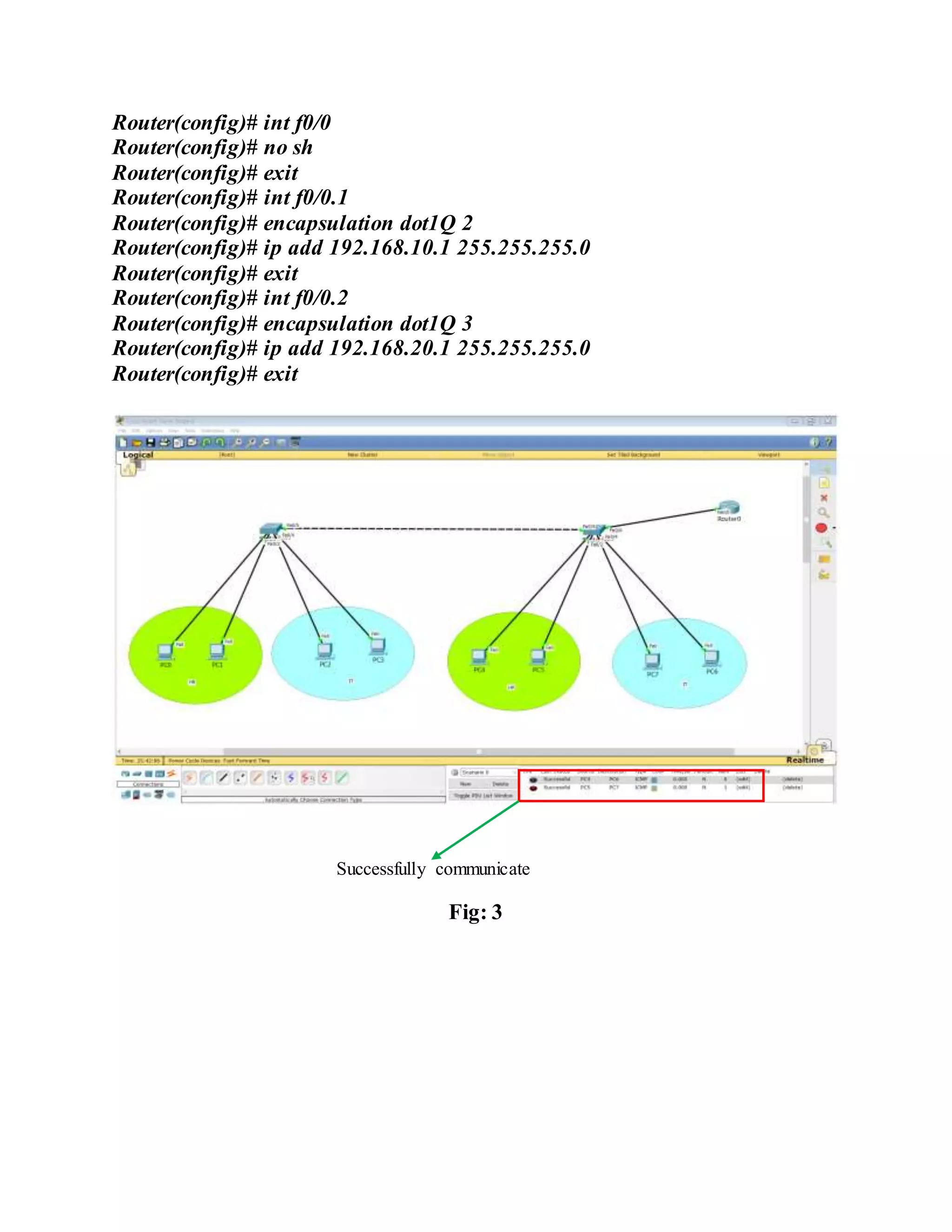
To configure inter VLAN no I need a router; which I connect with a switch. After
define the below command then I can use inter VLAN process-
Router(config)# int f0/0
Router(config)# no sh
Router(config)# exit
Router(config)# int f0/0.1
Router(config)# encapsulation dot1Q 2
Router(config)# ip add 192.168.10.1 255.255.255.0
Router(config)# exit
Router(config)# int f0/0.2
Router(config)# encapsulation dot1Q 3
Router(config)# ip add 192.168.20.1 255.255.255.0
Router(config)# exit
Successfully communicate
Fig: 3

Virtual local area network(VLAN)

  • 1.
    LAB REPORT Experiment No-03 Experiment Name: Configuration VLAN (Virtual Local Area Network). Subject: Computer Network LAB Course Code: CSE 312 Submittedby: Name: Md. Al-Amin Department: CSE ID No: 172015031 Shift: Evening Submittedto: Name: MS. Farhan Akhter Sunny Designation: Lecturer Department: CSE Signature:
  • 2.
    ExperimentNo- 03 ExperimentName: ConfigurationVLAN(Virtual Local Area Network). Objective:  To learn about the configuration of VLAN (Virtual Local Area Network). VLAN: A virtual LAN (VLAN) is any broadcastdomain that is partitioned and isolated in a computer network at the data link layer (OSI layer 2).[1][2] LAN is the abbreviation for local area network and in this context virtual refers to a physical object recreated and altered by additional logic. VLANs work by applying tags to network frames and handling these tags in networking systems – creating the appearance and functionality of network traffic that is physically on a single network but acts as if it is split between separate networks. In this way, VLANs can keep network applications separate despite being connected to the same physical network, and without requiring multiple sets of cabling and networking devices to be deployed. VLAN Configuration: To configure the VLAN first of all I arrange two network in a switch where each network have two connected PC. Then I isolate two network by define the VLAN as follow below- Switch# configureterminal Switch(config)#vlan2 Switch(config-vlan)# nameHR Switch(config-vlan)# exit Switch(config)#vlan3 Switch(config-vlan)# nameHR Switch(config-vlan)# exit After configuration VLAN two network now isolated. Therefore, they can’t communicate to each other. The below fig is showed it clearly-
  • 3.
    Successfully communicate Failedto communicate Fig: 1 In the fig:1 show that in same network user can communicate to each other. But different network they can’t communicate. PC0 and PC1can communicate; because the in same network which define as “HR”. As same PC2and PC2can communicate to each other; because they are in same network named “IT”. But when try to communication PC0 to PC2 they couldn’t; because PC0 and PC2 are connect in different network. Now again I create two network in a switch where each network have two pc. But this two network are same as “HR” and “IT” group. Then I connect two switch with cross-over cable. To connect same network within different network need to configuration as follow below- Switch(config)#intf0/5 Switch(config)#switchportmodetrunk Switch(config)#exit
  • 4.
    Switch(config)#intrangef0/0-4 Switch(config)#swithcportmodeaccess Switch(config)#exit Successfully communicate Fig: 2 InterVLAN Historically,the first solution for inter-VLAN routing relied onrouters with multiple physical interfaces. Each interface had to be connected to a separate network and configured with a distinct subnet. In this legacy approach, inter-VLAN routing is performed by connecting different physical router interfaces to different physical switch ports. The switch ports connected to the router are placed in access mode and each physical interface is assigned to a different VLAN. Each router interface can then accept traffic from the VLAN associated with the switch interface that it is connected to, and traffic can be routed to the other VLANs connected to the other interfaces. To configure inter VLAN no I need a router; which I connect with a switch. After define the below command then I can use inter VLAN process-
  • 5.
    Router(config)# int f0/0 Router(config)#no sh Router(config)# exit Router(config)# int f0/0.1 Router(config)# encapsulation dot1Q 2 Router(config)# ip add 192.168.10.1 255.255.255.0 Router(config)# exit Router(config)# int f0/0.2 Router(config)# encapsulation dot1Q 3 Router(config)# ip add 192.168.20.1 255.255.255.0 Router(config)# exit Successfully communicate Fig: 3