LAN
 A Local Area Network (LAN) was originally
defined as a network of computers located within the
same area
 Local Area Networks are defined as a single
broadcast domain. This means that if a user
broadcasts information on his/her LAN, the broadcast
will be received by every other user on the LAN.
 Broadcasts are prevented from leaving a LAN by
using a router. The disadvantage of this method is
routers usually take more time to process incoming
data compared to a bridge or a switch
VLAN
A VLAN is a logical group of network devices
that appears to be on the same LAN
Configured as if they are attached to the same
physical connection even if they are located on
a number of different LAN segments.
Logically segment LAN into different
broadcast domains.
VLAN
 VLANs can logically segment users into different
subnets (broadcast domains)
 Broadcast frames are only switched on the same
VLAN ID.
 This is a logical segmentation and not a physical one,
workstations do not have to be physically located
together. Users on different floors of the same
building, or even in different buildings can now
belong to the same LAN.
LAN VS VLAN
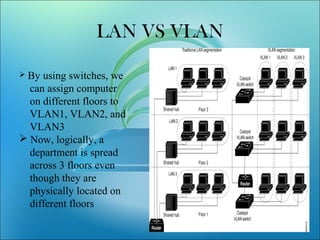
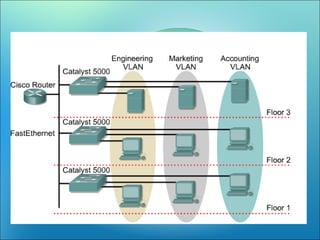
 By using switches, we
can assign computer
on different floors to
VLAN1, VLAN2, and
VLAN3
 Now, logically, a
department is spread
across 3 floors even
though they are
physically located on
different floors
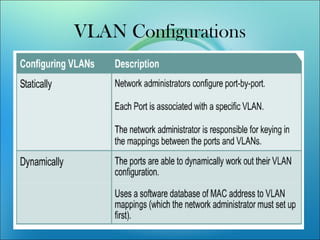
VLAN Configurations
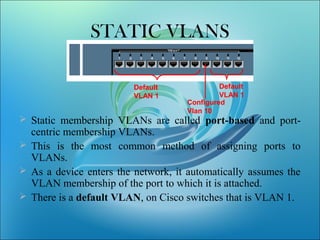
STATIC VLANS
 Static membership VLANs are called port-based and port-
centric membership VLANs.
 This is the most common method of assigning ports to
VLANs.
 As a device enters the network, it automatically assumes the
VLAN membership of the port to which it is attached.
 There is a default VLAN, on Cisco switches that is VLAN 1.
Default
VLAN 1
Default
VLAN 1
Configured
Vlan 10
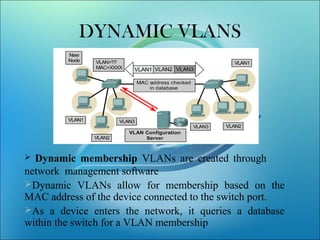
DYNAMIC VLANS
 Dynamic membership VLANs are created through
network management software
Dynamic VLANs allow for membership based on the
MAC address of the device connected to the switch port.
As a device enters the network, it queries a database
within the switch for a VLAN membership
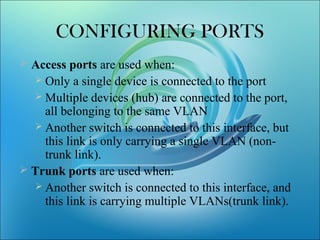
CONFIGURING PORTS
 Access ports are used when:
 Only a single device is connected to the port
 Multiple devices (hub) are connected to the port,
all belonging to the same VLAN
 Another switch is connected to this interface, but
this link is only carrying a single VLAN (non-
trunk link).
 Trunk ports are used when:
 Another switch is connected to this interface, and
this link is carrying multiple VLANs(trunk link).
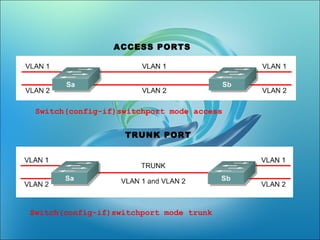
• Switch(config-if)switchport mode
[access|trunk]
• An access port means that the port
(interface) can only belong to a single
VLAN.
Switch(config-if)switchport mode access
Switch(config-if)switchport mode trunk
ACCESS PORTS
TRUNK PORT
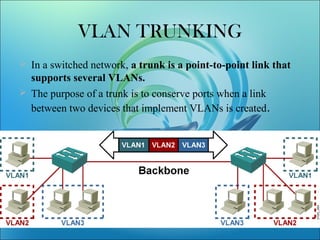
VLAN TRUNKING
 In a switched network, a trunk is a point-to-point link that
supports several VLANs.
 The purpose of a trunk is to conserve ports when a link
between two devices that implement VLANs is created.
VLAN TECHNIQUES
Two techniques
Frame Filtering--examines particular
information about each frame (MAC
address or layer 3 protocol type)
Frame Tagging--places a unique
identifier in the header of each frame as
it is forwarded throughout the network
backbone.
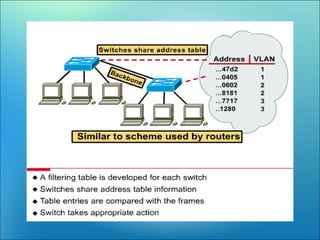
FRAME FILTERING
 Users can be logically group via software
based on:
– port number
– MAC address
– Ip subnet
– protocol being used
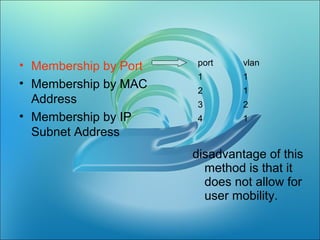
• Membership by Port
• Membership by MAC
Address
• Membership by IP
Subnet Address
port vlan
1 1
2 1
3 2
4 1
disadvantage of this
method is that it
does not allow for
user mobility.
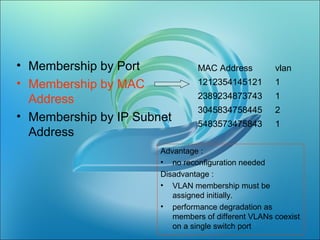
• Membership by Port
• Membership by MAC
Address
• Membership by IP Subnet
Address
MAC Address vlan
1212354145121 1
2389234873743 1
3045834758445 2
5483573475843 1
Advantage :
• no reconfiguration needed
Disadvantage :
• VLAN membership must be
assigned initially.
• performance degradation as
members of different VLANs coexist
on a single switch port
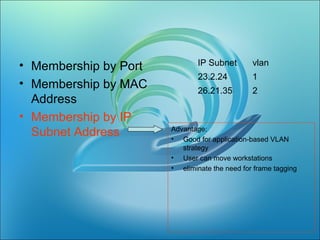
• Membership by Port
• Membership by MAC
Address
• Membership by IP
Subnet Address
IP Subnet vlan
23.2.24 1
26.21.35 2
Advantage:
• Good for application-based VLAN
strategy
• User can move workstations
• eliminate the need for frame tagging
VLAN TAGGING
 VLAN frame tagging was specifically developed for switched
communications.
 Frame tagging places a unique identifier in the header of each
frame as it is forwarded throughout the network backbone.
 The identifier is understood and examined by each switch
before any broadcasts or transmissions are made to other
switches, routers, or end stations.
 When the frame exits the network backbone, the switch
removes the identifier before the frame is transmitted to the
target end station.
The two most common tagging schemes for
Ethernet segments are
ISL (Inter-Switch Link)
802.1Q – An IEEE standard
ISL (Frame Encapsulation)
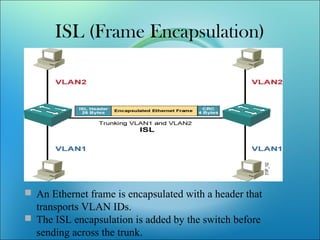
 An Ethernet frame is encapsulated with a header that
transports VLAN IDs.
 The ISL encapsulation is added by the switch before
sending across the trunk.
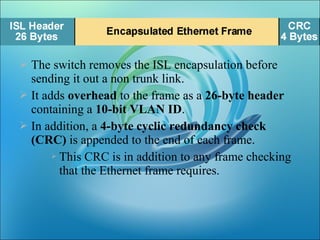
 The switch removes the ISL encapsulation before
sending it out a non trunk link.
 It adds overhead to the frame as a 26-byte header
containing a 10-bit VLAN ID.
 In addition, a 4-byte cyclic redundancy check
(CRC) is appended to the end of each frame.
 This CRC is in addition to any frame checking
that the Ethernet frame requires.
IEEE 802.1Q
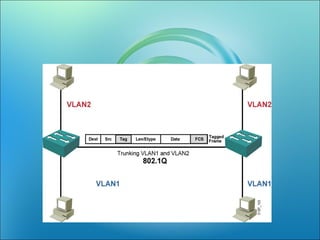
Significantly less overhead than the ISL.
802.1Q inserts only an additional 4 bytes
into the Ethernet frame.
The 802.1Q tag is inserted by the switch
before sending across the trunk.
The switch removes the 802.1Q tag
before sending it out a non trunk link.
 Trunking protocols were developed to effectively
manage the transfer of frames from different VLANs
on a single physical link.
 The trunking protocols establish agreement for the
distribution of frames to the associated ports at both
ends of the trunk.
 VLAN tagging information is added by the switch
before it is sent across the trunk and removed by the
switch before it is sent down a non-trunk link
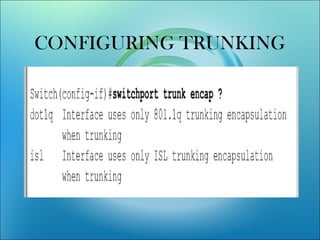
CONFIGURING TRUNKING
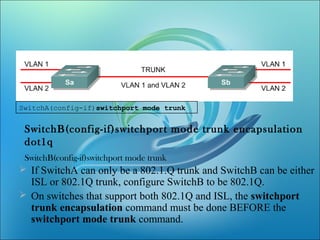
SwitchA(config-if)switchport mode trunk
SwitchB(config-if)switchport mode trunk encapsulation
dot1q
SwitchB(config-if)switchport mode trunk
 If SwitchA can only be a 802.1.Q trunk and SwitchB can be either
ISL or 802.1Q trunk, configure SwitchB to be 802.1Q.
 On switches that support both 802.1Q and ISL, the switchport
trunk encapsulation command must be done BEFORE the
switchport mode trunk command.
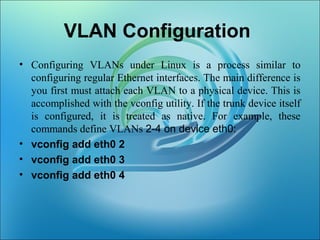
VLAN Configuration
• Configuring VLANs under Linux is a process similar to
configuring regular Ethernet interfaces. The main difference is
you first must attach each VLAN to a physical device. This is
accomplished with the vconfig utility. If the trunk device itself
is configured, it is treated as native. For example, these
commands define VLANs 2-4 on device eth0:
• vconfig add eth0 2
• vconfig add eth0 3
• vconfig add eth0 4
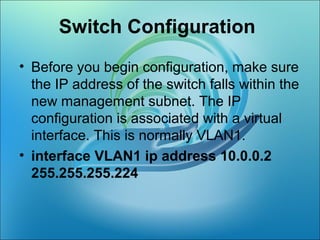
Switch Configuration
• Before you begin configuration, make sure
the IP address of the switch falls within the
new management subnet. The IP
configuration is associated with a virtual
interface. This is normally VLAN1.
• interface VLAN1 ip address 10.0.0.2
255.255.255.224
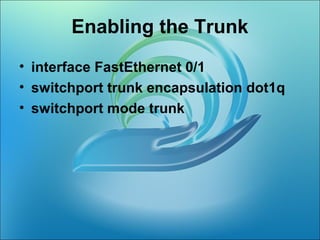
Enabling the Trunk
• interface FastEthernet 0/1
• switchport trunk encapsulation dot1q
• switchport mode trunk
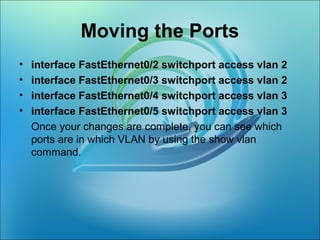
Moving the Ports
• interface FastEthernet0/2 switchport access vlan 2
• interface FastEthernet0/3 switchport access vlan 2
• interface FastEthernet0/4 switchport access vlan 3
• interface FastEthernet0/5 switchport access vlan 3
Once your changes are complete, you can see which
ports are in which VLAN by using the show vlan
command.
BENEFITS OF VLAN
• Performance
• Formation of Virtual Workgroups
• Simplified Administration
• Reduced Cost
• Security
REFERENCES
• David Passmore, John Freeman, ``The
Virtual LAN Technology Report,'‘
• Paul Frieden,” VLANS on LINUX “
• cisco
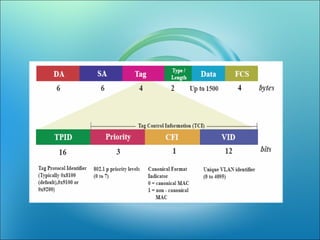
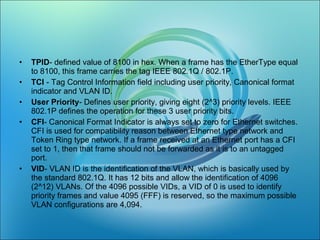
• TPID- defined value of 8100 in hex. When a frame has the EtherType equal
to 8100, this frame carries the tag IEEE 802.1Q / 802.1P.
• TCI - Tag Control Information field including user priority, Canonical format
indicator and VLAN ID.
• User Priority- Defines user priority, giving eight (2^3) priority levels. IEEE
802.1P defines the operation for these 3 user priority bits.
• CFI- Canonical Format Indicator is always set to zero for Ethernet switches.
CFI is used for compatibility reason between Ethernet type network and
Token Ring type network. If a frame received at an Ethernet port has a CFI
set to 1, then that frame should not be forwarded as it is to an untagged
port.
• VID- VLAN ID is the identification of the VLAN, which is basically used by
the standard 802.1Q. It has 12 bits and allow the identification of 4096
(2^12) VLANs. Of the 4096 possible VIDs, a VID of 0 is used to identify
priority frames and value 4095 (FFF) is reserved, so the maximum possible
VLAN configurations are 4,094.
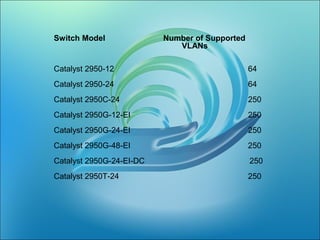
Switch Model Number of Supported
VLANs
Catalyst 2950-12 64
Catalyst 2950-24 64
Catalyst 2950C-24 250
Catalyst 2950G-12-EI 250
Catalyst 2950G-24-EI 250
Catalyst 2950G-48-EI 250
Catalyst 2950G-24-EI-DC 250
Catalyst 2950T-24 250

VLAN Virtual Area Network ,Switch,Ethernet ,VIkram Snehi

  • 2.
    LAN  A LocalArea Network (LAN) was originally defined as a network of computers located within the same area  Local Area Networks are defined as a single broadcast domain. This means that if a user broadcasts information on his/her LAN, the broadcast will be received by every other user on the LAN.  Broadcasts are prevented from leaving a LAN by using a router. The disadvantage of this method is routers usually take more time to process incoming data compared to a bridge or a switch
  • 3.
    VLAN A VLAN isa logical group of network devices that appears to be on the same LAN Configured as if they are attached to the same physical connection even if they are located on a number of different LAN segments. Logically segment LAN into different broadcast domains.
  • 4.
    VLAN  VLANs canlogically segment users into different subnets (broadcast domains)  Broadcast frames are only switched on the same VLAN ID.  This is a logical segmentation and not a physical one, workstations do not have to be physically located together. Users on different floors of the same building, or even in different buildings can now belong to the same LAN.
  • 5.
    LAN VS VLAN By using switches, we can assign computer on different floors to VLAN1, VLAN2, and VLAN3  Now, logically, a department is spread across 3 floors even though they are physically located on different floors
  • 7.
  • 8.
    STATIC VLANS  Staticmembership VLANs are called port-based and port- centric membership VLANs.  This is the most common method of assigning ports to VLANs.  As a device enters the network, it automatically assumes the VLAN membership of the port to which it is attached.  There is a default VLAN, on Cisco switches that is VLAN 1. Default VLAN 1 Default VLAN 1 Configured Vlan 10
  • 9.
    DYNAMIC VLANS  Dynamicmembership VLANs are created through network management software Dynamic VLANs allow for membership based on the MAC address of the device connected to the switch port. As a device enters the network, it queries a database within the switch for a VLAN membership
  • 10.
    CONFIGURING PORTS  Accessports are used when:  Only a single device is connected to the port  Multiple devices (hub) are connected to the port, all belonging to the same VLAN  Another switch is connected to this interface, but this link is only carrying a single VLAN (non- trunk link).  Trunk ports are used when:  Another switch is connected to this interface, and this link is carrying multiple VLANs(trunk link).
  • 11.
    • Switch(config-if)switchport mode [access|trunk] •An access port means that the port (interface) can only belong to a single VLAN.
  • 12.
  • 13.
    VLAN TRUNKING  Ina switched network, a trunk is a point-to-point link that supports several VLANs.  The purpose of a trunk is to conserve ports when a link between two devices that implement VLANs is created.
  • 14.
    VLAN TECHNIQUES Two techniques FrameFiltering--examines particular information about each frame (MAC address or layer 3 protocol type) Frame Tagging--places a unique identifier in the header of each frame as it is forwarded throughout the network backbone.
  • 15.
    FRAME FILTERING  Userscan be logically group via software based on: – port number – MAC address – Ip subnet – protocol being used
  • 17.
    • Membership byPort • Membership by MAC Address • Membership by IP Subnet Address port vlan 1 1 2 1 3 2 4 1 disadvantage of this method is that it does not allow for user mobility.
  • 18.
    • Membership byPort • Membership by MAC Address • Membership by IP Subnet Address MAC Address vlan 1212354145121 1 2389234873743 1 3045834758445 2 5483573475843 1 Advantage : • no reconfiguration needed Disadvantage : • VLAN membership must be assigned initially. • performance degradation as members of different VLANs coexist on a single switch port
  • 19.
    • Membership byPort • Membership by MAC Address • Membership by IP Subnet Address IP Subnet vlan 23.2.24 1 26.21.35 2 Advantage: • Good for application-based VLAN strategy • User can move workstations • eliminate the need for frame tagging
  • 20.
    VLAN TAGGING  VLANframe tagging was specifically developed for switched communications.  Frame tagging places a unique identifier in the header of each frame as it is forwarded throughout the network backbone.  The identifier is understood and examined by each switch before any broadcasts or transmissions are made to other switches, routers, or end stations.  When the frame exits the network backbone, the switch removes the identifier before the frame is transmitted to the target end station.
  • 21.
    The two mostcommon tagging schemes for Ethernet segments are ISL (Inter-Switch Link) 802.1Q – An IEEE standard
  • 22.
    ISL (Frame Encapsulation) An Ethernet frame is encapsulated with a header that transports VLAN IDs.  The ISL encapsulation is added by the switch before sending across the trunk.
  • 23.
     The switchremoves the ISL encapsulation before sending it out a non trunk link.  It adds overhead to the frame as a 26-byte header containing a 10-bit VLAN ID.  In addition, a 4-byte cyclic redundancy check (CRC) is appended to the end of each frame.  This CRC is in addition to any frame checking that the Ethernet frame requires.
  • 24.
    IEEE 802.1Q Significantly lessoverhead than the ISL. 802.1Q inserts only an additional 4 bytes into the Ethernet frame. The 802.1Q tag is inserted by the switch before sending across the trunk. The switch removes the 802.1Q tag before sending it out a non trunk link.
  • 27.
     Trunking protocolswere developed to effectively manage the transfer of frames from different VLANs on a single physical link.  The trunking protocols establish agreement for the distribution of frames to the associated ports at both ends of the trunk.  VLAN tagging information is added by the switch before it is sent across the trunk and removed by the switch before it is sent down a non-trunk link
  • 28.
  • 29.
    SwitchA(config-if)switchport mode trunk SwitchB(config-if)switchportmode trunk encapsulation dot1q SwitchB(config-if)switchport mode trunk  If SwitchA can only be a 802.1.Q trunk and SwitchB can be either ISL or 802.1Q trunk, configure SwitchB to be 802.1Q.  On switches that support both 802.1Q and ISL, the switchport trunk encapsulation command must be done BEFORE the switchport mode trunk command.
  • 30.
    VLAN Configuration • ConfiguringVLANs under Linux is a process similar to configuring regular Ethernet interfaces. The main difference is you first must attach each VLAN to a physical device. This is accomplished with the vconfig utility. If the trunk device itself is configured, it is treated as native. For example, these commands define VLANs 2-4 on device eth0: • vconfig add eth0 2 • vconfig add eth0 3 • vconfig add eth0 4
  • 31.
    Switch Configuration • Beforeyou begin configuration, make sure the IP address of the switch falls within the new management subnet. The IP configuration is associated with a virtual interface. This is normally VLAN1. • interface VLAN1 ip address 10.0.0.2 255.255.255.224
  • 32.
    Enabling the Trunk •interface FastEthernet 0/1 • switchport trunk encapsulation dot1q • switchport mode trunk
  • 33.
    Moving the Ports •interface FastEthernet0/2 switchport access vlan 2 • interface FastEthernet0/3 switchport access vlan 2 • interface FastEthernet0/4 switchport access vlan 3 • interface FastEthernet0/5 switchport access vlan 3 Once your changes are complete, you can see which ports are in which VLAN by using the show vlan command.
  • 34.
    BENEFITS OF VLAN •Performance • Formation of Virtual Workgroups • Simplified Administration • Reduced Cost • Security
  • 35.
    REFERENCES • David Passmore,John Freeman, ``The Virtual LAN Technology Report,'‘ • Paul Frieden,” VLANS on LINUX “ • cisco
  • 41.
    • TPID- definedvalue of 8100 in hex. When a frame has the EtherType equal to 8100, this frame carries the tag IEEE 802.1Q / 802.1P. • TCI - Tag Control Information field including user priority, Canonical format indicator and VLAN ID. • User Priority- Defines user priority, giving eight (2^3) priority levels. IEEE 802.1P defines the operation for these 3 user priority bits. • CFI- Canonical Format Indicator is always set to zero for Ethernet switches. CFI is used for compatibility reason between Ethernet type network and Token Ring type network. If a frame received at an Ethernet port has a CFI set to 1, then that frame should not be forwarded as it is to an untagged port. • VID- VLAN ID is the identification of the VLAN, which is basically used by the standard 802.1Q. It has 12 bits and allow the identification of 4096 (2^12) VLANs. Of the 4096 possible VIDs, a VID of 0 is used to identify priority frames and value 4095 (FFF) is reserved, so the maximum possible VLAN configurations are 4,094.
  • 42.
    Switch Model Numberof Supported VLANs Catalyst 2950-12 64 Catalyst 2950-24 64 Catalyst 2950C-24 250 Catalyst 2950G-12-EI 250 Catalyst 2950G-24-EI 250 Catalyst 2950G-48-EI 250 Catalyst 2950G-24-EI-DC 250 Catalyst 2950T-24 250