Programming and Development Tools                                Web Programming


                                                                  UNIT


                                                             2.5
Web Programming
List Types


  OBJECTIVES
 This unit helps you to insert different types of list to your Web page.
 At the end of this unit, you will be able to
             Add Ordered List to your document
             Add Unordered List to your document
             Add Nested List to your document
             Add Definition List to your document


Benchmark standard
       Create well-organised Web pages by adding different types of List in
       appropriate places.


List Types                                                                 2.5-1
Programming and Development Tools                                Web Programming


Let us Revise!

 1.      Name the tag to make a text bold.
 2.      List the tags used to change the size of a text.
 3.      Write the tags used to add subscript and superscript to a Web page.
 4.      Name the tag used to centre align a text.
 5.      Write how to strike out a text.


 Introduction
 You are seeing different types of list every day. Your class students’ names in
 the attendance register is a list. The index in your text book is a list. The set
 of teachers names maintained in your school’s office is list. The different food
 available in a hotel is provided as a list in the menu card. A list is generally a
 number of items displayed one after the other in consecutive lines. You can
 insert variety of lists in your Web page. There are three types of list in HTML.
 They are
         Ordered List
         Unordered List and
         Definition List.


 2.5.1 Ordered List
 Ordered list is a list of items that appears in some order. The list may appear
 in ascending order, alphabetical order or any logical order. The following list is
 an example for ordered list where planets are ordered based on its distance
 from the Sun.
      1. Mercury
      2. Venus
      3. Earth
      4. Mars
      5. Jupiter
      6. Saturn
      7. Uranus
      8. Neptune
      9. Pluto


 List Types                                                                2.5-2
Programming and Development Tools                           Web Programming


     Hands-On!

Open the HTML file Ord_List.html in Internet Explorer.
The code in Ord_List.html file is given below:
<HTML>
<HEAD>
<TITLE> Your Birthdate </TITLE>
</HEAD>
<BODY>
<H1 Align="Center"> Your Birthdate </H1>
Do you want to find the birthday of your friend? Ask your
friend to perform the following calculations:
<OL>               Creates an ordered list

<LI> Multiply the number of your birth month by 5.
<LI> Add 7 to the result.
<LI> Multiply the result by 4.
<LI> Add 13 to the result.
<LI> Multiply the result by 5.
                                                                  List
<LI> Add your birthday to the result.                             Items of
                                                                  Ordered
<LI> Subtract 205 from the result.                                List
</OL>
Now, ask him the final result. If the result is a 3 digit
number then the first digit represents the month of birth
and the other 2 digits represent the day of birth. If the
result is a 4 digit number then the first 2 digits
represent the month of birth and the next 2 digits
represent the day of birth.
</BODY>
</HTML>
The output of the above program is shown in Figure 2.5.1.


List Types                                                         2.5-3
Programming and Development Tools                              Web Programming


                          Figure 2.5.1: Ordered List
The above example helps you to find the birthday of a person by asking him
to perform some calculations. You will arrive at the correct result, only if the
calculations are performed in the same logical order given. Since they are in a
specific order they are numbered as 1, 2, 3, and so on. Hence it is an ordered
list.

         Note

The ordered list is also called as numbered list.


The <OL> and <LI> tags are used to create ordered list. OL stands for
Ordered List and LI stands for List Item. The <OL> tag specifies that the list
followed is an ordered list. The <LI> tag specifies the item to be displayed in
the ordered list. Each item in the list should be preceded by an <LI> tag. The
list of items should be placed within the <OL> and </OL> tags. The <LI>
tags should be placed inside the <OL> tag. The following code is used to
make the items appear in an ordered list shown in Figure 2.5.1.
<OL>
<LI> Multiply the number of your birth month by 5.
<LI> Add 7 to the result.
<LI> Multiply the result by 4.


List Types                                                              2.5-4
Programming and Development Tools                                  Web Programming


<LI> Add 13 to the result.
<LI> Multiply the result by 5.
<LI> Add your birthday to the result.
<LI> Subtract 205 from the result.
</OL>
                                     Code Sample 2.5.1

         Note

The closing tag of <LI> tag is optional.


Attributes of <OL> tag
The attributes of <OL> tag are explained in Table 2.5.1.
  Attribute           Value           Example                    Effect
    Type                1         <OL Type=“1”>      The items will be labelled
                                                     as 1, 2, 3, and so on.
                         A        <OL Type=“A”>      The items will be labelled
                                                     as A, B, C, and so on.
                         a        <OL Type=“a”>      The items will be labelled
                                                     as a, b, c, and so on.
                          i       <OL Type=“i”>      The items will be labelled
                                                     as i, ii, iii, and so on.
                          I       <OL Type=“I”>      The items will be labelled
                                                     as I, II, III, and so on.
      Start            Any    <OL Type = “a”         The items will be labelled
                     value in Start = “c”>           starting from c as c, d, e,
                       the                           and so on.
                    series of
                       the
                      TYPE
                    specified


                          Table 2.5.1: Attributes of <OL> Tag

         Note
The default value for Type attribute is 1.

        Self-Check Exercise 2.5.1

Match the output to its respective code:


List Types                                                                  2.5-5
Programming and Development Tools                                          Web Programming


             Code                                          Output
   <OL Type = “A”>                          Items labelled as 1, 2, 3, and so on.
   <OL Type = “i" Start =                   Items labelled as A, B, C, and so on.
   “iv”>
   <OL>                                     Items labelled as iv, v, vi, and so on.
   <OL Type = “a” Start =                   Items labelled as II, III, IV, and so on.
   “c”>
   <OL Type = “I” Start =                   Items labelled as c, d, e, and so on.
   “II”>
                      Table 2.5.2: Match the code and output

        Lab Exercise

Lab Exercise 1: Open D5_1.html in Internet Explorer. The following code will be present in
D5_1.html.


<HTML>
<HEAD>
<TITLE>         Ordered List </TITLE>
</HEAD>
<BODY>
        <H2 Align="CENTER">Ordered List </H2>
        <OL >
                <LI> January
                <LI> February
                <LI> March
                <LI> April
                <LI> May
                <LI> June
                <LI> July
                <LI> August
                <LI> September
                <LI> October
                <LI> November
                <LI> December
        </OL>

List Types                                                                           2.5-6
Programming and Development Tools                                          Web Programming


</BODY>
</HTML>
1.     Identify the tag which is used create an unordered list in source code D5_1.html.
2.     Name the attribute which used to change bullet type.
3.     Change the bullet style to a.


      Activity 2.5.1

1.     Create a web page that explains the types of Lists and <OL> tag as
       shown in Figure 2.5.2.
2.     Save the HTML file as Activity1.html.


             Figure 2.5.2: A Web page explaining the Ordered List


2.5.2 Unordered List
Unordered list is a list of items that can appear in any order. The following list
is an example for unordered list of Continents:
       Asia
       Africa
       Australia
       North America

List Types                                                                           2.5-7
Programming and Development Tools                             Web Programming


        South America
        Europe
        Antarctica


     Hands-On!

Open the HTML file Unord_List.html in Internet Explorer.
The code in Unord_List.html file is given below:
<HTML>
<HEAD>
<TITLE> Countries and Capitals </TITLE>
</HEAD>
<BODY>
<H1> Countries of South America and their Capitals</H1>
<UL>                      Creates an Unordered list

<LI>Argentina               -       Buenos Aires
<LI>Venezuela               -       Caracas
<LI>Ecuador                 -       Quito
<LI>Uruguay                 -       Montevideo
<LI>Paraguay                -       Asuncion
<LI>Bolivia                 -       La Paz
<LI>Peru                    -       Lima
<LI>Guyana                  -       Georgetown
<LI>Columbia                -       Bogota
<LI>Brazil                  -       Brasilia
<LI>Surinam                 -       Paramaribo               List Items of
                                                             UnOrdered List
<LI>Chile                   -       Santiago
<LI>French Guyana           -       Cayenne
</UL>
</BODY>
</HTML>
                                Code Sample 2.5.2


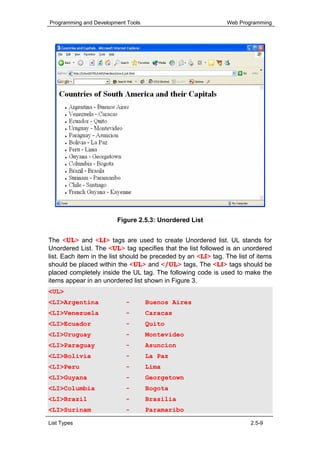
        The output of the above program is shown in Figure 2.5.3.


List Types                                                              2.5-8
Programming and Development Tools                              Web Programming


                        Figure 2.5.3: Unordered List


The <UL> and <LI> tags are used to create Unordered list. UL stands for
Unordered List. The <UL> tag specifies that the list followed is an unordered
list. Each item in the list should be preceded by an <LI> tag. The list of items
should be placed within the <UL> and </UL> tags, The <LI> tags should be
placed completely inside the UL tag. The following code is used to make the
items appear in an unordered list shown in Figure 3.
<UL>
<LI>Argentina              -        Buenos Aires
<LI>Venezuela              -        Caracas
<LI>Ecuador                -        Quito
<LI>Uruguay                -        Montevideo
<LI>Paraguay               -        Asuncion
<LI>Bolivia                -        La Paz
<LI>Peru                   -        Lima
<LI>Guyana                 -        Georgetown
<LI>Columbia               -        Bogota
<LI>Brazil                 -        Brasilia
<LI>Surinam                -        Paramaribo

List Types                                                              2.5-9
Programming and Development Tools                                               Web Programming


<LI>Chile                          -        Santiago
<LI>French Guyana                  -        Cayenne
</UL>
                                       Code Sample 2.5.3


Attributes of <UL> tag
The attribute of <UL> tag is explained in Table 2.5.3.
Attribute Value       Example                                              Effect
  Type     disc <UL Type =“disc”>                               The items will be preceded
                                                                by a disc shaped bullet.
                  circle     <UL Type =“circle”> The items will be preceded
                                                 by a circle shaped bullet.
                 square <UL Type =“square”> The items will be preceded
                                            by a square shaped bullet.


                           Table 2.5.3: Attributes of <UL> Tag

          Note

The unordered list is also called as bulleted list.


        Warning

The TYPE attribute of <UL> tag is deprecated from IE4 onwards.

        Self-Check Exercise 2.5.2

The following program runs perfectly. But there is a logical mistake in it. Identify the mistake:
<H1> Steps involved in creating and executing a HTML
document </H1>
<UL Type=”circle”>
<LI> Open Notepad.
<LI> Type the HTML code.
<LI> Save the file with extension .HTML and close
Notepad.
<LI> Open Internet Explorer
<LI> Select your HTML file.
</UL>


List Types                                                                                 2.5-10
Programming and Development Tools                                          Web Programming

      Activity 2.5.2

    1. Create a web page that explains Unordered List as shown in Figure
       2.5.4.
    2. Save the HTML file as Activity2.html.


              Figure 2.5.4: Web Page Explaining Unordered List


        Lab Exercise

Lab Exercise 2: Open D5_2.html in Internet Explorer. The following code will be present in
D5_2.html.


<HTML>
<HEAD>
<TITLE>Unorder List</TITLE>
</HEAD>
<BODY>
<H2 Align=CENTER>Lives Encyclopedia</H2>
<UL Type        ="circle">
<LI> Animals

List Types                                                                           2.5-11
Programming and Development Tools                                            Web Programming


<LI> Reptiles
<LI> Pisces
</UL>
</BODY>
</HTML>


        1. Identify the tag which is used to create order list in source code D5_2.html.
        2. Identify the attribute which used to change bullet type.
        3. Change the bullet style to square.


Nested Lists
A list of items appearing inside another list is known as Nested List. Lists of
same type or of different type can be nested within each other. The following
list is an example for Nested list where unordered list is nested within ordered
list.
   1. Asia
             Malaysia
             India
             Indonesia
   2. Europe
             England
             Germany
             France
   3. South America
             Brazil
             Argentina
             Uruguay


     Hands-On!

Open the HTML file Nest_List.html in Internet Explorer.
The code in Nest_List.html file is given below:
<HTML>
<HEAD>
<TITLE> Bones of Human Body </TITLE>
<BODY><FONT Size=5>


List Types                                                                             2.5-12
Programming and Development Tools                                Web Programming


<H1> The Bones of Human Body </H1>
<OL>                                             Creates an Ordered List

   <LI>The Bones in the Hand
   <UL Type = square>
      <LI>The Humerus                            Unordered List nested
                                                 within Ordered List
      <LI>The Ulna
      <LI>The Radius
      <LI>The Carpus
      <LI>The Metacarpus
      <LI>The Phalanges of the Hand
   </UL>
   <LI>The Bones in the Leg
   <UL Type = square>                          Unordered List nested
                                               within Ordered List
      <LI>The Femur
      <LI>The Patella
      <LI>The Tibia
      <LI>The Fibula
      <LI>The Tarsus
      <LI>The Metatarsus
      <LI>The Phalanges of the Foot
   </UL>
</OL>
</BODY>
</HTML>
                             Code Sample 2.5.4


The output of the above program is shown in Figure 2.5.5.


List Types                                                                 2.5-13
Programming and Development Tools                                           Web Programming


                               Figure 2.5.5: Nested List


In the above example, two <UL> tags are completely placed inside a <OL>
tag. Hence, the unordered list of items is displayed inside the ordered list of
items.


        Warning

While nesting tags, the starting and ending tags of one tag should be completely inside the
starting and ending tags of the other. The tags should not overlap each other.


        Lab Exercise

Lab Exercise 3: Write a HTML code to display the output as given in the following Figure
2.5.6.


List Types                                                                            2.5-14
Programming and Development Tools                                          Web Programming


                         Figure 2.5.6: Lives Encyclopaedia


Lab Exercise 4: Write a HTML code to display the output as given in the following Figure 2.5.7
using nested list. Save the file as Festivals.html under the folder in your name in C:.


List Types                                                                           2.5-15
Programming and Development Tools                                   Web Programming


                       Figure 2.5.7: Festivals in Malaysia


2.4.3 Definition List
Definition list is a list used to display the definitions of terms. The following list
is an example for definition list:
Atom
      An atom is the smallest particle of matter that uniquely defines a
chemical element.
Proton
      A proton is a positively charged subatomic particle present inside the
nucleus
Electron
         An electron is a negatively charged subatomic particle
Neutron
      A neutron is a neutrally charged subatomic particle present inside the
nucleus.


List Types                                                                   2.5-16
Programming and Development Tools                                       Web Programming


     Hands-On!

Open the HTML file Def_List.html in Internet Explorer.
The code in Def_List.html file is given below:
<HTML>
<HEAD>
<TITLE> Newton's Laws of Motion </TITLE>
<BODY>
<H1> Newton's Laws of Motion </H1>
<DL>                                       Creates a Definition List

<DT> Newton's I Law
                                           Displays the Definition Term
<DD> Every object in a state of rest or of uniform motion
tends to remain in that state of motion unless an
external force is applied to it. This is also known as
the law of inertia.
                                           Displays the Definition of the
<DT> Newton's II Law                       term
<DD> The force on an object is              equal to the product of
its mass and acceleration. F =              ma. The unit of force is
the Newton and is equal to the              force required to change
the velocity of a 1 kg mass by              1 metre per second in one
second.
<DT> Newton's III Law
<DD> For every action there is an equal and opposite
reaction.
</DL>
</BODY>
</HTML>
                              Code Sample 2.5.5


The output of the above program is shown in Figure 2.5.8.


List Types                                                                     2.5-17
Programming and Development Tools                                 Web Programming


                         Figure 2.5.8: Definition List

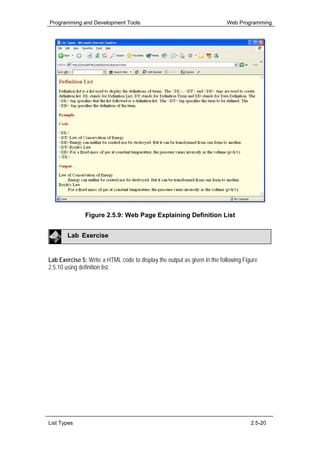
The <DL>, <DT> and <DD> tags are used to create definition list.
        Tag                            Function of the tag
        <DL>         Specifies that the list following this tag is a Definition
                     List.
        <DT>         Specifies the term to be defined.
        <DD>         Specifies the definition of the term.


The following code is used to make the items appear in a definition list shown
in Figure 2.5.3.
<DL>
<DT> Newton's I Law
<DD> Every object in a state of rest or of uniform motion
tends to remain in that state of motion unless an
external force is applied to it. This is also known as
the law of inertia.
<DT> Newton's II Law
<DD> The force on an object is             equal to the product of
its mass and acceleration. F =             ma. The unit of force is
the Newton and is equal to the             force required to change
the velocity of a 1 kg mass by             1 metre per second in one
second.

List Types                                                                 2.5-18
Programming and Development Tools                                                Web Programming


<DT> Newton's III Law
<DD> For every action there is an equal and opposite
reaction.
</DL>
                                      Code Sample 2.5.6

          Note

There are no closing tags for <DT> and <DD> tags.

        Self-Check Exercise 2.5.3

The tags and attributes involved in creating lists are hidden in the following table. The tags
appear in the boxes in 3 directions (                      ). Identify the tags and attributes by
drawing boxes around them.


                           S      K      N       L      I      S
                           Z      T      Y       P      E      P
                           O      P      A       C      A      U
                           L      P      N       R      Y      L
                           B      D      L       Z      T      X
                           Q      T      G       D      D      W


        Activity 2.5.3


    1. Create a web page that explains how to use the Definition List as
       shown in Figure 2.5.9.
    2. Save the HTML file as Activity3.html.


List Types                                                                                 2.5-19
Programming and Development Tools                                          Web Programming


               Figure 2.5.9: Web Page Explaining Definition List


        Lab Exercise


Lab Exercise 5: Write a HTML code to display the output as given in the following Figure
2.5.10 using definition list.


List Types                                                                           2.5-20
Programming and Development Tools                                    Web Programming


                           Figure 2.5.10: Ordered List


Technical Terminologies
Ordered List          - Ordered list is a list of items that appears in some order.
                         The list may appear in ascending order, alphabetical
                         order or any logical order.
Unordered List        - Unordered list is a list of items that can appear in any
                         order.
Nested List          - A list of items appearing inside another list is known as
                         Nested List.
Definition List       - Definition list is a list used to display the definitions of
                         terms.


Summary
In this unit, you learnt that
             The three types of list are Ordered List, Unordered List and
             Definition List.
             The <OL> and <LI> tags are used to create ordered list.
             TYPE and START are attributes of <OL> tag
             The <UL> and <LI> tags are used to create Unordered list. UL
             stands for Unordered List.
             The <DL>, <DT> and <DD> tags are used to create definition list.


List Types                                                                     2.5-21
Programming and Development Tools                          Web Programming


Assignment

I. Answer the following questions:
1. Name the different types of list.
2. State the differences between Ordered and Unordered Lists.
3. Name the attributes of <OL> tag.
4. List the tags to create Definition List.


List Types                                                        2.5-22
Programming and Development Tools                             Web Programming


Criterion Referenced Test

Instruction: Students must evaluate themselves to attain the list of
competencies to be achieved.

Name:
Subject: Programming and Development tools
Unit: List Types

Please tick [ √ ] the appropriate box when you have achieved the respective
competency.

Date              Text in HTML
                  C1 C2 C3 C4 C5


Comment


Competency codes

C1 = State the definition of a List. Identify the different types of List?
C2 = Write a program to create an Ordered List.
C3 = Write a program to create an Unordered List.
C4 = Create a HTML document to display a list of definitions for terms in any
    of your subject.
C5 = Write a program to create a Nested List.


List Types                                                             2.5-23

Unit 2.5

  • 1.
    Programming and DevelopmentTools Web Programming UNIT 2.5 Web Programming List Types OBJECTIVES This unit helps you to insert different types of list to your Web page. At the end of this unit, you will be able to Add Ordered List to your document Add Unordered List to your document Add Nested List to your document Add Definition List to your document Benchmark standard Create well-organised Web pages by adding different types of List in appropriate places. List Types 2.5-1
  • 2.
    Programming and DevelopmentTools Web Programming Let us Revise! 1. Name the tag to make a text bold. 2. List the tags used to change the size of a text. 3. Write the tags used to add subscript and superscript to a Web page. 4. Name the tag used to centre align a text. 5. Write how to strike out a text. Introduction You are seeing different types of list every day. Your class students’ names in the attendance register is a list. The index in your text book is a list. The set of teachers names maintained in your school’s office is list. The different food available in a hotel is provided as a list in the menu card. A list is generally a number of items displayed one after the other in consecutive lines. You can insert variety of lists in your Web page. There are three types of list in HTML. They are Ordered List Unordered List and Definition List. 2.5.1 Ordered List Ordered list is a list of items that appears in some order. The list may appear in ascending order, alphabetical order or any logical order. The following list is an example for ordered list where planets are ordered based on its distance from the Sun. 1. Mercury 2. Venus 3. Earth 4. Mars 5. Jupiter 6. Saturn 7. Uranus 8. Neptune 9. Pluto List Types 2.5-2
  • 3.
    Programming and DevelopmentTools Web Programming Hands-On! Open the HTML file Ord_List.html in Internet Explorer. The code in Ord_List.html file is given below: <HTML> <HEAD> <TITLE> Your Birthdate </TITLE> </HEAD> <BODY> <H1 Align="Center"> Your Birthdate </H1> Do you want to find the birthday of your friend? Ask your friend to perform the following calculations: <OL> Creates an ordered list <LI> Multiply the number of your birth month by 5. <LI> Add 7 to the result. <LI> Multiply the result by 4. <LI> Add 13 to the result. <LI> Multiply the result by 5. List <LI> Add your birthday to the result. Items of Ordered <LI> Subtract 205 from the result. List </OL> Now, ask him the final result. If the result is a 3 digit number then the first digit represents the month of birth and the other 2 digits represent the day of birth. If the result is a 4 digit number then the first 2 digits represent the month of birth and the next 2 digits represent the day of birth. </BODY> </HTML> The output of the above program is shown in Figure 2.5.1. List Types 2.5-3
  • 4.
    Programming and DevelopmentTools Web Programming Figure 2.5.1: Ordered List The above example helps you to find the birthday of a person by asking him to perform some calculations. You will arrive at the correct result, only if the calculations are performed in the same logical order given. Since they are in a specific order they are numbered as 1, 2, 3, and so on. Hence it is an ordered list. Note The ordered list is also called as numbered list. The <OL> and <LI> tags are used to create ordered list. OL stands for Ordered List and LI stands for List Item. The <OL> tag specifies that the list followed is an ordered list. The <LI> tag specifies the item to be displayed in the ordered list. Each item in the list should be preceded by an <LI> tag. The list of items should be placed within the <OL> and </OL> tags. The <LI> tags should be placed inside the <OL> tag. The following code is used to make the items appear in an ordered list shown in Figure 2.5.1. <OL> <LI> Multiply the number of your birth month by 5. <LI> Add 7 to the result. <LI> Multiply the result by 4. List Types 2.5-4
  • 5.
    Programming and DevelopmentTools Web Programming <LI> Add 13 to the result. <LI> Multiply the result by 5. <LI> Add your birthday to the result. <LI> Subtract 205 from the result. </OL> Code Sample 2.5.1 Note The closing tag of <LI> tag is optional. Attributes of <OL> tag The attributes of <OL> tag are explained in Table 2.5.1. Attribute Value Example Effect Type 1 <OL Type=“1”> The items will be labelled as 1, 2, 3, and so on. A <OL Type=“A”> The items will be labelled as A, B, C, and so on. a <OL Type=“a”> The items will be labelled as a, b, c, and so on. i <OL Type=“i”> The items will be labelled as i, ii, iii, and so on. I <OL Type=“I”> The items will be labelled as I, II, III, and so on. Start Any <OL Type = “a” The items will be labelled value in Start = “c”> starting from c as c, d, e, the and so on. series of the TYPE specified Table 2.5.1: Attributes of <OL> Tag Note The default value for Type attribute is 1. Self-Check Exercise 2.5.1 Match the output to its respective code: List Types 2.5-5
  • 6.
    Programming and DevelopmentTools Web Programming Code Output <OL Type = “A”> Items labelled as 1, 2, 3, and so on. <OL Type = “i" Start = Items labelled as A, B, C, and so on. “iv”> <OL> Items labelled as iv, v, vi, and so on. <OL Type = “a” Start = Items labelled as II, III, IV, and so on. “c”> <OL Type = “I” Start = Items labelled as c, d, e, and so on. “II”> Table 2.5.2: Match the code and output Lab Exercise Lab Exercise 1: Open D5_1.html in Internet Explorer. The following code will be present in D5_1.html. <HTML> <HEAD> <TITLE> Ordered List </TITLE> </HEAD> <BODY> <H2 Align="CENTER">Ordered List </H2> <OL > <LI> January <LI> February <LI> March <LI> April <LI> May <LI> June <LI> July <LI> August <LI> September <LI> October <LI> November <LI> December </OL> List Types 2.5-6
  • 7.
    Programming and DevelopmentTools Web Programming </BODY> </HTML> 1. Identify the tag which is used create an unordered list in source code D5_1.html. 2. Name the attribute which used to change bullet type. 3. Change the bullet style to a. Activity 2.5.1 1. Create a web page that explains the types of Lists and <OL> tag as shown in Figure 2.5.2. 2. Save the HTML file as Activity1.html. Figure 2.5.2: A Web page explaining the Ordered List 2.5.2 Unordered List Unordered list is a list of items that can appear in any order. The following list is an example for unordered list of Continents: Asia Africa Australia North America List Types 2.5-7
  • 8.
    Programming and DevelopmentTools Web Programming South America Europe Antarctica Hands-On! Open the HTML file Unord_List.html in Internet Explorer. The code in Unord_List.html file is given below: <HTML> <HEAD> <TITLE> Countries and Capitals </TITLE> </HEAD> <BODY> <H1> Countries of South America and their Capitals</H1> <UL> Creates an Unordered list <LI>Argentina - Buenos Aires <LI>Venezuela - Caracas <LI>Ecuador - Quito <LI>Uruguay - Montevideo <LI>Paraguay - Asuncion <LI>Bolivia - La Paz <LI>Peru - Lima <LI>Guyana - Georgetown <LI>Columbia - Bogota <LI>Brazil - Brasilia <LI>Surinam - Paramaribo List Items of UnOrdered List <LI>Chile - Santiago <LI>French Guyana - Cayenne </UL> </BODY> </HTML> Code Sample 2.5.2 The output of the above program is shown in Figure 2.5.3. List Types 2.5-8
  • 9.
    Programming and DevelopmentTools Web Programming Figure 2.5.3: Unordered List The <UL> and <LI> tags are used to create Unordered list. UL stands for Unordered List. The <UL> tag specifies that the list followed is an unordered list. Each item in the list should be preceded by an <LI> tag. The list of items should be placed within the <UL> and </UL> tags, The <LI> tags should be placed completely inside the UL tag. The following code is used to make the items appear in an unordered list shown in Figure 3. <UL> <LI>Argentina - Buenos Aires <LI>Venezuela - Caracas <LI>Ecuador - Quito <LI>Uruguay - Montevideo <LI>Paraguay - Asuncion <LI>Bolivia - La Paz <LI>Peru - Lima <LI>Guyana - Georgetown <LI>Columbia - Bogota <LI>Brazil - Brasilia <LI>Surinam - Paramaribo List Types 2.5-9
  • 10.
    Programming and DevelopmentTools Web Programming <LI>Chile - Santiago <LI>French Guyana - Cayenne </UL> Code Sample 2.5.3 Attributes of <UL> tag The attribute of <UL> tag is explained in Table 2.5.3. Attribute Value Example Effect Type disc <UL Type =“disc”> The items will be preceded by a disc shaped bullet. circle <UL Type =“circle”> The items will be preceded by a circle shaped bullet. square <UL Type =“square”> The items will be preceded by a square shaped bullet. Table 2.5.3: Attributes of <UL> Tag Note The unordered list is also called as bulleted list. Warning The TYPE attribute of <UL> tag is deprecated from IE4 onwards. Self-Check Exercise 2.5.2 The following program runs perfectly. But there is a logical mistake in it. Identify the mistake: <H1> Steps involved in creating and executing a HTML document </H1> <UL Type=”circle”> <LI> Open Notepad. <LI> Type the HTML code. <LI> Save the file with extension .HTML and close Notepad. <LI> Open Internet Explorer <LI> Select your HTML file. </UL> List Types 2.5-10
  • 11.
    Programming and DevelopmentTools Web Programming Activity 2.5.2 1. Create a web page that explains Unordered List as shown in Figure 2.5.4. 2. Save the HTML file as Activity2.html. Figure 2.5.4: Web Page Explaining Unordered List Lab Exercise Lab Exercise 2: Open D5_2.html in Internet Explorer. The following code will be present in D5_2.html. <HTML> <HEAD> <TITLE>Unorder List</TITLE> </HEAD> <BODY> <H2 Align=CENTER>Lives Encyclopedia</H2> <UL Type ="circle"> <LI> Animals List Types 2.5-11
  • 12.
    Programming and DevelopmentTools Web Programming <LI> Reptiles <LI> Pisces </UL> </BODY> </HTML> 1. Identify the tag which is used to create order list in source code D5_2.html. 2. Identify the attribute which used to change bullet type. 3. Change the bullet style to square. Nested Lists A list of items appearing inside another list is known as Nested List. Lists of same type or of different type can be nested within each other. The following list is an example for Nested list where unordered list is nested within ordered list. 1. Asia Malaysia India Indonesia 2. Europe England Germany France 3. South America Brazil Argentina Uruguay Hands-On! Open the HTML file Nest_List.html in Internet Explorer. The code in Nest_List.html file is given below: <HTML> <HEAD> <TITLE> Bones of Human Body </TITLE> <BODY><FONT Size=5> List Types 2.5-12
  • 13.
    Programming and DevelopmentTools Web Programming <H1> The Bones of Human Body </H1> <OL> Creates an Ordered List <LI>The Bones in the Hand <UL Type = square> <LI>The Humerus Unordered List nested within Ordered List <LI>The Ulna <LI>The Radius <LI>The Carpus <LI>The Metacarpus <LI>The Phalanges of the Hand </UL> <LI>The Bones in the Leg <UL Type = square> Unordered List nested within Ordered List <LI>The Femur <LI>The Patella <LI>The Tibia <LI>The Fibula <LI>The Tarsus <LI>The Metatarsus <LI>The Phalanges of the Foot </UL> </OL> </BODY> </HTML> Code Sample 2.5.4 The output of the above program is shown in Figure 2.5.5. List Types 2.5-13
  • 14.
    Programming and DevelopmentTools Web Programming Figure 2.5.5: Nested List In the above example, two <UL> tags are completely placed inside a <OL> tag. Hence, the unordered list of items is displayed inside the ordered list of items. Warning While nesting tags, the starting and ending tags of one tag should be completely inside the starting and ending tags of the other. The tags should not overlap each other. Lab Exercise Lab Exercise 3: Write a HTML code to display the output as given in the following Figure 2.5.6. List Types 2.5-14
  • 15.
    Programming and DevelopmentTools Web Programming Figure 2.5.6: Lives Encyclopaedia Lab Exercise 4: Write a HTML code to display the output as given in the following Figure 2.5.7 using nested list. Save the file as Festivals.html under the folder in your name in C:. List Types 2.5-15
  • 16.
    Programming and DevelopmentTools Web Programming Figure 2.5.7: Festivals in Malaysia 2.4.3 Definition List Definition list is a list used to display the definitions of terms. The following list is an example for definition list: Atom An atom is the smallest particle of matter that uniquely defines a chemical element. Proton A proton is a positively charged subatomic particle present inside the nucleus Electron An electron is a negatively charged subatomic particle Neutron A neutron is a neutrally charged subatomic particle present inside the nucleus. List Types 2.5-16
  • 17.
    Programming and DevelopmentTools Web Programming Hands-On! Open the HTML file Def_List.html in Internet Explorer. The code in Def_List.html file is given below: <HTML> <HEAD> <TITLE> Newton's Laws of Motion </TITLE> <BODY> <H1> Newton's Laws of Motion </H1> <DL> Creates a Definition List <DT> Newton's I Law Displays the Definition Term <DD> Every object in a state of rest or of uniform motion tends to remain in that state of motion unless an external force is applied to it. This is also known as the law of inertia. Displays the Definition of the <DT> Newton's II Law term <DD> The force on an object is equal to the product of its mass and acceleration. F = ma. The unit of force is the Newton and is equal to the force required to change the velocity of a 1 kg mass by 1 metre per second in one second. <DT> Newton's III Law <DD> For every action there is an equal and opposite reaction. </DL> </BODY> </HTML> Code Sample 2.5.5 The output of the above program is shown in Figure 2.5.8. List Types 2.5-17
  • 18.
    Programming and DevelopmentTools Web Programming Figure 2.5.8: Definition List The <DL>, <DT> and <DD> tags are used to create definition list. Tag Function of the tag <DL> Specifies that the list following this tag is a Definition List. <DT> Specifies the term to be defined. <DD> Specifies the definition of the term. The following code is used to make the items appear in a definition list shown in Figure 2.5.3. <DL> <DT> Newton's I Law <DD> Every object in a state of rest or of uniform motion tends to remain in that state of motion unless an external force is applied to it. This is also known as the law of inertia. <DT> Newton's II Law <DD> The force on an object is equal to the product of its mass and acceleration. F = ma. The unit of force is the Newton and is equal to the force required to change the velocity of a 1 kg mass by 1 metre per second in one second. List Types 2.5-18
  • 19.
    Programming and DevelopmentTools Web Programming <DT> Newton's III Law <DD> For every action there is an equal and opposite reaction. </DL> Code Sample 2.5.6 Note There are no closing tags for <DT> and <DD> tags. Self-Check Exercise 2.5.3 The tags and attributes involved in creating lists are hidden in the following table. The tags appear in the boxes in 3 directions ( ). Identify the tags and attributes by drawing boxes around them. S K N L I S Z T Y P E P O P A C A U L P N R Y L B D L Z T X Q T G D D W Activity 2.5.3 1. Create a web page that explains how to use the Definition List as shown in Figure 2.5.9. 2. Save the HTML file as Activity3.html. List Types 2.5-19
  • 20.
    Programming and DevelopmentTools Web Programming Figure 2.5.9: Web Page Explaining Definition List Lab Exercise Lab Exercise 5: Write a HTML code to display the output as given in the following Figure 2.5.10 using definition list. List Types 2.5-20
  • 21.
    Programming and DevelopmentTools Web Programming Figure 2.5.10: Ordered List Technical Terminologies Ordered List - Ordered list is a list of items that appears in some order. The list may appear in ascending order, alphabetical order or any logical order. Unordered List - Unordered list is a list of items that can appear in any order. Nested List - A list of items appearing inside another list is known as Nested List. Definition List - Definition list is a list used to display the definitions of terms. Summary In this unit, you learnt that The three types of list are Ordered List, Unordered List and Definition List. The <OL> and <LI> tags are used to create ordered list. TYPE and START are attributes of <OL> tag The <UL> and <LI> tags are used to create Unordered list. UL stands for Unordered List. The <DL>, <DT> and <DD> tags are used to create definition list. List Types 2.5-21
  • 22.
    Programming and DevelopmentTools Web Programming Assignment I. Answer the following questions: 1. Name the different types of list. 2. State the differences between Ordered and Unordered Lists. 3. Name the attributes of <OL> tag. 4. List the tags to create Definition List. List Types 2.5-22
  • 23.
    Programming and DevelopmentTools Web Programming Criterion Referenced Test Instruction: Students must evaluate themselves to attain the list of competencies to be achieved. Name: Subject: Programming and Development tools Unit: List Types Please tick [ √ ] the appropriate box when you have achieved the respective competency. Date Text in HTML C1 C2 C3 C4 C5 Comment Competency codes C1 = State the definition of a List. Identify the different types of List? C2 = Write a program to create an Ordered List. C3 = Write a program to create an Unordered List. C4 = Create a HTML document to display a list of definitions for terms in any of your subject. C5 = Write a program to create a Nested List. List Types 2.5-23