Transmission Control Protocol
(TCP) / Internet Protocol (IP)
Overview of TCP/IP
• Oldest networking standard developed for US
  department’s ARPANET
• Most popular network protocol
• Allows reasonably efficient and error – free
  transmission
• A file transfer protocol , sends large files
  uncorrupted across unreliable networks
• Compatible with a variety of data link protocols
  hence popular
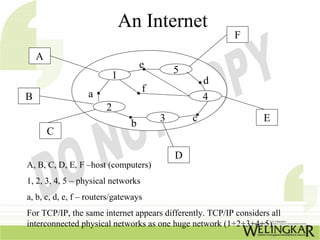
An Internet
                                                          F
    A
                                   e
                                            5
                         1                          d
                                    f
B                 a                                 4
                        2
                                        3       c                 E
                               b
        C

                                            D
A, B, C, D, E, F –host (computers)
1, 2, 3, 4, 5 – physical networks
a, b, c, d, e, f – routers/gateways
For TCP/IP, the same internet appears differently. TCP/IP considers all
interconnected physical networks as one huge network (1+2+3+4+5)
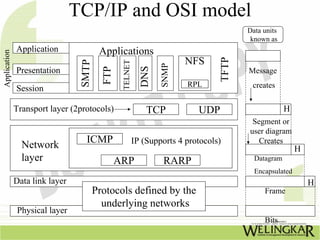
TCP/IP and OSI model
                                                                                         Data units
                                                                                          known as
              Application                Applications
Application


                                                                         NFS


                                                                                  TFTP
                                 SMTP


                                                 TELNET


                                                                  SNMP
                                                            DNS
                                          FTP
              Presentation                                                               Message
                                                                         RPL              creates
              Session

              Transport layer (2protocols)                    TCP           UDP                       H
                                                                                          Segment or
                                                                                         user diagram
                                   ICMP                   IP (Supports 4 protocols)         Creates
                Network                                                                                   H
                layer                           ARP               RARP                     Datagram
                                                                                           Encapsulated
              Data link layer                                                                                 H
                                        Protocols defined by the                              Frame
                                          underlying networks
               Physical layer
                                                                                              Bits
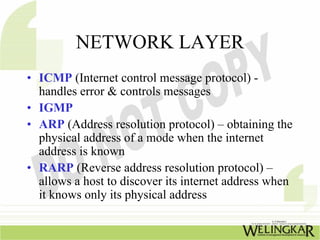
NETWORK LAYER
• ICMP (Internet control message protocol) -
  handles error & controls messages
• IGMP
• ARP (Address resolution protocol) – obtaining the
  physical address of a mode when the internet
  address is known
• RARP (Reverse address resolution protocol) –
  allows a host to discover its internet address when
  it knows only its physical address
Internet Protocol (IP) -1
• Transmission mechanism used for TCP/IP
• Unreliable & connectionless datagram
  protocol
• Assumes the unreliability of the underlying
  layers & gives best to get a transmission
  through to its destination
• For good quality IP must be paired with a
  reliable protocol like TCP
Internet Protocol (IP) – 2
• IP transports data in packets known as
  datagrams
• IP functionality in a limited way is not a
  weakness
• IP provides bare-bone transmission
  functions ; frees the user to add only those
  facilities necessary for a given application;
  allows for maximum efficiency
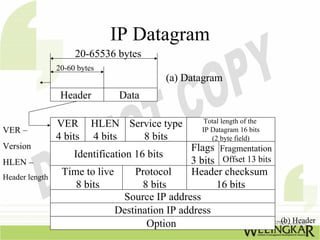
IP Datagram
                     20-65536 bytes
                20-60 bytes
                                          (a) Datagram
                 Header        Data

                VER       HLEN Service type         Total length of the
VER –                                              IP Datagram 16 bits
                4 bits    4 bits  8 bits              (2 byte field)
Version                                        Flags Fragmentation
                   Identification 16 bits
HLEN –                                         3 bits Offset 13 bits
Header length
                 Time to live     Protocol     Header checksum
                    8 bits          8 bits           16 bits
                                Source IP address
                              Destination IP address
                                     Option                               (b) Header
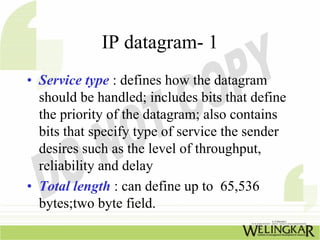
IP datagram- 1
• Service type : defines how the datagram
  should be handled; includes bits that define
  the priority of the datagram; also contains
  bits that specify type of service the sender
  desires such as the level of throughput,
  reliability and delay
• Total length : can define up to 65,536
  bytes;two byte field.
IP datagram- 2
• Flags : Bits in the flags deal with fragmentation.
  (Datagram can/cannot be fragmented; can be the first,
  middle or last fragment etc.)
• Fragmentation offset : A pointer shows the offset of the
  data in the original datagram
• Time to live : This field defines the number of hops a
  datagram can travel before it is discarded; source host,
  when it creates the datagram sets this field to an initial
  value; when the datagram travels through the internet
  router by router each router decrements this value by 1. If
  this value becomes 0 before the datagram reaches its final
  destination, the datagram is discarded. This prevents a
  datagram from going back & forth between routers
Internet address - 1
• Protocol : field defines which upper layer protocol
  data are encapsulated
• Source address, destination address : Each field is
  a four byte(32 bit) Internet address. It identifies
  the original source & final destination of the
  datagram respectively.
• Options : The field gives more functionality to the
  IP datagram. It carries field that control routing,
  timing, management and alignment.
Internet address - 2
•    Addressing : Physical addresses are on NICs. It
     identifies individual devices. The internet
     requires an additional addressing constituent :
     An address that identifies the connection of a
     host to its network
     Each internet consists of four bytes (32 bits)
     defining three fields :
I. Class type
II. Netid
III. Hostid
Internet address

  -   each internet consists of four bytes (32 bits)
      defining three fields :
  1) Class type
  2) Netid             varying lengths & depends on the
  3) Hostid               Class of the address


Class type
                      Netid                      Hostid
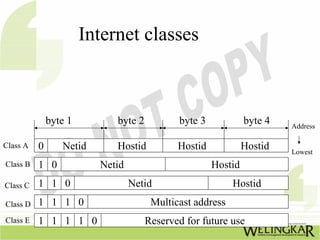
Internet classes


              byte 1        byte 2          byte 3            byte 4   Address

Class A   0      Netid      Hostid          Hostid            Hostid   Lowest
Class B   1 0            Netid                       Hostid
Class C   1 1 0                  Netid                    Hostid
Class D   1 1 1 0                     Multicast address
Class E   1 1 1 1 0                  Reserved for future use
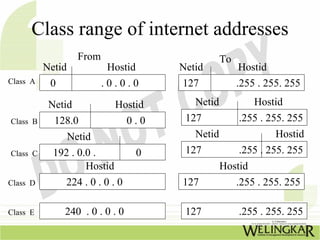
Class range of internet addresses
                  From                          To
          Netid           Hostid     Netid            Hostid
Class A    0             .0.0.0      127             .255 . 255. 255

           Netid            Hostid      Netid          Hostid
Class B     128.0              0.0    127           .255 . 255. 255
               Netid                    Netid                Hostid
Class C     192 . 0.0 .         0     127           .255 . 255. 255
                    Hostid                      Hostid
Class D        224 . 0 . 0 . 0       127           .255 . 255. 255

Class E       240 . 0 . 0 . 0         127            .255 . 255. 255
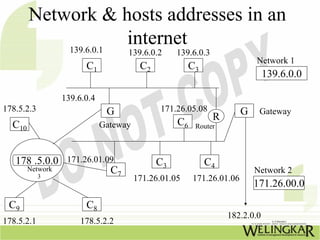
Network & hosts addresses in an
            139.6.0.1
                      internet
                               139.6.0.2      139.6.0.3
                                                                      Network 1
                   C1               C2            C3
                                                                          139.6.0.0

             139.6.0.4
178.5.2.3                 G              171.26.05.08             G    Gateway
                                                          R
  C10                    Gateway              C6   Router


   178 .5.0.0 171.26.01.09               C3            C4
     Network
        3
                         C7                                           Network 2
                                   171.26.01.05    171.26.01.06
                                                                      171.26.00.0
 C9                C8
                                                              182.2.0.0
178.5.2.1         178.5.2.2
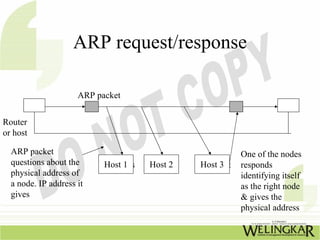
ARP request/response

                     ARP packet


Router
or host

  ARP packet                                            One of the nodes
  questions about the      HostHos
                               1     Host 2   Host 3
                                                 Host   responds
  physical address of                                   identifying itself
  a node. IP address it                                 as the right node
  gives                                                 & gives the
                                                        physical address
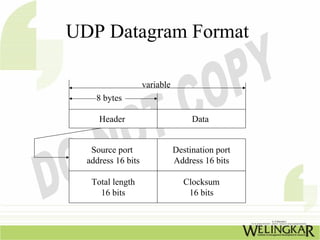
UDP Datagram Format

                    variable
    8 bytes

     Header                         Data


   Source port                 Destination port
  address 16 bits              Address 16 bits

   Total length                  Clocksum
     16 bits                      16 bits
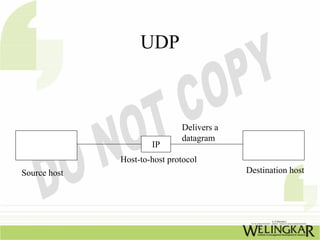
UDP


                              Delivers a
                              datagram
                      IP
              Host-to-host protocol
Source host                                Destination host
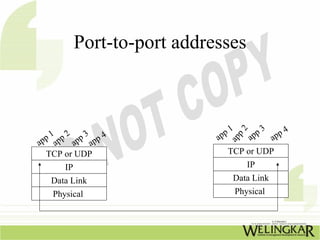
Port-to-port addresses


                                  1       3    4


                                   2
  p 1 pp 2 pp 3 pp 4           pp       pp app


                                   p
                              a       a


                                ap
ap a       a   a
  TCP or UDP                     TCP or UDP
       IP                              IP
   Data Link                     Data Link
    Physical                      Physical
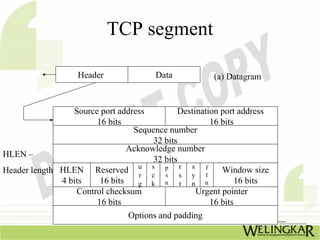
TCP segment

                   Header               Data           (a) Datagram


                 Source port address         Destination port address
                       16 bits                         16 bits
                                 Sequence number
                                      32 bits
                                Acknowledge number
HLEN –
                                      32 bits
                                  u s p r       s
Header length HLEN Reserved r c s s y f              l
                                                          Window size
              4 bits    16 bits   g k n       t n n            16 bits
                  Control checksum                Urgent pointer
                       16 bits                         16 bits
                                 Options and padding
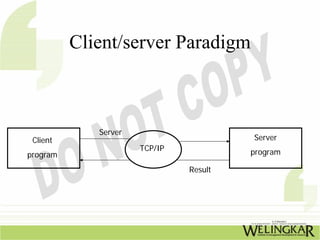
Client/server Paradigm


             Server
 Client                                 Server
                      TCP/IP            program
program
                               Result
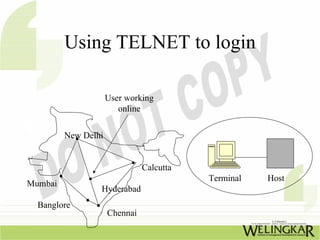
Using TELNET to login

                     User working
                        online


         New Delhi


                               Calcutta
                                          Terminal   Host
Mumbai
                 Hyderabad
  Banglore
                     Chennai
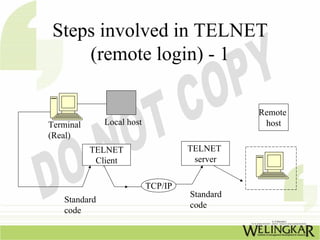
Steps involved in TELNET
     (remote login) - 1

                                               Remote
Terminal      Local host                        host
(Real)
           TELNET                   TELNET
            Client                   server


                           TCP/IP
                                    Standard
   Standard
                                    code
   code
Steps involved in TELNET
         (remote login) - 2
1. TELNET client transforms the output from the
   actual terminal to standard code
2. TELNET server in the remote host receives the
   information in the standard code
3. TELNET server will transform the information
   into character accepted by remote host
4. The remote host is pooled into thinking that a
   terminal is locally connected to it. (in other
   words a virtual terminal is connected to the local
   host)
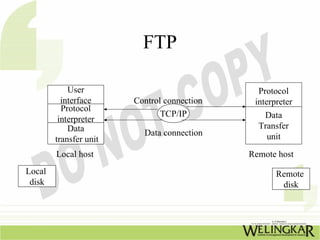
FTP

            User                               Protocol
          interface     Control connection    interpreter
          Protocol
                               TCP/IP           Data
         interpreter
            Data                               Transfer
                          Data connection        unit
        transfer unit
        Local host                           Remote host
Local                                               Remote
 disk                                                disk
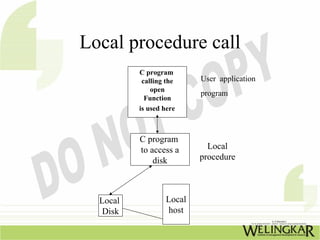
Local procedure call
          C program
           calling the    User application
              open
                          program
            Function
          is used here


          C program
          to access a       Local
              disk        procedure


  Local           Local
   Disk            host
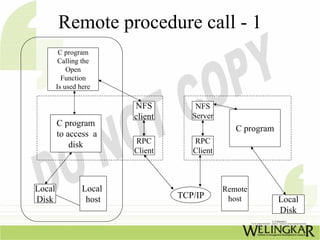
Remote procedure call - 1
         C program
         Calling the
            Open
          Function
        Is used here

                         NFS          NFS
                         client      Server
        C program
                                                 C program
        to access a
            disk         RPC         RPC
                         Client      Client


Local            Local                        Remote
Disk              host            TCP/IP       host          Local
                                                             Disk
Remote procedure call - 2
1. A program issues a call to the NFS client
   process. NFS client formats the call for the
   RPC client and passes it.
2. RPC client transforms the data to a format
   called XDR.(external data presentation) &
   provides the interface with TCP/IP
   transport mechanisms.
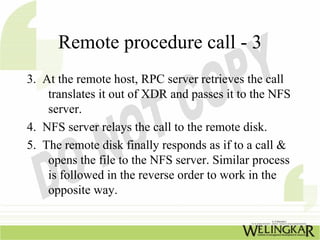
Remote procedure call - 3
3. At the remote host, RPC server retrieves the call
    translates it out of XDR and passes it to the NFS
    server.
4. NFS server relays the call to the remote disk.
5. The remote disk finally responds as if to a call &
    opens the file to the NFS server. Similar process
    is followed in the reverse order to work in the
    opposite way.
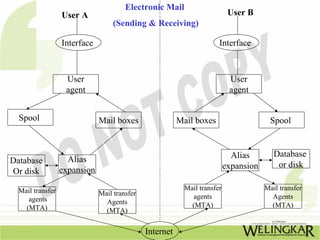
Electronic Mail
                  User A                                                    User B
                                   (Sending & Receiving)

                  Interface                                            Interface


                   User                                                     User
                   agent                                                    agent


  Spool                       Mail boxes                 Mail boxes                      Spool


                                                                             Alias        Database
Database            Alias
                                                                           expansion       or disk
Or disk           expansion

  Mail transfer                                            Mail transfer               Mail transfer
                              Mail transfer                  agents                      Agents
     agents                     Agents
    (MTA)                                                    (MTA)                       (MTA)
                                (MTA)


                                              Internet
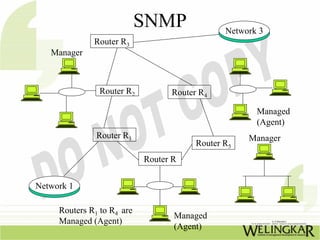
SNMP               Network 3
              Router R3
   Manager


                Router R2         Router R4

                                                      Managed
                                                      (Agent)
               Router R1                            Manager
                                        Router R5
                            Router R


Network 1

     Routers R1 to R4 are
                                   Managed
     Managed (Agent)
                                   (Agent)
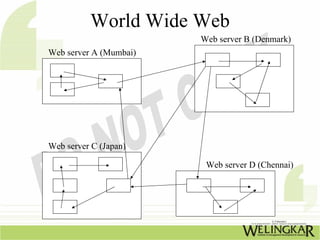
World Wide Web
                        Web server B (Denmark)
Web server A (Mumbai)


Web server C (Japan)

                         Web server D (Chennai)
World wide web
Requires
  A functional
 architecture
 A structural
 architecture
 A navigational
 architecture
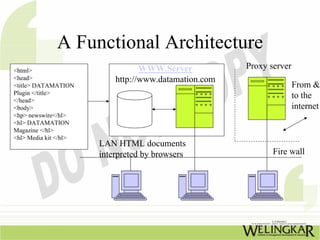
A Functional Architecture
<html>                            WWW.Server           Proxy server
<head>                     http://www.datamation.com
<title> DATAMATION                                                    From &
Plugin </title>                                                       to the
</head>
<body>                                                                internet
<hp> newswire</hl>
<hl> DATAMATION
Magazine </hl>
<hl> Media kit </hl>
                       LAN HTML documents
                       interpreted by browsers                Fire wall
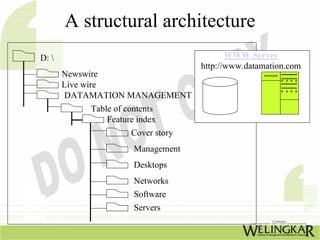
A structural architecture
D:                                       WWW.Server
                                   http://www.datamation.com
       Newswire
       Live wire
       DATAMATION MANAGEMENT
           Table of contents
               Feature index
                     Cover story
                      Management
                      Desktops
                      Networks
                      Software
                      Servers
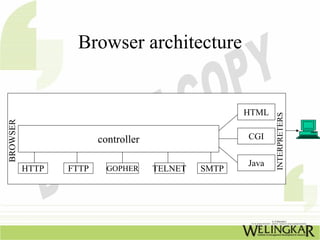
Browser architecture
•  Many commercial browsers exist
•  These interpret and display a web
   document. Each of these use the same
   architecture
• Browser has three parts :
1. Controller
2. Client programs
3. Interpreters
Browser architecture


                                                     HTML


                                                            INTERPRETERS
BROWSER


                        controller                   CGI


                                                     Java
          HTTP   FTTP     GOPHER     TELNET   SMTP
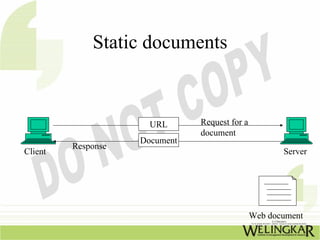
Static documents
• Fixed content documents are created and
  stored in a server
• Client accesses the document, a copy of the
  document is received
• User can use a browsing program to display
  the document
• User cannot change the contents;but the
  contents can be changed in the server
Static documents


                      URL      Request for a
                               document
                    Document
         Response
Client                                                Server


                                               Web document
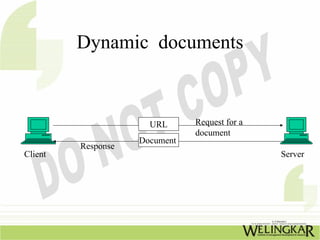
Dynamic documents -1
• These do not exist in predefined format
• Documents are created by a web server
  when a browser requests the document
• When the request arrives, the web server
  runs an application program to create the
  dynamic document
• Server then returns the output in response to
  the browsers request for document
Dynamic documents - 2

• Contents of document varies as these are
  created for each request. Time and date are
  types of dynamic information.
• Client can request that the server run a
  program in UNIX and send the result back
Dynamic documents


                      URL      Request for a
                               document
                    Document
         Response
Client                                         Server
Dynamic documents
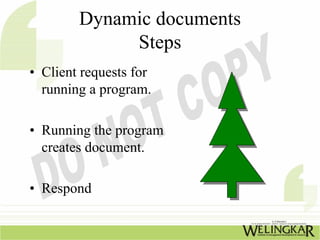
             Steps
• Client requests for
  running a program.

• Running the program
  creates document.

• Respond
Active documents
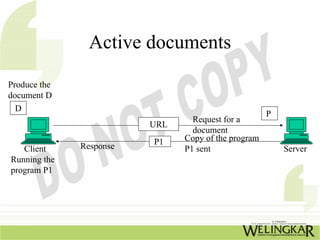
Produce the
document D
  D
                                                     P
                                 Request for a
                         URL
                                 document
                         P1    Copy of the program
   Client     Response         P1 sent                   Server
Running the
program P1
Active documents
                  Steps
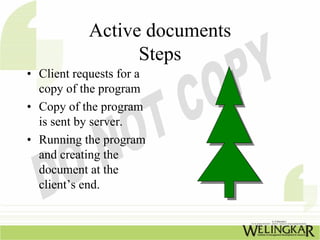
• Client requests for a
  copy of the program
• Copy of the program
  is sent by server.
• Running the program
  and creating the
  document at the
  client’s end.
“Like” us on Facebook: 
   p //                 /
http://www.facebook.com/welearnindia 

“Follow” us on Twitter:
http://twitter.com/WeLearnIndia
http://twitter com/WeLearnIndia

Watch informative videos on Youtube: 
http://www.youtube.com/WelingkarDLP

TCP/IP – Transmission Control Protocol/ Internet Protocol

  • 1.
    Transmission Control Protocol (TCP)/ Internet Protocol (IP)
  • 2.
    Overview of TCP/IP •Oldest networking standard developed for US department’s ARPANET • Most popular network protocol • Allows reasonably efficient and error – free transmission • A file transfer protocol , sends large files uncorrupted across unreliable networks • Compatible with a variety of data link protocols hence popular
  • 3.
    An Internet F A e 5 1 d f B a 4 2 3 c E b C D A, B, C, D, E, F –host (computers) 1, 2, 3, 4, 5 – physical networks a, b, c, d, e, f – routers/gateways For TCP/IP, the same internet appears differently. TCP/IP considers all interconnected physical networks as one huge network (1+2+3+4+5)
  • 4.
    TCP/IP and OSImodel Data units known as Application Applications Application NFS TFTP SMTP TELNET SNMP DNS FTP Presentation Message RPL creates Session Transport layer (2protocols) TCP UDP H Segment or user diagram ICMP IP (Supports 4 protocols) Creates Network H layer ARP RARP Datagram Encapsulated Data link layer H Protocols defined by the Frame underlying networks Physical layer Bits
  • 5.
    NETWORK LAYER • ICMP(Internet control message protocol) - handles error & controls messages • IGMP • ARP (Address resolution protocol) – obtaining the physical address of a mode when the internet address is known • RARP (Reverse address resolution protocol) – allows a host to discover its internet address when it knows only its physical address
  • 6.
    Internet Protocol (IP)-1 • Transmission mechanism used for TCP/IP • Unreliable & connectionless datagram protocol • Assumes the unreliability of the underlying layers & gives best to get a transmission through to its destination • For good quality IP must be paired with a reliable protocol like TCP
  • 7.
    Internet Protocol (IP)– 2 • IP transports data in packets known as datagrams • IP functionality in a limited way is not a weakness • IP provides bare-bone transmission functions ; frees the user to add only those facilities necessary for a given application; allows for maximum efficiency
  • 8.
    IP Datagram 20-65536 bytes 20-60 bytes (a) Datagram Header Data VER HLEN Service type Total length of the VER – IP Datagram 16 bits 4 bits 4 bits 8 bits (2 byte field) Version Flags Fragmentation Identification 16 bits HLEN – 3 bits Offset 13 bits Header length Time to live Protocol Header checksum 8 bits 8 bits 16 bits Source IP address Destination IP address Option (b) Header
  • 9.
    IP datagram- 1 •Service type : defines how the datagram should be handled; includes bits that define the priority of the datagram; also contains bits that specify type of service the sender desires such as the level of throughput, reliability and delay • Total length : can define up to 65,536 bytes;two byte field.
  • 10.
    IP datagram- 2 •Flags : Bits in the flags deal with fragmentation. (Datagram can/cannot be fragmented; can be the first, middle or last fragment etc.) • Fragmentation offset : A pointer shows the offset of the data in the original datagram • Time to live : This field defines the number of hops a datagram can travel before it is discarded; source host, when it creates the datagram sets this field to an initial value; when the datagram travels through the internet router by router each router decrements this value by 1. If this value becomes 0 before the datagram reaches its final destination, the datagram is discarded. This prevents a datagram from going back & forth between routers
  • 11.
    Internet address -1 • Protocol : field defines which upper layer protocol data are encapsulated • Source address, destination address : Each field is a four byte(32 bit) Internet address. It identifies the original source & final destination of the datagram respectively. • Options : The field gives more functionality to the IP datagram. It carries field that control routing, timing, management and alignment.
  • 12.
    Internet address -2 • Addressing : Physical addresses are on NICs. It identifies individual devices. The internet requires an additional addressing constituent : An address that identifies the connection of a host to its network Each internet consists of four bytes (32 bits) defining three fields : I. Class type II. Netid III. Hostid
  • 13.
    Internet address - each internet consists of four bytes (32 bits) defining three fields : 1) Class type 2) Netid varying lengths & depends on the 3) Hostid Class of the address Class type Netid Hostid
  • 14.
    Internet classes byte 1 byte 2 byte 3 byte 4 Address Class A 0 Netid Hostid Hostid Hostid Lowest Class B 1 0 Netid Hostid Class C 1 1 0 Netid Hostid Class D 1 1 1 0 Multicast address Class E 1 1 1 1 0 Reserved for future use
  • 15.
    Class range ofinternet addresses From To Netid Hostid Netid Hostid Class A 0 .0.0.0 127 .255 . 255. 255 Netid Hostid Netid Hostid Class B 128.0 0.0 127 .255 . 255. 255 Netid Netid Hostid Class C 192 . 0.0 . 0 127 .255 . 255. 255 Hostid Hostid Class D 224 . 0 . 0 . 0 127 .255 . 255. 255 Class E 240 . 0 . 0 . 0 127 .255 . 255. 255
  • 16.
    Network & hostsaddresses in an 139.6.0.1 internet 139.6.0.2 139.6.0.3 Network 1 C1 C2 C3 139.6.0.0 139.6.0.4 178.5.2.3 G 171.26.05.08 G Gateway R C10 Gateway C6 Router 178 .5.0.0 171.26.01.09 C3 C4 Network 3 C7 Network 2 171.26.01.05 171.26.01.06 171.26.00.0 C9 C8 182.2.0.0 178.5.2.1 178.5.2.2
  • 17.
    ARP request/response ARP packet Router or host ARP packet One of the nodes questions about the HostHos 1 Host 2 Host 3 Host responds physical address of identifying itself a node. IP address it as the right node gives & gives the physical address
  • 18.
    UDP Datagram Format variable 8 bytes Header Data Source port Destination port address 16 bits Address 16 bits Total length Clocksum 16 bits 16 bits
  • 19.
    UDP Delivers a datagram IP Host-to-host protocol Source host Destination host
  • 20.
    Port-to-port addresses 1 3 4 2 p 1 pp 2 pp 3 pp 4 pp pp app p a a ap ap a a a TCP or UDP TCP or UDP IP IP Data Link Data Link Physical Physical
  • 21.
    TCP segment Header Data (a) Datagram Source port address Destination port address 16 bits 16 bits Sequence number 32 bits Acknowledge number HLEN – 32 bits u s p r s Header length HLEN Reserved r c s s y f l Window size 4 bits 16 bits g k n t n n 16 bits Control checksum Urgent pointer 16 bits 16 bits Options and padding
  • 22.
    Client/server Paradigm Server Client Server TCP/IP program program Result
  • 24.
    Using TELNET tologin User working online New Delhi Calcutta Terminal Host Mumbai Hyderabad Banglore Chennai
  • 25.
    Steps involved inTELNET (remote login) - 1 Remote Terminal Local host host (Real) TELNET TELNET Client server TCP/IP Standard Standard code code
  • 26.
    Steps involved inTELNET (remote login) - 2 1. TELNET client transforms the output from the actual terminal to standard code 2. TELNET server in the remote host receives the information in the standard code 3. TELNET server will transform the information into character accepted by remote host 4. The remote host is pooled into thinking that a terminal is locally connected to it. (in other words a virtual terminal is connected to the local host)
  • 27.
    FTP User Protocol interface Control connection interpreter Protocol TCP/IP Data interpreter Data Transfer Data connection unit transfer unit Local host Remote host Local Remote disk disk
  • 28.
    Local procedure call C program calling the User application open program Function is used here C program to access a Local disk procedure Local Local Disk host
  • 29.
    Remote procedure call- 1 C program Calling the Open Function Is used here NFS NFS client Server C program C program to access a disk RPC RPC Client Client Local Local Remote Disk host TCP/IP host Local Disk
  • 30.
    Remote procedure call- 2 1. A program issues a call to the NFS client process. NFS client formats the call for the RPC client and passes it. 2. RPC client transforms the data to a format called XDR.(external data presentation) & provides the interface with TCP/IP transport mechanisms.
  • 31.
    Remote procedure call- 3 3. At the remote host, RPC server retrieves the call translates it out of XDR and passes it to the NFS server. 4. NFS server relays the call to the remote disk. 5. The remote disk finally responds as if to a call & opens the file to the NFS server. Similar process is followed in the reverse order to work in the opposite way.
  • 32.
    Electronic Mail User A User B (Sending & Receiving) Interface Interface User User agent agent Spool Mail boxes Mail boxes Spool Alias Database Database Alias expansion or disk Or disk expansion Mail transfer Mail transfer Mail transfer Mail transfer agents Agents agents Agents (MTA) (MTA) (MTA) (MTA) Internet
  • 33.
    SNMP Network 3 Router R3 Manager Router R2 Router R4 Managed (Agent) Router R1 Manager Router R5 Router R Network 1 Routers R1 to R4 are Managed Managed (Agent) (Agent)
  • 34.
    World Wide Web Web server B (Denmark) Web server A (Mumbai) Web server C (Japan) Web server D (Chennai)
  • 35.
    World wide web Requires A functional architecture A structural architecture A navigational architecture
  • 36.
    A Functional Architecture <html> WWW.Server Proxy server <head> http://www.datamation.com <title> DATAMATION From & Plugin </title> to the </head> <body> internet <hp> newswire</hl> <hl> DATAMATION Magazine </hl> <hl> Media kit </hl> LAN HTML documents interpreted by browsers Fire wall
  • 37.
    A structural architecture D: WWW.Server http://www.datamation.com Newswire Live wire DATAMATION MANAGEMENT Table of contents Feature index Cover story Management Desktops Networks Software Servers
  • 38.
    Browser architecture • Many commercial browsers exist • These interpret and display a web document. Each of these use the same architecture • Browser has three parts : 1. Controller 2. Client programs 3. Interpreters
  • 39.
    Browser architecture HTML INTERPRETERS BROWSER controller CGI Java HTTP FTTP GOPHER TELNET SMTP
  • 40.
    Static documents • Fixedcontent documents are created and stored in a server • Client accesses the document, a copy of the document is received • User can use a browsing program to display the document • User cannot change the contents;but the contents can be changed in the server
  • 41.
    Static documents URL Request for a document Document Response Client Server Web document
  • 42.
    Dynamic documents -1 •These do not exist in predefined format • Documents are created by a web server when a browser requests the document • When the request arrives, the web server runs an application program to create the dynamic document • Server then returns the output in response to the browsers request for document
  • 43.
    Dynamic documents -2 • Contents of document varies as these are created for each request. Time and date are types of dynamic information. • Client can request that the server run a program in UNIX and send the result back
  • 44.
    Dynamic documents URL Request for a document Document Response Client Server
  • 45.
    Dynamic documents Steps • Client requests for running a program. • Running the program creates document. • Respond
  • 46.
    Active documents Produce the documentD D P Request for a URL document P1 Copy of the program Client Response P1 sent Server Running the program P1
  • 47.
    Active documents Steps • Client requests for a copy of the program • Copy of the program is sent by server. • Running the program and creating the document at the client’s end.
  • 48.
    “Like” us on Facebook:  p // / http://www.facebook.com/welearnindia  “Follow” us on Twitter: http://twitter.com/WeLearnIndia http://twitter com/WeLearnIndia Watch informative videos on Youtube:  http://www.youtube.com/WelingkarDLP