

Introduction
TCP/IP Model
 Tools
 References
 OSI introduction
 TCP/IP Layers in detail
 Application Layer
 Transport Layer
 Internet Layer
 Data link Layer
Overview
 The Open System Interconnection (OSI) model defines a
networking framework to implement protocols in seven layers.
 Developed by International Standards Organization (ISO)
 Networks operate on one basic principle: "pass it on." Each layer
takes care of a very specific job, and then passes the data onto
the next layer.
OSI Model Introduction
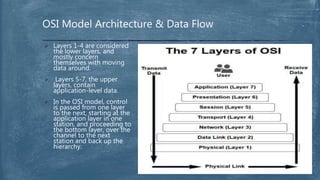
OSI Model Architecture & Data Flow
 Layers 1-4 are considered
the lower layers, and
mostly concern
themselves with moving
data around.
 Layers 5-7, the upper
layers, contain
application-level data.
 In the OSI model, control
is passed from one layer
to the next, starting at the
application layer in one
station, and proceeding to
the bottom layer, over the
channel to the next
station and back up the
hierarchy.
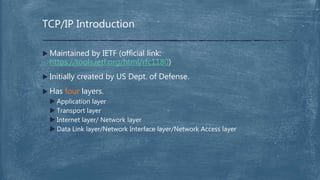
 Maintained by IETF (official link:
https://tools.ietf.org/html/rfc1180)
 Initially created by US Dept. of Defense.
 Has four layers.
 Application layer
 Transport layer
 Internet layer/ Network layer
 Data Link layer/Network Interface layer/Network Access layer
TCP/IP Introduction
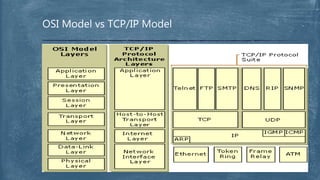
OSI Model vs TCP/IP Model
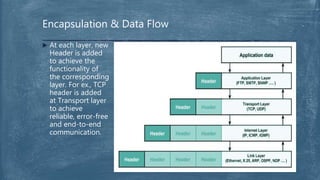
Encapsulation & Data Flow
 At each layer, new
Header is added
to achieve the
functionality of
the corresponding
layer. For ex., TCP
header is added
at Transport layer
to achieve
reliable, error-free
and end-to-end
communication.
 At each layer, data is called differently. In Application layer, it is called
Application Message.
 Example Protocols:
 HTTP, HTTPS, FTP, SMTP, Telnet, SSH, DNS, RDP, DHCP, SNMP, TFTP etc.
 Responsibilities:
 Defines TCP/IP application protocols and how host programs interface with Transport
layer services to use the network.
 Create user data and communicate this data to other applications on another or the
same host.
 Data flow while sending data :
 Get the actual data from application, add Header then pass Message to lower layer i.e.,
Transport layer.
 Data flow while receiving data:
 Get the Message from Transport layer and process the Header then pass the actual data to the
actual application (for example, browser application, which implements HTTP protocol, to
render/download/any action the message).
Application Layer
Application Layer: HTTP Header example
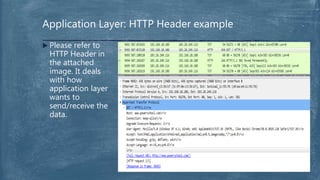
 Please refer to
HTTP Header in
the attached
image. It deals
with how
application layer
wants to
send/receive the
data.
 In Transport layer, it is called TCP Segment or UDP Datagram.
 Example Protocols:
 TCP, UDP.
 Responsibilities:
 Providing the Application layer with session and datagram communication
services.
 End-to-end message transfer independent of the underlying network, along
with error control, segmentation, flow control, congestion control, and
application addressing (port numbers).
 Data flow while sending data :
 Get the Message from Application layer, add TCP/UDP Header then pass TCP
Segment/Datagram to lower layer i.e., Internet layer.
 Data flow while receiving data:
 Get Segment/Datagram from Internet layer and process the TCP/UDP Header then
pass Message to upper layer i.e., Application layer.
Transport Layer
 Connection oriented:
 Must establish the connection with the device to communicate before
transferring the actual data using TCP Handshake.
 One-One (host to host):
 Connection is established only b/w two parties.
 Reliable:
 Assures whether all data is reached the destination using
Acknowledgments, Sequence Numbers and Checksums.
 Sliding window:
 Window Size - Determines the amount of data that can be transmitted
before an acknowledgement is required.
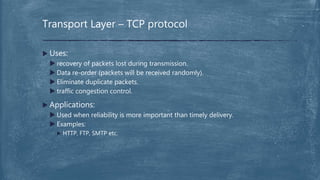
Transport Layer – TCP protocol
 Uses:
 recovery of packets lost during transmission.
 Data re-order (packets will be received randomly).
 Eliminate duplicate packets.
 traffic congestion control.
 Applications:
 Used when reliability is more important than timely delivery.
 Examples:
 HTTP, FTP, SMTP etc.
Transport Layer – TCP protocol
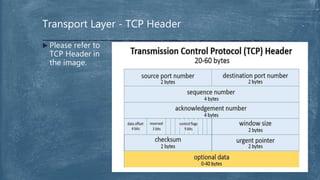
Transport Layer - TCP Header
 Please refer to
TCP Header in
the image.
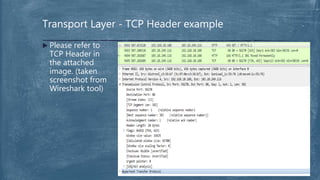
Transport Layer - TCP Header example
 Please refer to
TCP Header in
the attached
image. (taken
screenshot from
Wireshark tool)
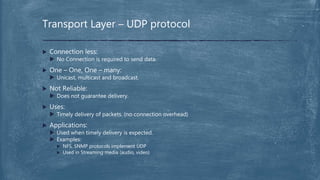
 Connection less:
 No Connection is required to send data.
 One – One, One – many:
 Unicast, multicast and broadcast.
 Not Reliable:
 Does not guarantee delivery.
 Uses:
 Timely delivery of packets. (no connection overhead)
 Applications:
 Used when timely delivery is expected.
 Examples:
 NFS, SNMP protocols implement UDP
 Used in Streaming media (audio, video)
Transport Layer – UDP protocol
 In Internet layer, it is called IP Packet.
 Example Protocols:
 IPv4, IPv6, ARP, ICMP.
 Responsibilities:
 Responsible for addressing, packaging, and routing functions.
 Uses route table to make all decisions about routing an IP packet.
 Data flow while sending data :
 Get the Segment or Datagram from Transport layer, add IP Header then pass
on IP Packet to lower layer i.e., Data Link layer.
 Data flow while receiving data:
 Get the IP Packet from Data Link layer and process IP Header then pass on
Segment or Datagram to upper layer i.e., Transport layer.
Internet Layer
 Internet Protocol (IP):
 is a routable protocol responsible for IP addressing, routing, and the
fragmentation and reassembly of packets.
 Address Resolution Protocol (ARP):
 is responsible for the resolution of the Internet layer address to the
Network Interface layer address such as a hardware address.
 Internet Control Message Protocol (ICMP):
 is responsible for providing diagnostic functions and reporting errors due
to the unsuccessful delivery of IP packets.
Internet Layer
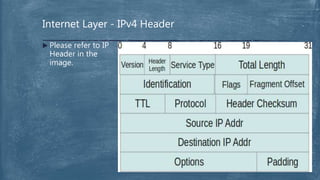
Internet Layer - IPv4 Header
 Please refer to IP
Header in the
image.
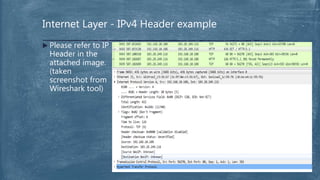
Internet Layer - IPv4 Header example
 Please refer to IP
Header in the
attached image.
(taken
screenshot from
Wireshark tool)
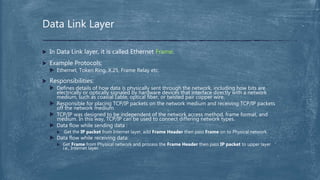
 In Data Link layer, it is called Ethernet Frame.
 Example Protocols:
 Ethernet, Token Ring, X.25, Frame Relay etc.
 Responsibilities:
 Defines details of how data is physically sent through the network, including how bits are
electrically or optically signaled by hardware devices that interface directly with a network
medium, such as coaxial cable, optical fiber, or twisted pair copper wire.
 Responsible for placing TCP/IP packets on the network medium and receiving TCP/IP packets
off the network medium.
 TCP/IP was designed to be independent of the network access method, frame format, and
medium. In this way, TCP/IP can be used to connect differing network types.
 Data flow while sending data :
 Get the IP packet from Internet layer, add Frame Header then pass Frame on to Physical network.
 Data flow while receiving data:
 Get Frame from Physical network and process the Frame Header then pass IP packet to upper layer
i.e., Internet layer.
Data Link Layer
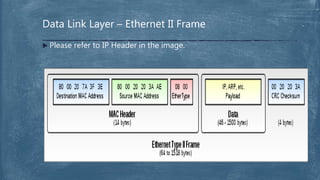
Data Link Layer – Ethernet II Frame
 Please refer to IP Header in the image.
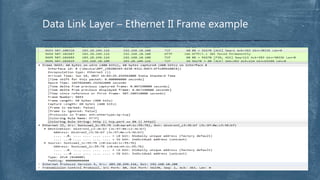
Data Link Layer – Ethernet II Frame example
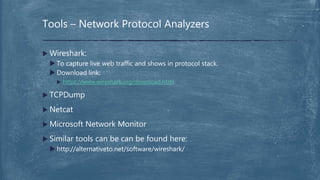
 Wireshark:
 To capture live web traffic and shows in protocol stack.
 Download link:
 https://www.wireshark.org/download.html
 TCPDump
 Netcat
 Microsoft Network Monitor
 Similar tools can be can be found here:
 http://alternativeto.net/software/wireshark/
Tools – Network Protocol Analyzers
 https://technet.microsoft.com/en-us/library/cc958821.aspx
 http://www.webopedia.com/quick_ref/OSI_Layers.asp
 https://in.pinterest.com/explore/7-layers-of-osi/
 https://tools.ietf.org/html/rfc1122#section-1.3.3
References
After introduction, I hope these questions are cleared.
 How Internet works? (of course, at high level). Using TCP/IP
protocol stack.
 How does a client on one computer reach the server on
another?
 Why do both TCP and UDP exist, instead of just one or the
other?
Conclusion
I hope I’ll be still alive after this slide ;-).
Questions & Discussion
I’m still alive, thanks mates .
Thank You

TCP/IP Introduction

  • 1.
  • 2.
     Tools  References OSI introduction  TCP/IP Layers in detail  Application Layer  Transport Layer  Internet Layer  Data link Layer Overview
  • 3.
     The OpenSystem Interconnection (OSI) model defines a networking framework to implement protocols in seven layers.  Developed by International Standards Organization (ISO)  Networks operate on one basic principle: "pass it on." Each layer takes care of a very specific job, and then passes the data onto the next layer. OSI Model Introduction
  • 4.
    OSI Model Architecture& Data Flow  Layers 1-4 are considered the lower layers, and mostly concern themselves with moving data around.  Layers 5-7, the upper layers, contain application-level data.  In the OSI model, control is passed from one layer to the next, starting at the application layer in one station, and proceeding to the bottom layer, over the channel to the next station and back up the hierarchy.
  • 5.
     Maintained byIETF (official link: https://tools.ietf.org/html/rfc1180)  Initially created by US Dept. of Defense.  Has four layers.  Application layer  Transport layer  Internet layer/ Network layer  Data Link layer/Network Interface layer/Network Access layer TCP/IP Introduction
  • 6.
    OSI Model vsTCP/IP Model
  • 7.
    Encapsulation & DataFlow  At each layer, new Header is added to achieve the functionality of the corresponding layer. For ex., TCP header is added at Transport layer to achieve reliable, error-free and end-to-end communication.
  • 8.
     At eachlayer, data is called differently. In Application layer, it is called Application Message.  Example Protocols:  HTTP, HTTPS, FTP, SMTP, Telnet, SSH, DNS, RDP, DHCP, SNMP, TFTP etc.  Responsibilities:  Defines TCP/IP application protocols and how host programs interface with Transport layer services to use the network.  Create user data and communicate this data to other applications on another or the same host.  Data flow while sending data :  Get the actual data from application, add Header then pass Message to lower layer i.e., Transport layer.  Data flow while receiving data:  Get the Message from Transport layer and process the Header then pass the actual data to the actual application (for example, browser application, which implements HTTP protocol, to render/download/any action the message). Application Layer
  • 9.
    Application Layer: HTTPHeader example  Please refer to HTTP Header in the attached image. It deals with how application layer wants to send/receive the data.
  • 10.
     In Transportlayer, it is called TCP Segment or UDP Datagram.  Example Protocols:  TCP, UDP.  Responsibilities:  Providing the Application layer with session and datagram communication services.  End-to-end message transfer independent of the underlying network, along with error control, segmentation, flow control, congestion control, and application addressing (port numbers).  Data flow while sending data :  Get the Message from Application layer, add TCP/UDP Header then pass TCP Segment/Datagram to lower layer i.e., Internet layer.  Data flow while receiving data:  Get Segment/Datagram from Internet layer and process the TCP/UDP Header then pass Message to upper layer i.e., Application layer. Transport Layer
  • 11.
     Connection oriented: Must establish the connection with the device to communicate before transferring the actual data using TCP Handshake.  One-One (host to host):  Connection is established only b/w two parties.  Reliable:  Assures whether all data is reached the destination using Acknowledgments, Sequence Numbers and Checksums.  Sliding window:  Window Size - Determines the amount of data that can be transmitted before an acknowledgement is required. Transport Layer – TCP protocol
  • 12.
     Uses:  recoveryof packets lost during transmission.  Data re-order (packets will be received randomly).  Eliminate duplicate packets.  traffic congestion control.  Applications:  Used when reliability is more important than timely delivery.  Examples:  HTTP, FTP, SMTP etc. Transport Layer – TCP protocol
  • 13.
    Transport Layer -TCP Header  Please refer to TCP Header in the image.
  • 14.
    Transport Layer -TCP Header example  Please refer to TCP Header in the attached image. (taken screenshot from Wireshark tool)
  • 15.
     Connection less: No Connection is required to send data.  One – One, One – many:  Unicast, multicast and broadcast.  Not Reliable:  Does not guarantee delivery.  Uses:  Timely delivery of packets. (no connection overhead)  Applications:  Used when timely delivery is expected.  Examples:  NFS, SNMP protocols implement UDP  Used in Streaming media (audio, video) Transport Layer – UDP protocol
  • 16.
     In Internetlayer, it is called IP Packet.  Example Protocols:  IPv4, IPv6, ARP, ICMP.  Responsibilities:  Responsible for addressing, packaging, and routing functions.  Uses route table to make all decisions about routing an IP packet.  Data flow while sending data :  Get the Segment or Datagram from Transport layer, add IP Header then pass on IP Packet to lower layer i.e., Data Link layer.  Data flow while receiving data:  Get the IP Packet from Data Link layer and process IP Header then pass on Segment or Datagram to upper layer i.e., Transport layer. Internet Layer
  • 17.
     Internet Protocol(IP):  is a routable protocol responsible for IP addressing, routing, and the fragmentation and reassembly of packets.  Address Resolution Protocol (ARP):  is responsible for the resolution of the Internet layer address to the Network Interface layer address such as a hardware address.  Internet Control Message Protocol (ICMP):  is responsible for providing diagnostic functions and reporting errors due to the unsuccessful delivery of IP packets. Internet Layer
  • 18.
    Internet Layer -IPv4 Header  Please refer to IP Header in the image.
  • 19.
    Internet Layer -IPv4 Header example  Please refer to IP Header in the attached image. (taken screenshot from Wireshark tool)
  • 20.
     In DataLink layer, it is called Ethernet Frame.  Example Protocols:  Ethernet, Token Ring, X.25, Frame Relay etc.  Responsibilities:  Defines details of how data is physically sent through the network, including how bits are electrically or optically signaled by hardware devices that interface directly with a network medium, such as coaxial cable, optical fiber, or twisted pair copper wire.  Responsible for placing TCP/IP packets on the network medium and receiving TCP/IP packets off the network medium.  TCP/IP was designed to be independent of the network access method, frame format, and medium. In this way, TCP/IP can be used to connect differing network types.  Data flow while sending data :  Get the IP packet from Internet layer, add Frame Header then pass Frame on to Physical network.  Data flow while receiving data:  Get Frame from Physical network and process the Frame Header then pass IP packet to upper layer i.e., Internet layer. Data Link Layer
  • 21.
    Data Link Layer– Ethernet II Frame  Please refer to IP Header in the image.
  • 22.
    Data Link Layer– Ethernet II Frame example
  • 23.
     Wireshark:  Tocapture live web traffic and shows in protocol stack.  Download link:  https://www.wireshark.org/download.html  TCPDump  Netcat  Microsoft Network Monitor  Similar tools can be can be found here:  http://alternativeto.net/software/wireshark/ Tools – Network Protocol Analyzers
  • 24.
     https://technet.microsoft.com/en-us/library/cc958821.aspx  http://www.webopedia.com/quick_ref/OSI_Layers.asp https://in.pinterest.com/explore/7-layers-of-osi/  https://tools.ietf.org/html/rfc1122#section-1.3.3 References
  • 25.
    After introduction, Ihope these questions are cleared.  How Internet works? (of course, at high level). Using TCP/IP protocol stack.  How does a client on one computer reach the server on another?  Why do both TCP and UDP exist, instead of just one or the other? Conclusion
  • 26.
    I hope I’llbe still alive after this slide ;-). Questions & Discussion
  • 27.
    I’m still alive,thanks mates . Thank You