Storage Systems and Business Continuity Overview  Alan McSweeney
Objectives To information on SAN storage options To provide details on business continuity and disaster recovery options
Agenda Types of Storage Enabling Greater Resource Utilisation Through Storage System Virtualisation Business Continuity and Disaster Recovery Systems Center Operations Manager (SCOM) Managing Disk Based Backup Through Storage Virtualisation Single Instance Storage (Deduplication) Enabling greater Data Management Through Storage System SnapShots Enabling Greater Application Resilience Through SnapShot Technologies Enabling Greater Data Resilience Through Storage System Mirroring Easing the Pain of Development Through SnapShot Cloning Rapid Microsoft Exchange Recovery through Storage Systems Technologies Rapid Microsoft SQL Recovery through Storage Systems Technologies Rapid Recovery of Oracle DB Through Storage Systems Technologies Server Virtualisation and Storage Storage Management and Business Continuity/Disaster Recovery Storage Management and WAN
Types of Storage DAS NAS SAN
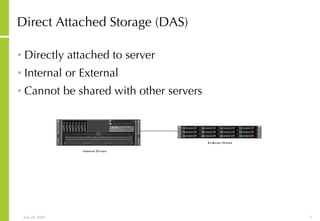
Direct Attached Storage (DAS) Directly attached to server Internal or External Cannot be shared with other servers
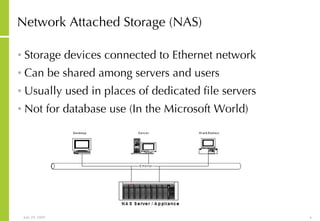
Network Attached Storage (NAS) Storage devices connected to Ethernet network Can be shared among servers and users Usually used in places of dedicated file servers Not for database use (In the Microsoft World)
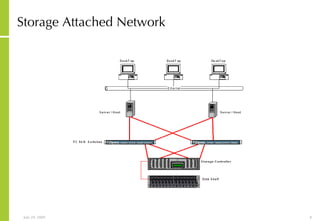
Storage Attached Network (SAN) Hosts attached via Fibre Channel Host Bus Adaptors Connect to storage system via Fibre Channel Switches Sees pre assigned storage as dedicated free space Desktops access storage on local server as normal
Storage Attached Network
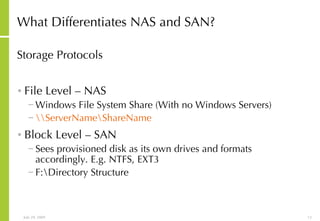
What Differentiates NAS and SAN?
What Differentiates NAS and SAN? Storage Protocols
What Differentiates NAS and SAN? Storage Protocols File Level – NAS Windows File System Share (With no Windows Servers) \\ServerName\ShareName
What Differentiates NAS and SAN? Storage Protocols File Level – NAS Windows File System Share (With no Windows Servers) \\ServerName\ShareName   Block Level – SAN Sees provisioned disk as its own drives and formats accordingly. E.g. NTFS, EXT3 F:\Directory Structure
File Level
File Level CIFS Common Internet File System Predominantly Windows Environments
File Level CIFS Common Internet File System Predominantly Windows Environments NFS Network File System Non Windows Environments Unix, Linux, NetWare, VMware
Block Level
Block Level Fibre Channel Uses Fibre Channel Switches FC-AL 1Gb, 2Gb, 4Gb
Block Level Fibre Channel Uses Fibre Channel Switches FC-AL 1Gb, 2Gb, 4Gb iSCSI Uses Ethernet Switches 1GB 10Gb
Storage Options – Advantages and Disadvantages
DAS - Pros Inexpensive Use of large capacity SCSI and SATA drives No added expense for controllers
DAS - Pros Inexpensive Use of large capacity SCSI and SATA drives No added expense for controllers Performance Dedicated disk array with various cache options
DAS - Pros Inexpensive Use of large capacity SCSI and SATA drives No added expense for controllers Performance Dedicated disk array with various cache options Skill Levels No new skill levels required to mange storage
DAS - Cons Captive Storage Storage can only be used by one server
DAS - Cons Captive Storage Storage can only be used by one server Performance Disk Arrays may be limited to the number of drives that can be used
DAS - Cons Captive Storage Storage can only be used by one server Performance Disk Arrays may be limited to the number of drives that can be used Backups can be slow and inconsistent Expense Can be expensive in terms of wasted disk space.
NAS - Pros
NAS - Pros Can replace file servers and introduce enterprise resilience Windows, Unix
NAS - Pros Can replace file servers and introduce enterprise resilience Windows, Unix Easily expandable From 36GB to over 0.5PB
NAS - Pros Can replace file servers and introduce enterprise resilience Windows, Unix Easily expandable From 36GB to over 0.5PB Cost Effective Single Appliance replace multiple servers
NAS - Pros Can replace file servers and introduce enterprise resilience Windows, Unix Easily expandable From 36GB to over 0.5PB Cost Effective Single Appliance replace multiple servers Ease of backup Can backup all shares from NAS appliance
NAS - Cons
NAS - Cons Expense Can be expensive relative to cost of single server
NAS - Cons Expense Can be expensive relative to cost of single server Performance Depending on protocol
NAS - Cons Expense Can be expensive relative to cost of single server Performance Depending on protocol Database Support No support for MS SQL or MS Exchange
NAS - Cons Expense Can be expensive relative to cost of single server Performance Depending on protocol Database Support No support for MS SQL or MS Exchange Skill Levels May require new skill sets
SAN - Pros
SAN - Pros High Performance IO/s Disk Utilisation
SAN - Pros High Performance IO/s Disk Utilisation Resilience SnapShots Mirroring Replication
SAN - Pros High Performance IO/s Disk Utilisation Resilience SnapShots Mirroring Replication Scalability Scales to PB
SAN - Cons
SAN - Cons Costs Initial Capital Cost Running Costs Maintenance
SAN - Cons Costs Initial Capital Cost Running Costs Maintenance Skill Sets New skill sets will be required
SAN - Cons Costs Initial Capital Cost Running Costs Maintenance Skill Sets New skill sets will be required Compatibility Most vendors require ‘Fork Lift’ upgrades
SAN - Cons Costs Initial Capital Cost Running Costs Maintenance Skill Sets New skill sets will be required Compatibility Most vendors require ‘Fork Lift’ upgrades Business Risk Lose the SAN and lose data from many servers Maximum resilience is a must
Which Storage Solution is Right for Me?
NAS or SAN? Depends on Application requirements Depends on User Requirements Depends on Skill Budget
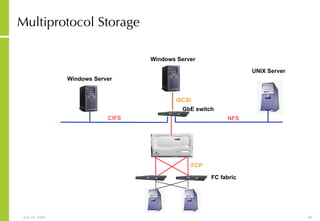
Why Not Both NAS and SAN Most organisations will benefit from both NAS and SAN NAS for file serving and low end applications SAN for greater application performance, OLTP, Exchange, SQL, Oracle Can be expensive Use multiprotocol storage systems
Multiprotocol Storage Windows Server UNIX Server GbE switch Windows Server CIFS NFS iSCSI FC fabric FCP
Multiprotocol Storage Systems No physical boundaries between NAS and SAN NAS protocols for file serving SAN protocols for Application Performance Bring enterprise functionality to NAS environment NAS data is no less important than SAN data Greater return on investment
SAN Basics SAN infrastructure (also called “fabric”) comprises the hardware, cabling and software components that allows data to move into and within the SAN  Server network cards (fibre channel HBAs or Ethernet NICs) and switches A disk array is a centralised storage pool for servers Data from multiple servers is stored in dedicated areas called logical unit number (LUNs) Data can be protected against data loss in the event of multiple disk failures using RAID
What is RAID
What is RAID R edundant  A rray of  I nexpensive  D isks Allows for single or multiple drive failure Can increase read and write performance Depending on environment Can have an adverse affect on performance Depending on environment Dependant on RAID controller
Multiple RAID Levels
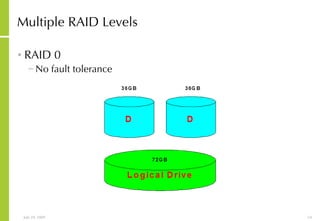
Multiple RAID Levels RAID 0 No fault tolerance
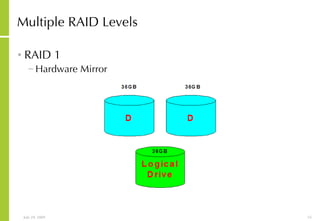
Multiple RAID Levels RAID 1 Hardware Mirror
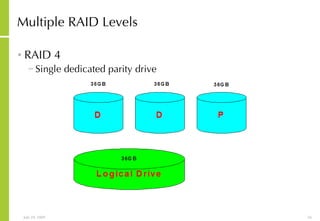
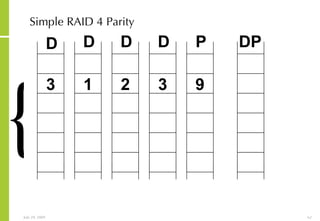
Multiple RAID Levels RAID 4 Single dedicated parity drive
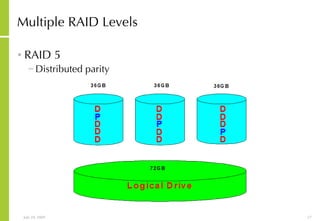
Multiple RAID Levels RAID 5 Distributed parity
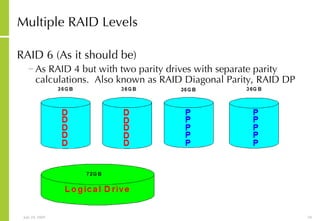
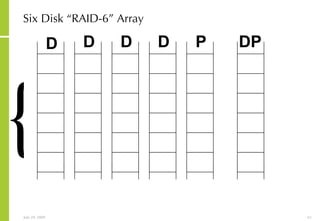
Multiple RAID Levels RAID 6 (As it should be) As RAID 4 but with two parity drives with separate parity calculations.  Also known as RAID Diagonal Parity, RAID DP
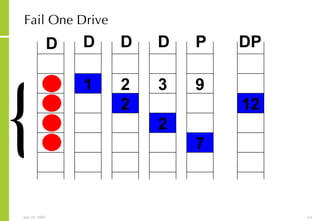
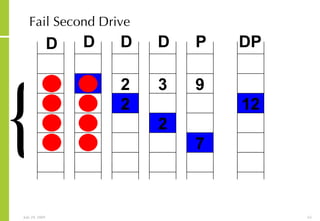
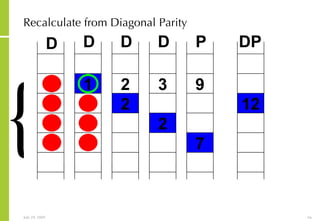
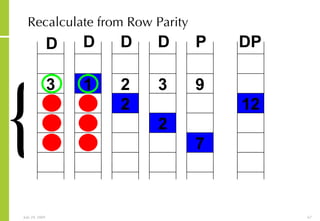
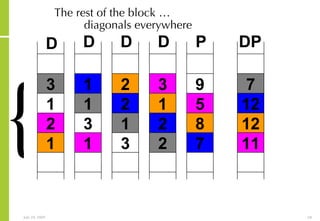
RAID 6 Overview (RAID DP) Description D iagonal- P arity RAID  –   two  parity drives per RAID group Benefits 2000~4000X data protection compared to RAID 4 or 5 Protects against 3 modes of double disk failure Concurrent failure of  any  2 disks (very rare) 2 simultaneous disk uncorrectable errors (also very rare) A failed disk and an uncorrectable error (most likely) Comparable operational cost to RAID 4 Equivalent performance for nearly all workloads Equally low parity capacity overhead supported Less system impact during RAID reconstruction
Why is RAID-DP Needed? ‘ Traditional’ single-parity-drive RAID group no longer provides enough protection Reasonably-sized RAID groups (e.g. 8 drives) are exposed to data loss during reconstruction Larger disk drives Disk drive uncorrectable (hard) error rate RAID 1 is too costly for widespread use Mirroring doubles the cost of storage Not affordable for all data
Six Disk “RAID-6” Array { D D D D P DP
Simple RAID 4 Parity 3 1 2 3 9 { D D D D P DP
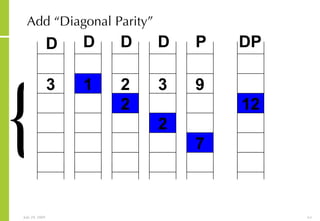
Add “Diagonal Parity” 3 1 2 1 1 1 3 1 2 2 1 3 3 1 2 2 9 5 8 7 7 12 12 11 { D D D D P DP
Fail One Drive 3 1 2 1 1 1 3 1 2 2 1 3 3 1 2 2 9 5 8 7 7 12 12 11 { D D D D P DP 7
Fail Second Drive 3 1 2 1 1 1 3 1 2 2 1 3 3 1 2 2 9 5 8 7 7 12 12 11 { D D D D P DP 7
Recalculate from Diagonal Parity 3 1 2 1 1 1 3 1 2 2 1 3 3 1 2 2 9 5 8 7 7 12 12 11 { D D D D P DP 7
Recalculate from Row Parity 3 1 2 1 1 1 3 1 2 2 1 3 3 1 2 2 9 5 8 7 7 12 12 11 { D D D D P DP 7
The rest of the block …  diagonals   everywhere 3 1 2 1 1 1 3 1 2 2 1 3 3 1 2 2 9 5 8 7 7 12 12 11 { D D D D P DP
Business Continuity and Disaster Recovery
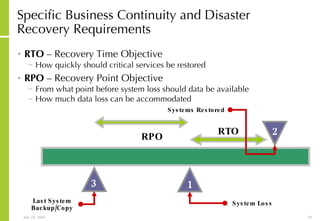
Specific Business Continuity and Disaster Recovery Requirements RTO  – Recovery Time Objective How quickly should critical services be restored RPO  – Recovery Point Objective From what point before system loss should data be available How much data loss can be accommodated 1 2 RTO Systems Restored System Loss 3 Last System Backup/Copy RPO
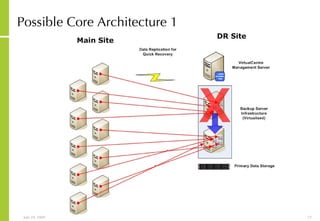
Options and Issues Virtualised infrastructure Virtualise secondary and/or primary server infrastructure Data replication software DoubleTake WANSync Hardware replication
Possible Core Architecture 1
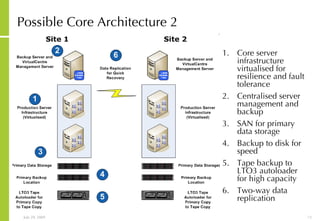
Possible Core Architecture 2 Core server infrastructure virtualised for resilience and fault tolerance Centralised server management and backup SAN for primary data storage Backup to disk for speed Tape backup to LTO3 autoloader for high capacity Two-way data replication
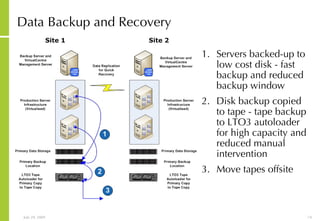
Data Backup and Recovery Servers backed-up to low cost disk - fast backup and reduced backup window Disk backup copied to tape - tape backup to LTO3 autoloader for high capacity and reduced manual intervention Move tapes offsite
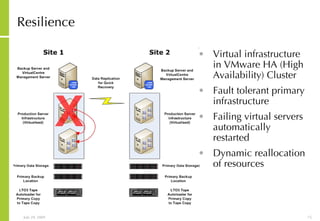
Resilience Virtual infrastructure in VMware HA (High Availability) Cluster Fault tolerant primary infrastructure Failing virtual servers automatically restarted Dynamic reallocation of resources
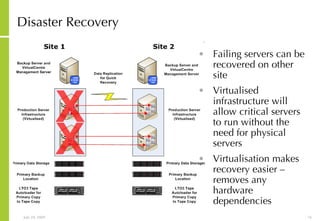
Disaster Recovery Failing servers can be recovered on other site Virtualised infrastructure will allow critical servers to run without the need for physical servers Virtualisation makes recovery easier – removes any hardware dependencies
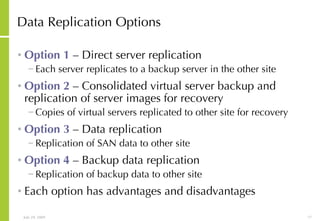
Data Replication Options Option 1  – Direct server replication Each server replicates to a backup server in the other site Option 2  – Consolidated virtual server backup and replication of server images for recovery Copies of virtual servers replicated to other site for recovery Option 3  – Data replication Replication of SAN data to other site Option 4  – Backup data replication Replication of backup data to other site Each option has advantages and disadvantages
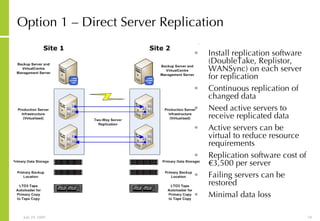
Option 1 – Direct Server Replication Install replication software (DoubleTake, Replistor, WANSync) on each server for replication Continuous replication of changed data Need active servers to receive replicated data Active servers can be virtual to reduce resource requirements Replication software cost of €3,500 per server Failing servers can be restored  Minimal data loss
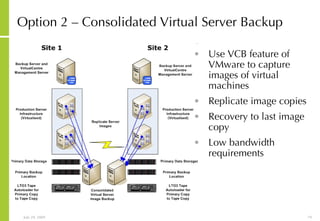
Option 2 – Consolidated Virtual Server Backup Use VCB feature of VMware to capture images of virtual machines Replicate image copies Recovery to last image copy Low bandwidth requirements
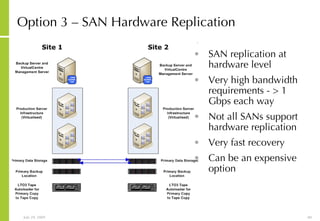
Option 3 – SAN Hardware Replication  SAN replication at hardware level Very high bandwidth requirements - > 1 Gbps each way Not all SANs support hardware replication Very fast recovery Can be an expensive option
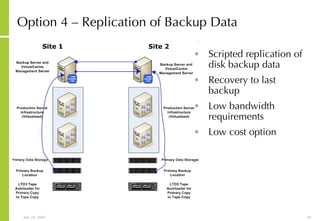
Option 4 – Replication of Backup Data Scripted replication of disk backup data Recovery to last backup Low bandwidth requirements Low cost option
Business Focus on Disaster Recovery Every year one out of 500 data centres will experience a severe disaster 43% of companies experiencing disasters never  re-open, and 29% close within two years 93% of business that lost their data centre for  10 days went bankrupt within one year 81% of CEOs indicated their company plans would not be able to cope with a catastrophic event
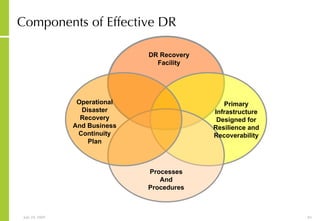
Components of Effective DR DR Recovery Facility Primary Infrastructure Designed for Resilience and Recoverability Processes And Procedures Operational Disaster Recovery And Business Continuity Plan
Components of Effective DR DR Recovery Facility  – this will be the second McNamara site Primary Infrastructure Designed for Recoverability  – this will consist of virtualised infrastructure and backup and recovery tools Processes And Procedures  – this is a set of housekeeping tasks that are followed to ensure recovery is possible Operational Disaster Recovery And Business Continuity Plan  – this is a tested plan to achieve recovery at the DR site
Server Virtualisation and Disaster Recovery Server Virtualisation assists recovery from disaster Changing disaster recovery requirements Higher standards are required More reliability is expected Faster pace of business generates more critical change Intense competitive environment requires high service levels
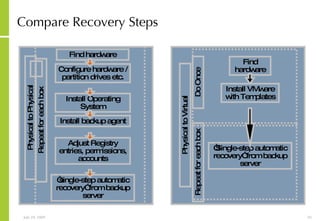
Challenges of Testing Recovery Hardware bottlenecks Need a separate target recovery server for each of the primary servers under test If doing “bare metal” restore, need to locate target recovery hardware matching exactly the primary server configurations Lengthy process with manual interventions Configure hardware and partition drives Install Windows and adjust Registry entries Install backup agent Before recovering automatically with the backup server Personnel not trained Complex processes and limited equipment availability make it difficult to train personnel
Successful Disaster Recovery Ensure successful recovery  Diligent use of a reliable backup tool Regular testing of recovery procedures Meet the TTR/RTO (Time To Recover/Recovery Time Objective) objectives Target recovery hardware available Alternate site available Processes documented and automated Put personnel plan in place Primary and backup DR coordinators designated  and trained Dry runs are conducted regularly
Why Virtual Infrastructure for DR? Hardware Independence Flexibility to restore to any hardware Hardware Consolidation / Pooling / Oversubscription Test recovery of all systems to one physical server Speed up recovery Use pre-configured templates with pre-installed OS & backup agent Single-step simplified capture and recovery Different purposes – same procedures – Staging, Deployment, Disaster Recovery One step system and application recovery No additional licensing requirements for bare metal restore tools More trained personnel available
Disaster Recovery at Lower Cost Hardware / System/ Application independence No need to worry about the exact hardware configuration Flexibility to restore to any hardware Application independent capture and recovery processes Less hardware required at “hot” failover site Support for all capture / replication technologies Tape / Media Disk-based Back up Synchronous or Asynchronous Data Replication
Simplified Processes for Recovery Restore system and application data in one step Single-step simplified capture and recovery One step system and application recovery No Windows registry issues Easy-to-automate recovery No need for 3rd party ‘bare metal’ restore tools Reduce learning and ramp-up Reduce software licensing expense Use the same methodology through application lifecycle Staging /Deployment/ DR Test once – recover anything Application independent recovery means simplified testing
Virtual Hardware for Real Recovery Follow the usual procedure for data backup For recovery Find ONE physical server  Install VMware ESX Server Copy from a template library a virtual machine with the appropriate Windows OS service packs and the Backup Agent pre-installed Register and start VM, edit IP addresses Restore from tape into VM using backup server
Compare Recovery Steps Find hardware Configure hardware / partition drives etc. Install Operating System Adjust Registry entries, permissions, accounts Install backup agent Find hardware Install VMware with Templates “ Single-step automatic recovery” from backup server “ single-step automatic recovery” from backup server Physical to Physical Do Once Repeat for each box Physical to Virtual Repeat for each box
Customer Options for Recovery 1 - Physical to Physical 2 - Physical to Virtual 3 - Virtual to Virtual
Disaster Recovery with SAN Replication Speed up recovery in solutions based on storage replication No need to upgrade secondary site server hardware in lock-step with the primary site Easy to automate and no need for bare metal recovery tools
SAN Replication Issues Hardware Synchronous  – data is written simultaneously to both SANs. The write operation is not completed until both individual writes are completed. This will require a communications link between both sites operating at least 1 Gbps. Asynchronous  – data is not written real-time to the backup unit. Data is buffered and written in blocks. This will require a communications link between both sites operating at least 2 Mbps. Software CommVault QiNetix ContinuousDataReplicator DoubleTake RepliStor WANSync
Virtualisation Resource Allocation and Configuration Analysis How much resources to leave free to cater for server failure? VM1 VM2 VM3 VM4 Limit Threshold  Reservation Threshold  Actual Usage VM5 VM6 VM7 VM8 Server 1 Server 2 HA Cluster
Virtualisation Resource Allocation and Configuration Analysis Critical (or all virtual servers) will be restarted on other physical server(s)  VM1 VM2 VM3 VM4 VM5 VM6 VM7 VM8 Server 1 Server 2 VM1 VM2 VM3 VM4 X HA Cluster
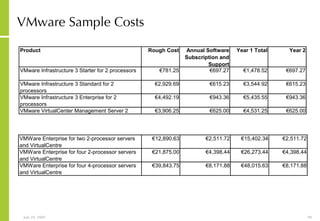
VMware Platforms and Options VMware Infrastructure 3 Starter NAS or local storage No HA, DRS, VCB Restrictions 4 processors 8 GB RAM VMware Infrastructure 3 Standard HA, DRS, VCB available as separate options VMware Infrastructure 3 Enterprise Includes virtual SMP, VMFS, VMotion, HA, DRS, Consolidated Backup VirtualCentre
VMware Sample Costs
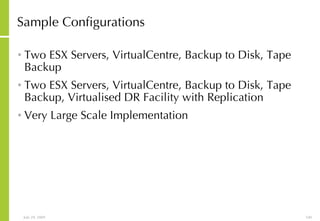
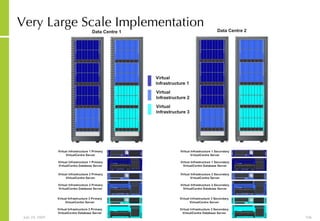
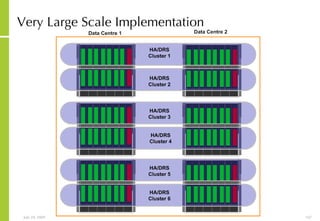
Sample Configurations Two ESX Servers, VirtualCentre, Backup to Disk, Tape Backup Two ESX Servers, VirtualCentre, Backup to Disk, Tape Backup, Virtualised DR Facility with Replication Very Large Scale Implementation
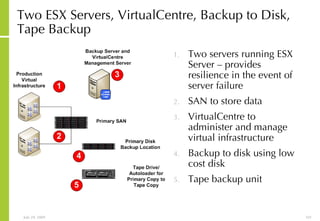
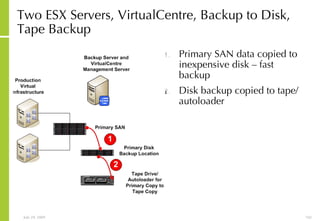
Two ESX Servers, VirtualCentre, Backup to Disk, Tape Backup Two servers running ESX Server – provides resilience in the event of server failure SAN to store data VirtualCentre to administer and manage virtual infrastructure Backup to disk using low cost disk Tape backup unit
Two ESX Servers, VirtualCentre, Backup to Disk, Tape Backup Primary SAN data copied to inexpensive disk – fast backup Disk backup copied to tape/autoloader
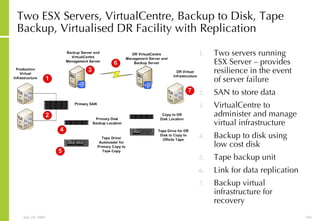
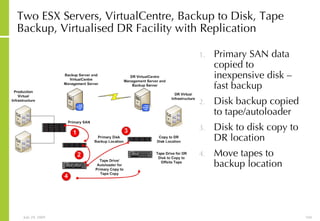
Two ESX Servers, VirtualCentre, Backup to Disk, Tape Backup, Virtualised DR Facility with Replication Two servers running ESX Server – provides resilience in the event of server failure SAN to store data VirtualCentre to administer and manage virtual infrastructure Backup to disk using low cost disk Tape backup unit Link for data replication Backup virtual infrastructure for recovery
Two ESX Servers, VirtualCentre, Backup to Disk, Tape Backup, Virtualised DR Facility with Replication Primary SAN data copied to inexpensive disk – fast backup Disk backup copied to tape/autoloader Disk to disk copy to DR location Move tapes to backup location
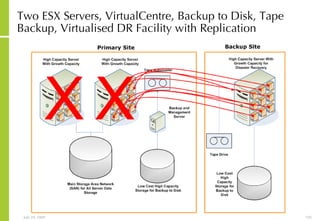
Two ESX Servers, VirtualCentre, Backup to Disk, Tape Backup, Virtualised DR Facility with Replication
Very Large Scale Implementation
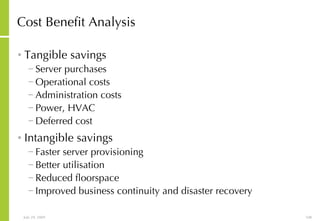
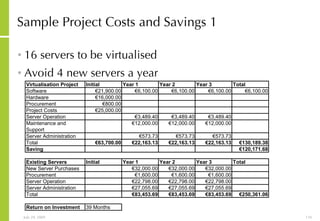
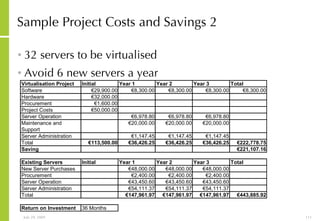
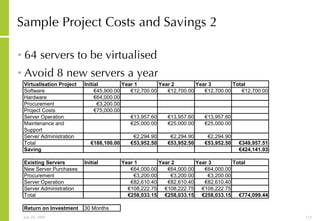
Cost Benefit Analysis Tangible savings Server purchases Operational costs Administration costs Power, HVAC Deferred cost Intangible savings Faster server provisioning Better utilisation Reduced floorspace Improved business continuity and disaster recovery
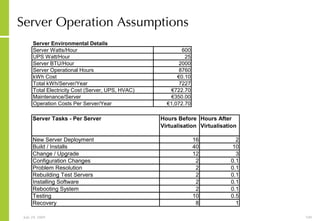
Server Operation Assumptions
Sample Project Costs and Savings 1 16 servers to be virtualised Avoid 4 new servers a year
Sample Project Costs and Savings 2 32 servers to be virtualised Avoid 6 new servers a year
Sample Project Costs and Savings 2 64 servers to be virtualised Avoid 8 new servers a year
SAN Options and Vendors
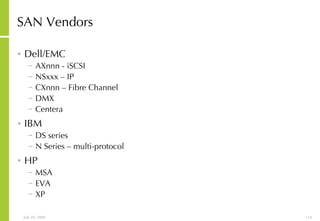
SAN Vendors Dell/EMC AXnnn - iSCSI NSxxx – IP  CXnnn – Fibre Channel DMX Centera IBM DS series N Series – multi-protocol HP MSA EVA XP
System Center Operations Manager (SCOM)
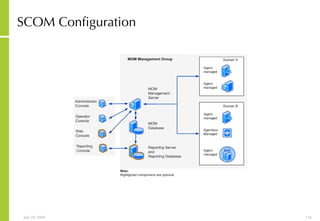
SCOM Configuration
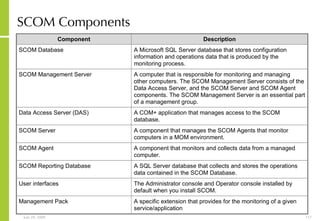
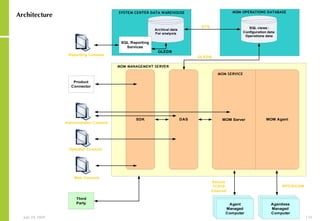
SCOM Components
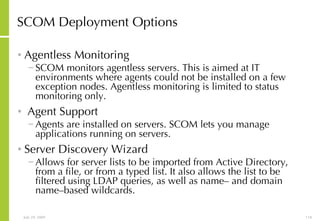
SCOM Deployment Options Agentless Monitoring SCOM monitors agentless servers. This is aimed at IT environments where agents could not be installed on a few exception nodes. Agentless monitoring is limited to status monitoring only. Agent Support Agents are installed on servers. SCOM lets you manage applications running on servers. Server Discovery Wizard Allows for server lists to be imported from Active Directory, from a file, or from a typed list. It also allows the list to be filtered using LDAP queries, as well as name– and domain name–based wildcards.
Architecture
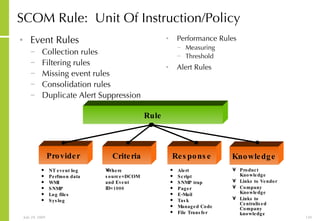
SCOM Rule:  Unit Of Instruction/Policy Event Rules Collection rules Filtering rules Missing event rules Consolidation rules Duplicate Alert Suppression Performance Rules Measuring Threshold Alert Rules Rule Provider NT event log Perfmon data WMI SNMP Log files Syslog Criteria Response Alert Script SNMP trap Pager E-Mail Task Managed Code File Transfer Where source=DCOM and Event ID=1006 Knowledge Product Knowledge Links to Vendor  Company Knowledge Links to Centralised Company  knowledge
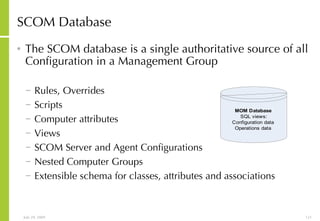
SCOM Database The SCOM database is a single authoritative source of all Configuration in a Management Group Rules, Overrides Scripts Computer attributes Views SCOM Server and Agent Configurations Nested Computer Groups Extensible schema for classes, attributes and associations
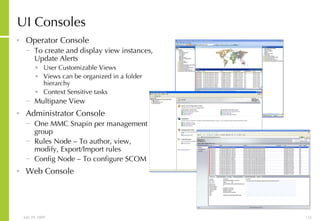
UI Consoles  Operator Console  To create and display view instances, Update Alerts User Customizable Views  Views can be organized in a folder hierarchy Context Sensitive tasks Multipane View Administrator Console One MMC Snapin per management group Rules Node – To author, view, modify, Export/Import rules Config Node – To configure SCOM Web Console
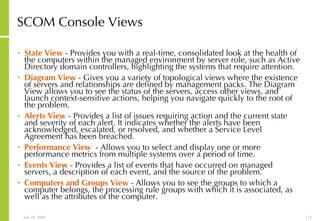
SCOM Console Views State View  - Provides you with a real-time, consolidated look at the health of the computers within the managed environment by server role, such as Active Directory domain controllers, highlighting the systems that require attention.  Diagram View  - Gives you a variety of topological views where the existence of servers and relationships are defined by management packs. The Diagram View allows you to see the status of the servers, access other views, and launch context-sensitive actions, helping you navigate quickly to the root of the problem.  Alerts View  - Provides a list of issues requiring action and the current state and severity of each alert. It indicates whether the alerts have been acknowledged, escalated, or resolved, and whether a Service Level Agreement has been breached. Performance View   - Allows you to select and display one or more performance metrics from multiple systems over a period of time.  Events View  - Provides a list of events that have occurred on managed servers, a description of each event, and the source of the problem. Computers and Groups View  - Allows you to see the groups to which a computer belongs, the processing rule groups with which it is associated, as well as the attributes of the computer.
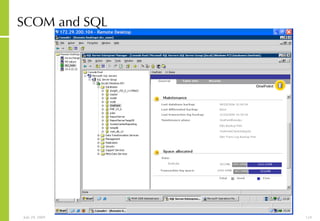
SCOM and SQL
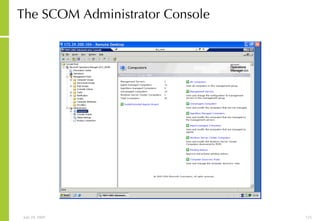
The SCOM Administrator Console
SCOM Management Packs SCOM management packs provide built-in, product-specific operations knowledge for a wide variety of server applications Management packs contain rules for monitoring an array of server health indicators and creating alerts when problems are detected or reasonable thresholds are exceeded Monitoring capability is extended by knowledge base content, prescriptive guidance, and actionable tasks that can be associated directly with the relevant alerts included in the management packs Administrators can then act to prevent or correct situations, such as degraded performance or service interruption, maintaining service availability with greater ease and reliability
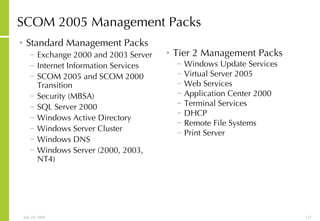
SCOM 2005 Management Packs Standard Management Packs Exchange 2000 and 2003 Server Internet Information Services  SCOM 2005 and SCOM 2000  Transition  Security (MBSA) SQL Server 2000 Windows Active Directory Windows Server Cluster Windows DNS Windows Server (2000, 2003, NT4) Tier 2 Management Packs Windows Update Services Virtual Server 2005 Web Services Application Center 2000 Terminal Services DHCP Remote File Systems Print Server
Management Packs Management Pack imported via SCOM Server Discovery finds computers in need of a given Management Pack  SCOM deploys appropriate Management Packs  No need to touch managed nodes to install  Management Packs  Rules:  Implement all SCOM monitoring behavior Watch  for indicators of problems Verify  key elements of functionality Management Packs provide a  definition of  server health
Management Pack Features Alerts :   Calls attention to critical events that require administrator intervention  Product Knowledge:  Provides guidance for administrators to resolve outstanding alerts  Views :   Provide targeted drill down details about server health Performance plots, collections of specific events/alerts, groups of servers , topology, etc. State Monitoring :   At a glance view of the state of my servers and applications by server role Detail to component level Tasks :   Enable administrators to investigate and repair issues from the SCOM console Context sensitive diagnostics and remediation Reports :   Historical data analytics Assess operations performance and capacity planning
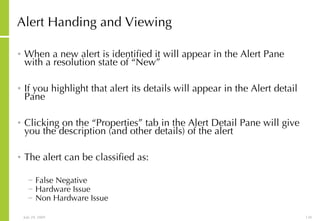
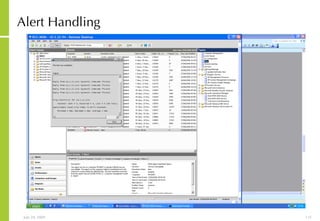
Alert Handing and Viewing When a new alert is identified it will appear in the Alert Pane with a resolution state of “New” If you highlight that alert its details will appear in the Alert detail Pane Clicking on the “Properties” tab in the Alert Detail Pane will give you the description (and other details) of the alert The alert can be classified as: False Negative Hardware Issue Non Hardware Issue
Alert Handling
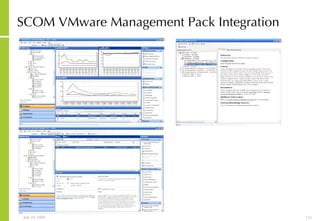
SCOM VMware Management Pack Integration
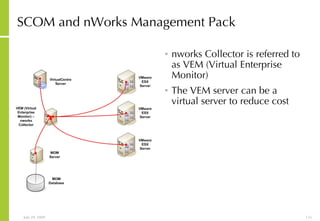
SCOM and nWorks Management Pack nworks Collector is referred to as VEM (Virtual Enterprise Monitor) The VEM server can be a virtual server to reduce cost
Enabling Greater Resource Utilisation Through Storage System Virtualisation
What is “Storage Virtualisation”? Abstracted Physical Storage Storage Pools Created from Physical Blocks of Storage Virtual Disks created from Storage Pool Physical Devices and Capacity Distribution Transparent to Servers and Applications
Why Is Storage Virtualisation so Critical?
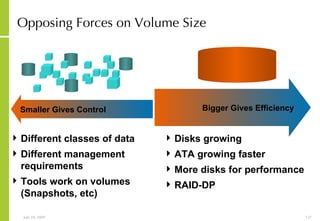
Opposing   Forces on Volume Size Bigger Gives Efficiency Disks growing ATA growing faster More disks for performance RAID-DP Smaller Gives Control Different classes of data Different management requirements Tools work on volumes (Snapshots, etc)
The Problem: Volumes Tied to Disks What we’ve got today: Small volumes are impractical Large volumes are hard to manage What we’d like: Manage volumes separately from physical disks Volumes for data; aggregates for disks
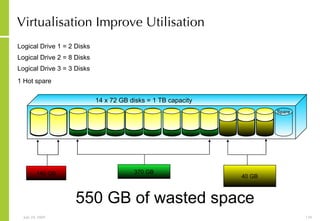
Virtualisation Improve Utilisation Spare Logical Drive 1 = 2 Disks  Logical Drive 2 = 8 Disks Logical Drive 3 = 3 Disks 1 Hot spare 550 GB of wasted space 14 x 72 GB disks = 1 TB capacity Vol 0 Data Parity Database Data Data Data Data Data Data Data Parity Home Directories Data Data Parity 140 GB 370 GB 40 GB
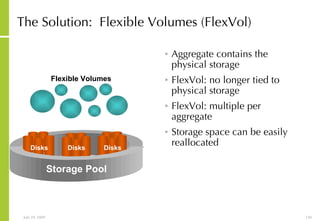
The Solution:  Flexible Volumes (FlexVol) Aggregate contains the physical storage FlexVol: no longer tied to physical storage FlexVol: multiple per aggregate Storage space can be easily reallocated Storage Pool Disks Disks Disks Flexible Volumes
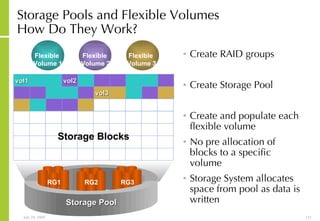
Storage Pools and Flexible Volumes How Do They Work? Create RAID groups Create Storage Pool Create and populate each flexible volume No pre allocation of blocks to a specific volume Storage System allocates space from pool as data is written vol2 vol3 RG1 RG2 RG3 Storage Blocks Storage Pool RG1 RG2 RG3 Flexible  Volume 1 Flexible  Volume 2 Flexible  Volume 3 vol1
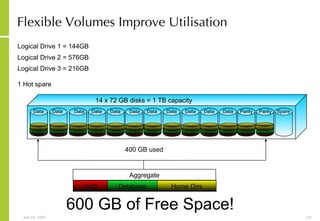
Flexible Volumes Improve Utilisation  Logical Drive 1 = 144GB  Logical Drive 2 = 576GB Logical Drive 3 = 216GB 1 Hot spare Spare Database Home Dirs Vol0 400 GB used 600 GB of Free Space! 14 x 72 GB disks = 1 TB capacity Data Data Data Data Data Data Data Data Data Data Data Parity Parity Aggregate
Flexible Volume Data Management Benefits Distinct containers (volumes) for distinct datasets Flexible Volumes resize to meet space requirements, simple command to adjust size (grow / shrink) Soft allocation of volumes and LUNs Free space flows among all Flexible Volumes in a storage pool; space reallocation without any overhead Flexible Volumes can be:  SnapManaged independently Backed up independently Restored without affecting other Flexible Volumes
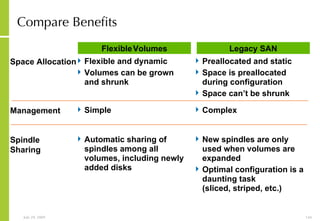
Compare Benefits Space Allocation Flexible and dynamic Volumes can be grown and shrunk Management Spindle Sharing Preallocated and static Space is preallocated during configuration Space can’t be shrunk Simple Complex Automatic sharing of spindles among all volumes, including newly added disks New spindles are only used when volumes are expanded Optimal configuration is a daunting task (sliced, striped, etc.) Flexible   Volumes Legacy SAN
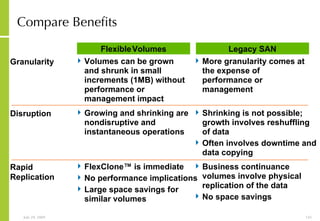
Compare Benefits Granularity Volumes can be grown and shrunk in small increments (1MB) without performance or management impact Disruption Rapid Replication More granularity comes at the expense of performance or management Growing and shrinking are nondisruptive and instantaneous operations Shrinking is not possible; growth involves reshuffling of data Often involves downtime and data copying FlexClone ™  is immediate No performance implications Large space savings for similar volumes Business continuance volumes involve physical replication of the data No space savings Flexible   Volumes Legacy SAN
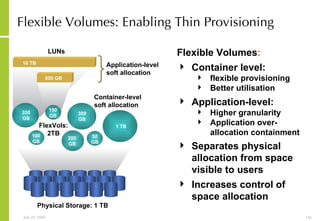
Flexible Volumes: Enabling Thin Provisioning Flexible Volumes : Container level: flexible provisioning Better utilisation Physical Storage: 1 TB FlexVols: 2TB Container-level soft allocation 1 TB 300 GB 200 GB 200 GB 50 GB 150 GB 100 GB Application-level: Higher granularity Application over-allocation containment Separates physical allocation from space visible to users Increases control of space allocation LUNs Application-level soft allocation 10 TB 800 GB
Managing Complexity through Storage Virtualisation
Unified Management Storage management and administration is very vendor specific Most vendors require different skills for different storage systems Hardware is not cross compatible
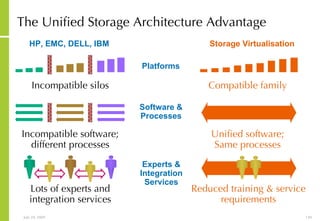
The Unified Storage Architecture Advantage Incompatible silos Compatible family Platforms HP, EMC, DELL, IBM Storage Virtualisation Software & Processes Incompatible software; different processes Unified software; Same processes Experts & Integration Services Lots of experts and integration services Reduced training & service requirements
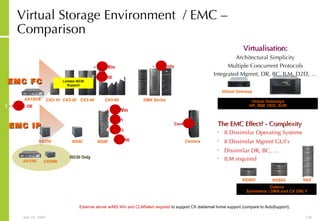
Virtual Storage Environment  / EMC – Comparison Virtualisation: Architectural Simplicity Multiple Concurrent Protocols Integrated Mgmnt, DR, BC, ILM, D2D, … Celerra Symmetrix / DMX and CX ONLY Virtual Gateways HP, IBM, HDS, SUN The EMC Effect? - Complexity 8 Dissimilar Operating Systems 8 Dissimilar Mgmnt GUI’s Dissimilar DR, BC, … ILM required CentraStar  -  6 1  -   FLARE OE 5  -  Enginuity 2  -  FLARE 8  -   MS Win 3  -  Dart 4  -  RHEL 2  -  FLARE 8  -   MS Win External server w/MS Win and CLARalert required  to support CX dial/email home support (compare to AutoSupport). Virtual Gateway Limited iSCSI Support DMX Series CX3-20 CX3-40 AX150/S EMC FC CX3-80 CX3-10 NS40G NSX NS80G Centera CX300i AX150i iSCSI Only EMC IP NS80 NS40 NS350
Managing Disk Based Backup Through Storage Virtualisation Single Instance Storage (Deduplication)
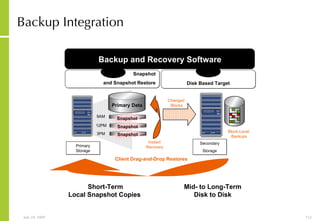
Backup Integration Snapshot and  Snapshot Restore Backup and Recovery Software Disk Based Target  Secondary Storage Short-Term Local Snapshot Copies   Mid- to Long-Term Disk to Disk Block-Level  Backups Client Drag-and-Drop Restores Changed  Blocks Primary Data 9AM 12PM 3PM Snapshot Snapshot Snapshot Primary Storage Instant Recovery
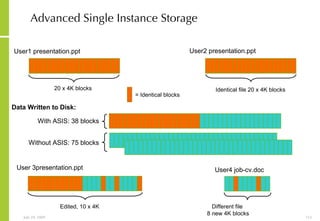
Advanced Single Instance Storage User1 presentation.ppt 20 x 4K blocks User2 presentation.ppt Identical file 20 x 4K blocks User 3presentation.ppt Edited, 10 x 4K User4 job-cv.doc Different file  8 new 4K blocks = Identical blocks Data Written to Disk: With ASIS: 38 blocks Without ASIS: 75 blocks
Enabling greater Data Management Through Storage System SnapShots
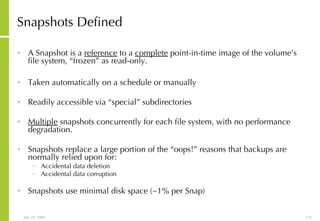
Snapshots Defined A Snapshot is a  reference  to a  complete  point-in-time image of the volume’s file system, “frozen” as read-only. Taken automatically on a schedule or manually Readily accessible via “special” subdirectories Multiple  snapshots concurrently for each file system, with no performance degradation. Snapshots replace a large portion of the “oops!” reasons that backups are normally relied upon for: Accidental data deletion Accidental data corruption Snapshots use minimal disk space (~1% per Snap)
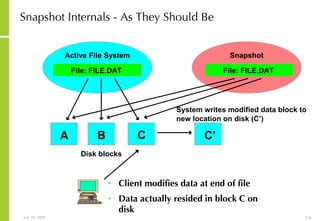
Snapshot Internals - As They Should Be Client modifies data at end of file Data actually resided in block C on disk System writes modified data block to new location on disk (C’) C’ Snapshot File: FILE.DAT A B C Active File System File: FILE.DAT Disk blocks
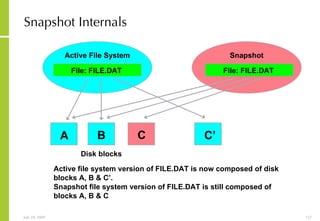
Snapshot   Internals Active file system version of FILE.DAT is now composed of disk blocks A, B & C’. Snapshot file system version of FILE.DAT is still composed of blocks A, B & C C’ Snapshot File: FILE.DAT A B C Active File System File: FILE.DAT Disk blocks
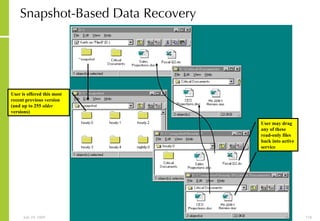
Snapshot-Based Data Recovery User is offered this most recent previous version (and up to 255  older  versions) User may drag any of these read-only files back into active service
Snapshots are State-of-the-Art Data Protection Snapshots should be near instantaneous! To create a point-in-time Snapshot copy requires copying a simple data structure, not copying the entire data volume Additional storage is expended incrementally only for changed blocks only as data changes, not at Snapshot creation time Avoids the significant costs associated with the I/O bandwidth, downtime, CPU cycles dedicated to copying and managing entire volumes
Not all Snapshots Are Equal   What is the disk storage requirement to maintain online data copies?  Will a planned or unplanned or "dirty" system shutdown lose existing data copies?  What is the overall performance impact with snapshots enabled?  How many data copies can be maintained online?  Is the reserve area fixed?  Can this "save area" be re-sized on the fly?  Are data copies automatically deleted once the save area is full? What is the answer to file system recovery?  Do they feature a SnapRestore-like capability?  Are snapshots a chargeable item?  How much?  What is the pricing model?  Is this snapshot method supported across the vendor's entire product line?  Questions to ask regarding storage system data copy techniques:
Enabling Greater Application Resilience Through SnapShot Technologies
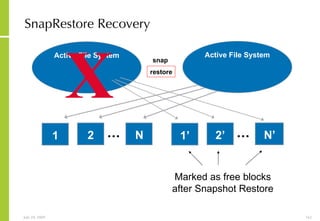
SnapRestore Recovery snap X restore … Snapshot  Active File System 2 N Active File System 1 2’ N’ 1’ … Marked as free blocks after Snapshot Restore
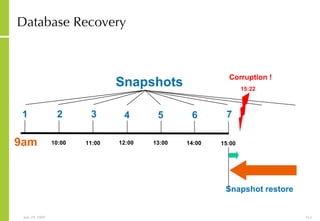
Database Recovery 9am 5pm 10:00 11:00 12:00 13:00 14:00 15:00 16:00 Snapshots 1 2 3 4 5 6 7 8 9 15:22 Corruption ! Snapshot restore
Enabling Greater Data Resilience Through Storage System Mirroring
Storage Mirroring Storage Mirroring Synchronous Semi Synchronous Asynchronous
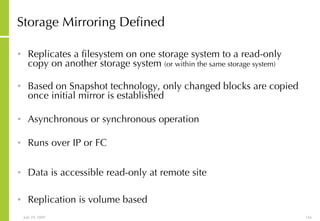
Storage Mirroring Defined Replicates a filesystem on one storage system to a read-only copy on another storage system  (or within the same storage system) Based on Snapshot technology, only changed blocks are copied once initial mirror is established Asynchronous or synchronous operation Runs over IP or FC Data is accessible read-only at remote site Replication is volume based
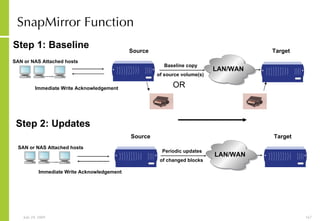
SnapMirror Function SAN or NAS Attached hosts Source Source Step 1: Baseline Step 2: Updates Target LAN/WAN Target LAN/WAN SAN or NAS Attached hosts OR Immediate Write Acknowledgement Immediate Write Acknowledgement … ... of source volume(s) Baseline copy … ... of changed blocks Periodic updates
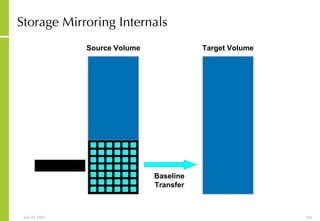
Storage Mirroring Internals Source Volume Target Volume Snap A Baseline Transfer
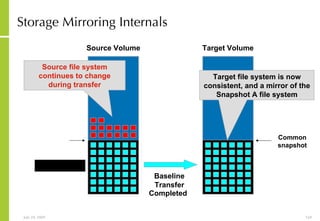
Storage Mirroring Internals Source Volume Target Volume Completed Target file system is now consistent, and a mirror of the Snapshot A file system Source file system continues to change during transfer Snap A Baseline Transfer Common snapshot
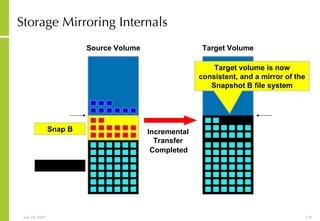
Storage Mirroring Internals Source Volume Target Volume Snap B Target volume is now consistent, and a mirror of the Snapshot B file system Completed Incremental Transfer Snap A
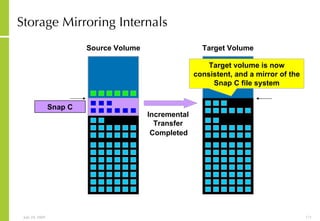
Storage Mirroring Internals Source Volume Target Volume Snap C Completed Target volume is now consistent, and a mirror of the Snap C file system Incremental Transfer
Storage Mirroring   Applications Data replication for local read access at remote sites Slow access to corporate data is eliminated Offload tape backup CPU cycles to mirror Isolate testing from production volume ERP testing, Offline Reporting Cascading Mirrors Replicated mirrors on a larger scale Disaster recovery Replication to “hot site” for mirror failover and eventual recovery
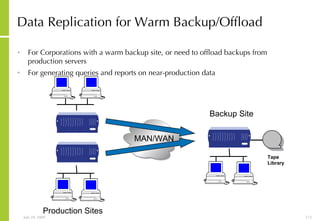
Data Replication for Warm Backup/Offload   For Corporations with a warm backup site, or need to offload backups from production servers For generating queries and reports on near-production data MAN/WAN Backup Site Production Sites Tape Library
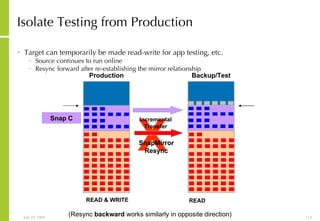
Isolate Testing from Production Target can temporarily be made read-write for app testing, etc. Source continues to run online Resync forward after re-establishing the mirror relationship & WRITE READ Production Backup/Test READ & WRITE X Snap C (Resync  backward  works similarly in opposite direction) SnapMirror Incremental Transfer SnapMirror Resync
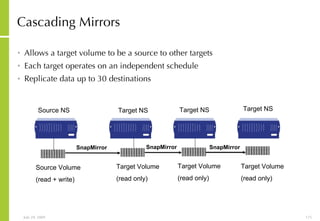
Cascading Mirrors Allows a target volume to be a source to other targets Each target operates on an independent schedule Replicate data up to 30 destinations Source NS Source Volume (read + write) SnapMirror Target NS Target Volume (read only) SnapMirror Target NS Target Volume (read only) SnapMirror Target NS Target Volume (read only)
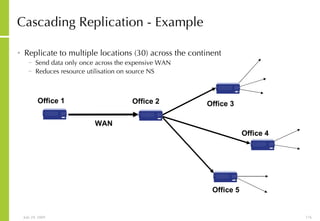
Cascading Replication - Example Replicate to multiple locations (30) across the continent Send data only once across the expensive WAN Reduces resource utilisation on source NS WAN Office 1 Office 2 Office 5 Office 4 Office 3
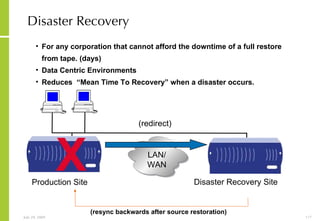
Disaster Recovery LAN/WAN For any corporation that cannot afford the downtime of a full restore from tape. (days) Data Centric Environments Reduces  “Mean Time To Recovery” when a disaster occurs. Production Site Disaster Recovery Site (redirect) (resync backwards after source restoration) X
Easing the Pain of Development Through SnapShot Cloning
Cloning SnapShots Write enables SnapShots Enables multiple, instant data set clones with no storage overhead  Provides dramatic improvement for application test and development environments Renders alternative methods archaic
Cloned SnapShot Volumes: Ideal for Managing Production Data Sets Error containment Bug fixing Platform upgrades ERP CRM Multiple simulations against a large data set
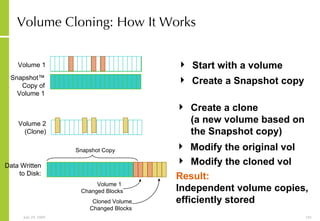
Volume Cloning: How It Works Start with a volume Volume 1 Volume 2 (Clone) Create a clone (a new volume based on the Snapshot copy) Snapshot™ Copy of Volume 1 Create a Snapshot copy Result:   Independent volume copies, efficiently stored Modify the cloned vol Modify the original vol Data Written to Disk: Snapshot Copy Cloned Volume Changed Blocks Volume 1  Changed Blocks
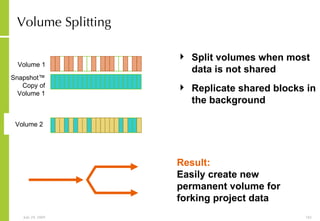
Volume Splitting Split volumes when most data is not shared Volume 1 Snapshot ™ Copy  of Volume 1 Replicate shared blocks in the background Volume 2 Result:   Easily create new permanent volume for forking project data
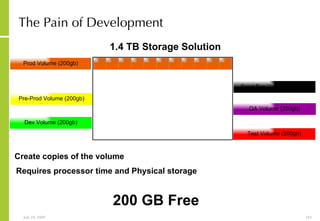
The Pain of Development Prod Volume (200gb) Pre-Prod Volume (200gb) QA Volume (200gb) Dev Volume (200gb) Test Volume (200gb) Sand Box Volume (200gb) 1.4 TB Storage Solution 200 GB Free Create copies of the volume Requires processor time and Physical storage
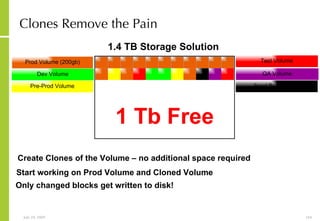
Clones Remove the Pain Prod Volume (200gb) Pre-Prod Volume QA Volume Dev Volume Test Volume Sand Box Volume 1.4 TB Storage Solution Create Clones of the Volume – no additional space required Start working on Prod Volume and Cloned Volume Only changed blocks get written to disk! 1 Tb Free
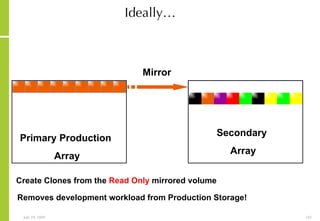
Ideally… Primary Production  Array Secondary  Array Mirror Create Clones from the  Read Only  mirrored volume Removes development workload from Production Storage!
Rapid Microsoft Exchange Recovery through Storage Systems Technologies
Why use Storage Systems Series for Exchange Data? Just a few off the top… Snapshot copies “snapshots” Data and snapshot management, replication Flexible and easy, dynamic provisioning Performance iSCSI, cost effective and gaining on Fibre Channel Excellent high-end FCP, clustering and MPIO options Tight Windows OS (incl. MSCS) and Exchange 5.5., 2000, 2003 and 2007 Server integration (SME, VSS on Windows 2003, etc.)
Required Storage Software for Exchange SnapShot Management Rapid online backups and restores—integrates with Exchange backup API; runs ESEFILE verification; automates log replay  Intuitive GUI and wizards for configuration, backup, and restore Server Based Connection Manager Dynamic disk and volume expansion Supports both Ethernet and Fibre Channel environments Supports MSCS and NS Series CFO for high availability Single mailbox recovery software Restores single message, mailbox, or folder from a Snapshot ™  backup to a live Exchange server or a .pst file
Effective SnapShot Management with Exchange Manages the entire snapshot backup process Backup and restore Exchange storage groups  Backups may be scheduled Each backup is a “full” Exchange backup and is verified using MS provided software, which is integrated into the storage system
SnapShot Management with Exchange Overview Interacts with Exchange using Exchange backup APIs interacts with VSS SnapShot Management is VSS requestor Exchange is VSS writer Storage System is VSS hardware provider Provides point-in-time and up-to-the-minute recovery using snapshots and Exchange database transaction logs
SnapShot Mirroring SnapShot Mirroring Automatic mirroring of Exchange data to remote site  Volume based mirroring Occurs immediately following a Exchange backup and is initiated by Exchange Server Can replicate over LAN or WAN Only changed blocks since previous mirror are replicated Rate of replication can be throttled to minimize impact on network
Single Mailbox Recovery Allows restores of individual items form Exchange backups in minutes compared to hours or days Single mailbox recovery is the most requested feature by Exchange customers
Single Mailbox Restore (Exchange) PowerControls Software Quickly access Exchange data already stored in the online snapshot backups Select any data, down to a single message Restore the data to one of two locations: An offline mail file (.PST personal storage file) which can be opened in MS Outlook Connect to a live Exchange server and copy data directly into the users mailbox, making it instantly available
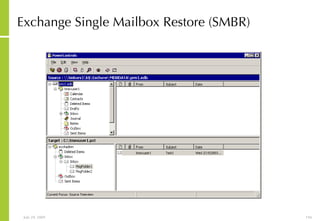
Exchange Single Mailbox Restore (SMBR)
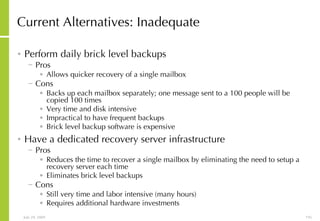
Current Alternatives: Inadequate Perform daily brick level backups Pros Allows quicker recovery of a single mailbox Cons Backs up each mailbox separately; one message sent to a 100 people will be copied 100 times Very time and disk intensive Impractical to have frequent backups  Brick level backup software is expensive Have a dedicated recovery server infrastructure Pros Reduces the time to recover a single mailbox by eliminating the need to setup a recovery server each time Eliminates brick level backups Cons Still very time and labor intensive (many hours) Requires additional hardware investments
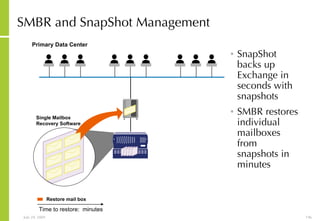
SMBR and SnapShot Management SnapShot backs up Exchange in seconds with snapshots SMBR restores individual mailboxes from snapshots in minutes Primary Data Center Single Mailbox Recovery Software Time to restore:  minutes Restore mail box
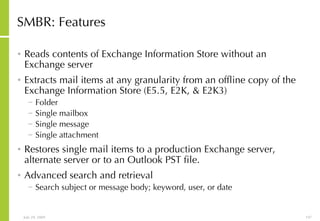
SMBR: Features Reads contents of Exchange Information Store without an Exchange server  Extracts mail items at any granularity from an offline copy of the Exchange Information Store (E5.5, E2K, & E2K3) Folder Single mailbox Single message Single attachment Restores single mail items to a production Exchange server, alternate server or to an Outlook PST file. Advanced search and retrieval Search subject or message body; keyword, user, or date
SMBR: Benefits Dramatically reduces the time required for single mailbox and single message recovery From hours or days to just minutes  Simplifies the most dreaded task by Exchange administrators Eliminates the need for expensive, cumbersome and disk-intensive daily brick level backups Eliminates the need for recovery server infrastructure Allows easy search and discovery of email messages and attachments
Rapid Microsoft SQL Recovery through Storage Systems Technologies
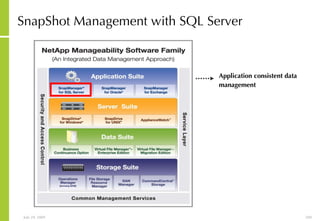
SnapShot Management with SQL Server Application consistent data management
SnapShot Management with SQL Server Provides integrated data management for SQL Server 2000 and SQL Server 2005 databases Automated, fast, and space-efficient backups using Snapshots Automated, fast, and granular restore and recovery using SnapShot restore technologies Integrated with storage system Mirroring for database replication Provides tight integration with Microsoft technologies such as MSCS, Volume Mount Points.
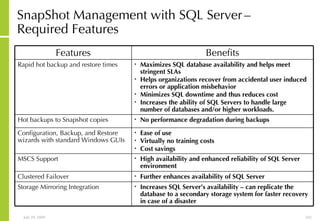
SnapShot Management with SQL Server   – Required Features Further enhances availability of SQL Server Clustered Failover Increases SQL Server’s availability – can replicate the database to a secondary storage system for faster recovery in case of a disaster Storage Mirroring Integration High availability and enhanced reliability of SQL Server environment MSCS Support Ease of use Virtually no training costs  Cost savings Configuration, Backup, and Restore wizards with standard Windows GUIs No performance degradation during backups Hot backups to Snapshot copies Maximizes SQL database availability and helps meet stringent SLAs Helps organizations recover from accidental user induced errors or application misbehavior Minimizes SQL downtime and thus reduces cost Increases the ability of SQL Servers to handle large number of databases and/or higher workloads. Rapid hot backup and restore times Benefits Features
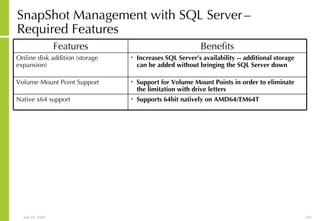
SnapShot Management with SQL Server   – Required Features Supports 64bit natively on AMD64/EM64T Native x64 support Increases SQL Server’s availability -- additional storage can be added without bringing the SQL Server down Online disk addition (storage expansion) Support for Volume Mount Points in order to eliminate the limitation with drive letters Volume Mount Point Support Benefits Features
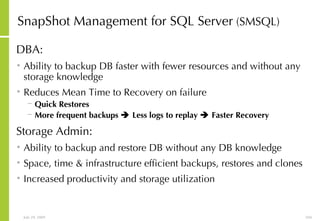
SnapShot Management for SQL Server  (SMSQL) DBA: Ability to backup DB faster with fewer resources and without any storage knowledge Reduces Mean Time to Recovery on failure Quick Restores More frequent backups    Less logs to replay    Faster Recovery Storage Admin: Ability to backup and restore DB without any DB knowledge Space, time & infrastructure efficient backups, restores and clones Increased productivity and storage utilization
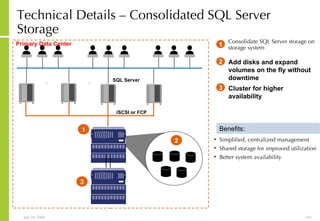
Technical Details – Consolidated SQL Server Storage Primary Data Center SQL Server iSCSI or FCP 1 Benefits: Simplified, centralized management Shared storage for improved utilization Better system availability Consolidate SQL Server storage on storage system 1 2 2 Add disks and expand volumes on the fly without downtime 3 3 Cluster for higher availability
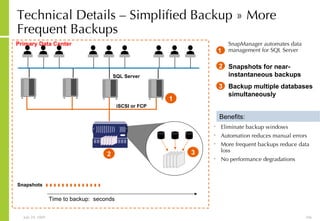
Technical Details – Simplified Backup » More Frequent Backups Primary Data Center iSCSI or FCP SQL Server Eliminate backup windows Automation reduces manual errors More frequent backups reduce data loss No performance degradations Benefits: SnapManager automates data management for SQL Server 1 1  Time to backup:  seconds Snapshots 2 2 Snapshots for near-instantaneous backups 3 3 Backup multiple databases simultaneously
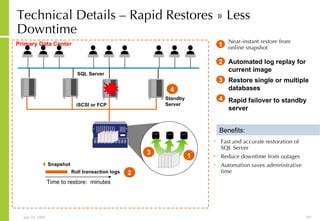
Technical Details – Rapid Restores » Less Downtime Primary Data Center Time to restore:  minutes iSCSI or FCP SQL Server Standby Server Fast and accurate restoration of SQL Server  Reduce downtime from outages Automation saves administrative time Benefits: Near-instant restore from online snapshot Snapshot 1 1 Roll transaction logs 2 2 Automated log replay for current image 3 3 Restore single or multiple databases 4 4 Rapid failover to standby server
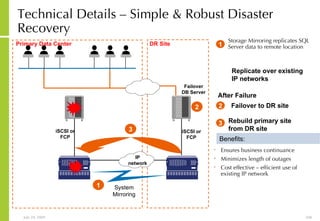
Technical Details – Simple & Robust Disaster Recovery Primary Data Center DR Site iSCSI or FCP iSCSI or FCP Failover DB Server IP network Ensures business continuance Minimizes length of outages Cost effective – efficient use of existing IP network Benefits: System Mirroring 1 Storage Mirroring replicates SQL Server data to remote location 1 Replicate over existing  IP networks 2 2 Failover to DR site After Failure 3 Rebuild primary site from DR site 3
Technical Details – Volume Mount Point (VMP) Support Drive letter limitations in SMSQL Only 26 available drive letters in a system. Minimum for 2 LUNs required for database migration. Limitation for customers who have hundreds of databases. The customer might not want to have multiple databases on one/two LUN. Again one database might span multiple LUNs. LUN restore is performed on whole disk. To support individual database restore, each database will require its own LUN and drive letter. Verification will fail on Local server if free drive letter exhausts.
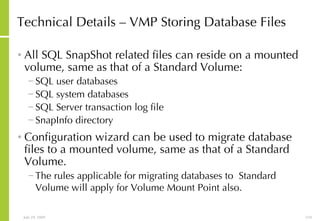
Technical Details – VMP Storing Database Files All SQL SnapShot related files can reside on a mounted volume, same as that of a Standard Volume: SQL user databases SQL system databases  SQL Server transaction log file SnapInfo directory Configuration wizard can be used to migrate database files to a mounted volume, same as that of a Standard Volume. The rules applicable for migrating databases to  Standard Volume will apply for Volume Mount Point also.
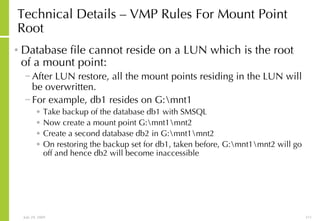
Technical Details – VMP Rules For Mount Point Root Database file cannot reside on a LUN which is the root of a mount point: After LUN restore, all the mount points residing in the LUN will be overwritten.  For example, db1 resides on G:\mnt1 Take backup of the database db1 with SMSQL Now create a mount point G:\mnt1\mnt2 Create a second database db2 in G:\mnt1\mnt2 On restoring the backup set for db1, taken before, G:\mnt1\mnt2 will go off and hence db2 will become inaccessible
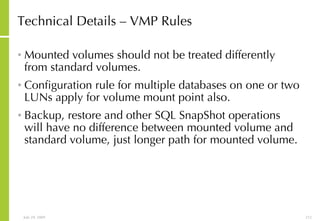
Technical Details – VMP Rules Mounted volumes should not be treated differently from standard volumes. Configuration rule for multiple databases on one or two LUNs apply for volume mount point also. Backup, restore and other SQL SnapShot operations will have no difference between mounted volume and standard volume, just longer path for mounted volume.
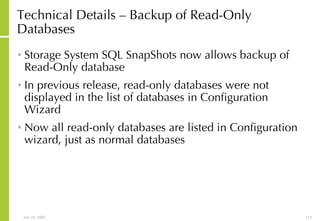
Technical Details – Backup of Read-Only Databases Storage System SQL SnapShots now allows backup of Read-Only database In previous release, read-only databases were not displayed in the list of databases in Configuration Wizard Now all read-only databases are listed in Configuration wizard, just as normal databases
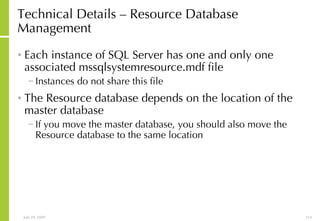
Technical Details – Resource Database Management Each instance of SQL Server has one and only one associated mssqlsystemresource.mdf file  Instances do not share this file The Resource database depends on the location of the master database If you move the master database, you should also move the Resource database to the same location
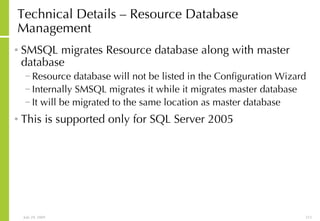
Technical Details – Resource Database Management SMSQL migrates Resource database along with master database Resource database will not be listed in the Configuration Wizard Internally SMSQL migrates it while it migrates master database It will be migrated to the same location as master database This is supported only for SQL Server 2005
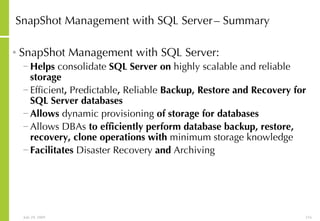
SnapShot Management with SQL Server   – Summary SnapShot Management with SQL Server: Helps  consolidate  SQL Server on  highly scalable and reliable  storage Efficient ,  Predictable ,  Reliable  Backup, Restore and Recovery for SQL Server databases Allows  dynamic provisioning  of storage for databases Allows DBAs  to efficiently perform database backup, restore, recovery, clone operations with  minimum storage knowledge Facilitates  Disaster Recovery  and  Archiving
Rapid Recovery of Oracle DB Through Storage Systems Technologies
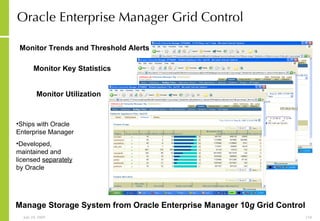
Oracle Enterprise Manager Grid Control Monitor Trends and Threshold Alerts Monitor Key Statistics Monitor Utilization Ships with Oracle Enterprise Manager Developed, maintained and licensed  separately  by Oracle  Manage Storage System from Oracle Enterprise Manager 10 g  Grid Control
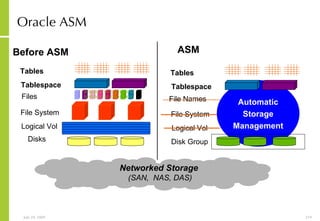
Oracle ASM Automatic Storage Management Disks   Logical Vol   File System   Files  Tablespace Tables Disk Group   Logical Vol   File System   File Names  Tablespace Tables Before ASM ASM Networked Storage  (SAN,  NAS, DAS) 0010 0010 0010 0010 0010 0010 0010 0010 0010 0010
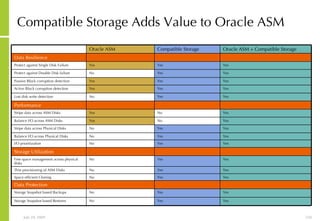
Compatible Storage Adds Value to Oracle ASM Yes Yes Yes Yes Yes Yes Yes Yes No No Yes Yes Yes Yes Yes Compatible Storage Yes No Thin provisioning of ASM Disks Yes No Space efficient Cloning Yes No Free space management across physical disks Yes No I/O prioritization Yes No Balance I/O across Physical Disks Yes No Stripe data across Physical Disks Yes Yes Balance I/O across ASM Disks Yes Yes Stripe data across ASM Disks Yes Yes Active Block corruption detection Yes Yes Passive Block corruption detection Yes No Lost disk write detection Yes Yes Protect against Single Disk Failure Yes No Storage Snapshot based Restores Yes No Storage Snapshot based Backups Data Protection Storage Utilization Performance Yes No Protect against Double Disk failure Data Resilience Oracle ASM + Compatible Storage Oracle ASM
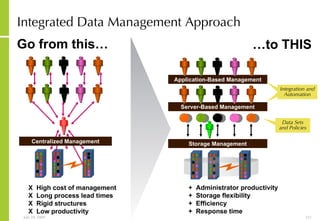
Integrated Data Management Approach Go from this… Centralized Management X  High cost of management X  Long process lead times X  Rigid structures X  Low productivity +  Administrator productivity +  Storage flexibility +  Efficiency +  Response time … to THIS Server-Based Management Application-Based Management Storage Management Integration and Automation Data Sets and Policies
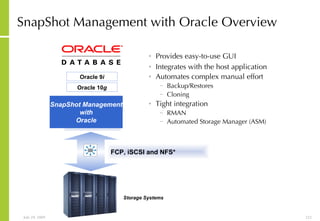
SnapShot Management with Oracle Overview Provides easy-to-use GUI Integrates with the host application Automates complex manual effort Backup/Restores Cloning Tight integration RMAN Automated Storage Manager (ASM) SnapDrive Oracle 10 g Oracle 9 i Storage Systems SnapShot Management with Oracle FCP, iSCSI and NFS*
SnapShot Management with Oracle Database cloning Ability to clone consistent copies of online databases GUI support for cloning  Added support for context sensitive cloning Increased footprint of platforms and protocols   Support for additional flavors of Unix SuSE 9, RHEL3/4 U3+, Solaris 9/10 32-bit and 64-bit  NFS, iSCSI and FCP for various Unix platforms HP-UX and AIX (NFS) (Refer to compatibility matrix for specific details) Product hardening Increased product stability and usability Improved performance by utilizing snapshot vs. safecopy Increase performance when dealing with high number of archive logs
SnapShot Management with Oracle Database cloning to remote hosts Ability to clone consistent copies of to remote hosts Previously clones were assigned to the host (with SMO) that initiated the cloning request Increased footprint of platforms and protocols   HP-UX and AIX support across NFS, iSCSI and FC
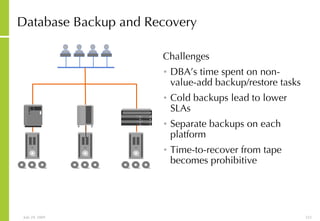
Database Backup and Recovery Challenges DBA’s time spent on non-value-add backup/restore tasks Cold backups lead to lower SLAs Separate backups on each platform Time-to-recover from tape becomes prohibitive
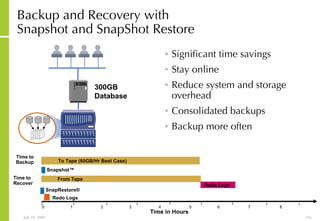
Backup and Recovery with  Snapshot and SnapShot Restore Significant time savings Stay online Reduce system and storage overhead Consolidated backups Backup more often Time in Hours Time to Backup Time to Recover To Tape (60GB/Hr Best Case) From Tape Redo Logs 300GB  Database 0  1  2  3  4  5  6  7  8  Snapshot ™ Redo Logs SnapRestore ®
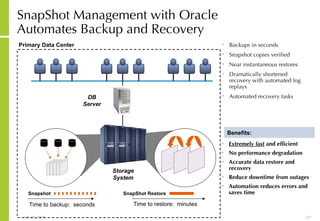
SnapShot Management with Oracle Automates Backup and Recovery Primary Data Center Backups in seconds Snapshot copies verified Near instantaneous restores Dramatically shortened recovery with automated log replays Automated recovery tasks SnapShot Restore Time to restore:  minutes DB Server Storage System Time to backup:  seconds Snapshot Benefits: Extremely fast  and efficient No performance degradation  Accurate data restore and recovery  Reduce downtime from outages Automation reduces errors and saves time
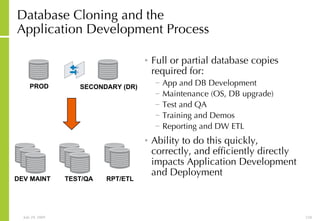
Database Cloning and the  Application Development Process Full or partial database copies required for: App and DB Development Maintenance (OS, DB upgrade) Test and QA Training and Demos Reporting and DW ETL Ability to do this quickly, correctly, and efficiently directly impacts Application Development and Deployment PROD SECONDARY (DR) DEV MAINT TEST/QA RPT/ETL
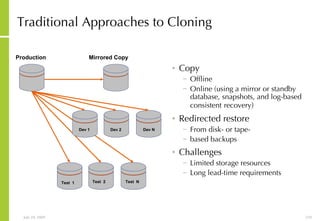
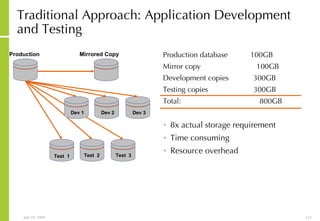
Traditional Approaches to Cloning Copy Offline Online (using a mirror or standby database, snapshots, and log-based consistent   recovery ) Redirected restore From disk- or tape- based backups Challenges Limited storage resources Long lead-time requirements Test  1 Test  2 Test  N Production Mirrored Copy Dev 1 Dev N Dev 2
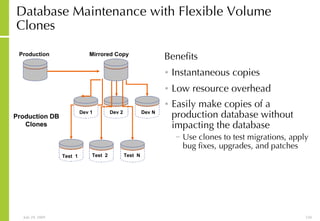
Database Maintenance with Flexible Volume Clones Benefits Instantaneous copies Low resource overhead Easily make copies of a production database without  impacting the database Use clones to test migrations, apply bug fixes, upgrades, and patches Test  1 Test  2 Test  N Production Mirrored Copy Dev 1 Dev N Dev 2 Production DB Clones
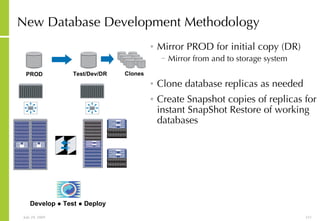
New Database Development Methodology Mirror PROD for initial copy (DR) Mirror from and to storage system Clone database replicas as needed Create Snapshot  copie s of replicas for instant SnapShot Restore of working databases PROD Test/Dev/DR Clones Develop  ● Test ● Deploy
Traditional Approach: Application Development and Testing Production database  100GB Mirror copy  100GB Development copies  300GB Testing copies  300GB Total:  800GB 8x actual storage requirement Time consuming  Resource overhead Production Test  1 Test  2 Test  3 Mirrored Copy Dev 1 Dev 3 Dev 2
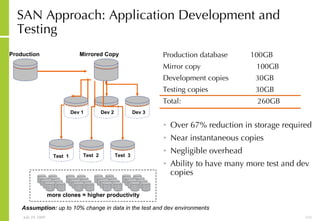
SAN Approach: Application Development and Testing Production database  100GB Mirror copy  100GB Development copies  30GB Testing copies  30GB Total:  260GB Over 67% reduction in storage required Near instantaneous copies  Negligible overhead Ability to have many more test and dev copies Test  1 Test  2 Test  3 Production Mirrored Copy Dev 1 Dev 3 Dev 2 Assumption:  up to 10% change in data in the test and dev environments more clones = higher productivity
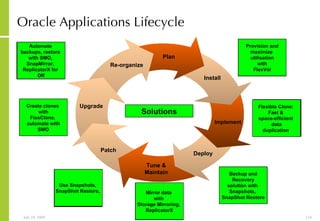
Oracle Applications Lifecycle  Need reliable backup and  recovery  solution Install Implement Re-organize Upgrade Patch Deploy Pain Points Plan Tune & Maintain Solutions Configure  systems, forecast  storage accurately Provision and maximize  utilisation with FlexVol Testing requires duplicate data, lengthy and  expensive process Flexible Clone:  Fast &  space-efficient  data duplication  Backup and Recovery solution with  Snapshots,  SnapShot Restore Mirror prod. data  to test and dev  system, lengthy  process Mirror data  with  Storage Mirroring,  ReplicatorX Create several  clones,  lengthy process,  expensive Create clones  with FlexClone,  automate with SMO Need  reliable backup  and  recovery solution Use Snapshots,  SnapShot Restore,  Need  reliable backup  restore, and DR solution Automate  backups, restore  with SMO,  SnapMirror,  ReplicatorX for  DR
Server Virtualisation and Storage
Server Virtualisation Components Shared storage required for operation HA (High Availability) VMotion – move virtual servers seamlessly between physical servers
More Information Alan McSweeney [email_address]

Storage, San And Business Continuity Overview

  • 1.
    Storage Systems andBusiness Continuity Overview Alan McSweeney
  • 2.
    Objectives To informationon SAN storage options To provide details on business continuity and disaster recovery options
  • 3.
    Agenda Types ofStorage Enabling Greater Resource Utilisation Through Storage System Virtualisation Business Continuity and Disaster Recovery Systems Center Operations Manager (SCOM) Managing Disk Based Backup Through Storage Virtualisation Single Instance Storage (Deduplication) Enabling greater Data Management Through Storage System SnapShots Enabling Greater Application Resilience Through SnapShot Technologies Enabling Greater Data Resilience Through Storage System Mirroring Easing the Pain of Development Through SnapShot Cloning Rapid Microsoft Exchange Recovery through Storage Systems Technologies Rapid Microsoft SQL Recovery through Storage Systems Technologies Rapid Recovery of Oracle DB Through Storage Systems Technologies Server Virtualisation and Storage Storage Management and Business Continuity/Disaster Recovery Storage Management and WAN
  • 4.
    Types of StorageDAS NAS SAN
  • 5.
    Direct Attached Storage(DAS) Directly attached to server Internal or External Cannot be shared with other servers
  • 6.
    Network Attached Storage(NAS) Storage devices connected to Ethernet network Can be shared among servers and users Usually used in places of dedicated file servers Not for database use (In the Microsoft World)
  • 7.
    Storage Attached Network(SAN) Hosts attached via Fibre Channel Host Bus Adaptors Connect to storage system via Fibre Channel Switches Sees pre assigned storage as dedicated free space Desktops access storage on local server as normal
  • 8.
  • 9.
  • 10.
    What Differentiates NASand SAN? Storage Protocols
  • 11.
    What Differentiates NASand SAN? Storage Protocols File Level – NAS Windows File System Share (With no Windows Servers) \\ServerName\ShareName
  • 12.
    What Differentiates NASand SAN? Storage Protocols File Level – NAS Windows File System Share (With no Windows Servers) \\ServerName\ShareName Block Level – SAN Sees provisioned disk as its own drives and formats accordingly. E.g. NTFS, EXT3 F:\Directory Structure
  • 13.
  • 14.
    File Level CIFSCommon Internet File System Predominantly Windows Environments
  • 15.
    File Level CIFSCommon Internet File System Predominantly Windows Environments NFS Network File System Non Windows Environments Unix, Linux, NetWare, VMware
  • 16.
  • 17.
    Block Level FibreChannel Uses Fibre Channel Switches FC-AL 1Gb, 2Gb, 4Gb
  • 18.
    Block Level FibreChannel Uses Fibre Channel Switches FC-AL 1Gb, 2Gb, 4Gb iSCSI Uses Ethernet Switches 1GB 10Gb
  • 19.
    Storage Options –Advantages and Disadvantages
  • 20.
    DAS - ProsInexpensive Use of large capacity SCSI and SATA drives No added expense for controllers
  • 21.
    DAS - ProsInexpensive Use of large capacity SCSI and SATA drives No added expense for controllers Performance Dedicated disk array with various cache options
  • 22.
    DAS - ProsInexpensive Use of large capacity SCSI and SATA drives No added expense for controllers Performance Dedicated disk array with various cache options Skill Levels No new skill levels required to mange storage
  • 23.
    DAS - ConsCaptive Storage Storage can only be used by one server
  • 24.
    DAS - ConsCaptive Storage Storage can only be used by one server Performance Disk Arrays may be limited to the number of drives that can be used
  • 25.
    DAS - ConsCaptive Storage Storage can only be used by one server Performance Disk Arrays may be limited to the number of drives that can be used Backups can be slow and inconsistent Expense Can be expensive in terms of wasted disk space.
  • 26.
  • 27.
    NAS - ProsCan replace file servers and introduce enterprise resilience Windows, Unix
  • 28.
    NAS - ProsCan replace file servers and introduce enterprise resilience Windows, Unix Easily expandable From 36GB to over 0.5PB
  • 29.
    NAS - ProsCan replace file servers and introduce enterprise resilience Windows, Unix Easily expandable From 36GB to over 0.5PB Cost Effective Single Appliance replace multiple servers
  • 30.
    NAS - ProsCan replace file servers and introduce enterprise resilience Windows, Unix Easily expandable From 36GB to over 0.5PB Cost Effective Single Appliance replace multiple servers Ease of backup Can backup all shares from NAS appliance
  • 31.
  • 32.
    NAS - ConsExpense Can be expensive relative to cost of single server
  • 33.
    NAS - ConsExpense Can be expensive relative to cost of single server Performance Depending on protocol
  • 34.
    NAS - ConsExpense Can be expensive relative to cost of single server Performance Depending on protocol Database Support No support for MS SQL or MS Exchange
  • 35.
    NAS - ConsExpense Can be expensive relative to cost of single server Performance Depending on protocol Database Support No support for MS SQL or MS Exchange Skill Levels May require new skill sets
  • 36.
  • 37.
    SAN - ProsHigh Performance IO/s Disk Utilisation
  • 38.
    SAN - ProsHigh Performance IO/s Disk Utilisation Resilience SnapShots Mirroring Replication
  • 39.
    SAN - ProsHigh Performance IO/s Disk Utilisation Resilience SnapShots Mirroring Replication Scalability Scales to PB
  • 40.
  • 41.
    SAN - ConsCosts Initial Capital Cost Running Costs Maintenance
  • 42.
    SAN - ConsCosts Initial Capital Cost Running Costs Maintenance Skill Sets New skill sets will be required
  • 43.
    SAN - ConsCosts Initial Capital Cost Running Costs Maintenance Skill Sets New skill sets will be required Compatibility Most vendors require ‘Fork Lift’ upgrades
  • 44.
    SAN - ConsCosts Initial Capital Cost Running Costs Maintenance Skill Sets New skill sets will be required Compatibility Most vendors require ‘Fork Lift’ upgrades Business Risk Lose the SAN and lose data from many servers Maximum resilience is a must
  • 45.
    Which Storage Solutionis Right for Me?
  • 46.
    NAS or SAN?Depends on Application requirements Depends on User Requirements Depends on Skill Budget
  • 47.
    Why Not BothNAS and SAN Most organisations will benefit from both NAS and SAN NAS for file serving and low end applications SAN for greater application performance, OLTP, Exchange, SQL, Oracle Can be expensive Use multiprotocol storage systems
  • 48.
    Multiprotocol Storage WindowsServer UNIX Server GbE switch Windows Server CIFS NFS iSCSI FC fabric FCP
  • 49.
    Multiprotocol Storage SystemsNo physical boundaries between NAS and SAN NAS protocols for file serving SAN protocols for Application Performance Bring enterprise functionality to NAS environment NAS data is no less important than SAN data Greater return on investment
  • 50.
    SAN Basics SANinfrastructure (also called “fabric”) comprises the hardware, cabling and software components that allows data to move into and within the SAN Server network cards (fibre channel HBAs or Ethernet NICs) and switches A disk array is a centralised storage pool for servers Data from multiple servers is stored in dedicated areas called logical unit number (LUNs) Data can be protected against data loss in the event of multiple disk failures using RAID
  • 51.
  • 52.
    What is RAIDR edundant A rray of I nexpensive D isks Allows for single or multiple drive failure Can increase read and write performance Depending on environment Can have an adverse affect on performance Depending on environment Dependant on RAID controller
  • 53.
  • 54.
    Multiple RAID LevelsRAID 0 No fault tolerance
  • 55.
    Multiple RAID LevelsRAID 1 Hardware Mirror
  • 56.
    Multiple RAID LevelsRAID 4 Single dedicated parity drive
  • 57.
    Multiple RAID LevelsRAID 5 Distributed parity
  • 58.
    Multiple RAID LevelsRAID 6 (As it should be) As RAID 4 but with two parity drives with separate parity calculations. Also known as RAID Diagonal Parity, RAID DP
  • 59.
    RAID 6 Overview(RAID DP) Description D iagonal- P arity RAID – two parity drives per RAID group Benefits 2000~4000X data protection compared to RAID 4 or 5 Protects against 3 modes of double disk failure Concurrent failure of any 2 disks (very rare) 2 simultaneous disk uncorrectable errors (also very rare) A failed disk and an uncorrectable error (most likely) Comparable operational cost to RAID 4 Equivalent performance for nearly all workloads Equally low parity capacity overhead supported Less system impact during RAID reconstruction
  • 60.
    Why is RAID-DPNeeded? ‘ Traditional’ single-parity-drive RAID group no longer provides enough protection Reasonably-sized RAID groups (e.g. 8 drives) are exposed to data loss during reconstruction Larger disk drives Disk drive uncorrectable (hard) error rate RAID 1 is too costly for widespread use Mirroring doubles the cost of storage Not affordable for all data
  • 61.
    Six Disk “RAID-6”Array { D D D D P DP
  • 62.
    Simple RAID 4Parity 3 1 2 3 9 { D D D D P DP
  • 63.
    Add “Diagonal Parity”3 1 2 1 1 1 3 1 2 2 1 3 3 1 2 2 9 5 8 7 7 12 12 11 { D D D D P DP
  • 64.
    Fail One Drive3 1 2 1 1 1 3 1 2 2 1 3 3 1 2 2 9 5 8 7 7 12 12 11 { D D D D P DP 7
  • 65.
    Fail Second Drive3 1 2 1 1 1 3 1 2 2 1 3 3 1 2 2 9 5 8 7 7 12 12 11 { D D D D P DP 7
  • 66.
    Recalculate from DiagonalParity 3 1 2 1 1 1 3 1 2 2 1 3 3 1 2 2 9 5 8 7 7 12 12 11 { D D D D P DP 7
  • 67.
    Recalculate from RowParity 3 1 2 1 1 1 3 1 2 2 1 3 3 1 2 2 9 5 8 7 7 12 12 11 { D D D D P DP 7
  • 68.
    The rest ofthe block … diagonals everywhere 3 1 2 1 1 1 3 1 2 2 1 3 3 1 2 2 9 5 8 7 7 12 12 11 { D D D D P DP
  • 69.
    Business Continuity andDisaster Recovery
  • 70.
    Specific Business Continuityand Disaster Recovery Requirements RTO – Recovery Time Objective How quickly should critical services be restored RPO – Recovery Point Objective From what point before system loss should data be available How much data loss can be accommodated 1 2 RTO Systems Restored System Loss 3 Last System Backup/Copy RPO
  • 71.
    Options and IssuesVirtualised infrastructure Virtualise secondary and/or primary server infrastructure Data replication software DoubleTake WANSync Hardware replication
  • 72.
  • 73.
    Possible Core Architecture2 Core server infrastructure virtualised for resilience and fault tolerance Centralised server management and backup SAN for primary data storage Backup to disk for speed Tape backup to LTO3 autoloader for high capacity Two-way data replication
  • 74.
    Data Backup andRecovery Servers backed-up to low cost disk - fast backup and reduced backup window Disk backup copied to tape - tape backup to LTO3 autoloader for high capacity and reduced manual intervention Move tapes offsite
  • 75.
    Resilience Virtual infrastructurein VMware HA (High Availability) Cluster Fault tolerant primary infrastructure Failing virtual servers automatically restarted Dynamic reallocation of resources
  • 76.
    Disaster Recovery Failingservers can be recovered on other site Virtualised infrastructure will allow critical servers to run without the need for physical servers Virtualisation makes recovery easier – removes any hardware dependencies
  • 77.
    Data Replication OptionsOption 1 – Direct server replication Each server replicates to a backup server in the other site Option 2 – Consolidated virtual server backup and replication of server images for recovery Copies of virtual servers replicated to other site for recovery Option 3 – Data replication Replication of SAN data to other site Option 4 – Backup data replication Replication of backup data to other site Each option has advantages and disadvantages
  • 78.
    Option 1 –Direct Server Replication Install replication software (DoubleTake, Replistor, WANSync) on each server for replication Continuous replication of changed data Need active servers to receive replicated data Active servers can be virtual to reduce resource requirements Replication software cost of €3,500 per server Failing servers can be restored Minimal data loss
  • 79.
    Option 2 –Consolidated Virtual Server Backup Use VCB feature of VMware to capture images of virtual machines Replicate image copies Recovery to last image copy Low bandwidth requirements
  • 80.
    Option 3 –SAN Hardware Replication SAN replication at hardware level Very high bandwidth requirements - > 1 Gbps each way Not all SANs support hardware replication Very fast recovery Can be an expensive option
  • 81.
    Option 4 –Replication of Backup Data Scripted replication of disk backup data Recovery to last backup Low bandwidth requirements Low cost option
  • 82.
    Business Focus onDisaster Recovery Every year one out of 500 data centres will experience a severe disaster 43% of companies experiencing disasters never re-open, and 29% close within two years 93% of business that lost their data centre for 10 days went bankrupt within one year 81% of CEOs indicated their company plans would not be able to cope with a catastrophic event
  • 83.
    Components of EffectiveDR DR Recovery Facility Primary Infrastructure Designed for Resilience and Recoverability Processes And Procedures Operational Disaster Recovery And Business Continuity Plan
  • 84.
    Components of EffectiveDR DR Recovery Facility – this will be the second McNamara site Primary Infrastructure Designed for Recoverability – this will consist of virtualised infrastructure and backup and recovery tools Processes And Procedures – this is a set of housekeeping tasks that are followed to ensure recovery is possible Operational Disaster Recovery And Business Continuity Plan – this is a tested plan to achieve recovery at the DR site
  • 85.
    Server Virtualisation andDisaster Recovery Server Virtualisation assists recovery from disaster Changing disaster recovery requirements Higher standards are required More reliability is expected Faster pace of business generates more critical change Intense competitive environment requires high service levels
  • 86.
    Challenges of TestingRecovery Hardware bottlenecks Need a separate target recovery server for each of the primary servers under test If doing “bare metal” restore, need to locate target recovery hardware matching exactly the primary server configurations Lengthy process with manual interventions Configure hardware and partition drives Install Windows and adjust Registry entries Install backup agent Before recovering automatically with the backup server Personnel not trained Complex processes and limited equipment availability make it difficult to train personnel
  • 87.
    Successful Disaster RecoveryEnsure successful recovery Diligent use of a reliable backup tool Regular testing of recovery procedures Meet the TTR/RTO (Time To Recover/Recovery Time Objective) objectives Target recovery hardware available Alternate site available Processes documented and automated Put personnel plan in place Primary and backup DR coordinators designated and trained Dry runs are conducted regularly
  • 88.
    Why Virtual Infrastructurefor DR? Hardware Independence Flexibility to restore to any hardware Hardware Consolidation / Pooling / Oversubscription Test recovery of all systems to one physical server Speed up recovery Use pre-configured templates with pre-installed OS & backup agent Single-step simplified capture and recovery Different purposes – same procedures – Staging, Deployment, Disaster Recovery One step system and application recovery No additional licensing requirements for bare metal restore tools More trained personnel available
  • 89.
    Disaster Recovery atLower Cost Hardware / System/ Application independence No need to worry about the exact hardware configuration Flexibility to restore to any hardware Application independent capture and recovery processes Less hardware required at “hot” failover site Support for all capture / replication technologies Tape / Media Disk-based Back up Synchronous or Asynchronous Data Replication
  • 90.
    Simplified Processes forRecovery Restore system and application data in one step Single-step simplified capture and recovery One step system and application recovery No Windows registry issues Easy-to-automate recovery No need for 3rd party ‘bare metal’ restore tools Reduce learning and ramp-up Reduce software licensing expense Use the same methodology through application lifecycle Staging /Deployment/ DR Test once – recover anything Application independent recovery means simplified testing
  • 91.
    Virtual Hardware forReal Recovery Follow the usual procedure for data backup For recovery Find ONE physical server Install VMware ESX Server Copy from a template library a virtual machine with the appropriate Windows OS service packs and the Backup Agent pre-installed Register and start VM, edit IP addresses Restore from tape into VM using backup server
  • 92.
    Compare Recovery StepsFind hardware Configure hardware / partition drives etc. Install Operating System Adjust Registry entries, permissions, accounts Install backup agent Find hardware Install VMware with Templates “ Single-step automatic recovery” from backup server “ single-step automatic recovery” from backup server Physical to Physical Do Once Repeat for each box Physical to Virtual Repeat for each box
  • 93.
    Customer Options forRecovery 1 - Physical to Physical 2 - Physical to Virtual 3 - Virtual to Virtual
  • 94.
    Disaster Recovery withSAN Replication Speed up recovery in solutions based on storage replication No need to upgrade secondary site server hardware in lock-step with the primary site Easy to automate and no need for bare metal recovery tools
  • 95.
    SAN Replication IssuesHardware Synchronous – data is written simultaneously to both SANs. The write operation is not completed until both individual writes are completed. This will require a communications link between both sites operating at least 1 Gbps. Asynchronous – data is not written real-time to the backup unit. Data is buffered and written in blocks. This will require a communications link between both sites operating at least 2 Mbps. Software CommVault QiNetix ContinuousDataReplicator DoubleTake RepliStor WANSync
  • 96.
    Virtualisation Resource Allocationand Configuration Analysis How much resources to leave free to cater for server failure? VM1 VM2 VM3 VM4 Limit Threshold Reservation Threshold Actual Usage VM5 VM6 VM7 VM8 Server 1 Server 2 HA Cluster
  • 97.
    Virtualisation Resource Allocationand Configuration Analysis Critical (or all virtual servers) will be restarted on other physical server(s) VM1 VM2 VM3 VM4 VM5 VM6 VM7 VM8 Server 1 Server 2 VM1 VM2 VM3 VM4 X HA Cluster
  • 98.
    VMware Platforms andOptions VMware Infrastructure 3 Starter NAS or local storage No HA, DRS, VCB Restrictions 4 processors 8 GB RAM VMware Infrastructure 3 Standard HA, DRS, VCB available as separate options VMware Infrastructure 3 Enterprise Includes virtual SMP, VMFS, VMotion, HA, DRS, Consolidated Backup VirtualCentre
  • 99.
  • 100.
    Sample Configurations TwoESX Servers, VirtualCentre, Backup to Disk, Tape Backup Two ESX Servers, VirtualCentre, Backup to Disk, Tape Backup, Virtualised DR Facility with Replication Very Large Scale Implementation
  • 101.
    Two ESX Servers,VirtualCentre, Backup to Disk, Tape Backup Two servers running ESX Server – provides resilience in the event of server failure SAN to store data VirtualCentre to administer and manage virtual infrastructure Backup to disk using low cost disk Tape backup unit
  • 102.
    Two ESX Servers,VirtualCentre, Backup to Disk, Tape Backup Primary SAN data copied to inexpensive disk – fast backup Disk backup copied to tape/autoloader
  • 103.
    Two ESX Servers,VirtualCentre, Backup to Disk, Tape Backup, Virtualised DR Facility with Replication Two servers running ESX Server – provides resilience in the event of server failure SAN to store data VirtualCentre to administer and manage virtual infrastructure Backup to disk using low cost disk Tape backup unit Link for data replication Backup virtual infrastructure for recovery
  • 104.
    Two ESX Servers,VirtualCentre, Backup to Disk, Tape Backup, Virtualised DR Facility with Replication Primary SAN data copied to inexpensive disk – fast backup Disk backup copied to tape/autoloader Disk to disk copy to DR location Move tapes to backup location
  • 105.
    Two ESX Servers,VirtualCentre, Backup to Disk, Tape Backup, Virtualised DR Facility with Replication
  • 106.
    Very Large ScaleImplementation
  • 107.
    Very Large ScaleImplementation
  • 108.
    Cost Benefit AnalysisTangible savings Server purchases Operational costs Administration costs Power, HVAC Deferred cost Intangible savings Faster server provisioning Better utilisation Reduced floorspace Improved business continuity and disaster recovery
  • 109.
  • 110.
    Sample Project Costsand Savings 1 16 servers to be virtualised Avoid 4 new servers a year
  • 111.
    Sample Project Costsand Savings 2 32 servers to be virtualised Avoid 6 new servers a year
  • 112.
    Sample Project Costsand Savings 2 64 servers to be virtualised Avoid 8 new servers a year
  • 113.
  • 114.
    SAN Vendors Dell/EMCAXnnn - iSCSI NSxxx – IP CXnnn – Fibre Channel DMX Centera IBM DS series N Series – multi-protocol HP MSA EVA XP
  • 115.
  • 116.
  • 117.
  • 118.
    SCOM Deployment OptionsAgentless Monitoring SCOM monitors agentless servers. This is aimed at IT environments where agents could not be installed on a few exception nodes. Agentless monitoring is limited to status monitoring only. Agent Support Agents are installed on servers. SCOM lets you manage applications running on servers. Server Discovery Wizard Allows for server lists to be imported from Active Directory, from a file, or from a typed list. It also allows the list to be filtered using LDAP queries, as well as name– and domain name–based wildcards.
  • 119.
  • 120.
    SCOM Rule: Unit Of Instruction/Policy Event Rules Collection rules Filtering rules Missing event rules Consolidation rules Duplicate Alert Suppression Performance Rules Measuring Threshold Alert Rules Rule Provider NT event log Perfmon data WMI SNMP Log files Syslog Criteria Response Alert Script SNMP trap Pager E-Mail Task Managed Code File Transfer Where source=DCOM and Event ID=1006 Knowledge Product Knowledge Links to Vendor Company Knowledge Links to Centralised Company knowledge
  • 121.
    SCOM Database TheSCOM database is a single authoritative source of all Configuration in a Management Group Rules, Overrides Scripts Computer attributes Views SCOM Server and Agent Configurations Nested Computer Groups Extensible schema for classes, attributes and associations
  • 122.
    UI Consoles Operator Console To create and display view instances, Update Alerts User Customizable Views Views can be organized in a folder hierarchy Context Sensitive tasks Multipane View Administrator Console One MMC Snapin per management group Rules Node – To author, view, modify, Export/Import rules Config Node – To configure SCOM Web Console
  • 123.
    SCOM Console ViewsState View - Provides you with a real-time, consolidated look at the health of the computers within the managed environment by server role, such as Active Directory domain controllers, highlighting the systems that require attention. Diagram View - Gives you a variety of topological views where the existence of servers and relationships are defined by management packs. The Diagram View allows you to see the status of the servers, access other views, and launch context-sensitive actions, helping you navigate quickly to the root of the problem. Alerts View - Provides a list of issues requiring action and the current state and severity of each alert. It indicates whether the alerts have been acknowledged, escalated, or resolved, and whether a Service Level Agreement has been breached. Performance View - Allows you to select and display one or more performance metrics from multiple systems over a period of time. Events View - Provides a list of events that have occurred on managed servers, a description of each event, and the source of the problem. Computers and Groups View - Allows you to see the groups to which a computer belongs, the processing rule groups with which it is associated, as well as the attributes of the computer.
  • 124.
  • 125.
  • 126.
    SCOM Management PacksSCOM management packs provide built-in, product-specific operations knowledge for a wide variety of server applications Management packs contain rules for monitoring an array of server health indicators and creating alerts when problems are detected or reasonable thresholds are exceeded Monitoring capability is extended by knowledge base content, prescriptive guidance, and actionable tasks that can be associated directly with the relevant alerts included in the management packs Administrators can then act to prevent or correct situations, such as degraded performance or service interruption, maintaining service availability with greater ease and reliability
  • 127.
    SCOM 2005 ManagementPacks Standard Management Packs Exchange 2000 and 2003 Server Internet Information Services SCOM 2005 and SCOM 2000 Transition Security (MBSA) SQL Server 2000 Windows Active Directory Windows Server Cluster Windows DNS Windows Server (2000, 2003, NT4) Tier 2 Management Packs Windows Update Services Virtual Server 2005 Web Services Application Center 2000 Terminal Services DHCP Remote File Systems Print Server
  • 128.
    Management Packs ManagementPack imported via SCOM Server Discovery finds computers in need of a given Management Pack SCOM deploys appropriate Management Packs No need to touch managed nodes to install Management Packs Rules: Implement all SCOM monitoring behavior Watch for indicators of problems Verify key elements of functionality Management Packs provide a definition of server health
  • 129.
    Management Pack FeaturesAlerts : Calls attention to critical events that require administrator intervention Product Knowledge: Provides guidance for administrators to resolve outstanding alerts Views : Provide targeted drill down details about server health Performance plots, collections of specific events/alerts, groups of servers , topology, etc. State Monitoring : At a glance view of the state of my servers and applications by server role Detail to component level Tasks : Enable administrators to investigate and repair issues from the SCOM console Context sensitive diagnostics and remediation Reports : Historical data analytics Assess operations performance and capacity planning
  • 130.
    Alert Handing andViewing When a new alert is identified it will appear in the Alert Pane with a resolution state of “New” If you highlight that alert its details will appear in the Alert detail Pane Clicking on the “Properties” tab in the Alert Detail Pane will give you the description (and other details) of the alert The alert can be classified as: False Negative Hardware Issue Non Hardware Issue
  • 131.
  • 132.
    SCOM VMware ManagementPack Integration
  • 133.
    SCOM and nWorksManagement Pack nworks Collector is referred to as VEM (Virtual Enterprise Monitor) The VEM server can be a virtual server to reduce cost
  • 134.
    Enabling Greater ResourceUtilisation Through Storage System Virtualisation
  • 135.
    What is “StorageVirtualisation”? Abstracted Physical Storage Storage Pools Created from Physical Blocks of Storage Virtual Disks created from Storage Pool Physical Devices and Capacity Distribution Transparent to Servers and Applications
  • 136.
    Why Is StorageVirtualisation so Critical?
  • 137.
    Opposing Forces on Volume Size Bigger Gives Efficiency Disks growing ATA growing faster More disks for performance RAID-DP Smaller Gives Control Different classes of data Different management requirements Tools work on volumes (Snapshots, etc)
  • 138.
    The Problem: VolumesTied to Disks What we’ve got today: Small volumes are impractical Large volumes are hard to manage What we’d like: Manage volumes separately from physical disks Volumes for data; aggregates for disks
  • 139.
    Virtualisation Improve UtilisationSpare Logical Drive 1 = 2 Disks Logical Drive 2 = 8 Disks Logical Drive 3 = 3 Disks 1 Hot spare 550 GB of wasted space 14 x 72 GB disks = 1 TB capacity Vol 0 Data Parity Database Data Data Data Data Data Data Data Parity Home Directories Data Data Parity 140 GB 370 GB 40 GB
  • 140.
    The Solution: Flexible Volumes (FlexVol) Aggregate contains the physical storage FlexVol: no longer tied to physical storage FlexVol: multiple per aggregate Storage space can be easily reallocated Storage Pool Disks Disks Disks Flexible Volumes
  • 141.
    Storage Pools andFlexible Volumes How Do They Work? Create RAID groups Create Storage Pool Create and populate each flexible volume No pre allocation of blocks to a specific volume Storage System allocates space from pool as data is written vol2 vol3 RG1 RG2 RG3 Storage Blocks Storage Pool RG1 RG2 RG3 Flexible Volume 1 Flexible Volume 2 Flexible Volume 3 vol1
  • 142.
    Flexible Volumes ImproveUtilisation Logical Drive 1 = 144GB Logical Drive 2 = 576GB Logical Drive 3 = 216GB 1 Hot spare Spare Database Home Dirs Vol0 400 GB used 600 GB of Free Space! 14 x 72 GB disks = 1 TB capacity Data Data Data Data Data Data Data Data Data Data Data Parity Parity Aggregate
  • 143.
    Flexible Volume DataManagement Benefits Distinct containers (volumes) for distinct datasets Flexible Volumes resize to meet space requirements, simple command to adjust size (grow / shrink) Soft allocation of volumes and LUNs Free space flows among all Flexible Volumes in a storage pool; space reallocation without any overhead Flexible Volumes can be: SnapManaged independently Backed up independently Restored without affecting other Flexible Volumes
  • 144.
    Compare Benefits SpaceAllocation Flexible and dynamic Volumes can be grown and shrunk Management Spindle Sharing Preallocated and static Space is preallocated during configuration Space can’t be shrunk Simple Complex Automatic sharing of spindles among all volumes, including newly added disks New spindles are only used when volumes are expanded Optimal configuration is a daunting task (sliced, striped, etc.) Flexible Volumes Legacy SAN
  • 145.
    Compare Benefits GranularityVolumes can be grown and shrunk in small increments (1MB) without performance or management impact Disruption Rapid Replication More granularity comes at the expense of performance or management Growing and shrinking are nondisruptive and instantaneous operations Shrinking is not possible; growth involves reshuffling of data Often involves downtime and data copying FlexClone ™ is immediate No performance implications Large space savings for similar volumes Business continuance volumes involve physical replication of the data No space savings Flexible Volumes Legacy SAN
  • 146.
    Flexible Volumes: EnablingThin Provisioning Flexible Volumes : Container level: flexible provisioning Better utilisation Physical Storage: 1 TB FlexVols: 2TB Container-level soft allocation 1 TB 300 GB 200 GB 200 GB 50 GB 150 GB 100 GB Application-level: Higher granularity Application over-allocation containment Separates physical allocation from space visible to users Increases control of space allocation LUNs Application-level soft allocation 10 TB 800 GB
  • 147.
    Managing Complexity throughStorage Virtualisation
  • 148.
    Unified Management Storagemanagement and administration is very vendor specific Most vendors require different skills for different storage systems Hardware is not cross compatible
  • 149.
    The Unified StorageArchitecture Advantage Incompatible silos Compatible family Platforms HP, EMC, DELL, IBM Storage Virtualisation Software & Processes Incompatible software; different processes Unified software; Same processes Experts & Integration Services Lots of experts and integration services Reduced training & service requirements
  • 150.
    Virtual Storage Environment / EMC – Comparison Virtualisation: Architectural Simplicity Multiple Concurrent Protocols Integrated Mgmnt, DR, BC, ILM, D2D, … Celerra Symmetrix / DMX and CX ONLY Virtual Gateways HP, IBM, HDS, SUN The EMC Effect? - Complexity 8 Dissimilar Operating Systems 8 Dissimilar Mgmnt GUI’s Dissimilar DR, BC, … ILM required CentraStar - 6 1 - FLARE OE 5 - Enginuity 2 - FLARE 8 - MS Win 3 - Dart 4 - RHEL 2 - FLARE 8 - MS Win External server w/MS Win and CLARalert required to support CX dial/email home support (compare to AutoSupport). Virtual Gateway Limited iSCSI Support DMX Series CX3-20 CX3-40 AX150/S EMC FC CX3-80 CX3-10 NS40G NSX NS80G Centera CX300i AX150i iSCSI Only EMC IP NS80 NS40 NS350
  • 151.
    Managing Disk BasedBackup Through Storage Virtualisation Single Instance Storage (Deduplication)
  • 152.
    Backup Integration Snapshotand Snapshot Restore Backup and Recovery Software Disk Based Target Secondary Storage Short-Term Local Snapshot Copies Mid- to Long-Term Disk to Disk Block-Level Backups Client Drag-and-Drop Restores Changed Blocks Primary Data 9AM 12PM 3PM Snapshot Snapshot Snapshot Primary Storage Instant Recovery
  • 153.
    Advanced Single InstanceStorage User1 presentation.ppt 20 x 4K blocks User2 presentation.ppt Identical file 20 x 4K blocks User 3presentation.ppt Edited, 10 x 4K User4 job-cv.doc Different file 8 new 4K blocks = Identical blocks Data Written to Disk: With ASIS: 38 blocks Without ASIS: 75 blocks
  • 154.
    Enabling greater DataManagement Through Storage System SnapShots
  • 155.
    Snapshots Defined ASnapshot is a reference to a complete point-in-time image of the volume’s file system, “frozen” as read-only. Taken automatically on a schedule or manually Readily accessible via “special” subdirectories Multiple snapshots concurrently for each file system, with no performance degradation. Snapshots replace a large portion of the “oops!” reasons that backups are normally relied upon for: Accidental data deletion Accidental data corruption Snapshots use minimal disk space (~1% per Snap)
  • 156.
    Snapshot Internals -As They Should Be Client modifies data at end of file Data actually resided in block C on disk System writes modified data block to new location on disk (C’) C’ Snapshot File: FILE.DAT A B C Active File System File: FILE.DAT Disk blocks
  • 157.
    Snapshot Internals Active file system version of FILE.DAT is now composed of disk blocks A, B & C’. Snapshot file system version of FILE.DAT is still composed of blocks A, B & C C’ Snapshot File: FILE.DAT A B C Active File System File: FILE.DAT Disk blocks
  • 158.
    Snapshot-Based Data RecoveryUser is offered this most recent previous version (and up to 255 older versions) User may drag any of these read-only files back into active service
  • 159.
    Snapshots are State-of-the-ArtData Protection Snapshots should be near instantaneous! To create a point-in-time Snapshot copy requires copying a simple data structure, not copying the entire data volume Additional storage is expended incrementally only for changed blocks only as data changes, not at Snapshot creation time Avoids the significant costs associated with the I/O bandwidth, downtime, CPU cycles dedicated to copying and managing entire volumes
  • 160.
    Not all SnapshotsAre Equal What is the disk storage requirement to maintain online data copies? Will a planned or unplanned or "dirty" system shutdown lose existing data copies? What is the overall performance impact with snapshots enabled? How many data copies can be maintained online? Is the reserve area fixed? Can this "save area" be re-sized on the fly? Are data copies automatically deleted once the save area is full? What is the answer to file system recovery? Do they feature a SnapRestore-like capability? Are snapshots a chargeable item? How much? What is the pricing model? Is this snapshot method supported across the vendor's entire product line? Questions to ask regarding storage system data copy techniques:
  • 161.
    Enabling Greater ApplicationResilience Through SnapShot Technologies
  • 162.
    SnapRestore Recovery snapX restore … Snapshot Active File System 2 N Active File System 1 2’ N’ 1’ … Marked as free blocks after Snapshot Restore
  • 163.
    Database Recovery 9am5pm 10:00 11:00 12:00 13:00 14:00 15:00 16:00 Snapshots 1 2 3 4 5 6 7 8 9 15:22 Corruption ! Snapshot restore
  • 164.
    Enabling Greater DataResilience Through Storage System Mirroring
  • 165.
    Storage Mirroring StorageMirroring Synchronous Semi Synchronous Asynchronous
  • 166.
    Storage Mirroring DefinedReplicates a filesystem on one storage system to a read-only copy on another storage system (or within the same storage system) Based on Snapshot technology, only changed blocks are copied once initial mirror is established Asynchronous or synchronous operation Runs over IP or FC Data is accessible read-only at remote site Replication is volume based
  • 167.
    SnapMirror Function SANor NAS Attached hosts Source Source Step 1: Baseline Step 2: Updates Target LAN/WAN Target LAN/WAN SAN or NAS Attached hosts OR Immediate Write Acknowledgement Immediate Write Acknowledgement … ... of source volume(s) Baseline copy … ... of changed blocks Periodic updates
  • 168.
    Storage Mirroring InternalsSource Volume Target Volume Snap A Baseline Transfer
  • 169.
    Storage Mirroring InternalsSource Volume Target Volume Completed Target file system is now consistent, and a mirror of the Snapshot A file system Source file system continues to change during transfer Snap A Baseline Transfer Common snapshot
  • 170.
    Storage Mirroring InternalsSource Volume Target Volume Snap B Target volume is now consistent, and a mirror of the Snapshot B file system Completed Incremental Transfer Snap A
  • 171.
    Storage Mirroring InternalsSource Volume Target Volume Snap C Completed Target volume is now consistent, and a mirror of the Snap C file system Incremental Transfer
  • 172.
    Storage Mirroring Applications Data replication for local read access at remote sites Slow access to corporate data is eliminated Offload tape backup CPU cycles to mirror Isolate testing from production volume ERP testing, Offline Reporting Cascading Mirrors Replicated mirrors on a larger scale Disaster recovery Replication to “hot site” for mirror failover and eventual recovery
  • 173.
    Data Replication forWarm Backup/Offload For Corporations with a warm backup site, or need to offload backups from production servers For generating queries and reports on near-production data MAN/WAN Backup Site Production Sites Tape Library
  • 174.
    Isolate Testing fromProduction Target can temporarily be made read-write for app testing, etc. Source continues to run online Resync forward after re-establishing the mirror relationship & WRITE READ Production Backup/Test READ & WRITE X Snap C (Resync backward works similarly in opposite direction) SnapMirror Incremental Transfer SnapMirror Resync
  • 175.
    Cascading Mirrors Allowsa target volume to be a source to other targets Each target operates on an independent schedule Replicate data up to 30 destinations Source NS Source Volume (read + write) SnapMirror Target NS Target Volume (read only) SnapMirror Target NS Target Volume (read only) SnapMirror Target NS Target Volume (read only)
  • 176.
    Cascading Replication -Example Replicate to multiple locations (30) across the continent Send data only once across the expensive WAN Reduces resource utilisation on source NS WAN Office 1 Office 2 Office 5 Office 4 Office 3
  • 177.
    Disaster Recovery LAN/WANFor any corporation that cannot afford the downtime of a full restore from tape. (days) Data Centric Environments Reduces “Mean Time To Recovery” when a disaster occurs. Production Site Disaster Recovery Site (redirect) (resync backwards after source restoration) X
  • 178.
    Easing the Painof Development Through SnapShot Cloning
  • 179.
    Cloning SnapShots Writeenables SnapShots Enables multiple, instant data set clones with no storage overhead Provides dramatic improvement for application test and development environments Renders alternative methods archaic
  • 180.
    Cloned SnapShot Volumes:Ideal for Managing Production Data Sets Error containment Bug fixing Platform upgrades ERP CRM Multiple simulations against a large data set
  • 181.
    Volume Cloning: HowIt Works Start with a volume Volume 1 Volume 2 (Clone) Create a clone (a new volume based on the Snapshot copy) Snapshot™ Copy of Volume 1 Create a Snapshot copy Result: Independent volume copies, efficiently stored Modify the cloned vol Modify the original vol Data Written to Disk: Snapshot Copy Cloned Volume Changed Blocks Volume 1 Changed Blocks
  • 182.
    Volume Splitting Splitvolumes when most data is not shared Volume 1 Snapshot ™ Copy of Volume 1 Replicate shared blocks in the background Volume 2 Result: Easily create new permanent volume for forking project data
  • 183.
    The Pain ofDevelopment Prod Volume (200gb) Pre-Prod Volume (200gb) QA Volume (200gb) Dev Volume (200gb) Test Volume (200gb) Sand Box Volume (200gb) 1.4 TB Storage Solution 200 GB Free Create copies of the volume Requires processor time and Physical storage
  • 184.
    Clones Remove thePain Prod Volume (200gb) Pre-Prod Volume QA Volume Dev Volume Test Volume Sand Box Volume 1.4 TB Storage Solution Create Clones of the Volume – no additional space required Start working on Prod Volume and Cloned Volume Only changed blocks get written to disk! 1 Tb Free
  • 185.
    Ideally… Primary Production Array Secondary Array Mirror Create Clones from the Read Only mirrored volume Removes development workload from Production Storage!
  • 186.
    Rapid Microsoft ExchangeRecovery through Storage Systems Technologies
  • 187.
    Why use StorageSystems Series for Exchange Data? Just a few off the top… Snapshot copies “snapshots” Data and snapshot management, replication Flexible and easy, dynamic provisioning Performance iSCSI, cost effective and gaining on Fibre Channel Excellent high-end FCP, clustering and MPIO options Tight Windows OS (incl. MSCS) and Exchange 5.5., 2000, 2003 and 2007 Server integration (SME, VSS on Windows 2003, etc.)
  • 188.
    Required Storage Softwarefor Exchange SnapShot Management Rapid online backups and restores—integrates with Exchange backup API; runs ESEFILE verification; automates log replay Intuitive GUI and wizards for configuration, backup, and restore Server Based Connection Manager Dynamic disk and volume expansion Supports both Ethernet and Fibre Channel environments Supports MSCS and NS Series CFO for high availability Single mailbox recovery software Restores single message, mailbox, or folder from a Snapshot ™ backup to a live Exchange server or a .pst file
  • 189.
    Effective SnapShot Managementwith Exchange Manages the entire snapshot backup process Backup and restore Exchange storage groups Backups may be scheduled Each backup is a “full” Exchange backup and is verified using MS provided software, which is integrated into the storage system
  • 190.
    SnapShot Management withExchange Overview Interacts with Exchange using Exchange backup APIs interacts with VSS SnapShot Management is VSS requestor Exchange is VSS writer Storage System is VSS hardware provider Provides point-in-time and up-to-the-minute recovery using snapshots and Exchange database transaction logs
  • 191.
    SnapShot Mirroring SnapShotMirroring Automatic mirroring of Exchange data to remote site Volume based mirroring Occurs immediately following a Exchange backup and is initiated by Exchange Server Can replicate over LAN or WAN Only changed blocks since previous mirror are replicated Rate of replication can be throttled to minimize impact on network
  • 192.
    Single Mailbox RecoveryAllows restores of individual items form Exchange backups in minutes compared to hours or days Single mailbox recovery is the most requested feature by Exchange customers
  • 193.
    Single Mailbox Restore(Exchange) PowerControls Software Quickly access Exchange data already stored in the online snapshot backups Select any data, down to a single message Restore the data to one of two locations: An offline mail file (.PST personal storage file) which can be opened in MS Outlook Connect to a live Exchange server and copy data directly into the users mailbox, making it instantly available
  • 194.
  • 195.
    Current Alternatives: InadequatePerform daily brick level backups Pros Allows quicker recovery of a single mailbox Cons Backs up each mailbox separately; one message sent to a 100 people will be copied 100 times Very time and disk intensive Impractical to have frequent backups Brick level backup software is expensive Have a dedicated recovery server infrastructure Pros Reduces the time to recover a single mailbox by eliminating the need to setup a recovery server each time Eliminates brick level backups Cons Still very time and labor intensive (many hours) Requires additional hardware investments
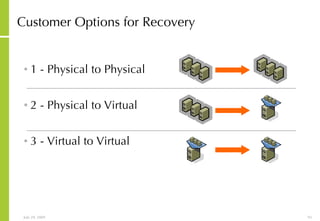
  • 196.
    SMBR and SnapShotManagement SnapShot backs up Exchange in seconds with snapshots SMBR restores individual mailboxes from snapshots in minutes Primary Data Center Single Mailbox Recovery Software Time to restore: minutes Restore mail box
  • 197.
    SMBR: Features Readscontents of Exchange Information Store without an Exchange server Extracts mail items at any granularity from an offline copy of the Exchange Information Store (E5.5, E2K, & E2K3) Folder Single mailbox Single message Single attachment Restores single mail items to a production Exchange server, alternate server or to an Outlook PST file. Advanced search and retrieval Search subject or message body; keyword, user, or date
  • 198.
    SMBR: Benefits Dramaticallyreduces the time required for single mailbox and single message recovery From hours or days to just minutes Simplifies the most dreaded task by Exchange administrators Eliminates the need for expensive, cumbersome and disk-intensive daily brick level backups Eliminates the need for recovery server infrastructure Allows easy search and discovery of email messages and attachments
  • 199.
    Rapid Microsoft SQLRecovery through Storage Systems Technologies
  • 200.
    SnapShot Management withSQL Server Application consistent data management
  • 201.
    SnapShot Management withSQL Server Provides integrated data management for SQL Server 2000 and SQL Server 2005 databases Automated, fast, and space-efficient backups using Snapshots Automated, fast, and granular restore and recovery using SnapShot restore technologies Integrated with storage system Mirroring for database replication Provides tight integration with Microsoft technologies such as MSCS, Volume Mount Points.
  • 202.
    SnapShot Management withSQL Server – Required Features Further enhances availability of SQL Server Clustered Failover Increases SQL Server’s availability – can replicate the database to a secondary storage system for faster recovery in case of a disaster Storage Mirroring Integration High availability and enhanced reliability of SQL Server environment MSCS Support Ease of use Virtually no training costs Cost savings Configuration, Backup, and Restore wizards with standard Windows GUIs No performance degradation during backups Hot backups to Snapshot copies Maximizes SQL database availability and helps meet stringent SLAs Helps organizations recover from accidental user induced errors or application misbehavior Minimizes SQL downtime and thus reduces cost Increases the ability of SQL Servers to handle large number of databases and/or higher workloads. Rapid hot backup and restore times Benefits Features
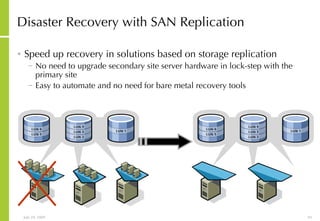
  • 203.
    SnapShot Management withSQL Server – Required Features Supports 64bit natively on AMD64/EM64T Native x64 support Increases SQL Server’s availability -- additional storage can be added without bringing the SQL Server down Online disk addition (storage expansion) Support for Volume Mount Points in order to eliminate the limitation with drive letters Volume Mount Point Support Benefits Features
  • 204.
    SnapShot Management forSQL Server (SMSQL) DBA: Ability to backup DB faster with fewer resources and without any storage knowledge Reduces Mean Time to Recovery on failure Quick Restores More frequent backups  Less logs to replay  Faster Recovery Storage Admin: Ability to backup and restore DB without any DB knowledge Space, time & infrastructure efficient backups, restores and clones Increased productivity and storage utilization
  • 205.
    Technical Details –Consolidated SQL Server Storage Primary Data Center SQL Server iSCSI or FCP 1 Benefits: Simplified, centralized management Shared storage for improved utilization Better system availability Consolidate SQL Server storage on storage system 1 2 2 Add disks and expand volumes on the fly without downtime 3 3 Cluster for higher availability
  • 206.
    Technical Details –Simplified Backup » More Frequent Backups Primary Data Center iSCSI or FCP SQL Server Eliminate backup windows Automation reduces manual errors More frequent backups reduce data loss No performance degradations Benefits: SnapManager automates data management for SQL Server 1 1 Time to backup: seconds Snapshots 2 2 Snapshots for near-instantaneous backups 3 3 Backup multiple databases simultaneously
  • 207.
    Technical Details –Rapid Restores » Less Downtime Primary Data Center Time to restore: minutes iSCSI or FCP SQL Server Standby Server Fast and accurate restoration of SQL Server Reduce downtime from outages Automation saves administrative time Benefits: Near-instant restore from online snapshot Snapshot 1 1 Roll transaction logs 2 2 Automated log replay for current image 3 3 Restore single or multiple databases 4 4 Rapid failover to standby server
  • 208.
    Technical Details –Simple & Robust Disaster Recovery Primary Data Center DR Site iSCSI or FCP iSCSI or FCP Failover DB Server IP network Ensures business continuance Minimizes length of outages Cost effective – efficient use of existing IP network Benefits: System Mirroring 1 Storage Mirroring replicates SQL Server data to remote location 1 Replicate over existing IP networks 2 2 Failover to DR site After Failure 3 Rebuild primary site from DR site 3
  • 209.
    Technical Details –Volume Mount Point (VMP) Support Drive letter limitations in SMSQL Only 26 available drive letters in a system. Minimum for 2 LUNs required for database migration. Limitation for customers who have hundreds of databases. The customer might not want to have multiple databases on one/two LUN. Again one database might span multiple LUNs. LUN restore is performed on whole disk. To support individual database restore, each database will require its own LUN and drive letter. Verification will fail on Local server if free drive letter exhausts.
  • 210.
    Technical Details –VMP Storing Database Files All SQL SnapShot related files can reside on a mounted volume, same as that of a Standard Volume: SQL user databases SQL system databases SQL Server transaction log file SnapInfo directory Configuration wizard can be used to migrate database files to a mounted volume, same as that of a Standard Volume. The rules applicable for migrating databases to Standard Volume will apply for Volume Mount Point also.
  • 211.
    Technical Details –VMP Rules For Mount Point Root Database file cannot reside on a LUN which is the root of a mount point: After LUN restore, all the mount points residing in the LUN will be overwritten. For example, db1 resides on G:\mnt1 Take backup of the database db1 with SMSQL Now create a mount point G:\mnt1\mnt2 Create a second database db2 in G:\mnt1\mnt2 On restoring the backup set for db1, taken before, G:\mnt1\mnt2 will go off and hence db2 will become inaccessible
  • 212.
    Technical Details –VMP Rules Mounted volumes should not be treated differently from standard volumes. Configuration rule for multiple databases on one or two LUNs apply for volume mount point also. Backup, restore and other SQL SnapShot operations will have no difference between mounted volume and standard volume, just longer path for mounted volume.
  • 213.
    Technical Details –Backup of Read-Only Databases Storage System SQL SnapShots now allows backup of Read-Only database In previous release, read-only databases were not displayed in the list of databases in Configuration Wizard Now all read-only databases are listed in Configuration wizard, just as normal databases
  • 214.
    Technical Details –Resource Database Management Each instance of SQL Server has one and only one associated mssqlsystemresource.mdf file Instances do not share this file The Resource database depends on the location of the master database If you move the master database, you should also move the Resource database to the same location
  • 215.
    Technical Details –Resource Database Management SMSQL migrates Resource database along with master database Resource database will not be listed in the Configuration Wizard Internally SMSQL migrates it while it migrates master database It will be migrated to the same location as master database This is supported only for SQL Server 2005
  • 216.
    SnapShot Management withSQL Server – Summary SnapShot Management with SQL Server: Helps consolidate SQL Server on highly scalable and reliable storage Efficient , Predictable , Reliable Backup, Restore and Recovery for SQL Server databases Allows dynamic provisioning of storage for databases Allows DBAs to efficiently perform database backup, restore, recovery, clone operations with minimum storage knowledge Facilitates Disaster Recovery and Archiving
  • 217.
    Rapid Recovery ofOracle DB Through Storage Systems Technologies
  • 218.
    Oracle Enterprise ManagerGrid Control Monitor Trends and Threshold Alerts Monitor Key Statistics Monitor Utilization Ships with Oracle Enterprise Manager Developed, maintained and licensed separately by Oracle Manage Storage System from Oracle Enterprise Manager 10 g Grid Control
  • 219.
    Oracle ASM AutomaticStorage Management Disks Logical Vol File System Files Tablespace Tables Disk Group Logical Vol File System File Names Tablespace Tables Before ASM ASM Networked Storage (SAN, NAS, DAS) 0010 0010 0010 0010 0010 0010 0010 0010 0010 0010
  • 220.
    Compatible Storage AddsValue to Oracle ASM Yes Yes Yes Yes Yes Yes Yes Yes No No Yes Yes Yes Yes Yes Compatible Storage Yes No Thin provisioning of ASM Disks Yes No Space efficient Cloning Yes No Free space management across physical disks Yes No I/O prioritization Yes No Balance I/O across Physical Disks Yes No Stripe data across Physical Disks Yes Yes Balance I/O across ASM Disks Yes Yes Stripe data across ASM Disks Yes Yes Active Block corruption detection Yes Yes Passive Block corruption detection Yes No Lost disk write detection Yes Yes Protect against Single Disk Failure Yes No Storage Snapshot based Restores Yes No Storage Snapshot based Backups Data Protection Storage Utilization Performance Yes No Protect against Double Disk failure Data Resilience Oracle ASM + Compatible Storage Oracle ASM
  • 221.
    Integrated Data ManagementApproach Go from this… Centralized Management X High cost of management X Long process lead times X Rigid structures X Low productivity + Administrator productivity + Storage flexibility + Efficiency + Response time … to THIS Server-Based Management Application-Based Management Storage Management Integration and Automation Data Sets and Policies
  • 222.
    SnapShot Management withOracle Overview Provides easy-to-use GUI Integrates with the host application Automates complex manual effort Backup/Restores Cloning Tight integration RMAN Automated Storage Manager (ASM) SnapDrive Oracle 10 g Oracle 9 i Storage Systems SnapShot Management with Oracle FCP, iSCSI and NFS*
  • 223.
    SnapShot Management withOracle Database cloning Ability to clone consistent copies of online databases GUI support for cloning Added support for context sensitive cloning Increased footprint of platforms and protocols Support for additional flavors of Unix SuSE 9, RHEL3/4 U3+, Solaris 9/10 32-bit and 64-bit NFS, iSCSI and FCP for various Unix platforms HP-UX and AIX (NFS) (Refer to compatibility matrix for specific details) Product hardening Increased product stability and usability Improved performance by utilizing snapshot vs. safecopy Increase performance when dealing with high number of archive logs
  • 224.
    SnapShot Management withOracle Database cloning to remote hosts Ability to clone consistent copies of to remote hosts Previously clones were assigned to the host (with SMO) that initiated the cloning request Increased footprint of platforms and protocols HP-UX and AIX support across NFS, iSCSI and FC
  • 225.
    Database Backup andRecovery Challenges DBA’s time spent on non-value-add backup/restore tasks Cold backups lead to lower SLAs Separate backups on each platform Time-to-recover from tape becomes prohibitive
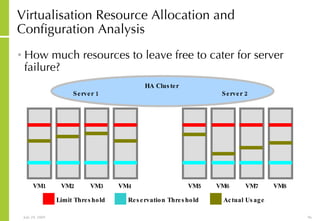
  • 226.
    Backup and Recoverywith Snapshot and SnapShot Restore Significant time savings Stay online Reduce system and storage overhead Consolidated backups Backup more often Time in Hours Time to Backup Time to Recover To Tape (60GB/Hr Best Case) From Tape Redo Logs 300GB Database 0 1 2 3 4 5 6 7 8 Snapshot ™ Redo Logs SnapRestore ®
  • 227.
    SnapShot Management withOracle Automates Backup and Recovery Primary Data Center Backups in seconds Snapshot copies verified Near instantaneous restores Dramatically shortened recovery with automated log replays Automated recovery tasks SnapShot Restore Time to restore: minutes DB Server Storage System Time to backup: seconds Snapshot Benefits: Extremely fast and efficient No performance degradation Accurate data restore and recovery Reduce downtime from outages Automation reduces errors and saves time
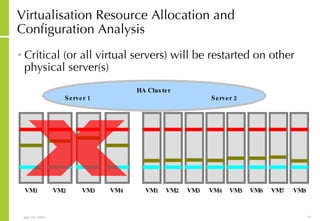
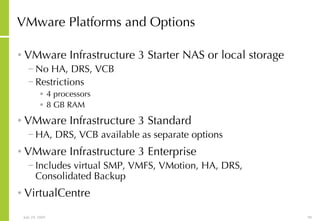
  • 228.
    Database Cloning andthe Application Development Process Full or partial database copies required for: App and DB Development Maintenance (OS, DB upgrade) Test and QA Training and Demos Reporting and DW ETL Ability to do this quickly, correctly, and efficiently directly impacts Application Development and Deployment PROD SECONDARY (DR) DEV MAINT TEST/QA RPT/ETL
  • 229.
    Traditional Approaches toCloning Copy Offline Online (using a mirror or standby database, snapshots, and log-based consistent recovery ) Redirected restore From disk- or tape- based backups Challenges Limited storage resources Long lead-time requirements Test 1 Test 2 Test N Production Mirrored Copy Dev 1 Dev N Dev 2
  • 230.
    Database Maintenance withFlexible Volume Clones Benefits Instantaneous copies Low resource overhead Easily make copies of a production database without impacting the database Use clones to test migrations, apply bug fixes, upgrades, and patches Test 1 Test 2 Test N Production Mirrored Copy Dev 1 Dev N Dev 2 Production DB Clones
  • 231.
    New Database DevelopmentMethodology Mirror PROD for initial copy (DR) Mirror from and to storage system Clone database replicas as needed Create Snapshot copie s of replicas for instant SnapShot Restore of working databases PROD Test/Dev/DR Clones Develop ● Test ● Deploy
  • 232.
    Traditional Approach: ApplicationDevelopment and Testing Production database 100GB Mirror copy 100GB Development copies 300GB Testing copies 300GB Total: 800GB 8x actual storage requirement Time consuming Resource overhead Production Test 1 Test 2 Test 3 Mirrored Copy Dev 1 Dev 3 Dev 2
  • 233.
    SAN Approach: ApplicationDevelopment and Testing Production database 100GB Mirror copy 100GB Development copies 30GB Testing copies 30GB Total: 260GB Over 67% reduction in storage required Near instantaneous copies Negligible overhead Ability to have many more test and dev copies Test 1 Test 2 Test 3 Production Mirrored Copy Dev 1 Dev 3 Dev 2 Assumption: up to 10% change in data in the test and dev environments more clones = higher productivity
  • 234.
    Oracle Applications Lifecycle Need reliable backup and recovery solution Install Implement Re-organize Upgrade Patch Deploy Pain Points Plan Tune & Maintain Solutions Configure systems, forecast storage accurately Provision and maximize utilisation with FlexVol Testing requires duplicate data, lengthy and expensive process Flexible Clone: Fast & space-efficient data duplication Backup and Recovery solution with Snapshots, SnapShot Restore Mirror prod. data to test and dev system, lengthy process Mirror data with Storage Mirroring, ReplicatorX Create several clones, lengthy process, expensive Create clones with FlexClone, automate with SMO Need reliable backup and recovery solution Use Snapshots, SnapShot Restore, Need reliable backup restore, and DR solution Automate backups, restore with SMO, SnapMirror, ReplicatorX for DR
  • 235.
  • 236.
    Server Virtualisation ComponentsShared storage required for operation HA (High Availability) VMotion – move virtual servers seamlessly between physical servers
  • 237.
    More Information AlanMcSweeney [email_address]

Editor's Notes

  • #62 This picture represents the basic framework of RAID-DP that I’ll be using in the rest of the talk. The bracket shows one 4 KB block on each disk. Unlike regular RAID, we divide the blocks on each disk into chunks – four 1 KB chunks in this example. All of the techniques that I’m going to show will apply to every block on the disk, but to keep things simple, I’m just going to focus on this one block.
  • #63 The left 5 disks are handled as regular RAID 4. So here you can see that I’ve put data in the disks using the example from the first page. And sure enough, 3 + 1 + 2 + 3 equals 9. One of the nice things about RAID-DP is that it is a strict super-set of RAID 4, which means that it’s easy to take a RAID 4 group and upgrade it to RAID-DP, or take a RAID-DP group and convert it back to RAID 4, to reclaim the extra disk. TRANSITION: Now let’s look at how the Diagonal Parity works.
  • #64 Here I’ve marked off a diagonal in blue. Notice that the diagonal includes not only the data disks from the RAID 4 array, but also the parity. We store the diagonal parity on the DP disk. Although the diagonal parity goes down the block as a diagonal, the parity calculation itself works just the same. So you can verify in this example that 1 + 2 + 2 + 7 equals 12. Also note that I’ve only filled in numbers for a few of the chunks. Right now, I’m just trying to help you understand the very basic operation of RAID-DP. I’ll fill in more details later. TRANSITION: So now let’s look at what happens if we fail a drive.
  • #65 If we fail just one drive, then we can reconstruct the data just with regular old RAID 4. Take 9 – 3 – 2 – 1 and you get 3, which is what was there. TRANSITION: But suppose a second disk fails… CLICK
  • #66 Now we would be hosed with normal RAID 4, because we are missing two values, but we only have one equation. But notice, we do still have a diagonal row that is missing only one element. So we can use the diagonal to reconstruct the missing block on the second disk. Do the math: 12 – 7 is 5, minus 2 is 3, minus 2 is 1. TRANSITION: Sure enough… CLICK
  • #67 Now we have enough data to do the reconstruction by normal RAID 4. Do the math: 9 minus 3 is 6, minus 2 is 4, minus 1 is 3. TRANSITION: And sure enough… CLICK.
  • #68 At this point, we’ve only reconstructed the missing chunk for the top row, but this simple example should help build your intuition for the next step, when we look at how to reconstruct the missing chunks for all of the rows. So far so good, but things are about to get much more complicated, so let’s review what we are doing. Remember that the bracket identifies 4 KB worth of data on each disk (one WAFL block), and we’ve divided that into four chunks, so that each little red dot represents 1 KB of lost data. The trick now is to show how to extend this same technique to cover all of the missing chunks in the picture. And remember also that this same technique can be applied to each block in the entire disk.
  • #69 You’ll just have to trust me that all of these add up the way they should. But just as an example, let’s look at the pink diagonal: 2 plus 1 is 3, plus 3 is 6, plus 5 is 11. Sure enough. Now is a good time to take a deep breath, look at this whole picture and make sure you understand all the working pieces. TRANSITION: Now let’s kill a couple of drives.
  • #97 The shows a simple configuration for illustrative purposes where there are VMs on two sets of servers in a HA cluster. The VMs have Reservation (lower resource limits) and Limits (higher resource limits) values explicitly. The actual level of usage of the VMs is between these two values. When one of blades fails the failing servers will be restarted on the remaining blades in the HA cluster with the result that the allocated resources to the VMs will be reduced dynamically to a lower value closer to their reservation threshold in order to accommodate the new VMs. This contains a suggested approach for setting resource allocation values in order to configure effective automatic recovery in a HA cluster. The following terms are used to define resource requirements: NS Number of servers in one half of a symmetrical HA cluster defined across both HP sites NPPS Number of processors per server PP Processing power of processor HSH High share resource allocation relative ratio number MSH Medium share resource allocation relative ratio number LSH Low share resource allocation relative ratio number NHVM Number of VMs with a share value set to High for which automatic disaster recovery is to be allowed NMVM Number of VMs with a share value set to Medium for which automatic disaster recovery is to be allowed NLVM Number of VMs with a share value set to Low for which automatic disaster recovery is to be allowed RF Reservation Factor – this is a ceiling for the total of the Reservation values for all virtual machines for which recovery is to be automated. Reservation Factor should be set to less than .5 in order to allow for processing resources for the virtualisation hypervisor. TPMR Total physical machine processing resource capacity RVU Reservation value unit – this is a notional amount of resources that when multiplied by RV Reservation value set for a virtual machine RVH This is the suggested reservation value to be set for a virtual server with a High share resource RVM This is the suggested reservation value to be set for a virtual server with a Medium share resource RVL This is the suggested reservation value to be set for a virtual server with a Low share resource TR This is the total of all the reservation values for virtual machines in one side of a symmetrical
  • #98 The following is one way of determining how the Reservation values should be set. (1) TPMR = NS x NPPS x PP (2) RVU = TPMR x RF / (NHVM x HSH + NMVM x MSH + NLVM x LSH) (3) RVH = RVU x HSH (4) RVM = RVU x MSH (5) RVL = RVU x LSH (6) TR = RVU x (NHVM x HSH + NMVM x MSH + NLVM x LSH) Number of servers in one half of a symmetrical HA cluster defined across both locations 8 Number of processors per server 2 Processing power of processor 3.2 High share resource allocation relative ratio number 2 Medium share resource allocation relative ratio number 1.5 Low share resource allocation relative ratio number 1 Number of VMs with a share value set to High for which automatic disaster recovery is to be allowed 20 Number of VMs with a share value set to Medium for which automatic disaster recovery is to be allowed 20 Number of VMs with a share value set to Low for which automatic disaster recovery is to be allowed 20 Reservation Factor – this is a ceiling for the total of the Reservation values for all virtual machines for which recovery is to be automated. Reservation Factor should be set to less than .5 in order to allow for processing resources for the virtualisation hypervisor. .45 (1) TPMR = 8 x 2 x 5.2 = 51.2 (2) RVU = 51.2 x .45 / (20 x 2 + 20 x 1.5 + 20 x 1) = 0.256 (3) RVH = 0.256 x 2 = 0.512 (4) RVM = 0.256 x 1.52 = 0.384 (5) RVH = 0.256 x 1 = 0.256 (6) TR = 0.256 x (20 x 2 + 20 x 1.5 + 20 x 1) = 23.04
  • #99 VMware ESX Server. A robust, production-proven virtualisation layer run on physical servers that abstracts processor, memory, storage, and networking resources into multiple virtual machines. VirtualCentre Management Server (VirtualCentre Server). The central point for configuring, provisioning, and managing virtualised IT environments. Virtual Infrastructure Client (VI Client). An interface that allows users to connect remotely to the VirtualCentre Server or individual ESX Servers from any Windows PC. VMware Virtual Machine File System (VMFS ). This is a high-performance cluster file system for ESX Server virtual machines. VMware Virtual Symmetric Multi-Processing (SMP). Feature that enables a single virtual machine to use multiple physical processors simultaneously. VMware VMotion. Feature that enables the live migration of running virtual machines from one physical server to another with zero down time, continuous service availability, and complete transaction integrity. VMotion is a technology used by the VMware DRS components VMware HA. Feature that provides easy-to-use, cost-effective high availability for applications running in virtual machines. In the event of server failure, affected virtual machines are automatically restarted on other production servers that have spare capacity. VMware Distributed Resource Scheduler (DRS). Feature that allocates and balances computing capacity dynamically across collections of hardware resources for virtual machines. VMware Consolidated Backup. Provides an easy to use, centralised facility for agent-free backup of virtual machines. It simplifies backup administration and reduces the load on ESX Server installations.
  • #100 This lists sample costs for various VMware configurations. VMware is priced per pair of processors on which the software runs. VirtualCentre is sold separately. Only one VirtualCentre instance is needed for a virtual infrastructure, subject to architectural limits.
  • #102 The elements of this option are: The primary server virtualisation infrastructure consists of two servers There is a separate server to run VirtualCentre to monitor, administer and control the virtual server environment. Data will be stored on a high-capacity, highly-resilient and reliable SAN. Server data will be initially backed-up onto a high-capacity, low-cost disk storage unit. Server data will then be backed-up to a LTO3 tape autoloader unit. This will reduce the manual effort associated with tape handling. The VirtualCentre server will provide centralised management, administration and control of the virtual server infrastructure. In the event of failure of one of the physical servers in the primary site, the HA component of VMware will allow the virtual servers on the failing physical server to be recovered onto the other physical server automatically.
  • #103 Data will be backed-up from the primary SAN to a low-cost, high-capacity disk storage unit. This will enable rapid backup with minimal impact on production systems during the backup process. Data will then be backed-up to an LTO3 tape autoloader. This will reduce the manual effort associated with tape handling during backup.
  • #105 Data will be backed-up from the primary SAN to a low-cost, high-capacity disk storage unit. This will enable rapid backup with minimal impact on production systems during the backup process. Data will then be backed-up to an LTO3 tape autoloader. This will reduce the manual effort associated with tape handling during backup. The backup data on the primary disk backup unit will be copied to a storage unit in the backup site to provide a copy from which data can be restored in the event of failure of the primary site. Backup tapes can be moved from the primary site to the backup site.
  • #107 There are a number of architectural limits that affect large scale implementation: Number of virtual machines (for management server scalability) 1500 Number of physical hosts per DRS cluster 32 Number of physical hosts per HA cluster 16 Number of physical hosts per VirtualCentre server 100 Ultimately this will require two or more entirely separate Virtual Infrastructures each of which will be managed by entirely separate VirtualCentre systems. In this configuration, each Virtual Infrastructure has three blade enclosures of 16 blade servers each in each data centre. This means each Virtual Infrastructure has 96 physical hosts – 48 in each data centre for symmetry. This will impose additional hardware requirements for VirtualCentre systems and VirtualCentre database servers. In reality the number of physical hosts per Virtual Infrastructure may be lower because of the number of virtual machines running on the physical servers. 96 physical hosts should be able to run a minimum of 750 virtual servers which is considerably less than the threshold of 1,500. This minimum of 750 is based on an average of around four virtual machines per blade processor.
  • #108 Multiple Clusters are defined up to the current maximum of 16 physical servers per HA cluster. VMware clusters are defined symmetrically across both sites. So, for a cluster of 16 physical servers, eight are located in each site. The VMware Cluster is designed to maximise recoverability while meeting agreed any SLA terms for resilience and high availability, maximising resource utilisation and long-term flexibility and minimising physical resource requirement. There is no ideal design that optimises all the factors. Some compromise is required. The easiest VMware Cluster design consists of two sets of identical resources across both data centres.
  • #109 Like any IT project, the investment in implementing server virtualisation should be justified to ensure that it delivers real benefits. A cost benefit analysis is important to l enable you to prepare a business case for server virtualisation safe in the knowledge that the information it contains is accurate and detailed. It will equip you with all the facts you need to understand if server virtualisation will deliver you bottom-line business benefits.
  • #134 DSS recommend the nworks SCOM Management Pack for VMware is selected for SCOM integration if required. The nworks MP provides full Alerting and Performance charting on VMware VI3 enterprise system status, as well as operational information. It collects: Performance and Event data for VMware ESX Hosts, either from VirtualCentre or ESX directly Performance and Event data for VMware ESX Guest Virtual Machines, either via VirtualCentre or ESX directly Events and Alerts from VirtualCentre in many categories such as security, status/state-change, object creation/deletion and other management & admin actions taken in VirtualCentre. The Topology of the Virtual Infrastructure within VirtualCentre – Data centres, Folders, Clusters, Hosts and Guests Events and Alerts from nworks own VEM Collector service The detailed data available in the nworks MP is delivered by use of the VMware SDK on VirtualCentre, which gives an accurate picture of the status of VirtualCentre, the managed Hosts, and the Guest Virtual Machines. The SCOM Management Packs runs the nworks Collector. The nworks Collector component is a Windows service which can run on a physical server or a Virtual Machine. The Collector is also referred to as VEM (Virtual Enterprise Monitor). The VEM server can be a virtual server to reduce cost. The nworks Collector architecture does not require the installation of software on the ESX Server. The nworks SCOM Management Pack two versions: VMware Events Only MP for SCOM - handled only VMWare events VMware MP for SCOM - covers both events and performance logging The second version is more expensive but more functional. It can collect up to 300 metrics on the operation of virtual servers.
  • #138 Now that’s all a grand oversimplification, since there are lots of forces at work. Let’s look at what’s really happening. First, let’s talk about Volumes. Volumes are the basic building block—the unit around which all data management is based. Therefore, the tools and processes that we have to manage our data acts on volumes—like snapshots, SnapVault, and backup & restore. When you can act on the smallest unit, you can have very precise control—all these things lead to a push to continue to control data at the volume level. Meanwhile, volumes themselves are getting bigger, and the disks that hold them are getting bigger, faster, and cheaper. (click) so creates an opposing dynamic—towards bigger and bigger physical storage. At one end, we’ve got increasing storage, performance and cost pressures driving the adoption of bigger and bigger disks. (what role does the grid and RAID DP play here?) At the same time, we know that the key to using these big disks efficiently is to have highly customized control over the management of all aspects of the data. Tools like SnapShots, SnapMirror and Snapvault all depend on optimizing configuations at the volume level. (more examples? ILM depends on each volume being managed by the demands of its types of data; automated migration, restore on demand, etc.)
  • #141 In order to accomplish this we are introducing a new entity to capture the physical characteristics of disks – We call it an aggregate. An aggregate is a collection of raid groups and is used to provide a large pool of storage for use by flexible volumes. There can now exist multiple flexible volumes in a single aggregate each of which can be dynamically resized. Reallocation of space is now an instantaneous non-disruptive operation. The thing to note is that from a data management perspective the basic container of data and the basic building block for your storage architecture is still a volume and aside from new features it maintains its properties of the past.
  • #142 Aggregate is representation of physical storage space provided by the combined raid groups – a collection of blocks. As a volume is created it takes some space to set up the meta data, file system view and provide a access point for the user, but no space is carved off of the aggregate space. As data is written in a volume, space from the aggregate is utilized just like we do for qtrees today. The blocks belonging to different flexible volumes are intertwined within an aggregate.
  • #150 Goal of this slide: Demonstrate the difference and consequential value of the N series Unified Architecture approach. Script: One of the best examples of N series innovation is the Unified Architectural Model which provides the foundation for the dramatic differences in value N series is able to provide. First let’s look at the hardware platform model. No matter which of our competitors you look at, they all use the same approach—specialized, incompatible platforms for different functions. They may have a platform for low end, another for mid-range, yet another for high-end, and still another for compliance. Each of these platforms, while robust in its own area, forms an information silo, and an investment dead-end. By contrast, N series systems base solutions on one, extremely broad, scalable and fully compatible platform, totally eliminating the notion of information silos. And to help you get the most out of your investment dollars, every system can be easily upgraded without migrating the data. [Click mouse to build] This model starts to get even more compelling when you look at the software and processes required. The specialized hardware platforms each run their own, incompatible software, each with its own set of processes and “best practices”. In contrast, the N series family all runs the same set of software, with the same processes. So much so that we hear customers say that they only have to test an application with one N series system—they know what works on one, will work on all. [Click mouse to build] Add to this the people side of the equation, and you see that all those incompatible platforms each need their own experts, and getting them to work together requires even more people and expensive integration services. With n series, your people need less training, spend less time on making things work together, and because they’re familiar with the systems, they make fewer mistakes—the leading cause of downtime. I hope this helps you understand how simple concept like “architectural simplicity” can make a big impact to your bottom line.
  • #151 EMC offers strong solutions in each of our markets including primary, secondary and backup. However, we can actually provide the simplification EMC can only talk about. Data ONTAP offers the user consistent management and functionality across all N series platforms. We mean not only in name by actual syntax and operational functionality from the low-end through the high-end. There is no need to re-train staff as another N series solution is added to the environment. EMC wide breadth of solutions have been acquired through a variety of acquisitions and partnerships resulting in not only different operating systems required for their products but often drastically different functionality implementation. Thus, the addition of another platform or the movement of staff to another EMC system required retraining and reeducation as to the capabilities and limitations of that system. Several of EMC’s products have a very narrow functionality limitations. One example is the CLARiiON CX which requires a separate platform to support FC and another platform to support iSCSI. N series allows customers to intermix. Other limitations include Centera’s scalability only by adding an additional frame, lack of a backup solution, lack of tape connectivity, lack of migration. As you can see with the complexity of EMC’s solutions, the only way to provide the integration for the customer is through the involvement of professional services. This not only increases the initial and on-going costs of the solution but locks the customer into the EMC solution.
  • #153 Then use the picture from the Customer Preso… Integrated NAS Protection Key Messages: The co-developed solution integrates all stages of NAS data protection, while increasing performance and simplifying management. While most of the short-term and long-term integration is available today, they have been enhanced and now integrated across each stage. Organization’s can now manage all operations from a single, intuitive interface (NetBackup). Previously, an administrator would have to log into NAS multiple systems and interface with a number of tools to perform each operation. In addition, there was no understanding or logic of what administrators have protected with online snapshots compared to NDMP tape backups. Short-Term (the solution already offered with NetBackup 5.1) – no need to discuss this in a lot of detail here, as it was covered in the Overview section NetBackup (Advanced Client) integrates with NetApp’s Snapshot technology to schedule, manage, and catalog local disk-based snapshots. Snapshots can managed across multiple NSs and locations. Snapshots are space-optimized by providing only a map of the file system at a point-in-time. However, the space required to store snapshots increases in size when data is changes over time. NetBackup (Advanced Client) integrates with NetApp’s SnapRestore to rapidly restore a single file from the local snapshots or rollback a fie system to a point-in-time. Note: Same concept and benefits as NetBackup Advanced Client Instant Recovery feature. Note: This functionality has already been released with NetBackup 5.1. However, it the integration of all components is where customers will find value. Near-Term NetBackup (Advanced Client) integrates with NetApp’s SnapVault technology to provide disk-to-disk backups of NetApp NSs to a consolidated NetApp NearStore system. Backups can be performed at an incremental changed block-level for high-performance backups and reduced storage requirements. Leveraging SnapVault’s ability to send data great distances, organizations will be able to backup remote office NAS systems to a centralize disk repository. Additional benefits of NetBackup managing NetApp SnapVault: - Oracle application interface. - Consolidation of primary and secondary snapshots reduces storage - Ease of use – replaces cumbersome administrative CLI commands which must be run on both the primary and secondary systems. - Provides a “single pane of glass” for NAS NS administration, backups, and restores. - Improved scheduling of snapshot and snapvault transfers with finer time granularity with predictability. - Provides a user restore browse capability enabling efficient user directed restores. (.vs. ~snapshot copies) - Improved snapshot naming conventions combined with NetBackup cataloguing to identify images. ((( Long-Term NetBackup for NDMP Option will migrate (backup) snapshots from the NetApp NearStore to tape for long-term storage. NetBackup 6.0 will bring SSO (drive sharing) for NDMP NAS systems, WORM tape support, and directory level DAR (direct access recovery). )))
  • #160 Another key element of Snapshots are that they are near instantaneous, as they only require copying a simple data structure, not copying the entire data volume. Taking a Snapshot requires virtually no storage. It is only as data changes in the volume that these changes are written. These changes are written to new disk locations thus the Snapshot doesn’t require extraneously copying data. In comparison, mirroring requires significant costs in terms of the bandwidth infrastructure, the potential for downtime, and the computing resource dedicated to doing the copies, as well as the management overhead of these time intensive tasks . Lastly, in comparison to expensive mirroring solutions, Snapshots are bundled in to Data ONTAP and come standard with every system we ship.
  • #184 Aggregate is representation of physical storage space provided by the combined raid groups – a collection of blocks. As a volume is created it takes some space to set up the meta data, file system view and provide a access point for the user, but no space is carved off of the aggregate space. As data is written in a volume, space from the aggregate is utilized just like we do for qtrees today. The blocks belonging to different flexible volumes are intertwined within an aggregate.
  • #185 Aggregate is representation of physical storage space provided by the combined raid groups – a collection of blocks. As a volume is created it takes some space to set up the meta data, file system view and provide a access point for the user, but no space is carved off of the aggregate space. As data is written in a volume, space from the aggregate is utilized just like we do for qtrees today. The blocks belonging to different flexible volumes are intertwined within an aggregate.
  • #186 Aggregate is representation of physical storage space provided by the combined raid groups – a collection of blocks. As a volume is created it takes some space to set up the meta data, file system view and provide a access point for the user, but no space is carved off of the aggregate space. As data is written in a volume, space from the aggregate is utilized just like we do for qtrees today. The blocks belonging to different flexible volumes are intertwined within an aggregate.
  • #188 Why Use NetApp for Exchange?
  • #189 Key Message: NetApp has software specialized for Exchange environments Talking points: SnapManager - currently (Q3CY’03) supports Exchange 5.5 and Exchange 2000. SnapDrive – runs in both ethernet and fiber channel environments Single mailbox recovery software - works with Exchange 5.5 and Exchange 2000. Data Fabric Manager – Provides a central management consol for NetApp systems NetApp Software for Exchange
  • #190 SnapManager for Exchange
  • #191 SnapManager for Exchange Overview
  • #192 SnapMirror (with SME)
  • #194 Single Mailbox Restore
  • #195 PowerControls Software
  • #201 Notes: 1) Unified positioning of NetApp management tools: -Complete set of management tools -Built from the strong base of our existing products 2) Management tools stack composed of 4 software suites targeted to 3 different administrative needs and roles: -storage administrator: storage and data suite -server administrator: server suite -application administrator: application suite 3) Application Suite -provides application solutions on top of NetApp technology by providing an abstraction layer on top of Server, Data, and Storage Suites -application administrator does not need to worry about layers underneath the Application Suite - improves efficiency of application administrator by taking advantage of NetApp technology 4) SnapManager for SQL Server is part of the Application Suite: - allows database administrators to backup, restore, recover and clone the Oracle database with minimum storage knowledge -uses transparently SnapDrive for Windows which is part of the Server Suite
  • #203 Here’s a chart with some of the features & benefits of SnapManager for Microsoft SQL Server. Backup& restore: First and foremost is the ability to make quick backups. As we had talked before, customers will be able to make backups that don’t impact the end user experience. This is a valuable feature. With organizations supporting users who the business application from across the globe, it is extremely hard to find times that the database servers can take a break. With SnapManager for SQL, this restriction can be removed. In the case of a disaster, like an accidental deletion or application misbehaviors, customers can stop their database system and get back to a good copy within minutes. This reduces downtime. The best news for this whole thing is that the benefits of rapid backup and restore can be achieved for any size of database installation. Hot backups to SnapShot : Wizards : One of the questions customers have when they buy a product is, “how long is it going to take to deploy this thing and how much time does it take to learn the product?” The beauty of NetApp’s SnapManager for Microsoft SQL Server, is that it is extremely simple to deploy and extremely simple to learn. The look and feel of the product is very much like Microsoft’s native backup tools that most Windows Administrators are familiar with. This makes the learning process extremely simple. MSCS Support: SnapManager for Microsoft SQL Server supports NetApp Cluster Failover for high availability of storage and integrates with MSCS for high availability of the Server Environment. This makes the entire Database infrastructure highly available. Cluster failover: Depending on customer’s needs, NetApp provides clustered or non-clustered storage appliance. For customers who run mission critical exchange servers, the clustered storage appliance is the best way to maximize on the high availability of the storage.
  • #204 Here’s a chart with some of the features & benefits of SnapManager for Microsoft SQL Server. Volume Mount Point: Support for Volume Mount Points eliminates the limitations with drive letters. This is primarily a limitation for customers who have hundreds of databases. Also, customers might not want to have multiple databases on one/two LUN. Resource Database: Resource database is a read-only database that contains all the system objects in SQL Server 2005. It doesn’t contain any user data or metadata. Each SQL Server has only one instance of this database and is not shared with any other instance. The location of the resource database is dependent on the location of “master database”. This is only supported with SQL Server 2005.
  • #206 Notes: Leverage larger servers to further consolidate
  • #209 Key Message : SnapMirror can protect Exchange data from disasters or catastrophic natural events by replication to a remote site Talking Points: Economical remote replication : SnapMirror replicates Exchange data to a a target filer at a remote site with low impact on network traffic and economical deployment over WAN. SnapMirror only replicates incremental changes thus reducing the bandwidth requirements. Rapid recovery in the event of a disaster : When disaster strikes the primary location, a standby Exchange server at the remote location can connect to the Exchange data on the SnapMirror target volume to provide users with rapid access to their email data.
  • #217 Here’s are the key reasons SnapManager on SQL is valuable to customers: It delivers high availability by making restores simple, reduces backup windows, increases availability of the database infrastructure and does all of this while delivering an easy to manage solution. NetApp’s Storage appliances, software solutions like SnapManager for Microsoft SQL and the services expertise that we bring in, make the transition to using our solution extremely simple, manageable and useful to the end customer. NetApp has a strategic partnership with Microsoft. Both companies collaborate on many fronts and this should give customers and prospects the necessary confidence in using our solutions together. This unbeatable combination of technology, partnership and services should help deliver the best solution for your customer’s environment.
  • #219 Go to Oracle store to buy it, need to license it.
  • #220 ASM provides its own portable Volume Management and File System services. These are Database orientated which aim to give the performance of raw disk with the ease of management of a file system. However, its not a general purpose file system (i.e. does not replace NFS, EXT3 etc.). Oracle’s “Automatic Storage Management” (ASM) is a powerful and portable storage manager designed to manage Oracle Database 10 g™ database files. ASM simplifies storage management so that DBAs worry less about Oracle Database file layout and management. ASM delivers lower total cost of ownership while increasing storage utilization, all without compromising performance or availability. With ASM, a fraction of the time is needed to manage your database files. ASM key features include: Volume Management Database File System with performance of RAW I/O Supports clustering (RAC) and single instance Automatic data distribution Online add/drop/resize disk with automated data relocation Automatic file management Flexible mirror protection
  • #222 Focus on admin productivity across the IT organization Focus on increasing storage flexibility Result is much faster response time and dramatically improved efficiency
  • #223 NetApp provides the other half of this efficient database management solution with SnapManager for Oracle (SMO). NetApp is the first to deliver a tightly integrated disk-based backup with granular recovery at the file level for Oracle customers using ASM technology. SnapManager for Oracle is a host-based management tool that integrates tightly with your Oracle Database to simplify, automate, and optimize database backup, recovery, and cloning Take snapshots with netapp, register with RMAN. SMO understands how ASM diskgroups translate into NetApp volumes. Can recover specific file or use RMAN SMO value is in recovery and cloning.
  • #226 Backup and recovery to ensure availability and uptime is something that is top of mind for most if not all DBA’s. Ensuring high levels of availability means, taking backups often. This results in degraded performance (in hot backup mode) or system being taken offline (in cold backup mode). In addition to performance, backups also take significant time as they are limited by the speed of tape. The time to backup and recover reduces DBA productivity as well. Time to recover from tape is also prohibitive as it is limited by speed of tape. All this results in DBA’s taking backups less frequently. Highlight DBA spends time on maintaining backup scripts
  • #227 A big DBA challenge is balancing BU/recovery, performance and space management. In some studies, work in these areas adds up to 50% of their time. NetApp Snapshot makes it simple. It alleviates the pain points we highlighted in the earlier slides regarding backup and recovery. NetApp allows the DBA to take backups more often as there is no performance or storage overhead. Given that we can store up to 255 snapshot copies, Snapshot can be taken every hour or less if needed Redo/transaction logs-tells you what changed over time
  • #228 SnapManager for Oracle provides capabilities that enable instantaneous and efficient disk-based backups of Oracle ASM-based databases. In addition to fast backups, SnapManager supports rapid restore and recovery of a failed Oracle Database instance within minutes. It leverages Snapshot ™ technology to provide automated, instantaneous, and space-efficient backups of Oracle Databases. It utilizes SnapRestore® technology to provide automated and rapid restore and recovery of the Oracle Databases. It uses FlexClone ™ technology to provide fast, automated creation of database clones within minutes. SnapManager for Oracle combines these with the NetApp intelligent storage infrastructure to simplify and optimize data management operations. SnapManager for Oracle is also protocol agnostic: it provides the same protection across NFS, iSCSI, and FCP.
  • #229 Why do you need to create copies of your database? There are a number of reasons (highlight list) Challenge is to be able to replicate data quickly and cost-effectively. Of
  • #230 There are several ways to copy production data. Offline – stop your application, make sure it’s in a consistent place, then make copies. This isn’t efficient as it impacts production applications unless you have planned downtime. Challenges and pain points Limited storage resources 100% storage capacity overhead per instance, or custom partial extraction scripts Long lead-time requirements Process heavy (I.e., Many “approvals” required.) Storage resource allocation Manual or scripted operations subject to human error Downtime (offline) or degraded production system performance (online) during copy Restoring the baseline requires repeat of this process … your DBAs and application developers could create (and repetitively re-create) a consistent copy of a database application environment……. nearly instantaneously, using negligible incremental storage, as needed, even for individual developers with little or no support of a storage admin? How would that impact the efficiency of your application development team?
  • #231 For example, supposed a volume is created for a production database. A Snapshot of that database is created for instant backup purposes. Recall that, with exception of a very small amount of metadata, the Snapshot does not occupy any more space. New blocks are allocated only as the active volume changes. A FlexClone can be created from that Snapshot, without creating any new blocks and another server can start a database instance against the cloned data (say for development). Additional space is consumed, only as the FlexClone changes. Hence, a rapid replica of a production volume can be created using a fraction of the storage. The benefits are self explanatory
  • #232 So the new methodology, if you take the combined solution, would look something like this where you've got your production copies of the database and you may have a DR copy as well which is something Topio can provide as well. And then you're going to clone potentially off of a DR copy. This is just an example. You can do it right off the production if you like. But basically you would mirror production for initial copy and then use clones off of that copy in order to enable all the functionality we've been talking about. You can also leverage, of course, all the other things that are on the NetApp storage device. Snapshots are one thing that of course you can leverage, besides all the other things like RAID-DP and all the advantages that are part of the WAFL file system. So snapshots are one of those, and bottom line is you can take multiple mirrors and span those out to the multiple use cases or multiple developers.
  • #233 An example. Typical test and dev environment with 3 copies for test and 3 for dev.
  • #234 NetApp consumes disk only for changed blocks. If you assume a 10% change in the data, it results in 67% reduction in storage required. In addition you also have the flexibility to create and delete clones at will! So first of all we talked about reducing the storage capacity which obviously has a direct impact on the overall cost of the solution if they require less storage. That's done by leveraging NetApp first of all for tiered storage which is a lower cost alternative, it has very good price performance. And on that storage eliminating the need to have a full copy, full physical copy of the data. In terms of simplifying operations there is no impact to production applications while you're maintaining the copies. But you can do that without impacting the production environments. The copies can be distributed to multiple locations. As I talked about, you could have them locally or remote, but you could actually have multiple copies at the same time. You could have one local, one remote, maybe two remote. 08:44 We have the capability to do that simultaneously so that if there's people distributed in different areas or you actually have different needs and you want to split off clones at different points in time based on the requirements, you can do that as well. 08:57 And using the capabilities in the NetApp storage those copies are created in a nearly instantaneous fashion. 09:04 So bottom line is, this allows customers to create and manage more copies of their data in less time and in a more efficient manner, and it really enables them to improve their operations. 09:15 They have an always current set of data using the Topio replication technology, and allows them to create them in an on-demand fashion. 09:25
  • #235 Pain points