Commvault
Data Protection & Management - Simplified
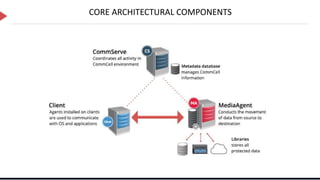
CORE ARCHITECTURAL COMPONENTS
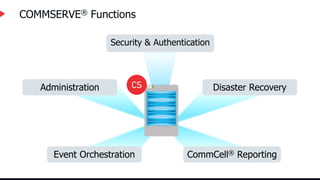
COMMSERVE® Functions
Event Orchestration CommCell® Reporting
Disaster Recovery
Administration
Security & Authentication
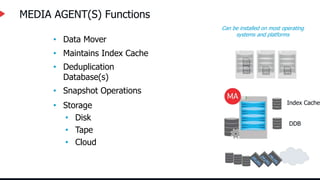
• Storage
• Disk
• Tape
• Cloud
• Snapshot Operations
• Deduplication
Database(s)
• Data Mover
MEDIA AGENT(S) Functions
Can be installed on most operating
systems and platforms
• Maintains Index Cache
Index Cache
DDB
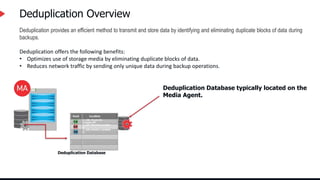
Deduplication Overview
Deduplication provides an efficient method to transmit and store data by identifying and eliminating duplicate blocks of data during
backups.
Deduplication offers the following benefits:
• Optimizes use of storage media by eliminating duplicate blocks of data.
• Reduces network traffic by sending only unique data during backup operations.
C#
V_100, Chunk 18,
Location 99
D#
V_107, Chunk 8, Location
6
V_109, Chunk 5, Location
2
F#
Deduplication Database
Deduplication Database typically located on the
Media Agent.
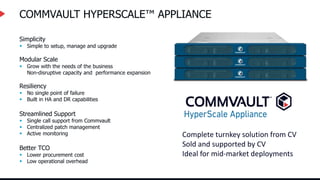
COMMVAULT HYPERSCALE™ APPLIANCE
Complete turnkey solution from CV
Sold and supported by CV
Ideal for mid-market deployments
Simplicity
 Simple to setup, manage and upgrade
Modular Scale
 Grow with the needs of the business
Non-disruptive capacity and performance expansion
Resiliency
 No single point of failure
 Built in HA and DR capabilities
Streamlined Support
 Single call support from Commvault
 Centralized patch management
 Active monitoring
Better TCO
 Lower procurement cost
 Low operational overhead
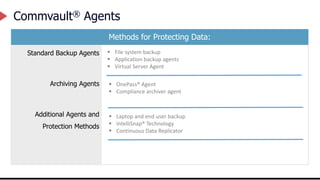
Commvault® Agents
Methods for Protecting Data:
Standard Backup Agents
Archiving Agents
Additional Agents and
Protection Methods
 File system backup
 Application backup agents
 Virtual Server Agent
 OnePass® Agent
 Compliance archiver agent
 Laptop and end user backup
 IntelliSnap® Technology
 Continuous Data Replicator
Application Protection
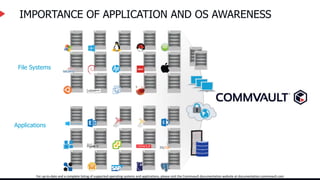
IMPORTANCE OF APPLICATION AND OS AWARENESS
File Systems
Applications
For up-to-date and a complete listing of supported operating systems and applications, please visit the Commvault documentation website at documentation.commvault.com
Commvault – Next Generation FS Agent
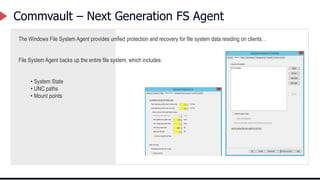
The Windows File System Agent provides unified protection and recovery for file system data residing on clients. .
File System Agent backs up the entire file system, which includes:
• System State
• UNC paths
• Mount points
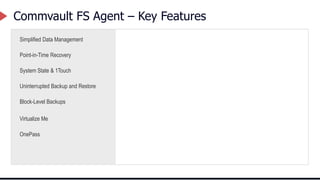
Commvault FS Agent – Key Features
Simplified Data Management
Point-in-Time Recovery
System State & 1Touch
Uninterrupted Backup and Restore
Block-Level Backups
Virtualize Me
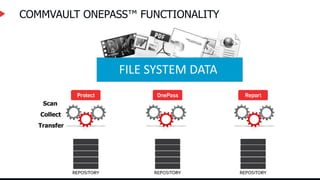
OnePass
COMMVAULT ONEPASS™ FUNCTIONALITY
Scan
Collect
Transfer
FILE SYSTEM DATA
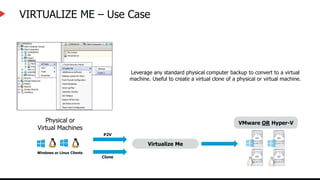
VIRTUALIZE ME – Use Case
Leverage any standard physical computer backup to convert to a virtual
machine. Useful to create a virtual clone of a physical or virtual machine.
Physical or
Virtual Machines
Windows or Linux Clients
Clone
P2V
Virtualize Me
VMware OR Hyper-V
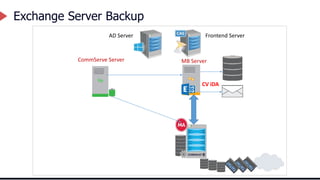
Exchange Server Backup
MB Server
CommServe Server
AD Server Frontend Server
CV iDA
15
15
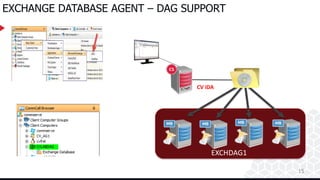
EXCHANGE DATABASE AGENT – DAG SUPPORT
CommVault_Software_Cache
EXCHDAG1
CV iDA
16
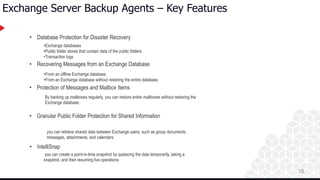
Exchange Server Backup Agents – Key Features
• Database Protection for Disaster Recovery
• Recovering Messages from an Exchange Database
• Protection of Messages and Mailbox Items
• Granular Public Folder Protection for Shared Information
• IntelliSnap
•Exchange databases
•Public folder stores that contain data of the public folders
•Transaction logs
•From an offline Exchange database.
•From an Exchange database without restoring the entire database.
By backing up mailboxes regularly, you can restore entire mailboxes without restoring the
Exchange database.
you can retrieve shared data between Exchange users, such as group documents,
messages, attachments, and calendars
you can create a point-in-time snapshot by quiescing the data temporarily, taking a
snapshot, and then resuming live operations
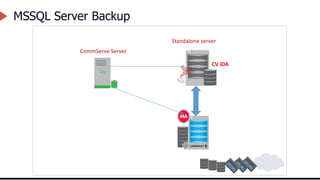
MSSQL Server Backup
Standalone server
CommServe Server
CV iDA
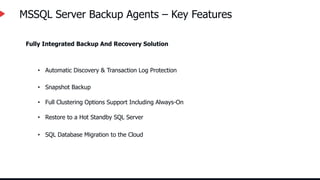
MSSQL Server Backup Agents – Key Features
Fully Integrated Backup And Recovery Solution
• Automatic Discovery & Transaction Log Protection
• Snapshot Backup
• Full Clustering Options Support Including Always-On
• Restore to a Hot Standby SQL Server
• SQL Database Migration to the Cloud
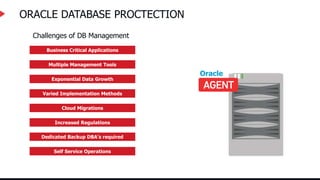
ORACLE DATABASE PROCTECTION
Business Critical Applications
Multiple Management Tools
Exponential Data Growth
Varied Implementation Methods
Cloud Migrations
Increased Regulations
Dedicated Backup DBA’s required
Self Service Operations
Challenges of DB Management
Oracle
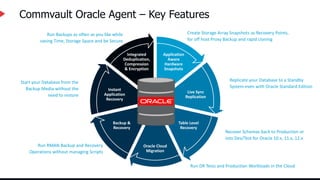
Commvault Oracle Agent – Key Features
Application
Aware
Hardware
Snapshots
Live Sync
Replication
Table Level
Recovery
Oracle Cloud
Migration
Backup &
Recovery
Instant
Application
Recovery
Integrated
Deduplication,
Compression
& Encryption
Create Storage Array Snapshots as Recovery Points,
for off host Proxy Backup and rapid cloning
Replicate your Database to a Standby
System even with Oracle Standard Edition
Recover Schemas back to Production or
into Dev/Test for Oracle 10.x, 11.x, 12.x
Run DR Tests and Production Workloads in the Cloud
Run RMAN Backup and Recovery
Operations without managing Scripts
Start your Database from the
Backup Media without the
need to restore
Run Backups as often as you like while
saving Time, Storage Space and be Secure
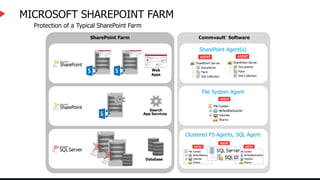
Commvault® Software
SharePoint Farm
MICROSOFT SHAREPOINT FARM
Search
App Services
Web
Apps
SharePoint Agent(s)
Database
File System Agent
Clustered FS Agents, SQL Agent
Protection of a Typical SharePoint Farm
MS Sharepoint Backup Agents – Key Features
The SharePoint Server Agent provides complete protection of on-premises SharePoint farm and documents in your
enterprise, and SharePoint online in Office 365
Protect All SharePoint Components
Fast Backup and Recovery for Content Database
Application-Aware Backups
Virtualization Environment Protection
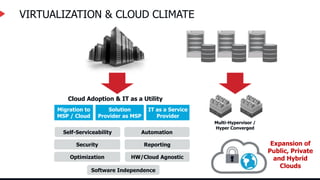
VIRTUALIZATION & CLOUD CLIMATE
Cloud Adoption & IT as a Utility
Migration to
MSP / Cloud
Solution
Provider as MSP
IT as a Service
Provider
Optimization
Security
Software Independence
Reporting
Automation
HW/Cloud Agnostic
Self-Serviceability
Expansion of
Public, Private
and Hybrid
Clouds
Multi-Hypervisor /
Hyper Converged
How Commvault® software solves customer data
management challenges in private and public cloud
environments
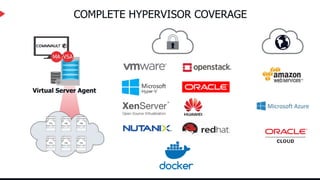
COMPLETE HYPERVISOR COVERAGE
Virtual Server Agent
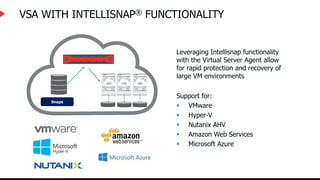
VSA WITH INTELLISNAP® FUNCTIONALITY
Leveraging Intellisnap functionality
with the Virtual Server Agent allow
for rapid protection and recovery of
large VM environments
Support for:
 VMware
 Hyper-V
 Nutanix AHV
 Amazon Web Services
 Microsoft Azure
Snaps
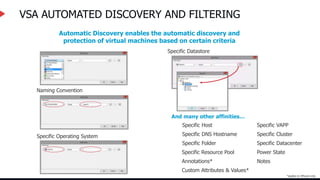
VSA AUTOMATED DISCOVERY AND FILTERING
Automatic Discovery enables the automatic discovery and
protection of virtual machines based on certain criteria
Naming Convention
Specific Operating System Specific DNS Hostname
Specific Host
Specific Datastore
Specific Resource Pool
Specific Datacenter
Specific Cluster
Specific Folder
Specific VAPP
And many other affinities…
Power State
Notes
Custom Attributes & Values*
Annotations*
*applies to VMware only
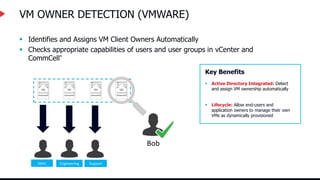
VM OWNER DETECTION (VMWARE)
 Identifies and Assigns VM Client Owners Automatically
 Checks appropriate capabilities of users and user groups in vCenter and
CommCell®
Key Benefits
 Active Directory Integrated: Detect
and assign VM ownership automatically
 Lifecycle: Allow end-users and
application owners to manage their own
VMs as dynamically provisioned
Bob
Sales Engineering Support
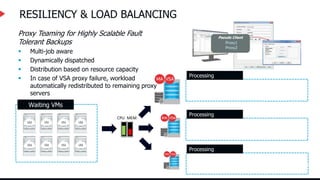
RESILIENCY & LOAD BALANCING
Proxy Teaming for Highly Scalable Fault
Tolerant Backups
 Multi-job aware
 Dynamically dispatched
 Distribution based on resource capacity
 In case of VSA proxy failure, workload
automatically redistributed to remaining proxy
servers
Processing
Processing
Processing
CPU MEM
Waiting VMs
Pseudo Client
Proxy1
Proxy2
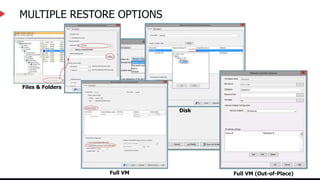
MULTIPLE RESTORE OPTIONS
Files & Folders
Disk
Full VM Full VM (Out-of-Place)
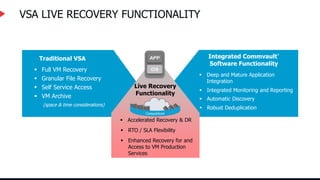
VSA LIVE RECOVERY FUNCTIONALITY
Live Recovery
Functionality
 Accelerated Recovery & DR
 RTO / SLA Flexibility
 Enhanced Recovery for and
Access to VM Production
Services
Integrated Commvault®
Software Functionality
 Deep and Mature Application
Integration
 Automatic Discovery
 Integrated Monitoring and Reporting
 Robust Deduplication
Traditional VSA
 Full VM Recovery
 Granular File Recovery
 VM Archive
 Self Service Access
(space & time considerations)
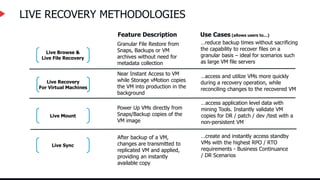
LIVE RECOVERY METHODOLOGIES
Live Browse &
Live File Recovery
Granular File Restore from
Snaps, Backups or VM
archives without need for
metadata collection
…reduce backup times without sacrificing
the capability to recover files on a
granular basis – ideal for scenarios such
as large VM file servers
Feature Description Use Cases (allows users to…)
Live Mount
Power Up VMs directly from
Snaps/Backup copies of the
VM image
…access application level data with
mining Tools. Instantly validate VM
copies for DR / patch / dev /test with a
non-persistent VM
Live Sync
After backup of a VM,
changes are transmitted to
replicated VM and applied,
providing an instantly
available copy
…create and instantly access standby
VMs with the highest RPO / RTO
requirements - Business Continuance
/ DR Scenarios
Live Recovery
For Virtual Machines
Near Instant Access to VM
while Storage vMotion copies
the VM into production in the
background
…access and utilize VMs more quickly
during a recovery operation, while
reconciling changes to the recovered VM
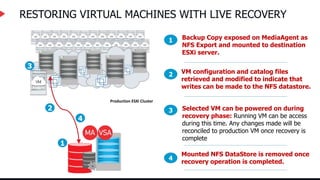
RESTORING VIRTUAL MACHINES WITH LIVE RECOVERY
Selected VM can be powered on during
recovery phase: Running VM can be access
during this time. Any changes made will be
reconciled to production VM once recovery is
complete
3
Production ESXi Cluster
1
4
Backup Copy exposed on MediaAgent as
NFS Export and mounted to destination
ESXi server.
1
VM configuration and catalog files
retrieved and modified to indicate that
writes can be made to the NFS datastore.
2
Mounted NFS DataStore is removed once
recovery operation is completed.
4
2
3
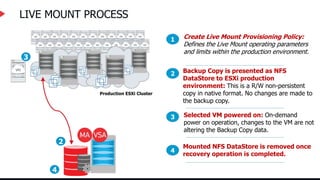
LIVE MOUNT PROCESS
Selected VM powered on: On-demand
power on operation, changes to the VM are not
altering the Backup Copy data.
3
Production ESXi Cluster
4
Create Live Mount Provisioning Policy:
Defines the Live Mount operating parameters
and limits within the production environment.
1
Backup Copy is presented as NFS
DataStore to ESXi production
environment: This is a R/W non-persistent
copy in native format. No changes are made to
the backup copy.
2
2
3
Mounted NFS DataStore is removed once
recovery operation is completed.
4
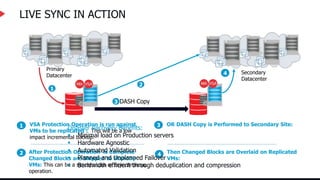
LIVE SYNC IN ACTION
VSA Protection Operation is run against
VMs to be replicated : This will be a low
impact incremental backup.
1
After Protection Operation is Complete
Changed Blocks are Shipped to Standby
VMs: This can be a synchronous or asynchronous
operation.
2
1
2
OR DASH Copy is Performed to Secondary Site:
3
Then Changed Blocks are Overlaid on Replicated
VMs:
4
Primary
Datacenter
Secondary
Datacenter
3 DASH Copy
4
Disaster Recovery Benefits:
 Minimal load on Production servers
 Hardware Agnostic
 Automated Validation
 Planned and Unplanned Failover
 Bandwidth efficient through deduplication and compression
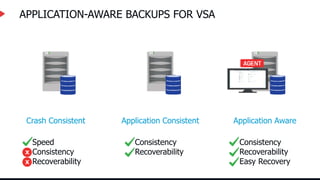
APPLICATION-AWARE BACKUPS FOR VSA
Consistency
Recoverability
Easy Recovery
Crash Consistent
Speed
Consistency
Recoverability
Application Consistent
Consistency
Recoverability
Application Aware
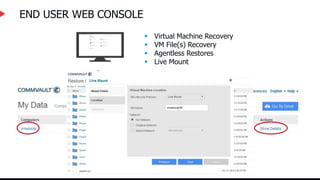
END USER WEB CONSOLE
 Virtual Machine Recovery
 VM File(s) Recovery
 Agentless Restores
 Live Mount
IntelliSnap® Functionality
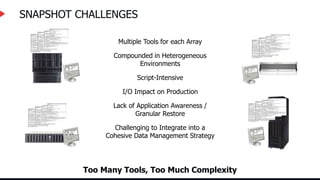
SNAPSHOT CHALLENGES
Too Many Tools, Too Much Complexity
Multiple Tools for each Array
Compounded in Heterogeneous
Environments
Script-Intensive
I/O Impact on Production
Lack of Application Awareness /
Granular Restore
Challenging to Integrate into a
Cohesive Data Management Strategy
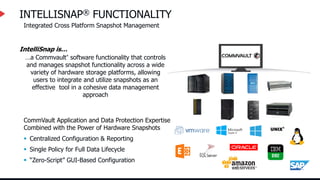
INTELLISNAP® FUNCTIONALITY
…a Commvault® software functionality that controls
and manages snapshot functionality across a wide
variety of hardware storage platforms, allowing
users to integrate and utilize snapshots as an
effective tool in a cohesive data management
approach
 Centralized Configuration & Reporting
 “Zero-Script” GUI-Based Configuration
 Single Policy for Full Data Lifecycle
CommVault Application and Data Protection Expertise
Combined with the Power of Hardware Snapshots
IntelliSnap is…
Integrated Cross Platform Snapshot Management
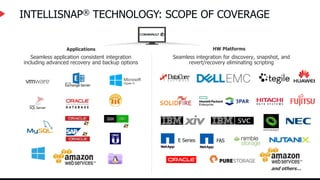
INTELLISNAP® TECHNOLOGY: SCOPE OF COVERAGE
Applications
Seamless application consistent integration
including advanced recovery and backup options
HW Platforms
Seamless integration for discovery, snapshot, and
revert/recovery eliminating scripting
and others…
FAS
E Series
1PM
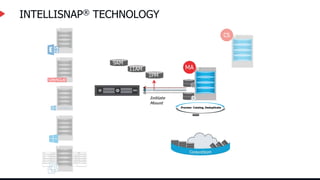
INTELLISNAP® TECHNOLOGY
Process- Catalog, Deduplicate
Initiate
Mount
9AM
11AM
1PM
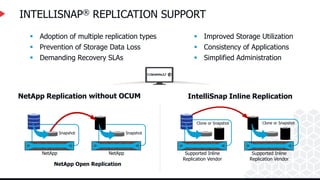
INTELLISNAP® REPLICATION SUPPORT
NetApp Replication with OCUM IntelliSnap Inline Replication
 Adoption of multiple replication types
 Prevention of Storage Data Loss
 Demanding Recovery SLAs
 Improved Storage Utilization
 Consistency of Applications
 Simplified Administration
Snapshot
NetApp
Snapshot
NetApp Supported Inline
Replication Vendor
Supported Inline
Replication Vendor
Clone or Snapshot Clone or Snapshot
NetApp Open Replication
without OCUM
Commvault® Block Level Backup
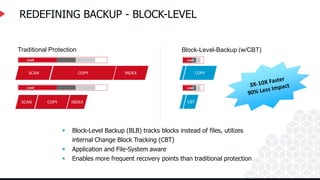
REDEFINING BACKUP - BLOCK-LEVEL
Load
Load Load
SCAN COPY INDEX COPY
SCAN COPY INDEX
Traditional Protection
Load
Load
Block-Level-Backup (w/CBT)
Load
CBT
 Block-Level Backup (BLB) tracks blocks instead of files, utilizes
internal Change Block Tracking (CBT)
 Application and File-System aware
 Enables more frequent recovery points than traditional protection
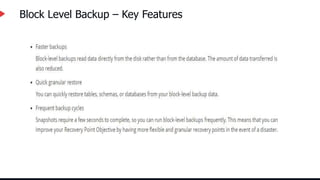
Block Level Backup – Key Features
Cloud Apps
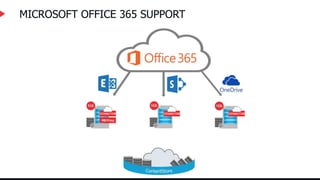
MICROSOFT OFFICE 365 SUPPORT
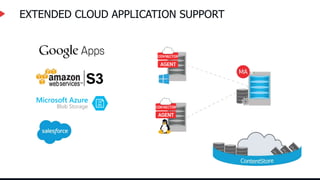
EXTENDED CLOUD APPLICATION SUPPORT
Journey to the Cloud
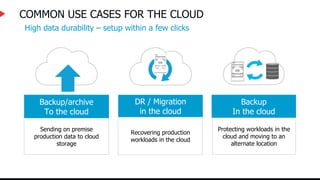
COMMON USE CASES FOR THE CLOUD
High data durability – setup within a few clicks
Sending on premise
production data to cloud
storage
Backup/archive
To the cloud
Protecting workloads in the
cloud and moving to an
alternate location
Backup
In the cloud
Recovering production
workloads in the cloud
DR / Migration
in the cloud
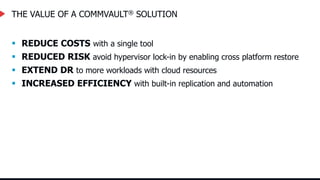
THE VALUE OF A COMMVAULT® SOLUTION
 REDUCE COSTS with a single tool
 REDUCED RISK avoid hypervisor lock-in by enabling cross platform restore
 EXTEND DR to more workloads with cloud resources
 INCREASED EFFICIENCY with built-in replication and automation
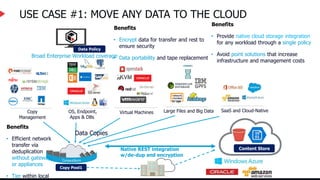
USE CASE #1: MOVE ANY DATA TO THE CLOUD
OS, Endpoint,
Apps & DBs
Large Files and Big Data SaaS and Cloud-Native
Copy
Management
Virtual Machines
Broad Enterprise Workload coverage
Copy Pool1
Data Copies
Data Policy
Native REST integration
w/de-dup and encryption
Content Store
Benefits
• Provide native cloud storage integration
for any workload through a single policy
• Avoid point solutions that increase
infrastructure and management costs
Benefits
• Efficient network
transfer via
deduplication
without gateways
or appliances
• Tier within local
Benefits
• Encrypt data for transfer and rest to
ensure security
• Data portability and tape replacement
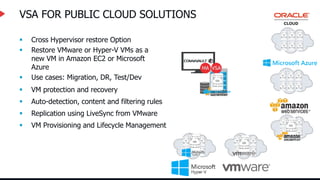
VSA FOR PUBLIC CLOUD SOLUTIONS
 Cross Hypervisor restore Option
 Restore VMware or Hyper-V VMs as a
new VM in Amazon EC2 or Microsoft
Azure
 Use cases: Migration, DR, Test/Dev
 VM Provisioning and Lifecycle Management
 Replication using LiveSync from VMware
 Auto-detection, content and filtering rules
 VM protection and recovery
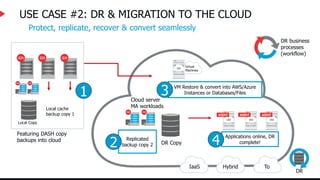
USE CASE #2: DR & MIGRATION TO THE CLOUD
IaaS Hybrid To
DR
DR business
processes
(workflow)
Cloud server
MA workloads
DR Copy
Replicated
backup copy 2
2
Protect, replicate, recover & convert seamlessly
Local Copy
Local cache
backup copy 1
Featuring DASH copy
backups into cloud
1
Virtual
Machines
VM Restore & convert into AWS/Azure
Instances or Databases/Files
3
Applications online, DR
complete!
4
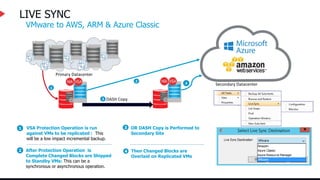
LIVE SYNC
Secondary Datacenter
VSA Protection Operation is run
against VMs to be replicated : This
will be a low impact incremental backup.
1
After Protection Operation is
Complete Changed Blocks are Shipped
to Standby VMs: This can be a
synchronous or asynchronous operation.
2
1
2
OR DASH Copy is Performed to
Secondary Site
3
Then Changed Blocks are
Overlaid on Replicated VMs
4
Primary Datacenter
3 DASH Copy
4
VMware to AWS, ARM & Azure Classic
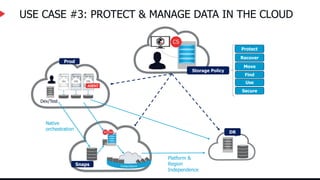
USE CASE #3: PROTECT & MANAGE DATA IN THE CLOUD
Prod
Dev/Test
Storage Policy
Protect
Recover
Move
Find
Use
Secure
Snaps
Native
orchestration
DR
Platform &
Region
Independence
Commvault Edge™ Endpoint Protection
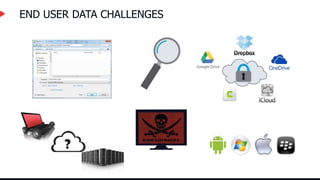
END USER DATA CHALLENGES
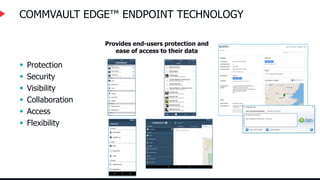
COMMVAULT EDGE™ ENDPOINT TECHNOLOGY
Provides end-users protection and
ease of access to their data
 Protection
 Security
 Visibility
 Collaboration
 Access
 Flexibility
62
62
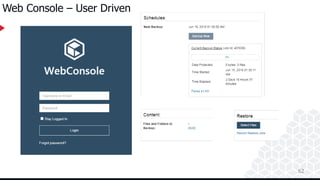
Web Console – User Driven
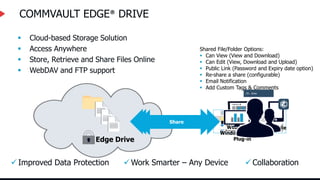
COMMVAULT EDGE® DRIVE
 Cloud-based Storage Solution
 Access Anywhere
 Store, Retrieve and Share Files Online
 WebDAV and FTP support
 Improved Data Protection  Work Smarter – Any Device  Collaboration
Web console
Windows Explorer
Plug-in
Mobile
Edge Drive
Access Anywhere
Local Access (Drag & Drop)
Share
Shared File/Folder Options:
 Can View (View and Download)
 Can Edit (View, Download and Upload)
 Public Link (Password and Expiry date option)
 Re-share a share (configurable)
 Email Notification
 Add Custom Tags & Comments
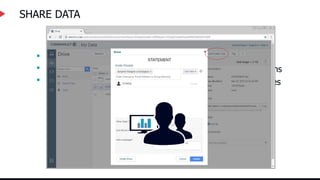
SHARE DATA
 Fully Integrated
 Share Files and Folders
 Re-Share Options
 Set Permissions
 Public Share Options
 Collaborative Shares
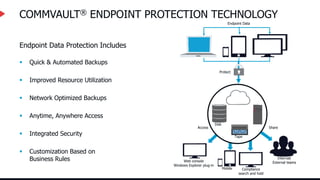
COMMVAULT® ENDPOINT PROTECTION TECHNOLOGY
 Quick & Automated Backups
 Improved Resource Utilization
 Network Optimized Backups
 Anytime, Anywhere Access
 Integrated Security
 Customization Based on
Business Rules
Endpoint Data Protection Includes
Endpoint Data
Protect
Access Share
Disk
Tape
Web console
Windows Explorer plug-in
Mobile Compliance
search and hold
Internal/
External teams
KEY TECHNOLOGIES:
OPERATIONAL MANGEMENT
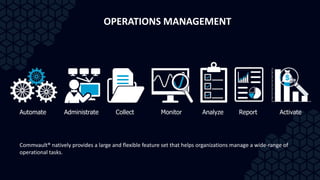
Automate Administrate Collect Monitor Analyze Report Activate
OPERATIONS MANAGEMENT
Commvault® natively provides a large and flexible feature set that helps organizations manage a wide-range of
operational tasks.
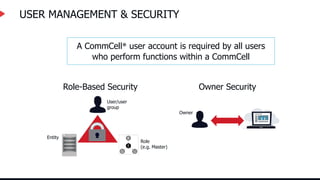
USER MANAGEMENT & SECURITY
A CommCell® user account is required by all users
who perform functions within a CommCell
Role-Based Security
User/user
group
Role
(e.g. Master)
Entity
Owner Security
Owner
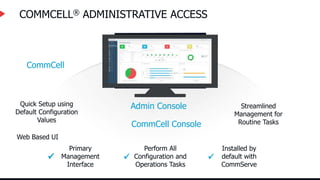
COMMCELL® ADMINISTRATIVE ACCESS
CommCell
CommCell Console
Primary
Management
Interface

Perform All
Configuration and
Operations Tasks

Installed by
default with
CommServe

Admin Console
Web Based UI

Streamlined
Management for
Routine Tasks

Quick Setup using
Default Configuration
Values

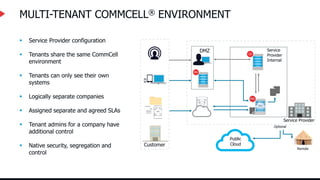
MULTI-TENANT COMMCELL® ENVIRONMENT
 Service Provider configuration
 Tenants share the same CommCell
environment
 Tenants can only see their own
systems
 Logically separate companies
 Assigned separate and agreed SLAs
 Tenant admins for a company have
additional control
 Native security, segregation and
control
Customer
Service Provider
DMZ Service
Provider
Internal
Optional
Remote
Public
Cloud
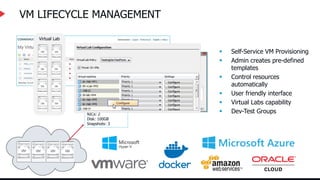
VM LIFECYCLE MANAGEMENT
 Self-Service VM Provisioning
 Admin creates pre-defined
templates
 Control resources
automatically
 User friendly interface
 Virtual Labs capability
 Dev-Test Groups
VMware Dev Template
Name: VM*Dev
CPUs: 2
Memory: 8GB
NICs: 2
Disk: 100GB
Snapshots: 3
Virtual Lab
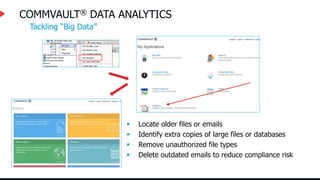
COMMVAULT® DATA ANALYTICS
 Locate older files or emails
 Identify extra copies of large files or databases
 Remove unauthorized file types
 Delete outdated emails to reduce compliance risk
Tackling “Big Data”
COMMVAULT® SEARCH ENGINE
 Ability to index data and allow search and eDiscovery across repositories
 Provides a highly distributed indexing and searching configuration that enables
you to index simultaneously on multiple servers and search across these search
servers
 Enables end users to find the single document most relevant to their specific goal
 Ability to identify and discover the right information applicable to your eDiscovery
requests
 Lighter deployment package end easier installation
Reporting
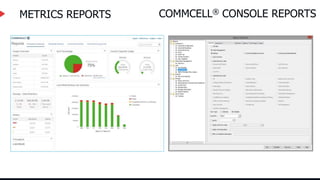
METRICS REPORTS COMMCELL® CONSOLE REPORTS
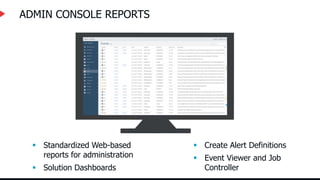
ADMIN CONSOLE REPORTS
 Standardized Web-based
reports for administration
 Solution Dashboards
 Create Alert Definitions
 Event Viewer and Job
Controller
Discovery & Positioning
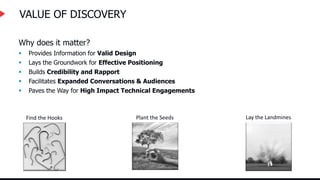
VALUE OF DISCOVERY
Why does it matter?
 Provides Information for Valid Design
 Lays the Groundwork for Effective Positioning
 Builds Credibility and Rapport
 Facilitates Expanded Conversations & Audiences
 Paves the Way for High Impact Technical Engagements
Find the Hooks Plant the Seeds Lay the Landmines
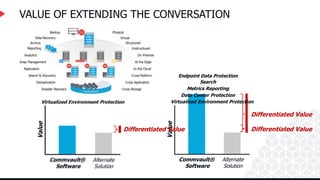
Differentiated Value
VALUE OF EXTENDING THE CONVERSATION
Alternate
Solution
Commvault®
Software
Value
Virtualized Environment Protection
Alternate
Solution
Commvault®
Software
Value
Virtualized Environment Protection
Data Center Protection
Metrics Reporting
Search
Endpoint Data Protection
Differentiated Value Differentiated Value
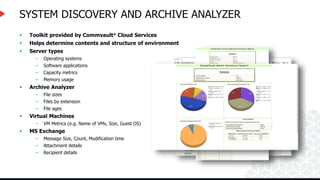
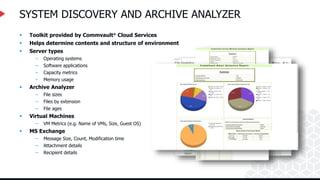
SYSTEM DISCOVERY AND ARCHIVE ANALYZER
 Toolkit provided by Commvault® Cloud Services
 Helps determine contents and structure of environment
 Server types
– Operating systems
– Software applications
– Capacity metrics
– Memory usage
 Archive Analyzer
– File sizes
– Files by extension
– File ages
 Virtual Machines
– VM Metrics (e.g. Name of VMs, Size, Guest OS)
 MS Exchange
– Message Size, Count, Modification time
– Attachment details
– Recipient details
Pain Point and Opportunity Identification
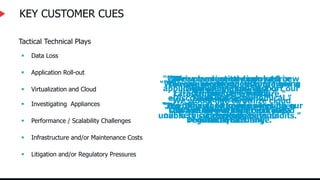
KEY CUSTOMER CUES
Tactical Technical Plays
“We can barely meet our daily
12-hour backup window.”
“We’re having trouble meeting
our service level agreements.”
 Application Roll-out
 Virtualization and Cloud
 Investigating Appliances
 Infrastructure and/or Maintenance Costs
“Our maintenance costs are going
through the roof.”
“It’s difficult to keep pace with our
storage costs.”
“We’re planning to deploy 10 new
application servers to support our
financial systems.”
“We’re migrating from Lotus
Domino to Exchange.”
“We’re evaluating open source
cloud computing.”
“We would like to utilize cloud
storage for our long term data
retention.”
 Data Loss
“We were unable to restore from a
catastrophic server failure.”
“Our Disaster Recovery has been
unable to successfully pass audits.”
“We are looking at
deduplication
solutions.”
 Litigation and/or Regulatory Pressures
“We were recently involved in
litigation and the cost of
eDiscovery was astronomical.”
“Our industry is under increased
regulatory scrutiny.”
 Performance / Scalability Challenges
Gathering Details for Design
SYSTEM DISCOVERY AND ARCHIVE ANALYZER
 Toolkit provided by Commvault® Cloud Services
 Helps determine contents and structure of environment
 Server types
– Operating systems
– Software applications
– Capacity metrics
– Memory usage
 Archive Analyzer
– File sizes
– Files by extension
– File ages
 Virtual Machines
– VM Metrics (e.g. Name of VMs, Size, Guest OS)
 MS Exchange
– Message Size, Count, Modification time
– Attachment details
– Recipient details
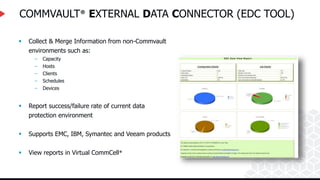
COMMVAULT® EXTERNAL DATA CONNECTOR (EDC TOOL)
 Collect & Merge Information from non-Commvault
environments such as:
– Capacity
– Hosts
– Clients
– Schedules
– Devices
 Report success/failure rate of current data
protection environment
 Supports EMC, IBM, Symantec and Veeam products
 View reports in Virtual CommCell®
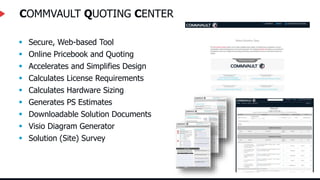
COMMVAULT QUOTING CENTER
 Secure, Web-based Tool
 Online Pricebook and Quoting
 Accelerates and Simplifies Design
 Calculates License Requirements
 Calculates Hardware Sizing
 Generates PS Estimates
 Downloadable Solution Documents
 Visio Diagram Generator
 Solution (Site) Survey
VALUE OF DISCOVERY BEYOND DESIGN AND ARCHITECTURE
 Data collection for configuration and design using the CQC
 Areas of exploration
 Expanding the conversation
 Data discovery using Commvault® tools
Thank you!

Commvault Story - CVTSP_1.pptx

  • 1.
    Commvault Data Protection &Management - Simplified
  • 2.
  • 3.
    COMMSERVE® Functions Event OrchestrationCommCell® Reporting Disaster Recovery Administration Security & Authentication
  • 4.
    • Storage • Disk •Tape • Cloud • Snapshot Operations • Deduplication Database(s) • Data Mover MEDIA AGENT(S) Functions Can be installed on most operating systems and platforms • Maintains Index Cache Index Cache DDB
  • 5.
    Deduplication Overview Deduplication providesan efficient method to transmit and store data by identifying and eliminating duplicate blocks of data during backups. Deduplication offers the following benefits: • Optimizes use of storage media by eliminating duplicate blocks of data. • Reduces network traffic by sending only unique data during backup operations. C# V_100, Chunk 18, Location 99 D# V_107, Chunk 8, Location 6 V_109, Chunk 5, Location 2 F# Deduplication Database Deduplication Database typically located on the Media Agent.
  • 6.
    COMMVAULT HYPERSCALE™ APPLIANCE Completeturnkey solution from CV Sold and supported by CV Ideal for mid-market deployments Simplicity  Simple to setup, manage and upgrade Modular Scale  Grow with the needs of the business Non-disruptive capacity and performance expansion Resiliency  No single point of failure  Built in HA and DR capabilities Streamlined Support  Single call support from Commvault  Centralized patch management  Active monitoring Better TCO  Lower procurement cost  Low operational overhead
  • 7.
    Commvault® Agents Methods forProtecting Data: Standard Backup Agents Archiving Agents Additional Agents and Protection Methods  File system backup  Application backup agents  Virtual Server Agent  OnePass® Agent  Compliance archiver agent  Laptop and end user backup  IntelliSnap® Technology  Continuous Data Replicator
  • 8.
  • 9.
    IMPORTANCE OF APPLICATIONAND OS AWARENESS File Systems Applications For up-to-date and a complete listing of supported operating systems and applications, please visit the Commvault documentation website at documentation.commvault.com
  • 10.
    Commvault – NextGeneration FS Agent The Windows File System Agent provides unified protection and recovery for file system data residing on clients. . File System Agent backs up the entire file system, which includes: • System State • UNC paths • Mount points
  • 11.
    Commvault FS Agent– Key Features Simplified Data Management Point-in-Time Recovery System State & 1Touch Uninterrupted Backup and Restore Block-Level Backups Virtualize Me OnePass
  • 12.
  • 13.
    VIRTUALIZE ME –Use Case Leverage any standard physical computer backup to convert to a virtual machine. Useful to create a virtual clone of a physical or virtual machine. Physical or Virtual Machines Windows or Linux Clients Clone P2V Virtualize Me VMware OR Hyper-V
  • 14.
    Exchange Server Backup MBServer CommServe Server AD Server Frontend Server CV iDA
  • 15.
    15 15 EXCHANGE DATABASE AGENT– DAG SUPPORT CommVault_Software_Cache EXCHDAG1 CV iDA
  • 16.
    16 Exchange Server BackupAgents – Key Features • Database Protection for Disaster Recovery • Recovering Messages from an Exchange Database • Protection of Messages and Mailbox Items • Granular Public Folder Protection for Shared Information • IntelliSnap •Exchange databases •Public folder stores that contain data of the public folders •Transaction logs •From an offline Exchange database. •From an Exchange database without restoring the entire database. By backing up mailboxes regularly, you can restore entire mailboxes without restoring the Exchange database. you can retrieve shared data between Exchange users, such as group documents, messages, attachments, and calendars you can create a point-in-time snapshot by quiescing the data temporarily, taking a snapshot, and then resuming live operations
  • 17.
    MSSQL Server Backup Standaloneserver CommServe Server CV iDA
  • 18.
    MSSQL Server BackupAgents – Key Features Fully Integrated Backup And Recovery Solution • Automatic Discovery & Transaction Log Protection • Snapshot Backup • Full Clustering Options Support Including Always-On • Restore to a Hot Standby SQL Server • SQL Database Migration to the Cloud
  • 19.
    ORACLE DATABASE PROCTECTION BusinessCritical Applications Multiple Management Tools Exponential Data Growth Varied Implementation Methods Cloud Migrations Increased Regulations Dedicated Backup DBA’s required Self Service Operations Challenges of DB Management Oracle
  • 20.
    Commvault Oracle Agent– Key Features Application Aware Hardware Snapshots Live Sync Replication Table Level Recovery Oracle Cloud Migration Backup & Recovery Instant Application Recovery Integrated Deduplication, Compression & Encryption Create Storage Array Snapshots as Recovery Points, for off host Proxy Backup and rapid cloning Replicate your Database to a Standby System even with Oracle Standard Edition Recover Schemas back to Production or into Dev/Test for Oracle 10.x, 11.x, 12.x Run DR Tests and Production Workloads in the Cloud Run RMAN Backup and Recovery Operations without managing Scripts Start your Database from the Backup Media without the need to restore Run Backups as often as you like while saving Time, Storage Space and be Secure
  • 21.
    Commvault® Software SharePoint Farm MICROSOFTSHAREPOINT FARM Search App Services Web Apps SharePoint Agent(s) Database File System Agent Clustered FS Agents, SQL Agent Protection of a Typical SharePoint Farm
  • 22.
    MS Sharepoint BackupAgents – Key Features The SharePoint Server Agent provides complete protection of on-premises SharePoint farm and documents in your enterprise, and SharePoint online in Office 365 Protect All SharePoint Components Fast Backup and Recovery for Content Database Application-Aware Backups
  • 23.
  • 24.
    VIRTUALIZATION & CLOUDCLIMATE Cloud Adoption & IT as a Utility Migration to MSP / Cloud Solution Provider as MSP IT as a Service Provider Optimization Security Software Independence Reporting Automation HW/Cloud Agnostic Self-Serviceability Expansion of Public, Private and Hybrid Clouds Multi-Hypervisor / Hyper Converged
  • 25.
    How Commvault® softwaresolves customer data management challenges in private and public cloud environments
  • 26.
  • 27.
    VSA WITH INTELLISNAP®FUNCTIONALITY Leveraging Intellisnap functionality with the Virtual Server Agent allow for rapid protection and recovery of large VM environments Support for:  VMware  Hyper-V  Nutanix AHV  Amazon Web Services  Microsoft Azure Snaps
  • 28.
    VSA AUTOMATED DISCOVERYAND FILTERING Automatic Discovery enables the automatic discovery and protection of virtual machines based on certain criteria Naming Convention Specific Operating System Specific DNS Hostname Specific Host Specific Datastore Specific Resource Pool Specific Datacenter Specific Cluster Specific Folder Specific VAPP And many other affinities… Power State Notes Custom Attributes & Values* Annotations* *applies to VMware only
  • 29.
    VM OWNER DETECTION(VMWARE)  Identifies and Assigns VM Client Owners Automatically  Checks appropriate capabilities of users and user groups in vCenter and CommCell® Key Benefits  Active Directory Integrated: Detect and assign VM ownership automatically  Lifecycle: Allow end-users and application owners to manage their own VMs as dynamically provisioned Bob Sales Engineering Support
  • 30.
    RESILIENCY & LOADBALANCING Proxy Teaming for Highly Scalable Fault Tolerant Backups  Multi-job aware  Dynamically dispatched  Distribution based on resource capacity  In case of VSA proxy failure, workload automatically redistributed to remaining proxy servers Processing Processing Processing CPU MEM Waiting VMs Pseudo Client Proxy1 Proxy2
  • 31.
    MULTIPLE RESTORE OPTIONS Files& Folders Disk Full VM Full VM (Out-of-Place)
  • 32.
    VSA LIVE RECOVERYFUNCTIONALITY Live Recovery Functionality  Accelerated Recovery & DR  RTO / SLA Flexibility  Enhanced Recovery for and Access to VM Production Services Integrated Commvault® Software Functionality  Deep and Mature Application Integration  Automatic Discovery  Integrated Monitoring and Reporting  Robust Deduplication Traditional VSA  Full VM Recovery  Granular File Recovery  VM Archive  Self Service Access (space & time considerations)
  • 33.
    LIVE RECOVERY METHODOLOGIES LiveBrowse & Live File Recovery Granular File Restore from Snaps, Backups or VM archives without need for metadata collection …reduce backup times without sacrificing the capability to recover files on a granular basis – ideal for scenarios such as large VM file servers Feature Description Use Cases (allows users to…) Live Mount Power Up VMs directly from Snaps/Backup copies of the VM image …access application level data with mining Tools. Instantly validate VM copies for DR / patch / dev /test with a non-persistent VM Live Sync After backup of a VM, changes are transmitted to replicated VM and applied, providing an instantly available copy …create and instantly access standby VMs with the highest RPO / RTO requirements - Business Continuance / DR Scenarios Live Recovery For Virtual Machines Near Instant Access to VM while Storage vMotion copies the VM into production in the background …access and utilize VMs more quickly during a recovery operation, while reconciling changes to the recovered VM
  • 34.
    RESTORING VIRTUAL MACHINESWITH LIVE RECOVERY Selected VM can be powered on during recovery phase: Running VM can be access during this time. Any changes made will be reconciled to production VM once recovery is complete 3 Production ESXi Cluster 1 4 Backup Copy exposed on MediaAgent as NFS Export and mounted to destination ESXi server. 1 VM configuration and catalog files retrieved and modified to indicate that writes can be made to the NFS datastore. 2 Mounted NFS DataStore is removed once recovery operation is completed. 4 2 3
  • 35.
    LIVE MOUNT PROCESS SelectedVM powered on: On-demand power on operation, changes to the VM are not altering the Backup Copy data. 3 Production ESXi Cluster 4 Create Live Mount Provisioning Policy: Defines the Live Mount operating parameters and limits within the production environment. 1 Backup Copy is presented as NFS DataStore to ESXi production environment: This is a R/W non-persistent copy in native format. No changes are made to the backup copy. 2 2 3 Mounted NFS DataStore is removed once recovery operation is completed. 4
  • 36.
    LIVE SYNC INACTION VSA Protection Operation is run against VMs to be replicated : This will be a low impact incremental backup. 1 After Protection Operation is Complete Changed Blocks are Shipped to Standby VMs: This can be a synchronous or asynchronous operation. 2 1 2 OR DASH Copy is Performed to Secondary Site: 3 Then Changed Blocks are Overlaid on Replicated VMs: 4 Primary Datacenter Secondary Datacenter 3 DASH Copy 4 Disaster Recovery Benefits:  Minimal load on Production servers  Hardware Agnostic  Automated Validation  Planned and Unplanned Failover  Bandwidth efficient through deduplication and compression
  • 37.
    APPLICATION-AWARE BACKUPS FORVSA Consistency Recoverability Easy Recovery Crash Consistent Speed Consistency Recoverability Application Consistent Consistency Recoverability Application Aware
  • 38.
    END USER WEBCONSOLE  Virtual Machine Recovery  VM File(s) Recovery  Agentless Restores  Live Mount
  • 39.
  • 40.
    SNAPSHOT CHALLENGES Too ManyTools, Too Much Complexity Multiple Tools for each Array Compounded in Heterogeneous Environments Script-Intensive I/O Impact on Production Lack of Application Awareness / Granular Restore Challenging to Integrate into a Cohesive Data Management Strategy
  • 41.
    INTELLISNAP® FUNCTIONALITY …a Commvault®software functionality that controls and manages snapshot functionality across a wide variety of hardware storage platforms, allowing users to integrate and utilize snapshots as an effective tool in a cohesive data management approach  Centralized Configuration & Reporting  “Zero-Script” GUI-Based Configuration  Single Policy for Full Data Lifecycle CommVault Application and Data Protection Expertise Combined with the Power of Hardware Snapshots IntelliSnap is… Integrated Cross Platform Snapshot Management
  • 42.
    INTELLISNAP® TECHNOLOGY: SCOPEOF COVERAGE Applications Seamless application consistent integration including advanced recovery and backup options HW Platforms Seamless integration for discovery, snapshot, and revert/recovery eliminating scripting and others… FAS E Series
  • 43.
    1PM INTELLISNAP® TECHNOLOGY Process- Catalog,Deduplicate Initiate Mount 9AM 11AM 1PM
  • 44.
    INTELLISNAP® REPLICATION SUPPORT NetAppReplication with OCUM IntelliSnap Inline Replication  Adoption of multiple replication types  Prevention of Storage Data Loss  Demanding Recovery SLAs  Improved Storage Utilization  Consistency of Applications  Simplified Administration Snapshot NetApp Snapshot NetApp Supported Inline Replication Vendor Supported Inline Replication Vendor Clone or Snapshot Clone or Snapshot NetApp Open Replication without OCUM
  • 45.
  • 46.
    REDEFINING BACKUP -BLOCK-LEVEL Load Load Load SCAN COPY INDEX COPY SCAN COPY INDEX Traditional Protection Load Load Block-Level-Backup (w/CBT) Load CBT  Block-Level Backup (BLB) tracks blocks instead of files, utilizes internal Change Block Tracking (CBT)  Application and File-System aware  Enables more frequent recovery points than traditional protection
  • 47.
    Block Level Backup– Key Features
  • 48.
  • 49.
  • 50.
  • 51.
  • 52.
    COMMON USE CASESFOR THE CLOUD High data durability – setup within a few clicks Sending on premise production data to cloud storage Backup/archive To the cloud Protecting workloads in the cloud and moving to an alternate location Backup In the cloud Recovering production workloads in the cloud DR / Migration in the cloud
  • 53.
    THE VALUE OFA COMMVAULT® SOLUTION  REDUCE COSTS with a single tool  REDUCED RISK avoid hypervisor lock-in by enabling cross platform restore  EXTEND DR to more workloads with cloud resources  INCREASED EFFICIENCY with built-in replication and automation
  • 54.
    USE CASE #1:MOVE ANY DATA TO THE CLOUD OS, Endpoint, Apps & DBs Large Files and Big Data SaaS and Cloud-Native Copy Management Virtual Machines Broad Enterprise Workload coverage Copy Pool1 Data Copies Data Policy Native REST integration w/de-dup and encryption Content Store Benefits • Provide native cloud storage integration for any workload through a single policy • Avoid point solutions that increase infrastructure and management costs Benefits • Efficient network transfer via deduplication without gateways or appliances • Tier within local Benefits • Encrypt data for transfer and rest to ensure security • Data portability and tape replacement
  • 55.
    VSA FOR PUBLICCLOUD SOLUTIONS  Cross Hypervisor restore Option  Restore VMware or Hyper-V VMs as a new VM in Amazon EC2 or Microsoft Azure  Use cases: Migration, DR, Test/Dev  VM Provisioning and Lifecycle Management  Replication using LiveSync from VMware  Auto-detection, content and filtering rules  VM protection and recovery
  • 56.
    USE CASE #2:DR & MIGRATION TO THE CLOUD IaaS Hybrid To DR DR business processes (workflow) Cloud server MA workloads DR Copy Replicated backup copy 2 2 Protect, replicate, recover & convert seamlessly Local Copy Local cache backup copy 1 Featuring DASH copy backups into cloud 1 Virtual Machines VM Restore & convert into AWS/Azure Instances or Databases/Files 3 Applications online, DR complete! 4
  • 57.
    LIVE SYNC Secondary Datacenter VSAProtection Operation is run against VMs to be replicated : This will be a low impact incremental backup. 1 After Protection Operation is Complete Changed Blocks are Shipped to Standby VMs: This can be a synchronous or asynchronous operation. 2 1 2 OR DASH Copy is Performed to Secondary Site 3 Then Changed Blocks are Overlaid on Replicated VMs 4 Primary Datacenter 3 DASH Copy 4 VMware to AWS, ARM & Azure Classic
  • 58.
    USE CASE #3:PROTECT & MANAGE DATA IN THE CLOUD Prod Dev/Test Storage Policy Protect Recover Move Find Use Secure Snaps Native orchestration DR Platform & Region Independence
  • 59.
  • 60.
    END USER DATACHALLENGES
  • 61.
    COMMVAULT EDGE™ ENDPOINTTECHNOLOGY Provides end-users protection and ease of access to their data  Protection  Security  Visibility  Collaboration  Access  Flexibility
  • 62.
  • 63.
    COMMVAULT EDGE® DRIVE Cloud-based Storage Solution  Access Anywhere  Store, Retrieve and Share Files Online  WebDAV and FTP support  Improved Data Protection  Work Smarter – Any Device  Collaboration Web console Windows Explorer Plug-in Mobile Edge Drive Access Anywhere Local Access (Drag & Drop) Share Shared File/Folder Options:  Can View (View and Download)  Can Edit (View, Download and Upload)  Public Link (Password and Expiry date option)  Re-share a share (configurable)  Email Notification  Add Custom Tags & Comments
  • 64.
    SHARE DATA  FullyIntegrated  Share Files and Folders  Re-Share Options  Set Permissions  Public Share Options  Collaborative Shares
  • 65.
    COMMVAULT® ENDPOINT PROTECTIONTECHNOLOGY  Quick & Automated Backups  Improved Resource Utilization  Network Optimized Backups  Anytime, Anywhere Access  Integrated Security  Customization Based on Business Rules Endpoint Data Protection Includes Endpoint Data Protect Access Share Disk Tape Web console Windows Explorer plug-in Mobile Compliance search and hold Internal/ External teams
  • 66.
  • 67.
    Automate Administrate CollectMonitor Analyze Report Activate OPERATIONS MANAGEMENT Commvault® natively provides a large and flexible feature set that helps organizations manage a wide-range of operational tasks.
  • 68.
    USER MANAGEMENT &SECURITY A CommCell® user account is required by all users who perform functions within a CommCell Role-Based Security User/user group Role (e.g. Master) Entity Owner Security Owner
  • 69.
    COMMCELL® ADMINISTRATIVE ACCESS CommCell CommCellConsole Primary Management Interface  Perform All Configuration and Operations Tasks  Installed by default with CommServe  Admin Console Web Based UI  Streamlined Management for Routine Tasks  Quick Setup using Default Configuration Values 
  • 70.
    MULTI-TENANT COMMCELL® ENVIRONMENT Service Provider configuration  Tenants share the same CommCell environment  Tenants can only see their own systems  Logically separate companies  Assigned separate and agreed SLAs  Tenant admins for a company have additional control  Native security, segregation and control Customer Service Provider DMZ Service Provider Internal Optional Remote Public Cloud
  • 71.
    VM LIFECYCLE MANAGEMENT Self-Service VM Provisioning  Admin creates pre-defined templates  Control resources automatically  User friendly interface  Virtual Labs capability  Dev-Test Groups VMware Dev Template Name: VM*Dev CPUs: 2 Memory: 8GB NICs: 2 Disk: 100GB Snapshots: 3 Virtual Lab
  • 72.
    COMMVAULT® DATA ANALYTICS Locate older files or emails  Identify extra copies of large files or databases  Remove unauthorized file types  Delete outdated emails to reduce compliance risk Tackling “Big Data”
  • 73.
    COMMVAULT® SEARCH ENGINE Ability to index data and allow search and eDiscovery across repositories  Provides a highly distributed indexing and searching configuration that enables you to index simultaneously on multiple servers and search across these search servers  Enables end users to find the single document most relevant to their specific goal  Ability to identify and discover the right information applicable to your eDiscovery requests  Lighter deployment package end easier installation
  • 74.
  • 75.
  • 76.
    ADMIN CONSOLE REPORTS Standardized Web-based reports for administration  Solution Dashboards  Create Alert Definitions  Event Viewer and Job Controller
  • 77.
  • 78.
    VALUE OF DISCOVERY Whydoes it matter?  Provides Information for Valid Design  Lays the Groundwork for Effective Positioning  Builds Credibility and Rapport  Facilitates Expanded Conversations & Audiences  Paves the Way for High Impact Technical Engagements Find the Hooks Plant the Seeds Lay the Landmines
  • 79.
    Differentiated Value VALUE OFEXTENDING THE CONVERSATION Alternate Solution Commvault® Software Value Virtualized Environment Protection Alternate Solution Commvault® Software Value Virtualized Environment Protection Data Center Protection Metrics Reporting Search Endpoint Data Protection Differentiated Value Differentiated Value
  • 80.
    SYSTEM DISCOVERY ANDARCHIVE ANALYZER  Toolkit provided by Commvault® Cloud Services  Helps determine contents and structure of environment  Server types – Operating systems – Software applications – Capacity metrics – Memory usage  Archive Analyzer – File sizes – Files by extension – File ages  Virtual Machines – VM Metrics (e.g. Name of VMs, Size, Guest OS)  MS Exchange – Message Size, Count, Modification time – Attachment details – Recipient details
  • 81.
    Pain Point andOpportunity Identification
  • 82.
    KEY CUSTOMER CUES TacticalTechnical Plays “We can barely meet our daily 12-hour backup window.” “We’re having trouble meeting our service level agreements.”  Application Roll-out  Virtualization and Cloud  Investigating Appliances  Infrastructure and/or Maintenance Costs “Our maintenance costs are going through the roof.” “It’s difficult to keep pace with our storage costs.” “We’re planning to deploy 10 new application servers to support our financial systems.” “We’re migrating from Lotus Domino to Exchange.” “We’re evaluating open source cloud computing.” “We would like to utilize cloud storage for our long term data retention.”  Data Loss “We were unable to restore from a catastrophic server failure.” “Our Disaster Recovery has been unable to successfully pass audits.” “We are looking at deduplication solutions.”  Litigation and/or Regulatory Pressures “We were recently involved in litigation and the cost of eDiscovery was astronomical.” “Our industry is under increased regulatory scrutiny.”  Performance / Scalability Challenges
  • 83.
  • 84.
    SYSTEM DISCOVERY ANDARCHIVE ANALYZER  Toolkit provided by Commvault® Cloud Services  Helps determine contents and structure of environment  Server types – Operating systems – Software applications – Capacity metrics – Memory usage  Archive Analyzer – File sizes – Files by extension – File ages  Virtual Machines – VM Metrics (e.g. Name of VMs, Size, Guest OS)  MS Exchange – Message Size, Count, Modification time – Attachment details – Recipient details
  • 85.
    COMMVAULT® EXTERNAL DATACONNECTOR (EDC TOOL)  Collect & Merge Information from non-Commvault environments such as: – Capacity – Hosts – Clients – Schedules – Devices  Report success/failure rate of current data protection environment  Supports EMC, IBM, Symantec and Veeam products  View reports in Virtual CommCell®
  • 86.
    COMMVAULT QUOTING CENTER Secure, Web-based Tool  Online Pricebook and Quoting  Accelerates and Simplifies Design  Calculates License Requirements  Calculates Hardware Sizing  Generates PS Estimates  Downloadable Solution Documents  Visio Diagram Generator  Solution (Site) Survey
  • 87.
    VALUE OF DISCOVERYBEYOND DESIGN AND ARCHITECTURE  Data collection for configuration and design using the CQC  Areas of exploration  Expanding the conversation  Data discovery using Commvault® tools
  • 88.