System and Network administration
Prepared by: Kebebe.S(MSc)
kebe05shife@gmail.com
HARAMBEE UNIVERSITY FITCHE SALALE CAMPUS
Outline
➢Introduction
➢System and Network administration
➢Duties of system and network administration
➢Network Operating Systems:
➢ Unix-like Systems Vs Windows Systems
➢ Linux Distributions and UIs
➢Linux operation overview
➢File system
Chapter objective
At the end of this chapter, the students will be able to:
➢Learn the foundation of network and system administration
➢ Know the scope,duties and responsibilities of network and
system administrator
➢Know the network operation system that support system
administration
➢Distinguish the support of each network operating system
Introduction
⚫Networking is the technology of interconnecting computing devices of all
types so information can flow between them.
⚫Systems administration is the design, installation, configuration,
operation, and support of these servers.
⚫Networking professionals must be knowledgeable in considering when to
use physical or virtual servers, when to use a public or private cloud, and
other key performance, reliability, and security issues.
What is network administration?
⚫network administration and system administration exist
separately; However,are used both variously and inconsistently by
industry and academics.
⚫Isthe management of network infrastructure devices (routers
and switches)
⚫involves a wide array of operational tasks that help anetwork to run
smoothly and efficiently.
⚫Without network administration,it would be difficult for all but the
smallest networks to maintain network operations.
⚫The main tasks associated with network administration include:
➢Design, installation and evaluation of the network
➢Execution and administration of regular backups
➢Creation of precise technical documentation, such as network
diagrams,
➢Provision for troubleshooting assistance
➢ Administration of network security, including intrusion detection
➢Provision for precise authentication to access network resources
What is system administration ?
⚫Is a branch of engineering mainly concerned
with the operational management of human-
computer systems
⚫An organized collaboration between humans and
computers to solve a problem or provide a service
⚫Is the term used traditionally by mainframe and
Unix engineers to describe the management of
computers whether they are coupled by a network
or not
⚫What is the Key Role of Network and
System Administration?
It is to build hardwareconfiguration and to configure software
systems
Network and System Administrators
▪ Network Administrator: a person who responsible to admin,
manage and maintain the network design, configuration and
infrastructure development
▪ System Administrator: a person who responsible to admin
users, maintaining system, create file systems, install software
and other related issues
11
Responsibilities of the Network Administrator
Asa network administrator,your tasks generally will fall into
four areas:
➢Designing and planning the network
➢ Setting up the network
➢ Maintaining the network
➢Expanding the network
Asystem administrator's responsibilities
12
✓ UserAdministration (Setup and MaintainingAccount)
Maintaining System
✓ Verify that Peripherals areWorking Properly
✓ QuicklyArrange Repair for Hardware in occasion of Hardware
Failure
✓ Monitor System Performance
✓ Create File Systems
✓ Install Software
Cont.…
13
✓ Create aBackupand Recover Policy
✓ Monitor Network Communication
✓ Update system as soon as new version of OS and application
software comes out
✓ Implement the Policies for the use of the Computer System
and Network
✓ Setup Security Policies for users.Asysadmin must havea
strong grasp of computer security (e.g. firewalls and intrusion
detection systems)
✓ Documentation in form of InternalWiki
✓ Password and Identity Management
Network and System Administration Ethics
14
Professionalism:
✓Maintain professional conduct in the workplace and will not
allow personal feelings or beliefs to cause to treat people
unfairly or unprofessionally.
Personal Integrity:
✓Behonest in professional dealings and forthcoming about
competence and the impact of mistakes, seek assistance from
others when required
✓avoid conflicts of interest and biases whenever possible.
Cont.…
15
Privacy:
✓maintain and protect the confidentiality of anyinformation
Laws and Policies:
✓Educate myself and others on relevant laws, regulations,and
policies regarding the performance of myduties.
Communication:
✓Communicate with management, users, and colleagues about
computer matters of mutual interest,strive to listen to and
understand the needs of all parties.
Cont.…
System Integrity:
✓ Strive to ensure the necessary integrity, reliability,and availability of
the systems for which responsible,design and maintain each system
in amanner to support the purpose of the system to the
organization.
Education:
✓ Continue to update and enhance technical knowledge and other
work-related skills, share knowledge and experience with others.
16
Network operating system
⚫Network operating system refers to software that
implements an operating system of some kind that is
oriented to computer networking.
⚫For example, one that runs on a server and enables
the server to manage data, users, groups, security,
applications, and other networking functions.
⚫Network operating systems can be based on a
client/server architecture in which a server enables
multiple clients to share resources.
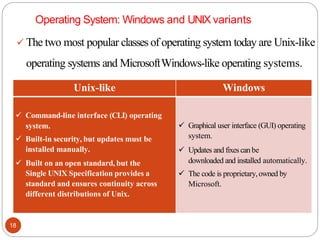
Operating System: Windows and UNIX variants
18
✓ The two most popular classes of operating system today are Unix-like
operating systems and MicrosoftWindows-like operating systems.
Unix-like Windows
✓ Command-line interface (CLI) operating
system.
✓ Built-in security, but updates must be
installed manually.
✓ Built on an open standard, but the
Single UNIX Specification provides a
standard and ensures continuity across
different distributions of Unix.
✓ Graphical user interface (GUI) operating
system.
✓ Updates and fixescan be
downloaded and installed automatically.
✓ The code is proprietary,owned by
Microsoft.
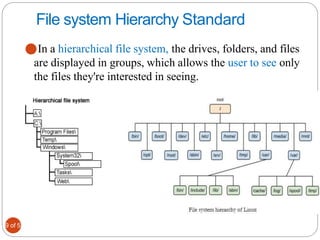
File system Hierarchy Standard
19 of 52
⚫In a hierarchical file system, the drives, folders, and files
are displayed in groups, which allows the user to see only
the files they're interested in seeing.
20 of 52
/
⚫This is the root directory which should contain only
the directories needed at the top level of the file
structure
⚫/root is the main directory which contains all
other subdirectories.
/bin
⚫This directory contains executable files necessary to manage
and run the Linux system, including shells (such as bash) and
file system management utilities such as cp and rm.
⚫These files are availableto all users
/boot
⚫This directory contains your bootloader files,which
are required to boot your system
/dev
⚫ This directory contains special files that are used
to represent the various hardware devices installed in
the system
/dev /HD1: /dev /HD1: are subdirectories
⚫EX: hda, hdb ...
/home
⚫This directory contains subdirectories that serve as
home directories for each user account on your Linux
system.
/etc
⚫ This directory contains text-based configuration files used by
the system as well as services running on the system.You can edit
these files with atext editor to customize howLinux behaves
⚫It also contains the information of your login name and password.
/lib
⚫This directory contains code libraries used by programs in /bin
and
/sbin.Your kernel modules are also stored in the modules
subdirectory of /lib.
/media
⚫This directory is used by some Linux distributions (such
as SUSE Linux) to mount external devices, including CD
drives, DVD drives, and floppy drives.
/mnt
⚫This directory is used by some Linux distributions (such
as Fedora or Red Hat) to mount external devices, including
CD drives, DVD drives, and floppy drives
/opt
⚫This directory contains files for some programs you
install on the system
/sbin
⚫This directory contains important system management and
administration files, such as fdisk, fsck, ifconfig, init, mkfs,
shutdown, and halt.
/sys
⚫This directory contains information about the hardware in
your system.
/temp
⚫This directory contains temporary files created byyou or by
the system.
/usr
⚫This directory contains all the information related to the users in
a UNIX system.
⚫It means it contains all the user account such as user1,user2,and
so on.
/var
⚫This directory contains a variety of variable data, including
your system log files
WINDOWS vs LINUX FILE SYSTEM
⚫In Linux there is a single hierarchical directory
structure. In Windows, there are typically many partitions
with directories under these partitions.
⚫In Linux, everything starts from the root directory,
represented by '/', and then expands into sub-directories. In
Windows, it had various partitions and then directories under
those partitions
⚫unlike Windows, Linux is case sensitive
FAT file system
⚫FAT is a type of file system, which is developed for
hard drives.
⚫ It stands for file allocation table and was first introduced
in 1977, which is used for 12 or 16 bits for each and every
cluster access into the file allocation table (FAT).
⚫On hard drives and other computer systems, it helps to
manage files on Microsoft operating systems.
⚫in devices like digital cameras, flash memory, and other
portable devices, it is also often found that is used to store file
information.
⚫FAT is not used by later versions of Microsoft Windows
like Windows XP, Vista, 7, and 10 as they use NTFS.
⚫The FAT8, FAT12, FAT32, FAT16 are all the different
types of FAT (for file allocation table).
HFS file system
⚫It stands Hierarchical file system
⚫used on a Macintosh computer for creating a directory
at the time a hard disk is format
⚫It used organize or hold the files on a Macintosh hard disk.
NTFS file system
⚫is the file system, which stands for NT file system and stores and
retrieves files on Windows NT operating system and other versions
of Windows
⚫it is sometimes known as the New Technology File System
⚫As compared to the FAT and HPFS file system, it provides better
methods of file recovery and data protection and offers a number of
improvements in terms of extendibility, security, and
performance.
⚫It is used by removable storage devices and Microsoft Windows
to name, organize and store files.
Network files system
⚫It is mechanism for storing files on a network.
⚫It is a distributed file system that allows users to
access files and directories located on remote
computers and treat those files and directories as if they
were local.
⚫It is implemented in that client/server application
in which the server of NFS manages the
authorization, authentication, and clients.

33
Virtual file system
⚫A Virtual File System (VFS) module has been added to the
UNIX kernel to distinguish local and remote files. And
translate the UNIX-independent file identifiers used by NFS
and the internal file identifiers used in UNIX.
⚫The file identifiers used in NFS are called file handlers. (
File system identifier + i-node number of file + i-node
generation number)
Group Assignment-20%
⚫Compare and contrast above file system
for example FATvs NTFS?
⚫Difference between local and distributed
file system with example ?
⚫What is High performance file
system (HPFS?
⚫File System Mounting and unmounting?
⚫File types?
Thank You!!
35
?

Chapter 1 Introduction to Network and System Administration.pdf

  • 1.
    System and Networkadministration Prepared by: Kebebe.S(MSc) kebe05shife@gmail.com HARAMBEE UNIVERSITY FITCHE SALALE CAMPUS
  • 2.
    Outline ➢Introduction ➢System and Networkadministration ➢Duties of system and network administration ➢Network Operating Systems: ➢ Unix-like Systems Vs Windows Systems ➢ Linux Distributions and UIs ➢Linux operation overview ➢File system
  • 3.
    Chapter objective At theend of this chapter, the students will be able to: ➢Learn the foundation of network and system administration ➢ Know the scope,duties and responsibilities of network and system administrator ➢Know the network operation system that support system administration ➢Distinguish the support of each network operating system
  • 4.
    Introduction ⚫Networking is thetechnology of interconnecting computing devices of all types so information can flow between them. ⚫Systems administration is the design, installation, configuration, operation, and support of these servers. ⚫Networking professionals must be knowledgeable in considering when to use physical or virtual servers, when to use a public or private cloud, and other key performance, reliability, and security issues.
  • 5.
    What is networkadministration? ⚫network administration and system administration exist separately; However,are used both variously and inconsistently by industry and academics. ⚫Isthe management of network infrastructure devices (routers and switches) ⚫involves a wide array of operational tasks that help anetwork to run smoothly and efficiently. ⚫Without network administration,it would be difficult for all but the smallest networks to maintain network operations.
  • 6.
    ⚫The main tasksassociated with network administration include: ➢Design, installation and evaluation of the network ➢Execution and administration of regular backups ➢Creation of precise technical documentation, such as network diagrams, ➢Provision for troubleshooting assistance ➢ Administration of network security, including intrusion detection ➢Provision for precise authentication to access network resources
  • 7.
    What is systemadministration ? ⚫Is a branch of engineering mainly concerned with the operational management of human- computer systems ⚫An organized collaboration between humans and computers to solve a problem or provide a service ⚫Is the term used traditionally by mainframe and Unix engineers to describe the management of computers whether they are coupled by a network or not
  • 8.
    ⚫What is theKey Role of Network and System Administration? It is to build hardwareconfiguration and to configure software systems
  • 9.
    Network and SystemAdministrators ▪ Network Administrator: a person who responsible to admin, manage and maintain the network design, configuration and infrastructure development ▪ System Administrator: a person who responsible to admin users, maintaining system, create file systems, install software and other related issues
  • 10.
    11 Responsibilities of theNetwork Administrator Asa network administrator,your tasks generally will fall into four areas: ➢Designing and planning the network ➢ Setting up the network ➢ Maintaining the network ➢Expanding the network
  • 11.
    Asystem administrator's responsibilities 12 ✓UserAdministration (Setup and MaintainingAccount) Maintaining System ✓ Verify that Peripherals areWorking Properly ✓ QuicklyArrange Repair for Hardware in occasion of Hardware Failure ✓ Monitor System Performance ✓ Create File Systems ✓ Install Software
  • 12.
    Cont.… 13 ✓ Create aBackupandRecover Policy ✓ Monitor Network Communication ✓ Update system as soon as new version of OS and application software comes out ✓ Implement the Policies for the use of the Computer System and Network ✓ Setup Security Policies for users.Asysadmin must havea strong grasp of computer security (e.g. firewalls and intrusion detection systems) ✓ Documentation in form of InternalWiki ✓ Password and Identity Management
  • 13.
    Network and SystemAdministration Ethics 14 Professionalism: ✓Maintain professional conduct in the workplace and will not allow personal feelings or beliefs to cause to treat people unfairly or unprofessionally. Personal Integrity: ✓Behonest in professional dealings and forthcoming about competence and the impact of mistakes, seek assistance from others when required ✓avoid conflicts of interest and biases whenever possible.
  • 14.
    Cont.… 15 Privacy: ✓maintain and protectthe confidentiality of anyinformation Laws and Policies: ✓Educate myself and others on relevant laws, regulations,and policies regarding the performance of myduties. Communication: ✓Communicate with management, users, and colleagues about computer matters of mutual interest,strive to listen to and understand the needs of all parties.
  • 15.
    Cont.… System Integrity: ✓ Striveto ensure the necessary integrity, reliability,and availability of the systems for which responsible,design and maintain each system in amanner to support the purpose of the system to the organization. Education: ✓ Continue to update and enhance technical knowledge and other work-related skills, share knowledge and experience with others. 16
  • 16.
    Network operating system ⚫Networkoperating system refers to software that implements an operating system of some kind that is oriented to computer networking. ⚫For example, one that runs on a server and enables the server to manage data, users, groups, security, applications, and other networking functions. ⚫Network operating systems can be based on a client/server architecture in which a server enables multiple clients to share resources.
  • 17.
    Operating System: Windowsand UNIX variants 18 ✓ The two most popular classes of operating system today are Unix-like operating systems and MicrosoftWindows-like operating systems. Unix-like Windows ✓ Command-line interface (CLI) operating system. ✓ Built-in security, but updates must be installed manually. ✓ Built on an open standard, but the Single UNIX Specification provides a standard and ensures continuity across different distributions of Unix. ✓ Graphical user interface (GUI) operating system. ✓ Updates and fixescan be downloaded and installed automatically. ✓ The code is proprietary,owned by Microsoft.
  • 18.
    File system HierarchyStandard 19 of 52 ⚫In a hierarchical file system, the drives, folders, and files are displayed in groups, which allows the user to see only the files they're interested in seeing.
  • 19.
    20 of 52 / ⚫Thisis the root directory which should contain only the directories needed at the top level of the file structure ⚫/root is the main directory which contains all other subdirectories.
  • 20.
    /bin ⚫This directory containsexecutable files necessary to manage and run the Linux system, including shells (such as bash) and file system management utilities such as cp and rm. ⚫These files are availableto all users /boot ⚫This directory contains your bootloader files,which are required to boot your system
  • 21.
    /dev ⚫ This directorycontains special files that are used to represent the various hardware devices installed in the system /dev /HD1: /dev /HD1: are subdirectories ⚫EX: hda, hdb ... /home ⚫This directory contains subdirectories that serve as home directories for each user account on your Linux system.
  • 22.
    /etc ⚫ This directorycontains text-based configuration files used by the system as well as services running on the system.You can edit these files with atext editor to customize howLinux behaves ⚫It also contains the information of your login name and password. /lib ⚫This directory contains code libraries used by programs in /bin and /sbin.Your kernel modules are also stored in the modules subdirectory of /lib.
  • 23.
    /media ⚫This directory isused by some Linux distributions (such as SUSE Linux) to mount external devices, including CD drives, DVD drives, and floppy drives. /mnt ⚫This directory is used by some Linux distributions (such as Fedora or Red Hat) to mount external devices, including CD drives, DVD drives, and floppy drives
  • 24.
    /opt ⚫This directory containsfiles for some programs you install on the system /sbin ⚫This directory contains important system management and administration files, such as fdisk, fsck, ifconfig, init, mkfs, shutdown, and halt.
  • 25.
    /sys ⚫This directory containsinformation about the hardware in your system. /temp ⚫This directory contains temporary files created byyou or by the system.
  • 26.
    /usr ⚫This directory containsall the information related to the users in a UNIX system. ⚫It means it contains all the user account such as user1,user2,and so on. /var ⚫This directory contains a variety of variable data, including your system log files
  • 27.
    WINDOWS vs LINUXFILE SYSTEM ⚫In Linux there is a single hierarchical directory structure. In Windows, there are typically many partitions with directories under these partitions. ⚫In Linux, everything starts from the root directory, represented by '/', and then expands into sub-directories. In Windows, it had various partitions and then directories under those partitions ⚫unlike Windows, Linux is case sensitive
  • 28.
    FAT file system ⚫FATis a type of file system, which is developed for hard drives. ⚫ It stands for file allocation table and was first introduced in 1977, which is used for 12 or 16 bits for each and every cluster access into the file allocation table (FAT). ⚫On hard drives and other computer systems, it helps to manage files on Microsoft operating systems. ⚫in devices like digital cameras, flash memory, and other portable devices, it is also often found that is used to store file information. ⚫FAT is not used by later versions of Microsoft Windows like Windows XP, Vista, 7, and 10 as they use NTFS. ⚫The FAT8, FAT12, FAT32, FAT16 are all the different types of FAT (for file allocation table).
  • 29.
    HFS file system ⚫Itstands Hierarchical file system ⚫used on a Macintosh computer for creating a directory at the time a hard disk is format ⚫It used organize or hold the files on a Macintosh hard disk.
  • 30.
    NTFS file system ⚫isthe file system, which stands for NT file system and stores and retrieves files on Windows NT operating system and other versions of Windows ⚫it is sometimes known as the New Technology File System ⚫As compared to the FAT and HPFS file system, it provides better methods of file recovery and data protection and offers a number of improvements in terms of extendibility, security, and performance. ⚫It is used by removable storage devices and Microsoft Windows to name, organize and store files.
  • 31.
    Network files system ⚫Itis mechanism for storing files on a network. ⚫It is a distributed file system that allows users to access files and directories located on remote computers and treat those files and directories as if they were local. ⚫It is implemented in that client/server application in which the server of NFS manages the authorization, authentication, and clients.
  • 32.
    33 Virtual file system ⚫AVirtual File System (VFS) module has been added to the UNIX kernel to distinguish local and remote files. And translate the UNIX-independent file identifiers used by NFS and the internal file identifiers used in UNIX. ⚫The file identifiers used in NFS are called file handlers. ( File system identifier + i-node number of file + i-node generation number)
  • 33.
    Group Assignment-20% ⚫Compare andcontrast above file system for example FATvs NTFS? ⚫Difference between local and distributed file system with example ? ⚫What is High performance file system (HPFS? ⚫File System Mounting and unmounting? ⚫File types?
  • 34.