Storage School I An introduction to the world of storage
Storage School I:  An introduction to the world of storage Presented by Stephen Foskett Director of the Data Practice Contoural [email_address] www.contoural.com
The world of storage can be daunting the uninitiated.  This session provides all of the background that you will need to get started in the world of storage.  We will start with the basic concepts: SAN vs.  NAS, block vs. file, RAID levels, and other basic topics.  These are woven together in a lively lesson, explaining how we got here and why it all matters.  We will finish up with a brief discussion of how storage fits within the big picture of enterprise IT.
WHAT I ASSUME YOU KNOW Storage School I assumes no prior knowledge of storage topics, but a basic comprehension of computing and networks would be helpful.
BY THE END OF THE SESSION, YOU’LL KNOW THE FOLLOWING: A bit of history and context Five Important Concepts: Storage outside the computer Blocks and files The importance of SCSI What RAID is and why it’s important The three kinds of storage arrays How it all fits together in a storage architecture
How involved with storage are you? I’m soaking in it! (it’s my job) Touch and go (I’m involved but not all the time) I just stepped in quicksand! (I’m new to all this) Cardboard boxes and tape! (what’s this all about?)
NIL NOVI SUB SOLE (There Is Nothing New Under The Sun) The basic concepts of storage are not new and most are easy to grasp once the reasoning and history behind them is understood Simply put, the storage world of today is the result of consolidation, networking, and sharing of resources We mostly talk about open systems now, but much of the work was pioneered in the world of mainframes and minicomputers
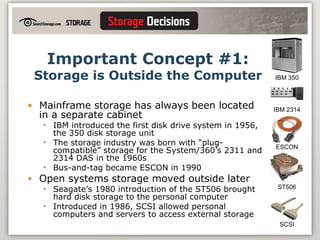
Important Concept #1: Storage is Outside the Computer Mainframe storage has always been located in a separate cabinet IBM introduced the first disk drive system in 1956, the 350 disk storage unit The storage industry was born with “plug-compatible” storage for the System/360’s 2311 and 2314 DAS in the 1960s Bus-and-tag became ESCON in 1990 Open systems storage moved outside later Seagate’s 1980 introduction of the ST506 brought hard disk storage to the personal computer Introduced in 1986, SCSI allowed personal computers and servers to access external storage IBM 350 IBM 2314 ST506 ESCON SCSI
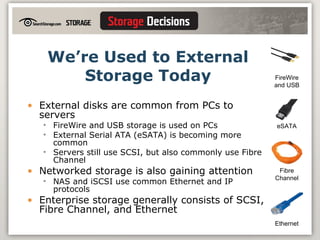
We’re Used to External Storage Today External disks are common from PCs to servers FireWire and USB storage is used on PCs External Serial ATA (eSATA) is becoming more common Servers still use SCSI, but also commonly use Fibre Channel Networked storage is also gaining attention NAS and iSCSI use common Ethernet and IP protocols Enterprise storage generally consists of SCSI, Fibre Channel, and Ethernet FireWire and USB eSATA Ethernet Fibre Channel
Important Concept #2: Blocks and Files Disk drives (and things  like  disk drives) organize data in  blocks Equal-sized units have unique addresses on the disk People (and most applications) organize data as  files  in folder hierarchies Filesystem drivers in the operating system translate file requests to block addresses
Most Enterprise Storage Systems and Protocols are  Block  or  File  Based Block protocols require a filesystem driver in the computer to locate files SCSI, Fibre Channel, and iSCSI Also USB, FireWire, thumb drives – anything that acts like a disk drive File-based devices handle the file translation and organization themselves File servers and NAS arrays return data based on directory location and filename Content-addressable storage (CAS) is something else altogether CAS uses a hash of the content itself (block  or  file) to create a unique address for data
SAN and NAS A storage area network (SAN) is a  block  storage network SCSI “initiators” (servers) talk to “targets” (disks or arrays) and request access to logical sets of block storage (LUNs) SAN implies FC or iSCSI storage Network-attached storage (NAS) is a  file  storage network Clients request files from file servers or NAS arrays (“filers”) Common NAS protocols include CIFS/SMB for Windows and NFS for UNIX A network of NAS devices has been dubbed a file area network (FAN)
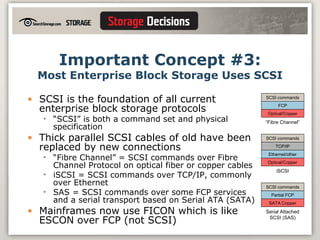
Important Concept #3: Most Enterprise Block Storage Uses SCSI SCSI is the foundation of all current enterprise block storage protocols “ SCSI” is both a command set and physical specification Thick parallel SCSI cables of old have been replaced by new connections “ Fibre Channel” = SCSI commands over Fibre Channel Protocol on optical fiber or copper cables iSCSI = SCSI commands over TCP/IP, commonly over Ethernet SAS = SCSI commands over some FCP services and a serial transport based on Serial ATA (SATA) Mainframes now use FICON which is like ESCON over FCP (not SCSI) SCSI commands FCP Optical/Copper “ Fibre Channel” SCSI commands Partial FCP SATA Copper Serial Attached SCSI (SAS) SCSI commands TCP/IP Optical/Copper iSCSI Ethernet/other
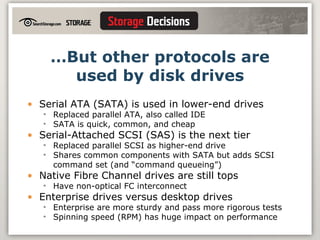
… But other protocols are used by disk drives Serial ATA (SATA) is used in lower-end drives  Replaced parallel ATA, also called IDE SATA is quick, common, and cheap Serial-Attached SCSI (SAS) is the next tier Replaced parallel SCSI as higher-end drive Shares common components with SATA but adds SCSI command set (and “command queueing”) Native Fibre Channel drives are still tops Have non-optical FC interconnect Enterprise drives versus desktop drives Enterprise are more sturdy and pass more rigorous tests Spinning speed (RPM) has huge impact on performance
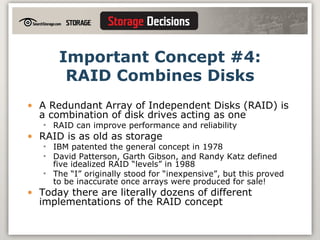
Important Concept #4: RAID Combines Disks A Redundant Array of Independent Disks (RAID) is a combination of disk drives acting as one RAID can improve performance and reliability RAID is as old as storage IBM patented the general concept in 1978  David Patterson, Garth Gibson, and Randy Katz defined five idealized RAID “levels” in 1988 The “I” originally stood for “inexpensive”, but this proved to be inaccurate once arrays were produced for sale! Today there are literally dozens of different implementations of the RAID concept
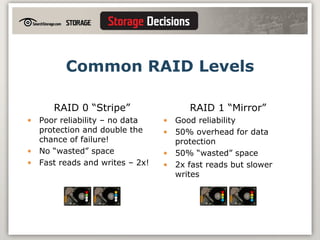
Common RAID Levels RAID 0 “Stripe” Poor reliability – no data protection and double the chance of failure! No “wasted” space Fast reads and writes – 2x! RAID 1 “Mirror” Good reliability 50% overhead for data protection 50% “wasted” space 2x fast reads but slower writes
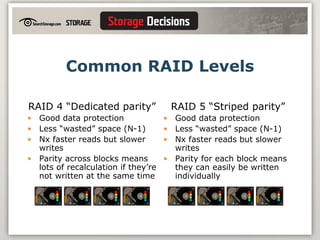
Common RAID Levels RAID 4 “Dedicated parity” Good data protection Less “wasted” space (N-1) Nx faster reads but slower writes Parity across blocks means lots of recalculation if they’re not written at the same time RAID 5 “Striped parity” Good data protection Less “wasted” space (N-1) Nx faster reads but slower writes Parity for each block means they can easily be written individually P P P P P P P P
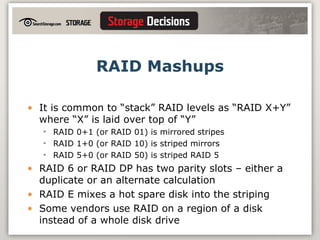
RAID Mashups It is common to “stack” RAID levels as “RAID X+Y” where “X” is laid over top of “Y” RAID 0+1 (or RAID 01) is mirrored stripes RAID 1+0 (or RAID 10) is striped mirrors RAID 5+0 (or RAID 50) is striped RAID 5 RAID 6 or RAID DP has two parity slots – either a duplicate or an alternate calculation RAID E mixes a hot spare disk into the striping Some vendors use RAID on a region of a disk instead of a whole disk drive
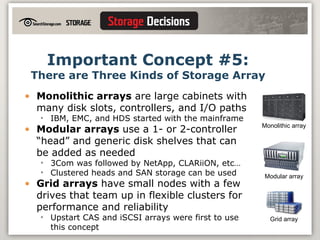
Important Concept #5: There are Three Kinds of Storage Array Monolithic arrays  are large cabinets with many disk slots, controllers, and I/O paths IBM, EMC, and HDS started with the mainframe Modular arrays  use a 1- or 2-controller “head” and generic disk shelves that can be added as needed 3Com was followed by NetApp, CLARiiON, etc… Clustered heads and SAN storage can be used Grid arrays  have small nodes with a few drives that team up in flexible clusters for performance and reliability Upstart CAS and iSCSI arrays were first to use this concept Grid array Monolithic array Modular array
Choices Abound for Networked Enterprise Storage No matter if you’re looking for SAN, NAS, iSCSI, or CAS there are lots of options There are monolithic, modular, and grid devices that support most protocols Every type of equipment and protocol  could  support every type of application Databases  can  run great on NAS or RAID 5 You  can  build a cheap SAN with Fibre Channel or iSCSI NAS filers  can  make great archiving targets Workstations  can  share SAN storage CAS  can  be accessed with NFS or CIFS You  can  put tier-3 bulk storage on an enterprise array Modular arrays  can  outrun their big brothers
Mixing Up the Right SAN The best choice is the one that makes the most sense in  your  environment Select the right tool for the job instead of using a wrench as a hammer Just because something  can  work doesn’t make it a good idea Always pick the simplest and most straightforward solution Look for the best fit for your budget and scale If you only have a few terabytes, buy just one networked array that will work for most of your applications Match your chosen technologies with the platforms and applications you have
Architecture Example: Small Web Company A small but growing business focused on a web-based product Wants stability, flexibility, scalability, low cost, and DR All Windows, mostly file but with some block storage Selected a modular NAS/iSCSI array NAS replaced all current Windows file servers iSCSI replaced internal storage for email and database Picked a midrange device with lots of growth potential Used SATA drives with RAID 6 for reliability and “good enough” performance Built-in snapshots and replication of both file and block data from a single interface
Architecture Example: Large Financial Company A household name in the world of finance Wanted to implement tiered storage to save money Hundreds of TB, mixed Windows, UNIX, and mainframe Selected a modular FC SAN device Sufficient staff and money to bring in a new storage platform Spent time and money on data classification to move less critical apps off Tier 1 Decided to consolidate Windows systems with virtualization and blades rather than use iSCSI Deferred all enterprise storage purchases for two years Kept all mainframe data on Tier 1 enterprise storage for now
Closing Thoughts Bring in the storage that is right for you Don’t let “rules of thumb” and bogus “best practices” prejudice your choice All storage devices work pretty well these days - but none are perfect Don’t try to do anything exotic with basic devices Use the right tool for the job Make the vendors prove it works Talk to references who are doing what you want to do Create a proof of concept before buying Remember that it’s not all about the technology – even the best storage can’t fill an uncertain need!
Questions? Audience Q&A: 10-15 minutes Contact me at   [email_address] Come talk to me after the session or at lunch I'll be available at the Ask-the-Expert booth today and tomorrow from 5 PM to 6 PM
For More Information Contact me: Stephen Foskett –  [email_address] Visit SearchStorage.com and read Storage magazine Get SNIA’s "Network Storage Terms and Acronyms" book Ask others here at the show or at user groups Storage Networking User Group (SNUG) http://storagenetworking.org Association of Storage Networking Professionals (ASNP) http://asnp.org Ask the vendors (really!)

Storage School 1

  • 1.
    Storage School IAn introduction to the world of storage
  • 2.
    Storage School I: An introduction to the world of storage Presented by Stephen Foskett Director of the Data Practice Contoural [email_address] www.contoural.com
  • 3.
    The world ofstorage can be daunting the uninitiated. This session provides all of the background that you will need to get started in the world of storage. We will start with the basic concepts: SAN vs. NAS, block vs. file, RAID levels, and other basic topics. These are woven together in a lively lesson, explaining how we got here and why it all matters. We will finish up with a brief discussion of how storage fits within the big picture of enterprise IT.
  • 4.
    WHAT I ASSUMEYOU KNOW Storage School I assumes no prior knowledge of storage topics, but a basic comprehension of computing and networks would be helpful.
  • 5.
    BY THE ENDOF THE SESSION, YOU’LL KNOW THE FOLLOWING: A bit of history and context Five Important Concepts: Storage outside the computer Blocks and files The importance of SCSI What RAID is and why it’s important The three kinds of storage arrays How it all fits together in a storage architecture
  • 6.
    How involved withstorage are you? I’m soaking in it! (it’s my job) Touch and go (I’m involved but not all the time) I just stepped in quicksand! (I’m new to all this) Cardboard boxes and tape! (what’s this all about?)
  • 7.
    NIL NOVI SUBSOLE (There Is Nothing New Under The Sun) The basic concepts of storage are not new and most are easy to grasp once the reasoning and history behind them is understood Simply put, the storage world of today is the result of consolidation, networking, and sharing of resources We mostly talk about open systems now, but much of the work was pioneered in the world of mainframes and minicomputers
  • 8.
    Important Concept #1:Storage is Outside the Computer Mainframe storage has always been located in a separate cabinet IBM introduced the first disk drive system in 1956, the 350 disk storage unit The storage industry was born with “plug-compatible” storage for the System/360’s 2311 and 2314 DAS in the 1960s Bus-and-tag became ESCON in 1990 Open systems storage moved outside later Seagate’s 1980 introduction of the ST506 brought hard disk storage to the personal computer Introduced in 1986, SCSI allowed personal computers and servers to access external storage IBM 350 IBM 2314 ST506 ESCON SCSI
  • 9.
    We’re Used toExternal Storage Today External disks are common from PCs to servers FireWire and USB storage is used on PCs External Serial ATA (eSATA) is becoming more common Servers still use SCSI, but also commonly use Fibre Channel Networked storage is also gaining attention NAS and iSCSI use common Ethernet and IP protocols Enterprise storage generally consists of SCSI, Fibre Channel, and Ethernet FireWire and USB eSATA Ethernet Fibre Channel
  • 10.
    Important Concept #2:Blocks and Files Disk drives (and things like disk drives) organize data in blocks Equal-sized units have unique addresses on the disk People (and most applications) organize data as files in folder hierarchies Filesystem drivers in the operating system translate file requests to block addresses
  • 11.
    Most Enterprise StorageSystems and Protocols are Block or File Based Block protocols require a filesystem driver in the computer to locate files SCSI, Fibre Channel, and iSCSI Also USB, FireWire, thumb drives – anything that acts like a disk drive File-based devices handle the file translation and organization themselves File servers and NAS arrays return data based on directory location and filename Content-addressable storage (CAS) is something else altogether CAS uses a hash of the content itself (block or file) to create a unique address for data
  • 12.
    SAN and NASA storage area network (SAN) is a block storage network SCSI “initiators” (servers) talk to “targets” (disks or arrays) and request access to logical sets of block storage (LUNs) SAN implies FC or iSCSI storage Network-attached storage (NAS) is a file storage network Clients request files from file servers or NAS arrays (“filers”) Common NAS protocols include CIFS/SMB for Windows and NFS for UNIX A network of NAS devices has been dubbed a file area network (FAN)
  • 13.
    Important Concept #3:Most Enterprise Block Storage Uses SCSI SCSI is the foundation of all current enterprise block storage protocols “ SCSI” is both a command set and physical specification Thick parallel SCSI cables of old have been replaced by new connections “ Fibre Channel” = SCSI commands over Fibre Channel Protocol on optical fiber or copper cables iSCSI = SCSI commands over TCP/IP, commonly over Ethernet SAS = SCSI commands over some FCP services and a serial transport based on Serial ATA (SATA) Mainframes now use FICON which is like ESCON over FCP (not SCSI) SCSI commands FCP Optical/Copper “ Fibre Channel” SCSI commands Partial FCP SATA Copper Serial Attached SCSI (SAS) SCSI commands TCP/IP Optical/Copper iSCSI Ethernet/other
  • 14.
    … But otherprotocols are used by disk drives Serial ATA (SATA) is used in lower-end drives Replaced parallel ATA, also called IDE SATA is quick, common, and cheap Serial-Attached SCSI (SAS) is the next tier Replaced parallel SCSI as higher-end drive Shares common components with SATA but adds SCSI command set (and “command queueing”) Native Fibre Channel drives are still tops Have non-optical FC interconnect Enterprise drives versus desktop drives Enterprise are more sturdy and pass more rigorous tests Spinning speed (RPM) has huge impact on performance
  • 15.
    Important Concept #4:RAID Combines Disks A Redundant Array of Independent Disks (RAID) is a combination of disk drives acting as one RAID can improve performance and reliability RAID is as old as storage IBM patented the general concept in 1978 David Patterson, Garth Gibson, and Randy Katz defined five idealized RAID “levels” in 1988 The “I” originally stood for “inexpensive”, but this proved to be inaccurate once arrays were produced for sale! Today there are literally dozens of different implementations of the RAID concept
  • 16.
    Common RAID LevelsRAID 0 “Stripe” Poor reliability – no data protection and double the chance of failure! No “wasted” space Fast reads and writes – 2x! RAID 1 “Mirror” Good reliability 50% overhead for data protection 50% “wasted” space 2x fast reads but slower writes
  • 17.
    Common RAID LevelsRAID 4 “Dedicated parity” Good data protection Less “wasted” space (N-1) Nx faster reads but slower writes Parity across blocks means lots of recalculation if they’re not written at the same time RAID 5 “Striped parity” Good data protection Less “wasted” space (N-1) Nx faster reads but slower writes Parity for each block means they can easily be written individually P P P P P P P P
  • 18.
    RAID Mashups Itis common to “stack” RAID levels as “RAID X+Y” where “X” is laid over top of “Y” RAID 0+1 (or RAID 01) is mirrored stripes RAID 1+0 (or RAID 10) is striped mirrors RAID 5+0 (or RAID 50) is striped RAID 5 RAID 6 or RAID DP has two parity slots – either a duplicate or an alternate calculation RAID E mixes a hot spare disk into the striping Some vendors use RAID on a region of a disk instead of a whole disk drive
  • 19.
    Important Concept #5:There are Three Kinds of Storage Array Monolithic arrays are large cabinets with many disk slots, controllers, and I/O paths IBM, EMC, and HDS started with the mainframe Modular arrays use a 1- or 2-controller “head” and generic disk shelves that can be added as needed 3Com was followed by NetApp, CLARiiON, etc… Clustered heads and SAN storage can be used Grid arrays have small nodes with a few drives that team up in flexible clusters for performance and reliability Upstart CAS and iSCSI arrays were first to use this concept Grid array Monolithic array Modular array
  • 20.
    Choices Abound forNetworked Enterprise Storage No matter if you’re looking for SAN, NAS, iSCSI, or CAS there are lots of options There are monolithic, modular, and grid devices that support most protocols Every type of equipment and protocol could support every type of application Databases can run great on NAS or RAID 5 You can build a cheap SAN with Fibre Channel or iSCSI NAS filers can make great archiving targets Workstations can share SAN storage CAS can be accessed with NFS or CIFS You can put tier-3 bulk storage on an enterprise array Modular arrays can outrun their big brothers
  • 21.
    Mixing Up theRight SAN The best choice is the one that makes the most sense in your environment Select the right tool for the job instead of using a wrench as a hammer Just because something can work doesn’t make it a good idea Always pick the simplest and most straightforward solution Look for the best fit for your budget and scale If you only have a few terabytes, buy just one networked array that will work for most of your applications Match your chosen technologies with the platforms and applications you have
  • 22.
    Architecture Example: SmallWeb Company A small but growing business focused on a web-based product Wants stability, flexibility, scalability, low cost, and DR All Windows, mostly file but with some block storage Selected a modular NAS/iSCSI array NAS replaced all current Windows file servers iSCSI replaced internal storage for email and database Picked a midrange device with lots of growth potential Used SATA drives with RAID 6 for reliability and “good enough” performance Built-in snapshots and replication of both file and block data from a single interface
  • 23.
    Architecture Example: LargeFinancial Company A household name in the world of finance Wanted to implement tiered storage to save money Hundreds of TB, mixed Windows, UNIX, and mainframe Selected a modular FC SAN device Sufficient staff and money to bring in a new storage platform Spent time and money on data classification to move less critical apps off Tier 1 Decided to consolidate Windows systems with virtualization and blades rather than use iSCSI Deferred all enterprise storage purchases for two years Kept all mainframe data on Tier 1 enterprise storage for now
  • 24.
    Closing Thoughts Bringin the storage that is right for you Don’t let “rules of thumb” and bogus “best practices” prejudice your choice All storage devices work pretty well these days - but none are perfect Don’t try to do anything exotic with basic devices Use the right tool for the job Make the vendors prove it works Talk to references who are doing what you want to do Create a proof of concept before buying Remember that it’s not all about the technology – even the best storage can’t fill an uncertain need!
  • 25.
    Questions? Audience Q&A:10-15 minutes Contact me at [email_address] Come talk to me after the session or at lunch I'll be available at the Ask-the-Expert booth today and tomorrow from 5 PM to 6 PM
  • 26.
    For More InformationContact me: Stephen Foskett – [email_address] Visit SearchStorage.com and read Storage magazine Get SNIA’s "Network Storage Terms and Acronyms" book Ask others here at the show or at user groups Storage Networking User Group (SNUG) http://storagenetworking.org Association of Storage Networking Professionals (ASNP) http://asnp.org Ask the vendors (really!)

Editor's Notes

  • #8 Ecclesiastes 1:9
  • #9 Photos courtesy of IBM Corporate Archives and Seagate
  • #20 Photos courtesy of EMC, Network Appliance, and LeftHand Networks