STATE SPACE MODELS
MATLAB Tutorial
Why State Space Models
 The state space model represents a physical
system as n first order differential
equations. This form is better suited for
computer simulation than an nth order input-
output differential equation.
Basics
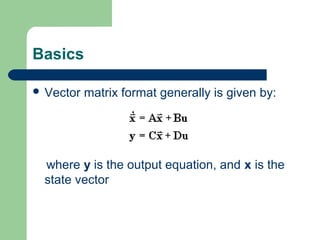
 Vector matrix format generally is given by:
where y is the output equation, and x is the
state vector
PARTS OF A STATE SPACE
REPRESENTATION
 State Variables: a subset of system variables which
if known at an initial time t0 along with subsequent
inputs are determined for all time t>t0+
 State Equations: n linearly independent first order
differential equations relating the first derivatives of
the state variables to functions of the state variables
and the inputs.
 Output equations: algebraic equations relating the
state variables to the system outputs.
EXAMPLE
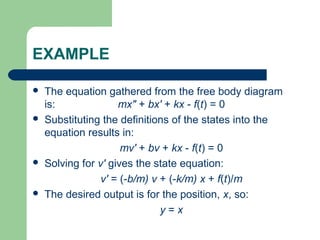
 The equation gathered from the free body diagram
is: mx" + bx' + kx - f(t) = 0
 Substituting the definitions of the states into the
equation results in:
mv' + bv + kx - f(t) = 0
 Solving for v' gives the state equation:
v' = (-b/m) v + (-k/m) x + f(t)/m
 The desired output is for the position, x, so:
y = x
Cont…
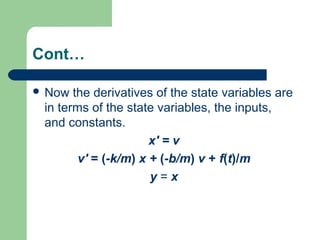
 Now the derivatives of the state variables are
in terms of the state variables, the inputs,
and constants.
x' = v
v' = (-k/m) x + (-b/m) v + f(t)/m
y = x
PUTTING INTO VECTOR-MATRIX
FORM
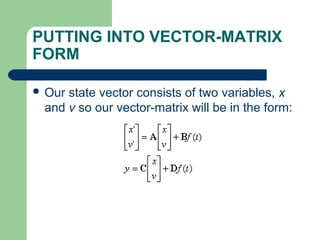
 Our state vector consists of two variables, x
and v so our vector-matrix will be in the form:
Explanation
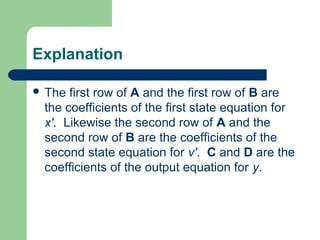
 The first row of A and the first row of B are
the coefficients of the first state equation for
x'. Likewise the second row of A and the
second row of B are the coefficients of the
second state equation for v'. C and D are the
coefficients of the output equation for y.
EXACT REPRESENTATION
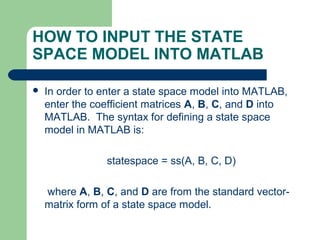
HOW TO INPUT THE STATE
SPACE MODEL INTO MATLAB
 In order to enter a state space model into MATLAB,
enter the coefficient matrices A, B, C, and D into
MATLAB. The syntax for defining a state space
model in MATLAB is:
statespace = ss(A, B, C, D)
where A, B, C, and D are from the standard vector-
matrix form of a state space model.
Example
 For the sake of example, lets take m = 2, b = 5, and k = 3.
 >> m = 2;
 >> b = 5;
 >> k = 3;
 >> A = [ 0 1 ; -k/m -b/m ];
 >> B = [ 0 ; 1/m ];
 >> C = [ 1 0 ];
 >> D = 0;
 >> statespace_ss = ss(A, B, C, D)
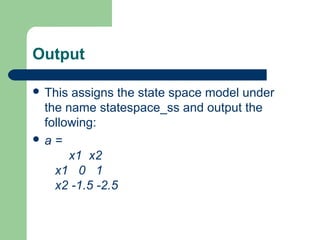
Output
 This assigns the state space model under
the name statespace_ss and output the
following:
 a =
x1 x2
x1 0 1
x2 -1.5 -2.5
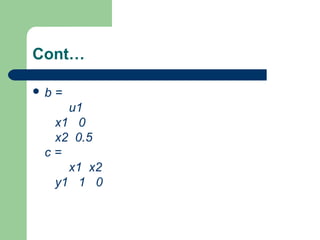
Cont…
 b =
u1
x1 0
x2 0.5
c =
x1 x2
y1 1 0
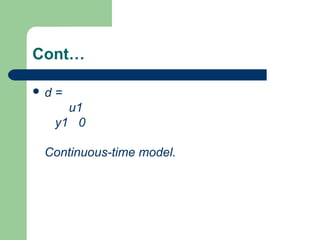
Cont…
 d =
u1
y1 0
Continuous-time model.
EXTRACTING A, B, C, D
MATRICES FROM A STATE
SPACE MODEL
 In order to extract the A, B, C, and D
matrices from a previously defined state
space model, use MATLAB's ssdata
command.
 [A, B, C, D] = ssdata(statespace)
where statespace is the name of the state
space system.
Example
 >> [A, B, C, D] = ssdata(statespace_ss)
 The MATLAB output will be:
 A =

 -2.5000 -0.3750
4.0000 0
Cont…
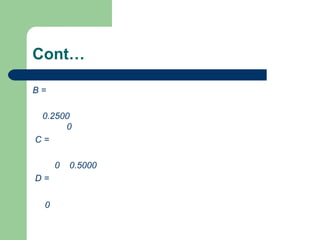
B =
0.2500
0
C =
0 0.5000
D =
0
STEP RESPONSE USING THE
STATE SPACE MODEL
 Once the state space model is entered into MATLAB it is easy
to calculate the response to a step input. To calculate the
response to a unit step input, use:
 step(statespace)
 where statespace is the name of the state space system.
 For steps with magnitude other than one, calculate the step
response using:
 step(u * statespace)
 where u is the magnitude of the step and statespace is the
name of the state space system.
State space models

State space models

  • 1.
  • 2.
    Why State SpaceModels  The state space model represents a physical system as n first order differential equations. This form is better suited for computer simulation than an nth order input- output differential equation.
  • 3.
    Basics  Vector matrixformat generally is given by: where y is the output equation, and x is the state vector
  • 4.
    PARTS OF ASTATE SPACE REPRESENTATION  State Variables: a subset of system variables which if known at an initial time t0 along with subsequent inputs are determined for all time t>t0+  State Equations: n linearly independent first order differential equations relating the first derivatives of the state variables to functions of the state variables and the inputs.  Output equations: algebraic equations relating the state variables to the system outputs.
  • 5.
    EXAMPLE  The equationgathered from the free body diagram is: mx" + bx' + kx - f(t) = 0  Substituting the definitions of the states into the equation results in: mv' + bv + kx - f(t) = 0  Solving for v' gives the state equation: v' = (-b/m) v + (-k/m) x + f(t)/m  The desired output is for the position, x, so: y = x
  • 6.
    Cont…  Now thederivatives of the state variables are in terms of the state variables, the inputs, and constants. x' = v v' = (-k/m) x + (-b/m) v + f(t)/m y = x
  • 7.
    PUTTING INTO VECTOR-MATRIX FORM Our state vector consists of two variables, x and v so our vector-matrix will be in the form:
  • 8.
    Explanation  The firstrow of A and the first row of B are the coefficients of the first state equation for x'. Likewise the second row of A and the second row of B are the coefficients of the second state equation for v'. C and D are the coefficients of the output equation for y.
  • 9.
  • 10.
    HOW TO INPUTTHE STATE SPACE MODEL INTO MATLAB  In order to enter a state space model into MATLAB, enter the coefficient matrices A, B, C, and D into MATLAB. The syntax for defining a state space model in MATLAB is: statespace = ss(A, B, C, D) where A, B, C, and D are from the standard vector- matrix form of a state space model.
  • 11.
    Example  For thesake of example, lets take m = 2, b = 5, and k = 3.  >> m = 2;  >> b = 5;  >> k = 3;  >> A = [ 0 1 ; -k/m -b/m ];  >> B = [ 0 ; 1/m ];  >> C = [ 1 0 ];  >> D = 0;  >> statespace_ss = ss(A, B, C, D)
  • 12.
    Output  This assignsthe state space model under the name statespace_ss and output the following:  a = x1 x2 x1 0 1 x2 -1.5 -2.5
  • 13.
    Cont…  b = u1 x10 x2 0.5 c = x1 x2 y1 1 0
  • 14.
    Cont…  d = u1 y10 Continuous-time model.
  • 15.
    EXTRACTING A, B,C, D MATRICES FROM A STATE SPACE MODEL  In order to extract the A, B, C, and D matrices from a previously defined state space model, use MATLAB's ssdata command.  [A, B, C, D] = ssdata(statespace) where statespace is the name of the state space system.
  • 16.
    Example  >> [A,B, C, D] = ssdata(statespace_ss)  The MATLAB output will be:  A =   -2.5000 -0.3750 4.0000 0
  • 17.
  • 18.
    STEP RESPONSE USINGTHE STATE SPACE MODEL  Once the state space model is entered into MATLAB it is easy to calculate the response to a step input. To calculate the response to a unit step input, use:  step(statespace)  where statespace is the name of the state space system.  For steps with magnitude other than one, calculate the step response using:  step(u * statespace)  where u is the magnitude of the step and statespace is the name of the state space system.