http://www.tutorialspoint.com/matlab/matlab_variables.htm Copyright © tutorialspoint.com
MATLAB - VARIABLES
InMATLAB environment, every variable is anarray or matrix.
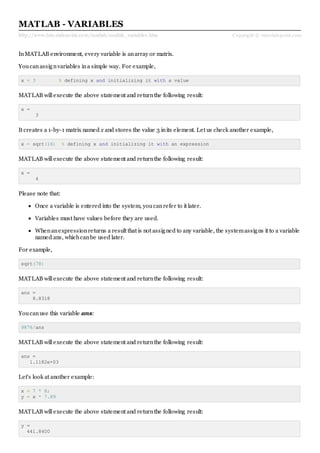
Youcanassignvariables ina simple way. For example,
x = 3 % defining x and initializing it with a value
MATLAB willexecute the above statement and returnthe following result:
x =
3
It creates a 1-by-1 matrix named x and stores the value 3 inits element. Let us check another example,
x = sqrt(16) % defining x and initializing it with an expression
MATLAB willexecute the above statement and returnthe following result:
x =
4
Please note that:
Once a variable is entered into the system, youcanrefer to it later.
Variables must have values before they are used.
Whenanexpressionreturns a result that is not assigned to any variable, the systemassigns it to a variable
named ans, whichcanbe used later.
For example,
sqrt(78)
MATLAB willexecute the above statement and returnthe following result:
ans =
8.8318
Youcanuse this variable ans:
9876/ans
MATLAB willexecute the above statement and returnthe following result:
ans =
1.1182e+03
Let's look at another example:
x = 7 * 8;
y = x * 7.89
MATLAB willexecute the above statement and returnthe following result:
y =
441.8400
Multiple Assignments
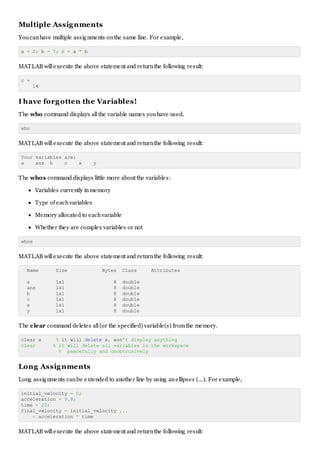
Youcanhave multiple assignments onthe same line. For example,
a = 2; b = 7; c = a * b
MATLAB willexecute the above statement and returnthe following result:
c =
14
I have forgotten the Variables!
The who command displays allthe variable names youhave used.
who
MATLAB willexecute the above statement and returnthe following result:
Your variables are:
a ans b c x y
The whos command displays little more about the variables:
Variables currently inmemory
Type of eachvariables
Memory allocated to eachvariable
Whether they are complex variables or not
whos
MATLAB willexecute the above statement and returnthe following result:
Name Size Bytes Class Attributes
a 1x1 8 double
ans 1x1 8 double
b 1x1 8 double
c 1x1 8 double
x 1x1 8 double
y 1x1 8 double
The clear command deletes all(or the specified) variable(s) fromthe memory.
clear x % it will delete x, won't display anything
clear % it will delete all variables in the workspace
% peacefully and unobtrusively
Long Assignments
Long assignments canbe extended to another line by using anellipses (...). For example,
initial_velocity = 0;
acceleration = 9.8;
time = 20;
final_velocity = initial_velocity ...
+ acceleration * time
MATLAB willexecute the above statement and returnthe following result:
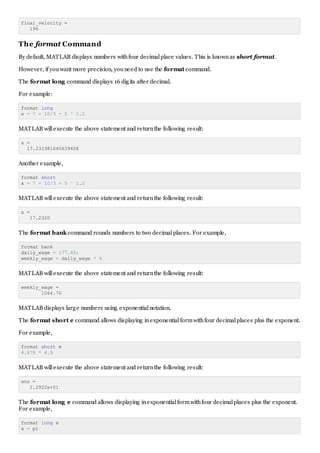
final_velocity =
196
The format Command
By default, MATLAB displays numbers withfour decimalplace values. This is knownas short format.
However, if youwant more precision, youneed to use the format command.
The format long command displays 16 digits after decimal.
For example:
format long
x = 7 + 10/3 + 5 ^ 1.2
MATLAB willexecute the above statement and returnthe following result:
x =
17.231981640639408
Another example,
format short
x = 7 + 10/3 + 5 ^ 1.2
MATLAB willexecute the above statement and returnthe following result:
x =
17.2320
The format bank command rounds numbers to two decimalplaces. For example,
format bank
daily_wage = 177.45;
weekly_wage = daily_wage * 6
MATLAB willexecute the above statement and returnthe following result:
weekly_wage =
1064.70
MATLAB displays large numbers using exponentialnotation.
The format short e command allows displaying inexponentialformwithfour decimalplaces plus the exponent.
For example,
format short e
4.678 * 4.9
MATLAB willexecute the above statement and returnthe following result:
ans =
2.2922e+01
The format long e command allows displaying inexponentialformwithfour decimalplaces plus the exponent.
For example,
format long e
x = pi
MATLAB willexecute the above statement and returnthe following result:
x =
3.141592653589793e+00
The format rat command gives the closest rationalexpressionresulting froma calculation. For example,
format rat
4.678 * 4.9
MATLAB willexecute the above statement and returnthe following result:
ans =
2063/90
Creating Vectors
A vector is a one-dimensionalarray of numbers. MATLAB allows creating two types of vectors:
Row vectors
Columnvectors
Row vectors are created by enclosing the set of elements insquare brackets, using space or comma to
delimit the elements.
For example,
r = [7 8 9 10 11]
MATLAB willexecute the above statement and returnthe following result:
r =
Columns 1 through 4
7 8 9 10
Column 5
11
Another example,
r = [7 8 9 10 11];
t = [2, 3, 4, 5, 6];
res = r + t
MATLAB willexecute the above statement and returnthe following result:
res =
Columns 1 through 4
9 11 13 15
Column 5
17
Column vectors are created by enclosing the set of elements insquare brackets, using semicolon(;) to delimit
the elements.
c = [7; 8; 9; 10; 11]
MATLAB willexecute the above statement and returnthe following result:
c =
7
8
9
10
11
Creating Matrices
A matrix is a two-dimensionalarray of numbers.
InMATLAB, a matrix is created by entering eachrow as a sequence of space or comma separated elements,
and end of a row is demarcated by a semicolon. For example, let us create a 3-by-3 matrix as:
m = [1 2 3; 4 5 6; 7 8 9]
MATLAB willexecute the above statement and returnthe following result:
m =
1 2 3
4 5 6
7 8 9

Matlab variables

  • 1.
    http://www.tutorialspoint.com/matlab/matlab_variables.htm Copyright ©tutorialspoint.com MATLAB - VARIABLES InMATLAB environment, every variable is anarray or matrix. Youcanassignvariables ina simple way. For example, x = 3 % defining x and initializing it with a value MATLAB willexecute the above statement and returnthe following result: x = 3 It creates a 1-by-1 matrix named x and stores the value 3 inits element. Let us check another example, x = sqrt(16) % defining x and initializing it with an expression MATLAB willexecute the above statement and returnthe following result: x = 4 Please note that: Once a variable is entered into the system, youcanrefer to it later. Variables must have values before they are used. Whenanexpressionreturns a result that is not assigned to any variable, the systemassigns it to a variable named ans, whichcanbe used later. For example, sqrt(78) MATLAB willexecute the above statement and returnthe following result: ans = 8.8318 Youcanuse this variable ans: 9876/ans MATLAB willexecute the above statement and returnthe following result: ans = 1.1182e+03 Let's look at another example: x = 7 * 8; y = x * 7.89 MATLAB willexecute the above statement and returnthe following result: y = 441.8400
  • 2.
    Multiple Assignments Youcanhave multipleassignments onthe same line. For example, a = 2; b = 7; c = a * b MATLAB willexecute the above statement and returnthe following result: c = 14 I have forgotten the Variables! The who command displays allthe variable names youhave used. who MATLAB willexecute the above statement and returnthe following result: Your variables are: a ans b c x y The whos command displays little more about the variables: Variables currently inmemory Type of eachvariables Memory allocated to eachvariable Whether they are complex variables or not whos MATLAB willexecute the above statement and returnthe following result: Name Size Bytes Class Attributes a 1x1 8 double ans 1x1 8 double b 1x1 8 double c 1x1 8 double x 1x1 8 double y 1x1 8 double The clear command deletes all(or the specified) variable(s) fromthe memory. clear x % it will delete x, won't display anything clear % it will delete all variables in the workspace % peacefully and unobtrusively Long Assignments Long assignments canbe extended to another line by using anellipses (...). For example, initial_velocity = 0; acceleration = 9.8; time = 20; final_velocity = initial_velocity ... + acceleration * time MATLAB willexecute the above statement and returnthe following result:
  • 3.
    final_velocity = 196 The formatCommand By default, MATLAB displays numbers withfour decimalplace values. This is knownas short format. However, if youwant more precision, youneed to use the format command. The format long command displays 16 digits after decimal. For example: format long x = 7 + 10/3 + 5 ^ 1.2 MATLAB willexecute the above statement and returnthe following result: x = 17.231981640639408 Another example, format short x = 7 + 10/3 + 5 ^ 1.2 MATLAB willexecute the above statement and returnthe following result: x = 17.2320 The format bank command rounds numbers to two decimalplaces. For example, format bank daily_wage = 177.45; weekly_wage = daily_wage * 6 MATLAB willexecute the above statement and returnthe following result: weekly_wage = 1064.70 MATLAB displays large numbers using exponentialnotation. The format short e command allows displaying inexponentialformwithfour decimalplaces plus the exponent. For example, format short e 4.678 * 4.9 MATLAB willexecute the above statement and returnthe following result: ans = 2.2922e+01 The format long e command allows displaying inexponentialformwithfour decimalplaces plus the exponent. For example, format long e x = pi
  • 4.
    MATLAB willexecute theabove statement and returnthe following result: x = 3.141592653589793e+00 The format rat command gives the closest rationalexpressionresulting froma calculation. For example, format rat 4.678 * 4.9 MATLAB willexecute the above statement and returnthe following result: ans = 2063/90 Creating Vectors A vector is a one-dimensionalarray of numbers. MATLAB allows creating two types of vectors: Row vectors Columnvectors Row vectors are created by enclosing the set of elements insquare brackets, using space or comma to delimit the elements. For example, r = [7 8 9 10 11] MATLAB willexecute the above statement and returnthe following result: r = Columns 1 through 4 7 8 9 10 Column 5 11 Another example, r = [7 8 9 10 11]; t = [2, 3, 4, 5, 6]; res = r + t MATLAB willexecute the above statement and returnthe following result: res = Columns 1 through 4 9 11 13 15 Column 5 17 Column vectors are created by enclosing the set of elements insquare brackets, using semicolon(;) to delimit the elements. c = [7; 8; 9; 10; 11] MATLAB willexecute the above statement and returnthe following result: c = 7 8 9
  • 5.
    10 11 Creating Matrices A matrixis a two-dimensionalarray of numbers. InMATLAB, a matrix is created by entering eachrow as a sequence of space or comma separated elements, and end of a row is demarcated by a semicolon. For example, let us create a 3-by-3 matrix as: m = [1 2 3; 4 5 6; 7 8 9] MATLAB willexecute the above statement and returnthe following result: m = 1 2 3 4 5 6 7 8 9