


INTERNETWORKING DEVICES 
 By Ray Mkindo 
 It Guru Tz 
 Itgurutz.blogspot.com 
 +255718574710 
Ray Mkindo - It Guru Tz 11/5/2014 1
Terminologies 
 Internet 
 Internetworking devices 
 Gateway 
 Repeater/Hub 
 Bridge 
 Switch 
 Router 
 Packet 
Ray Mkindo - It Guru Tz 11/5/2014 2
Internetworking Device 
 Internetworking Devices 
Is the practice of connecting a computer network with other network through 
the use of gateways that provide a common method of routing information 
packets between the networks. 
Network 
is two or more computers connected to each other so that they can exchange 
information, such as e-mail messages or documents, or share resources, such as 
disk storage or printers. 
Gateway 
is a network point that acts as an entrance to another network. 
Packet 
Is a unit data that is routed between an origin and destination. 
Ray Mkindo - It Guru Tz 11/5/2014 3
Internetworking Devices 
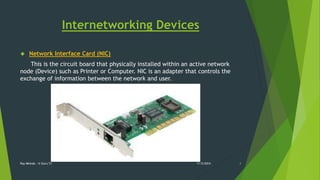
 Network Interface Card (NIC) 
This is the circuit board that physically installed within an active network 
node (Device) such as Printer or Computer. NIC is an adapter that controls the 
exchange of information between the network and user. 
Ray Mkindo - It Guru Tz 11/5/2014 4
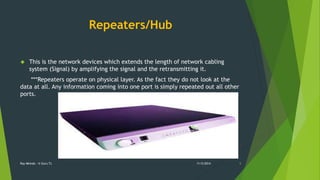
Repeaters/Hub 
 This is the network devices which extends the length of network cabling 
system (Signal) by amplifying the signal and the retransmitting it. 
***Repeaters operate on physical layer. As the fact they do not look at the 
data at all. Any information coming into one port is simply repeated out all other 
ports. 
Ray Mkindo - It Guru Tz 11/5/2014 5
Bridge 
 Is a data link layer device that provides a connection between separate LAN 
segments. 
Ray Mkindo - It Guru Tz 11/5/2014 6
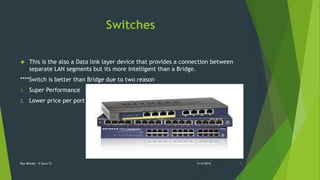
Switches 
 This is the also a Data link layer device that provides a connection between 
separate LAN segments but its more intelligent than a Bridge. 
****Switch is better than Bridge due to two reason 
1. Super Performance 
2. Lower price per port 
Ray Mkindo - It Guru Tz 11/5/2014 7
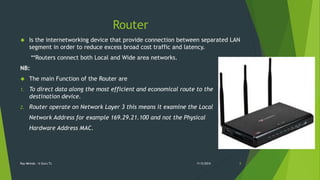
Router 
 Is the internetworking device that provide connection between separated LAN 
segment in order to reduce excess broad cost traffic and latency. 
**Routers connect both Local and Wide area networks. 
NB: 
 The main Function of the Router are 
1. To direct data along the most efficient and economical route to the 
destination device. 
2. Router operate on Network Layer 3 this means it examine the Local 
Network Address for example 169.29.21.100 and not the Physical 
Hardware Address MAC. 
Ray Mkindo - It Guru Tz 11/5/2014 8
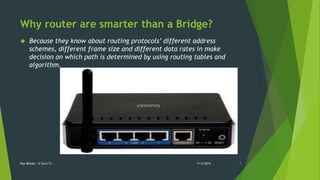
Why router are smarter than a Bridge? 
 Because they know about routing protocols’ different address 
schemes, different frame size and different data rates in make 
decision on which path is determined by using routing tables and 
algorithm. 
Ray Mkindo - It Guru Tz 11/5/2014 9
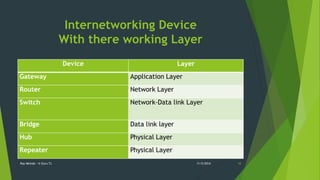
Internetworking Device 
With there working Layer 
Device Layer 
Gateway Application Layer 
Router Network Layer 
Switch Network-Data link Layer 
Bridge Data link layer 
Hub Physical Layer 
Repeater Physical Layer 
Ray Mkindo - It Guru Tz 11/5/2014 10
Knowledge Base 
Why use crossover instead of straight through when 
connecting computer to computer? 
Ray Mkindo - It Guru Tz 11/5/2014 11
Ray Mkindo- It Guru Tz 
Ray Mkindo 
Itgurutz.blogspot.com 
+255718574710 
Raymkindo02@gmail.com 
Tweeter : Ray_Mkindo 
Facebook: Ray 
Instagram: Raymkindo 
Ray Mkindo - It Guru Tz 11/5/2014 12

Internetworking device

  • 1.
    INTERNETWORKING DEVICES By Ray Mkindo  It Guru Tz  Itgurutz.blogspot.com  +255718574710 Ray Mkindo - It Guru Tz 11/5/2014 1
  • 2.
    Terminologies  Internet  Internetworking devices  Gateway  Repeater/Hub  Bridge  Switch  Router  Packet Ray Mkindo - It Guru Tz 11/5/2014 2
  • 3.
    Internetworking Device Internetworking Devices Is the practice of connecting a computer network with other network through the use of gateways that provide a common method of routing information packets between the networks. Network is two or more computers connected to each other so that they can exchange information, such as e-mail messages or documents, or share resources, such as disk storage or printers. Gateway is a network point that acts as an entrance to another network. Packet Is a unit data that is routed between an origin and destination. Ray Mkindo - It Guru Tz 11/5/2014 3
  • 4.
    Internetworking Devices Network Interface Card (NIC) This is the circuit board that physically installed within an active network node (Device) such as Printer or Computer. NIC is an adapter that controls the exchange of information between the network and user. Ray Mkindo - It Guru Tz 11/5/2014 4
  • 5.
    Repeaters/Hub  Thisis the network devices which extends the length of network cabling system (Signal) by amplifying the signal and the retransmitting it. ***Repeaters operate on physical layer. As the fact they do not look at the data at all. Any information coming into one port is simply repeated out all other ports. Ray Mkindo - It Guru Tz 11/5/2014 5
  • 6.
    Bridge  Isa data link layer device that provides a connection between separate LAN segments. Ray Mkindo - It Guru Tz 11/5/2014 6
  • 7.
    Switches  Thisis the also a Data link layer device that provides a connection between separate LAN segments but its more intelligent than a Bridge. ****Switch is better than Bridge due to two reason 1. Super Performance 2. Lower price per port Ray Mkindo - It Guru Tz 11/5/2014 7
  • 8.
    Router  Isthe internetworking device that provide connection between separated LAN segment in order to reduce excess broad cost traffic and latency. **Routers connect both Local and Wide area networks. NB:  The main Function of the Router are 1. To direct data along the most efficient and economical route to the destination device. 2. Router operate on Network Layer 3 this means it examine the Local Network Address for example 169.29.21.100 and not the Physical Hardware Address MAC. Ray Mkindo - It Guru Tz 11/5/2014 8
  • 9.
    Why router aresmarter than a Bridge?  Because they know about routing protocols’ different address schemes, different frame size and different data rates in make decision on which path is determined by using routing tables and algorithm. Ray Mkindo - It Guru Tz 11/5/2014 9
  • 10.
    Internetworking Device Withthere working Layer Device Layer Gateway Application Layer Router Network Layer Switch Network-Data link Layer Bridge Data link layer Hub Physical Layer Repeater Physical Layer Ray Mkindo - It Guru Tz 11/5/2014 10
  • 11.
    Knowledge Base Whyuse crossover instead of straight through when connecting computer to computer? Ray Mkindo - It Guru Tz 11/5/2014 11
  • 12.
    Ray Mkindo- ItGuru Tz Ray Mkindo Itgurutz.blogspot.com +255718574710 Raymkindo02@gmail.com Tweeter : Ray_Mkindo Facebook: Ray Instagram: Raymkindo Ray Mkindo - It Guru Tz 11/5/2014 12

Editor's Notes

  • #2 In order to understand the Internetworking Devices first you need to understand a little bit about networking and Internet.