Ashis Talukder, MIS, DU. 1
Lecture
Software
Ashis Talukder, MIS, DU. 2
Why we use a computer?
 A computer is an electronic device used to
process data.
 A computer can convert data into information
that is useful to people.
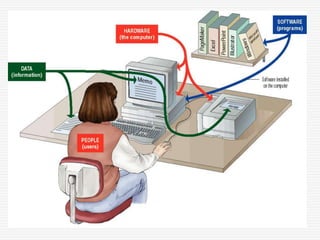
 A complete computer system includes four
distinct parts:
 Hardware
 Software
 Data
 User
Ashis Talukder, MIS, DU. 3
Data Processing
 The activity of processing data using a computer is called
data processing.
 Data processing consists of three sub-activities:
 Capturing the input data
 Manipulating the data
 Managing the output results
 In data processing, information is data arranged in an
order and form, which is useful to the people who
receive it.
 Data is the raw material used as input to data
processing, and information is the processed data
obtained as the output of data processing.
Ashis Talukder, MIS, DU. 4
Ashis Talukder, MIS, DU. 5
Hardware
 A computer's hardware consists of electronic
devices; the parts you can see and touch.
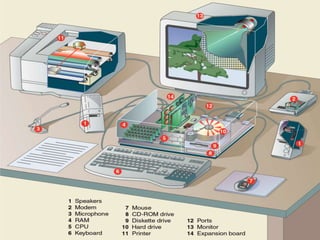
 The term "device" refers to any piece of
hardware used by the computer, such as a
keyboard, monitor, modem, mouse, etc.
Ashis Talukder, MIS, DU. 6
Ashis Talukder, MIS, DU. 7
Software
 Software:
 also called programs (combination of 1 or more)
 consists of organized sets of instructions for
controlling the computer.
 Software is a set of electronic instructions that tells the
computer how to do certain tasks. A set of instructions is
often called a program.
 When a computer is using a particular program, it is said
to be running or executing the program.
Ashis Talukder, MIS, DU. 8
Relationship Between Hardware &
Software
 Both hardware and software are necessary for
a computer to do useful job. Both are
complementary to each other.
 The same hardware can be loaded with
different software to make a computer system
perform different types of jobs.
 Except for upgrades, hardware is normally a
one-time expense, whereas software is a
continuing expense.
Ashis Talukder, MIS, DU. 9
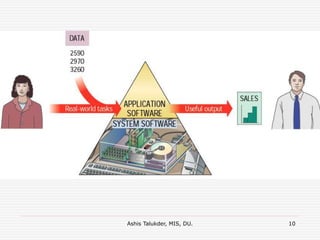
Types of Software
 The two most common types of programs are:
 System software and
 Application software.
 Some programs exist for the computer's use,
to help it manage its own tasks and devices.
 Other programs exist for the user, and enable
the computer to perform tasks for you, such as
creating documents.
Ashis Talukder, MIS, DU. 10
Ashis Talukder, MIS, DU. 11
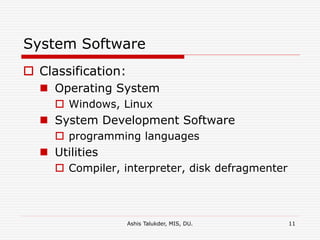
System Software
 Classification:
 Operating System
 Windows, Linux
 System Development Software
 programming languages
 Utilities
 Compiler, interpreter, disk defragmenter
Ashis Talukder, MIS, DU. 12
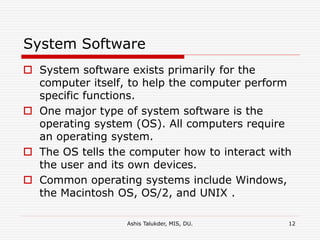
System Software
 System software exists primarily for the
computer itself, to help the computer perform
specific functions.
 One major type of system software is the
operating system (OS). All computers require
an operating system.
 The OS tells the computer how to interact with
the user and its own devices.
 Common operating systems include Windows,
the Macintosh OS, OS/2, and UNIX .
Ashis Talukder, MIS, DU. 13
Application Software
 Application software tells the computer
how to accomplish tasks the user
requires, such as creating a document
or editing a graphic image.
 Classification:
 User developed/customized
 Application Package
Ashis Talukder, MIS, DU. 14
Application Software
 User developed/customized Application Software:
 User developed or get developed by any software development
firm according to his/her need.
 Example: BAXI BANK (for bank transaction)
 Some important kinds of application software are:
 Word processing programs: MS word, Latex, Page Maker
 Spreadsheet software: MS Excel
 Database management: MS Access
 Presentation programs: MS PowerPoint
 Graphics programs: 3D MAx
 Networking software: Packet Tracer, Router Sim
 Web design tools and browsers: MS FropntPage
 Internet applications: Internet Explorer
 Communications programs
 Utilities
 Entertainment and education: MP3 player, PowerDVD
 Multimedia authoring
Ashis Talukder, MIS, DU. 15
Data
 Data consists of raw facts, which the computer
can manipulate and process into information
that is useful to people.
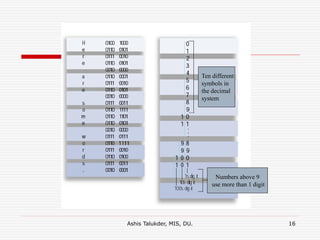
 Computerized data is digital, meaning that it
has been reduced to digits, or numbers. The
computer stores and reads all data as
numbers.
 Although computers use data in digital form,
they convert data into forms that people can
understand, such as text, numerals, sounds,
and images.
Ashis Talukder, MIS, DU. 16
Ten different
symbols in
the decimal
system
Numbers above 9
use more than 1 digit
Ashis Talukder, MIS, DU. 17
Users
 People are the computer's operators, or users.
 Some types of computers can operate without
much intervention from people, but personal
computers are designed specifically for use by
people.
 Some computer systems are complete without
human involvement but no computer is totally
autonomous. It can do some tasks without a
person sitting before it, but people still design,
build, program and repair it.
 Human ware refers to the persons who design,
program and operate computer.
Ashis Talukder, MIS, DU. 18
Types of Users
 System analyst: The main tasks of a system analyst is
to study information system and their processing
requirements. He or she defines the application problem,
determines system specifications, recommends the
hardware and software and design.
 Programmer: The main requirement of a programmer
is the knowledge of programming language and standard
coding procedures. He or she only code or prepare
programs based on the specification made by the system
analyst. He does not require the broader understanding
of the structure and inner working of the applications.
 Operator: He or she generally performs a series of
tasks to keep the computer operating with maximum
efficiency.

Software

  • 1.
    Ashis Talukder, MIS,DU. 1 Lecture Software
  • 2.
    Ashis Talukder, MIS,DU. 2 Why we use a computer?  A computer is an electronic device used to process data.  A computer can convert data into information that is useful to people.  A complete computer system includes four distinct parts:  Hardware  Software  Data  User
  • 3.
    Ashis Talukder, MIS,DU. 3 Data Processing  The activity of processing data using a computer is called data processing.  Data processing consists of three sub-activities:  Capturing the input data  Manipulating the data  Managing the output results  In data processing, information is data arranged in an order and form, which is useful to the people who receive it.  Data is the raw material used as input to data processing, and information is the processed data obtained as the output of data processing.
  • 4.
  • 5.
    Ashis Talukder, MIS,DU. 5 Hardware  A computer's hardware consists of electronic devices; the parts you can see and touch.  The term "device" refers to any piece of hardware used by the computer, such as a keyboard, monitor, modem, mouse, etc.
  • 6.
  • 7.
    Ashis Talukder, MIS,DU. 7 Software  Software:  also called programs (combination of 1 or more)  consists of organized sets of instructions for controlling the computer.  Software is a set of electronic instructions that tells the computer how to do certain tasks. A set of instructions is often called a program.  When a computer is using a particular program, it is said to be running or executing the program.
  • 8.
    Ashis Talukder, MIS,DU. 8 Relationship Between Hardware & Software  Both hardware and software are necessary for a computer to do useful job. Both are complementary to each other.  The same hardware can be loaded with different software to make a computer system perform different types of jobs.  Except for upgrades, hardware is normally a one-time expense, whereas software is a continuing expense.
  • 9.
    Ashis Talukder, MIS,DU. 9 Types of Software  The two most common types of programs are:  System software and  Application software.  Some programs exist for the computer's use, to help it manage its own tasks and devices.  Other programs exist for the user, and enable the computer to perform tasks for you, such as creating documents.
  • 10.
  • 11.
    Ashis Talukder, MIS,DU. 11 System Software  Classification:  Operating System  Windows, Linux  System Development Software  programming languages  Utilities  Compiler, interpreter, disk defragmenter
  • 12.
    Ashis Talukder, MIS,DU. 12 System Software  System software exists primarily for the computer itself, to help the computer perform specific functions.  One major type of system software is the operating system (OS). All computers require an operating system.  The OS tells the computer how to interact with the user and its own devices.  Common operating systems include Windows, the Macintosh OS, OS/2, and UNIX .
  • 13.
    Ashis Talukder, MIS,DU. 13 Application Software  Application software tells the computer how to accomplish tasks the user requires, such as creating a document or editing a graphic image.  Classification:  User developed/customized  Application Package
  • 14.
    Ashis Talukder, MIS,DU. 14 Application Software  User developed/customized Application Software:  User developed or get developed by any software development firm according to his/her need.  Example: BAXI BANK (for bank transaction)  Some important kinds of application software are:  Word processing programs: MS word, Latex, Page Maker  Spreadsheet software: MS Excel  Database management: MS Access  Presentation programs: MS PowerPoint  Graphics programs: 3D MAx  Networking software: Packet Tracer, Router Sim  Web design tools and browsers: MS FropntPage  Internet applications: Internet Explorer  Communications programs  Utilities  Entertainment and education: MP3 player, PowerDVD  Multimedia authoring
  • 15.
    Ashis Talukder, MIS,DU. 15 Data  Data consists of raw facts, which the computer can manipulate and process into information that is useful to people.  Computerized data is digital, meaning that it has been reduced to digits, or numbers. The computer stores and reads all data as numbers.  Although computers use data in digital form, they convert data into forms that people can understand, such as text, numerals, sounds, and images.
  • 16.
    Ashis Talukder, MIS,DU. 16 Ten different symbols in the decimal system Numbers above 9 use more than 1 digit
  • 17.
    Ashis Talukder, MIS,DU. 17 Users  People are the computer's operators, or users.  Some types of computers can operate without much intervention from people, but personal computers are designed specifically for use by people.  Some computer systems are complete without human involvement but no computer is totally autonomous. It can do some tasks without a person sitting before it, but people still design, build, program and repair it.  Human ware refers to the persons who design, program and operate computer.
  • 18.
    Ashis Talukder, MIS,DU. 18 Types of Users  System analyst: The main tasks of a system analyst is to study information system and their processing requirements. He or she defines the application problem, determines system specifications, recommends the hardware and software and design.  Programmer: The main requirement of a programmer is the knowledge of programming language and standard coding procedures. He or she only code or prepare programs based on the specification made by the system analyst. He does not require the broader understanding of the structure and inner working of the applications.  Operator: He or she generally performs a series of tasks to keep the computer operating with maximum efficiency.