
Presented by:
Dr. Akhlas Ahmed
Preston University
An electronic device, operating under
the control of instructions stored in its
own memory unit, that can accept data
(input), manipulate the data according
to specified rules (process), produce
information
(output)
from
the
processing, and store the results for
future use.
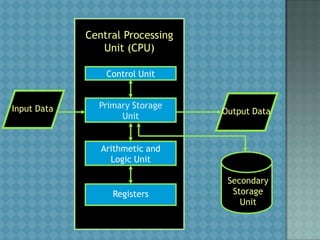
Central Processing
Unit (CPU)
Control Unit

Input Data

Primary Storage
Unit

Output Data

Arithmetic and
Logic Unit

Registers

Secondary
Storage
Unit
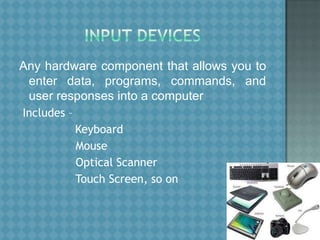
Any hardware component that allows you to
enter data, programs, commands, and
user responses into a computer
Includes –

Keyboard
Mouse
Optical Scanner
Touch Screen, so on
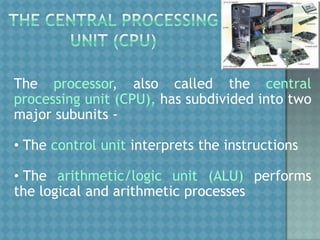
The processor, also called the central
processing unit (CPU), has subdivided into two
major subunits • The control unit interprets the instructions
• The arithmetic/logic unit (ALU) performs
the logical and arithmetic processes
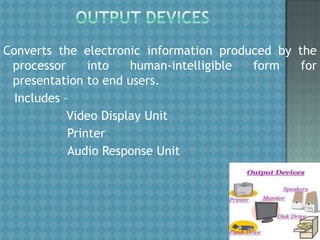
Converts the electronic information produced by the
processor
into
human-intelligible
form
for
presentation to end users.
Includes –
Video Display Unit
Printer
Audio Response Unit
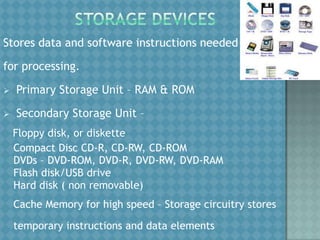
Stores data and software instructions needed
for processing.


Primary Storage Unit – RAM & ROM



Secondary Storage Unit –
Floppy disk, or diskette
Compact Disc CD-R, CD-RW, CD-ROM
DVDs – DVD-ROM, DVD-R, DVD-RW, DVD-RAM
Flash disk/USB drive
Hard disk ( non removable)
Cache Memory for high speed – Storage circuitry stores
temporary instructions and data elements
1. TYPES OF COMPUTER SYSTEMS
• Microcomputer systems
•Personal computers, PDA’s, workstations etc.
• Midrange systems

•Network or Web servers, Multi-user systems etc.
• Mainframe systems
•Enterprise systems, Super servers, Transaction
Processors etc.
2. PERIPHERALS
•Monitors

•Printers
•Scanners

•Hard Disk Drives
•CD & DVD (Dissociated Vertical Deviation) Drives
•Backup Systems
3. INPUT TECHNOLOGIES
•Pointing Devices

•Pen based Computing
•Speech Recognition System

•Optical scanning
•Magnetic stripe

•Smart Cards
4. OUTPUT TECHNOLOGIES
•Video Output

•Printed Output
•Storage
•Magnetic Disks
•Floppy disks
•Hard disk drives

•Magnetic Tape
•Optical Disks
Is the general term for various kinds of programs
used to operate and manipulate computers and
their peripheral devices.
TYPES OF SOFTWARE
•Application Software: performs information processing tasks for end
users.

•General purpose application programs
•Application specific programs (custom software)
•System Software: manages and supports operations of computer
systems and networks.
•System management programs.

•System development programs.
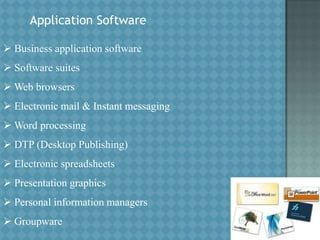
Application Software
 Business application software
 Software suites

 Web browsers
 Electronic mail & Instant messaging
 Word processing

 DTP (Desktop Publishing)
 Electronic spreadsheets
 Presentation graphics
 Personal information managers
 Groupware
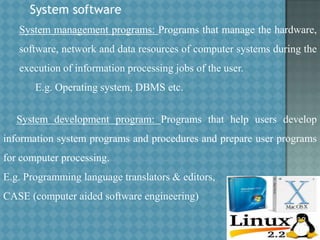
System software
System management programs: Programs that manage the hardware,
software, network and data resources of computer systems during the
execution of information processing jobs of the user.
E.g. Operating system, DBMS etc.
System development program: Programs that help users develop
information system programs and procedures and prepare user programs
for computer processing.
E.g. Programming language translators & editors,
CASE (computer aided software engineering)
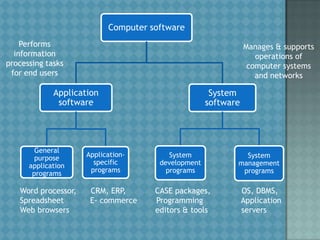
Computer software
Performs
information
processing tasks
for end users

Manages & supports
operations of
computer systems
and networks

Application
software

General
purpose
application
programs

Word processor,
Spreadsheet
Web browsers

Applicationspecific
programs

CRM, ERP,
E- commerce

System
software

System
development
programs

CASE packages,
Programming
editors & tools

System
management
programs

OS, DBMS,
Application
servers
THANK YOU

Lecture 01 concept of computer system

  • 1.
    Presented by: Dr. AkhlasAhmed Preston University
  • 2.
    An electronic device,operating under the control of instructions stored in its own memory unit, that can accept data (input), manipulate the data according to specified rules (process), produce information (output) from the processing, and store the results for future use.
  • 3.
    Central Processing Unit (CPU) ControlUnit Input Data Primary Storage Unit Output Data Arithmetic and Logic Unit Registers Secondary Storage Unit
  • 4.
    Any hardware componentthat allows you to enter data, programs, commands, and user responses into a computer Includes – Keyboard Mouse Optical Scanner Touch Screen, so on
  • 5.
    The processor, alsocalled the central processing unit (CPU), has subdivided into two major subunits • The control unit interprets the instructions • The arithmetic/logic unit (ALU) performs the logical and arithmetic processes
  • 6.
    Converts the electronicinformation produced by the processor into human-intelligible form for presentation to end users. Includes – Video Display Unit Printer Audio Response Unit
  • 7.
    Stores data andsoftware instructions needed for processing.  Primary Storage Unit – RAM & ROM  Secondary Storage Unit – Floppy disk, or diskette Compact Disc CD-R, CD-RW, CD-ROM DVDs – DVD-ROM, DVD-R, DVD-RW, DVD-RAM Flash disk/USB drive Hard disk ( non removable) Cache Memory for high speed – Storage circuitry stores temporary instructions and data elements
  • 8.
    1. TYPES OFCOMPUTER SYSTEMS • Microcomputer systems •Personal computers, PDA’s, workstations etc. • Midrange systems •Network or Web servers, Multi-user systems etc. • Mainframe systems •Enterprise systems, Super servers, Transaction Processors etc.
  • 9.
    2. PERIPHERALS •Monitors •Printers •Scanners •Hard DiskDrives •CD & DVD (Dissociated Vertical Deviation) Drives •Backup Systems
  • 10.
    3. INPUT TECHNOLOGIES •PointingDevices •Pen based Computing •Speech Recognition System •Optical scanning •Magnetic stripe •Smart Cards
  • 11.
    4. OUTPUT TECHNOLOGIES •VideoOutput •Printed Output •Storage •Magnetic Disks •Floppy disks •Hard disk drives •Magnetic Tape •Optical Disks
  • 12.
    Is the generalterm for various kinds of programs used to operate and manipulate computers and their peripheral devices.
  • 13.
    TYPES OF SOFTWARE •ApplicationSoftware: performs information processing tasks for end users. •General purpose application programs •Application specific programs (custom software) •System Software: manages and supports operations of computer systems and networks. •System management programs. •System development programs.
  • 14.
    Application Software  Businessapplication software  Software suites  Web browsers  Electronic mail & Instant messaging  Word processing  DTP (Desktop Publishing)  Electronic spreadsheets  Presentation graphics  Personal information managers  Groupware
  • 15.
    System software System managementprograms: Programs that manage the hardware, software, network and data resources of computer systems during the execution of information processing jobs of the user. E.g. Operating system, DBMS etc. System development program: Programs that help users develop information system programs and procedures and prepare user programs for computer processing. E.g. Programming language translators & editors, CASE (computer aided software engineering)
  • 16.
    Computer software Performs information processing tasks forend users Manages & supports operations of computer systems and networks Application software General purpose application programs Word processor, Spreadsheet Web browsers Applicationspecific programs CRM, ERP, E- commerce System software System development programs CASE packages, Programming editors & tools System management programs OS, DBMS, Application servers
  • 17.