1
BASIC
COMPUTER
CONCEPTS
DYUTHI CENTRE FOR EXCELLENCE
Questions
 The operating system is the most
common type of ………. Software.(July
2021)
 A. Communication B. Application
 C. System D. Word Processing
software
An: System Software
2
 Expand the abbreviation ‘LCD’(2020 Feb)
 A. Light Crystal Display
 B. Liquid Crystal Display
 C. Learning computer Discourse
 D. Light Compact Display
Ans: B
3
 A ‘JPG file stores:
 A. Audio data
 B. Video data
 C. Text data
 D. Image data
 Ans: Image data
4
 An interactive computer application for
organization,analysis and storage of
data in tabular form is
 A. Power point
 B. Spread sheets
 C. Work sheet
 D. Excel
 Ans: B
5
COMPUTER
 COMPUTER IS AN ELECTRONIC DEVICE THAT RECEIVES
DATA PROCESS IT AND GIVES MEANINGFUL INFORMATION.
 A collection of facts ad figures are called data.
 Processed data is called information.
 The word ‘computer’ is originated from the latin word ‘computes’
 The word ‘data’ is originated from the latin word’ datum’
 Characteristics of computer.
 accuracy. Speed. Versatility. Storage capacity. Automation .
Diligence. Reliability.
6
7
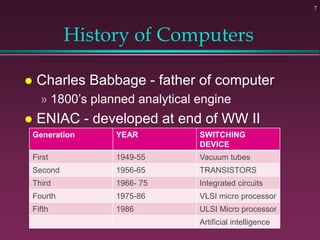
History of Computers
 Charles Babbage - father of computer
» 1800’s planned analytical engine
 ENIAC - developed at end of WW II
Generation YEAR SWITCHING
DEVICE
First 1949-55 Vacuum tubes
Second 1956-65 TRANSISTORS
Third 1966- 75 Integrated circuits
Fourth 1975-86 VLSI micro processor
Fifth 1986 ULSI Micro processor
Artificial intelligence
8
Computer - Social Impact
 Threat to privacy
 Reduce personal interactions
 Displace workers and change workplace
» Create two tiered society
 Computer failures cause great damage
 Artificial Intelligence
» Create a “new life form”
» Machines smarter than their creators
9
Hardware vs. Software
 Hardware
» The computer equipment
» Includes printers, monitors, disk drives, etc.
 Software
» Programs which tell the computer what to
do
» Examples - word processing, gradebook,
tutorials, games, etc.
10
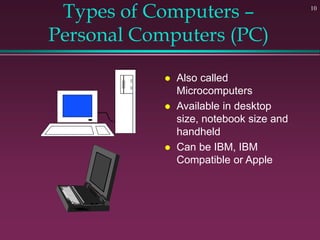
Types of Computers –
Personal Computers (PC)
 Also called
Microcomputers
 Available in desktop
size, notebook size and
handheld
 Can be IBM, IBM
Compatible or Apple
11
History - Microcomputers
 Apple
» First sold in late 1970’s
» Developed by Jobs and Wozniak
 IBM Personal Computers
» First sold in 1981
» Was quickly accepted by businesses
» IBM compatibles soon developed
12
Types of Computers -
Minicomputers
 Size of filing cabinet
 Used by small and medium size
companies and institutions
 Operated by computer specialist
 Terminals allow many people to use
13
Types of Computers -
Mainframes
 Very powerful
 Very fast
 Used by large corporations and
governmental agencies
 Operated by computer specialist
14
Types of Computers-
Supercomputers
 Most powerful
 Fastest
 Most expensive
» Several million dollars each
 Used only by
» Governmental agencies
» Large international corporations
 First super computer- CDC 6600
 India’s first super computer- Param 8000
 India’s fastest super computer- Pratyush
 (Second Param Yuva II installed at Indian institute of
Tropical meterology (IITM, Pune))
 PARAM is a series of super computers developed by
CDAC in pune
 Processin speed of a supercomputer is measured in –
FLOPs (Floating Point Operations Per Second)
 India’s super computers are EKA, PARAM, Kabru, Blue
Gene
15
16
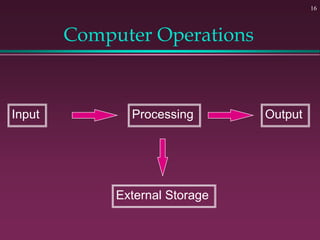
Computer Operations
Input Processing Output
External Storage
17
Input Devices - Keyboard
 Most commonly used input device
 Key board mouse, light pen, joystick,
scanner, track ball, touch screen,
barcode reader, Optical Mark reader,
magnetic ink character reader(MICR)
Inventors
 Mouse - Douglas C Engelbart
 Keyboard - Christopher Sholes
 CD – James T Russell
 Digital Computer - Howard Alken
 Floppy Disk Drive - Alan Shugart
 Laser Printing – Gary Starkwealther
18
Founders
 World Wide Web - Tim Berners Lee
 Microsoft – Bill gates, Paul Allen
 Google – Larry Page and Sergey Brin
 Facebook – Mark Zuckerberg
 Twitter – Jack Dorsey
 Orkut - Orkut Buyukkokten
 Wikipedia – Jimmy Wales, Larry Sanger
 Wikileaks – Julian Assange
 Yahoo – Jerri Yang and David Filo
 E – mail – Ray Tomilinson
 G-mail – Paul Buchhict
 YouTube – Stevechen, Chad Hurley,Jawed Karim
 Apple – Ronald Wayne, Steve Wozniak, Steve Jobs
 Whatsapp – Jan Koum, Brian Acton
 Instagram – Kevin Systrom, Mike krieger
19
Language developers
 B - Ken Thomson
 C – Dennis Ritchie
 C++ - Bjarne Stroustrup
 C# - Microsoft
 VB – Microsoft
 .Net - Microsoft
 Java – James A Gosling
 Python – Guido Van Rossum
20
21
Output Devices
 Monitor, Speaker, Printer, Sound card
 Printer, Video card, Projector, Plotter,
head phone
 Disk Drive
» Can also be input device
 Modem
» Can also be input device
22
Printers
 Printers can be divided into two
» Impact printers: Printers printing heads touch on the paper.
Eg: Dotmatrix printer, Drum Printer, Line printer, Chain printer,
character Printer, Daisy wheel printer
» Non impact printers: Printers do not touch on the paper. Eg:
Laser printer.
» The output resolution of a printer is measured in – DPI(Dots
per Inch)
23
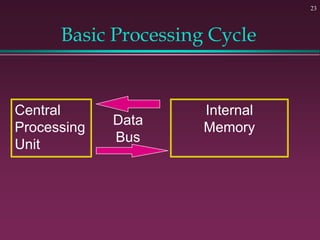
Basic Processing Cycle
Central
Processing
Unit
Internal
Memory
Data
Bus
Central Processing Unit(CPU)
24
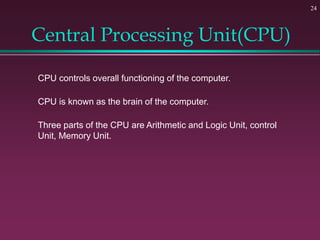
CPU controls overall functioning of the computer.
CPU is known as the brain of the computer.
Three parts of the CPU are Arithmetic and Logic Unit, control
Unit, Memory Unit.
25
How Information Is Stored
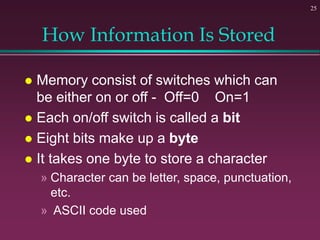
 Memory consist of switches which can
be either on or off - Off=0 On=1
 Each on/off switch is called a bit
 Eight bits make up a byte
 It takes one byte to store a character
» Character can be letter, space, punctuation,
etc.
» ASCII code used
26
Other Memory Terms
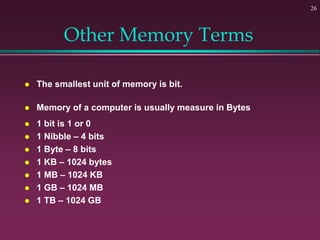
 The smallest unit of memory is bit.
 Memory of a computer is usually measure in Bytes
 1 bit is 1 or 0
 1 Nibble – 4 bits
 1 Byte – 8 bits
 1 KB – 1024 bytes
 1 MB – 1024 KB
 1 GB – 1024 MB
 1 TB – 1024 GB
27
Central Processing Unit
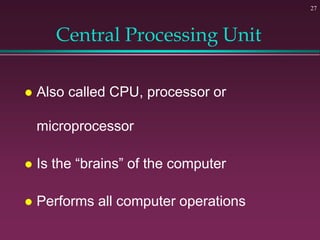
 Also called CPU, processor or
microprocessor
 Is the “brains” of the computer
 Performs all computer operations
28
Internal Memory - RAM
 Primary Memory
 Primary memory is known as the main memory. Classified as
RAM and ROM
 RAM - Random Access Memory
» CPU can access any location as quickly as any other
» Can not only read current info but also write new info
» Very important in determining capabilities of the computer systemR
» RAM is called volatile because it loses its data when computer is turned off.
It is a temporary memory.
ROM – Read Only Memory
ROM is called non volatile because it doesn’t lose its data even after computer
is turned off.
Secondary Memory
 Secondary Memory is also known as
external memory.
 Eg. Magnetic tape, Magnetic disc (hard
disc, Floppy Disc) optical Disc, Flash
drives
 The speed of a hard disc is measured in
Revolutions Per minute (RPm)
29
Cache memory
 Cache memory, also called cache,
supplementary memory system that
temporarily stores frequently used
instructions and data for quicker
processing by the central processing
unit (CPU) of a computer
30
31
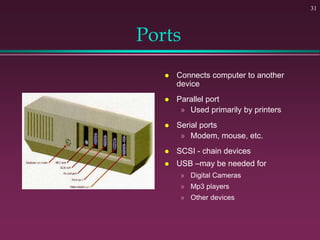
Ports
 Connects computer to another
device
 Parallel port
» Used primarily by printers
 Serial ports
» Modem, mouse, etc.
 SCSI - chain devices
 USB –may be needed for
» Digital Cameras
» Mp3 players
» Other devices
32
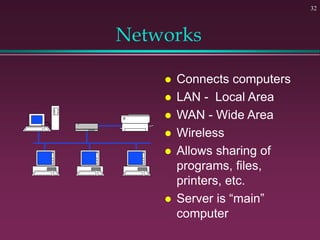
Networks
 Connects computers
 LAN - Local Area
 WAN - Wide Area
 Wireless
 Allows sharing of
programs, files,
printers, etc.
 Server is “main”
computer
Network
 LAN(Local Area Network) is the network that is usually used
inside an office building or inside a class room.
» The 2 most common technology currently used to build LAN
– Ethernet and Wifi
 MAN (Metropolitan Area Network) is a network that spread
over a city.
Network used in cable TV connection is MAN
WAN (Wide Area Network) spans a relatively large geographical
area.
Eg: internet
33
34
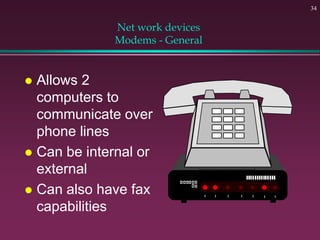
Net work devices
Modems - General
 Allows 2
computers to
communicate over
phone lines
 Can be internal or
external
 Can also have fax
capabilities
 HUB
» It is a device to connect more than one
computer together in a network.
ISP
» Internet Service Provider
» Eg: VSNL, Asianet, Reliance etc
» OFC(Optical Fiber Cable-light)
35
Bluetooth and WiFi
 Bluetoothe is a short range
wireless technology used to
connect and exchange
information between device.
They use short-wavelength,
ultra-high frequency (UHF) radio
waves within the range 2.400 to
2.485 GHz, for wireless
communications
 Range maximum 10 mtr
 Wi-Fi signals will usually reach
about 150 feet or over 45
meters for a 2.4Ghz
frequency. Using a 5Ghz
frequency, you will get about 50
feet or about 15 meters of reach.
36
 Wireless Fidelity
 It allows electronic device to
exchange data wirelessly using
radio waves.
 Wi-Fi signals will usually reach
about 150 feet or over 45
meters for a 2.4Ghz
frequency. Using a 5Ghz
frequency, you will get about 50
feet or about 15 meters of reach
37
38
Programs
 Set of instructions to the computer
 Programming languages
» Machine language
» Assembly language
» Procedural languages
– Basic, Fortran, Cobol
» Object oriented languages
– Visual Basic, C++, C#, Java
Software
 Two type of software
» System Software
» Application Software
39
40
Systems Software
 It coordinates the operation of the various
hardware components of the computer.
 Run fundamental operations
» Loading and running programs
» Saving and retrieving data
» Communicating with printers, modems, etc.
Operating System
 It is a collection of programs which controls
the overall operations of the computer.
 It works as an interface between computer
hardware and user.
 Important operating systems are
Linux,DOS,Windows, Mac OS, Unix, Ubantu
etc
41
 Windows operating system was developed by – Microsoft
 Founder of Microsoft- Bilgates, Paul Allen.
 Windows operating system for mobile phones is known as – Windows
mobile
 Android and operating system for mobile phone was developed by –
Google
 Linux Operating system was developed by – Linus benedict Torvalds
 The term free software was coined by Richard Stallman
42
43
Applications Software
 Helps you to accomplish a certain task
 Examples
» Word processing - memos, reports, etc.
» Spreadsheets - budgets, etc.
» Database - search, sort, select data
» Educational - simulations, practice
» Graphics - charts, diagrams
» Desktop publishing - pamphlets, etc.
Firmware
 Firmware is a combination of hardware and
software.
 Computer chips that have programs recorded
on them are known as Firmware
 Eg: ROM, EPROM, Flash Memory
 Common firmware containing devices are
computers, mobiles phones Digital camera
etc.
44
45
Software Viruses
 Illegal code added to a program
 May spread to many computers
» Copy files from one computer to another
» Download files by modem
» E-mail attachments
 Virus may be relatively harmless
» Writes “You’ve been stoned” on screen
 Virus may also be very damaging
» Erases everything on hard drive
 Virus may activate on a certain date
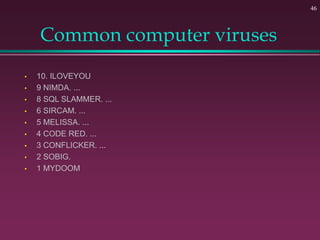
Common computer viruses
• 10. ILOVEYOU
• 9 NIMDA. ...
• 8 SQL SLAMMER. ...
• 6 SIRCAM. ...
• 5 MELISSA. ...
• 4 CODE RED. ...
• 3 CONFLICKER. ...
• 2 SOBIG.
• 1 MYDOOM
46
Anti virus
 Avast One,
 Antivirus Business Edition,
 Bitdefender Total Security,
 Kaspersky,
 McAfee,
 Malwarebytes Premium Plus,
 Norton Antivirus 360,
 SecureMac,
 Trend Micro Antivirus+ Security, and
 Webroot SecureAnywhere
47
48
Virus Protection
 Be careful where you copy files from
 Do not open e-mail attachments unless
you are sure that it is safe
 Use virus protection program
» Detects and removes illegal code
» Should be updated often
Network Topologies
 In computer networking, topology means
layout of connected devices.
 Network topologies are categorized into the
following basic types.
 Bus
 Tree
 Ring
 Mesh
 Star
49
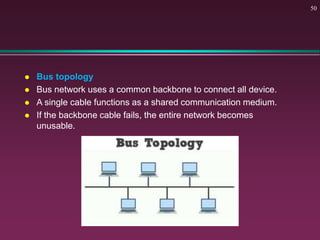
 Bus topology
 Bus network uses a common backbone to connect all device.
 A single cable functions as a shared communication medium.
 If the backbone cable fails, the entire network becomes
unusable.
50
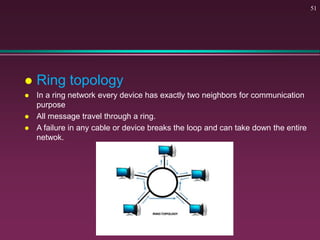
 Ring topology
 In a ring network every device has exactly two neighbors for communication
purpose
 All message travel through a ring.
 A failure in any cable or device breaks the loop and can take down the entire
netwok.
51
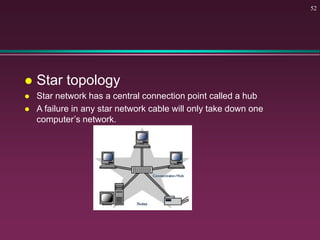
 Star topology
 Star network has a central connection point called a hub
 A failure in any star network cable will only take down one
computer’s network.
52
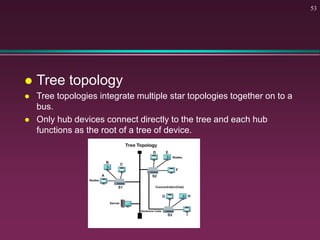
 Tree topology
 Tree topologies integrate multiple star topologies together on to a
bus.
 Only hub devices connect directly to the tree and each hub
functions as the root of a tree of device.
53
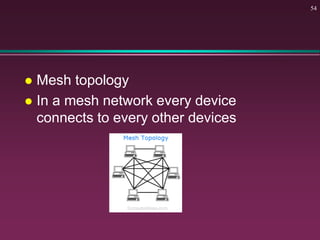
 Mesh topology
 In a mesh network every device
connects to every other devices
54
BASIC COMPUTER
CONCEPTS
End of Slide Show

concepts-of-computer.ppt

  • 1.
  • 2.
    Questions  The operatingsystem is the most common type of ………. Software.(July 2021)  A. Communication B. Application  C. System D. Word Processing software An: System Software 2
  • 3.
     Expand theabbreviation ‘LCD’(2020 Feb)  A. Light Crystal Display  B. Liquid Crystal Display  C. Learning computer Discourse  D. Light Compact Display Ans: B 3
  • 4.
     A ‘JPGfile stores:  A. Audio data  B. Video data  C. Text data  D. Image data  Ans: Image data 4
  • 5.
     An interactivecomputer application for organization,analysis and storage of data in tabular form is  A. Power point  B. Spread sheets  C. Work sheet  D. Excel  Ans: B 5
  • 6.
    COMPUTER  COMPUTER ISAN ELECTRONIC DEVICE THAT RECEIVES DATA PROCESS IT AND GIVES MEANINGFUL INFORMATION.  A collection of facts ad figures are called data.  Processed data is called information.  The word ‘computer’ is originated from the latin word ‘computes’  The word ‘data’ is originated from the latin word’ datum’  Characteristics of computer.  accuracy. Speed. Versatility. Storage capacity. Automation . Diligence. Reliability. 6
  • 7.
    7 History of Computers Charles Babbage - father of computer » 1800’s planned analytical engine  ENIAC - developed at end of WW II Generation YEAR SWITCHING DEVICE First 1949-55 Vacuum tubes Second 1956-65 TRANSISTORS Third 1966- 75 Integrated circuits Fourth 1975-86 VLSI micro processor Fifth 1986 ULSI Micro processor Artificial intelligence
  • 8.
    8 Computer - SocialImpact  Threat to privacy  Reduce personal interactions  Displace workers and change workplace » Create two tiered society  Computer failures cause great damage  Artificial Intelligence » Create a “new life form” » Machines smarter than their creators
  • 9.
    9 Hardware vs. Software Hardware » The computer equipment » Includes printers, monitors, disk drives, etc.  Software » Programs which tell the computer what to do » Examples - word processing, gradebook, tutorials, games, etc.
  • 10.
    10 Types of Computers– Personal Computers (PC)  Also called Microcomputers  Available in desktop size, notebook size and handheld  Can be IBM, IBM Compatible or Apple
  • 11.
    11 History - Microcomputers Apple » First sold in late 1970’s » Developed by Jobs and Wozniak  IBM Personal Computers » First sold in 1981 » Was quickly accepted by businesses » IBM compatibles soon developed
  • 12.
    12 Types of Computers- Minicomputers  Size of filing cabinet  Used by small and medium size companies and institutions  Operated by computer specialist  Terminals allow many people to use
  • 13.
    13 Types of Computers- Mainframes  Very powerful  Very fast  Used by large corporations and governmental agencies  Operated by computer specialist
  • 14.
    14 Types of Computers- Supercomputers Most powerful  Fastest  Most expensive » Several million dollars each  Used only by » Governmental agencies » Large international corporations
  • 15.
     First supercomputer- CDC 6600  India’s first super computer- Param 8000  India’s fastest super computer- Pratyush  (Second Param Yuva II installed at Indian institute of Tropical meterology (IITM, Pune))  PARAM is a series of super computers developed by CDAC in pune  Processin speed of a supercomputer is measured in – FLOPs (Floating Point Operations Per Second)  India’s super computers are EKA, PARAM, Kabru, Blue Gene 15
  • 16.
  • 17.
    17 Input Devices -Keyboard  Most commonly used input device  Key board mouse, light pen, joystick, scanner, track ball, touch screen, barcode reader, Optical Mark reader, magnetic ink character reader(MICR)
  • 18.
    Inventors  Mouse -Douglas C Engelbart  Keyboard - Christopher Sholes  CD – James T Russell  Digital Computer - Howard Alken  Floppy Disk Drive - Alan Shugart  Laser Printing – Gary Starkwealther 18
  • 19.
    Founders  World WideWeb - Tim Berners Lee  Microsoft – Bill gates, Paul Allen  Google – Larry Page and Sergey Brin  Facebook – Mark Zuckerberg  Twitter – Jack Dorsey  Orkut - Orkut Buyukkokten  Wikipedia – Jimmy Wales, Larry Sanger  Wikileaks – Julian Assange  Yahoo – Jerri Yang and David Filo  E – mail – Ray Tomilinson  G-mail – Paul Buchhict  YouTube – Stevechen, Chad Hurley,Jawed Karim  Apple – Ronald Wayne, Steve Wozniak, Steve Jobs  Whatsapp – Jan Koum, Brian Acton  Instagram – Kevin Systrom, Mike krieger 19
  • 20.
    Language developers  B- Ken Thomson  C – Dennis Ritchie  C++ - Bjarne Stroustrup  C# - Microsoft  VB – Microsoft  .Net - Microsoft  Java – James A Gosling  Python – Guido Van Rossum 20
  • 21.
    21 Output Devices  Monitor,Speaker, Printer, Sound card  Printer, Video card, Projector, Plotter, head phone  Disk Drive » Can also be input device  Modem » Can also be input device
  • 22.
    22 Printers  Printers canbe divided into two » Impact printers: Printers printing heads touch on the paper. Eg: Dotmatrix printer, Drum Printer, Line printer, Chain printer, character Printer, Daisy wheel printer » Non impact printers: Printers do not touch on the paper. Eg: Laser printer. » The output resolution of a printer is measured in – DPI(Dots per Inch)
  • 23.
  • 24.
    Central Processing Unit(CPU) 24 CPUcontrols overall functioning of the computer. CPU is known as the brain of the computer. Three parts of the CPU are Arithmetic and Logic Unit, control Unit, Memory Unit.
  • 25.
    25 How Information IsStored  Memory consist of switches which can be either on or off - Off=0 On=1  Each on/off switch is called a bit  Eight bits make up a byte  It takes one byte to store a character » Character can be letter, space, punctuation, etc. » ASCII code used
  • 26.
    26 Other Memory Terms The smallest unit of memory is bit.  Memory of a computer is usually measure in Bytes  1 bit is 1 or 0  1 Nibble – 4 bits  1 Byte – 8 bits  1 KB – 1024 bytes  1 MB – 1024 KB  1 GB – 1024 MB  1 TB – 1024 GB
  • 27.
    27 Central Processing Unit Also called CPU, processor or microprocessor  Is the “brains” of the computer  Performs all computer operations
  • 28.
    28 Internal Memory -RAM  Primary Memory  Primary memory is known as the main memory. Classified as RAM and ROM  RAM - Random Access Memory » CPU can access any location as quickly as any other » Can not only read current info but also write new info » Very important in determining capabilities of the computer systemR » RAM is called volatile because it loses its data when computer is turned off. It is a temporary memory. ROM – Read Only Memory ROM is called non volatile because it doesn’t lose its data even after computer is turned off.
  • 29.
    Secondary Memory  SecondaryMemory is also known as external memory.  Eg. Magnetic tape, Magnetic disc (hard disc, Floppy Disc) optical Disc, Flash drives  The speed of a hard disc is measured in Revolutions Per minute (RPm) 29
  • 30.
    Cache memory  Cachememory, also called cache, supplementary memory system that temporarily stores frequently used instructions and data for quicker processing by the central processing unit (CPU) of a computer 30
  • 31.
    31 Ports  Connects computerto another device  Parallel port » Used primarily by printers  Serial ports » Modem, mouse, etc.  SCSI - chain devices  USB –may be needed for » Digital Cameras » Mp3 players » Other devices
  • 32.
    32 Networks  Connects computers LAN - Local Area  WAN - Wide Area  Wireless  Allows sharing of programs, files, printers, etc.  Server is “main” computer
  • 33.
    Network  LAN(Local AreaNetwork) is the network that is usually used inside an office building or inside a class room. » The 2 most common technology currently used to build LAN – Ethernet and Wifi  MAN (Metropolitan Area Network) is a network that spread over a city. Network used in cable TV connection is MAN WAN (Wide Area Network) spans a relatively large geographical area. Eg: internet 33
  • 34.
    34 Net work devices Modems- General  Allows 2 computers to communicate over phone lines  Can be internal or external  Can also have fax capabilities
  • 35.
     HUB » Itis a device to connect more than one computer together in a network. ISP » Internet Service Provider » Eg: VSNL, Asianet, Reliance etc » OFC(Optical Fiber Cable-light) 35
  • 36.
    Bluetooth and WiFi Bluetoothe is a short range wireless technology used to connect and exchange information between device. They use short-wavelength, ultra-high frequency (UHF) radio waves within the range 2.400 to 2.485 GHz, for wireless communications  Range maximum 10 mtr  Wi-Fi signals will usually reach about 150 feet or over 45 meters for a 2.4Ghz frequency. Using a 5Ghz frequency, you will get about 50 feet or about 15 meters of reach. 36  Wireless Fidelity  It allows electronic device to exchange data wirelessly using radio waves.  Wi-Fi signals will usually reach about 150 feet or over 45 meters for a 2.4Ghz frequency. Using a 5Ghz frequency, you will get about 50 feet or about 15 meters of reach
  • 37.
  • 38.
    38 Programs  Set ofinstructions to the computer  Programming languages » Machine language » Assembly language » Procedural languages – Basic, Fortran, Cobol » Object oriented languages – Visual Basic, C++, C#, Java
  • 39.
    Software  Two typeof software » System Software » Application Software 39
  • 40.
    40 Systems Software  Itcoordinates the operation of the various hardware components of the computer.  Run fundamental operations » Loading and running programs » Saving and retrieving data » Communicating with printers, modems, etc.
  • 41.
    Operating System  Itis a collection of programs which controls the overall operations of the computer.  It works as an interface between computer hardware and user.  Important operating systems are Linux,DOS,Windows, Mac OS, Unix, Ubantu etc 41
  • 42.
     Windows operatingsystem was developed by – Microsoft  Founder of Microsoft- Bilgates, Paul Allen.  Windows operating system for mobile phones is known as – Windows mobile  Android and operating system for mobile phone was developed by – Google  Linux Operating system was developed by – Linus benedict Torvalds  The term free software was coined by Richard Stallman 42
  • 43.
    43 Applications Software  Helpsyou to accomplish a certain task  Examples » Word processing - memos, reports, etc. » Spreadsheets - budgets, etc. » Database - search, sort, select data » Educational - simulations, practice » Graphics - charts, diagrams » Desktop publishing - pamphlets, etc.
  • 44.
    Firmware  Firmware isa combination of hardware and software.  Computer chips that have programs recorded on them are known as Firmware  Eg: ROM, EPROM, Flash Memory  Common firmware containing devices are computers, mobiles phones Digital camera etc. 44
  • 45.
    45 Software Viruses  Illegalcode added to a program  May spread to many computers » Copy files from one computer to another » Download files by modem » E-mail attachments  Virus may be relatively harmless » Writes “You’ve been stoned” on screen  Virus may also be very damaging » Erases everything on hard drive  Virus may activate on a certain date
  • 46.
    Common computer viruses •10. ILOVEYOU • 9 NIMDA. ... • 8 SQL SLAMMER. ... • 6 SIRCAM. ... • 5 MELISSA. ... • 4 CODE RED. ... • 3 CONFLICKER. ... • 2 SOBIG. • 1 MYDOOM 46
  • 47.
    Anti virus  AvastOne,  Antivirus Business Edition,  Bitdefender Total Security,  Kaspersky,  McAfee,  Malwarebytes Premium Plus,  Norton Antivirus 360,  SecureMac,  Trend Micro Antivirus+ Security, and  Webroot SecureAnywhere 47
  • 48.
    48 Virus Protection  Becareful where you copy files from  Do not open e-mail attachments unless you are sure that it is safe  Use virus protection program » Detects and removes illegal code » Should be updated often
  • 49.
    Network Topologies  Incomputer networking, topology means layout of connected devices.  Network topologies are categorized into the following basic types.  Bus  Tree  Ring  Mesh  Star 49
  • 50.
     Bus topology Bus network uses a common backbone to connect all device.  A single cable functions as a shared communication medium.  If the backbone cable fails, the entire network becomes unusable. 50
  • 51.
     Ring topology In a ring network every device has exactly two neighbors for communication purpose  All message travel through a ring.  A failure in any cable or device breaks the loop and can take down the entire netwok. 51
  • 52.
     Star topology Star network has a central connection point called a hub  A failure in any star network cable will only take down one computer’s network. 52
  • 53.
     Tree topology Tree topologies integrate multiple star topologies together on to a bus.  Only hub devices connect directly to the tree and each hub functions as the root of a tree of device. 53
  • 54.
     Mesh topology In a mesh network every device connects to every other devices 54
  • 55.