Social Media 101

Prepared by:
Krista Jensen
Knowledge Mobilization Officer
York University

http://slidesha.re/YorkSocialMedia101
Agenda
1. What is Social Media or Web 2.0?

2. An Overview of Select Tools

3. Developing a Social Media Strategy

4. “Gone Phishing” and Other Dangers

5. Top tips for Using Social Media

6. Resources

7. Q and A

                                        2
Social Media- Some Definitions
•    “A group of Internet based applications that build on the ideological and
     technological foundations of Web 2.0, and that allow the creation and exchange
     of user-generated content”

•    “Includes web-based and mobile technologies used to turn communication into
     interactive dialogue”

•    “Online communications in which individuals shift fluidly and flexibly between
     the role of audience and author. To do this, they use social software that
     enables anyone without knowledge of coding, to post, comment on, share or
     mash up content and to form communities around shared interests.”


Kaplan, A. M., & Haenlein, M. (2010).Users of the world, unite! The challenges and opportunities of social media. Business
Horizons,53(1), 59-68

Social media. (n.d.). In Wikipedia. Retrieved January 10, 2012, from http://en.wikipedia.org/wiki/Social_media

Thornley, J. (2008, April 8). What is “social media?”. Retrieved January 10, 2012 from ProPR blog http://propr.ca/2008/what-is-
social-media/
                                                                                                                              3
Social Media: Web 1.0 vs. Web 2.0


        http://www.sizlopedia.com/2007/08/18/web-10-vs-web-20-the-visual-
        difference/

                                                                            4
Social Media and Knowledge Mobilization
                                                     Why use social media for KMb?
                                                     Social media provides the tools to
                                                     help support the process of KMb
                                                     • Disseminate knowledge and
                                                       research in an iterative and
                                                       interactive way
                                                     • Build communities for
                                                       partnerships, collaboration and
                                                       sharing
                                                     • Get academic research into the
                                                       hands of people who can use it
 Image adapted from http://webbiquity.com/social-media-marketing/the-four-cs-of-social-media-marketing/   5
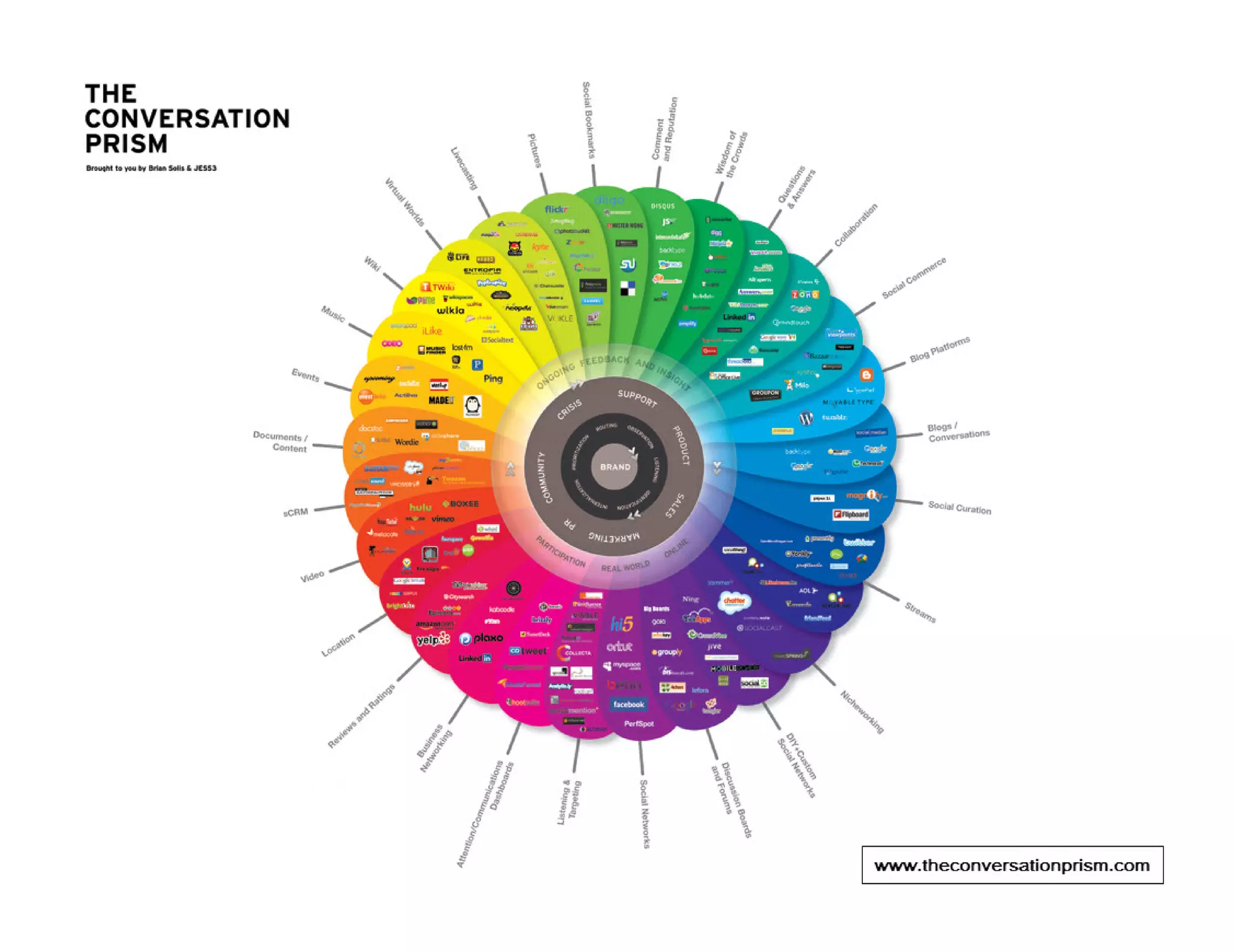
Social Media Landscape


                         6
Social Media Tools for Collaboration


                                       7
Blogging with Wordpress


                          8
Blogging with Wordpress
Highlights
• Allows you to share stories and information with
  wider audience
• Way to promote your services, events and activities
• Wordpress.com is free, web accessible and easy to
  use

Tips:
• Information you would put into a newsletter can go
  into a blog
• Aim for at least one post a week
                                                        9
Microblogging with twitter


                             10
Microblogging with twitter
Highlights
• Send out short (140 character) messages called tweets
• Allows you to share updates, opinions, resources and
  information with followers
• Good way to connect with other people with shared interests
  and build communities of practice


Tips:
• Use a URL shorten like bitly.com to save on characters in
  your tweets and track who clicks on your links
• Back up your tweets regularly with TweetBackup
• Aim for at least one tweet a day
                                                              11
Collaborative Online Platform othree.ca


                                          12
Collaborative Online Platform othree.ca
Highlights
• Suite of social media tools including:

       •Document sharing             •Member profiles
       •Wikis                        •Forums
       •Blogs                        •Events Calendar

• Free for researchers and their partners
• Software developed by Canadian company (IGLOO), so data
  is stored in Canada

Tip:
• A collaborative platform like this great for collaborative
  research projects
                                                               13
Connecting with facebook


                           14
Connecting with facebook
Highlights
• A fan page allows you to share updates, links, resources and
  have discussions
• People can follow your updates and activities and post
  questions or comments on your wall
• Includes facebook Insights which gives you some analytics
  so you can see who is visiting your page


Tips:
• Once you have 25 fans you can set up a vanity URL
  www.facebook.com/projectnamehere
• Set up a fan page and post updates there to keep it separate
  from your personal facebook page
                                                             15
Presentation Sharing with SlideShare


                                       16
Presentation Sharing with SlideShare
Highlights
• Easy way to store and share your presentations
• Makes them accessible from any computer with an internet
  connection
• Share your presentations with others on your website or blog
  by embedding
• People can get notified when you upload a new presentation
  by following you


Tip:
• Instead of emailing your presentation to people, upload it
  onto SlideShare and email the link to the presentation online

                                                              17
Social Bookmarking with delicious


                                    18
Social Bookmarking with delicious
Highlights
• Allows you to save and tag your favourite websites
• Makes your favourites accessible on any computer
• Uses tagging to categorize and organize
• Share your favourites with others, on your website or blog
  through RSS or by embedding
• Can be used to create a library of online resources


Tip:
• Other similar sites are http://www.stumbleupon.com ;
  http://digg.com ; http://www.reddit.com/


                                                               19
Developing a Social Media Strategy

• Develop a social media strategy to help guide you and avoid
  “shiny object” syndrome

• Think about which tools you will use for various purposes, eg.
  Wordpress for blogging, delicious for sharing resources,
  eventbrite to manage events, linkedin to connect with
  professionals

• Don’t feel that you have to use every tool, especially at the
  beginning. Start by picking a few tools that suit your goals and
  use them well


                                                                20
Social Media Strategy Worksheet
•   Team: Identify the person or persons who will have primary responsibility for
    populating, maintaining and monitoring your site. Ensure they have the time and
    enthusiasm to devote to this project. List the team members.

•   Primary Goals: Are you trying to communicate research results, find partners to
    collaborate with, generally promote your work? Define your goal for your social
    media presence.

•   Measuring Success: Determine how you will measure the success, or lack of
    success, of your site. Increased traffic to your Web site? Better communication with
    prospective partners? A new network of colleagues? List how you plan to measure
    the site’s success, and the tools you’ll use to track that success.

•   Audiences: Identifying your audiences will help you tailor your content and also
    choose the right tool. List your primary audiences.

•   Current Conversation: This is when the listening begins. Survey the social media
    landscape for the “thought leaders” in your field. What are people already saying?
    What are people saying about you? Who is saying it? List the topics, people and
    sites that are leading the conversations that are relevant to you.
                                                                                       21
Social Media Strategy Worksheet

•     Content: Identify the content you have to share. Is it primarily news updates,
      research developments, or networking information? Photographs? Video? List the
      content you will be sharing via social media.

•     Name and Design: Identify a simple and descriptive name for your profile that
      clearly identifies your affiliation with your university or organization.

•     Evaluation: Set a timeline for when you will conduct an evaluation of your site’s
      success, using the goals and measures identified above. At that time, be prepared
      to realign your site’s content. Ongoing evaluation should also be part of your
      strategy. Define your timeline.


    Adapted from Social Media Strategy Worksheet. (n.d.). In Social Media Handbook. Retrieved January 10, 2012 from
    http://web.vanderbilt.edu/resources/social-media-handbook/appendix-a/

                                                                                                                      22
“Gone Phishing” and Other Dangers


• Choose a strong password
• Be careful of scams and phishing- look for suspicious links and make sure you are
  on the correct webpage
• Don’t give out your username and password
• Keep your computer and browser up to date and use anti-virus software


Safety: Keeping your account secure. (n.d.). In Twitter Help Centre. Retrieved January 10, 2012 from
http://support.twitter.com/articles/76036-safety-keeping-your-account-secure
                                                                                                       23
Top tips for Using Social Media

• Develop a social media strategy

• Try to use the same username across various tools and sites
  and develop a common look and feel

• Think about how you are going to measure and evaluate
  success before you start

• Remember that this does take time and resources

• Have fun with it!


                                                            24
Resources
10 Ways Researchers Can Use Twitter
   http://www.networkedresearcher.co.uk/2011/08/03/10-ways-researchers-
   can-use-twitter/

Bit.ly http://bit.ly
    • URL shortener that lets you track who clicked on your links and creates a
      QR code for your shortened link that you can add to print materials

Cambridge Community Television www.slideshare.net/cctvcambridge
  • Good presentations on how to develop a social media strategy

The Conversation Prism www.theconversationprism.com
  • Visual of many social media tools for various purposes

HOW TO: Set up a facebook Page http://mashable.com/2011/05/22/how-to-
  facebook-page/
  • Includes step by step instructions to set up a fan page
                                                                             25
Resources
LSE Guide to Using twitter in University Research, Teaching and Impact
   Activites http://blogs.lse.ac.uk/impactofsocialsciences/2011/09/29/twitter-
   guide

NameChk http://namechk.com/
  • Let’s you see if your username is available on social networking sites

Nonprofit Social Network Benchmark Report 2012
    http://nonprofitsocialnetworksurvey.com/index.php
  • Report that summarizes how nonprofit organizations are using social
    media and the top factors for success

Online Database of Social Media Policies
    http://socialmediagovernance.com/policies.php
  • Links to over 175 social media policies and guidelines in use by various
    organizations, including many universities

                                                                               26
Resources
SlideShare www.slideshare.net
   • Post your presentations online and allows you to embed them on your
     website

TweetBackup http://tweetbackup.com
  • Twitter doesn’t archive tweets but you can backup your tweets and
    export them to Excel with this tool

TweetChat http://tweetchat.com/
  • Allows you to have a tweetup, a kind of twitter “conference call”, using
    hashtags. This tool with show only conversations with your chosen
    hashtag

TweetStats http://tweetstats.com
  • Show some statistics and analytics on your tweets. Also can create a
    word cloud of all the words you tweet

                                                                               27
Resources
Twuffer http://twuffer.com/
  • Allows to you schedule in tweets for a later time. Good to use if you are
    going to be away or plan to tweet daily about a resource, eg.
    ResearchSnapshots

Twitter Help Center http://support.twitter.com/
  • Articles to get you started, as well as information about solving common
     problems and how to report a violation

Using Twitter for Research https://www.martineve.com/2011/05/23/using-
twitter-for-research/
   • A Prezi presentation outlining ways to use twitter aimed at researchers

Vanderbilt University Social Media Handbook
    http://web.vanderbilt.edu/resources/social-media-handbook/
  • Very good resources on how to create a social media strategy and how
    to start using various tools
                                                                               28
Questions?


             29
Krista Jensen
Knowledge Mobilization Officer
kejensen@yorku.ca x 88847
Website                        SlideShare
www.researchimpact.ca          www.slideshare.net/KMbYork

Twitter                        YouTube
twitter.com/KMbYork            www.slideshare.net/KMbYork
twitter.com/researchimpact
                               Delicious
Mobilize This! Blog            delicious.com/researchimpact
researchimpact.wordpress.com

O3 Space
researchimpact.othree.ca

Social media 101

  • 1.
    Social Media 101 Preparedby: Krista Jensen Knowledge Mobilization Officer York University http://slidesha.re/YorkSocialMedia101
  • 2.
    Agenda 1. What isSocial Media or Web 2.0? 2. An Overview of Select Tools 3. Developing a Social Media Strategy 4. “Gone Phishing” and Other Dangers 5. Top tips for Using Social Media 6. Resources 7. Q and A 2
  • 3.
    Social Media- SomeDefinitions • “A group of Internet based applications that build on the ideological and technological foundations of Web 2.0, and that allow the creation and exchange of user-generated content” • “Includes web-based and mobile technologies used to turn communication into interactive dialogue” • “Online communications in which individuals shift fluidly and flexibly between the role of audience and author. To do this, they use social software that enables anyone without knowledge of coding, to post, comment on, share or mash up content and to form communities around shared interests.” Kaplan, A. M., & Haenlein, M. (2010).Users of the world, unite! The challenges and opportunities of social media. Business Horizons,53(1), 59-68 Social media. (n.d.). In Wikipedia. Retrieved January 10, 2012, from http://en.wikipedia.org/wiki/Social_media Thornley, J. (2008, April 8). What is “social media?”. Retrieved January 10, 2012 from ProPR blog http://propr.ca/2008/what-is- social-media/ 3
  • 4.
    Social Media: Web1.0 vs. Web 2.0 http://www.sizlopedia.com/2007/08/18/web-10-vs-web-20-the-visual- difference/ 4
  • 5.
    Social Media andKnowledge Mobilization Why use social media for KMb? Social media provides the tools to help support the process of KMb • Disseminate knowledge and research in an iterative and interactive way • Build communities for partnerships, collaboration and sharing • Get academic research into the hands of people who can use it Image adapted from http://webbiquity.com/social-media-marketing/the-four-cs-of-social-media-marketing/ 5
  • 6.
  • 7.
    Social Media Toolsfor Collaboration 7
  • 8.
  • 9.
    Blogging with Wordpress Highlights •Allows you to share stories and information with wider audience • Way to promote your services, events and activities • Wordpress.com is free, web accessible and easy to use Tips: • Information you would put into a newsletter can go into a blog • Aim for at least one post a week 9
  • 10.
  • 11.
    Microblogging with twitter Highlights •Send out short (140 character) messages called tweets • Allows you to share updates, opinions, resources and information with followers • Good way to connect with other people with shared interests and build communities of practice Tips: • Use a URL shorten like bitly.com to save on characters in your tweets and track who clicks on your links • Back up your tweets regularly with TweetBackup • Aim for at least one tweet a day 11
  • 12.
  • 13.
    Collaborative Online Platformothree.ca Highlights • Suite of social media tools including: •Document sharing •Member profiles •Wikis •Forums •Blogs •Events Calendar • Free for researchers and their partners • Software developed by Canadian company (IGLOO), so data is stored in Canada Tip: • A collaborative platform like this great for collaborative research projects 13
  • 14.
  • 15.
    Connecting with facebook Highlights •A fan page allows you to share updates, links, resources and have discussions • People can follow your updates and activities and post questions or comments on your wall • Includes facebook Insights which gives you some analytics so you can see who is visiting your page Tips: • Once you have 25 fans you can set up a vanity URL www.facebook.com/projectnamehere • Set up a fan page and post updates there to keep it separate from your personal facebook page 15
  • 16.
  • 17.
    Presentation Sharing withSlideShare Highlights • Easy way to store and share your presentations • Makes them accessible from any computer with an internet connection • Share your presentations with others on your website or blog by embedding • People can get notified when you upload a new presentation by following you Tip: • Instead of emailing your presentation to people, upload it onto SlideShare and email the link to the presentation online 17
  • 18.
  • 19.
    Social Bookmarking withdelicious Highlights • Allows you to save and tag your favourite websites • Makes your favourites accessible on any computer • Uses tagging to categorize and organize • Share your favourites with others, on your website or blog through RSS or by embedding • Can be used to create a library of online resources Tip: • Other similar sites are http://www.stumbleupon.com ; http://digg.com ; http://www.reddit.com/ 19
  • 20.
    Developing a SocialMedia Strategy • Develop a social media strategy to help guide you and avoid “shiny object” syndrome • Think about which tools you will use for various purposes, eg. Wordpress for blogging, delicious for sharing resources, eventbrite to manage events, linkedin to connect with professionals • Don’t feel that you have to use every tool, especially at the beginning. Start by picking a few tools that suit your goals and use them well 20
  • 21.
    Social Media StrategyWorksheet • Team: Identify the person or persons who will have primary responsibility for populating, maintaining and monitoring your site. Ensure they have the time and enthusiasm to devote to this project. List the team members. • Primary Goals: Are you trying to communicate research results, find partners to collaborate with, generally promote your work? Define your goal for your social media presence. • Measuring Success: Determine how you will measure the success, or lack of success, of your site. Increased traffic to your Web site? Better communication with prospective partners? A new network of colleagues? List how you plan to measure the site’s success, and the tools you’ll use to track that success. • Audiences: Identifying your audiences will help you tailor your content and also choose the right tool. List your primary audiences. • Current Conversation: This is when the listening begins. Survey the social media landscape for the “thought leaders” in your field. What are people already saying? What are people saying about you? Who is saying it? List the topics, people and sites that are leading the conversations that are relevant to you. 21
  • 22.
    Social Media StrategyWorksheet • Content: Identify the content you have to share. Is it primarily news updates, research developments, or networking information? Photographs? Video? List the content you will be sharing via social media. • Name and Design: Identify a simple and descriptive name for your profile that clearly identifies your affiliation with your university or organization. • Evaluation: Set a timeline for when you will conduct an evaluation of your site’s success, using the goals and measures identified above. At that time, be prepared to realign your site’s content. Ongoing evaluation should also be part of your strategy. Define your timeline. Adapted from Social Media Strategy Worksheet. (n.d.). In Social Media Handbook. Retrieved January 10, 2012 from http://web.vanderbilt.edu/resources/social-media-handbook/appendix-a/ 22
  • 23.
    “Gone Phishing” andOther Dangers • Choose a strong password • Be careful of scams and phishing- look for suspicious links and make sure you are on the correct webpage • Don’t give out your username and password • Keep your computer and browser up to date and use anti-virus software Safety: Keeping your account secure. (n.d.). In Twitter Help Centre. Retrieved January 10, 2012 from http://support.twitter.com/articles/76036-safety-keeping-your-account-secure 23
  • 24.
    Top tips forUsing Social Media • Develop a social media strategy • Try to use the same username across various tools and sites and develop a common look and feel • Think about how you are going to measure and evaluate success before you start • Remember that this does take time and resources • Have fun with it! 24
  • 25.
    Resources 10 Ways ResearchersCan Use Twitter http://www.networkedresearcher.co.uk/2011/08/03/10-ways-researchers- can-use-twitter/ Bit.ly http://bit.ly • URL shortener that lets you track who clicked on your links and creates a QR code for your shortened link that you can add to print materials Cambridge Community Television www.slideshare.net/cctvcambridge • Good presentations on how to develop a social media strategy The Conversation Prism www.theconversationprism.com • Visual of many social media tools for various purposes HOW TO: Set up a facebook Page http://mashable.com/2011/05/22/how-to- facebook-page/ • Includes step by step instructions to set up a fan page 25
  • 26.
    Resources LSE Guide toUsing twitter in University Research, Teaching and Impact Activites http://blogs.lse.ac.uk/impactofsocialsciences/2011/09/29/twitter- guide NameChk http://namechk.com/ • Let’s you see if your username is available on social networking sites Nonprofit Social Network Benchmark Report 2012 http://nonprofitsocialnetworksurvey.com/index.php • Report that summarizes how nonprofit organizations are using social media and the top factors for success Online Database of Social Media Policies http://socialmediagovernance.com/policies.php • Links to over 175 social media policies and guidelines in use by various organizations, including many universities 26
  • 27.
    Resources SlideShare www.slideshare.net • Post your presentations online and allows you to embed them on your website TweetBackup http://tweetbackup.com • Twitter doesn’t archive tweets but you can backup your tweets and export them to Excel with this tool TweetChat http://tweetchat.com/ • Allows you to have a tweetup, a kind of twitter “conference call”, using hashtags. This tool with show only conversations with your chosen hashtag TweetStats http://tweetstats.com • Show some statistics and analytics on your tweets. Also can create a word cloud of all the words you tweet 27
  • 28.
    Resources Twuffer http://twuffer.com/ • Allows to you schedule in tweets for a later time. Good to use if you are going to be away or plan to tweet daily about a resource, eg. ResearchSnapshots Twitter Help Center http://support.twitter.com/ • Articles to get you started, as well as information about solving common problems and how to report a violation Using Twitter for Research https://www.martineve.com/2011/05/23/using- twitter-for-research/ • A Prezi presentation outlining ways to use twitter aimed at researchers Vanderbilt University Social Media Handbook http://web.vanderbilt.edu/resources/social-media-handbook/ • Very good resources on how to create a social media strategy and how to start using various tools 28
  • 29.
  • 30.
    Krista Jensen Knowledge MobilizationOfficer kejensen@yorku.ca x 88847 Website SlideShare www.researchimpact.ca www.slideshare.net/KMbYork Twitter YouTube twitter.com/KMbYork www.slideshare.net/KMbYork twitter.com/researchimpact Delicious Mobilize This! Blog delicious.com/researchimpact researchimpact.wordpress.com O3 Space researchimpact.othree.ca