Troubleshooting Flowchart
What is a troubleshooting flowchart?
• A Flowchart is a graphically representation of the structure of process
or system, algorithm or the step-by-step solution of the problem
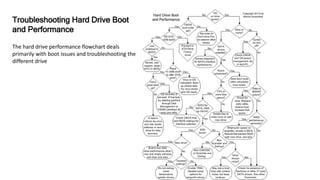
The hard drive performance flowchart deals
primarily with boot issues and troubleshooting the
different drive
Troubleshooting Hard Drive Boot
and Performance
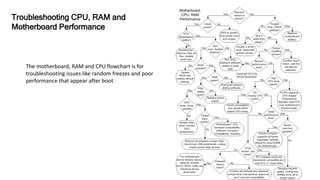
Troubleshooting CPU, RAM and
Motherboard Performance
The motherboard, RAM and CPU flowchart is for
troubleshooting issues like random freezes and poor
performance that appear after boot
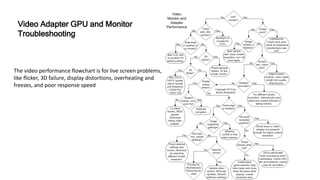
The video performance flowchart is for live screen problems,
like flicker, 3D failure, display distortions, overheating and
freezes, and poor response speed
Video Adapter GPU and Monitor
Troubleshooting
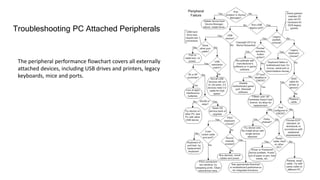
The peripheral performance flowchart covers all externally
attached devices, including USB drives and printers, legacy
keyboards, mice and ports.
Troubleshooting PC Attached Peripherals
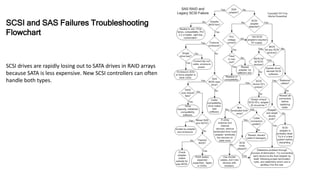
SCSI drives are rapidly losing out to SATA drives in RAID arrays
because SATA is less expensive. New SCSI controllers can often
handle both types.
SCSI and SAS Failures Troubleshooting
Flowchart
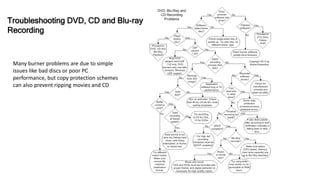
Many burner problems are due to simple
issues like bad discs or poor PC
performance, but copy protection schemes
can also prevent ripping movies and CD
Troubleshooting DVD, CD and Blu-ray
Recording
Reference
• https://www.ifitjams.com/manual.htm

Lesson 3.2

  • 1.
  • 2.
    What is atroubleshooting flowchart? • A Flowchart is a graphically representation of the structure of process or system, algorithm or the step-by-step solution of the problem
  • 3.
    The hard driveperformance flowchart deals primarily with boot issues and troubleshooting the different drive Troubleshooting Hard Drive Boot and Performance
  • 4.
    Troubleshooting CPU, RAMand Motherboard Performance The motherboard, RAM and CPU flowchart is for troubleshooting issues like random freezes and poor performance that appear after boot
  • 5.
    The video performanceflowchart is for live screen problems, like flicker, 3D failure, display distortions, overheating and freezes, and poor response speed Video Adapter GPU and Monitor Troubleshooting
  • 6.
    The peripheral performanceflowchart covers all externally attached devices, including USB drives and printers, legacy keyboards, mice and ports. Troubleshooting PC Attached Peripherals
  • 7.
    SCSI drives arerapidly losing out to SATA drives in RAID arrays because SATA is less expensive. New SCSI controllers can often handle both types. SCSI and SAS Failures Troubleshooting Flowchart
  • 8.
    Many burner problemsare due to simple issues like bad discs or poor PC performance, but copy protection schemes can also prevent ripping movies and CD Troubleshooting DVD, CD and Blu-ray Recording
  • 9.