CONCON--TAINTAIN--ERSERS
CON-TAIN-ERSCON-TAIN-ERS
CON-TAINCON-TAIN--ERSERS
CONCON--TAINTAIN-ERS-ERS
CON-TAIN-ERSCON-TAIN-ERS
CONCON-TAIN-ERS-TAIN-ERS
CON-TAIN-ERSCON-TAIN-ERS
CON-CON-TAINTAIN--ERSERS
● chroot
● namespaces
● cgroups
Control Groups
What do we have?
● cpuset - whole cores and cpu mapping
● cpuacct - cpu cycle accounting
● cpu - less then core granularity
● memory - limits and accounting
● blkio - limits and accounting
● net_cls - network classification
● net_prio - network priority
● Freezer + checkpoint/restore - migration
General structure
● tasks
– attach a task(thread) and show
list of threads
● cgroup.procs
– show list of processes
# mount -t cgroup none /cgroups
# mount -t cgroup -o cpuset cpuset /cg/cpuset
How to use them?
● Create cgroup
# mkdir /cgroup/GRP
● Prepare minimum limits
# echo 0-2 > /cgroup/GRP/cpuset.cpus
# echo 0-1 > /cgroup/GRP/cpuset.mems
● Add a process to a cgroup:
# echo PID > /cgroup/GRP/tasks
● Verify that a process is in the cgroup
# grep PID /cgroup/GRP/tasks
cpuset
● Physical CPU & Memory limits
– cpuset.cpus - list of allowed CPUs
– cpuset.mems - list of allowed memory slots
– cpuset.cpu_exclusive - 0/1 are the CPUs
exclusive to this group
– cpuset.mem_exclusive - 0/1 are the memory
slots exclusive to this group
Documentation/cgroups/cpusets.txt
CPU accounting
● cpu usage combined for all cpus (in
nanoseconds)
● cpu usage per-cpu (in nanoseconds)
● per cpu and user/system(in USER_HZ)
● Documentation/cgroups/cpuacct.txt
CPU
● CPU scheduler limits CONFIG_CGROUP_SCHED
– cpu.shares
– cpu.cfs_quota_us: in microseconds
– cpu.cfs_period_us: in microseconds (default 100ms)
– cpu.stat: exports throttling statistics
nr_throttled: Number of times the group has been
throttled/limited.
throttled_time: The total time duration (in
nanoseconds) for which entities of the group have
been throttled.
● Documentation/scheduler/sched-bwc.txt
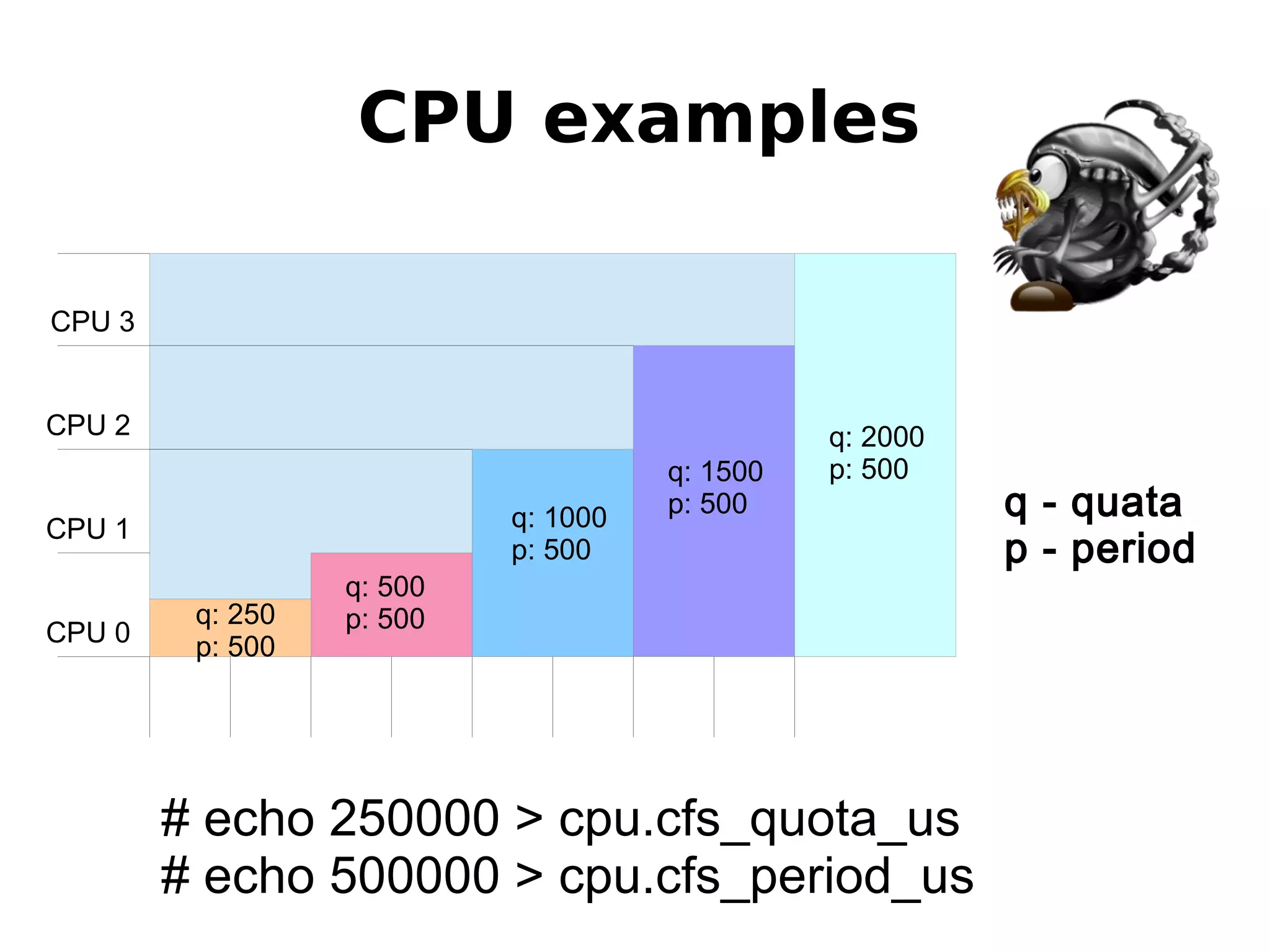
CPU 3
CPU 2
CPU 0
CPU examples
CPU 1
q - quata
p - period
q: 500
p: 500
q: 1000
p: 500
q: 1500
p: 500
q: 2000
p: 500
# echo 250000 > cpu.cfs_quota_us
# echo 500000 > cpu.cfs_period_us
q: 250
p: 500
memory
Only Memory
● memory.usage_in_bytes
– show current res_counter usage for memory
● memory.limit_in_bytes
– set/show limit of memory usage
● memory.failcnt
– show the number of memory usage hits limits
Memory + Swap
● memory.memsw.usage_in_bytes
● memory.memsw.limit_in_bytes
● memory.memsw.failcnt
memory
Kernel Memory limits
● memory.kmem.limit_in_bytes
– set/show hard limit for kernel memory
● memory.kmem.usage_in_bytes
– show current kernel memory allocation
● memory.kmem.failcnt
– show the number of kernel memory usage hits
limits
blkio
● blkio.weight
– allowed range 10 - 1000
– we use 500
● blkio.throttle.io_serviced
blkio
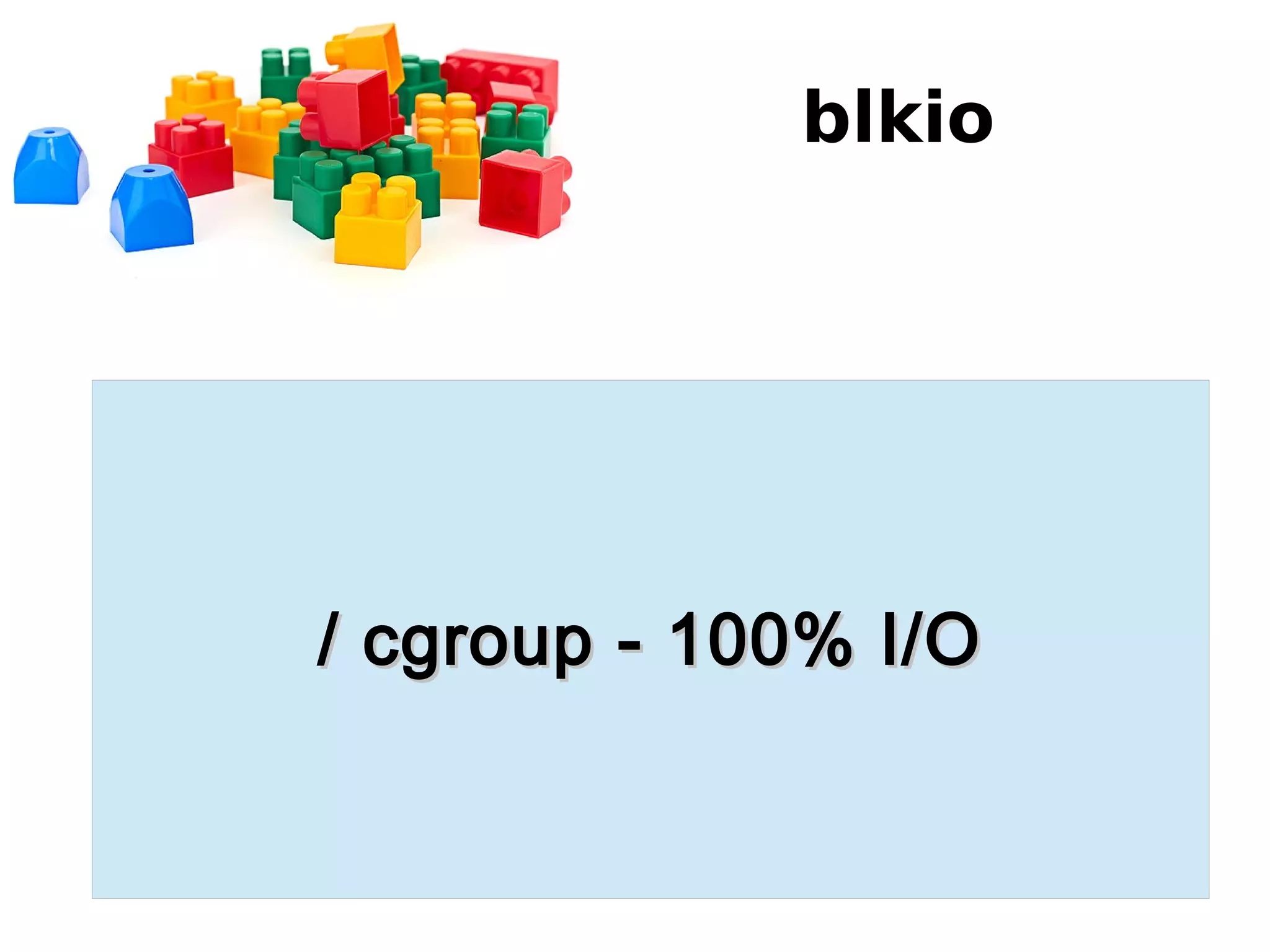
/ cgroup - 100% I/O/ cgroup - 100% I/O
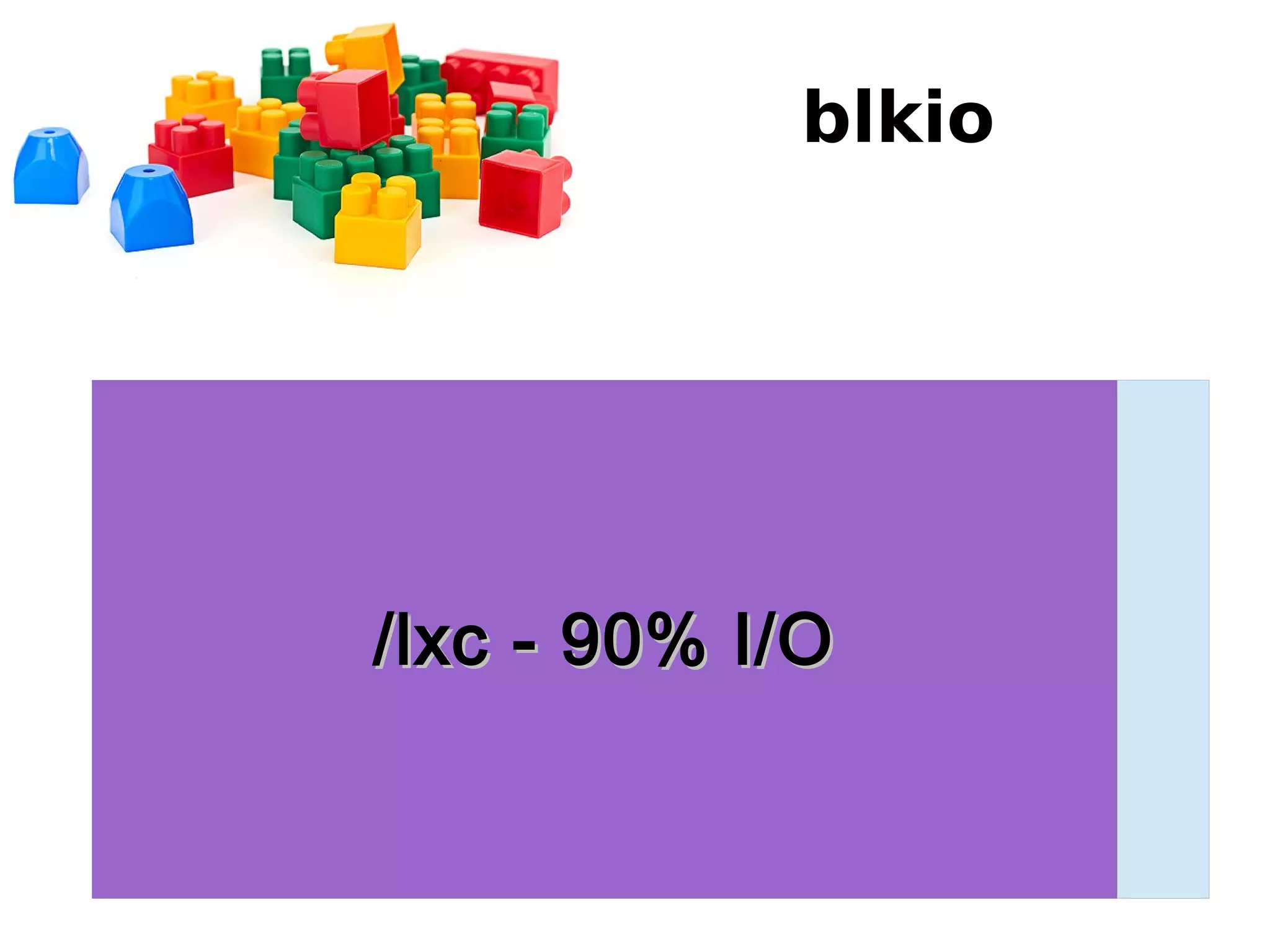
blkio
/lxc - 90% I/O/lxc - 90% I/O
blkio
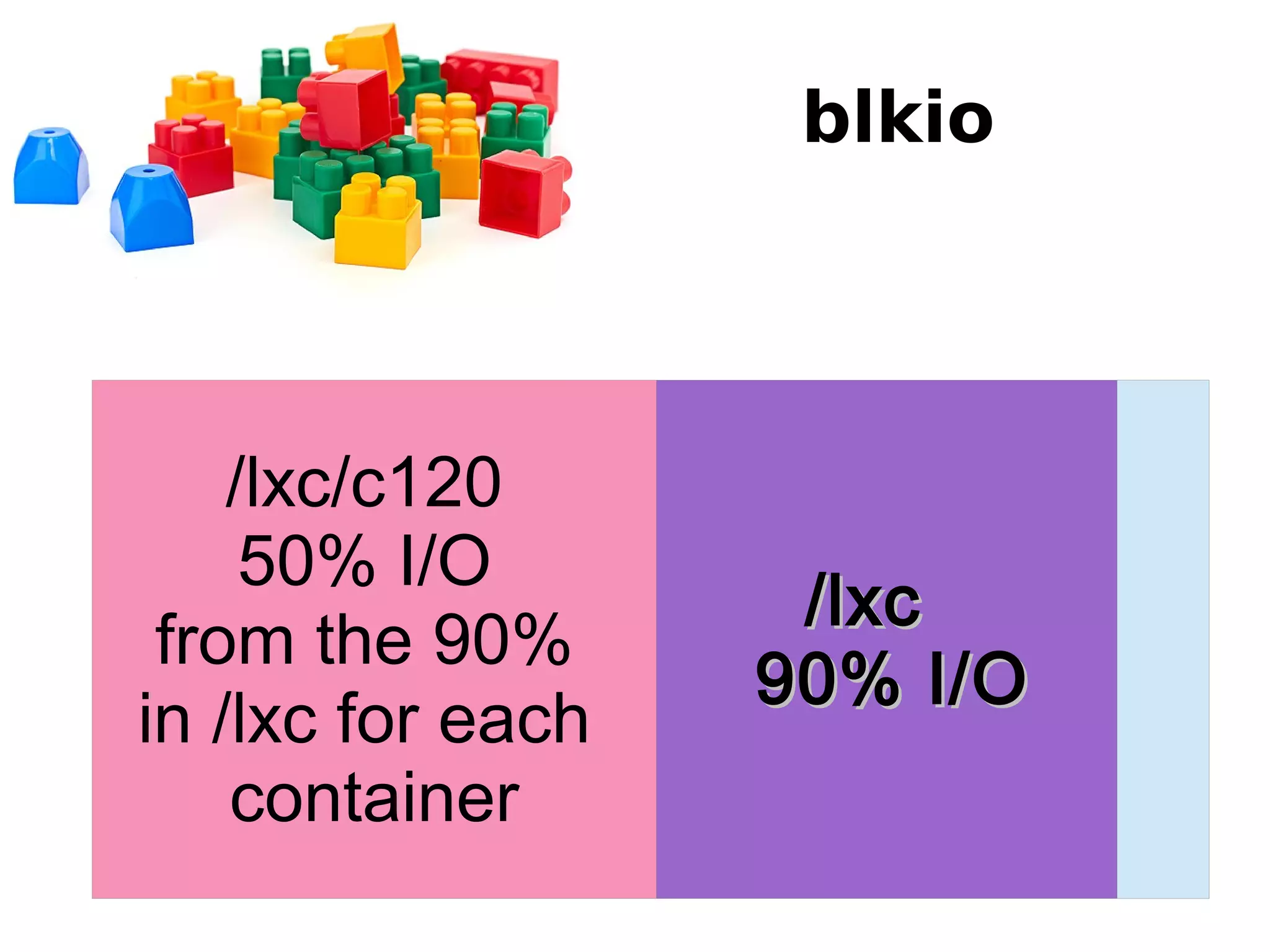
/lxc/lxc
90% I/O90% I/O
/lxc/c120
50% I/O
from the 90%
in /lxc for each
container
blkio
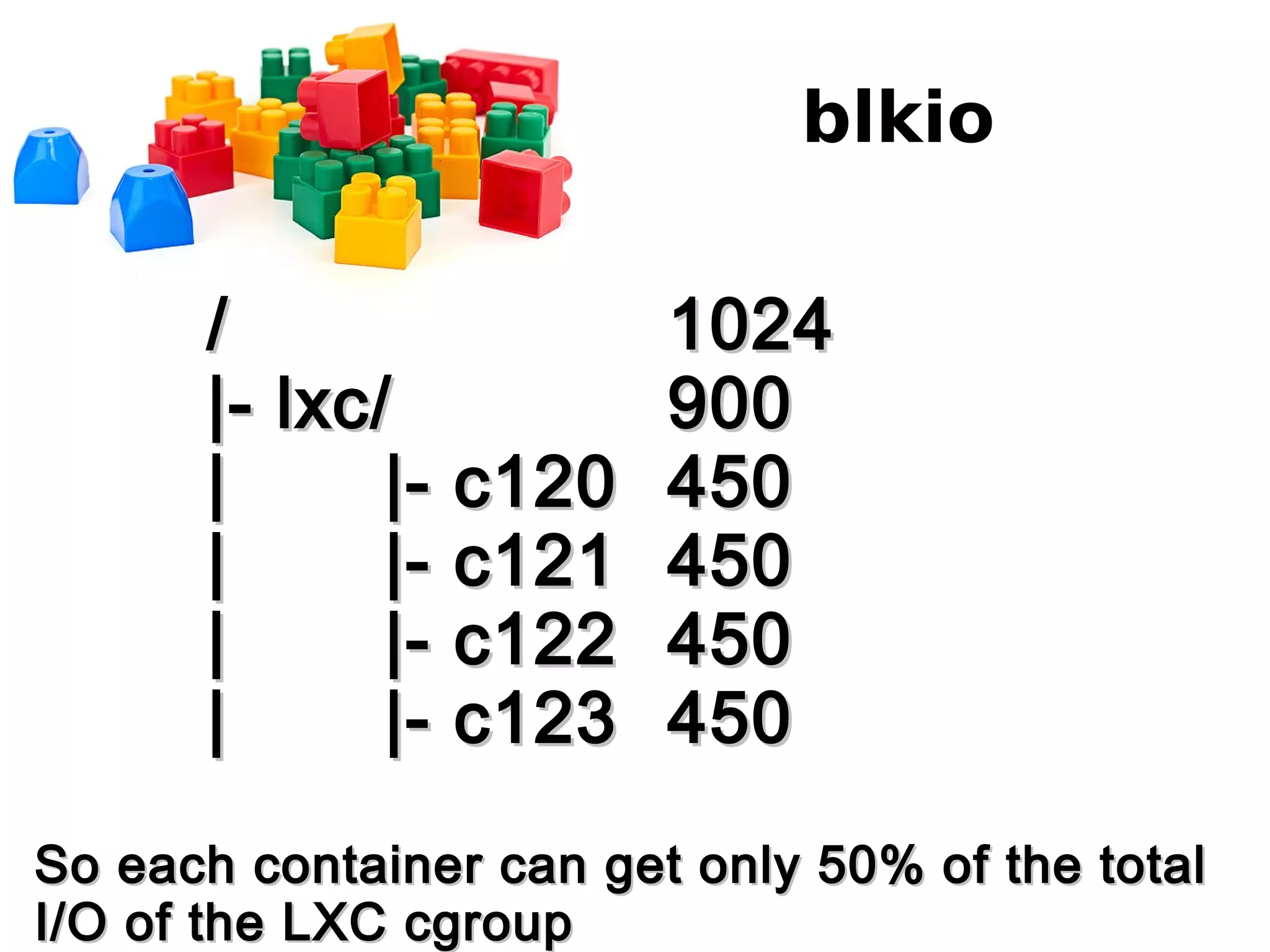
// 10241024
|- lxc/|- lxc/ 900900
| |- c120| |- c120 450450
| |- c121| |- c121 450450
| |- c122| |- c122 450450
| |- c123| |- c123 450450
So each container can get only 50% of the totalSo each container can get only 50% of the total
I/O of the LXC cgroupI/O of the LXC cgroup
Network
● Adding network class to each cgroup so you
can later limit it with tc
– Documentation/cgroups/net_cls.txt
● Prioritizing network traffic on interface
– Documentation/cgroups/net_prio.txt
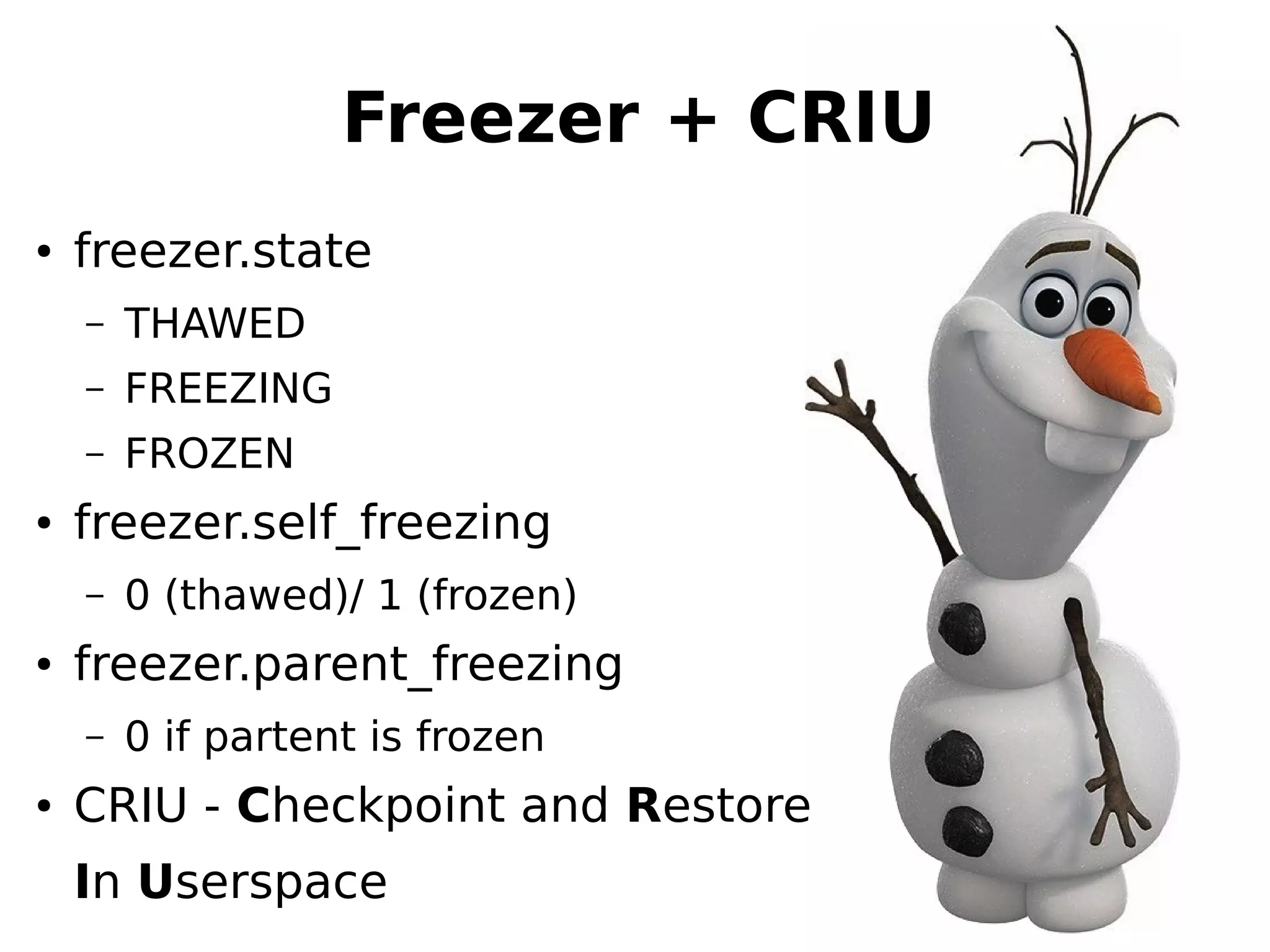
Freezer + CRIU
● freezer.state
– ТHAWED
– FREEZING
– FROZEN
● freezer.self_freezing
– 0 (thawed)/ 1 (frozen)
● freezer.parent_freezing
– 0 if partent is frozen
● CRIU - Checkpoint and Restore
In Userspace
Linux
Namespac
es
Why do we need that?
What namespaces do we
have?
● UTS namespace
● User namespace
● PID namespace
● IPC namespace
● Mount namespace
● Network namespace
UTS namespace
● Hostname
kernel.hostname = lxc1
● Domainname
kernel.domainname = sgvps.net
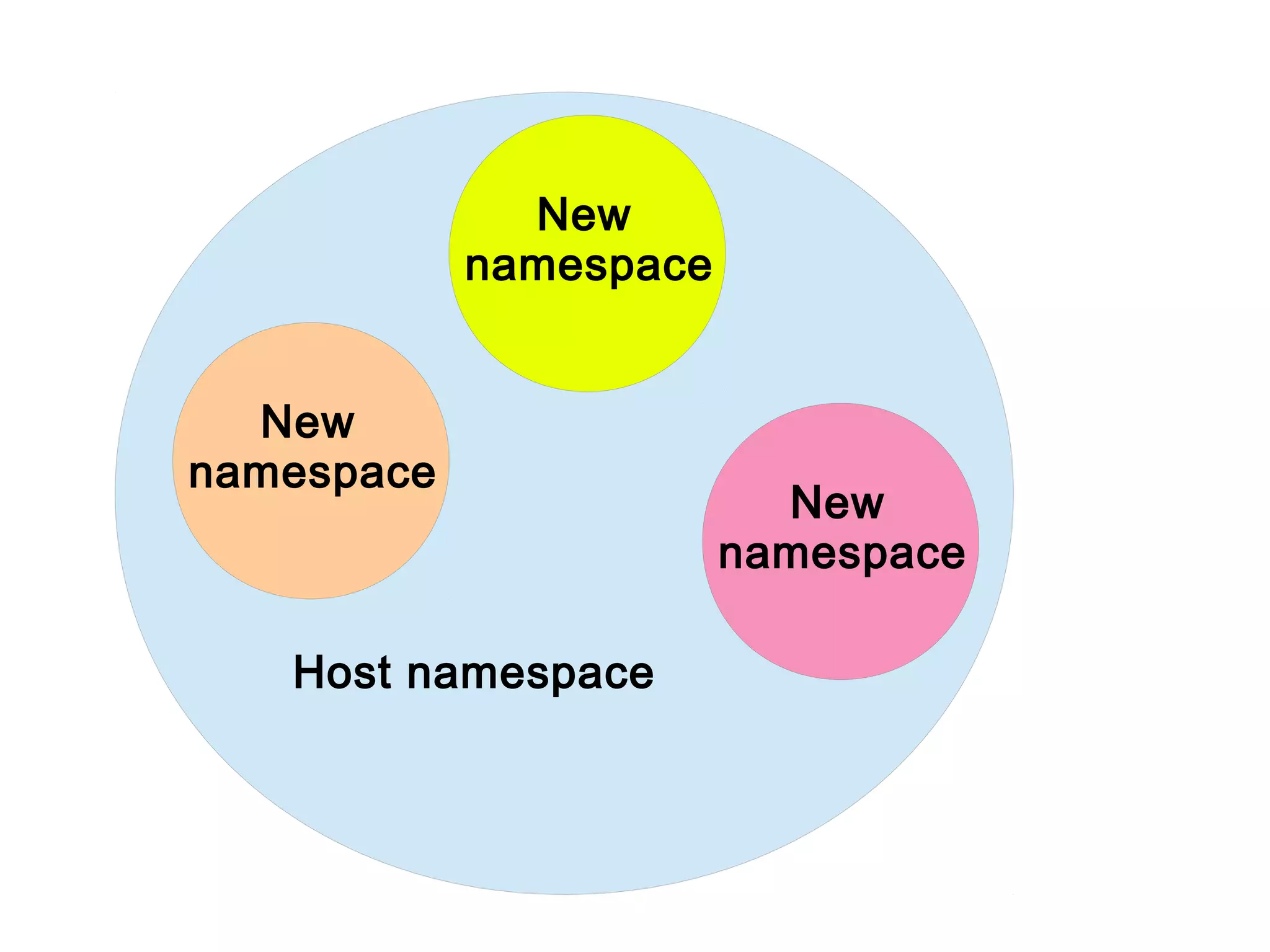
Host namespace
New
namespace
New
namespace
New
namespace
User namespace
User authentication and mapping files:
● /etc/passwd
● /etc/group
● /etc/shadow
- What if we want to create a username called
pesho, but such user already exists?
- What if we want to create user joan with UID
1005, but there is already user pesho with UID
1005?
IPC namespace
Unix/Linux IPCs
- unix domain sockets
- shared memory
- semaphores
- message queues
/proc/PID/fd/
|- 3 -> socket:[3537]
IPC namespace
Unix/Linux IPCs
- unix domain sockets
- shared memory
- semaphores
- message queues
key shmid owner perms bytes nattch
0x0052e2c1 1139834880 postgres 600 37879808 4
Network namespace
- IP
- IPv6
- Routing
- TCP
- UDP
- SCTP
- DCCP
- RDS
● Having а separate
loopback device for a process
● Or simply test the MySQL
server on the same IP
● Completely different routing
for a process
Mount namespace
the most complex one...
having only one / is a problem...
- at around 22000 mounts everything on your
machine starts to lag... no matter how many
cores or ram you have :(
- having a different /proc/mounts per process
would be nice and very interesting to
implement... :)
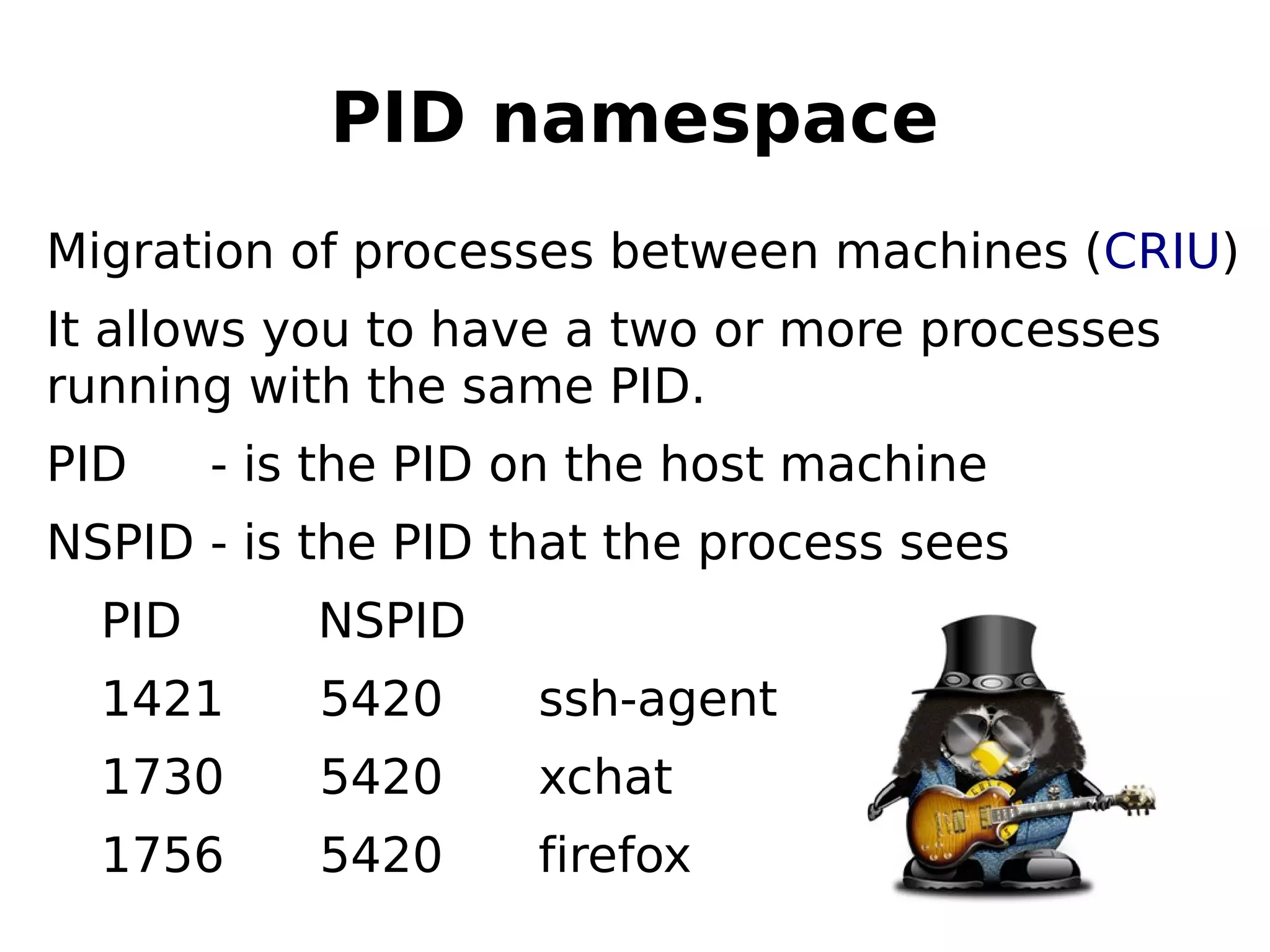
PID namespace
Migration of processes between machines (CRIU)
It allows you to have a two or more processes
running with the same PID.
PID - is the PID on the host machine
NSPID - is the PID that the process sees
PID NSPID
1421 5420 ssh-agent
1730 5420 xchat
1756 5420 firefox
QQ
UU
EE
SS
TT
II
OO
NN
SS
The NEW Backup system
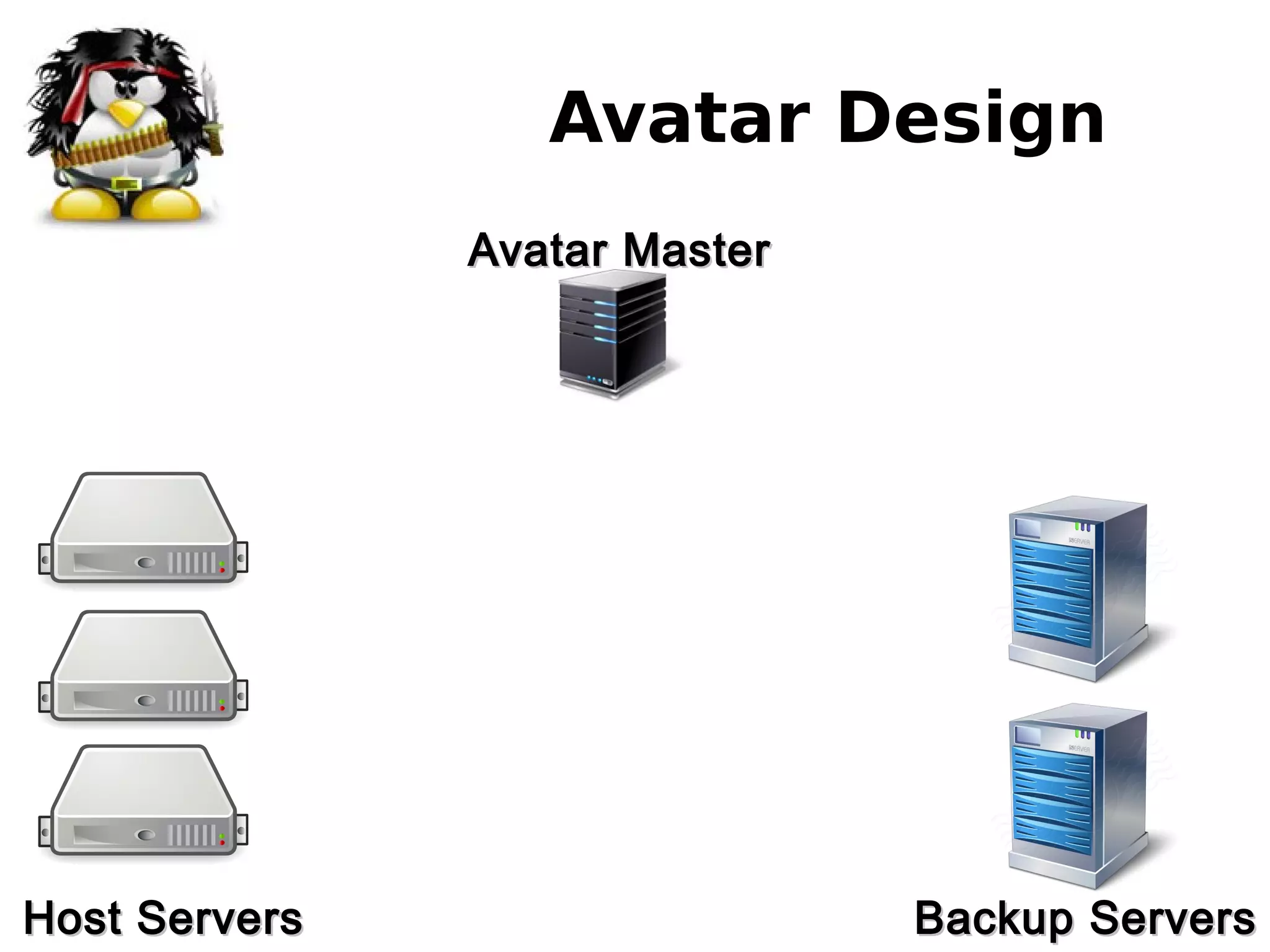
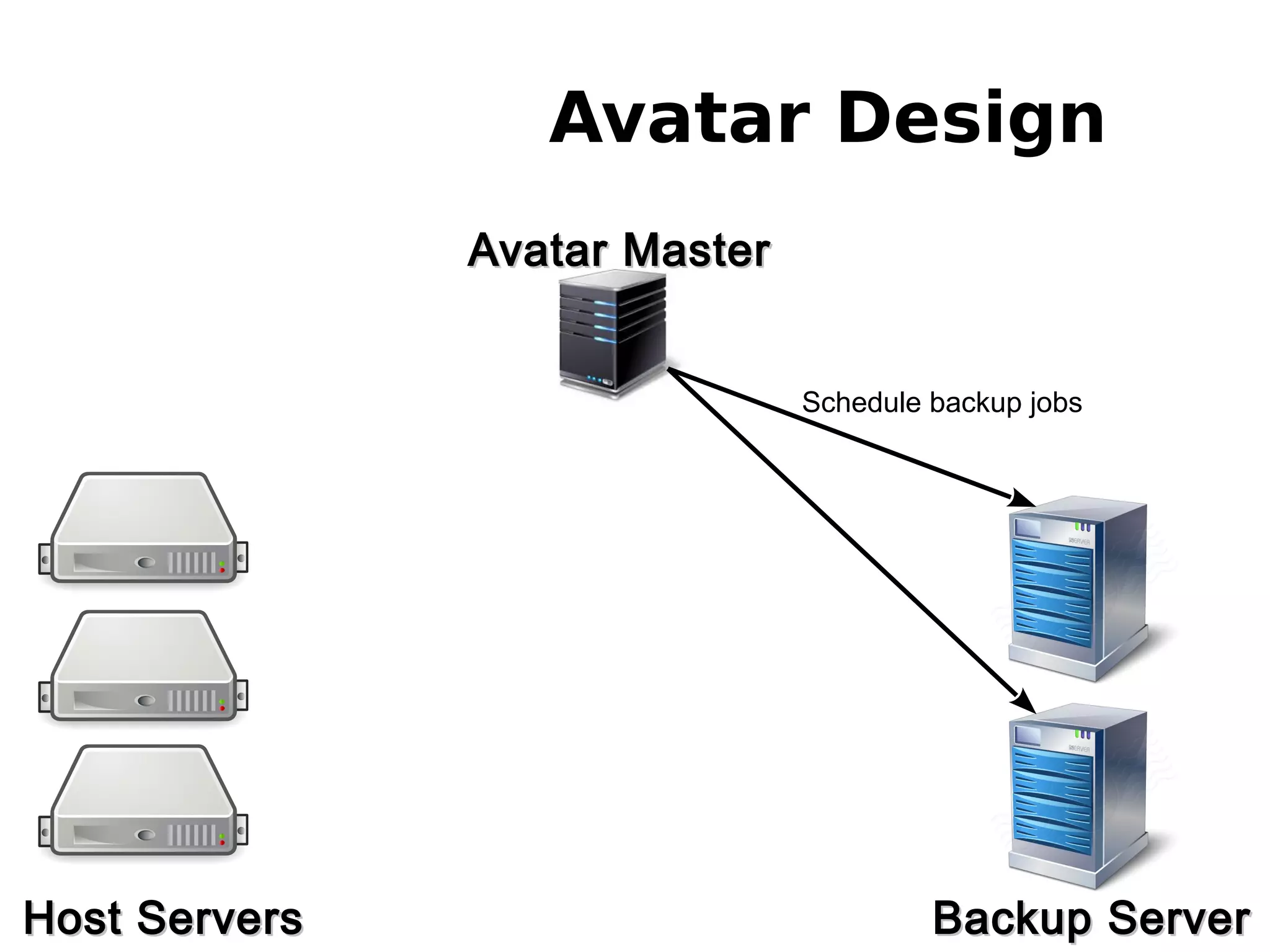
Avatar Design
Avatar MasterAvatar Master
Host ServersHost Servers Backup ServersBackup Servers
Avatar Design
Avatar MasterAvatar Master
Host ServersHost Servers Backup ServerBackup Server
Schedule backup jobs
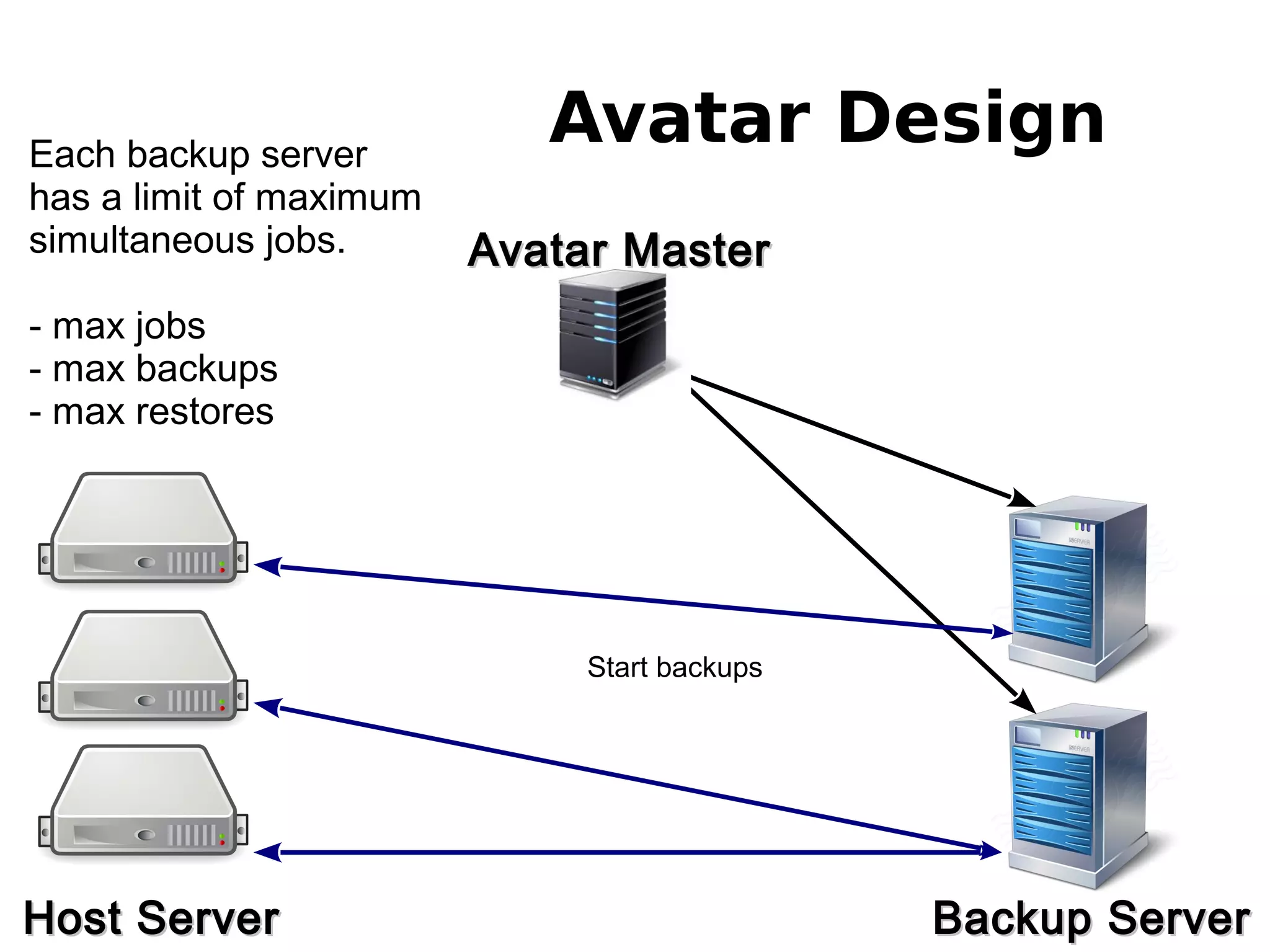
Avatar Design
Avatar MasterAvatar Master
Host ServerHost Server Backup ServerBackup Server
Start backups
Each backup server
has a limit of maximum
simultaneous jobs.
- max jobs
- max backups
- max restores
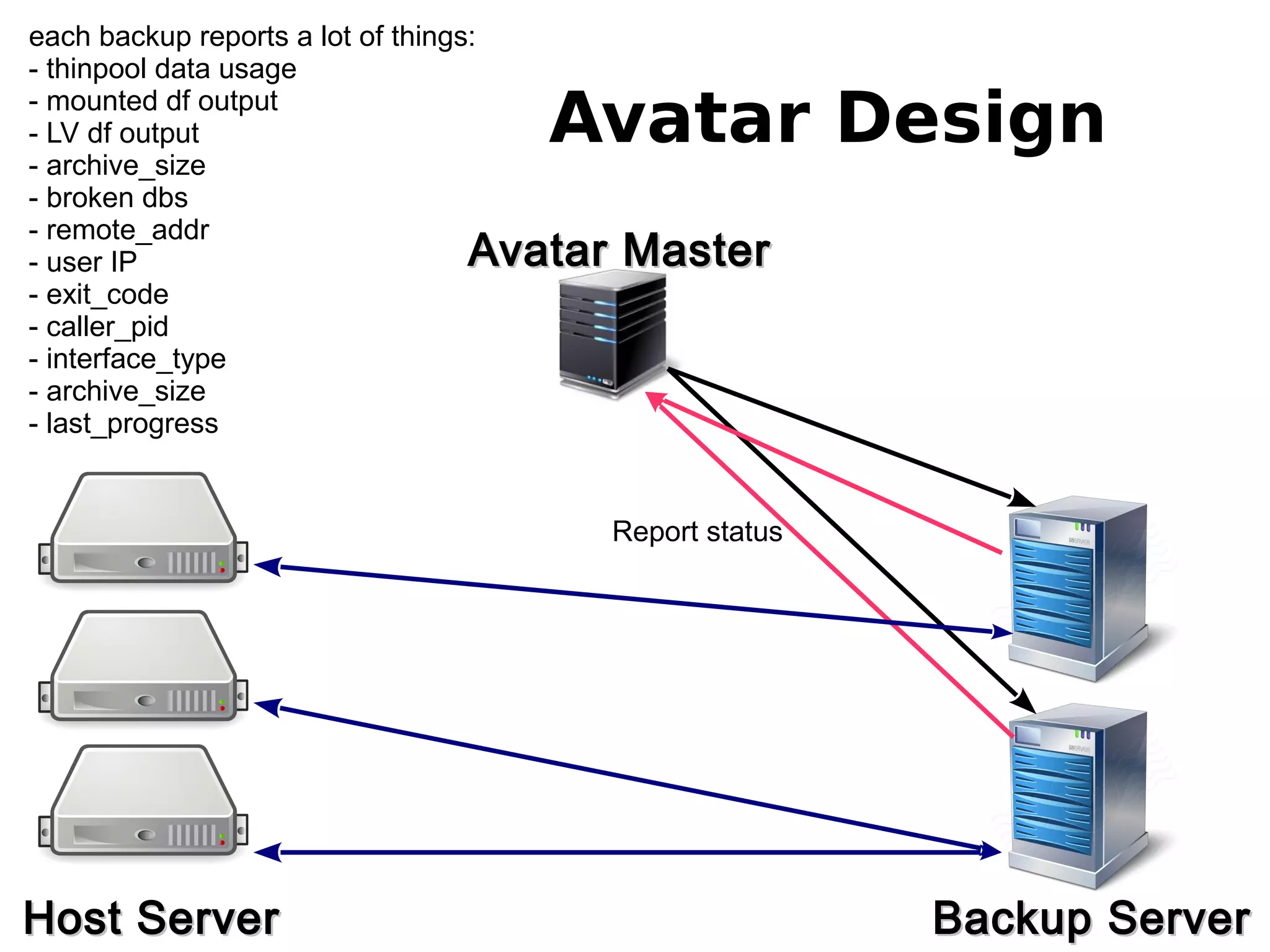
Avatar Design
Avatar MasterAvatar Master
Host ServerHost Server Backup ServerBackup Server
Report status
each backup reports a lot of things:
- thinpool data usage
- mounted df output
- LV df output
- archive_size
- broken dbs
- remote_addr
- user IP
- exit_code
- caller_pid
- interface_type
- archive_size
- last_progress
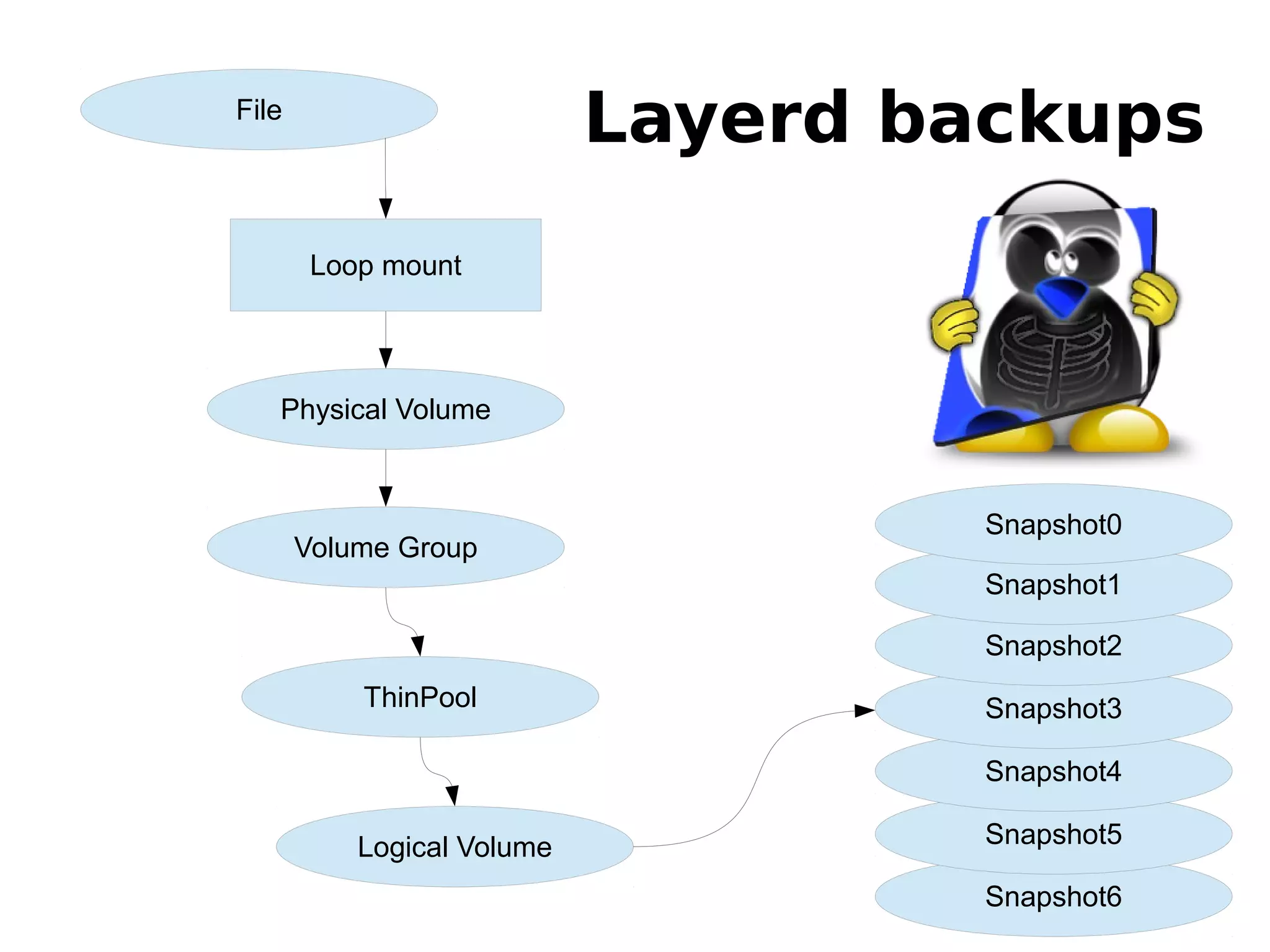
Layerd backupsFile
Physical Volume
Volume Group
ThinPool
Logical Volume
Snapshot6
Snapshot5
Snapshot4
Snapshot3
Snapshot2
Snapshot1
Snapshot0
Loop mount
Backup Server Structure
/sdb/avatar on /var/backups type none (rw,bind)
# ls /var/backups/siteground200.com/
total 33333656
-rw------- 1 root root 32212254720 Jul 22 04:03 camerafi
-rw------- 1 root root 32212254720 Jul 22 01:36 celticc1
-rw------- 1 root root 32212254720 Jul 22 00:57 citecang
-rw------- 1 root root 32212254720 Jul 21 20:24 ecoshea5
[root@smallvault1 /]#
Backup Server Structure
# losetup -f /var/backups/siteground200.com/exaera30
# losetup -a
/dev/loop0: [0811]:909901835
(/var/backups/siteground200.com/exaera30)
# vgchange -K -ay
2 logical volume(s) in volume group "exaera30" now active
# lvs
LV VG Attr LSize Pool Origin Data% Meta%
1437516546 exaera30 Vwi-a-t--- 30.00g coregroup 2.09
coregroup exaera30 twi-a-t--- 29.82g 2.10 1.54
#
Backup Server Structure
[root@smallvault1 /]# mount /dev/exaera30/1437516546
/mnt/...
[root@smallvault1 /]# ls -l /mnt/exaera30/1437516546
total 40
drwxr-xr-x5 root root 4096 Jul 21 17:09 configs
drwxr-xr-x3 963 959 4096 Dec 23 2014 etc
drwx--x--x14963 959 4096 Dec 23 2014 home
drwx------ 2 root root 16384 Jul 21 17:09 lost+found
drwxr-x--- 9 963 959 4096 Feb 29 2012 mail
drwxr-xr-x2 root root 4096 Jul 21 17:09 mysql
drwxr-xr-x2 root root 4096 Jul 21 17:09 pgsql
[root@smallvault1 /]#
Account Backup/Restore
● Configuration
– Extractor scripts
– Intractor scripts
● Files
● Mails
● SQLs
– MySQL, mysqldump
– PgSQL, pg_dump
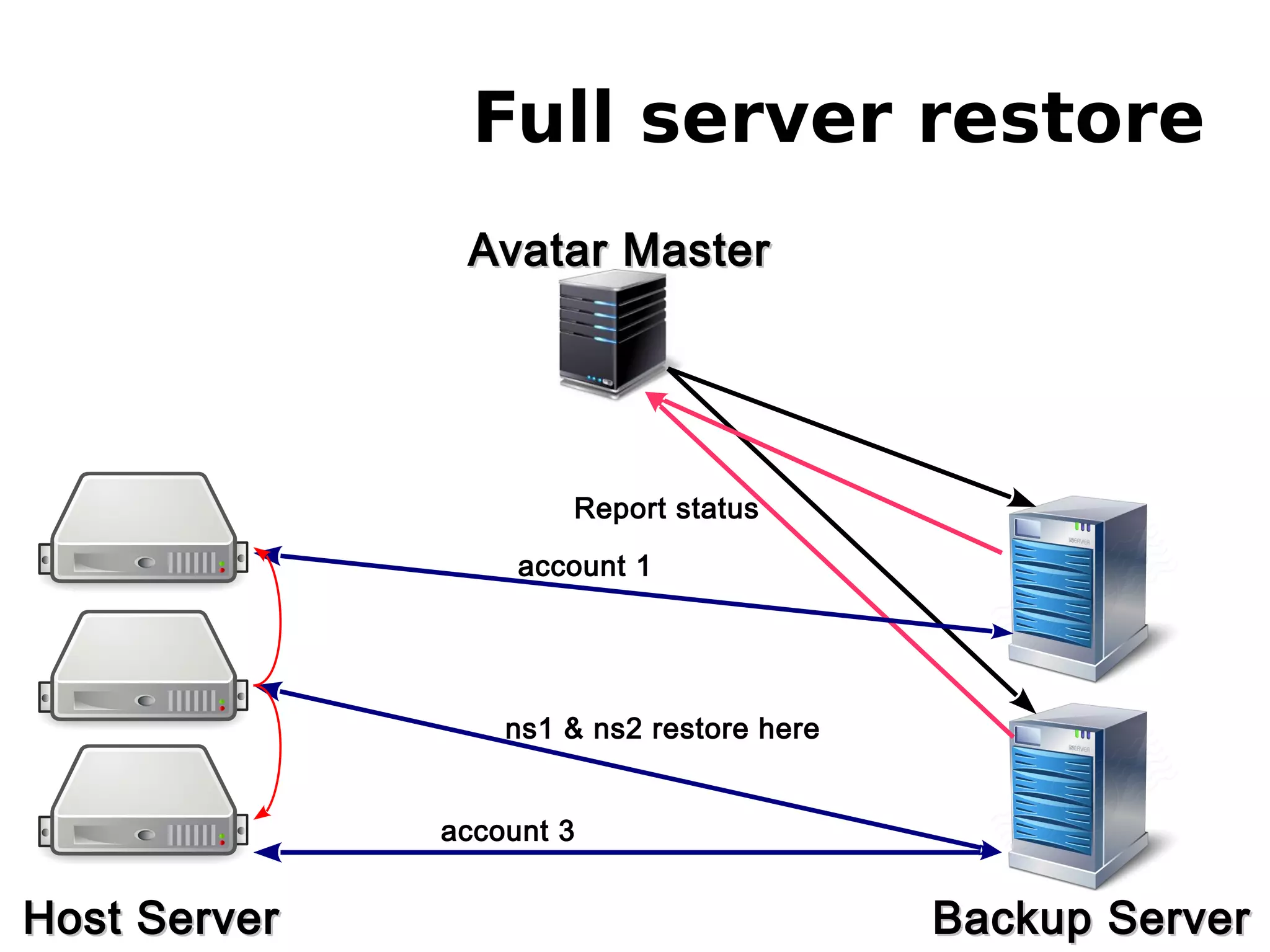
Full server restore
Avatar MasterAvatar Master
Host ServerHost Server Backup ServerBackup Server
Report status
account 1
ns1 & ns2 restore here
account 3
Web Interface?
● Ammm...
SOON :)
SiteGround Tech TeamBuilding

SiteGround Tech TeamBuilding

  • 1.
  • 2.
  • 3.
  • 4.
  • 5.
  • 6.
    What do wehave? ● cpuset - whole cores and cpu mapping ● cpuacct - cpu cycle accounting ● cpu - less then core granularity ● memory - limits and accounting ● blkio - limits and accounting ● net_cls - network classification ● net_prio - network priority ● Freezer + checkpoint/restore - migration
  • 7.
    General structure ● tasks –attach a task(thread) and show list of threads ● cgroup.procs – show list of processes # mount -t cgroup none /cgroups # mount -t cgroup -o cpuset cpuset /cg/cpuset
  • 8.
    How to usethem? ● Create cgroup # mkdir /cgroup/GRP ● Prepare minimum limits # echo 0-2 > /cgroup/GRP/cpuset.cpus # echo 0-1 > /cgroup/GRP/cpuset.mems ● Add a process to a cgroup: # echo PID > /cgroup/GRP/tasks ● Verify that a process is in the cgroup # grep PID /cgroup/GRP/tasks
  • 9.
    cpuset ● Physical CPU& Memory limits – cpuset.cpus - list of allowed CPUs – cpuset.mems - list of allowed memory slots – cpuset.cpu_exclusive - 0/1 are the CPUs exclusive to this group – cpuset.mem_exclusive - 0/1 are the memory slots exclusive to this group Documentation/cgroups/cpusets.txt
  • 10.
    CPU accounting ● cpuusage combined for all cpus (in nanoseconds) ● cpu usage per-cpu (in nanoseconds) ● per cpu and user/system(in USER_HZ) ● Documentation/cgroups/cpuacct.txt
  • 11.
    CPU ● CPU schedulerlimits CONFIG_CGROUP_SCHED – cpu.shares – cpu.cfs_quota_us: in microseconds – cpu.cfs_period_us: in microseconds (default 100ms) – cpu.stat: exports throttling statistics nr_throttled: Number of times the group has been throttled/limited. throttled_time: The total time duration (in nanoseconds) for which entities of the group have been throttled. ● Documentation/scheduler/sched-bwc.txt
  • 12.
    CPU 3 CPU 2 CPU0 CPU examples CPU 1 q - quata p - period q: 500 p: 500 q: 1000 p: 500 q: 1500 p: 500 q: 2000 p: 500 # echo 250000 > cpu.cfs_quota_us # echo 500000 > cpu.cfs_period_us q: 250 p: 500
  • 13.
    memory Only Memory ● memory.usage_in_bytes –show current res_counter usage for memory ● memory.limit_in_bytes – set/show limit of memory usage ● memory.failcnt – show the number of memory usage hits limits Memory + Swap ● memory.memsw.usage_in_bytes ● memory.memsw.limit_in_bytes ● memory.memsw.failcnt
  • 14.
    memory Kernel Memory limits ●memory.kmem.limit_in_bytes – set/show hard limit for kernel memory ● memory.kmem.usage_in_bytes – show current kernel memory allocation ● memory.kmem.failcnt – show the number of kernel memory usage hits limits
  • 15.
    blkio ● blkio.weight – allowedrange 10 - 1000 – we use 500 ● blkio.throttle.io_serviced
  • 16.
    blkio / cgroup -100% I/O/ cgroup - 100% I/O
  • 17.
    blkio /lxc - 90%I/O/lxc - 90% I/O
  • 18.
    blkio /lxc/lxc 90% I/O90% I/O /lxc/c120 50%I/O from the 90% in /lxc for each container
  • 19.
    blkio // 10241024 |- lxc/|-lxc/ 900900 | |- c120| |- c120 450450 | |- c121| |- c121 450450 | |- c122| |- c122 450450 | |- c123| |- c123 450450 So each container can get only 50% of the totalSo each container can get only 50% of the total I/O of the LXC cgroupI/O of the LXC cgroup
  • 20.
    Network ● Adding networkclass to each cgroup so you can later limit it with tc – Documentation/cgroups/net_cls.txt ● Prioritizing network traffic on interface – Documentation/cgroups/net_prio.txt
  • 21.
    Freezer + CRIU ●freezer.state – ТHAWED – FREEZING – FROZEN ● freezer.self_freezing – 0 (thawed)/ 1 (frozen) ● freezer.parent_freezing – 0 if partent is frozen ● CRIU - Checkpoint and Restore In Userspace
  • 23.
  • 24.
    Why do weneed that?
  • 25.
    What namespaces dowe have? ● UTS namespace ● User namespace ● PID namespace ● IPC namespace ● Mount namespace ● Network namespace
  • 26.
    UTS namespace ● Hostname kernel.hostname= lxc1 ● Domainname kernel.domainname = sgvps.net
  • 27.
  • 28.
    User namespace User authenticationand mapping files: ● /etc/passwd ● /etc/group ● /etc/shadow - What if we want to create a username called pesho, but such user already exists? - What if we want to create user joan with UID 1005, but there is already user pesho with UID 1005?
  • 29.
    IPC namespace Unix/Linux IPCs -unix domain sockets - shared memory - semaphores - message queues /proc/PID/fd/ |- 3 -> socket:[3537]
  • 30.
    IPC namespace Unix/Linux IPCs -unix domain sockets - shared memory - semaphores - message queues key shmid owner perms bytes nattch 0x0052e2c1 1139834880 postgres 600 37879808 4
  • 31.
    Network namespace - IP -IPv6 - Routing - TCP - UDP - SCTP - DCCP - RDS ● Having а separate loopback device for a process ● Or simply test the MySQL server on the same IP ● Completely different routing for a process
  • 32.
    Mount namespace the mostcomplex one... having only one / is a problem... - at around 22000 mounts everything on your machine starts to lag... no matter how many cores or ram you have :( - having a different /proc/mounts per process would be nice and very interesting to implement... :)
  • 33.
    PID namespace Migration ofprocesses between machines (CRIU) It allows you to have a two or more processes running with the same PID. PID - is the PID on the host machine NSPID - is the PID that the process sees PID NSPID 1421 5420 ssh-agent 1730 5420 xchat 1756 5420 firefox
  • 34.
  • 35.
  • 36.
  • 37.
    Avatar Design Avatar MasterAvatarMaster Host ServersHost Servers Backup ServersBackup Servers
  • 38.
    Avatar Design Avatar MasterAvatarMaster Host ServersHost Servers Backup ServerBackup Server Schedule backup jobs
  • 39.
    Avatar Design Avatar MasterAvatarMaster Host ServerHost Server Backup ServerBackup Server Start backups Each backup server has a limit of maximum simultaneous jobs. - max jobs - max backups - max restores
  • 40.
    Avatar Design Avatar MasterAvatarMaster Host ServerHost Server Backup ServerBackup Server Report status each backup reports a lot of things: - thinpool data usage - mounted df output - LV df output - archive_size - broken dbs - remote_addr - user IP - exit_code - caller_pid - interface_type - archive_size - last_progress
  • 41.
    Layerd backupsFile Physical Volume VolumeGroup ThinPool Logical Volume Snapshot6 Snapshot5 Snapshot4 Snapshot3 Snapshot2 Snapshot1 Snapshot0 Loop mount
  • 42.
    Backup Server Structure /sdb/avataron /var/backups type none (rw,bind) # ls /var/backups/siteground200.com/ total 33333656 -rw------- 1 root root 32212254720 Jul 22 04:03 camerafi -rw------- 1 root root 32212254720 Jul 22 01:36 celticc1 -rw------- 1 root root 32212254720 Jul 22 00:57 citecang -rw------- 1 root root 32212254720 Jul 21 20:24 ecoshea5 [root@smallvault1 /]#
  • 43.
    Backup Server Structure #losetup -f /var/backups/siteground200.com/exaera30 # losetup -a /dev/loop0: [0811]:909901835 (/var/backups/siteground200.com/exaera30) # vgchange -K -ay 2 logical volume(s) in volume group "exaera30" now active # lvs LV VG Attr LSize Pool Origin Data% Meta% 1437516546 exaera30 Vwi-a-t--- 30.00g coregroup 2.09 coregroup exaera30 twi-a-t--- 29.82g 2.10 1.54 #
  • 44.
    Backup Server Structure [root@smallvault1/]# mount /dev/exaera30/1437516546 /mnt/... [root@smallvault1 /]# ls -l /mnt/exaera30/1437516546 total 40 drwxr-xr-x5 root root 4096 Jul 21 17:09 configs drwxr-xr-x3 963 959 4096 Dec 23 2014 etc drwx--x--x14963 959 4096 Dec 23 2014 home drwx------ 2 root root 16384 Jul 21 17:09 lost+found drwxr-x--- 9 963 959 4096 Feb 29 2012 mail drwxr-xr-x2 root root 4096 Jul 21 17:09 mysql drwxr-xr-x2 root root 4096 Jul 21 17:09 pgsql [root@smallvault1 /]#
  • 45.
    Account Backup/Restore ● Configuration –Extractor scripts – Intractor scripts ● Files ● Mails ● SQLs – MySQL, mysqldump – PgSQL, pg_dump
  • 46.
    Full server restore AvatarMasterAvatar Master Host ServerHost Server Backup ServerBackup Server Report status account 1 ns1 & ns2 restore here account 3
  • 47.