Performance comparisson of
Distributed File Systems
GlusterFS
XfreemFS
FhgFS

Marian Marinov
CEO of 1H Ltd.
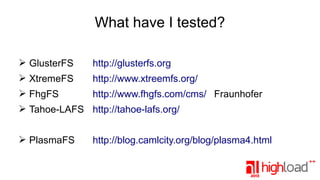
What have I tested?
➢ GlusterFS

http://glusterfs.org

➢ XtremeFS

http://www.xtreemfs.org/

➢ FhgFS

http://www.fhgfs.com/cms/ Fraunhofer

➢ Tahoe-LAFS http://tahoe-lafs.org/
➢ PlasmaFS

http://blog.camlcity.org/blog/plasma4.html
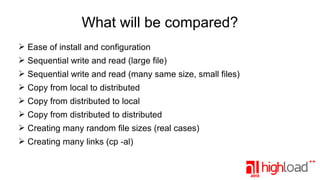
What will be compared?
➢ Ease of install and configuration
➢ Sequential write and read (large file)
➢ Sequential write and read (many same size, small files)
➢ Copy from local to distributed
➢ Copy from distributed to local
➢ Copy from distributed to distributed
➢ Creating many random file sizes (real cases)
➢ Creating many links (cp -al)
Why only on 1Gbit/s ?
➢ It is considered commodity
➢ 6-7 years ago it was considered high performance
➢ Some projects have started around that time
➢ And last, I only had 1Gbit/s switches available for the
tests
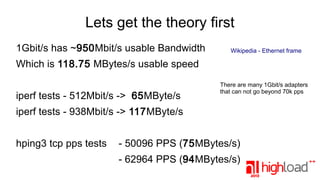
Lets get the theory first
1Gbit/s has ~950Mbit/s usable Bandwidth

Wikipedia - Ethernet frame

Which is 118.75 MBytes/s usable speed
iperf tests - 512Mbit/s -> 65MByte/s

There are many 1Gbit/s adapters
that can not go beyond 70k pps

iperf tests - 938Mbit/s -> 117MByte/s
hping3 tcp pps tests

- 50096 PPS (75MBytes/s)
- 62964 PPS (94MBytes/s)
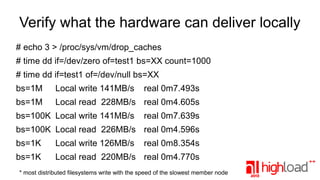
Verify what the hardware can deliver locally
# echo 3 > /proc/sys/vm/drop_caches
# time dd if=/dev/zero of=test1 bs=XX count=1000
# time dd if=test1 of=/dev/null bs=XX
bs=1M

Local write 141MB/s

bs=1M

Local read 228MB/s real 0m4.605s

bs=100K Local write 141MB/s

real 0m7.493s
real 0m7.639s

bs=100K Local read 226MB/s real 0m4.596s
bs=1K

Local write 126MB/s

real 0m8.354s

bs=1K

Local read 220MB/s real 0m4.770s

* most distributed filesystems write with the speed of the slowest member node
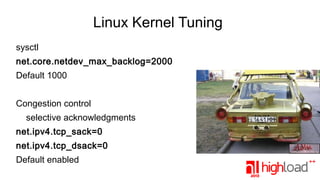
Linux Kernel Tuning
sysctl
net.core.netdev_max_backlog=2000
Default 1000
Congestion control
selective acknowledgments
net.ipv4.tcp_sack=0
net.ipv4.tcp_dsack=0
Default enabled
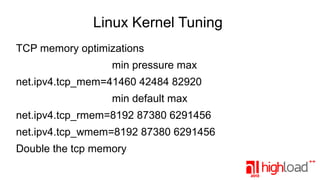
Linux Kernel Tuning
TCP memory optimizations
min pressure max
net.ipv4.tcp_mem=41460 42484 82920
min default max
net.ipv4.tcp_rmem=8192 87380 6291456
net.ipv4.tcp_wmem=8192 87380 6291456
Double the tcp memory
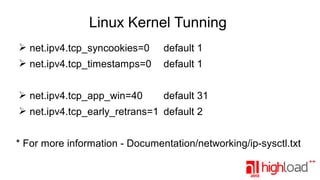
Linux Kernel Tunning
➢ net.ipv4.tcp_syncookies=0

default 1

➢ net.ipv4.tcp_timestamps=0

default 1

➢ net.ipv4.tcp_app_win=40

default 31

➢ net.ipv4.tcp_early_retrans=1 default 2
* For more information - Documentation/networking/ip-sysctl.txt
More tuning :)
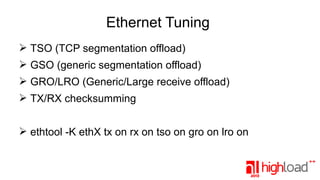
Ethernet Tuning
➢ TSO (TCP segmentation offload)
➢ GSO (generic segmentation offload)
➢ GRO/LRO (Generic/Large receive offload)
➢ TX/RX checksumming
➢ ethtool -K ethX tx on rx on tso on gro on lro on
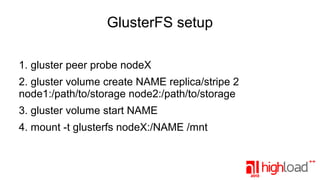
GlusterFS setup
1. gluster peer probe nodeX
2. gluster volume create NAME replica/stripe 2
node1:/path/to/storage node2:/path/to/storage
3. gluster volume start NAME
4. mount -t glusterfs nodeX:/NAME /mnt
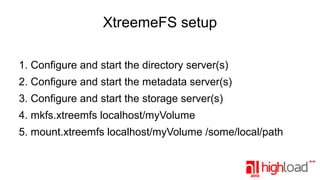
XtreemeFS setup
1. Configure and start the directory server(s)
2. Configure and start the metadata server(s)
3. Configure and start the storage server(s)
4. mkfs.xtreemfs localhost/myVolume
5. mount.xtreemfs localhost/myVolume /some/local/path
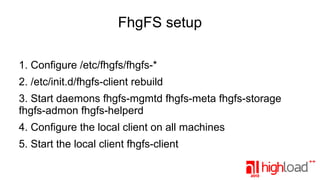
FhgFS setup
1. Configure /etc/fhgfs/fhgfs-*
2. /etc/init.d/fhgfs-client rebuild
3. Start daemons fhgfs-mgmtd fhgfs-meta fhgfs-storage
fhgfs-admon fhgfs-helperd
4. Configure the local client on all machines
5. Start the local client fhgfs-client
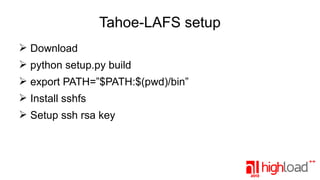
Tahoe-LAFS setup
➢ Download
➢ python setup.py build
➢ export PATH=”$PATH:$(pwd)/bin”
➢ Install sshfs
➢ Setup ssh rsa key
Tahoe-LAFS setup
➢ mkdir /storage/tahoe
➢ cd /storage/tahoe && tahoe create-introducer .
➢ tahoe start .
➢ cat /storage/tahoe/private/introducer.furl
➢ mkdir /storage/tahoe-storage
➢ cd /storage/tahoe-storage && tahoe create-node .
➢ Add the introducer.furl to tahoe.cfg
➢ Add [sftpd] section to tahoe.cfg
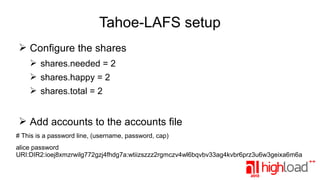
Tahoe-LAFS setup
➢ Configure the shares
➢ shares.needed = 2
➢ shares.happy = 2
➢ shares.total = 2

➢ Add accounts to the accounts file
# This is a password line, (username, password, cap)
alice password
URI:DIR2:ioej8xmzrwilg772gzj4fhdg7a:wtiizszzz2rgmczv4wl6bqvbv33ag4kvbr6prz3u6w3geixa6m6a
Statistics
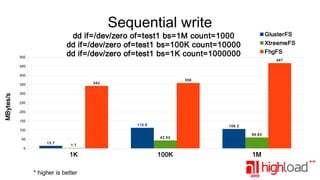
Sequential write
GlusterFS

dd if=/dev/zero of=test1 bs=1M count=1000
dd if=/dev/zero of=test1 bs=100K count=10000
dd if=/dev/zero of=test1 bs=1K count=1000000

500

XtreemeFS
FhgFS
467

450
400

MBytes/s

358

342

350
300
250
200
150

112.6

106.3

100
50
0

43.53
13.7

59.83

1.7

1K
* higher is better

100K

1M
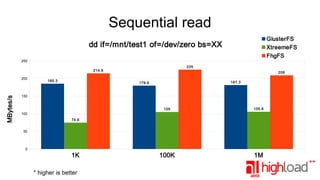
Sequential read
GlusterFS
XtreemeFS
FhgFS

dd if=/mnt/test1 of=/dev/zero bs=XX
250
225

214.6

MBytes/s

200

185.3

209
181.3

179.6

150

105

105.6

100K

1M

100
74.6
50

0

1K
* higher is better
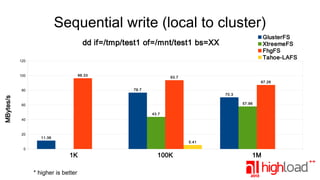
Sequential write (local to cluster)
GlusterFS
XtreemeFS
FhgFS
Tahoe-LAFS

dd if=/tmp/test1 of=/mnt/test1 bs=XX
120

96.33

100

93.7
87.26
76.7

MBytes/s

80

70.3
57.96

60
43.7
40

20

11.36
5.41

0

1K
* higher is better

100K

1M
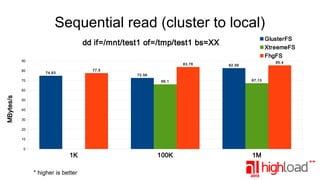
Sequential read (cluster to local)
GlusterFS
XtreemeFS
FhgFS

dd if=/mnt/test1 of=/tmp/test1 bs=XX
90
80

83.76

85.4

82.56

77.5

74.83

72.56
66.1

70

67.13

100K

1M

MBytes/s

60
50
40
30
20
10
0

1K
* higher is better
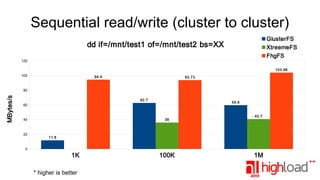
Sequential read/write (cluster to cluster)
GlusterFS
XtreemeFS
FhgFS

dd if=/mnt/test1 of=/mnt/test2 bs=XX
120

103.96
100

94.4

93.73

MBytes/s

80
62.7

59.6

60

40

20

36

40.7

11.8

0

1K
* higher is better

100K

1M
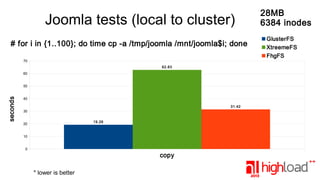
Joomla tests (local to cluster)
# for i in {1..100}; do time cp -a /tmp/joomla /mnt/joomla$i; done
70
62.83
60

seconds

50
40
31.42
30
19.26

20
10
0

copy
* lower is better

28MB
6384 inodes
GlusterFS
XtreemeFS
FhgFS
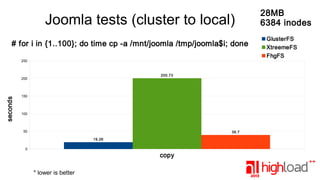
Joomla tests (cluster to local)
# for i in {1..100}; do time cp -a /mnt/joomla /tmp/joomla$i; done
250

200.73

seconds

200

150

100

50

39.7
19.26

0

copy
* lower is better

28MB
6384 inodes
GlusterFS
XtreemeFS
FhgFS
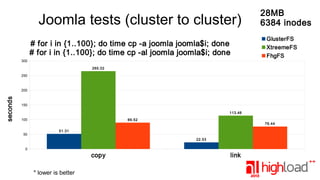
Joomla tests (cluster to cluster)
# for i in {1..100}; do time cp -a joomla joomla$i; done
# for i in {1..100}; do time cp -al joomla joomla$i; done

28MB
6384 inodes
GlusterFS
XtreemeFS
FhgFS

300
265.02
250

seconds

200

150
113.46
100

50

89.52

76.44

51.31
22.53

0

copy
* lower is better

link
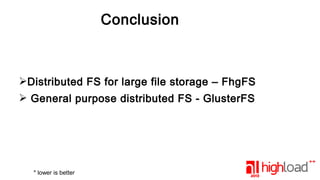
Conclusion

➢Distributed FS for large file storage – FhgFS
➢ General purpose distributed FS - GlusterFS

* lower is better
QUESTIONS?
Marian Marinov
<mm@1h.com>
http://www.1h.com
http://hydra.azilian.net
irc.freenode.net hackman
ICQ: 7556201
Jabber: hackman@jabber.org

Performance comparison of Distributed File Systems on 1Gbit networks

  • 1.
    Performance comparisson of DistributedFile Systems GlusterFS XfreemFS FhgFS Marian Marinov CEO of 1H Ltd.
  • 2.
    What have Itested? ➢ GlusterFS http://glusterfs.org ➢ XtremeFS http://www.xtreemfs.org/ ➢ FhgFS http://www.fhgfs.com/cms/ Fraunhofer ➢ Tahoe-LAFS http://tahoe-lafs.org/ ➢ PlasmaFS http://blog.camlcity.org/blog/plasma4.html
  • 3.
    What will becompared? ➢ Ease of install and configuration ➢ Sequential write and read (large file) ➢ Sequential write and read (many same size, small files) ➢ Copy from local to distributed ➢ Copy from distributed to local ➢ Copy from distributed to distributed ➢ Creating many random file sizes (real cases) ➢ Creating many links (cp -al)
  • 4.
    Why only on1Gbit/s ? ➢ It is considered commodity ➢ 6-7 years ago it was considered high performance ➢ Some projects have started around that time ➢ And last, I only had 1Gbit/s switches available for the tests
  • 5.
    Lets get thetheory first 1Gbit/s has ~950Mbit/s usable Bandwidth Wikipedia - Ethernet frame Which is 118.75 MBytes/s usable speed iperf tests - 512Mbit/s -> 65MByte/s There are many 1Gbit/s adapters that can not go beyond 70k pps iperf tests - 938Mbit/s -> 117MByte/s hping3 tcp pps tests - 50096 PPS (75MBytes/s) - 62964 PPS (94MBytes/s)
  • 6.
    Verify what thehardware can deliver locally # echo 3 > /proc/sys/vm/drop_caches # time dd if=/dev/zero of=test1 bs=XX count=1000 # time dd if=test1 of=/dev/null bs=XX bs=1M Local write 141MB/s bs=1M Local read 228MB/s real 0m4.605s bs=100K Local write 141MB/s real 0m7.493s real 0m7.639s bs=100K Local read 226MB/s real 0m4.596s bs=1K Local write 126MB/s real 0m8.354s bs=1K Local read 220MB/s real 0m4.770s * most distributed filesystems write with the speed of the slowest member node
  • 7.
    Linux Kernel Tuning sysctl net.core.netdev_max_backlog=2000 Default1000 Congestion control selective acknowledgments net.ipv4.tcp_sack=0 net.ipv4.tcp_dsack=0 Default enabled
  • 8.
    Linux Kernel Tuning TCPmemory optimizations min pressure max net.ipv4.tcp_mem=41460 42484 82920 min default max net.ipv4.tcp_rmem=8192 87380 6291456 net.ipv4.tcp_wmem=8192 87380 6291456 Double the tcp memory
  • 9.
    Linux Kernel Tunning ➢net.ipv4.tcp_syncookies=0 default 1 ➢ net.ipv4.tcp_timestamps=0 default 1 ➢ net.ipv4.tcp_app_win=40 default 31 ➢ net.ipv4.tcp_early_retrans=1 default 2 * For more information - Documentation/networking/ip-sysctl.txt
  • 10.
  • 11.
    Ethernet Tuning ➢ TSO(TCP segmentation offload) ➢ GSO (generic segmentation offload) ➢ GRO/LRO (Generic/Large receive offload) ➢ TX/RX checksumming ➢ ethtool -K ethX tx on rx on tso on gro on lro on
  • 12.
    GlusterFS setup 1. glusterpeer probe nodeX 2. gluster volume create NAME replica/stripe 2 node1:/path/to/storage node2:/path/to/storage 3. gluster volume start NAME 4. mount -t glusterfs nodeX:/NAME /mnt
  • 13.
    XtreemeFS setup 1. Configureand start the directory server(s) 2. Configure and start the metadata server(s) 3. Configure and start the storage server(s) 4. mkfs.xtreemfs localhost/myVolume 5. mount.xtreemfs localhost/myVolume /some/local/path
  • 14.
    FhgFS setup 1. Configure/etc/fhgfs/fhgfs-* 2. /etc/init.d/fhgfs-client rebuild 3. Start daemons fhgfs-mgmtd fhgfs-meta fhgfs-storage fhgfs-admon fhgfs-helperd 4. Configure the local client on all machines 5. Start the local client fhgfs-client
  • 15.
    Tahoe-LAFS setup ➢ Download ➢python setup.py build ➢ export PATH=”$PATH:$(pwd)/bin” ➢ Install sshfs ➢ Setup ssh rsa key
  • 16.
    Tahoe-LAFS setup ➢ mkdir/storage/tahoe ➢ cd /storage/tahoe && tahoe create-introducer . ➢ tahoe start . ➢ cat /storage/tahoe/private/introducer.furl ➢ mkdir /storage/tahoe-storage ➢ cd /storage/tahoe-storage && tahoe create-node . ➢ Add the introducer.furl to tahoe.cfg ➢ Add [sftpd] section to tahoe.cfg
  • 17.
    Tahoe-LAFS setup ➢ Configurethe shares ➢ shares.needed = 2 ➢ shares.happy = 2 ➢ shares.total = 2 ➢ Add accounts to the accounts file # This is a password line, (username, password, cap) alice password URI:DIR2:ioej8xmzrwilg772gzj4fhdg7a:wtiizszzz2rgmczv4wl6bqvbv33ag4kvbr6prz3u6w3geixa6m6a
  • 18.
  • 19.
    Sequential write GlusterFS dd if=/dev/zeroof=test1 bs=1M count=1000 dd if=/dev/zero of=test1 bs=100K count=10000 dd if=/dev/zero of=test1 bs=1K count=1000000 500 XtreemeFS FhgFS 467 450 400 MBytes/s 358 342 350 300 250 200 150 112.6 106.3 100 50 0 43.53 13.7 59.83 1.7 1K * higher is better 100K 1M
  • 20.
    Sequential read GlusterFS XtreemeFS FhgFS dd if=/mnt/test1of=/dev/zero bs=XX 250 225 214.6 MBytes/s 200 185.3 209 181.3 179.6 150 105 105.6 100K 1M 100 74.6 50 0 1K * higher is better
  • 21.
    Sequential write (localto cluster) GlusterFS XtreemeFS FhgFS Tahoe-LAFS dd if=/tmp/test1 of=/mnt/test1 bs=XX 120 96.33 100 93.7 87.26 76.7 MBytes/s 80 70.3 57.96 60 43.7 40 20 11.36 5.41 0 1K * higher is better 100K 1M
  • 22.
    Sequential read (clusterto local) GlusterFS XtreemeFS FhgFS dd if=/mnt/test1 of=/tmp/test1 bs=XX 90 80 83.76 85.4 82.56 77.5 74.83 72.56 66.1 70 67.13 100K 1M MBytes/s 60 50 40 30 20 10 0 1K * higher is better
  • 23.
    Sequential read/write (clusterto cluster) GlusterFS XtreemeFS FhgFS dd if=/mnt/test1 of=/mnt/test2 bs=XX 120 103.96 100 94.4 93.73 MBytes/s 80 62.7 59.6 60 40 20 36 40.7 11.8 0 1K * higher is better 100K 1M
  • 24.
    Joomla tests (localto cluster) # for i in {1..100}; do time cp -a /tmp/joomla /mnt/joomla$i; done 70 62.83 60 seconds 50 40 31.42 30 19.26 20 10 0 copy * lower is better 28MB 6384 inodes GlusterFS XtreemeFS FhgFS
  • 25.
    Joomla tests (clusterto local) # for i in {1..100}; do time cp -a /mnt/joomla /tmp/joomla$i; done 250 200.73 seconds 200 150 100 50 39.7 19.26 0 copy * lower is better 28MB 6384 inodes GlusterFS XtreemeFS FhgFS
  • 26.
    Joomla tests (clusterto cluster) # for i in {1..100}; do time cp -a joomla joomla$i; done # for i in {1..100}; do time cp -al joomla joomla$i; done 28MB 6384 inodes GlusterFS XtreemeFS FhgFS 300 265.02 250 seconds 200 150 113.46 100 50 89.52 76.44 51.31 22.53 0 copy * lower is better link
  • 27.
    Conclusion ➢Distributed FS forlarge file storage – FhgFS ➢ General purpose distributed FS - GlusterFS * lower is better
  • 28.