Achieving the Ultimate Performance
with KVM
Venko Moyankov
DevOps.com Webinar
2020-10-06
about me
● Solutions Architect @ StorPool
● Network and System administrator
● 20+ years in telecoms building and operating
infrastructures
linkedin.com/in/venkomoyankov/
venko@storpool.com
about StorPool
● NVMe software-defined storage for VMs and containers
● Scale-out, HA, API-controlled
● Since 2011, in commercial production use since 2013
● Based in Sofia, Bulgaria
● Mostly virtual disks for KVM
● … and bare metal Linux hosts
● Also used with VMWare, Hyper-V, XenServer
● Integrations into OpenStack/Cinder, Kubernetes Persistent
Volumes, CloudStack, OpenNebula, OnApp
3
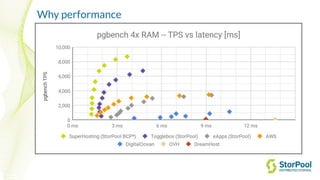
Why performance
● Better application performance -- e.g. time to load a page, time to
rebuild, time to execute specific query
● Happier customers (in cloud / multi-tenant environments)
● ROI, TCO - Lower cost per delivered resource (per VM) through
higher density
Agenda
● Hardware
● Compute - CPU & Memory
● Networking
● Storage
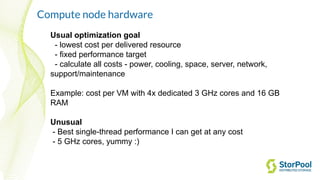
Usual optimization goal
- lowest cost per delivered resource
- fixed performance target
- calculate all costs - power, cooling, space, server, network,
support/maintenance
Example: cost per VM with 4x dedicated 3 GHz cores and 16 GB
RAM
Unusual
- Best single-thread performance I can get at any cost
- 5 GHz cores, yummy :)
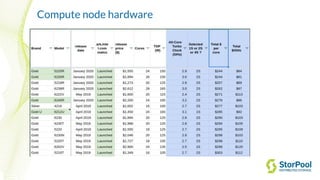
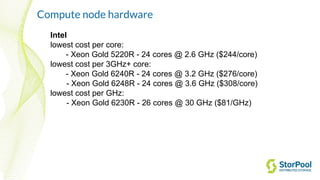
Compute node hardware
Intel
lowest cost per core:
- Xeon Gold 5220R - 24 cores @ 2.6 GHz ($244/core)
lowest cost per 3GHz+ core:
- Xeon Gold 6240R - 24 cores @ 3.2 GHz ($276/core)
- Xeon Gold 6248R - 24 cores @ 3.6 GHz ($308/core)
lowest cost per GHz:
- Xeon Gold 6230R - 26 cores @ 30 GHz ($81/GHz)
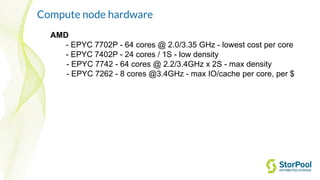
Compute node hardware
AMD
- EPYC 7702P - 64 cores @ 2.0/3.35 GHz - lowest cost per core
- EPYC 7402P - 24 cores / 1S - low density
- EPYC 7742 - 64 cores @ 2.2/3.4GHz x 2S - max density
- EPYC 7262 - 8 cores @3.4GHz - max IO/cache per core, per $
Compute node hardware
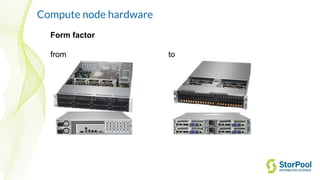
Form factor
from to
Compute node hardware
● firmware versions and BIOS settings
● Understand power management -- esp. C-states, P-states,
HWP and “bias”
○ Different on AMD EPYC: "power-deterministic",
"performance-deterministic"
● Think of rack level optimization - how do we get the lowest
total cost per delivered resource?
Agenda
● Hardware
● Compute - CPU & Memory
● Networking
● Storage
Tuning KVM
RHEL7 Virtualization_Tuning_and_Optimization_Guide link
https://pve.proxmox.com/wiki/Performance_Tweaks
https://events.static.linuxfound.org/sites/events/files/slides/CloudOpen2013_Khoa_Huynh_v3.pdf
http://www.linux-kvm.org/images/f/f9/2012-forum-virtio-blk-performance-improvement.pdf
http://www.slideshare.net/janghoonsim/kvm-performance-optimization-for-ubuntu
… but don’t trust everything you read. Perform your own benchmarking!
CPU and Memory
Recent Linux kernel, KVM and QEMU
… but beware of the bleeding edge
E.g. qemu-kvm-ev from RHEV (repackaged by CentOS)
tuned-adm virtual-host
tuned-adm virtual-guest
CPU
Typical
● (heavy) oversubscription, because VMs are mostly idling
● HT
● NUMA
● route IRQs of network and storage adapters to a core on the
NUMA node they are on
Unusual
● CPU Pinning
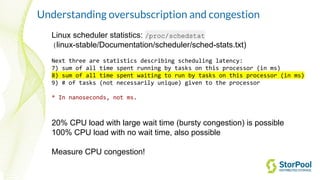
Understanding oversubscription and congestion
Linux scheduler statistics: /proc/schedstat
(linux-stable/Documentation/scheduler/sched-stats.txt)
Next three are statistics describing scheduling latency:
7) sum of all time spent running by tasks on this processor (in ms)
8) sum of all time spent waiting to run by tasks on this processor (in ms)
9) # of tasks (not necessarily unique) given to the processor
* In nanoseconds, not ms.
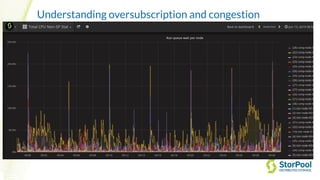
20% CPU load with large wait time (bursty congestion) is possible
100% CPU load with no wait time, also possible
Measure CPU congestion!
Understanding oversubscription and congestion
Memory
Typical
● Dedicated RAM
● huge pages, THP
● NUMA
● use local-node memory if you can
Unusual
● Oversubscribed RAM
● balloon
● KSM (RAM dedup)
Agenda
● Hardware
● Compute - CPU & Memory
● Networking
● Storage
Networking
Virtualized networking
● hardware emulation (rtl8139, e1000)
● paravirtualized drivers - virtio-net
regular virtio vs vhost-net vs vhost-user
Linux Bridge vs OVS in-kernel vs OVS-DPDK
Pass-through networking
SR-IOV (PCIe pass-through)
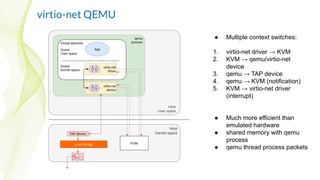
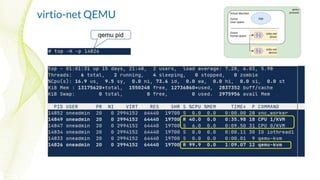
virtio-net QEMU
● Multiple context switches:
1. virtio-net driver → KVM
2. KVM → qemu/virtio-net
device
3. qemu → TAP device
4. qemu → KVM (notification)
5. KVM → virtio-net driver
(interrupt)
● Much more efficient than
emulated hardware
● shared memory with qemu
process
● qemu thread process packets
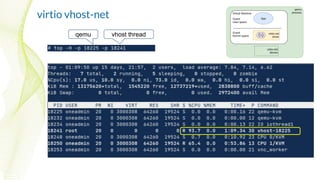
virtio vhost-net
● Two context switches
(optional):
1. virtio-net driver → KVM
2. KVM → virtio-net driver
(interrupt)
● shared memory with the host
kernel (vhost protocol)
● Allows Linux Bridge Zero
Copy
● qemu / virtio-net device is on
the control path only
● kernel thread [vhost] process
packets
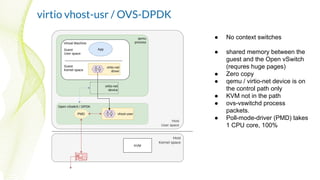
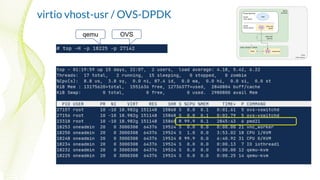
virtio vhost-usr / OVS-DPDK
● No context switches
● shared memory between the
guest and the Open vSwitch
(requres huge pages)
● Zero copy
● qemu / virtio-net device is on
the control path only
● KVM not in the path
● ovs-vswitchd process
packets.
● Poll-mode-driver (PMD) takes
1 CPU core, 100%
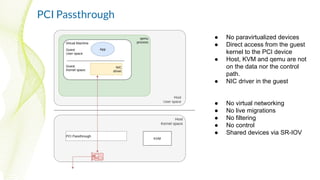
PCI Passthrough
● No paravirtualized devices
● Direct access from the guest
kernel to the PCI device
● Host, KVM and qemu are not
on the data nor the control
path.
● NIC driver in the guest
● No virtual networking
● No live migrations
● No filtering
● No control
● Shared devices via SR-IOV
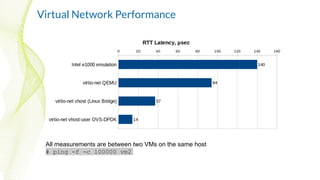
Virtual Network Performance
All measurements are between two VMs on the same host
# ping -f -c 100000 vm2
virtio-net QEMU
qemu pid
virtio vhost-net
qemu vhost thread
virtio vhost-usr / OVS-DPDK
qemu OVS
Discussion
● Deep dive into Virtio-networking and vhost-net
https://www.redhat.com/en/blog/deep-dive-virtio-networking-and-vhost-net
● Open vSwitch DPDK support
https://docs.openvswitch.org/en/latest/topics/dpdk/
Agenda
● Hardware
● Compute - CPU & Memory
● Networking
● Storage
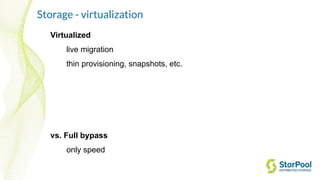
Storage - virtualization
Virtualized
live migration
thin provisioning, snapshots, etc.
vs. Full bypass
only speed
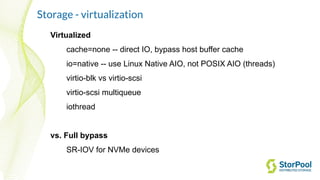
Storage - virtualization
Virtualized
cache=none -- direct IO, bypass host buffer cache
io=native -- use Linux Native AIO, not POSIX AIO (threads)
virtio-blk vs virtio-scsi
virtio-scsi multiqueue
iothread
vs. Full bypass
SR-IOV for NVMe devices
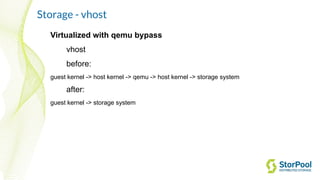
Storage - vhost
Virtualized with qemu bypass
vhost
before:
guest kernel -> host kernel -> qemu -> host kernel -> storage system
after:
guest kernel -> storage system
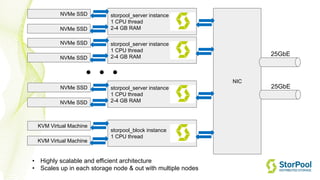
storpool_server instance
1 CPU thread
2-4 GB RAM
NIC
storpool_server instance
1 CPU thread
2-4 GB RAM
storpool_server instance
1 CPU thread
2-4 GB RAM
• Highly scalable and efficient architecture
• Scales up in each storage node & out with multiple nodes
25GbE
. . .
25GbE
storpool_block instance
1 CPU thread
NVMe SSD
NVMe SSD
NVMe SSD
NVMe SSD
NVMe SSD
NVMe SSD
KVM Virtual Machine
KVM Virtual Machine
Storage benchmarks
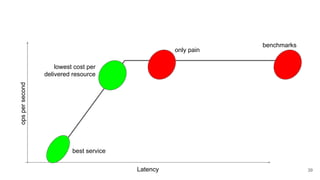
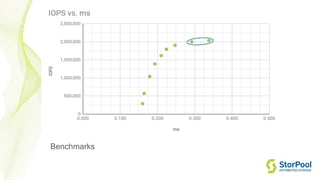
Beware: lots of snake oil out there!
● performance numbers from hardware configurations totally
unlike what you’d use in production
● synthetic tests with high iodepth - 10 nodes, 10 workloads *
iodepth 256 each. (because why not)
● testing with ramdisk backend
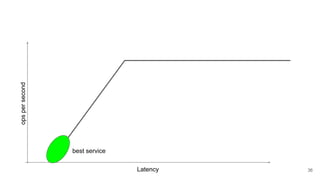
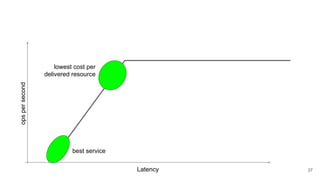
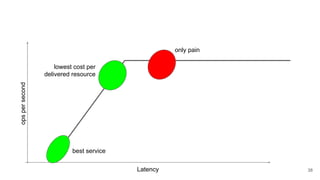
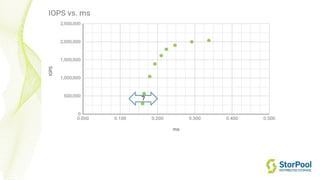
● synthetic workloads don't approximate real world (example)
Latency
opspersecond
best service
36
Latency
opspersecond
best service
lowest cost per
delivered resource
37
Latency
opspersecond
best service
lowest cost per
delivered resource
only pain
38
Latency
opspersecond
best service
lowest cost per
delivered resource
only pain
39
benchmarks
Benchmarks
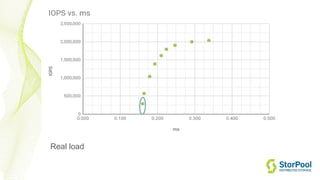
Real load
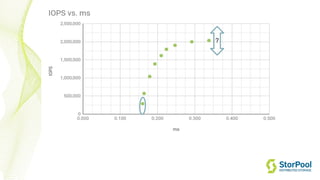
?
?
StorPool
Storage
@storpool StorPool
Storage
StorPool
Storage
StorPool
Storage
StorPool
Storage
Follow Us Online
Q&A
Venko Moyankov
venko@storpool.com
StorPool Storage
www.storpool.com
@storpool
Thank you!
Why performance

Achieving the Ultimate Performance with KVM

  • 1.
    Achieving the UltimatePerformance with KVM Venko Moyankov DevOps.com Webinar 2020-10-06
  • 2.
    about me ● SolutionsArchitect @ StorPool ● Network and System administrator ● 20+ years in telecoms building and operating infrastructures linkedin.com/in/venkomoyankov/ venko@storpool.com
  • 3.
    about StorPool ● NVMesoftware-defined storage for VMs and containers ● Scale-out, HA, API-controlled ● Since 2011, in commercial production use since 2013 ● Based in Sofia, Bulgaria ● Mostly virtual disks for KVM ● … and bare metal Linux hosts ● Also used with VMWare, Hyper-V, XenServer ● Integrations into OpenStack/Cinder, Kubernetes Persistent Volumes, CloudStack, OpenNebula, OnApp 3
  • 4.
    Why performance ● Betterapplication performance -- e.g. time to load a page, time to rebuild, time to execute specific query ● Happier customers (in cloud / multi-tenant environments) ● ROI, TCO - Lower cost per delivered resource (per VM) through higher density
  • 5.
    Agenda ● Hardware ● Compute- CPU & Memory ● Networking ● Storage
  • 6.
    Usual optimization goal -lowest cost per delivered resource - fixed performance target - calculate all costs - power, cooling, space, server, network, support/maintenance Example: cost per VM with 4x dedicated 3 GHz cores and 16 GB RAM Unusual - Best single-thread performance I can get at any cost - 5 GHz cores, yummy :) Compute node hardware
  • 7.
  • 8.
    Compute node hardware Intel lowestcost per core: - Xeon Gold 5220R - 24 cores @ 2.6 GHz ($244/core) lowest cost per 3GHz+ core: - Xeon Gold 6240R - 24 cores @ 3.2 GHz ($276/core) - Xeon Gold 6248R - 24 cores @ 3.6 GHz ($308/core) lowest cost per GHz: - Xeon Gold 6230R - 26 cores @ 30 GHz ($81/GHz)
  • 9.
    Compute node hardware AMD -EPYC 7702P - 64 cores @ 2.0/3.35 GHz - lowest cost per core - EPYC 7402P - 24 cores / 1S - low density - EPYC 7742 - 64 cores @ 2.2/3.4GHz x 2S - max density - EPYC 7262 - 8 cores @3.4GHz - max IO/cache per core, per $
  • 10.
  • 11.
    Compute node hardware ●firmware versions and BIOS settings ● Understand power management -- esp. C-states, P-states, HWP and “bias” ○ Different on AMD EPYC: "power-deterministic", "performance-deterministic" ● Think of rack level optimization - how do we get the lowest total cost per delivered resource?
  • 12.
    Agenda ● Hardware ● Compute- CPU & Memory ● Networking ● Storage
  • 13.
    Tuning KVM RHEL7 Virtualization_Tuning_and_Optimization_Guidelink https://pve.proxmox.com/wiki/Performance_Tweaks https://events.static.linuxfound.org/sites/events/files/slides/CloudOpen2013_Khoa_Huynh_v3.pdf http://www.linux-kvm.org/images/f/f9/2012-forum-virtio-blk-performance-improvement.pdf http://www.slideshare.net/janghoonsim/kvm-performance-optimization-for-ubuntu … but don’t trust everything you read. Perform your own benchmarking!
  • 14.
    CPU and Memory RecentLinux kernel, KVM and QEMU … but beware of the bleeding edge E.g. qemu-kvm-ev from RHEV (repackaged by CentOS) tuned-adm virtual-host tuned-adm virtual-guest
  • 15.
    CPU Typical ● (heavy) oversubscription,because VMs are mostly idling ● HT ● NUMA ● route IRQs of network and storage adapters to a core on the NUMA node they are on Unusual ● CPU Pinning
  • 16.
    Understanding oversubscription andcongestion Linux scheduler statistics: /proc/schedstat (linux-stable/Documentation/scheduler/sched-stats.txt) Next three are statistics describing scheduling latency: 7) sum of all time spent running by tasks on this processor (in ms) 8) sum of all time spent waiting to run by tasks on this processor (in ms) 9) # of tasks (not necessarily unique) given to the processor * In nanoseconds, not ms. 20% CPU load with large wait time (bursty congestion) is possible 100% CPU load with no wait time, also possible Measure CPU congestion!
  • 17.
  • 18.
    Memory Typical ● Dedicated RAM ●huge pages, THP ● NUMA ● use local-node memory if you can Unusual ● Oversubscribed RAM ● balloon ● KSM (RAM dedup)
  • 19.
    Agenda ● Hardware ● Compute- CPU & Memory ● Networking ● Storage
  • 20.
    Networking Virtualized networking ● hardwareemulation (rtl8139, e1000) ● paravirtualized drivers - virtio-net regular virtio vs vhost-net vs vhost-user Linux Bridge vs OVS in-kernel vs OVS-DPDK Pass-through networking SR-IOV (PCIe pass-through)
  • 21.
    virtio-net QEMU ● Multiplecontext switches: 1. virtio-net driver → KVM 2. KVM → qemu/virtio-net device 3. qemu → TAP device 4. qemu → KVM (notification) 5. KVM → virtio-net driver (interrupt) ● Much more efficient than emulated hardware ● shared memory with qemu process ● qemu thread process packets
  • 22.
    virtio vhost-net ● Twocontext switches (optional): 1. virtio-net driver → KVM 2. KVM → virtio-net driver (interrupt) ● shared memory with the host kernel (vhost protocol) ● Allows Linux Bridge Zero Copy ● qemu / virtio-net device is on the control path only ● kernel thread [vhost] process packets
  • 23.
    virtio vhost-usr /OVS-DPDK ● No context switches ● shared memory between the guest and the Open vSwitch (requres huge pages) ● Zero copy ● qemu / virtio-net device is on the control path only ● KVM not in the path ● ovs-vswitchd process packets. ● Poll-mode-driver (PMD) takes 1 CPU core, 100%
  • 24.
    PCI Passthrough ● Noparavirtualized devices ● Direct access from the guest kernel to the PCI device ● Host, KVM and qemu are not on the data nor the control path. ● NIC driver in the guest ● No virtual networking ● No live migrations ● No filtering ● No control ● Shared devices via SR-IOV
  • 25.
    Virtual Network Performance Allmeasurements are between two VMs on the same host # ping -f -c 100000 vm2
  • 26.
  • 27.
  • 28.
    virtio vhost-usr /OVS-DPDK qemu OVS
  • 29.
    Discussion ● Deep diveinto Virtio-networking and vhost-net https://www.redhat.com/en/blog/deep-dive-virtio-networking-and-vhost-net ● Open vSwitch DPDK support https://docs.openvswitch.org/en/latest/topics/dpdk/
  • 30.
    Agenda ● Hardware ● Compute- CPU & Memory ● Networking ● Storage
  • 31.
    Storage - virtualization Virtualized livemigration thin provisioning, snapshots, etc. vs. Full bypass only speed
  • 32.
    Storage - virtualization Virtualized cache=none-- direct IO, bypass host buffer cache io=native -- use Linux Native AIO, not POSIX AIO (threads) virtio-blk vs virtio-scsi virtio-scsi multiqueue iothread vs. Full bypass SR-IOV for NVMe devices
  • 33.
    Storage - vhost Virtualizedwith qemu bypass vhost before: guest kernel -> host kernel -> qemu -> host kernel -> storage system after: guest kernel -> storage system
  • 34.
    storpool_server instance 1 CPUthread 2-4 GB RAM NIC storpool_server instance 1 CPU thread 2-4 GB RAM storpool_server instance 1 CPU thread 2-4 GB RAM • Highly scalable and efficient architecture • Scales up in each storage node & out with multiple nodes 25GbE . . . 25GbE storpool_block instance 1 CPU thread NVMe SSD NVMe SSD NVMe SSD NVMe SSD NVMe SSD NVMe SSD KVM Virtual Machine KVM Virtual Machine
  • 35.
    Storage benchmarks Beware: lotsof snake oil out there! ● performance numbers from hardware configurations totally unlike what you’d use in production ● synthetic tests with high iodepth - 10 nodes, 10 workloads * iodepth 256 each. (because why not) ● testing with ramdisk backend ● synthetic workloads don't approximate real world (example)
  • 36.
  • 37.
  • 38.
    Latency opspersecond best service lowest costper delivered resource only pain 38
  • 39.
    Latency opspersecond best service lowest costper delivered resource only pain 39 benchmarks
  • 40.
  • 41.
  • 42.
  • 43.
  • 44.
  • 45.
  • 46.
  • 47.