Session 3 DHCP Network Design
TCP/IP works on four layers: Interface Internet Transport Application. The subnet mask displays only the network ID. Subnets can be created on a physical or logical basis. A secure network is one where data and resources are protected effectively. Review
Objectives Describe DHCP and its working Identify the requirements for a DHCP solution Identify DHCP design possibilities Secure the DHCP service Identify the methods to enhance the DHCP service
Dynamic Host Configuration Protocol (DHCP) Automates the allocation of: IP addresses Subnet mask Default gateway WINS server. IP address allocation takes place using four commands: DHCPDISCOVER DHCPOFFER DHCPREQUEST DHCPACK IP address allocation can be dynamic, automatic or manual IP addresses must be renewed periodically
Features of DHCP The features of DHCP are: RFC Compliance  Integration with DNS and Active Directory  Support for vendor specific options and Multicast addresses Integration of Routing and Remote Access
DHCP Design DHCP can be designed for: LAN Routed Networks Non-Microsoft Clients
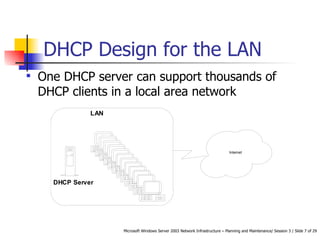
DHCP Design for the LAN One DHCP server can support thousands of DHCP clients in a local area network
DHCP Design for the LAN Contd…  In a single DHCP environment, one scope that contains the entire TCP/IP configuration required for that network, is defined for all the DHCP clients.  In a multiple DHCP environment, we may need to define one superscope that includes all the scopes.
DHCP Design for Routed Network  We have to make use of the DHCP relay agent to forward broadcast requests through the routers to the DHCP servers.  DHCP client uses the dynamic host communication protocol to communicate with the DHCP relay agent.  DHCP relay agent sends unicast packets to the DHCP server.
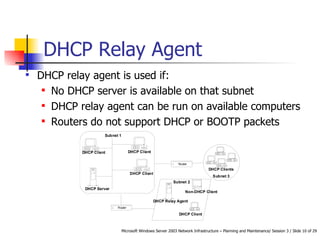
DHCP Relay Agent DHCP relay agent is used if: No DHCP server is available on that subnet  DHCP relay agent can be run on available computers  Routers do not support DHCP or BOOTP packets
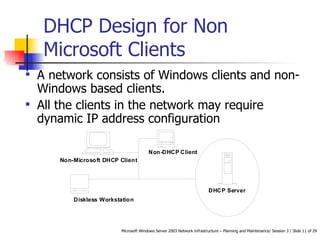
DHCP Design for Non Microsoft Clients  A network consists of Windows clients and non-Windows based clients.  All the clients in the network may require dynamic IP address configuration
DHCP Design Enhancement  To increase the availability of the DHCP server, we need to: Create superscopes on multiple DHCP servers  Enable support for Windows Server 2003 clustering solution DHCP server
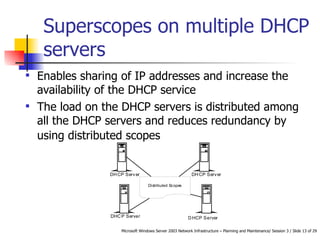
Superscopes on multiple DHCP servers Enables sharing of IP addresses and increase the availability of the DHCP service  The load on the DHCP servers is distributed among all the DHCP servers and reduces redundancy by using distributed scopes
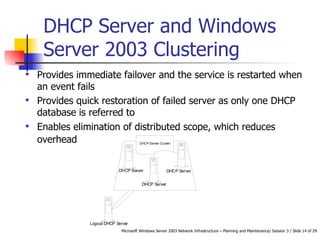
DHCP Server and Windows Server 2003 Clustering  Provides immediate failover and the service is restarted when an event fails  Provides quick restoration of failed server as only one DHCP database is referred to  Enables elimination of distributed scope, which reduces overhead
Installing DHCP Installing DHCP involves:  Installing and authorizing the DHCP service Creating and configuring the scopes to be used Setting up optional parameters Activating the scopes
DHCP Administration Security DHCP administrating can be secured by: Securing the DHCP service Identifying and stopping rogue DHCP servers Using a firewall
Securing DHCP We can provide security by: Authorizing the DHCP Server Controlling user access to the configuration files of the DHCP server
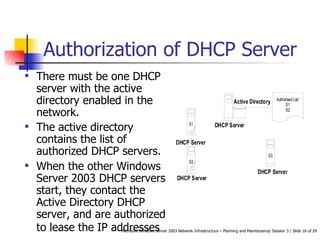
Authorization of DHCP Server There must be one DHCP server with the active directory enabled in the network.  The active directory contains the list of authorized DHCP servers.  When the other Windows Server 2003 DHCP servers start, they contact the Active Directory DHCP server, and are authorized to lease the IP addresses
Control User Access using Windows Server 2003 Groups   DHCP administrators are special group that have permissions for DHCP administration.  The DHCP Users and special local group permit Read Only access.  An authorized user can gain access to information on a DHCP server by being a member of the special group.  A user can be stopped from making any changes to the configuration
Rogue DHCP Servers  An unauthorized or rogue DHCP server may cause the network to malfunction.  Windows Server 2003 supports server authorization when DHCP service is installed.  The DHCP service is shut down if the DHCP server is not authorized
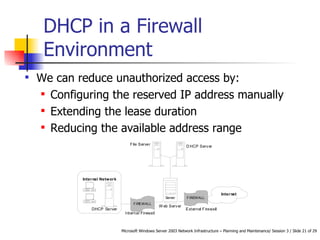
DHCP in a Firewall Environment  We can reduce unauthorized access by: Configuring the reserved IP address manually  Extending the lease duration  Reducing the available address range
DHCP Performance DHCP server performance can be increased by: Enhancing the single DHCP server’s response time Using multiple DHCP servers Modifying the DHCP lease time
Single DHCP Server We can improve the DHCP performance in Windows Server 2003 by:   Using multiple CPUs so that the DHCP service can function faster using multithreading   Enhancing the database so that the query response time can be the best possibl e We can improve the DHCP server response time by:   Adding more than one CPU   Adding enough memory   Having high performance disks   Having high bandwidth network card or many network cards
Multiple DHCP Servers   We can enhance the performance of multiple DHCP servers by: Having distributed scopes so that the address range is divided between the servers   Placing a DHCP server on the most populated subnet   Placing DHCP servers on either side of the WAN link   Having multi-homed DHCP servers so that network traffic across subnets is minimized
DHCP Server Lease Time If we reduce the lease time, the network traffic increases, though the IP address is released sooner.  If we increase the lease time, the network traffic decreases and the IP address is released later.
Summary DHCP automates allocation of IP addresses and other networking information IP address allocation uses four commands: DHCPDISCOVER DHCPOFFER DHCPREQUEST DHCPACK DHCP can be designed for LANs, Routed Networks, and non-Microsoft clients
Summary Contd… DHCP can be secured by stopping rogue servers and using firewalls One DHCP server can support thousands of DHCP clients in a local area network DHCP client uses the dynamic host communication protocol to communicate with the DHCP relay agent DHCP relay agent sends unicast packets to the DHCP server
Summary Contd… Installing DHCP involves:  Installing and authorizing the DHCP service Creating and configuring the scopes to be used Setting up optional parameters Activating the scopes DHCP administrating can be secured by: Securing the DHCP service Identifying and stopping rogue DHCP servers Using a firewall
Summary Contd… DHCP server performance can be increased by: Enhancing the single DHCP response time of the server Using multiple DHCP servers Modifying the DHCP lease time

Session 3 Tp 3

  • 1.
    Session 3 DHCPNetwork Design
  • 2.
    TCP/IP works onfour layers: Interface Internet Transport Application. The subnet mask displays only the network ID. Subnets can be created on a physical or logical basis. A secure network is one where data and resources are protected effectively. Review
  • 3.
    Objectives Describe DHCPand its working Identify the requirements for a DHCP solution Identify DHCP design possibilities Secure the DHCP service Identify the methods to enhance the DHCP service
  • 4.
    Dynamic Host ConfigurationProtocol (DHCP) Automates the allocation of: IP addresses Subnet mask Default gateway WINS server. IP address allocation takes place using four commands: DHCPDISCOVER DHCPOFFER DHCPREQUEST DHCPACK IP address allocation can be dynamic, automatic or manual IP addresses must be renewed periodically
  • 5.
    Features of DHCPThe features of DHCP are: RFC Compliance Integration with DNS and Active Directory Support for vendor specific options and Multicast addresses Integration of Routing and Remote Access
  • 6.
    DHCP Design DHCPcan be designed for: LAN Routed Networks Non-Microsoft Clients
  • 7.
    DHCP Design forthe LAN One DHCP server can support thousands of DHCP clients in a local area network
  • 8.
    DHCP Design forthe LAN Contd… In a single DHCP environment, one scope that contains the entire TCP/IP configuration required for that network, is defined for all the DHCP clients. In a multiple DHCP environment, we may need to define one superscope that includes all the scopes.
  • 9.
    DHCP Design forRouted Network We have to make use of the DHCP relay agent to forward broadcast requests through the routers to the DHCP servers. DHCP client uses the dynamic host communication protocol to communicate with the DHCP relay agent. DHCP relay agent sends unicast packets to the DHCP server.
  • 10.
    DHCP Relay AgentDHCP relay agent is used if: No DHCP server is available on that subnet DHCP relay agent can be run on available computers Routers do not support DHCP or BOOTP packets
  • 11.
    DHCP Design forNon Microsoft Clients A network consists of Windows clients and non-Windows based clients. All the clients in the network may require dynamic IP address configuration
  • 12.
    DHCP Design Enhancement To increase the availability of the DHCP server, we need to: Create superscopes on multiple DHCP servers Enable support for Windows Server 2003 clustering solution DHCP server
  • 13.
    Superscopes on multipleDHCP servers Enables sharing of IP addresses and increase the availability of the DHCP service The load on the DHCP servers is distributed among all the DHCP servers and reduces redundancy by using distributed scopes
  • 14.
    DHCP Server andWindows Server 2003 Clustering Provides immediate failover and the service is restarted when an event fails Provides quick restoration of failed server as only one DHCP database is referred to Enables elimination of distributed scope, which reduces overhead
  • 15.
    Installing DHCP InstallingDHCP involves: Installing and authorizing the DHCP service Creating and configuring the scopes to be used Setting up optional parameters Activating the scopes
  • 16.
    DHCP Administration SecurityDHCP administrating can be secured by: Securing the DHCP service Identifying and stopping rogue DHCP servers Using a firewall
  • 17.
    Securing DHCP Wecan provide security by: Authorizing the DHCP Server Controlling user access to the configuration files of the DHCP server
  • 18.
    Authorization of DHCPServer There must be one DHCP server with the active directory enabled in the network. The active directory contains the list of authorized DHCP servers. When the other Windows Server 2003 DHCP servers start, they contact the Active Directory DHCP server, and are authorized to lease the IP addresses
  • 19.
    Control User Accessusing Windows Server 2003 Groups DHCP administrators are special group that have permissions for DHCP administration. The DHCP Users and special local group permit Read Only access. An authorized user can gain access to information on a DHCP server by being a member of the special group. A user can be stopped from making any changes to the configuration
  • 20.
    Rogue DHCP Servers An unauthorized or rogue DHCP server may cause the network to malfunction. Windows Server 2003 supports server authorization when DHCP service is installed. The DHCP service is shut down if the DHCP server is not authorized
  • 21.
    DHCP in aFirewall Environment We can reduce unauthorized access by: Configuring the reserved IP address manually Extending the lease duration Reducing the available address range
  • 22.
    DHCP Performance DHCPserver performance can be increased by: Enhancing the single DHCP server’s response time Using multiple DHCP servers Modifying the DHCP lease time
  • 23.
    Single DHCP ServerWe can improve the DHCP performance in Windows Server 2003 by: Using multiple CPUs so that the DHCP service can function faster using multithreading Enhancing the database so that the query response time can be the best possibl e We can improve the DHCP server response time by: Adding more than one CPU Adding enough memory Having high performance disks Having high bandwidth network card or many network cards
  • 24.
    Multiple DHCP Servers We can enhance the performance of multiple DHCP servers by: Having distributed scopes so that the address range is divided between the servers Placing a DHCP server on the most populated subnet Placing DHCP servers on either side of the WAN link Having multi-homed DHCP servers so that network traffic across subnets is minimized
  • 25.
    DHCP Server LeaseTime If we reduce the lease time, the network traffic increases, though the IP address is released sooner. If we increase the lease time, the network traffic decreases and the IP address is released later.
  • 26.
    Summary DHCP automatesallocation of IP addresses and other networking information IP address allocation uses four commands: DHCPDISCOVER DHCPOFFER DHCPREQUEST DHCPACK DHCP can be designed for LANs, Routed Networks, and non-Microsoft clients
  • 27.
    Summary Contd… DHCPcan be secured by stopping rogue servers and using firewalls One DHCP server can support thousands of DHCP clients in a local area network DHCP client uses the dynamic host communication protocol to communicate with the DHCP relay agent DHCP relay agent sends unicast packets to the DHCP server
  • 28.
    Summary Contd… InstallingDHCP involves: Installing and authorizing the DHCP service Creating and configuring the scopes to be used Setting up optional parameters Activating the scopes DHCP administrating can be secured by: Securing the DHCP service Identifying and stopping rogue DHCP servers Using a firewall
  • 29.
    Summary Contd… DHCPserver performance can be increased by: Enhancing the single DHCP response time of the server Using multiple DHCP servers Modifying the DHCP lease time