DHCP SERVER CONFIGURATION
DHCP - INTRODUCTION
 DHCP was created by the Dynamic Host Configuration Working Group of the Internet
Engineering Task Force(IETF)
 Runs over UDP
 Utilizing ports:
 67 – connections to server
 68 – connections to client
 Used for Dynamic configuration
 Uses client–server model
 Extension of BOOTP
OBJECTIVE OF DHCP
 It temporarily binds IP address & other configuration parameters to DHCP client & provides
framework for passing configuration information to hosts
 It was designed to provide computers with temporary address
 It is well adapted to situation where hosts move from one location to another or are routinely
connected and disconnected
 Thus DHCP is mainly used to simplify the installation & maintenance of networked
computers.
CHARACTERISTICS
 Centralized IP address administration
 Backward compatible with BOOTP
 Supports multiple servers
 Provides dynamic assignment
 Allows static assignment
 Doesn’t interact with domain name service (DNS)
SOFTWARE ELEMENTS
 Client Software
 Installed in client Machines
 To handle broadcast requests
 For automatic IP acquisition and acquiring other configuration
 Server Software
 Installed in server machines
 Designated to respond to client requests for ip address
 Manage pools of IP addresses and related configuration
SOFTWARE ELEMENTS
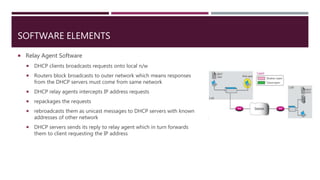
 Relay Agent Software
 DHCP clients broadcasts requests onto local n/w
 Routers block broadcasts to outer network which means responses
from the DHCP servers must come from same network
 DHCP relay agents intercepts IP address requests
 repackages the requests
 rebroadcasts them as unicast messages to DHCP servers with known
addresses of other network
 DHCP servers sends its reply to relay agent which in turn forwards
them to client requesting the IP address
DHCP SERVER INSTALLATION
BASIC DHCP CONFIGURATION
 By default, DHCP server configuration does not include any subnets on which DHCP server should lease
IP addresses.
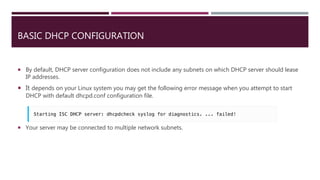
 It depends on your Linux system you may get the following error message when you attempt to start
DHCP with default dhcpd.conf configuration file.
 Your server may be connected to multiple network subnets.
BASIC DHCP CONFIGURATION
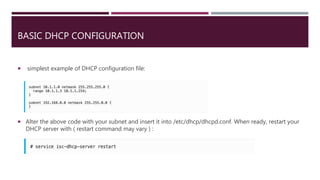
 simplest example of DHCP configuration file:
 Alter the above code with your subnet and insert it into /etc/dhcp/dhcpd.conf. When ready, restart your
DHCP server with ( restart command may vary ) :
DHCP DATABASES
 DHCP server uses 2 databases :
 One database acquires IP addresses manually and binds them permanently to hardware
addresses similar to BOOTP
 Other database contains 1 or more blocks of IP addresses (address pools) that are
dynamically assigned to clients on FCFS basis i.e. assigning on demand.
 when host no longer needs the IP address, it is released & returned
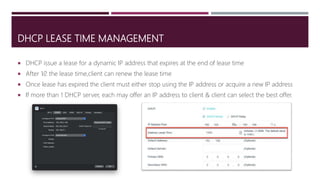
DHCP LEASE TIME MANAGEMENT
 DHCP issue a lease for a dynamic IP address that expires at the end of lease time
 After 1⁄2 the lease time,client can renew the lease time
 Once lease has expired the client must either stop using the IP address or acquire a new IP address
 If more than 1 DHCP server, each may offer an IP address to client & client can select the best offer.
3 TYPES OF ADDRESS LEASES
 Manual Lease : Network manager explicitly assigns all IP addresses
 Automatic Lease : DHCP server permanently assigns specific IP address and dynamically
assigns the rest
 Dynamic Lease : DHCP server dynamically assigns IP addresses for a specific period of time
when permanent address is not required
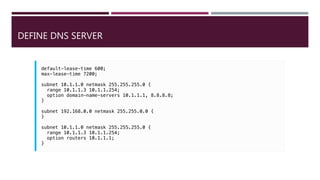
DHCP DEFAULT AND MAX LEASE TIME
 At this point we can add few additional settings to our DHCP configuration :
 Default-lease-time
 Max –lease-time
DEFINE DNS SERVER
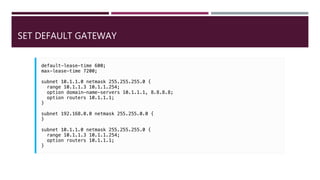
SET DEFAULT GATEWAY
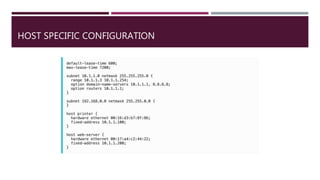
HOST SPECIFIC CONFIGURATION
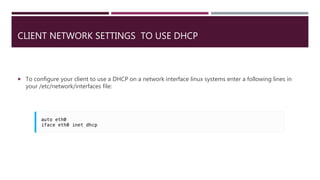
CLIENT NETWORK SETTINGS TO USE DHCP
 To configure your client to use a DHCP on a network interface linux systems enter a following lines in
your /etc/network/interfaces file:
CONFIGURING DHCP RELAY AGENT
 If your DHCP server does not have an access to some particular subnet it does not mean that it
cannot provide its services there. To make this work a DHCP relay agent needs to be configured on a
remote subnet which forwards all request to a specified DHCP server and distant subnet. First install
DHCP relay agent:
 Then create a configuration file /etc/default/isc-dhcp-relay with two lines:
 The above config file will instruct DHCP relay agent to listen on eth0 interface for a DHCP client
requests and forward them to a DHCP server on an IP address 192.168.5.5.
USAGE SCENARIOS
 There are four key DHCP usage scenarios:
 Initial Client Connection: the client requests from the DHCP server an IP address and other
parameter values for accessing network services
 IP Usage Extension: the client contacts the DHCP server to extend usage of its current IP
address
 Client Connection After Reboot: the client contacts the DHCP server for confirmation that it
can use the same IP address being used before reboot
 Client Disconnection: the client requests the DHCP server to release its IP address.
DHCP SECURITY
 DHCP is an unauthenticated protocol
 When connecting to a network, the user is not required to provide credentials in order to
obtain a lease
 Also the server is also not the authenticated one
 Malicious users with physical access to the DHCP-enabled network can start a denial-of-
service attack on DHCP servers by requesting many leases from the server, thereby
reducing the number of leases that are available to other DHCP clients
THANK YOU!

Dhcp server configuration

  • 1.
  • 2.
    DHCP - INTRODUCTION DHCP was created by the Dynamic Host Configuration Working Group of the Internet Engineering Task Force(IETF)  Runs over UDP  Utilizing ports:  67 – connections to server  68 – connections to client  Used for Dynamic configuration  Uses client–server model  Extension of BOOTP
  • 3.
    OBJECTIVE OF DHCP It temporarily binds IP address & other configuration parameters to DHCP client & provides framework for passing configuration information to hosts  It was designed to provide computers with temporary address  It is well adapted to situation where hosts move from one location to another or are routinely connected and disconnected  Thus DHCP is mainly used to simplify the installation & maintenance of networked computers.
  • 4.
    CHARACTERISTICS  Centralized IPaddress administration  Backward compatible with BOOTP  Supports multiple servers  Provides dynamic assignment  Allows static assignment  Doesn’t interact with domain name service (DNS)
  • 5.
    SOFTWARE ELEMENTS  ClientSoftware  Installed in client Machines  To handle broadcast requests  For automatic IP acquisition and acquiring other configuration  Server Software  Installed in server machines  Designated to respond to client requests for ip address  Manage pools of IP addresses and related configuration
  • 6.
    SOFTWARE ELEMENTS  RelayAgent Software  DHCP clients broadcasts requests onto local n/w  Routers block broadcasts to outer network which means responses from the DHCP servers must come from same network  DHCP relay agents intercepts IP address requests  repackages the requests  rebroadcasts them as unicast messages to DHCP servers with known addresses of other network  DHCP servers sends its reply to relay agent which in turn forwards them to client requesting the IP address
  • 7.
  • 8.
    BASIC DHCP CONFIGURATION By default, DHCP server configuration does not include any subnets on which DHCP server should lease IP addresses.  It depends on your Linux system you may get the following error message when you attempt to start DHCP with default dhcpd.conf configuration file.  Your server may be connected to multiple network subnets.
  • 9.
    BASIC DHCP CONFIGURATION simplest example of DHCP configuration file:  Alter the above code with your subnet and insert it into /etc/dhcp/dhcpd.conf. When ready, restart your DHCP server with ( restart command may vary ) :
  • 10.
    DHCP DATABASES  DHCPserver uses 2 databases :  One database acquires IP addresses manually and binds them permanently to hardware addresses similar to BOOTP  Other database contains 1 or more blocks of IP addresses (address pools) that are dynamically assigned to clients on FCFS basis i.e. assigning on demand.  when host no longer needs the IP address, it is released & returned
  • 11.
    DHCP LEASE TIMEMANAGEMENT  DHCP issue a lease for a dynamic IP address that expires at the end of lease time  After 1⁄2 the lease time,client can renew the lease time  Once lease has expired the client must either stop using the IP address or acquire a new IP address  If more than 1 DHCP server, each may offer an IP address to client & client can select the best offer.
  • 12.
    3 TYPES OFADDRESS LEASES  Manual Lease : Network manager explicitly assigns all IP addresses  Automatic Lease : DHCP server permanently assigns specific IP address and dynamically assigns the rest  Dynamic Lease : DHCP server dynamically assigns IP addresses for a specific period of time when permanent address is not required
  • 13.
    DHCP DEFAULT ANDMAX LEASE TIME  At this point we can add few additional settings to our DHCP configuration :  Default-lease-time  Max –lease-time
  • 14.
  • 15.
  • 16.
  • 17.
    CLIENT NETWORK SETTINGSTO USE DHCP  To configure your client to use a DHCP on a network interface linux systems enter a following lines in your /etc/network/interfaces file:
  • 18.
    CONFIGURING DHCP RELAYAGENT  If your DHCP server does not have an access to some particular subnet it does not mean that it cannot provide its services there. To make this work a DHCP relay agent needs to be configured on a remote subnet which forwards all request to a specified DHCP server and distant subnet. First install DHCP relay agent:  Then create a configuration file /etc/default/isc-dhcp-relay with two lines:  The above config file will instruct DHCP relay agent to listen on eth0 interface for a DHCP client requests and forward them to a DHCP server on an IP address 192.168.5.5.
  • 19.
    USAGE SCENARIOS  Thereare four key DHCP usage scenarios:  Initial Client Connection: the client requests from the DHCP server an IP address and other parameter values for accessing network services  IP Usage Extension: the client contacts the DHCP server to extend usage of its current IP address  Client Connection After Reboot: the client contacts the DHCP server for confirmation that it can use the same IP address being used before reboot  Client Disconnection: the client requests the DHCP server to release its IP address.
  • 20.
    DHCP SECURITY  DHCPis an unauthenticated protocol  When connecting to a network, the user is not required to provide credentials in order to obtain a lease  Also the server is also not the authenticated one  Malicious users with physical access to the DHCP-enabled network can start a denial-of- service attack on DHCP servers by requesting many leases from the server, thereby reducing the number of leases that are available to other DHCP clients
  • 21.