Microsoft Windows Server 2003 Network Infrastructure – Planning and Maintenance/ Session 1 / Slide 1 of 21
Session 1
Planning a Network
Service
Infrastructure
Microsoft Windows Server 2003 Network Infrastructure – Planning and Maintenance/ Session 1 / Slide 2 of 21
Objectives
 Explain Network Services Infrastructure
design
 Identify the protocols for the Network
Infrastructure design
 Identify the Data-Link layer protocol
 Discuss the Networking services
 Analyze the Organizational goals
Microsoft Windows Server 2003 Network Infrastructure – Planning and Maintenance/ Session 1 / Slide 3 of 21
Network Infrastructure
 Network Infrastructure consists of:
 Physical infrastructure: Provides the basic
design of the network
 Logical infrastructure: Consists of the
software elements that connect, maintain,
and provide security to the hosts on the
network
Microsoft Windows Server 2003 Network Infrastructure – Planning and Maintenance/ Session 1 / Slide 4 of 21
Network Services
Infrastructure Stages
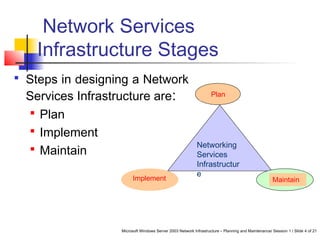
 Steps in designing a Network
Services Infrastructure are:
 Plan
 Implement
 Maintain
Networking
Services
Infrastructur
e
Implement
Plan
Maintain
Microsoft Windows Server 2003 Network Infrastructure – Planning and Maintenance/ Session 1 / Slide 5 of 21
Selecting the Protocols for the
Network
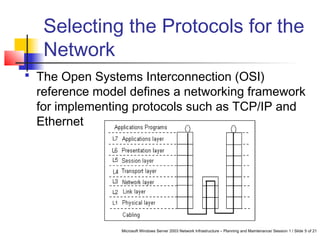
 The Open Systems Interconnection (OSI)
reference model defines a networking framework
for implementing protocols such as TCP/IP and
Ethernet
Microsoft Windows Server 2003 Network Infrastructure – Planning and Maintenance/ Session 1 / Slide 6 of 21
Selecting the Protocols for the
Network Contd…
 Physical layer (layer 1) – Specifies the signals
transmitted over the network
 Data-Link layer (layer 2) – Furnishes
transmission protocol knowledge, management and
handles errors in the Physical layer
 Network layer (layer 3) – Defines the functions
that provide communication between computers on
different networks
Microsoft Windows Server 2003 Network Infrastructure – Planning and Maintenance/ Session 1 / Slide 7 of 21
Selecting the Protocols for the
Network Contd…
 Transport layer (layer 4) – Guarantees data delivery
and ensures error detection
 Session layer (layer 5) – Establishes, maintains and
ceases connections between applications
 Presentation layer (layer 6) – Translates the
computer syntax into a readable format
 Application layer (layer 7) – Supports application
and end-user processes
Microsoft Windows Server 2003 Network Infrastructure – Planning and Maintenance/ Session 1 / Slide 8 of 21
Data-Link Layer Protocol
 We must consider the following criteria while
selecting the Data-Link layer protocol:
 Type of Media
 Transmission speed
 The most widely used Data-Link layer
protocol is the Ethernet
Microsoft Windows Server 2003 Network Infrastructure – Planning and Maintenance/ Session 1 / Slide 9 of 21
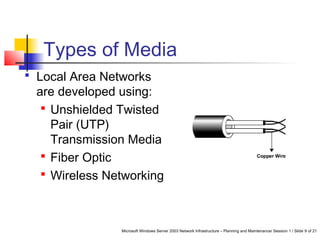
Types of Media
 Local Area Networks
are developed using:
 Unshielded Twisted
Pair (UTP)
Transmission Media
 Fiber Optic
 Wireless Networking
Microsoft Windows Server 2003 Network Infrastructure – Planning and Maintenance/ Session 1 / Slide 10 of 21
Transport Layer Protocol
 Windows Server 2003 supports three
transport layer protocols such as:
 Transmission Control Protocol/Internet
Protocol (TCP/IP)
 Internetwork Packet Exchange (IPX)
 NetBEUI
Microsoft Windows Server 2003 Network Infrastructure – Planning and Maintenance/ Session 1 / Slide 11 of 21
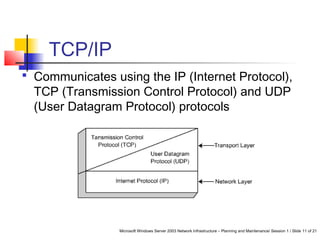
TCP/IP
 Communicates using the IP (Internet Protocol),
TCP (Transmission Control Protocol) and UDP
(User Datagram Protocol) protocols
Microsoft Windows Server 2003 Network Infrastructure – Planning and Maintenance/ Session 1 / Slide 12 of 21
IPX
 Communicates using the following
protocols:
 Sequenced Packet Exchange (SPX) –
Connection-oriented transport layer
protocol
 NetWare Core Protocol (NCP) –
Equivalent of UDP
Microsoft Windows Server 2003 Network Infrastructure – Planning and Maintenance/ Session 1 / Slide 13 of 21
NetBEUI
 Uses the NetBIOS namespace to
identify computers on the network
 We can install the NetBEUI on Windows
Server 2003 computer using the
installation files to check network
communication problems.
Microsoft Windows Server 2003 Network Infrastructure – Planning and Maintenance/ Session 1 / Slide 14 of 21
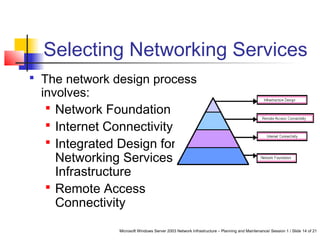
Selecting Networking Services
 The network design process
involves:
 Network Foundation
 Internet Connectivity
 Integrated Design for
Networking Services
Infrastructure
 Remote Access
Connectivity
Microsoft Windows Server 2003 Network Infrastructure – Planning and Maintenance/ Session 1 / Slide 15 of 21
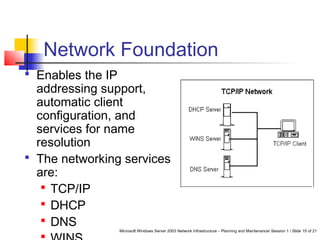
Network Foundation
 Enables the IP
addressing support,
automatic client
configuration, and
services for name
resolution
 The networking services
are:
 TCP/IP
 DHCP
 DNS
Microsoft Windows Server 2003 Network Infrastructure – Planning and Maintenance/ Session 1 / Slide 16 of 21
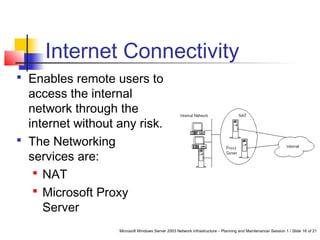
Internet Connectivity
 Enables remote users to
access the internal
network through the
internet without any risk.
 The Networking
services are:
 NAT
 Microsoft Proxy
Server
Microsoft Windows Server 2003 Network Infrastructure – Planning and Maintenance/ Session 1 / Slide 17 of 21
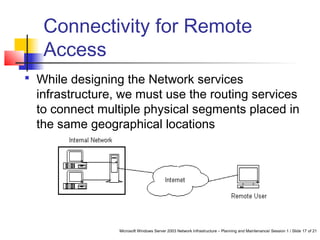
Connectivity for Remote
Access
 While designing the Network services
infrastructure, we must use the routing services
to connect multiple physical segments placed in
the same geographical locations
Microsoft Windows Server 2003 Network Infrastructure – Planning and Maintenance/ Session 1 / Slide 18 of 21
Infrastructure design
 We must provide the required networking
solution to the organization through:
 Management Strategy Design
 Combination of services
 Organizational Network solution
Microsoft Windows Server 2003 Network Infrastructure – Planning and Maintenance/ Session 1 / Slide 19 of 21
Analyzing Organizational
Goals
 While designing the network services
infrastructure we must take the following points
into consideration:
 Functionality
 Security
 Availability
 Performance
Microsoft Windows Server 2003 Network Infrastructure – Planning and Maintenance/ Session 1 / Slide 20 of 21
Summary
 Network Services Infrastructure design depends on the
execution of three phases:
 Plan
 Implement
 Maintain
 The design process involves:
 Network Foundation
 Internet Connectivity
 Remote Access Connectivity
 Infrastructure design
Microsoft Windows Server 2003 Network Infrastructure – Planning and Maintenance/ Session 1 / Slide 21 of 21
Summary Contd…
 A Network Infrastructure is made up of the Physical and
the Logical infrastructure
 The Open Systems Interconnection (OSI) reference
model defines a networking framework for implementing
protocols
 The Data-Link layer protocol is one of the main decisions
to be taken while designing the network infrastructure
 Common network services include TCP/IP, DHCP, DNS,
and WINS
 Remote Access Connectivity can be achieved through IP
Routing, Routing and Remote Access, and RADIUS

Session 1 Tp 1

  • 1.
    Microsoft Windows Server2003 Network Infrastructure – Planning and Maintenance/ Session 1 / Slide 1 of 21 Session 1 Planning a Network Service Infrastructure
  • 2.
    Microsoft Windows Server2003 Network Infrastructure – Planning and Maintenance/ Session 1 / Slide 2 of 21 Objectives  Explain Network Services Infrastructure design  Identify the protocols for the Network Infrastructure design  Identify the Data-Link layer protocol  Discuss the Networking services  Analyze the Organizational goals
  • 3.
    Microsoft Windows Server2003 Network Infrastructure – Planning and Maintenance/ Session 1 / Slide 3 of 21 Network Infrastructure  Network Infrastructure consists of:  Physical infrastructure: Provides the basic design of the network  Logical infrastructure: Consists of the software elements that connect, maintain, and provide security to the hosts on the network
  • 4.
    Microsoft Windows Server2003 Network Infrastructure – Planning and Maintenance/ Session 1 / Slide 4 of 21 Network Services Infrastructure Stages  Steps in designing a Network Services Infrastructure are:  Plan  Implement  Maintain Networking Services Infrastructur e Implement Plan Maintain
  • 5.
    Microsoft Windows Server2003 Network Infrastructure – Planning and Maintenance/ Session 1 / Slide 5 of 21 Selecting the Protocols for the Network  The Open Systems Interconnection (OSI) reference model defines a networking framework for implementing protocols such as TCP/IP and Ethernet
  • 6.
    Microsoft Windows Server2003 Network Infrastructure – Planning and Maintenance/ Session 1 / Slide 6 of 21 Selecting the Protocols for the Network Contd…  Physical layer (layer 1) – Specifies the signals transmitted over the network  Data-Link layer (layer 2) – Furnishes transmission protocol knowledge, management and handles errors in the Physical layer  Network layer (layer 3) – Defines the functions that provide communication between computers on different networks
  • 7.
    Microsoft Windows Server2003 Network Infrastructure – Planning and Maintenance/ Session 1 / Slide 7 of 21 Selecting the Protocols for the Network Contd…  Transport layer (layer 4) – Guarantees data delivery and ensures error detection  Session layer (layer 5) – Establishes, maintains and ceases connections between applications  Presentation layer (layer 6) – Translates the computer syntax into a readable format  Application layer (layer 7) – Supports application and end-user processes
  • 8.
    Microsoft Windows Server2003 Network Infrastructure – Planning and Maintenance/ Session 1 / Slide 8 of 21 Data-Link Layer Protocol  We must consider the following criteria while selecting the Data-Link layer protocol:  Type of Media  Transmission speed  The most widely used Data-Link layer protocol is the Ethernet
  • 9.
    Microsoft Windows Server2003 Network Infrastructure – Planning and Maintenance/ Session 1 / Slide 9 of 21 Types of Media  Local Area Networks are developed using:  Unshielded Twisted Pair (UTP) Transmission Media  Fiber Optic  Wireless Networking
  • 10.
    Microsoft Windows Server2003 Network Infrastructure – Planning and Maintenance/ Session 1 / Slide 10 of 21 Transport Layer Protocol  Windows Server 2003 supports three transport layer protocols such as:  Transmission Control Protocol/Internet Protocol (TCP/IP)  Internetwork Packet Exchange (IPX)  NetBEUI
  • 11.
    Microsoft Windows Server2003 Network Infrastructure – Planning and Maintenance/ Session 1 / Slide 11 of 21 TCP/IP  Communicates using the IP (Internet Protocol), TCP (Transmission Control Protocol) and UDP (User Datagram Protocol) protocols
  • 12.
    Microsoft Windows Server2003 Network Infrastructure – Planning and Maintenance/ Session 1 / Slide 12 of 21 IPX  Communicates using the following protocols:  Sequenced Packet Exchange (SPX) – Connection-oriented transport layer protocol  NetWare Core Protocol (NCP) – Equivalent of UDP
  • 13.
    Microsoft Windows Server2003 Network Infrastructure – Planning and Maintenance/ Session 1 / Slide 13 of 21 NetBEUI  Uses the NetBIOS namespace to identify computers on the network  We can install the NetBEUI on Windows Server 2003 computer using the installation files to check network communication problems.
  • 14.
    Microsoft Windows Server2003 Network Infrastructure – Planning and Maintenance/ Session 1 / Slide 14 of 21 Selecting Networking Services  The network design process involves:  Network Foundation  Internet Connectivity  Integrated Design for Networking Services Infrastructure  Remote Access Connectivity
  • 15.
    Microsoft Windows Server2003 Network Infrastructure – Planning and Maintenance/ Session 1 / Slide 15 of 21 Network Foundation  Enables the IP addressing support, automatic client configuration, and services for name resolution  The networking services are:  TCP/IP  DHCP  DNS
  • 16.
    Microsoft Windows Server2003 Network Infrastructure – Planning and Maintenance/ Session 1 / Slide 16 of 21 Internet Connectivity  Enables remote users to access the internal network through the internet without any risk.  The Networking services are:  NAT  Microsoft Proxy Server
  • 17.
    Microsoft Windows Server2003 Network Infrastructure – Planning and Maintenance/ Session 1 / Slide 17 of 21 Connectivity for Remote Access  While designing the Network services infrastructure, we must use the routing services to connect multiple physical segments placed in the same geographical locations
  • 18.
    Microsoft Windows Server2003 Network Infrastructure – Planning and Maintenance/ Session 1 / Slide 18 of 21 Infrastructure design  We must provide the required networking solution to the organization through:  Management Strategy Design  Combination of services  Organizational Network solution
  • 19.
    Microsoft Windows Server2003 Network Infrastructure – Planning and Maintenance/ Session 1 / Slide 19 of 21 Analyzing Organizational Goals  While designing the network services infrastructure we must take the following points into consideration:  Functionality  Security  Availability  Performance
  • 20.
    Microsoft Windows Server2003 Network Infrastructure – Planning and Maintenance/ Session 1 / Slide 20 of 21 Summary  Network Services Infrastructure design depends on the execution of three phases:  Plan  Implement  Maintain  The design process involves:  Network Foundation  Internet Connectivity  Remote Access Connectivity  Infrastructure design
  • 21.
    Microsoft Windows Server2003 Network Infrastructure – Planning and Maintenance/ Session 1 / Slide 21 of 21 Summary Contd…  A Network Infrastructure is made up of the Physical and the Logical infrastructure  The Open Systems Interconnection (OSI) reference model defines a networking framework for implementing protocols  The Data-Link layer protocol is one of the main decisions to be taken while designing the network infrastructure  Common network services include TCP/IP, DHCP, DNS, and WINS  Remote Access Connectivity can be achieved through IP Routing, Routing and Remote Access, and RADIUS