Microsoft Windows Server 2003 Network Infrastructure – Planning and Maintenance/ Session 9 / Slide 1 of 38
Session 9
Planning a Secure
Baseline Installation
Microsoft Windows Server 2003 Network Infrastructure – Planning and Maintenance/ Session 9 / Slide 2 of 38
 Windows Server 2003 provides two tools to
analyze the server performance:
 Performance Console
 Network Monitor
 The types of counter logs are:
 trace
 counter
 Alert
Review
Microsoft Windows Server 2003 Network Infrastructure – Planning and Maintenance/ Session 9 / Slide 3 of 38
Review Contd…
 Two filters provided by the Network monitor are
 Capture Filter
 Display Filter
 Network services are applications that always run in the
background
 Four services that enable us to monitor the network
server are:
 DHCP
 DNS
 WINS
 Routing and Remote Access
Microsoft Windows Server 2003 Network Infrastructure – Planning and Maintenance/ Session 9 / Slide 4 of 38
Review Contd…
 DNS server hosts the information that enables
client computers to resolve memorable,
alphanumeric DNS names to the IP addresses that
computers use to communicate with each other
 WINS uses a distributed database that is
automatically updated with the names of computers
currently available and the IP address assigned to
each one
Microsoft Windows Server 2003 Network Infrastructure – Planning and Maintenance/ Session 9 / Slide 5 of 38
Objectives
 Select Computers on a Network
 Select Operating System in Network
 Discuss security issues
 Set permissions
 Work with Group Policy Object
 Explain domain controller
 Secure servers
Microsoft Windows Server 2003 Network Infrastructure – Planning and Maintenance/ Session 9 / Slide 6 of 38
Selecting Computers in a
Network
 Each machine in a network performs a certain
role
 Standardizing the hardware and software
depending on the roles of computer in the network
enables:
 Administration of several computers manageable in a
network
 Easier to troubleshoot the network
 Computers in a network are classified as:
 Server
 Desktop Workstation
 Portable Workstation
Microsoft Windows Server 2003 Network Infrastructure – Planning and Maintenance/ Session 9 / Slide 7 of 38
Server
 Server is a centralized computer in a network which
performs different roles on a network
 Server is a computer having a faster processor,
larger memory size, and hard disk space
 Depending on the roles servers on a network are
classified as follows:
 Backup server
 Database server
 Domain Controller
 Web server
 E-mail server
 File and Print server
 Infrastructure server
Microsoft Windows Server 2003 Network Infrastructure – Planning and Maintenance/ Session 9 / Slide 8 of 38
Hardware Specifications for
the Server
 Depends on the requirements and capabilities of
the applications that will be running on the server
 Computers designed to be a server usually have
more robust power supplies than personal
computers or workstations
Microsoft Windows Server 2003 Network Infrastructure – Planning and Maintenance/ Session 9 / Slide 9 of 38
Desktop
 Desktop workstation can have a wide range of
roles ranging from simple systems designed to
run one or two small applications to high-
powered computers performing complex
graphics, video and computer-aided functions
 Workstation may work without CD-ROM and
floppy disk drives. Such workstation cannot
install their own applications.
Microsoft Windows Server 2003 Network Infrastructure – Planning and Maintenance/ Session 9 / Slide 10 of 38
Hardware Specifications for
the Desktop
 While designing the hardware
specifications for a desktop workstation,
the objective is to create hardware
specifications suitable for a wide variety
of jobs
Microsoft Windows Server 2003 Network Infrastructure – Planning and Maintenance/ Session 9 / Slide 11 of 38
Selecting Operating System
 While selecting the operating system in a
network, we must match up it with the hardware
specifications
 Some of the important factors are as follows:
 Application Compatibility
 Support issues
 Security features
 Cost
Microsoft Windows Server 2003 Network Infrastructure – Planning and Maintenance/ Session 9 / Slide 12 of 38
Security Design Team
 Security team must be a well balanced team consisting
of people from technical, management, and financial
backgrounds
 Security team should consider the following issues:
 Identifying the most valuable resources
 Identifying danger to the resources
 Significant resources
 Analyzing different security resources available
 Deciding the security features
 Impact of the security features on the administrator, managers,
and the users
Microsoft Windows Server 2003 Network Infrastructure – Planning and Maintenance/ Session 9 / Slide 13 of 38
Security Life Cycle
 The security life cycle consists of the following:
 Security Infrastructure
 Access Control
 Auditing
 Authentication
 Encryption
 Firewalls
 Implementation of security features
 Security Management
Microsoft Windows Server 2003 Network Infrastructure – Planning and Maintenance/ Session 9 / Slide 14 of 38
Managing Security
 Managing the security in a network is
continuous process
 Network must after a certain period of time the
network according to the latest technology
available
 Administrator must monitor the user accounts
 Network traffics must be maintained
 If several users on a network try to access the
network, sometimes the network may crash due
to heavy traffic
Microsoft Windows Server 2003 Network Infrastructure – Planning and Maintenance/ Session 9 / Slide 15 of 38
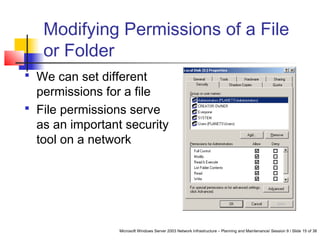
Modifying Permissions of a File
or Folder
 We can set different
permissions for a file
 File permissions serve
as an important security
tool on a network
Microsoft Windows Server 2003 Network Infrastructure – Planning and Maintenance/ Session 9 / Slide 16 of 38
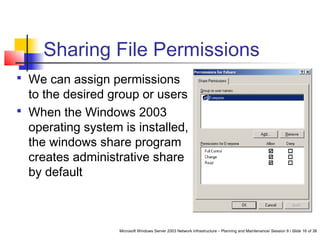
Sharing File Permissions
 We can assign permissions
to the desired group or users
 When the Windows 2003
operating system is installed,
the windows share program
creates administrative share
by default
Microsoft Windows Server 2003 Network Infrastructure – Planning and Maintenance/ Session 9 / Slide 17 of 38
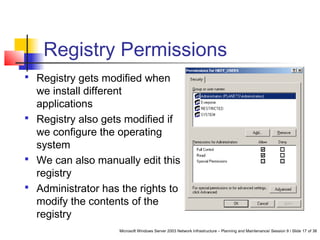
Registry Permissions
 Registry gets modified when
we install different
applications
 Registry also gets modified if
we configure the operating
system
 We can also manually edit this
registry
 Administrator has the rights to
modify the contents of the
registry
Microsoft Windows Server 2003 Network Infrastructure – Planning and Maintenance/ Session 9 / Slide 18 of 38
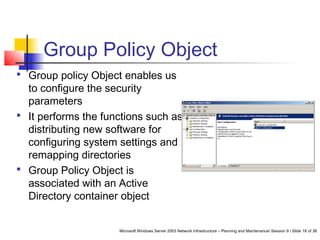
Group Policy Object
 Group policy Object enables us
to configure the security
parameters
 It performs the functions such as
distributing new software for
configuring system settings and
remapping directories
 Group Policy Object is
associated with an Active
Directory container object
Microsoft Windows Server 2003 Network Infrastructure – Planning and Maintenance/ Session 9 / Slide 19 of 38
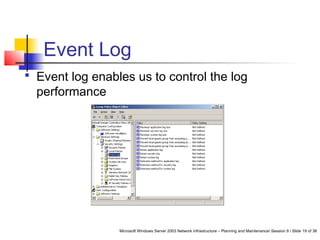
Event Log
 Event log enables us to control the log
performance
Microsoft Windows Server 2003 Network Infrastructure – Planning and Maintenance/ Session 9 / Slide 20 of 38
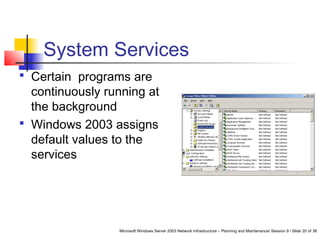
System Services
 Certain programs are
continuously running at
the background
 Windows 2003 assigns
default values to the
services
 
Microsoft Windows Server 2003 Network Infrastructure – Planning and Maintenance/ Session 9 / Slide 21 of 38
Domain Controller
 Requires more security, as the failure of domain
controller may be a disaster to the network
 Performs the following functions:
 Provides authentication
 Stores group policies
 Distributes group policies
 To provide security these domain controllers must be in
a secured location
 We must provide a password for domain controller, so
that unauthorized users will not get access to the domain
controller
Microsoft Windows Server 2003 Network Infrastructure – Planning and Maintenance/ Session 9 / Slide 22 of 38
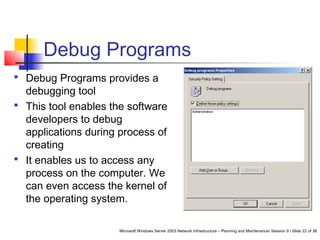
Debug Programs
 Debug Programs provides a
debugging tool
 This tool enables the software
developers to debug
applications during process of
creating
 It enables us to access any
process on the computer. We
can even access the kernel of
the operating system.
Microsoft Windows Server 2003 Network Infrastructure – Planning and Maintenance/ Session 9 / Slide 23 of 38
Services for a Domain
Controller
 Domain controller requires additional
services along with the member services
 These services are as follows:
 Distributed file system
 File replication service
 Intersite messaging
 Kerberos key distribution center
 Remote procedure call locator
Microsoft Windows Server 2003 Network Infrastructure – Planning and Maintenance/ Session 9 / Slide 24 of 38
Adding Workstations to the
Domain
 Authenticated users have the rights to add
computers to the domain up to 10 ten
computers to an Active Directory
Microsoft Windows Server 2003 Network Infrastructure – Planning and Maintenance/ Session 9 / Slide 25 of 38
Allow Log On Locally
 Facilitates users and groups to log on
the computer from the console
 Users having this right also have the
right to access some of the important
operating system elements
Microsoft Windows Server 2003 Network Infrastructure – Planning and Maintenance/ Session 9 / Slide 26 of 38
Shut Down the Domain
Controller
 It is necessary to carefully shut down the
system as this would affect the systems over
the network
 Default Domain Controller grants this right to
the following groups:
 Administrators
 Backup operators
 Print operators
 Server operators
Microsoft Windows Server 2003 Network Infrastructure – Planning and Maintenance/ Session 9 / Slide 27 of 38
Securing Infrastructure
Servers
 Infrastructure servers are the computers that run
network support services such as, DNS, DHCP, and
Windows Internet Name Service.
 Services that we must include using the automatic
startup type are as follow:
 DHCP server
 DNS server
 NT LM security support provider
 Windows internet name service
Microsoft Windows Server 2003 Network Infrastructure – Planning and Maintenance/ Session 9 / Slide 28 of 38
Configuring DNS Security
 DHCP servers centrally manage IP
addresses and related information and
provide it to clients automatically
 If you want this computer to distribute IP
addresses to clients, then configure this
computer as a DHCP server
Microsoft Windows Server 2003 Network Infrastructure – Planning and Maintenance/ Session 9 / Slide 29 of 38
Protecting Active Directory-
Integrated DNS
 When we create Active Directory-
integrated zones on the DNS server, the
zone database is stored as part of the
Active Directory database
 Groups such as, DnsAdmins, Domain
Admins, and Enterprise Admins groups
have full permission for the MicrosoftDNS
container
Microsoft Windows Server 2003 Network Infrastructure – Planning and Maintenance/ Session 9 / Slide 30 of 38
Protecting DNS Database
Files
 Active Directory does not have all the DNS
zones integrated. For such DNS zones the
zone databases are simple text files.
 System creates DNS logs files
 There are no file system permissions to
maintain the DNS zone databases using the
DNS zone databases using the DNS console
or for accessing DNS server information
using a client
Microsoft Windows Server 2003 Network Infrastructure – Planning and Maintenance/ Session 9 / Slide 31 of 38
Configuring DHCP Security
 Several techniques can be used against
denial of service attacks, they are as
follows:
 Use the 80/20 address allocation method
 Create a DHCP server cluster
Microsoft Windows Server 2003 Network Infrastructure – Planning and Maintenance/ Session 9 / Slide 32 of 38
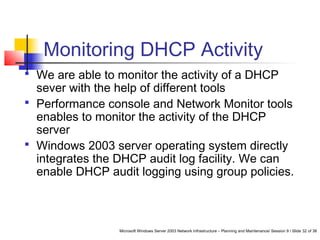
Monitoring DHCP Activity
 We are able to monitor the activity of a DHCP
sever with the help of different tools
 Performance console and Network Monitor tools
enables to monitor the activity of the DHCP
server
 Windows 2003 server operating system directly
integrates the DHCP audit log facility. We can
enable DHCP audit logging using group policies.
Microsoft Windows Server 2003 Network Infrastructure – Planning and Maintenance/ Session 9 / Slide 33 of 38
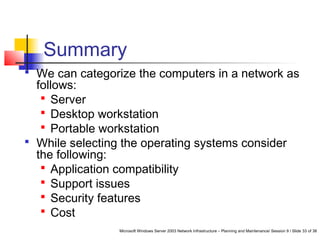
Summary
 We can categorize the computers in a network as
follows:
 Server
 Desktop workstation
 Portable workstation
 While selecting the operating systems consider
the following:
 Application compatibility
 Support issues
 Security features
 Cost
Microsoft Windows Server 2003 Network Infrastructure – Planning and Maintenance/ Session 9 / Slide 34 of 38
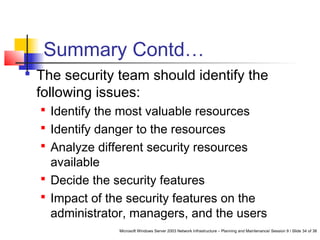
Summary Contd…
 The security team should identify the
following issues:
 Identify the most valuable resources
 Identify danger to the resources
 Analyze different security resources
available
 Decide the security features
 Impact of the security features on the
administrator, managers, and the users
Microsoft Windows Server 2003 Network Infrastructure – Planning and Maintenance/ Session 9 / Slide 35 of 38
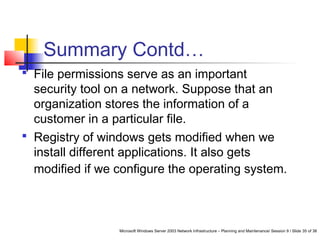
Summary Contd…
 File permissions serve as an important
security tool on a network. Suppose that an
organization stores the information of a
customer in a particular file.
 Registry of windows gets modified when we
install different applications. It also gets
modified if we configure the operating system.
Microsoft Windows Server 2003 Network Infrastructure – Planning and Maintenance/ Session 9 / Slide 36 of 38
Summary Contd…
 Group policy Object enables us to configure
the security parameters
 We can configure the Windows Server 2003
operating system to audit the events
 Active directory permission enables us to
modify the permissions for accessing and
managing objects in the Active Directory
database
Microsoft Windows Server 2003 Network Infrastructure – Planning and Maintenance/ Session 9 / Slide 37 of 38
Summary Contd…
 Most important server on the windows 2003
server operating system using the active
Directory is the domain controllers
 Domain controller requires more security, as
the failure of domain controller may be a
disaster to the network
Microsoft Windows Server 2003 Network Infrastructure – Planning and Maintenance/ Session 9 / Slide 38 of 38
Summary Contd…
 Authenticated users have the rights to add
computers to the domain. They can add up to
10 ten computers to an Active Directory
 Infrastructure servers are the computers that
run network support services such as, DNS,
DHCP, and Windows Internet Name Service

Session 9 Tp 9

  • 1.
    Microsoft Windows Server2003 Network Infrastructure – Planning and Maintenance/ Session 9 / Slide 1 of 38 Session 9 Planning a Secure Baseline Installation
  • 2.
    Microsoft Windows Server2003 Network Infrastructure – Planning and Maintenance/ Session 9 / Slide 2 of 38  Windows Server 2003 provides two tools to analyze the server performance:  Performance Console  Network Monitor  The types of counter logs are:  trace  counter  Alert Review
  • 3.
    Microsoft Windows Server2003 Network Infrastructure – Planning and Maintenance/ Session 9 / Slide 3 of 38 Review Contd…  Two filters provided by the Network monitor are  Capture Filter  Display Filter  Network services are applications that always run in the background  Four services that enable us to monitor the network server are:  DHCP  DNS  WINS  Routing and Remote Access
  • 4.
    Microsoft Windows Server2003 Network Infrastructure – Planning and Maintenance/ Session 9 / Slide 4 of 38 Review Contd…  DNS server hosts the information that enables client computers to resolve memorable, alphanumeric DNS names to the IP addresses that computers use to communicate with each other  WINS uses a distributed database that is automatically updated with the names of computers currently available and the IP address assigned to each one
  • 5.
    Microsoft Windows Server2003 Network Infrastructure – Planning and Maintenance/ Session 9 / Slide 5 of 38 Objectives  Select Computers on a Network  Select Operating System in Network  Discuss security issues  Set permissions  Work with Group Policy Object  Explain domain controller  Secure servers
  • 6.
    Microsoft Windows Server2003 Network Infrastructure – Planning and Maintenance/ Session 9 / Slide 6 of 38 Selecting Computers in a Network  Each machine in a network performs a certain role  Standardizing the hardware and software depending on the roles of computer in the network enables:  Administration of several computers manageable in a network  Easier to troubleshoot the network  Computers in a network are classified as:  Server  Desktop Workstation  Portable Workstation
  • 7.
    Microsoft Windows Server2003 Network Infrastructure – Planning and Maintenance/ Session 9 / Slide 7 of 38 Server  Server is a centralized computer in a network which performs different roles on a network  Server is a computer having a faster processor, larger memory size, and hard disk space  Depending on the roles servers on a network are classified as follows:  Backup server  Database server  Domain Controller  Web server  E-mail server  File and Print server  Infrastructure server
  • 8.
    Microsoft Windows Server2003 Network Infrastructure – Planning and Maintenance/ Session 9 / Slide 8 of 38 Hardware Specifications for the Server  Depends on the requirements and capabilities of the applications that will be running on the server  Computers designed to be a server usually have more robust power supplies than personal computers or workstations
  • 9.
    Microsoft Windows Server2003 Network Infrastructure – Planning and Maintenance/ Session 9 / Slide 9 of 38 Desktop  Desktop workstation can have a wide range of roles ranging from simple systems designed to run one or two small applications to high- powered computers performing complex graphics, video and computer-aided functions  Workstation may work without CD-ROM and floppy disk drives. Such workstation cannot install their own applications.
  • 10.
    Microsoft Windows Server2003 Network Infrastructure – Planning and Maintenance/ Session 9 / Slide 10 of 38 Hardware Specifications for the Desktop  While designing the hardware specifications for a desktop workstation, the objective is to create hardware specifications suitable for a wide variety of jobs
  • 11.
    Microsoft Windows Server2003 Network Infrastructure – Planning and Maintenance/ Session 9 / Slide 11 of 38 Selecting Operating System  While selecting the operating system in a network, we must match up it with the hardware specifications  Some of the important factors are as follows:  Application Compatibility  Support issues  Security features  Cost
  • 12.
    Microsoft Windows Server2003 Network Infrastructure – Planning and Maintenance/ Session 9 / Slide 12 of 38 Security Design Team  Security team must be a well balanced team consisting of people from technical, management, and financial backgrounds  Security team should consider the following issues:  Identifying the most valuable resources  Identifying danger to the resources  Significant resources  Analyzing different security resources available  Deciding the security features  Impact of the security features on the administrator, managers, and the users
  • 13.
    Microsoft Windows Server2003 Network Infrastructure – Planning and Maintenance/ Session 9 / Slide 13 of 38 Security Life Cycle  The security life cycle consists of the following:  Security Infrastructure  Access Control  Auditing  Authentication  Encryption  Firewalls  Implementation of security features  Security Management
  • 14.
    Microsoft Windows Server2003 Network Infrastructure – Planning and Maintenance/ Session 9 / Slide 14 of 38 Managing Security  Managing the security in a network is continuous process  Network must after a certain period of time the network according to the latest technology available  Administrator must monitor the user accounts  Network traffics must be maintained  If several users on a network try to access the network, sometimes the network may crash due to heavy traffic
  • 15.
    Microsoft Windows Server2003 Network Infrastructure – Planning and Maintenance/ Session 9 / Slide 15 of 38 Modifying Permissions of a File or Folder  We can set different permissions for a file  File permissions serve as an important security tool on a network
  • 16.
    Microsoft Windows Server2003 Network Infrastructure – Planning and Maintenance/ Session 9 / Slide 16 of 38 Sharing File Permissions  We can assign permissions to the desired group or users  When the Windows 2003 operating system is installed, the windows share program creates administrative share by default
  • 17.
    Microsoft Windows Server2003 Network Infrastructure – Planning and Maintenance/ Session 9 / Slide 17 of 38 Registry Permissions  Registry gets modified when we install different applications  Registry also gets modified if we configure the operating system  We can also manually edit this registry  Administrator has the rights to modify the contents of the registry
  • 18.
    Microsoft Windows Server2003 Network Infrastructure – Planning and Maintenance/ Session 9 / Slide 18 of 38 Group Policy Object  Group policy Object enables us to configure the security parameters  It performs the functions such as distributing new software for configuring system settings and remapping directories  Group Policy Object is associated with an Active Directory container object
  • 19.
    Microsoft Windows Server2003 Network Infrastructure – Planning and Maintenance/ Session 9 / Slide 19 of 38 Event Log  Event log enables us to control the log performance
  • 20.
    Microsoft Windows Server2003 Network Infrastructure – Planning and Maintenance/ Session 9 / Slide 20 of 38 System Services  Certain programs are continuously running at the background  Windows 2003 assigns default values to the services  
  • 21.
    Microsoft Windows Server2003 Network Infrastructure – Planning and Maintenance/ Session 9 / Slide 21 of 38 Domain Controller  Requires more security, as the failure of domain controller may be a disaster to the network  Performs the following functions:  Provides authentication  Stores group policies  Distributes group policies  To provide security these domain controllers must be in a secured location  We must provide a password for domain controller, so that unauthorized users will not get access to the domain controller
  • 22.
    Microsoft Windows Server2003 Network Infrastructure – Planning and Maintenance/ Session 9 / Slide 22 of 38 Debug Programs  Debug Programs provides a debugging tool  This tool enables the software developers to debug applications during process of creating  It enables us to access any process on the computer. We can even access the kernel of the operating system.
  • 23.
    Microsoft Windows Server2003 Network Infrastructure – Planning and Maintenance/ Session 9 / Slide 23 of 38 Services for a Domain Controller  Domain controller requires additional services along with the member services  These services are as follows:  Distributed file system  File replication service  Intersite messaging  Kerberos key distribution center  Remote procedure call locator
  • 24.
    Microsoft Windows Server2003 Network Infrastructure – Planning and Maintenance/ Session 9 / Slide 24 of 38 Adding Workstations to the Domain  Authenticated users have the rights to add computers to the domain up to 10 ten computers to an Active Directory
  • 25.
    Microsoft Windows Server2003 Network Infrastructure – Planning and Maintenance/ Session 9 / Slide 25 of 38 Allow Log On Locally  Facilitates users and groups to log on the computer from the console  Users having this right also have the right to access some of the important operating system elements
  • 26.
    Microsoft Windows Server2003 Network Infrastructure – Planning and Maintenance/ Session 9 / Slide 26 of 38 Shut Down the Domain Controller  It is necessary to carefully shut down the system as this would affect the systems over the network  Default Domain Controller grants this right to the following groups:  Administrators  Backup operators  Print operators  Server operators
  • 27.
    Microsoft Windows Server2003 Network Infrastructure – Planning and Maintenance/ Session 9 / Slide 27 of 38 Securing Infrastructure Servers  Infrastructure servers are the computers that run network support services such as, DNS, DHCP, and Windows Internet Name Service.  Services that we must include using the automatic startup type are as follow:  DHCP server  DNS server  NT LM security support provider  Windows internet name service
  • 28.
    Microsoft Windows Server2003 Network Infrastructure – Planning and Maintenance/ Session 9 / Slide 28 of 38 Configuring DNS Security  DHCP servers centrally manage IP addresses and related information and provide it to clients automatically  If you want this computer to distribute IP addresses to clients, then configure this computer as a DHCP server
  • 29.
    Microsoft Windows Server2003 Network Infrastructure – Planning and Maintenance/ Session 9 / Slide 29 of 38 Protecting Active Directory- Integrated DNS  When we create Active Directory- integrated zones on the DNS server, the zone database is stored as part of the Active Directory database  Groups such as, DnsAdmins, Domain Admins, and Enterprise Admins groups have full permission for the MicrosoftDNS container
  • 30.
    Microsoft Windows Server2003 Network Infrastructure – Planning and Maintenance/ Session 9 / Slide 30 of 38 Protecting DNS Database Files  Active Directory does not have all the DNS zones integrated. For such DNS zones the zone databases are simple text files.  System creates DNS logs files  There are no file system permissions to maintain the DNS zone databases using the DNS zone databases using the DNS console or for accessing DNS server information using a client
  • 31.
    Microsoft Windows Server2003 Network Infrastructure – Planning and Maintenance/ Session 9 / Slide 31 of 38 Configuring DHCP Security  Several techniques can be used against denial of service attacks, they are as follows:  Use the 80/20 address allocation method  Create a DHCP server cluster
  • 32.
    Microsoft Windows Server2003 Network Infrastructure – Planning and Maintenance/ Session 9 / Slide 32 of 38 Monitoring DHCP Activity  We are able to monitor the activity of a DHCP sever with the help of different tools  Performance console and Network Monitor tools enables to monitor the activity of the DHCP server  Windows 2003 server operating system directly integrates the DHCP audit log facility. We can enable DHCP audit logging using group policies.
  • 33.
    Microsoft Windows Server2003 Network Infrastructure – Planning and Maintenance/ Session 9 / Slide 33 of 38 Summary  We can categorize the computers in a network as follows:  Server  Desktop workstation  Portable workstation  While selecting the operating systems consider the following:  Application compatibility  Support issues  Security features  Cost
  • 34.
    Microsoft Windows Server2003 Network Infrastructure – Planning and Maintenance/ Session 9 / Slide 34 of 38 Summary Contd…  The security team should identify the following issues:  Identify the most valuable resources  Identify danger to the resources  Analyze different security resources available  Decide the security features  Impact of the security features on the administrator, managers, and the users
  • 35.
    Microsoft Windows Server2003 Network Infrastructure – Planning and Maintenance/ Session 9 / Slide 35 of 38 Summary Contd…  File permissions serve as an important security tool on a network. Suppose that an organization stores the information of a customer in a particular file.  Registry of windows gets modified when we install different applications. It also gets modified if we configure the operating system.
  • 36.
    Microsoft Windows Server2003 Network Infrastructure – Planning and Maintenance/ Session 9 / Slide 36 of 38 Summary Contd…  Group policy Object enables us to configure the security parameters  We can configure the Windows Server 2003 operating system to audit the events  Active directory permission enables us to modify the permissions for accessing and managing objects in the Active Directory database
  • 37.
    Microsoft Windows Server2003 Network Infrastructure – Planning and Maintenance/ Session 9 / Slide 37 of 38 Summary Contd…  Most important server on the windows 2003 server operating system using the active Directory is the domain controllers  Domain controller requires more security, as the failure of domain controller may be a disaster to the network
  • 38.
    Microsoft Windows Server2003 Network Infrastructure – Planning and Maintenance/ Session 9 / Slide 38 of 38 Summary Contd…  Authenticated users have the rights to add computers to the domain. They can add up to 10 ten computers to an Active Directory  Infrastructure servers are the computers that run network support services such as, DNS, DHCP, and Windows Internet Name Service