Session 8 Maintaining Server Availability
Review  A cluster is a group of interconnected servers that together function to provide load balancing and fault tolerance Windows Server 2003 operating system provides two types of clustering services: Server Clusters Network Load Balancing Clusters Windows Server 2003, Enterprise Edition and Windows Server 2003, Datacenter Edition support up to 8 nodes in a Server cluster Windows Server 2003 supports up to 32 nodes in a NLB cluster, in all the editions.
Objectives Monitor Server Performance Monitor Network Services Monitor System Bottlenecks Plan  a Backup Strategy
Monitoring Server Performance Monitoring system performance is the important task for maintaining and administering the operating system.  Windows Server 2003 provides two tools to analyze the server performance: Performance Console Network Monitor
Performance Console The Performance console provides detailed data about the resources that are used by specific components and programs of the operating system. The Performance console consists of two snap-ins: System Monitor Performance Logs and Alerts
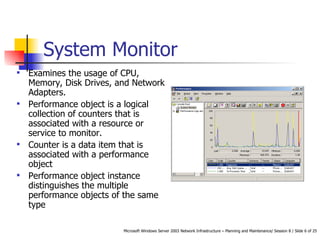
System Monitor Examines the usage of CPU, Memory, Disk Drives, and Network Adapters.  Performance object is a logical collection of counters that is associated with a resource or service to monitor.  Counter is a data item that is associated with a performance object Performance object instance distinguishes the multiple performance objects of the same type
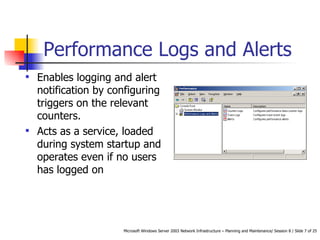
Performance Logs and Alerts Enables logging and alert notification by configuring triggers on the relevant counters.  Acts as a service, loaded during system startup and operates even if no users has logged on
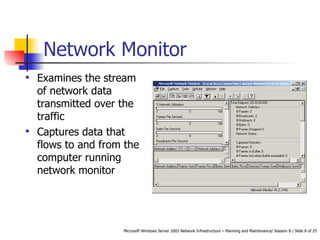
Network Monitor Examines the stream of network data transmitted over the traffic Captures data that flows to and from the computer running network monitor
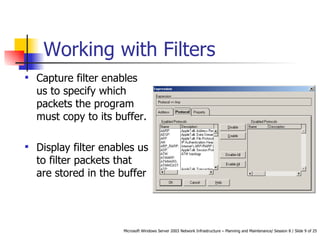
Working with Filters Capture filter enables us to specify which packets the program must copy to its buffer.  Display filter enables us to filter packets that are stored in the buffer
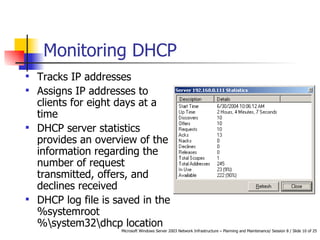
Monitoring DHCP Tracks IP addresses Assigns IP addresses to clients for eight days at a time  DHCP server statistics provides an overview of the information regarding the number of request transmitted, offers, and declines received DHCP log file is saved in the %systemroot%\system32\dhcp location
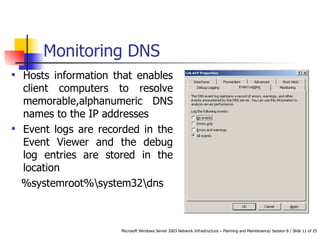
Monitoring DNS Hosts information that enables client computers to resolve memorable,alphanumeric DNS names to the IP addresses Event logs are recorded in the Event Viewer and the debug log entries are stored in the location %systemroot%\system32\dns
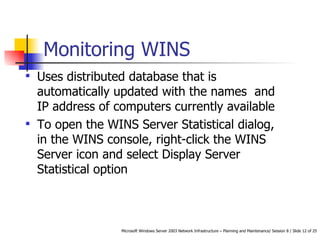
Monitoring WINS Uses distributed database that is automatically updated with the names  and IP address of computers currently available To open the WINS Server Statistical dialog, in the WINS console, right-click the WINS Server icon and select Display Server Statistical option
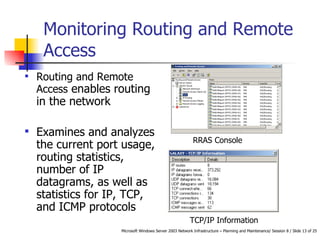
Monitoring Routing and Remote Access Routing and Remote Access  enables routing in the network Examines and analyzes the current port usage, routing statistics, number of IP datagrams, as well as statistics for IP, TCP, and ICMP protocols TCP/IP Information RRAS Console
Monitoring System Bottlenecks Tracking the bottleneck that is affecting the performance is a complicated task Performance console tracks the bottlenecks and solves the performance problems To locate the bottleneck, there are four systems that we need to monitor:  Processor Memory Storage Subsystem Network.
Processor Subsystem Processor array inadequately configured it results the server to accumulate the incoming client request.  This prevents the server from processing the request.  % Processor Time counter is the main indicator of the processor performance.
Memory Subsystem Inadequate amount of memory in a server, prevents the computer from caching data effectively This leads the processes to depend on the disks reads more than memory read, thereby slowing down the enter system Pages/Sec and Available MBytes counters are used to monitor memory performance
Storage Subsystem Overloaded with Read and Write commands, results in processing the client request at a very slow rate.  Prime location to find bottlenecks as the server’s hard disk carries greater physical load than the other systems % Disk Time counter , enable us to monitor the performance of the storage subsystem.
Network Subsystem The amount of network traffic reaching the server through its network interface restricts the bandwidth of the network connections.  Current Bandwidth performance object  monitors the Network performance.
Network Backup Strategy Panning a backup strategy for a network includes of three components: Backup Hardware Backup Software Backup Plan
Backup Types The backup software provides us with various backup types that enable us to backup only required files and folders.  Normal - Creates the back up for all the selected files and folders.  It will clear all the markers but will not look out for markers.  Differential - Creates the back up of the selected files and folders having markers.  It does not clear the markers.  Incremental - Creates the back up of the selected files and folders having markers.  It clears the markers.
Restoring Tasks The backup software along with providing solutions for backup must provide solutions for restoring data.  The basics options that must be provided by backup software for restoring data are: Original Location Alternate Location Single Folder
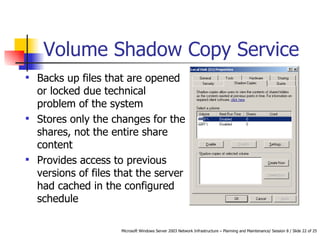
Volume Shadow Copy Service Backs up files that are opened or locked due technical problem of the system  Stores only the changes for the shares, not the entire share content Provides access to previous versions of files that the server had cached in the configured schedule
Summary  Windows Server 2003 provides two tools to analyze the server performance: Performance Console Network Monitor The Performance console consists of two snap-ins: System Monitor Performance Logs and Alerts There are three types of counter logs; trace, counter, and alerts.  Network Monitor is an administrative tool that enables us to examine the stream of network data transmitted over the traffic.
Summary Contd… The two filters provided by the Network monitor are: Capture Filter and Display Filter. There are four services that enable us to monitor the network server: DHCP, DNS, WINS, and Routing and Remote Access To locate the bottleneck, there are four systems that we ideally need to monitor: Processor, Memory, Storage Subsystem, and Network.
Panning a backup strategy for a network includes of three components; backup hardware, backup software, and backup plan. Volume Shadow Copy Service (VSS) in Windows Server 2003 enables us to take back up of files that are opened or locked due technical problem of the system. Summary Contd…

Session 8 Tp 8

  • 1.
    Session 8 MaintainingServer Availability
  • 2.
    Review Acluster is a group of interconnected servers that together function to provide load balancing and fault tolerance Windows Server 2003 operating system provides two types of clustering services: Server Clusters Network Load Balancing Clusters Windows Server 2003, Enterprise Edition and Windows Server 2003, Datacenter Edition support up to 8 nodes in a Server cluster Windows Server 2003 supports up to 32 nodes in a NLB cluster, in all the editions.
  • 3.
    Objectives Monitor ServerPerformance Monitor Network Services Monitor System Bottlenecks Plan a Backup Strategy
  • 4.
    Monitoring Server PerformanceMonitoring system performance is the important task for maintaining and administering the operating system. Windows Server 2003 provides two tools to analyze the server performance: Performance Console Network Monitor
  • 5.
    Performance Console ThePerformance console provides detailed data about the resources that are used by specific components and programs of the operating system. The Performance console consists of two snap-ins: System Monitor Performance Logs and Alerts
  • 6.
    System Monitor Examinesthe usage of CPU, Memory, Disk Drives, and Network Adapters. Performance object is a logical collection of counters that is associated with a resource or service to monitor. Counter is a data item that is associated with a performance object Performance object instance distinguishes the multiple performance objects of the same type
  • 7.
    Performance Logs andAlerts Enables logging and alert notification by configuring triggers on the relevant counters. Acts as a service, loaded during system startup and operates even if no users has logged on
  • 8.
    Network Monitor Examinesthe stream of network data transmitted over the traffic Captures data that flows to and from the computer running network monitor
  • 9.
    Working with FiltersCapture filter enables us to specify which packets the program must copy to its buffer. Display filter enables us to filter packets that are stored in the buffer
  • 10.
    Monitoring DHCP TracksIP addresses Assigns IP addresses to clients for eight days at a time DHCP server statistics provides an overview of the information regarding the number of request transmitted, offers, and declines received DHCP log file is saved in the %systemroot%\system32\dhcp location
  • 11.
    Monitoring DNS Hostsinformation that enables client computers to resolve memorable,alphanumeric DNS names to the IP addresses Event logs are recorded in the Event Viewer and the debug log entries are stored in the location %systemroot%\system32\dns
  • 12.
    Monitoring WINS Usesdistributed database that is automatically updated with the names and IP address of computers currently available To open the WINS Server Statistical dialog, in the WINS console, right-click the WINS Server icon and select Display Server Statistical option
  • 13.
    Monitoring Routing andRemote Access Routing and Remote Access enables routing in the network Examines and analyzes the current port usage, routing statistics, number of IP datagrams, as well as statistics for IP, TCP, and ICMP protocols TCP/IP Information RRAS Console
  • 14.
    Monitoring System BottlenecksTracking the bottleneck that is affecting the performance is a complicated task Performance console tracks the bottlenecks and solves the performance problems To locate the bottleneck, there are four systems that we need to monitor: Processor Memory Storage Subsystem Network.
  • 15.
    Processor Subsystem Processorarray inadequately configured it results the server to accumulate the incoming client request. This prevents the server from processing the request. % Processor Time counter is the main indicator of the processor performance.
  • 16.
    Memory Subsystem Inadequateamount of memory in a server, prevents the computer from caching data effectively This leads the processes to depend on the disks reads more than memory read, thereby slowing down the enter system Pages/Sec and Available MBytes counters are used to monitor memory performance
  • 17.
    Storage Subsystem Overloadedwith Read and Write commands, results in processing the client request at a very slow rate. Prime location to find bottlenecks as the server’s hard disk carries greater physical load than the other systems % Disk Time counter , enable us to monitor the performance of the storage subsystem.
  • 18.
    Network Subsystem Theamount of network traffic reaching the server through its network interface restricts the bandwidth of the network connections. Current Bandwidth performance object monitors the Network performance.
  • 19.
    Network Backup StrategyPanning a backup strategy for a network includes of three components: Backup Hardware Backup Software Backup Plan
  • 20.
    Backup Types Thebackup software provides us with various backup types that enable us to backup only required files and folders. Normal - Creates the back up for all the selected files and folders. It will clear all the markers but will not look out for markers. Differential - Creates the back up of the selected files and folders having markers. It does not clear the markers. Incremental - Creates the back up of the selected files and folders having markers. It clears the markers.
  • 21.
    Restoring Tasks Thebackup software along with providing solutions for backup must provide solutions for restoring data. The basics options that must be provided by backup software for restoring data are: Original Location Alternate Location Single Folder
  • 22.
    Volume Shadow CopyService Backs up files that are opened or locked due technical problem of the system Stores only the changes for the shares, not the entire share content Provides access to previous versions of files that the server had cached in the configured schedule
  • 23.
    Summary WindowsServer 2003 provides two tools to analyze the server performance: Performance Console Network Monitor The Performance console consists of two snap-ins: System Monitor Performance Logs and Alerts There are three types of counter logs; trace, counter, and alerts. Network Monitor is an administrative tool that enables us to examine the stream of network data transmitted over the traffic.
  • 24.
    Summary Contd… Thetwo filters provided by the Network monitor are: Capture Filter and Display Filter. There are four services that enable us to monitor the network server: DHCP, DNS, WINS, and Routing and Remote Access To locate the bottleneck, there are four systems that we ideally need to monitor: Processor, Memory, Storage Subsystem, and Network.
  • 25.
    Panning a backupstrategy for a network includes of three components; backup hardware, backup software, and backup plan. Volume Shadow Copy Service (VSS) in Windows Server 2003 enables us to take back up of files that are opened or locked due technical problem of the system. Summary Contd…