
DHCP
(DYNAMIC HOST CONFIGURATION
PROTOCOL)


                                       By
                               Lalit Bhati
                         HCL cdc Gr.Noida
                      lkumar008@gmail.com
OUTLINE
 What is DHCP
 Purpose of DHCP

 Configuration of DHCP

 How DHCP works on a network

 Lease Renewal in DHCP

 Planning for DHCP
WHAT IS DHCP
 Dynamic   Host Control Protocol (DHCP) is a
 method for automating the assignment of IP
 addresses and other networking information.
 It is used on campus in residence halls and
 libraries, as well as over the wireless network.

 Inother words DHCP Automatically
 assigns IP addresses and tcp/ip setting to
 devices on a network
PURPOSE OF DHCP


   The overall purpose of the DHCP server is to
    reduce the workload and error margins, which
    can occur in assigning the IP addresses
    manually.

   When a computer uses a static IP address there
    can be the chances of error and conflict when two
    computers use the same IP address. By using the
    DHCP server there are no chances of such kind of
    conflicts and errors.
CONFIGURATION OF DHCP

 Installing the DHCP server is made quite easy in
  Windows 2003. By using the "Manage your
  server" wizard, you are able to enter the details
  you require and have the wizard set the basics
  for you. Open to "Manage your server" wizard,
  select the DHCP server option for the list of
  server roles and press Next.
  You will be asked to enter the name and
  description of your scope.
 Scope: A scope is a collection of IP addresses for
  computers on a subnet that use DHCP.
HOW DHCP WORKS ON A
              NETWORK


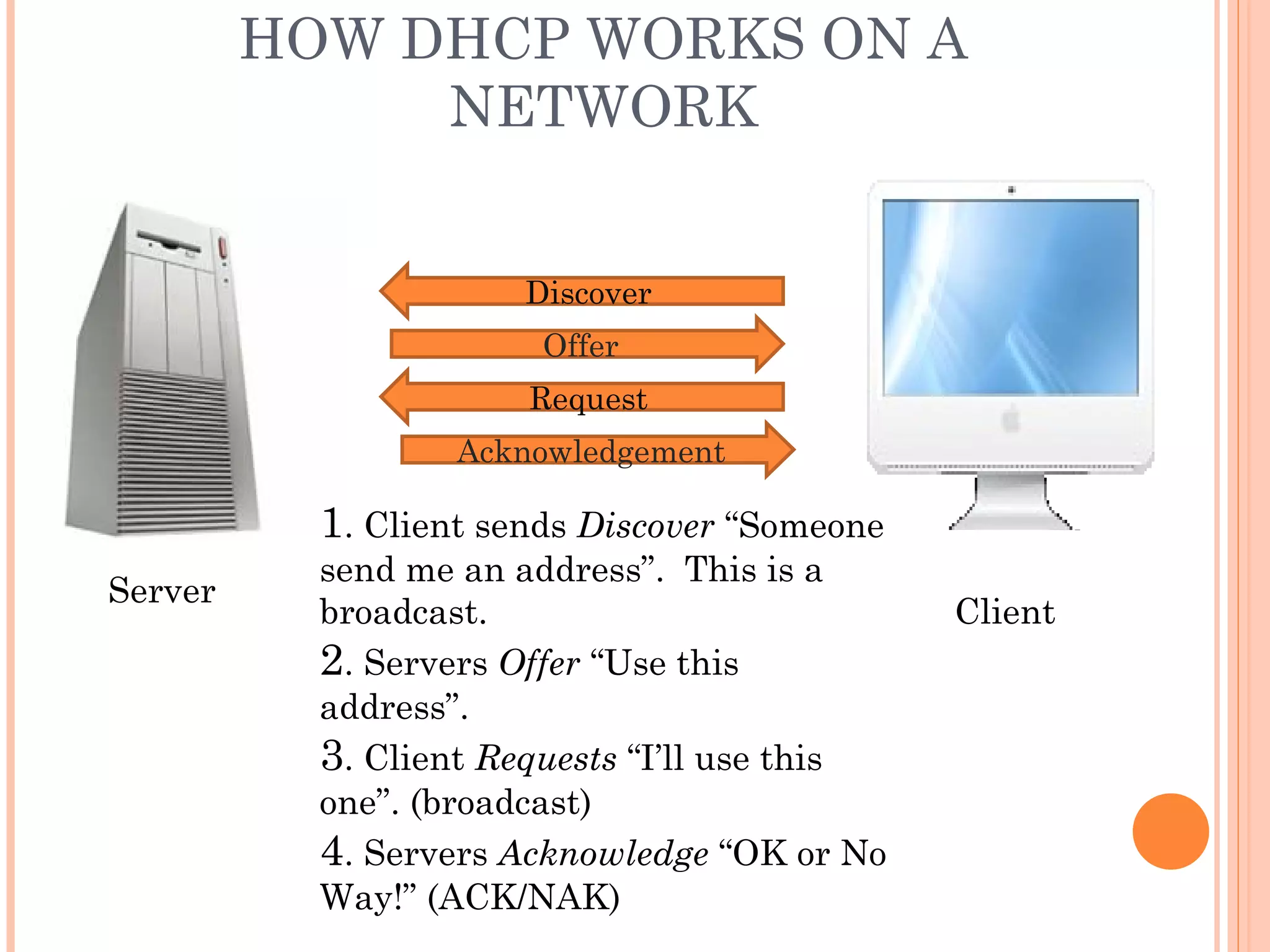
                       Discover
                        Offer
                       Request
                   Acknowledgement

           1. Client sends Discover “Someone
           send me an address”. This is a
Server
           broadcast.                          Client
           2. Servers Offer “Use this
           address”.
           3. Client Requests “I’ll use this
           one”. (broadcast)
           4. Servers Acknowledge “OK or No
           Way!” (ACK/NAK)
LEASE RENEWAL IN DHCP


 Halfway through lease period, client asks its
  current server to continue using the address.
    Client sends Request (uncast).
    Server sends Acknowledgement.
 If current server isn’t available, client will
  broadcast request. This may cause it to change
  servers.
 If lease expires, client must stop using the
  address and start the process from scratch
PLANNING FOR DHCP


   Preparation for DHCP requires careful planning

   IP addressing strategy
     Consider current needs
     Allow for growth


   Network architect configures rules for addressing
    strategy into DHCP server
THANK
YOU

Dhcp by lalit bhati

  • 1.
    DHCP (DYNAMIC HOST CONFIGURATION PROTOCOL) By Lalit Bhati HCL cdc Gr.Noida lkumar008@gmail.com
  • 2.
    OUTLINE  What isDHCP  Purpose of DHCP  Configuration of DHCP  How DHCP works on a network  Lease Renewal in DHCP  Planning for DHCP
  • 3.
    WHAT IS DHCP Dynamic Host Control Protocol (DHCP) is a method for automating the assignment of IP addresses and other networking information. It is used on campus in residence halls and libraries, as well as over the wireless network.  Inother words DHCP Automatically assigns IP addresses and tcp/ip setting to devices on a network
  • 4.
    PURPOSE OF DHCP  The overall purpose of the DHCP server is to reduce the workload and error margins, which can occur in assigning the IP addresses manually.  When a computer uses a static IP address there can be the chances of error and conflict when two computers use the same IP address. By using the DHCP server there are no chances of such kind of conflicts and errors.
  • 5.
    CONFIGURATION OF DHCP Installing the DHCP server is made quite easy in Windows 2003. By using the "Manage your server" wizard, you are able to enter the details you require and have the wizard set the basics for you. Open to "Manage your server" wizard, select the DHCP server option for the list of server roles and press Next. You will be asked to enter the name and description of your scope.  Scope: A scope is a collection of IP addresses for computers on a subnet that use DHCP.
  • 6.
    HOW DHCP WORKSON A NETWORK Discover Offer Request Acknowledgement 1. Client sends Discover “Someone send me an address”. This is a Server broadcast. Client 2. Servers Offer “Use this address”. 3. Client Requests “I’ll use this one”. (broadcast) 4. Servers Acknowledge “OK or No Way!” (ACK/NAK)
  • 7.
    LEASE RENEWAL INDHCP  Halfway through lease period, client asks its current server to continue using the address.  Client sends Request (uncast).  Server sends Acknowledgement.  If current server isn’t available, client will broadcast request. This may cause it to change servers.  If lease expires, client must stop using the address and start the process from scratch
  • 8.
    PLANNING FOR DHCP  Preparation for DHCP requires careful planning  IP addressing strategy  Consider current needs  Allow for growth  Network architect configures rules for addressing strategy into DHCP server
  • 9.