Team Emertxe
Introduction to Embedded System (IES)
Pass on the ball
1)Let us get the ball rolling 
2)Introduce yourself
3)Expectations from this program
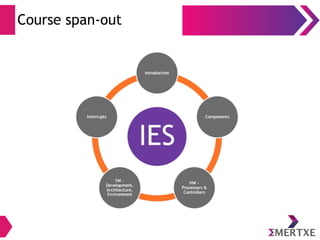
Course span-out
Introduction to Embedded System
Let us ponder…
● What do you understand as Embedded System?
● Name few examples of Embedded System from our daily usage
● How different they are from a general purpose system (GPS)?
● What difference can be there between multiple Embedded
Systems?
“Any Hardware System which is intended to do a specific
task can be called as an Embedded System”
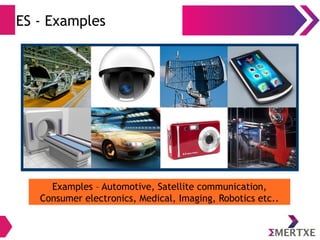
ES - Examples
Examples – Automotive, Satellite communication,
Consumer electronics, Medical, Imaging, Robotics etc..
ES - Classifications
●
Embedded systems can be classified into four different
categories:
– Stand alone Embedded System – Performs a single and specific functionality
– Real time Embedded System – Provides real time guarantee in terms of response
and predictability
– Network appliances – High focus on packet processing
– Mobile devices – Hand held devices
●
Embedded systems – “Choice-points”
– Embedded Systems type and expectations drastically vary
– In order to meet customer needs specific “Choice-points” to be decided
– These are popularly known as “Design parameters”
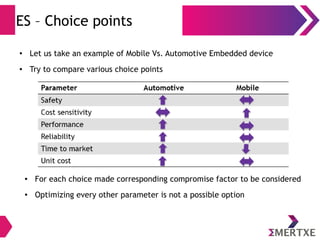
ES – Choice points
● Let us take an example of Mobile Vs. Automotive Embedded device
● Try to compare various choice points
● For each choice made corresponding compromise factor to be considered
● Optimizing every other parameter is not a possible option
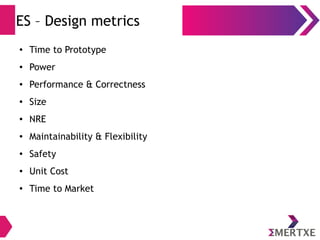
ES – Design metrics
● Time to Prototype
● Power
● Performance & Correctness
● Size
● NRE
● Maintainability & Flexibility
● Safety
● Unit Cost
● Time to Market
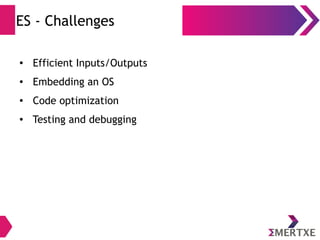
ES - Challenges
● Efficient Inputs/Outputs
● Embedding an OS   
● Code optimization
● Testing and debugging
Embedded System Components
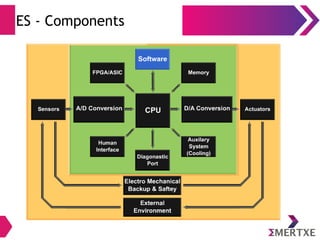
ES - Components
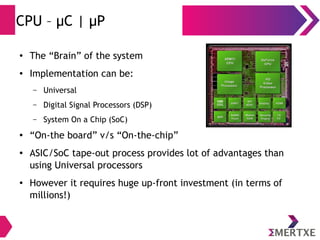
CPU – μC | μP
● The “Brain” of the system
● Implementation can be:
– Universal
– Digital Signal Processors (DSP)
– System On a Chip (SoC)
● “On-the board” v/s “On-the-chip”
● ASIC/SoC tape-out process provides lot of advantages than
using Universal processors
● However it requires huge up-front investment (in terms of
millions!)
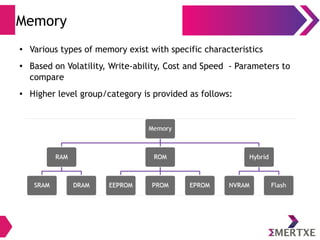
Memory
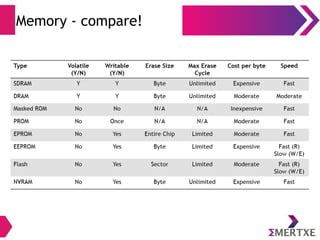
● Various types of memory exist with specific characteristics
● Based on Volatility, Write-ability, Cost and Speed - Parameters to
compare
● Higher level group/category is provided as follows:
Memory - compare!
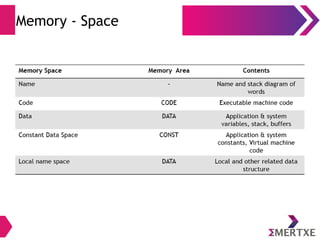
Memory - Space
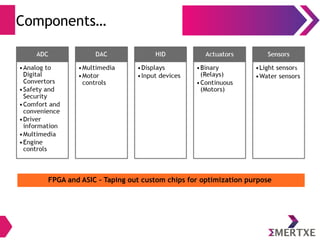
Components…
FPGA and ASIC – Taping out custom chips for optimization purpose
HW – Processors and Controllers
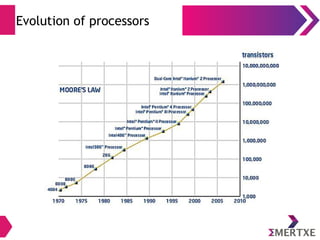
Evolution of processors
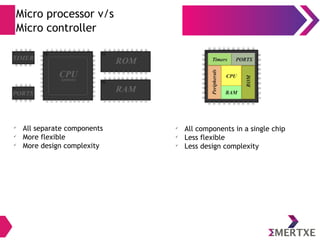
Micro processor v/s
Micro controller
ü
All separate components
ü
More flexible
ü
More design complexity
ü
All components in a single chip
ü
Less flexible
ü
Less design complexity
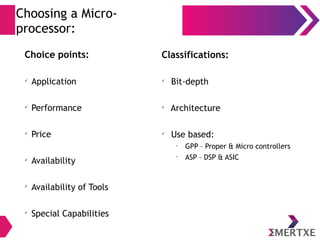
Choosing a Micro-
processor:
Choice points:
ü
Application
ü
Performance
ü
Price
ü
Availability
ü
Availability of Tools
ü
Special Capabilities
Classifications:
ü
Bit-depth
ü
Architecture
ü
Use based:
•
GPP – Proper & Micro controllers
•
ASP – DSP & ASIC
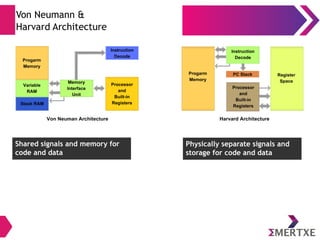
Von Neumann &
Harvard Architecture
Shared signals and memory for
code and data
Physically separate signals and
storage for code and data
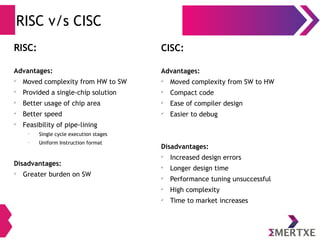
RISC v/s CISC
RISC:
Advantages:
ü
Moved complexity from HW to SW
ü
Provided a single-chip solution
ü
Better usage of chip area
ü
Better speed
ü
Feasibility of pipe-lining
•
Single cycle execution stages
•
Uniform Instruction format
Disadvantages:
ü
Greater burden on SW
CISC:
Advantages:
ü
Moved complexity from SW to HW
ü
Compact code
ü
Ease of compiler design
ü
Easier to debug
Disadvantages:
ü
Increased design errors
ü
Longer design time
ü
Performance tuning unsuccessful
ü
High complexity
ü
Time to market increases
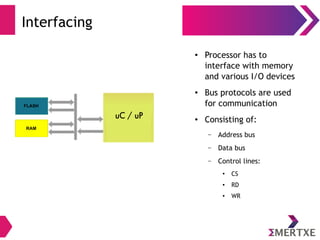
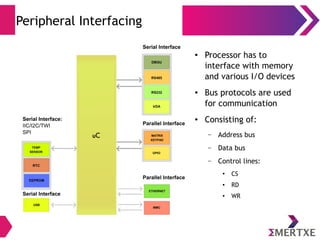
Interfacing
●
Processor has to
interface with memory
and various I/O devices
●
Bus protocols are used
for communication
●
Consisting of:
– Address bus
– Data bus
– Control lines:
● CS
● RD
● WR
Peripheral Interfacing
●
Processor has to
interface with memory
and various I/O devices
●
Bus protocols are used
for communication
●
Consisting of:
– Address bus
– Data bus
– Control lines:
● CS
● RD
● WR
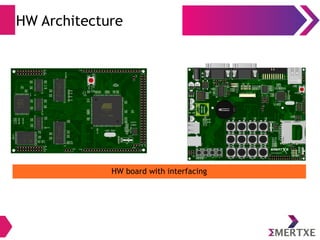
HW Architecture
HW board with interfacing
SW – Development, Architecture, Environment
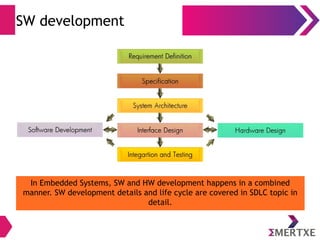
SW development
In Embedded Systems, SW and HW development happens in a combined
manner. SW development details and life cycle are covered in SDLC topic in
detail.
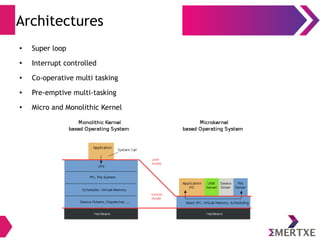
Architectures
● Super loop
●
Interrupt controlled
● Co-operative multi tasking
● Pre-emptive multi-tasking
● Micro and Monolithic Kernel
Dev Environment
● Embedded development environment is quite different and
relatively complex than application development
● The simple reason the embedded software developed in a ‘host’
machine and executed on a ‘target’ which makes the compilation
and debugging process quite challenging
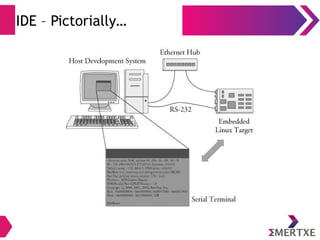
● Popularly known as Integrated Development Environment (IDE), this
environment consist of the following key candidates:
– Editor – For scripting Embedded program
– Configuration
– Tool chain – Cross compiler, linker and associated tools
– Target download and debug environment – Installation and test
IDE – Pictorially…
Interrupts
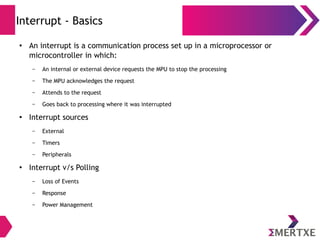
Interrupt - Basics
●
An interrupt is a communication process set up in a microprocessor or
microcontroller in which:
– An internal or external device requests the MPU to stop the processing
– The MPU acknowledges the request
– Attends to the request
– Goes back to processing where it was interrupted
●
Interrupt sources
– External
– Timers
– Peripherals
●
Interrupt v/s Polling
– Loss of Events
– Response
– Power Management
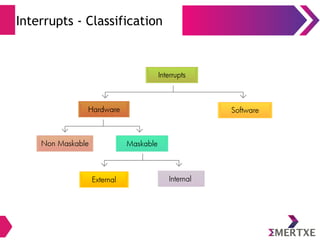
Interrupts - Classification
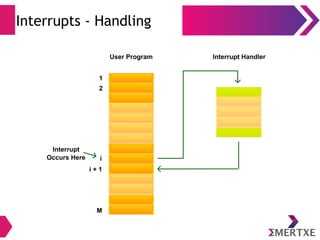
Interrupts - Handling
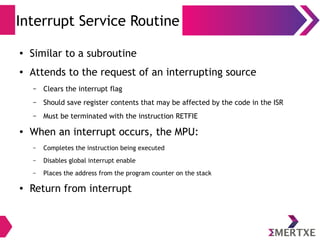
Interrupt Service Routine
● Similar to a subroutine
● Attends to the request of an interrupting source
– Clears the interrupt flag
– Should save register contents that may be affected by the code in the ISR
– Must be terminated with the instruction RETFIE
● When an interrupt occurs, the MPU:
– Completes the instruction being executed
– Disables global interrupt enable
– Places the address from the program counter on the stack
● Return from interrupt
Interrupt Latency
● Latency is determined by:
– Instruction time (how long is the longest)
– How much of the context must be saved
– How much of the context must be restored
– The effort to implement priority scheme
– Time spend executing protected code
Thank You

Introduction to Embedded System

  • 1.
    Team Emertxe Introduction toEmbedded System (IES)
  • 2.
    Pass on theball 1)Let us get the ball rolling  2)Introduce yourself 3)Expectations from this program
  • 3.
  • 4.
  • 5.
    Let us ponder… ●What do you understand as Embedded System? ● Name few examples of Embedded System from our daily usage ● How different they are from a general purpose system (GPS)? ● What difference can be there between multiple Embedded Systems? “Any Hardware System which is intended to do a specific task can be called as an Embedded System”
  • 6.
    ES - Examples Examples– Automotive, Satellite communication, Consumer electronics, Medical, Imaging, Robotics etc..
  • 7.
    ES - Classifications ● Embeddedsystems can be classified into four different categories: – Stand alone Embedded System – Performs a single and specific functionality – Real time Embedded System – Provides real time guarantee in terms of response and predictability – Network appliances – High focus on packet processing – Mobile devices – Hand held devices ● Embedded systems – “Choice-points” – Embedded Systems type and expectations drastically vary – In order to meet customer needs specific “Choice-points” to be decided – These are popularly known as “Design parameters”
  • 8.
    ES – Choicepoints ● Let us take an example of Mobile Vs. Automotive Embedded device ● Try to compare various choice points ● For each choice made corresponding compromise factor to be considered ● Optimizing every other parameter is not a possible option
  • 9.
    ES – Designmetrics ● Time to Prototype ● Power ● Performance & Correctness ● Size ● NRE ● Maintainability & Flexibility ● Safety ● Unit Cost ● Time to Market
  • 10.
    ES - Challenges ●Efficient Inputs/Outputs ● Embedding an OS    ● Code optimization ● Testing and debugging
  • 11.
  • 12.
  • 13.
    CPU – μC| μP ● The “Brain” of the system ● Implementation can be: – Universal – Digital Signal Processors (DSP) – System On a Chip (SoC) ● “On-the board” v/s “On-the-chip” ● ASIC/SoC tape-out process provides lot of advantages than using Universal processors ● However it requires huge up-front investment (in terms of millions!)
  • 14.
    Memory ● Various typesof memory exist with specific characteristics ● Based on Volatility, Write-ability, Cost and Speed - Parameters to compare ● Higher level group/category is provided as follows:
  • 15.
  • 16.
  • 17.
    Components… FPGA and ASIC– Taping out custom chips for optimization purpose
  • 18.
    HW – Processorsand Controllers
  • 19.
  • 20.
    Micro processor v/s Microcontroller ü All separate components ü More flexible ü More design complexity ü All components in a single chip ü Less flexible ü Less design complexity
  • 21.
    Choosing a Micro- processor: Choicepoints: ü Application ü Performance ü Price ü Availability ü Availability of Tools ü Special Capabilities Classifications: ü Bit-depth ü Architecture ü Use based: • GPP – Proper & Micro controllers • ASP – DSP & ASIC
  • 22.
    Von Neumann & HarvardArchitecture Shared signals and memory for code and data Physically separate signals and storage for code and data
  • 23.
    RISC v/s CISC RISC: Advantages: ü Movedcomplexity from HW to SW ü Provided a single-chip solution ü Better usage of chip area ü Better speed ü Feasibility of pipe-lining • Single cycle execution stages • Uniform Instruction format Disadvantages: ü Greater burden on SW CISC: Advantages: ü Moved complexity from SW to HW ü Compact code ü Ease of compiler design ü Easier to debug Disadvantages: ü Increased design errors ü Longer design time ü Performance tuning unsuccessful ü High complexity ü Time to market increases
  • 24.
    Interfacing ● Processor has to interfacewith memory and various I/O devices ● Bus protocols are used for communication ● Consisting of: – Address bus – Data bus – Control lines: ● CS ● RD ● WR
  • 25.
    Peripheral Interfacing ● Processor hasto interface with memory and various I/O devices ● Bus protocols are used for communication ● Consisting of: – Address bus – Data bus – Control lines: ● CS ● RD ● WR
  • 26.
    HW Architecture HW boardwith interfacing
  • 27.
    SW – Development,Architecture, Environment
  • 28.
    SW development In EmbeddedSystems, SW and HW development happens in a combined manner. SW development details and life cycle are covered in SDLC topic in detail.
  • 29.
    Architectures ● Super loop ● Interruptcontrolled ● Co-operative multi tasking ● Pre-emptive multi-tasking ● Micro and Monolithic Kernel
  • 30.
    Dev Environment ● Embeddeddevelopment environment is quite different and relatively complex than application development ● The simple reason the embedded software developed in a ‘host’ machine and executed on a ‘target’ which makes the compilation and debugging process quite challenging ● Popularly known as Integrated Development Environment (IDE), this environment consist of the following key candidates: – Editor – For scripting Embedded program – Configuration – Tool chain – Cross compiler, linker and associated tools – Target download and debug environment – Installation and test
  • 31.
  • 32.
  • 33.
    Interrupt - Basics ● Aninterrupt is a communication process set up in a microprocessor or microcontroller in which: – An internal or external device requests the MPU to stop the processing – The MPU acknowledges the request – Attends to the request – Goes back to processing where it was interrupted ● Interrupt sources – External – Timers – Peripherals ● Interrupt v/s Polling – Loss of Events – Response – Power Management
  • 34.
  • 35.
  • 36.
    Interrupt Service Routine ●Similar to a subroutine ● Attends to the request of an interrupting source – Clears the interrupt flag – Should save register contents that may be affected by the code in the ISR – Must be terminated with the instruction RETFIE ● When an interrupt occurs, the MPU: – Completes the instruction being executed – Disables global interrupt enable – Places the address from the program counter on the stack ● Return from interrupt
  • 37.
    Interrupt Latency ● Latencyis determined by: – Instruction time (how long is the longest) – How much of the context must be saved – How much of the context must be restored – The effort to implement priority scheme – Time spend executing protected code
  • 38.