



Essentials for the
SharePoint Power User
SPTechCon
San Francisco 2016
Drew Madelung
Email : dmadelung@concurrency.com
Twitter : @dmadelung
Website: drewmadelung.com
Technical Architect – SharePoint & Office 365
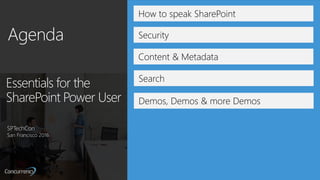
How to speak SharePoint
Security
Demos, Demos & more Demos
Content & Metadata
Essentials for the
SharePoint Power User
SPTechCon
San Francisco 2016
Search
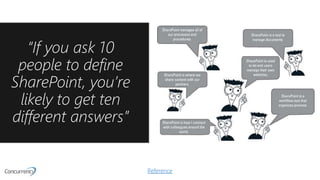
“If you ask 10
people to define
SharePoint, you’re
likely to get ten
different answers”
Reference
Power Users are essential
for SharePoint adoption
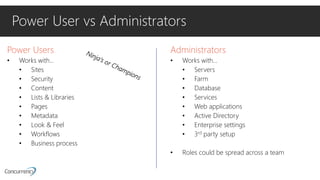
Power User vs Administrators
Power Users
• Works with…
• Sites
• Security
• Content
• Lists & Libraries
• Pages
• Metadata
• Look & Feel
• Workflows
• Business process
Administrators
• Works with…
• Servers
• Farm
• Database
• Services
• Web applications
• Active Directory
• Enterprise settings
• 3rd party setup
• Roles could be spread across a team
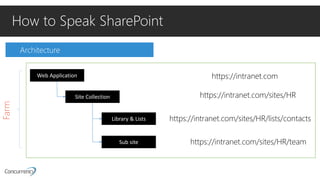
Architecture
How to Speak SharePoint
Web Application
Farm
Site Collection
Library & Lists
Sub site
https://intranet.com/sites/HR
https://intranet.com
https://intranet.com/sites/HR/lists/contacts
https://intranet.com/sites/HR/team
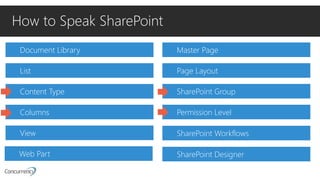
Document Library
How to Speak SharePoint
List
Content Type
Columns
View
Web Part
Master Page
Page Layout
SharePoint Group
Permission Level
SharePoint Workflows
SharePoint Designer
CONGRATULATIONS!
You have passed level 1 of how to speak SharePoint
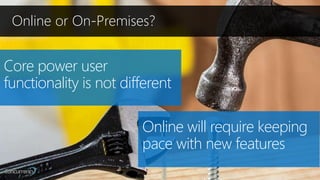
Online or On-Premises?
Core power user
functionality is not different
Online will require keeping
pace with new features
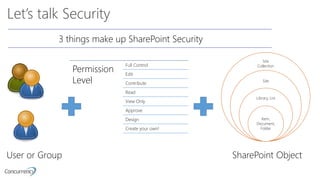
Let’s talk Security
Site
Collection
Site
Library, List
Item,
Document,
Folder
Permission
Level
Full Control
Edit
Contribute
Read
View Only
Approve
Design
Create your own!
User or Group SharePoint Object
3 things make up SharePoint Security
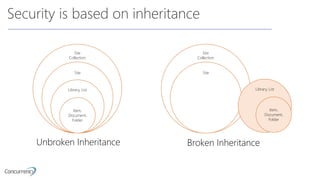
Security is based on inheritance
Site
Collection
Site
Library, List
Item,
Document,
Folder
Site
Collection
Site
Library, List
Item,
Document,
Folder
Unbroken Inheritance Broken Inheritance
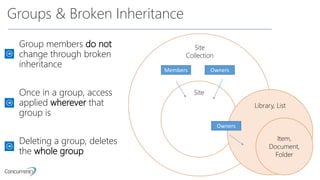
Groups & Broken Inheritance
Site
Collection
Site
Library, List
Item,
Document,
Folder
Group members do not
change through broken
inheritance
Members Owners
Owners
Once in a group, access
applied wherever that
group is
Deleting a group, deletes
the whole group
Security info & advice
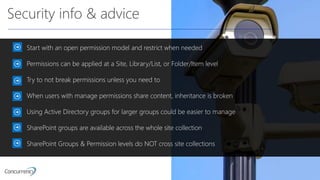
Start with an open permission model and restrict when needed
Permissions can be applied at a Site, Library/List, or Folder/Item level
Try to not break permissions unless you need to
When users with manage permissions share content, inheritance is broken
Using Active Directory groups for larger groups could be easier to manage
SharePoint groups are available across the whole site collection
SharePoint Groups & Permission levels do NOT cross site collections
Security
Demo!
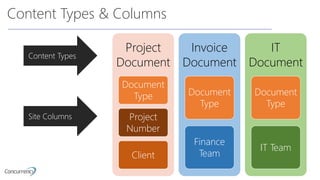
Content Types & Columns
Project
Document
Document
Type
Project
Number
Client
Invoice
Document
Document
Type
Finance
Team
IT
Document
Document
Type
IT Team
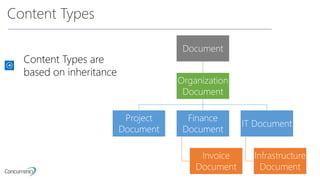
Content Types
Site Columns
Content Types
Document
Organization
Document
Project
Document
Finance
Document
Invoice
Document
IT Document
Infrastructure
Document
Content Types are
based on inheritance
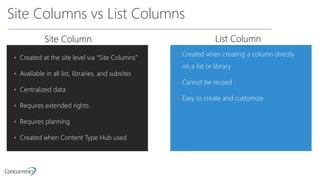
Site Columns vs List Columns
• Created when creating a column directly
on a list or library
• Cannot be reused
• Easy to create and customize
Site Column List Column
• Created at the site level via “Site Columns”
• Available in all list, libraries, and subsites
• Centralized data
• Requires extended rights
• Requires planning
• Created when Content Type Hub used
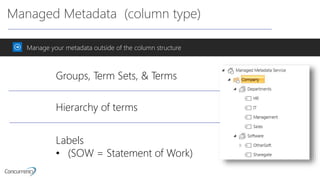
Managed Metadata (column type)
Manage your metadata outside of the column structure
Groups, Term Sets, & Terms
Hierarchy of terms
Labels
• (SOW = Statement of Work)
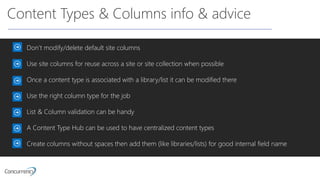
Content Types & Columns info & advice
Don’t modify/delete default site columns
Use site columns for reuse across a site or site collection when possible
Once a content type is associated with a library/list it can be modified there
Use the right column type for the job
List & Column validation can be handy
A Content Type Hub can be used to have centralized content types
Create columns without spaces then add them (like libraries/lists) for good internal field name
Content Type
& Column
Demo
Search
SharePoint search will never be like Google search
Involve end users
Content is search driven using metadata
Use Search web parts to make intelligent sites
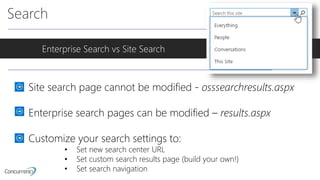
Search
Enterprise Search vs Site Search
Site search page cannot be modified - osssearchresults.aspx
Enterprise search pages can be modified – results.aspx
Customize your search settings to:
• Set new search center URL
• Set custom search results page (build your own!)
• Set search navigation
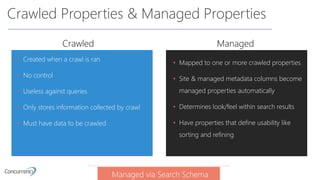
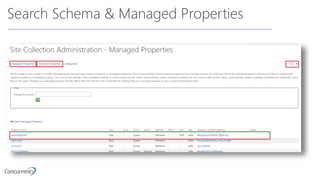
Crawled Properties & Managed Properties
• Created when a crawl is ran
• No control
• Useless against queries
• Only stores information collected by crawl
• Must have data to be crawled
ManagedCrawled
• Mapped to one or more crawled properties
• Site & managed metadata columns become
managed properties automatically
• Determines look/feel within search results
• Have properties that define usability like
sorting and refining
Managed via Search Schema
Search Schema & Managed Properties
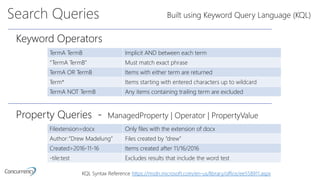
Search Queries
Keyword Operators
TermA TermB Implicit AND between each term
“TermA TermB” Must match exact phrase
TermA OR TermB Items with either term are returned
Term* Items starting with entered characters up to wildcard
TermA NOT TermB Any items containing trailing term are excluded
Built using Keyword Query Language (KQL)
Property Queries - ManagedProperty | Operator | PropertyValue
Filextension=docx Only files with the extension of docx
Author:”Drew Madelung” Files created by “drew”
Created>2016-11-16 Items created after 11/16/2016
-tile:test Excludes results that include the word test
KQL Syntax Reference https://msdn.microsoft.com/en-us/library/office/ee558911.aspx
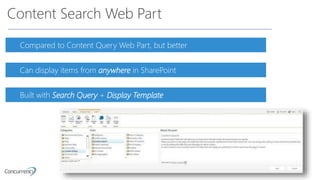
Content Search Web Part
Compared to Content Query Web Part, but better
Can display items from anywhere in SharePoint
Built with Search Query + Display Template
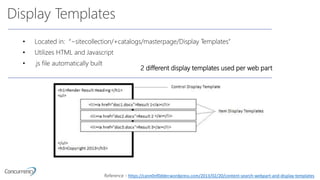
Display Templates
• Located in: “~sitecollection/+catalogs/masterpage/Display Templates”
• Utilizes HTML and Javascript
• .js file automatically built
2 different display templates used per web part
Reference - https://cann0nf0dder.wordpress.com/2013/02/20/content-search-webpart-and-display-templates
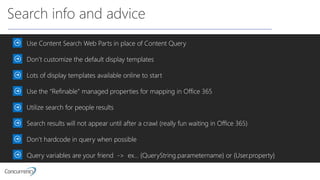
Search info and advice
Use Content Search Web Parts in place of Content Query
Don’t customize the default display templates
Lots of display templates available online to start
Use the “Refinable” managed properties for mapping in Office 365
Utilize search for people results
Search results will not appear until after a crawl (really fun waiting in Office 365)
Don’t hardcode in query when possible
Query variables are your friend -> ex… {QueryString.parametername} or {User.property}
One More
Demo!
One More
Demo!
Drew’s Random Tips From the Field
• You can filter views using [Me] and [Today]
• Put your scripts into a file and reference them via a content editor web part
• Take advantage of calculated columns and list validation
• When editing a view, if there is a web part on another page it will NOT update that web part
• If you modify a view within a web part it will only be done within that web part
• There is a hidden User information list on each site collection
• Use SP groups to audience target web parts
• JSLink for web parts (not available in modern experiences)
• Put your scripts into a file and reference them via a content editor web part
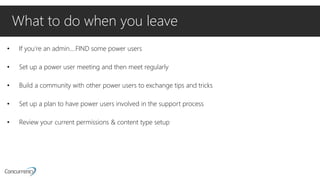
What to do when you leave
• If you’re an admin….FIND some power users
• Set up a power user meeting and then meet regularly
• Build a community with other power users to exchange tips and tricks
• Set up a plan to have power users involved in the support process
• Review your current permissions & content type setup
• xxxx
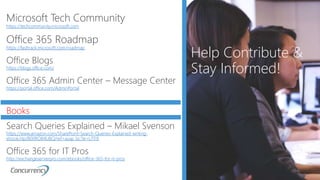
Help Contribute &
Stay Informed!
Microsoft Tech Community
https://techcommunity.microsoft.com
Office 365 Roadmap
https://fasttrack.microsoft.com/roadmap
Office Blogs
https://blogs.office.com/
Office 365 Admin Center – Message Center
https://portal.office.com/AdminPortal
Books
Search Queries Explained – Mikael Svenson
https://www.amazon.com/SharePoint-Search-Queries-Explained-writing-
ebook/dp/B00RO84UBQ/ref=asap_bc?ie=UTF8
Office 365 for IT Pros
http://exchangeserverpro.com/ebooks/office-365-for-it-pros
Questions?
Email: dmadelung@concurrency.com
Twitter: @dmadelung
Website: drewmadelung.com
Slides: http://bit.ly/DrewSlides
Essentials for the
SharePoint Power User
SPTechCon
San Francisco 2016

Essentials for the SharePoint Power User - SPTechCon San Francisco 2016

  • 1.
    Essentials for the SharePointPower User SPTechCon San Francisco 2016
  • 2.
    Drew Madelung Email :dmadelung@concurrency.com Twitter : @dmadelung Website: drewmadelung.com Technical Architect – SharePoint & Office 365
  • 3.
    How to speakSharePoint Security Demos, Demos & more Demos Content & Metadata Essentials for the SharePoint Power User SPTechCon San Francisco 2016 Search
  • 4.
    “If you ask10 people to define SharePoint, you’re likely to get ten different answers” Reference
  • 5.
    Power Users areessential for SharePoint adoption
  • 6.
    Power User vsAdministrators Power Users • Works with… • Sites • Security • Content • Lists & Libraries • Pages • Metadata • Look & Feel • Workflows • Business process Administrators • Works with… • Servers • Farm • Database • Services • Web applications • Active Directory • Enterprise settings • 3rd party setup • Roles could be spread across a team
  • 7.
    Architecture How to SpeakSharePoint Web Application Farm Site Collection Library & Lists Sub site https://intranet.com/sites/HR https://intranet.com https://intranet.com/sites/HR/lists/contacts https://intranet.com/sites/HR/team
  • 8.
    Document Library How toSpeak SharePoint List Content Type Columns View Web Part Master Page Page Layout SharePoint Group Permission Level SharePoint Workflows SharePoint Designer
  • 9.
    CONGRATULATIONS! You have passedlevel 1 of how to speak SharePoint
  • 10.
    Online or On-Premises? Corepower user functionality is not different Online will require keeping pace with new features
  • 11.
    Let’s talk Security Site Collection Site Library,List Item, Document, Folder Permission Level Full Control Edit Contribute Read View Only Approve Design Create your own! User or Group SharePoint Object 3 things make up SharePoint Security
  • 12.
    Security is basedon inheritance Site Collection Site Library, List Item, Document, Folder Site Collection Site Library, List Item, Document, Folder Unbroken Inheritance Broken Inheritance
  • 13.
    Groups & BrokenInheritance Site Collection Site Library, List Item, Document, Folder Group members do not change through broken inheritance Members Owners Owners Once in a group, access applied wherever that group is Deleting a group, deletes the whole group
  • 14.
    Security info &advice Start with an open permission model and restrict when needed Permissions can be applied at a Site, Library/List, or Folder/Item level Try to not break permissions unless you need to When users with manage permissions share content, inheritance is broken Using Active Directory groups for larger groups could be easier to manage SharePoint groups are available across the whole site collection SharePoint Groups & Permission levels do NOT cross site collections
  • 15.
  • 16.
    Content Types &Columns Project Document Document Type Project Number Client Invoice Document Document Type Finance Team IT Document Document Type IT Team Content Types Site Columns
  • 17.
  • 18.
    Site Columns vsList Columns • Created when creating a column directly on a list or library • Cannot be reused • Easy to create and customize Site Column List Column • Created at the site level via “Site Columns” • Available in all list, libraries, and subsites • Centralized data • Requires extended rights • Requires planning • Created when Content Type Hub used
  • 19.
    Managed Metadata (columntype) Manage your metadata outside of the column structure Groups, Term Sets, & Terms Hierarchy of terms Labels • (SOW = Statement of Work)
  • 20.
    Content Types &Columns info & advice Don’t modify/delete default site columns Use site columns for reuse across a site or site collection when possible Once a content type is associated with a library/list it can be modified there Use the right column type for the job List & Column validation can be handy A Content Type Hub can be used to have centralized content types Create columns without spaces then add them (like libraries/lists) for good internal field name
  • 21.
  • 22.
    Search SharePoint search willnever be like Google search Involve end users Content is search driven using metadata Use Search web parts to make intelligent sites
  • 23.
    Search Enterprise Search vsSite Search Site search page cannot be modified - osssearchresults.aspx Enterprise search pages can be modified – results.aspx Customize your search settings to: • Set new search center URL • Set custom search results page (build your own!) • Set search navigation
  • 24.
    Crawled Properties &Managed Properties • Created when a crawl is ran • No control • Useless against queries • Only stores information collected by crawl • Must have data to be crawled ManagedCrawled • Mapped to one or more crawled properties • Site & managed metadata columns become managed properties automatically • Determines look/feel within search results • Have properties that define usability like sorting and refining Managed via Search Schema
  • 25.
    Search Schema &Managed Properties
  • 26.
    Search Queries Keyword Operators TermATermB Implicit AND between each term “TermA TermB” Must match exact phrase TermA OR TermB Items with either term are returned Term* Items starting with entered characters up to wildcard TermA NOT TermB Any items containing trailing term are excluded Built using Keyword Query Language (KQL) Property Queries - ManagedProperty | Operator | PropertyValue Filextension=docx Only files with the extension of docx Author:”Drew Madelung” Files created by “drew” Created>2016-11-16 Items created after 11/16/2016 -tile:test Excludes results that include the word test KQL Syntax Reference https://msdn.microsoft.com/en-us/library/office/ee558911.aspx
  • 27.
    Content Search WebPart Compared to Content Query Web Part, but better Can display items from anywhere in SharePoint Built with Search Query + Display Template
  • 28.
    Display Templates • Locatedin: “~sitecollection/+catalogs/masterpage/Display Templates” • Utilizes HTML and Javascript • .js file automatically built 2 different display templates used per web part Reference - https://cann0nf0dder.wordpress.com/2013/02/20/content-search-webpart-and-display-templates
  • 29.
    Search info andadvice Use Content Search Web Parts in place of Content Query Don’t customize the default display templates Lots of display templates available online to start Use the “Refinable” managed properties for mapping in Office 365 Utilize search for people results Search results will not appear until after a crawl (really fun waiting in Office 365) Don’t hardcode in query when possible Query variables are your friend -> ex… {QueryString.parametername} or {User.property}
  • 30.
  • 31.
    Drew’s Random TipsFrom the Field • You can filter views using [Me] and [Today] • Put your scripts into a file and reference them via a content editor web part • Take advantage of calculated columns and list validation • When editing a view, if there is a web part on another page it will NOT update that web part • If you modify a view within a web part it will only be done within that web part • There is a hidden User information list on each site collection • Use SP groups to audience target web parts • JSLink for web parts (not available in modern experiences) • Put your scripts into a file and reference them via a content editor web part
  • 32.
    What to dowhen you leave • If you’re an admin….FIND some power users • Set up a power user meeting and then meet regularly • Build a community with other power users to exchange tips and tricks • Set up a plan to have power users involved in the support process • Review your current permissions & content type setup
  • 33.
    • xxxx Help Contribute& Stay Informed! Microsoft Tech Community https://techcommunity.microsoft.com Office 365 Roadmap https://fasttrack.microsoft.com/roadmap Office Blogs https://blogs.office.com/ Office 365 Admin Center – Message Center https://portal.office.com/AdminPortal Books Search Queries Explained – Mikael Svenson https://www.amazon.com/SharePoint-Search-Queries-Explained-writing- ebook/dp/B00RO84UBQ/ref=asap_bc?ie=UTF8 Office 365 for IT Pros http://exchangeserverpro.com/ebooks/office-365-for-it-pros
  • 34.
    Questions? Email: dmadelung@concurrency.com Twitter: @dmadelung Website:drewmadelung.com Slides: http://bit.ly/DrewSlides
  • 35.
    Essentials for the SharePointPower User SPTechCon San Francisco 2016