
Theeasiest,mostefficientwaytomanageAzuresubscriptionsatscale
The easiest,
most efficient way to
manage Azure subscriptions
at scale
Stephane Lapointe
Theeasiest,mostefficientwaytomanageAzuresubscriptionsatscale
@s_lapointe
Microsoft Azure MVP
Cloud Solutions Architect
• Management at scale in Azure
• What we used to do
• Say hello to Azure Resource Graph
• Query syntax and basics
• ARG in the portal
• ARG outside the portal
• ARG and Azure Policy
• Q&A
Agenda
Theeasiest,mostefficientwaytomanageAzuresubscriptionsatscale
Management at scale in Azure
Theeasiest,mostefficientwaytomanageAzuresubscriptionsatscale
Things tend to get messy
Theeasiest,mostefficientwaytomanageAzuresubscriptionsatscale
Management groups
Azure policy
Blueprints
Resource Graph
Cost Management
Theeasiest,mostefficientwaytomanageAzuresubscriptionsatscale
What we used to do
Theeasiest,mostefficientwaytomanageAzuresubscriptionsatscale
One at a time
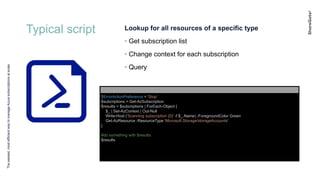
Typical script
Theeasiest,mostefficientwaytomanageAzuresubscriptionsatscale
Lookup for all resources of a specific type
• Get subscription list
• Change context for each subscription
• Query
$ErrorActionPreference = 'Stop'
$subcriptions = Get-AzSubscription
$results = $subcriptions | ForEach-Object {
$_ | Set-AzContext | Out-Null
Write-Host ('Scanning subscription {0}' -f $_.Name) -ForegroundColor Green
Get-AzResource -ResourceType 'Microsoft.Storage/storageAccounts'
}
#do something with $results
$results
Theeasiest,mostefficientwaytomanageAzuresubscriptionsatscale
Say hello to Azure Resource Graph
Theeasiest,mostefficientwaytomanageAzuresubscriptionsatscale
provide efficient and performant
resource exploration
ability to query at scale across a
given set of subscriptions
Azure
Resource Graph
Theeasiest,mostefficientwaytomanageAzuresubscriptionsatscale
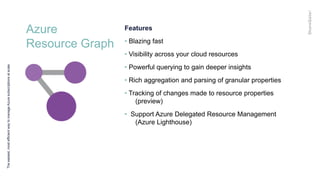
Features
• Blazing fast
• Visibility across your cloud resources
• Powerful querying to gain deeper insights
• Rich aggregation and parsing of granular properties
• Tracking of changes made to resource properties
(preview)
• Support Azure Delegated Resource Management
(Azure Lighthouse)
Azure
Resource Graph
Theeasiest,mostefficientwaytomanageAzuresubscriptionsatscale
Queries are read only
• Subset of the operators and functions of Azure Data
Explorer
https://docs.microsoft.com/en-
us/azure/governance/resource-graph/concepts/query-
language
Refresh frequencies
• ~15 sec at change
• Regular full scan
Azure
Resource Graph
Theeasiest,mostefficientwaytomanageAzuresubscriptionsatscale
Restrictions and nice to know
• Not all types are supported
see the schema browser in the portal or
https://docs.microsoft.com/en-ca/azure/azure-
resource-manager/complete-mode-deletion
• Need to implement a paging mechanism when you
have a large result set or more than 1000
subscriptions
Theeasiest,mostefficientwaytomanageAzuresubscriptionsatscale
Query syntax and basics
Theeasiest,mostefficientwaytomanageAzuresubscriptionsatscale
Query language is based on the Kusto
query language used by Azure Data
Explorer.
Azure
Resource Graph
Theeasiest,mostefficientwaytomanageAzuresubscriptionsatscale
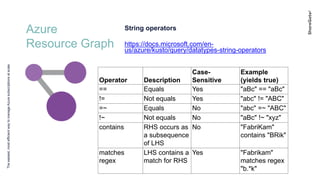
String operators
https://docs.microsoft.com/en-
us/azure/kusto/query/datatypes-string-operators
Operator Description
Case-
Sensitive
Example
(yields true)
== Equals Yes "aBc" == "aBc"
!= Not equals Yes "abc" != "ABC"
=~ Equals No "abc" =~ "ABC"
!~ Not equals No "aBc" !~ "xyz"
contains RHS occurs as
a subsequence
of LHS
No "FabriKam"
contains "BRik"
matches
regex
LHS contains a
match for RHS
Yes "Fabrikam"
matches regex
"b.*k"
Azure
Resource Graph
Theeasiest,mostefficientwaytomanageAzuresubscriptionsatscale
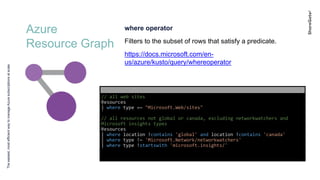
where operator
Filters to the subset of rows that satisfy a predicate.
https://docs.microsoft.com/en-
us/azure/kusto/query/whereoperator
// all web sites
Resources
| where type =~ "Microsoft.Web/sites"
// all resources not global or canada, excluding networkwatchers and
Microsoft insights types
Resources
| where location !contains 'global' and location !contains 'canada'
| where type !~ 'Microsoft.Network/networkwatchers'
| where type !startswith 'microsoft.insights/'
Azure
Resource Graph
Theeasiest,mostefficientwaytomanageAzuresubscriptionsatscale
project operator
Select the columns to include, rename or drop, and
insert new computed columns.
https://docs.microsoft.com/en-
us/azure/kusto/query/projectoperator
// all web sites, returning only subscriptionId, resourceGroup and
name
Resources
| where type =~ "Microsoft.Web/sites"
| project subscriptionId, resourceGroup, name
Azure
Resource Graph
Theeasiest,mostefficientwaytomanageAzuresubscriptionsatscale
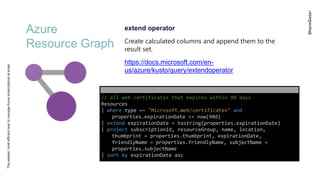
extend operator
Create calculated columns and append them to the
result set.
https://docs.microsoft.com/en-
us/azure/kusto/query/extendoperator
// all web certificates that expires within 90 days
Resources
| where type =~ "Microsoft.Web/certificates" and
properties.expirationDate <= now(90d)
| extend expirationDate = tostring(properties.expirationDate)
| project subscriptionId, resourceGroup, name, location,
thumbprint = properties.thumbprint, expirationDate,
friendlyName = properties.friendlyName, subjectName =
properties.subjectName
| sort by expirationDate asc
Azure
Resource Graph
Theeasiest,mostefficientwaytomanageAzuresubscriptionsatscale
summarize operator
Produces a table that aggregates the content of the
input table.
https://docs.microsoft.com/en-
us/azure/kusto/query/summarizeoperator
// count of all resources by subscription and location
Resources
| summarize count() by subscriptionId, location
// count of storage accounts with HTTP enabled by location
Resources
| where type =~ 'Microsoft.Storage/storageAccounts'
| where properties.supportsHttpsTrafficOnly == 'false'
| summarize count = count() by location
Azure
Resource Graph
Theeasiest,mostefficientwaytomanageAzuresubscriptionsatscale
Querying over tags
Use tags.name or tags['name'] construct to query
tags on resources.
https://docs.microsoft.com/en-
us/azure/kusto/query/extendoperator
// return all resources with the value 'production' in the
'environment' tag
Resources
| where tags['environment'] =~ 'production'
| project subscriptionId, resourceGroup, name, tags
// return all resources where the tag 'environment' is not present
Resources
| where isempty(tags['environment'])
| project subscriptionId, resourceGroup, name, tags
Azure
Resource Graph
Theeasiest,mostefficientwaytomanageAzuresubscriptionsatscale
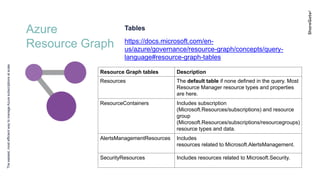
Tables
https://docs.microsoft.com/en-
us/azure/governance/resource-graph/concepts/query-
language#resource-graph-tables
Resource Graph tables Description
Resources The default table if none defined in the query. Most
Resource Manager resource types and properties
are here.
ResourceContainers Includes subscription
(Microsoft.Resources/subscriptions) and resource
group
(Microsoft.Resources/subscriptions/resourcegroups)
resource types and data.
AlertsManagementResources Includes
resources related to Microsoft.AlertsManagement.
SecurityResources Includes resources related to Microsoft.Security.
Azure
Resource Graph
Theeasiest,mostefficientwaytomanageAzuresubscriptionsatscale
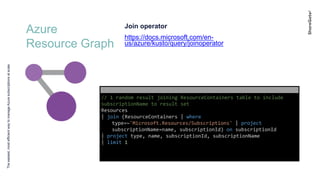
Join operator
https://docs.microsoft.com/en-
us/azure/kusto/query/joinoperator
// 1 random result joining ResourceContainers table to include
subscriptionName to result set
Resources
| join (ResourceContainers | where
type=~'Microsoft.Resources/Subscriptions' | project
subscriptionName=name, subscriptionId) on subscriptionId
| project type, name, subscriptionId, subscriptionName
| limit 1
Theeasiest,mostefficientwaytomanageAzuresubscriptionsatscale
Demo: ARG in the portal
Theeasiest,mostefficientwaytomanageAzuresubscriptionsatscale
ARG outside the portal
PowerShell
Theeasiest,mostefficientwaytomanageAzuresubscriptionsatscale
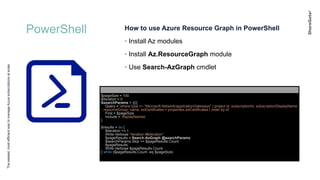
How to use Azure Resource Graph in PowerShell
• Install Az modules
• Install Az.ResourceGraph module
• Use Search-AzGraph cmdlet
$pageSize = 100
$iteration = 0
$searchParams = @{
Query = 'where type =~ "Microsoft.Network/applicationGateways" | project id, subscriptionId, subscriptionDisplayName
, resourceGroup, name, sslCertificates = properties.sslCertificates | order by id'
First = $pageSize
Include = 'displayNames'
}
$results = do {
$iteration += 1
Write-Verbose "Iteration #$iteration"
$pageResults = Search-AzGraph @searchParams
$searchParams.Skip += $pageResults.Count
$pageResults
Write-Verbose $pageResults.Count
} while ($pageResults.Count -eq $pageSize)
Azure CLI
Theeasiest,mostefficientwaytomanageAzuresubscriptionsatscale
How to use Azure Resource Graph in Azure CLI
• Install Azure CLI
• Install resource-graph extension
• Use az graph query
// Request a subset of results, skipping 20 items and getting the next 10.
az graph query -q "where type =~ "Microsoft.Compute" | project name, tags" --first 10 --
skip 20
// Choose subscriptions to query.
az graph query -q "where type =~ "Microsoft.Compute" | project name, tags" –subscriptions
11111111-1111-1111-1111-111111111111, 22222222-2222-2222-2222-222222222222
Theeasiest,mostefficientwaytomanageAzuresubscriptionsatscale
ARG and Azure Policy
graph2policy
Theeasiest,mostefficientwaytomanageAzuresubscriptionsatscale
Convert simple graph query to Azure policy
This tool converts an Azure Resource Graph query into
a policy rule
https://github.com/slapointe/ConvertToPolicy
graph2policy -
q "where type =~ 'microsoft.compute/virtualmachines' and isempty(aliases['Microso
ft.Compute/virtualMachines/storageProfile.osDisk.managedDisk.id’]) |
summarize count()" --effect "audit" --create "AuditNonManagedDiskVMPolicy"
Theeasiest,mostefficientwaytomanageAzuresubscriptionsatscale
Resources
Azure Resource Graph documentation
Azure Resource Graph quickstart queries
Azure Policy
Azure Policy Aliases
Azure Governance
Azure CLI
Azure PowerShell
graph2policy
Theeasiest,mostefficientwaytomanageAzuresubscriptionsatscale
Questions?
use Q&A
after the webinar
@sharegatetools
#ShareGateChat

Webinar slides: Getting started with Azure Resource Graph

Editor's Notes

  • #6 Without the right tools, it can get messy pretty quickly If you don’t have visibility and control over what is happening in your environments, things will get like this at some point
  • #7 * Register the Newsletter for upcoming webinars around Azure Governance MG: • Highest assignation level • Can have none, one or many subscriptions • Enable assignation at MG level of: Role Based Access Control (RBAC) Azure Policy Cost Management Azure Security Center And more Policy: Enable you to set strict rules over what resources and types people can create Audit your environments for compliance Take remediation if resources are non-compliant
  • #9 Azure Resource Manager without the help of ARG currently supports queries over basic resource fields, specifically - Resource name, ID, Type, Resource Group, Subscription, and Location. Resource Manager also provides facilities for calling individual resource providers for detailed properties one resource at a time. You can make it work, but it is not a fun job and requires you to go over each subscriptions one at a time and do your queries It is not fun with 10 subscription, just imagine over 100s or 1000s of subscriptions
  • #12 Azure Resource Graph is a service in Azure that is designed to extend Azure Resource Management by providing efficient and performant resource exploration with the ability to query at scale across a given set of subscriptions so that you can effectively govern your environment. Azure Resource Graph powers Azure portal's search bar, the new browse 'All resources' experience, and Azure Policy's Change history visual diff. It's designed to help customers manage large-scale environments.
  • #13  Ability to query resources with complex filtering, grouping, and sorting by resource properties. Ability to iteratively explore resources based on governance requirements. Ability to assess the impact of applying policies in a vast cloud environment. Ability to detail changes made to resource properties (preview). Access the properties returned by resource providers without needing to make individual calls to each resource provider. View the last 14 days of change history made to the resource to see what properties changed and when. (preview)
  • #17 It's important to understand that Azure Resource Graph's query language is based on the Kusto query language used by Azure Data Explorer. Resource Graph supports all KQL data types, scalar functions, scalar operators, and aggregation functions. Specific tabular operators are supported by Resource Graph, some of which have different behaviors. Azure Data Explorer capabilities is the backend of other services built on its powerful query language, including Azure Monitor logs, Application Insights, Time Series Insights, and Windows Defender Advanced Threat Protection.
  • #26 NOTE: When limiting the join results with project, the property used by join to relate the two tables, subscriptionId in the above example, must be included in project.
  • #27 Schema browser visualization - charts pin query visualization to dashboard Get queries from github repository – vm without managed disks Create dynamically query with restriction to : subscriptionId == '0eb8caba-9df3-4cdc-b951-a28f58890ab9'