May 7th, 2016
SharePoint Saturday
Madrid
Getting SQL Spinning with SharePoint –
Best Practices for the Back End
Knut Relbe-Moe
Knut Relbe-Moe
Chief Technical Architect
Advania Knowledge Factory
http://sharepointblog.no
@shareptkarm
Knut is a Office Server & Services MVP, Nintex vTE, SharePoint and migration expert,
conference speaker and blogger. Knut is MCSE SharePoint, MCSA Office 365 and MCT.
He delivers both engaging keynotes and highly technical sessions (level 400) on many
different subjects in the Office 365 space. His job as an architect is to engage people and
companies in evaluating and adopting new technologies as well as running key projects
as a consultant. His core competence is to explain complex scenarios and make it
understandable by combining technical insight and business value.
Gold sponsors
Silver sponsors
Bronze sponsors
Collaborate
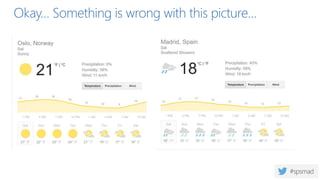
Okay… Something is wrong with this picture…
MS SQL Server is like the brain of your SharePoint
environment
So if the brain works slow, everything else will be
slow….
99.9% of SharePoint content stored in SQL Server
 Farm Configuration information stored in configuration db
 Central Administration content stored in seperate content db
 Most Service Applications have at least one db
 All Web Applications have at least one content db
How to fix this
 Follow the guidelines in this presentation
 Read and understand this whitepaper from Vlad Catrienscu
 Maximizing SQL 2012 Performance for SharePoint 2013 WhitePaper
 If you have to reinstall MS SQL server as a new instance with the correct
settings.
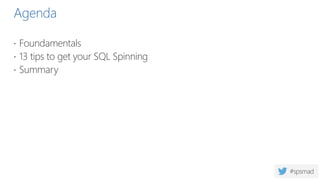
Agenda
 Foundamentals
 13 tips to get your SQL Spinning
 Summary
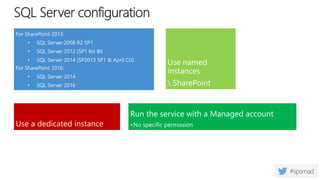
SQL Server configuration
For SharePoint 2013:
• SQL Server 2008 R2 SP1
• SQL Server 2012 (SP1 for BI)
• SQL Server 2014 (SP2013 SP1 & April CU)
For SharePoint 2016:
• SQL Server 2014
• SQL Server 2016
Use a dedicated instance
Run the service with a Managed account
•No specific permission
Use named
instances
 SharePoint
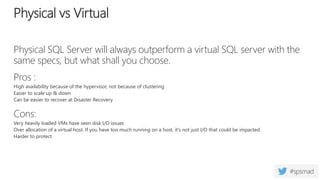
Physical SQL Server will always outperform a virtual SQL server with the
same specs, but what shall you choose.
Pros :
High availability because of the hypervisor, not because of clustering
Easier to scale up & down
Can be easier to recover at Disaster Recovery
Cons:
Very heavily loaded VMs have seen disk I/O issues
Over allocation of a virtual host. If you have too much running on a host, it's not just I/O that could be impacted.
Harder to protect
Physical vs Virtual
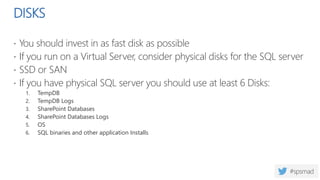
DISKS
 You should invest in as fast disk as possible
 If you run on a Virtual Server, consider physical disks for the SQL server
 SSD or SAN
 If you have physical SQL server you should use at least 6 Disks:
1. TempDB
2. TempDB Logs
3. SharePoint Databases
4. SharePoint Databases Logs
5. OS
6. SQL binaries and other application Installs
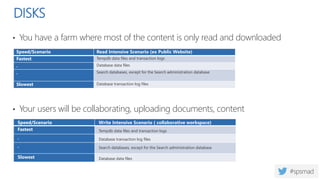
DISKS
• You have a farm where most of the content is only read and downloaded
• Your users will be collaborating, uploading documents, content
Speed/Scenario Read Intensive Scenario (ex Public Website)
Fastest Tempdb data files and transaction logs
. Database data files
. Search databases, except for the Search administration database
Slowest Database transaction log files
Speed/Scenario Write Intensive Scenario ( collaborative workspace)
Fastest Tempdb data files and transaction logs
. Database transaction log files
. Search databases, except for the Search administration database
Slowest Database data files
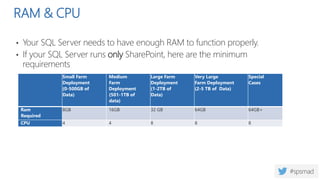
RAM & CPU
• Your SQL Server needs to have enough RAM to function properly.
• If your SQL Server runs only SharePoint, here are the minimum
requirements
Small Farm
Deployment
(0-500GB of
Data)
Medium
Farm
Deployment
(501-1TB of
data)
Large Farm
Deployment
(1-2TB of
Data)
Very Large
Farm Deployment
(2-5 TB of Data)
Special
Cases
Ram
Required
8GB 16GB 32 GB 64GB 64GB+
CPU 4 4 8 8 8
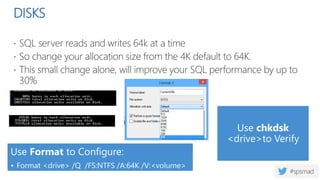
DISKS
 SQL server reads and writes 64k at a time
 So change your allocation size from the 4K default to 64K.
 This small change alone, will improve your SQL performance by up to
30%
Use chkdsk
<drive>to Verify
Use Format to Configure:
• Format <drive> /Q /FS:NTFS /A:64K /V:<volume>
/Y
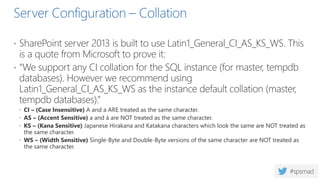
Server Configuration – Collation
 SharePoint server 2013 is built to use Latin1_General_CI_AS_KS_WS. This
is a quote from Microsoft to prove it:
 “We support any CI collation for the SQL instance (for master, tempdb
databases). However we recommend using
Latin1_General_CI_AS_KS_WS as the instance default collation (master,
tempdb databases).”
 CI – (Case Insensitive) A and a ARE treated as the same character.
 AS – (Accent Sensitive) a and á are NOT treated as the same character.
 KS – (Kana Sensitive) Japanese Hirakana and Katakana characters which look the same are NOT treated as
the same character.
 WS – (Width Sensitive) Single-Byte and Double-Byte versions of the same character are NOT treated as
the same character.
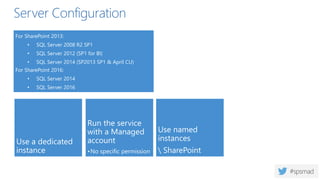
Server Configuration
For SharePoint 2013:
• SQL Server 2008 R2 SP1
• SQL Server 2012 (SP1 for BI)
• SQL Server 2014 (SP2013 SP1 & April CU)
For SharePoint 2016:
• SQL Server 2014
• SQL Server 2016
Use named
instances
 SharePoint
Use a dedicated
instance
Run the service
with a Managed
account
•No specific permission
Server Configuration
Use alias for the connection string
• Client alias or DNS alias (preferred)
Good practice : every SP Content db must be created (and documented) by a DBA
after a strict capacity plan
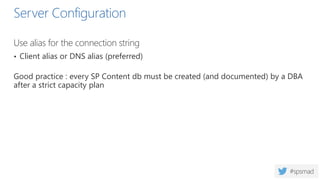
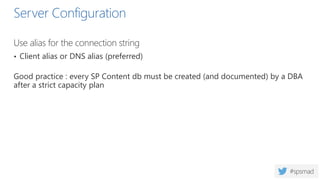
Server Configuration
Use alias for the connection string
• Client alias or DNS alias (preferred)
Good practice : every SP Content db must be created (and documented) by a DBA
after a strict capacity plan
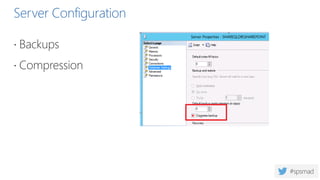
Server Configuration
 Backups
 Compression
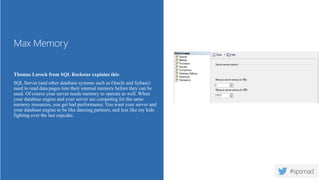
Thomas Larock from SQL Rockstar explains this:
SQL Server (and other database systems such as Oracle and Sybase)
need to read data pages into their internal memory before they can be
used. Of course your server needs memory to operate as well. When
your database engine and your server are competing for the same
memory resources, you get bad performance. You want your server and
your database engine to be like dancing partners, and less like my kids

fighting over the last cupcake.
Max Memory
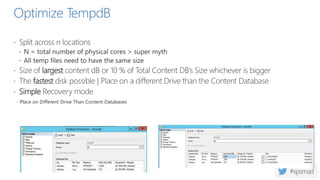
Optimize TempdB
 Split across n locations
 N = total number of physical cores > super myth
 All temp files need to have the same size
 Size of largest content dB or 10 % of Total Content DB’s Size whichever is bigger
 The fastest disk possible | Place on a different Drive than the Content Database
 Simple Recovery mode
 Place on Different Drive Than Content Databases
Model Database
 SQL Server uses the Model database as a template for creating new
user databases
 So therefor make sure that Model database have correct initial size and
growth settings.
 The log should be around 25% of the initial size.
 The auto growth is your insurance policy if your current database size has been reached.
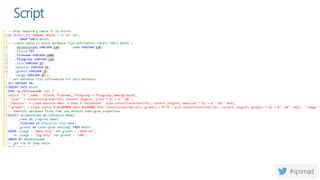
Script
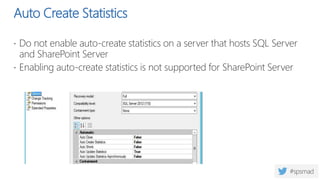
Auto Create Statistics
 Do not enable auto-create statistics on a server that hosts SQL Server
and SharePoint Server
 Enabling auto-create statistics is not supported for SharePoint Server
USE “DBA” created databases
 Sizing
 Autogrowth
 DO NOT USE SIMPLE RECOVERY
 Unless you understand the implications
Maintenance Plan
 Create a maintenance plan to backup databases, rebuild indexes and
checking the logical and physical integrity of your database
 Make sure you don’t run backup when heavy timer jobs runs in the
SharePoint environment, like midnight
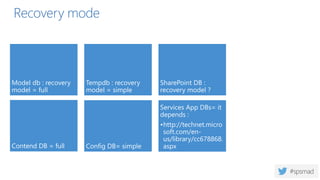
Recovery mode
Model db : recovery
model = full
Tempdb : recovery
model = simple
SharePoint DB :
recovery model ?
Contend DB = full Config DB= simple
Services App DBs= it
depends :
•http://technet.micro
soft.com/en-
us/library/cc678868.
aspx
Script your SQL Server installation
 https://sqlserverfinebuild.codeplex.com/
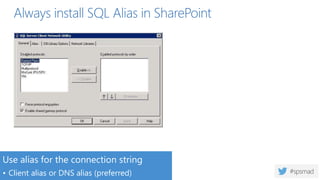
Always install SQL Alias in SharePoint
Use alias for the connection string
• Client alias or DNS alias (preferred)
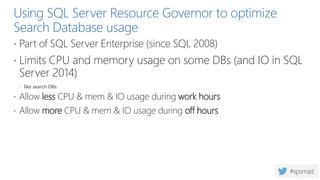
Using SQL Server Resource Governor to optimize
Search Database usage
 Part of SQL Server Enterprise (since SQL 2008)
 Limits CPU and memory usage on some DBs (and IO in SQL
Server 2014)
 like search DBs
 Allow less CPU & mem & IO usage during work hours
 Allow more CPU & mem & IO usage during off hours
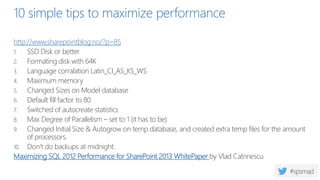
10 simple tips to maximize performance
http://www.sharepointblog.no/?p=85
1. SSD Disk or better
2. Formating disk with 64K
3. Language corralation Latin_CI_AS_KS_WS
4. Maximum memory
5. Changed Sizes on Model database
6. Default fill factor to 80
7. Switched of autocreate statistics
8. Max Degree of Parallelism – set to 1 (it has to be)
9. Changed Initial Size & Autogrow on temp database, and created extra temp files for the amount
of processors.
10. Don’t do backups at midnight.
Maximizing SQL 2012 Performance for SharePoint 2013 WhitePaper by Vlad Catrinescu
Questions?
@shareptkarm
Office Server &
Services
Knut Relbe-Moe
Chief Technical Architect
Knut.relbe-moe@knowledgefactory.com
shareptkarm@outlook.com
Gold sponsors
Silver sponsors
Bronze sponsors
Collaborate
Raffle
Please, fill your SPS Madrid passport if
you want to participate.
You must get signature from sponsors
and complete the poll.
Give us the passport at 6:00 PM in the
Auditorium room.
You can win one Sphero BB-8 or a mini
drone:

SPSMadrid Get sql spinning with SharePoint. Best practice for the back end

  • 1.
    May 7th, 2016 SharePointSaturday Madrid Getting SQL Spinning with SharePoint – Best Practices for the Back End Knut Relbe-Moe
  • 2.
    Knut Relbe-Moe Chief TechnicalArchitect Advania Knowledge Factory http://sharepointblog.no @shareptkarm Knut is a Office Server & Services MVP, Nintex vTE, SharePoint and migration expert, conference speaker and blogger. Knut is MCSE SharePoint, MCSA Office 365 and MCT. He delivers both engaging keynotes and highly technical sessions (level 400) on many different subjects in the Office 365 space. His job as an architect is to engage people and companies in evaluating and adopting new technologies as well as running key projects as a consultant. His core competence is to explain complex scenarios and make it understandable by combining technical insight and business value.
  • 3.
  • 4.
    Okay… Something iswrong with this picture…
  • 5.
    MS SQL Serveris like the brain of your SharePoint environment
  • 6.
    So if thebrain works slow, everything else will be slow….
  • 7.
    99.9% of SharePointcontent stored in SQL Server  Farm Configuration information stored in configuration db  Central Administration content stored in seperate content db  Most Service Applications have at least one db  All Web Applications have at least one content db
  • 8.
    How to fixthis  Follow the guidelines in this presentation  Read and understand this whitepaper from Vlad Catrienscu  Maximizing SQL 2012 Performance for SharePoint 2013 WhitePaper  If you have to reinstall MS SQL server as a new instance with the correct settings.
  • 9.
    Agenda  Foundamentals  13tips to get your SQL Spinning  Summary
  • 11.
    SQL Server configuration ForSharePoint 2013: • SQL Server 2008 R2 SP1 • SQL Server 2012 (SP1 for BI) • SQL Server 2014 (SP2013 SP1 & April CU) For SharePoint 2016: • SQL Server 2014 • SQL Server 2016 Use a dedicated instance Run the service with a Managed account •No specific permission Use named instances SharePoint
  • 13.
    Physical SQL Serverwill always outperform a virtual SQL server with the same specs, but what shall you choose. Pros : High availability because of the hypervisor, not because of clustering Easier to scale up & down Can be easier to recover at Disaster Recovery Cons: Very heavily loaded VMs have seen disk I/O issues Over allocation of a virtual host. If you have too much running on a host, it's not just I/O that could be impacted. Harder to protect Physical vs Virtual
  • 15.
    DISKS  You shouldinvest in as fast disk as possible  If you run on a Virtual Server, consider physical disks for the SQL server  SSD or SAN  If you have physical SQL server you should use at least 6 Disks: 1. TempDB 2. TempDB Logs 3. SharePoint Databases 4. SharePoint Databases Logs 5. OS 6. SQL binaries and other application Installs
  • 16.
    DISKS • You havea farm where most of the content is only read and downloaded • Your users will be collaborating, uploading documents, content Speed/Scenario Read Intensive Scenario (ex Public Website) Fastest Tempdb data files and transaction logs . Database data files . Search databases, except for the Search administration database Slowest Database transaction log files Speed/Scenario Write Intensive Scenario ( collaborative workspace) Fastest Tempdb data files and transaction logs . Database transaction log files . Search databases, except for the Search administration database Slowest Database data files
  • 18.
    RAM & CPU •Your SQL Server needs to have enough RAM to function properly. • If your SQL Server runs only SharePoint, here are the minimum requirements Small Farm Deployment (0-500GB of Data) Medium Farm Deployment (501-1TB of data) Large Farm Deployment (1-2TB of Data) Very Large Farm Deployment (2-5 TB of Data) Special Cases Ram Required 8GB 16GB 32 GB 64GB 64GB+ CPU 4 4 8 8 8
  • 20.
    DISKS  SQL serverreads and writes 64k at a time  So change your allocation size from the 4K default to 64K.  This small change alone, will improve your SQL performance by up to 30% Use chkdsk <drive>to Verify Use Format to Configure: • Format <drive> /Q /FS:NTFS /A:64K /V:<volume> /Y
  • 22.
    Server Configuration –Collation  SharePoint server 2013 is built to use Latin1_General_CI_AS_KS_WS. This is a quote from Microsoft to prove it:  “We support any CI collation for the SQL instance (for master, tempdb databases). However we recommend using Latin1_General_CI_AS_KS_WS as the instance default collation (master, tempdb databases).”  CI – (Case Insensitive) A and a ARE treated as the same character.  AS – (Accent Sensitive) a and á are NOT treated as the same character.  KS – (Kana Sensitive) Japanese Hirakana and Katakana characters which look the same are NOT treated as the same character.  WS – (Width Sensitive) Single-Byte and Double-Byte versions of the same character are NOT treated as the same character.
  • 23.
    Server Configuration For SharePoint2013: • SQL Server 2008 R2 SP1 • SQL Server 2012 (SP1 for BI) • SQL Server 2014 (SP2013 SP1 & April CU) For SharePoint 2016: • SQL Server 2014 • SQL Server 2016 Use named instances SharePoint Use a dedicated instance Run the service with a Managed account •No specific permission
  • 24.
    Server Configuration Use aliasfor the connection string • Client alias or DNS alias (preferred) Good practice : every SP Content db must be created (and documented) by a DBA after a strict capacity plan
  • 25.
    Server Configuration Use aliasfor the connection string • Client alias or DNS alias (preferred) Good practice : every SP Content db must be created (and documented) by a DBA after a strict capacity plan
  • 26.
  • 28.
    Thomas Larock fromSQL Rockstar explains this: SQL Server (and other database systems such as Oracle and Sybase) need to read data pages into their internal memory before they can be used. Of course your server needs memory to operate as well. When your database engine and your server are competing for the same memory resources, you get bad performance. You want your server and your database engine to be like dancing partners, and less like my kids fighting over the last cupcake. Max Memory
  • 30.
    Optimize TempdB  Splitacross n locations  N = total number of physical cores > super myth  All temp files need to have the same size  Size of largest content dB or 10 % of Total Content DB’s Size whichever is bigger  The fastest disk possible | Place on a different Drive than the Content Database  Simple Recovery mode  Place on Different Drive Than Content Databases
  • 31.
    Model Database  SQLServer uses the Model database as a template for creating new user databases  So therefor make sure that Model database have correct initial size and growth settings.  The log should be around 25% of the initial size.  The auto growth is your insurance policy if your current database size has been reached.
  • 32.
  • 34.
    Auto Create Statistics Do not enable auto-create statistics on a server that hosts SQL Server and SharePoint Server  Enabling auto-create statistics is not supported for SharePoint Server
  • 36.
    USE “DBA” createddatabases  Sizing  Autogrowth  DO NOT USE SIMPLE RECOVERY  Unless you understand the implications
  • 38.
    Maintenance Plan  Createa maintenance plan to backup databases, rebuild indexes and checking the logical and physical integrity of your database  Make sure you don’t run backup when heavy timer jobs runs in the SharePoint environment, like midnight
  • 39.
    Recovery mode Model db: recovery model = full Tempdb : recovery model = simple SharePoint DB : recovery model ? Contend DB = full Config DB= simple Services App DBs= it depends : •http://technet.micro soft.com/en- us/library/cc678868. aspx
  • 41.
    Script your SQLServer installation  https://sqlserverfinebuild.codeplex.com/
  • 43.
    Always install SQLAlias in SharePoint Use alias for the connection string • Client alias or DNS alias (preferred)
  • 45.
    Using SQL ServerResource Governor to optimize Search Database usage  Part of SQL Server Enterprise (since SQL 2008)  Limits CPU and memory usage on some DBs (and IO in SQL Server 2014)  like search DBs  Allow less CPU & mem & IO usage during work hours  Allow more CPU & mem & IO usage during off hours
  • 47.
    10 simple tipsto maximize performance http://www.sharepointblog.no/?p=85 1. SSD Disk or better 2. Formating disk with 64K 3. Language corralation Latin_CI_AS_KS_WS 4. Maximum memory 5. Changed Sizes on Model database 6. Default fill factor to 80 7. Switched of autocreate statistics 8. Max Degree of Parallelism – set to 1 (it has to be) 9. Changed Initial Size & Autogrow on temp database, and created extra temp files for the amount of processors. 10. Don’t do backups at midnight. Maximizing SQL 2012 Performance for SharePoint 2013 WhitePaper by Vlad Catrinescu
  • 48.
  • 49.
    Knut Relbe-Moe Chief TechnicalArchitect Knut.relbe-moe@knowledgefactory.com shareptkarm@outlook.com
  • 50.
  • 51.
    Raffle Please, fill yourSPS Madrid passport if you want to participate. You must get signature from sponsors and complete the poll. Give us the passport at 6:00 PM in the Auditorium room. You can win one Sphero BB-8 or a mini drone:

Editor's Notes

  • #2 This slide is mandatory. Please do not remove.
  • #4 This slide is mandatory. Please do not remove and try to use it during Q&A at the end of your session. Thank you!
  • #51 This slide is mandatory. Please do not remove and try to use it during Q&A at the end of your session. Thank you!