Secure web Publications & Transactions
Agenda Web site Threats Dot NET based web site Protection  Protection of data & Cryptography
Threats – Top 10 Web Application Attacks  Cross Site Scripting (XSS) Injection Flaws Malicious File Execution Insecure Direct Object Reference Cross Site Request  Forgery (CSRF)
Threats – Top 10 Web Application Attacks  Information Leakage & Improper Error Handling Broken Authentication & Session Management Insecure Cryptographic storage Insecure Communications Failure to restrict URL Access
Threats – Other types of Attacks Anti DNS Pinning History Stealing Web Worms using XHR/Flash/QuickTime as a vector Intranet Hacking Session Fixation using URL Re-writing
Threats – Other types of Attacks Cross Protocol Exploitation Dropping SSL after Login Denial of Service (DOS )Attack SQL Injection
Dot Net Security Enforcement Guidelines with .NET
Dot Net - Validation Do not relay on ASP.NET Request validation Validate input for length, range, format, and type  Validate input from all sources like QueryString, cookies, and HTML controls
Dot Net - Validation Do not echo untrusted input  If you need to write out untrusted data, encode the output  Avoid user-supplied file name and path input  Do not rely on client-side validation
Dot Net - Authentication - Forms Use membership providers instead of custom authentication  Use SSL to protect credentials and authentication cookies  If you cannot use SSL, consider reducing session lifetime  Validate user login information
Dot Net - Authentication - Forms Do not store passwords directly in the user store  Enforce strong passwords  Protect access to your credential store  Do not persist authentication cookies  Restrict authentication tickets to HTTPS connections
Dot Net - Authentication - Forms Consider partitioning your site to restricted areas and public areas  Use unique cookie names and paths
Dot Net - Authorizations Use URL authorization for page and directory access control  Configure ACLs on your Web site files  Use ASP.NET role manager for roles authorization  If your role lookup is expensive, consider role caching  Protect your authorization cookie
Dot Net - Code Access Security Consider code access security for partial trust applications  Choose a trust level that does not exceed your application's requirements  Create a custom trust policy if your application needs additional permissions  Use Medium trust in shared hosting environments
Dot Net - Code Access Security Declarative Security During compile time, specified in the assembly meta data (+decide) Imperative security Enforced during run-time, by CLR (+decide) Set the Permissions Like isolated storage permission, UIPermission, Registry permission (+decide)
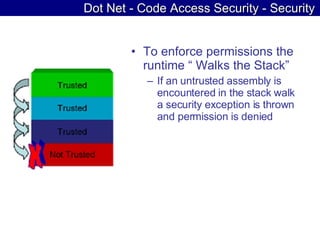
Dot Net - Code Access Security - Security To enforce permissions the runtime “ Walks the Stack” If an untrusted assembly is encountered in the stack walk a security exception is thrown and permission is denied
Dot Net - Isolated Storage A Virtual file system, unique to each assembly. A set of types & methods supported by the Framework for local storage. Each assembly is given access to a segregated storage on disk. No access to other data is allowed. Isolated storage is 100% private
Dot Net - Isolated Storage No need for file system path determination Access to isolated storage is restricted by zone: Internet Zone: small quota Intranet Zone: larger quota Restricted Sites: No access
Dot Net - Exception Management Use structured exception handling  Do not reveal exception details to the client  Use a global error handler to catch unhandled exceptions
Dot Net - Impersonation/Delegation Know your tradeoffs with impersonation  Avoid Calling LogonUser  Avoid programmatic impersonation where possible  If you need to impersonate, consider threading issues  If you need to impersonate, clean up appropriately
Dot Net - Parameter Manipulation Do not make security decisions based on parameters accessible on the client-side  Validate all input parameters  Avoid storing sensitive data in ViewState  Encrypt ViewState if it must contain sensitive data
Dot Net - Session Do not rely on client-side state management options  Protect your out-of-process state service  Protect SQL Server session state
Dot Net - Auditing and Logging Use health monitoring to log and audit events  Instrument for user management events  Instrument for unusual activity  Instrument for significant business operations  Consider using an application-specific event source  Protect audit and log files
Dot Net - Deployment Considerations Use a least-privileged account for running ASP.NET applications  Encrypt configuration sections that store sensitive data  Consider your key storage location  Block Protected File Retrieval by Using HttpForbiddenHandler  Configure the MachineKey to use the same keys on all servers in a Web farm  Lock configuration settings to enforce policy settings
Dot Net - Communication Security Consider SSL vs. IPSec  Optimize pages that use SSL
Data Data Protection
Data Access Encrypt your connection strings  Use least-privileged accounts for database access  Use Windows authentication where possible  If you use Windows authentication, use a trusted service account  If you cannot use a domain account, consider mirrored accounts
Data Access When using SQL authentication, use strong passwords  When using SQL authentication, protect credentials over the network  When using SQL authentication, protect credentials in configuration files  Validate untrusted input passed to your data access methods  When constructing SQL queries, use type safe SQL parameters  Avoid dynamic queries that accept user input
Sensitive Data Avoid plaintext passwords in configuration files  Use platform features to manage keys where possible  Do not pass sensitive data from page to page  Protect sensitive data over the wire  Do not cache sensitive data
Cryptography Cryptography
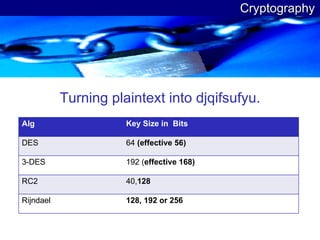
Cryptography Turning plaintext into djqifsufyu. Alg Key Size in  Bits DES 64  (effective 56) 3-DES 192 ( effective 168) RC2 40, 128 Rijndael 128, 192 or 256
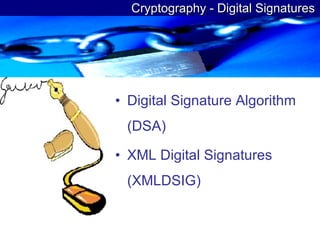
Cryptography - Digital Signatures Digital Signature Algorithm (DSA) XML Digital Signatures (XMLDSIG)
 

Secure Web Applications Ver0.01

  • 1.
  • 2.
    Agenda Web siteThreats Dot NET based web site Protection Protection of data & Cryptography
  • 3.
    Threats – Top10 Web Application Attacks Cross Site Scripting (XSS) Injection Flaws Malicious File Execution Insecure Direct Object Reference Cross Site Request Forgery (CSRF)
  • 4.
    Threats – Top10 Web Application Attacks Information Leakage & Improper Error Handling Broken Authentication & Session Management Insecure Cryptographic storage Insecure Communications Failure to restrict URL Access
  • 5.
    Threats – Othertypes of Attacks Anti DNS Pinning History Stealing Web Worms using XHR/Flash/QuickTime as a vector Intranet Hacking Session Fixation using URL Re-writing
  • 6.
    Threats – Othertypes of Attacks Cross Protocol Exploitation Dropping SSL after Login Denial of Service (DOS )Attack SQL Injection
  • 7.
    Dot Net SecurityEnforcement Guidelines with .NET
  • 8.
    Dot Net -Validation Do not relay on ASP.NET Request validation Validate input for length, range, format, and type Validate input from all sources like QueryString, cookies, and HTML controls
  • 9.
    Dot Net -Validation Do not echo untrusted input If you need to write out untrusted data, encode the output Avoid user-supplied file name and path input Do not rely on client-side validation
  • 10.
    Dot Net -Authentication - Forms Use membership providers instead of custom authentication Use SSL to protect credentials and authentication cookies If you cannot use SSL, consider reducing session lifetime Validate user login information
  • 11.
    Dot Net -Authentication - Forms Do not store passwords directly in the user store Enforce strong passwords Protect access to your credential store Do not persist authentication cookies Restrict authentication tickets to HTTPS connections
  • 12.
    Dot Net -Authentication - Forms Consider partitioning your site to restricted areas and public areas Use unique cookie names and paths
  • 13.
    Dot Net -Authorizations Use URL authorization for page and directory access control Configure ACLs on your Web site files Use ASP.NET role manager for roles authorization If your role lookup is expensive, consider role caching Protect your authorization cookie
  • 14.
    Dot Net -Code Access Security Consider code access security for partial trust applications Choose a trust level that does not exceed your application's requirements Create a custom trust policy if your application needs additional permissions Use Medium trust in shared hosting environments
  • 15.
    Dot Net -Code Access Security Declarative Security During compile time, specified in the assembly meta data (+decide) Imperative security Enforced during run-time, by CLR (+decide) Set the Permissions Like isolated storage permission, UIPermission, Registry permission (+decide)
  • 16.
    Dot Net -Code Access Security - Security To enforce permissions the runtime “ Walks the Stack” If an untrusted assembly is encountered in the stack walk a security exception is thrown and permission is denied
  • 17.
    Dot Net -Isolated Storage A Virtual file system, unique to each assembly. A set of types & methods supported by the Framework for local storage. Each assembly is given access to a segregated storage on disk. No access to other data is allowed. Isolated storage is 100% private
  • 18.
    Dot Net -Isolated Storage No need for file system path determination Access to isolated storage is restricted by zone: Internet Zone: small quota Intranet Zone: larger quota Restricted Sites: No access
  • 19.
    Dot Net -Exception Management Use structured exception handling Do not reveal exception details to the client Use a global error handler to catch unhandled exceptions
  • 20.
    Dot Net -Impersonation/Delegation Know your tradeoffs with impersonation Avoid Calling LogonUser Avoid programmatic impersonation where possible If you need to impersonate, consider threading issues If you need to impersonate, clean up appropriately
  • 21.
    Dot Net -Parameter Manipulation Do not make security decisions based on parameters accessible on the client-side Validate all input parameters Avoid storing sensitive data in ViewState Encrypt ViewState if it must contain sensitive data
  • 22.
    Dot Net -Session Do not rely on client-side state management options Protect your out-of-process state service Protect SQL Server session state
  • 23.
    Dot Net -Auditing and Logging Use health monitoring to log and audit events Instrument for user management events Instrument for unusual activity Instrument for significant business operations Consider using an application-specific event source Protect audit and log files
  • 24.
    Dot Net -Deployment Considerations Use a least-privileged account for running ASP.NET applications Encrypt configuration sections that store sensitive data Consider your key storage location Block Protected File Retrieval by Using HttpForbiddenHandler Configure the MachineKey to use the same keys on all servers in a Web farm Lock configuration settings to enforce policy settings
  • 25.
    Dot Net -Communication Security Consider SSL vs. IPSec Optimize pages that use SSL
  • 26.
  • 27.
    Data Access Encryptyour connection strings Use least-privileged accounts for database access Use Windows authentication where possible If you use Windows authentication, use a trusted service account If you cannot use a domain account, consider mirrored accounts
  • 28.
    Data Access Whenusing SQL authentication, use strong passwords When using SQL authentication, protect credentials over the network When using SQL authentication, protect credentials in configuration files Validate untrusted input passed to your data access methods When constructing SQL queries, use type safe SQL parameters Avoid dynamic queries that accept user input
  • 29.
    Sensitive Data Avoidplaintext passwords in configuration files Use platform features to manage keys where possible Do not pass sensitive data from page to page Protect sensitive data over the wire Do not cache sensitive data
  • 30.
  • 31.
    Cryptography Turning plaintextinto djqifsufyu. Alg Key Size in Bits DES 64 (effective 56) 3-DES 192 ( effective 168) RC2 40, 128 Rijndael 128, 192 or 256
  • 32.
    Cryptography - DigitalSignatures Digital Signature Algorithm (DSA) XML Digital Signatures (XMLDSIG)
  • 33.